



简介
gpcopy是一个数据迁移实用程序,可以在不同集群之间进行传输数据,可以将一个集群中的Greenplum数据库的元数据和数据复制到另一个集群的Greenplum数据库中。gpcopy可以迁移数据库的全部内容,包括数据库架构、表数据、索引、视图、角色、用户自定义函数、资源队列、资源组。
gpcopy 是新一代的 Greenplum 数据迁移工具,可以帮助客户在不同集群间,不同版本间,快速稳定地迁移数据。同上一代迁移工具 gptransfer 相比,gpcopy 具有巨大的优势:更快,更稳定,更易用,功能更丰富,是gptransfer的升级版
gpcopy 可以干什么
gpcopy 可以迁移整个集群,也可以具体传输某些数据库、某些命名空间和某些表;可以从文件读取传输或者略过的表,支持正则表达式;可以略过、追加或者替换目标集群的数据;可以并行传输;可以只迁移结构信息;可以静默自动化执行……
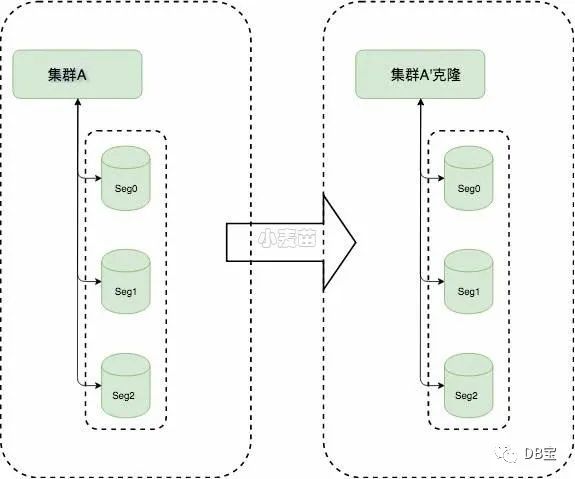
简单说,就是集群间迁移所存储的信息,使得用户业务可以迁移:
和gptransfer的速度对比
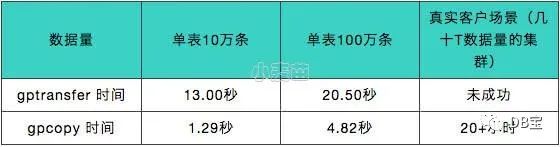
(1)复制数据更快:注意这里说的是数据,而不是元数据。gpcopy更快速原因可分为三点:segment间直接传输、Snappy压缩传输、数据校验。
①segment间直接传输:当一个表的数据超过指定数据行数(--on-segment-threshold默认为10000行)时,gpcopy会利用COPY ON SEGMENT特性使得gpcopy可以做到两个cluster的多节点间并发传输。除此之外,gpcopy的数据传输本身就是利用copy命令,而gptransfer则是通过外部表的SELECT和INSERT进行逐条操作,copy使用批量操作自然而然要比insert更快。
②Snappy压缩传输:gpcopy默认使用Google的Snappy格式对数据进行压缩和传输,而gptransfer使用zlib格式进行压缩和传输,百度snappy和zlib压缩性能对比,Snappy性能明显要高很多。
③数据校验:gpcopy和gptransfer都有两种校验方式,第一种校验方式相同:比较源表数据和目标表数据之间的行数,第二种校验方式也都是基于md5校验,但是gptransfer是先对源表和目标表进行排序,再对排序后的行计算MD5哈希值并逐行比较,反观gpcopy,先将每一行的所有列转换为文本,然后计算每行的md5值,最后对md5值进行XOR(异或)比较。
(2)数据迁移更稳定:命名管道以文件的形式存在于文件系统中,任何进程只要有权限,打开该文件即可通信。导致命名管道文件难以管理,也容易出问题。gpcopy没有命名管道文件。而gptransfer使用可写和可读外部表、Greenplum的gpfdist并行数据装载工具以及命名管道来从源数据库传输数据到目标数据库,所以命名管道必不可少。
为什么 gpcopy 可以更快速
·segment 间直接传输
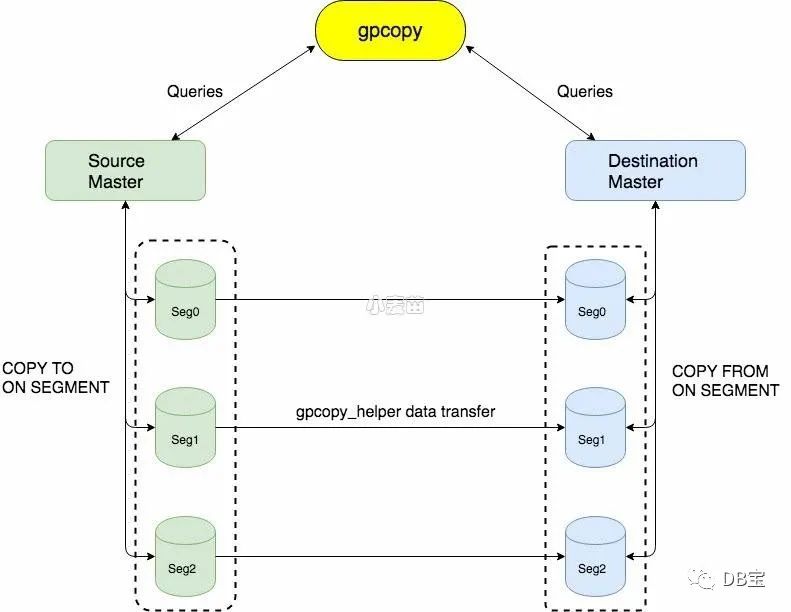
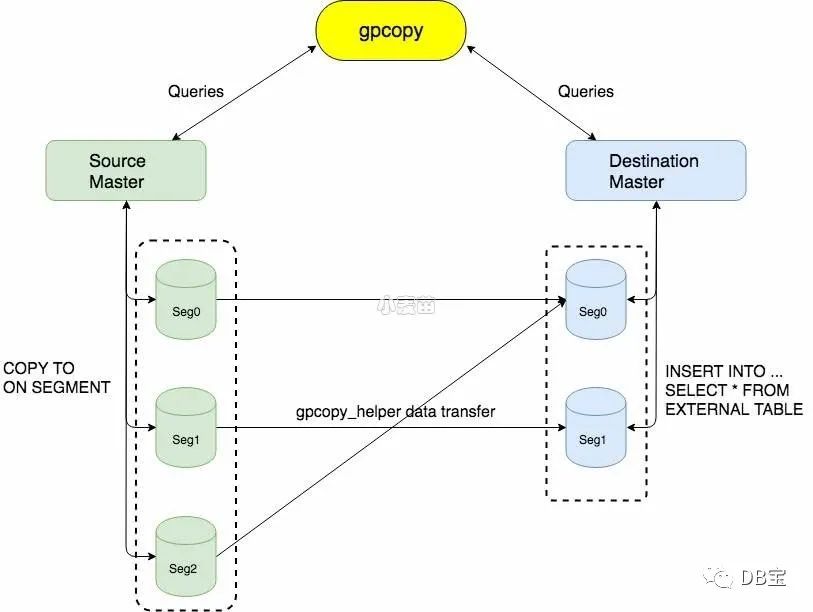
gpcopy 的数据传输利用了 Greenplum 最新的 COPY ON SEGMENT 特性,首先 COPY 相较于 gptransfer 单纯使用的外部表就更快,因为它是批量操作,而外部表的 SELECT 和 INSERT 都是逐条操作;另外 COPY ON SEGMENT 特性使得 gpcopy 可以做到两个集群的多节点间并发传输,快上加快。
以下是 gpcopy 应用于相同节点数 Greenplum 集群间传输的架构,还是很简单直接的。
·Snappy 压缩传输
gpcopy 默认打开压缩选项,使用 Google 的 Snappy 格式对所传输得数据进行压缩,网络传输少了很多压力,速度也更快。
Snappy 对大多数的输入比 zlib 的最快模式要快几个数量级。在 core i7 的单核64位模式下,Snappy 压缩速度可以达到250MB/s或者更快,解压缩可以达到大约500MB/s或更快。
· 更快的数据校验
判断两个数据库系统的表是否一致从来不是一个简单的问题,简单使用哈希校验的话要考虑条目的顺序,排序的话又会把速度拖得更慢。如果这两个数据库系统和 Greenplum 一样是集群系统,这个问题就更难了。而 gpcopy 灵活地解决了这个问题,不需要排序,数据校验的速度是对所导出CSV格式文件做哈希的几倍!
为什么 gpcopy 可以更稳定
· 没有命名管道文件
命名管道以文件的形式存在于文件系统中,任何进程只要有权限,打开该文件即可通信。命令管道遵守先进先出的规则,对命名管道读总是从开始处返回数据,读过的数据不再存在于命名管道中,对它写则是添加到末尾,不支持lseek等操作。
命名管道文件难以管理,也容易出问题。例如不限制其它进程读、读过的数据不再存在这两个特点,结合起来会发生什么?想象一下,如果用户系统中存在着杀毒软件,所有文件都会被它读取采样……(这是一个真实案例)
· 完善的日志记录和错误处理
gpcopy 在这一块花了很大力气,每一步的操作,执行的查询,命令和结果都写到了日志文件,并根据用户指定的级别显示到标准输出。
迁移操作也都在事务内,发生错误可以做到表一级的回滚。运行结束的时候会有详细的成功和失败总结,同时生成和提示用户运行命令去重试所有的错误。
可以说,万一用户环境出现了错误,结合 gpcopy 和 Greenplum 的日志文件,我们的支持人员可以迅速地定位问题和给出解决方案,最大程度保障客户顺利迁移。
· “能用”而且好用的数据校验
这个前面提过了,前代 gptransfer 的数据校验是对数据进行排序然后哈希,用户基本都因为太慢而不得不略过,“稳定和一致”也就无从谈起了。
· gpcopy 可以用于升级
Greenplum 版本升级一般会有 catalog 变化,只升级可执行文件是不兼容的。而利用 gpcopy 则可以做到原地升级,另外因为有了快速好用的数据校验,用户也可以放心地一边迁移数据一边释放空间。(即使这样也强烈建议备份)
GPCOPY版本发展史
gpcopy改动变迁比较大的版本分别为1.0.0、1.1.0、1.5.0。
gpcopy1.0.0:始于greenplum-db-5.9.0,仅支持相同segment数的gpdb之间的数据迁移。
gpcopy1.1.0:始于greenplum-db-5.12.0,支持不同segment数的Greenplum集群间传输,分为两种情况,
①gpcopy从小集群到大集群传输
②gpcopy从大集群到小集群传输
gpcopy1.5.0:从4.3.33.0、5.21.0开始,gpcopy不再捆绑在greenplum的安装包中,成为Pivotal gpcopy的第一个独立发行版,gpcopy1.5.0相比较于之前版本做出了如下更改:
①在复制表数据时可以更改目标schema和table名称,前提是目标表必须存在,且必须具有与源表完全相同的表结构。
②默认支持传输表所有权和特权信息,以前只有在使用-full选项时才复制所有权和特权信息。
支持不同节点数的 Greenplum 集群间传输
·gpcopy 1.1.0 现已支持不同节点数的 Greenplum 集群间传输!
现阶段导出依然是最快的COPY ON SEGMENT,导入则是利用外部表。多节点间并发传输、压缩和更快的数据校验,一个特性也不少。后续还会针对这个场景做更多的优化,敬请期待。
以下是 gpcopy 从小集群到大集群传输的基本架构,图片之外我们还做了传输量倾斜的优化。
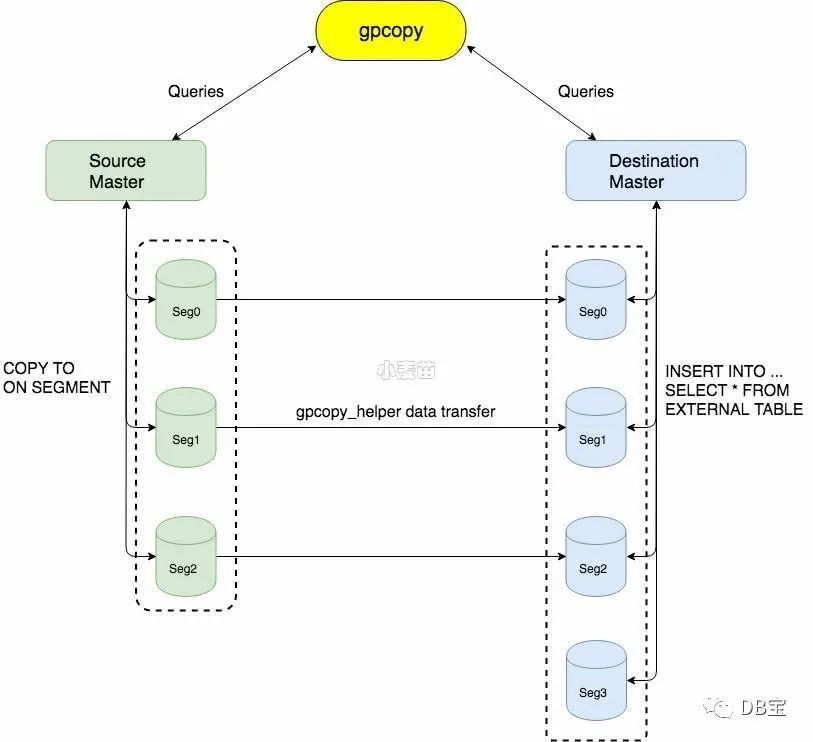
以下是 gpcopy 从大集群到小集群传输的基本架构,一样也会有避免倾斜的优化。
下载
https://network.pivotal.io/products/gpdb-data-copy
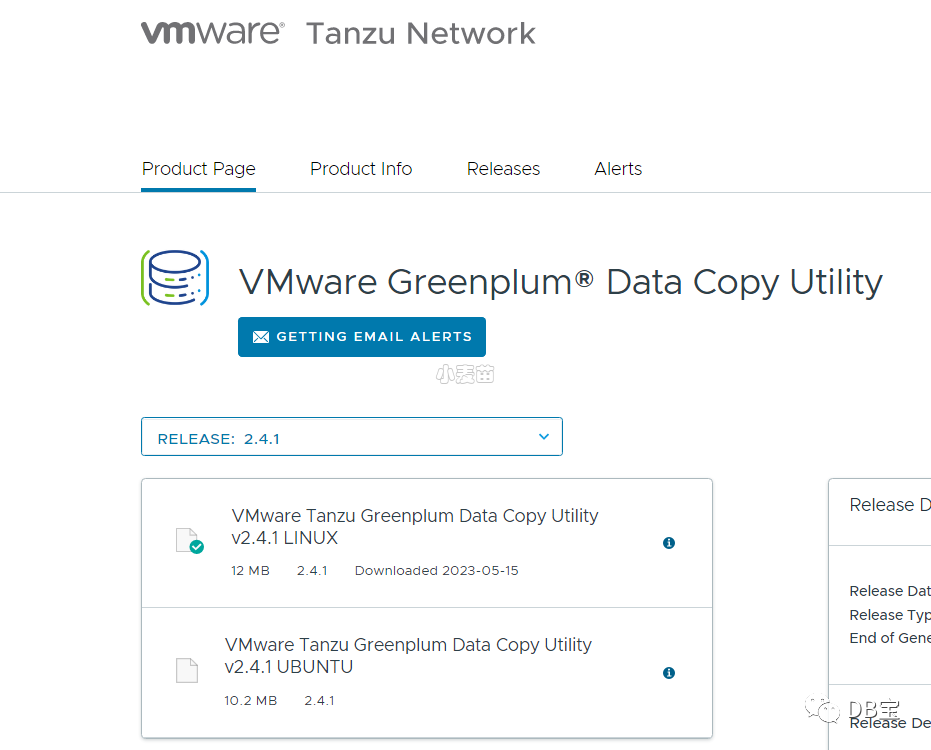
大小:12MB
安装使用
解压后,将gpcopy和gpcopy_helper文件拷贝到所有节点的
$GPHOME/bin
目录下。
 1-- 1.解压安装包
 2tar xzvf gpcopy-2.4.1.tar.gz
 3cd gpcopy-2.4.1/
 4
 5-- 2.在master节点,复制gpcopy和gpcopy_helper到GreenPlum相应的bin目录
 6cp gpcopy $GPHOME/bin
 7cp gpcopy_helper $GPHOME/bin
 8
 9-- 3.赋予权限
10chmod 755 $GPHOME/bin/gpcopy
11chmod 755 $GPHOME/bin/gpcopy_helper
12
13-- 4.在segment节点,只拷贝gpcopy_helper到相应目录下并赋予权限即可。(建议全拷贝)
14scp gpcopy gpadmin@sdw1:/usr/local/greenplum-db-6.23.1/bin/
15scp gpcopy_helper gpadmin@sdw1:/usr/local/greenplum-db-6.23.1/bin/
帮助
 1[gpadmin@lhrgp40 ~]$ gpcopy -h
 2gpcopy utility is for copying objects from a Greenplum cluster to another
 3
 4Usage:
 5  gpcopy [flags]
 6
 7Flags:
 8  -a, --analyze                          Analyze tables after copy
 9      --append                           Append destination table if it exists
10      --data-port-range DashInt          The range of port number destination helper chooses to transfer data in
11  -d, --dbname string                    The database to be copied
12      --debug                            Print debug log messages
13  -D, --dest-dbname string               The database in destination cluster to copy to
14      --dest-host string                 The host of destination cluster
15      --dest-mapping-file string         Use the host to IP map file in case of destination cluster IP auto-resovling fails
16      --dest-port int                    The port of destination cluster (default 5432)
17      --dest-table string                The renamed dest table(s) for include-table, separated by commas, supports regular expression
18      --dest-user string                 The user of destination cluster (default "gpadmin")
19      --drop                             Drop destination table if it exists prior to copying data
20      --dry-run                          Just run for test without affecting gpdb schema or data
21      --dumper string                    The dll dumper to be used. "pgdump" or "gpbackup" ("gpbackup" is an experimental option) (default "pgdump")
22      --enable-receive-daemon            Use a daemon helper process with a single port on destination to receive data (default true)
23  -e, --exclude-table string             Copy all tables except the specified table(s), separated by commas
24  -E, --exclude-table-file ArrayString   Copy all tables except the specified table(s) listed in the file
25  -F, --full                             Copy full data cluster
26  -h, --help                             help for gpcopy
27  -t, --include-table string             Copy only the specified table(s), separated by commas, supports regular expression
28  -T, --include-table-file string        Copy only the specified table(s) listed in the file
29      --include-table-json string        Copy only the specified table(s) listed in the json format, can contain destination table name and filter SQL.
30      --jobs int                         The maximum number of tables that concurrently copies, valid values are between 1 and 64512 (default 4)
31  -m, --metadata-only                    Only copy metadata, do not copy data
32      --no-compression                   Transfer the plain data, instead of compressing as Snappy format
33      --no-distribution-check            Don't check distribution while copying
34      --no-ownership                     Don't copy owner and privileges for table or sequence
35  -o, --on-segment-threshold int         Copy between masters directly, if the table has smaller or same number of rows (default 10000)
36  -p, --parallelize-leaf-partitions      Copy the leaf partition tables in parallel (default true)
37      --quiet                            Suppress non-warning, non-error log messages
38      --skip-existing                    Skip tables that exist in destination cluster
39      --source-host string               The host of source cluster (default "127.0.0.1")
40      --source-port int                  The port of source cluster (default 5432)
41      --source-user string               The user of source cluster (default "gpadmin")
42      --ssl-ca string                    SSL ca root cert file path for helper's TLS data socket
43      --ssl-cert string                  SSL cert file path for helper's TLS data socket
44      --ssl-key string                   SSL key file path for helper's TLS data socket
45      --ssl-min-tls string               Minus version of helper's TLS data socket
46      --timeout int                      The timeout in second to wait until source and destination are both ready for data transferring. '0' means waiting forever. (default 30)
47      --truncate                         Truncate destination table if it exists prior to copying data
48      --truncate-source-after            Truncate the source table after it's copied to release storage space
49  -v, --validate string                  The method performing data validation on table data, "count" or "md5xor"
50      --verbose                          Print verbose log messages
51      --version                          version for gpcopy
52      --yes                              Do not prompt
53[gpadmin@lhrgp40 ~]$
命令示例
 1# --debug 是为了在前台查看日志
 2# 从21服务器上把 datadev.public.dmtestone表 数据迁移到 102服务器上
 3# 库:datadev 模式:public 表:dmtestone
 4
 5export PGSSLMODE=disable
 6gpcopy --source-host 192.168.100.21 --dest-host 192.168.100.102 \
 7--include-table datadev.public.dmtestone --drop --dest-table postgres2.public.dmtestone --debug
 8
 9
10# 从21服务器上把dc数据库 迁移到 102服务器上
11gpcopy --source-host 192.168.100.21 --dest-host 192.168.100.102 \
12--dbname dc --dest-dbname  dc --skip-existing --debug
13
14
15
16gpcopy --source-host mytest --source-port 1234 --source-user gpuser \
17    --dest-host demohost --dest-port 1234 --dest-user gpuser \
18    --full --drop --validate count
我的示例1(单库迁移)
 1-- 参数--dry-run不真实执行
 2export PGSSLMODE=disable
 3gpcopy --source-host 172.72.6.40  --source-port 5432 --source-user gpadmin \
 4--dest-host 172.72.6.50 --dest-port 5432 --dest-user gpadmin \
 5--dbname lhrgpdb --dest-dbname  lhrgpdb \
 6--drop --jobs 4  --dry-run
 7
 8-- 真实迁移
 9export PGSSLMODE=disable
10gpcopy --source-host 172.72.6.40  --source-port 5432 --source-user gpadmin \
11--dest-host 172.72.6.50 --dest-port 5432 --dest-user gpadmin \
12--dbname lhrgpdb --dest-dbname  lhrgpdb \
13--drop --jobs 4
日志:
  1[gpadmin@mdw gpseg-1]$ gpcopy --source-host 172.72.6.40 --dest-host 172.72.6.50 \
  2> --dbname lhrgpdb --dest-dbname  lhrgpdb --drop --jobs 4  --dry-run
  320230516:12:23:59 gpcopy:gpadmin:mdw:1597904-[INFO]:-"--drop" will work as "--truncate" on partition tables
  420230516:12:23:59 gpcopy:gpadmin:mdw:1597904-[INFO]:-Starting dry-run copy 2.4.1...
  520230516:12:23:59 gpcopy:gpadmin:mdw:1597904-[INFO]:-Copy appname: gpcopy_202305161223_4dtjAgpngjQWA3qEvtNry6
  620230516:12:23:59 gpcopy:gpadmin:mdw:1597904-[INFO]:-'gpcopy' --dbname 'lhrgpdb' --dest-dbname 'lhrgpdb' --dest-host '172.72.6.50' --drop --dry-run --jobs '4' --source-host '172.72.6.40'
  720230516:12:23:59 gpcopy:gpadmin:mdw:1597904-[INFO]:-Initializing gpcopy
  820230516:12:23:59 gpcopy:gpadmin:mdw:1597904-[INFO]:-Source cluster version: 6.13.0 build commit:4f1adf8e247a9685c19ea02bcaddfdc200937ecd Open Source
  920230516:12:23:59 gpcopy:gpadmin:mdw:1597904-[INFO]:-Destination cluster version: 6.23.1 build commit:2731a45ecb364317207c560730cf9e2cbf17d7e4 Open Source
 1020230516:12:23:59 gpcopy:gpadmin:mdw:1597904-[INFO]:-pg_dump (PostgreSQL) 9.4.26
 1120230516:12:23:59 gpcopy:gpadmin:mdw:1597904-[INFO]:-pg_dumpall (PostgreSQL) 9.4.26
 1220230516:12:23:59 gpcopy:gpadmin:mdw:1597904-[WARNING]:-pg_dump version is higher than source cluster, which might have compatibility issues
 1320230516:12:23:59 gpcopy:gpadmin:mdw:1597904-[WARNING]:-pg_dumpall version is higher than source cluster, which might have compatibility issues
 14
 1520230516:12:24:13 gpcopy:gpadmin:mdw:1597904-[INFO]:-Start copying database "lhrgpdb"
 1620230516:12:24:13 gpcopy:gpadmin:mdw:1597904-[INFO]:-[Worker 3] Start copying table "lhrgpdb"."public"."table6" => "lhrgpdb"."public"."table6"
 1720230516:12:24:13 gpcopy:gpadmin:mdw:1597904-[INFO]:-[Worker 3] Start copying table "lhrgpdb"."public"."table1" => "lhrgpdb"."public"."table1"
 1820230516:12:24:13 gpcopy:gpadmin:mdw:1597904-[INFO]:-[Worker 3] Start copying table "lhrgpdb"."public"."table4" => "lhrgpdb"."public"."table4"
 1920230516:12:24:13 gpcopy:gpadmin:mdw:1597904-[INFO]:-[Worker 3] Start copying table "lhrgpdb"."public"."table3" => "lhrgpdb"."public"."table3"
 2020230516:12:24:13 gpcopy:gpadmin:mdw:1597904-[INFO]:-[Worker 3] Start copying table "lhrgpdb"."public"."table5" => "lhrgpdb"."public"."table5"
 2120230516:12:24:13 gpcopy:gpadmin:mdw:1597904-[INFO]:-[Worker 3] Start copying table "lhrgpdb"."public"."table9" => "lhrgpdb"."public"."table9"
 2220230516:12:24:13 gpcopy:gpadmin:mdw:1597904-[INFO]:-[Worker 2] Start copying table "lhrgpdb"."public"."table2" => "lhrgpdb"."public"."table2"
 2320230516:12:24:13 gpcopy:gpadmin:mdw:1597904-[INFO]:-[Worker 2] Start copying table "lhrgpdb"."public"."t_hash" => "lhrgpdb"."public"."t_hash"
 2420230516:12:24:13 gpcopy:gpadmin:mdw:1597904-[INFO]:-[Worker 1] Start copying table "lhrgpdb"."public"."table8" => "lhrgpdb"."public"."table8"
 2520230516:12:24:13 gpcopy:gpadmin:mdw:1597904-[INFO]:-[Worker 3] [Progress: (0/1) DBs, (1/11) tables done] Finished copying table "lhrgpdb"."public"."table6" => "lhrgpdb"."public"."table6"
 2620230516:12:24:13 gpcopy:gpadmin:mdw:1597904-[INFO]:-[Worker 3] [Progress: (0/1) DBs, (2/11) tables done] Finished copying table "lhrgpdb"."public"."table1" => "lhrgpdb"."public"."table1"
 2720230516:12:24:13 gpcopy:gpadmin:mdw:1597904-[INFO]:-[Worker 3] [Progress: (0/1) DBs, (3/11) tables done] Finished copying table "lhrgpdb"."public"."table4" => "lhrgpdb"."public"."table4"
 2820230516:12:24:13 gpcopy:gpadmin:mdw:1597904-[INFO]:-[Worker 3] [Progress: (0/1) DBs, (4/11) tables done] Finished copying table "lhrgpdb"."public"."table3" => "lhrgpdb"."public"."table3"
 2920230516:12:24:13 gpcopy:gpadmin:mdw:1597904-[INFO]:-[Worker 3] [Progress: (0/1) DBs, (5/11) tables done] Finished copying table "lhrgpdb"."public"."table5" => "lhrgpdb"."public"."table5"
 3020230516:12:24:13 gpcopy:gpadmin:mdw:1597904-[INFO]:-[Worker 3] [Progress: (0/1) DBs, (6/11) tables done] Finished copying table "lhrgpdb"."public"."table9" => "lhrgpdb"."public"."table9"
 3120230516:12:24:13 gpcopy:gpadmin:mdw:1597904-[INFO]:-[Worker 2] [Progress: (0/1) DBs, (7/11) tables done] Finished copying table "lhrgpdb"."public"."table2" => "lhrgpdb"."public"."table2"
 3220230516:12:24:13 gpcopy:gpadmin:mdw:1597904-[INFO]:-[Worker 2] [Progress: (0/1) DBs, (8/11) tables done] Finished copying table "lhrgpdb"."public"."t_hash" => "lhrgpdb"."public"."t_hash"
 3320230516:12:24:13 gpcopy:gpadmin:mdw:1597904-[INFO]:-[Worker 1] [Progress: (0/1) DBs, (9/11) tables done] Finished copying table "lhrgpdb"."public"."table8" => "lhrgpdb"."public"."table8"
 3420230516:12:24:13 gpcopy:gpadmin:mdw:1597904-[INFO]:-[Worker 3] Start copying table "lhrgpdb"."public"."table7" => "lhrgpdb"."public"."table7"
 3520230516:12:24:13 gpcopy:gpadmin:mdw:1597904-[INFO]:-[Worker 3] [Progress: (0/1) DBs, (10/11) tables done] Finished copying table "lhrgpdb"."public"."table7" => "lhrgpdb"."public"."table7"
 3620230516:12:24:13 gpcopy:gpadmin:mdw:1597904-[INFO]:-[Worker 0] Start copying table "lhrgpdb"."public"."table10" => "lhrgpdb"."public"."table10"
 3720230516:12:24:13 gpcopy:gpadmin:mdw:1597904-[INFO]:-[Worker 0] [Progress: (0/1) DBs, (11/11) tables done] Finished copying table "lhrgpdb"."public"."table10" => "lhrgpdb"."public"."table10"
 3820230516:12:24:13 gpcopy:gpadmin:mdw:1597904-[INFO]:-[lhrgpdb] Finished copying database "Progress: (1/1) DBs, (11/11) tables done"
 3920230516:12:24:13 gpcopy:gpadmin:mdw:1597904-[INFO]:-Copy completed successfully
 4020230516:12:24:13 gpcopy:gpadmin:mdw:1597904-[INFO]:-------------------------------------------------
 4120230516:12:24:13 gpcopy:gpadmin:mdw:1597904-[INFO]:-Total elapsed time: 14.05000979s
 4220230516:12:24:13 gpcopy:gpadmin:mdw:1597904-[INFO]:-Total transferred data 0B, transfer rate 0B/h
 4320230516:12:24:13 gpcopy:gpadmin:mdw:1597904-[INFO]:-Copied 1 databases
 4420230516:12:24:13 gpcopy:gpadmin:mdw:1597904-[INFO]:-   Database lhrgpdb: successfully copied 11 tables, skipped 0 tables, failed 0 tables
 45[gpadmin@mdw gpseg-1]$
 46[gpadmin@mdw gpseg-1]$ psql
 47psql (9.4.26)
 48Type "help" for help.
 49
 50postgres=# \l
 51                               List of databases
 52   Name    |  Owner  | Encoding |  Collate   |   Ctype    |  Access privileges
 53-----------+---------+----------+------------+------------+---------------------
 54 db1       | gpadmin | UTF8     | en_US.utf8 | en_US.utf8 |
 55 gpperfmon | gpadmin | UTF8     | en_US.utf8 | en_US.utf8 |
 56 lhrdb     | gpadmin | UTF8     | en_US.utf8 | en_US.utf8 |
 57 lhrgpdb   | gpadmin | UTF8     | en_US.utf8 | en_US.utf8 |
 58 postgres  | gpadmin | UTF8     | en_US.utf8 | en_US.utf8 |
 59 template0 | gpadmin | UTF8     | en_US.utf8 | en_US.utf8 | =c/gpadmin         +
 60           |         |          |            |            | gpadmin=CTc/gpadmin
 61 template1 | gpadmin | UTF8     | en_US.utf8 | en_US.utf8 | =c/gpadmin         +
 62           |         |          |            |            | gpadmin=CTc/gpadmin
 63 testdb    | gpadmin | UTF8     | en_US.utf8 | en_US.utf8 |
 64(8 rows)
 65
 66postgres=# \q
 67[gpadmin@mdw gpseg-1]$ gpcopy --source-host 172.72.6.40 --dest-host 172.72.6.50 \
 68> --dbname lhrgpdb --dest-dbname  lhrgpdb --drop --jobs 4
 6920230516:12:24:58 gpcopy:gpadmin:mdw:1598187-[INFO]:-"--drop" will work as "--truncate" on partition tables
 7020230516:12:24:58 gpcopy:gpadmin:mdw:1598187-[INFO]:-Starting copy 2.4.1...
 7120230516:12:24:58 gpcopy:gpadmin:mdw:1598187-[INFO]:-Copy appname: gpcopy_202305161224_chYGAwHJYEtUn67gquyc8k
 7220230516:12:24:58 gpcopy:gpadmin:mdw:1598187-[INFO]:-'gpcopy' --dbname 'lhrgpdb' --dest-dbname 'lhrgpdb' --dest-host '172.72.6.50' --drop --jobs '4' --source-host '172.72.6.40'
 7320230516:12:24:58 gpcopy:gpadmin:mdw:1598187-[INFO]:-Initializing gpcopy
 7420230516:12:24:58 gpcopy:gpadmin:mdw:1598187-[INFO]:-Source cluster version: 6.13.0 build commit:4f1adf8e247a9685c19ea02bcaddfdc200937ecd Open Source
 7520230516:12:24:58 gpcopy:gpadmin:mdw:1598187-[INFO]:-Destination cluster version: 6.23.1 build commit:2731a45ecb364317207c560730cf9e2cbf17d7e4 Open Source
 7620230516:12:24:58 gpcopy:gpadmin:mdw:1598187-[INFO]:-pg_dump (PostgreSQL) 9.4.26
 7720230516:12:24:58 gpcopy:gpadmin:mdw:1598187-[INFO]:-pg_dumpall (PostgreSQL) 9.4.26
 7820230516:12:24:58 gpcopy:gpadmin:mdw:1598187-[WARNING]:-pg_dump version is higher than source cluster, which might have compatibility issues
 7920230516:12:24:58 gpcopy:gpadmin:mdw:1598187-[WARNING]:-pg_dumpall version is higher than source cluster, which might have compatibility issues
 8020230516:12:25:02 gpcopy:gpadmin:mdw:1598187-[INFO]:-Start copying database "lhrgpdb"
 8120230516:12:25:02 gpcopy:gpadmin:mdw:1598187-[INFO]:-[Worker 3] Start copying table "lhrgpdb"."public"."table10" => "lhrgpdb"."public"."table10"
 8220230516:12:25:02 gpcopy:gpadmin:mdw:1598187-[INFO]:-[Worker 1] Start copying table "lhrgpdb"."public"."t_hash" => "lhrgpdb"."public"."t_hash"
 8320230516:12:25:02 gpcopy:gpadmin:mdw:1598187-[INFO]:-[Worker 2] Start copying table "lhrgpdb"."public"."table4" => "lhrgpdb"."public"."table4"
 8420230516:12:25:02 gpcopy:gpadmin:mdw:1598187-[INFO]:-[Worker 0] Start copying table "lhrgpdb"."public"."table7" => "lhrgpdb"."public"."table7"
 8520230516:12:25:17 gpcopy:gpadmin:mdw:1598187-[INFO]:-[Worker 3] Start copying table "lhrgpdb"."public"."table5" => "lhrgpdb"."public"."table5"
 8620230516:12:25:17 gpcopy:gpadmin:mdw:1598187-[INFO]:-[Worker 3] [Progress: (0/1) DBs, (1/11) tables done] Finished copying table "lhrgpdb"."public"."table10" => "lhrgpdb"."public"."table10"
 8720230516:12:25:17 gpcopy:gpadmin:mdw:1598187-[INFO]:-[Worker 2] Start copying table "lhrgpdb"."public"."table6" => "lhrgpdb"."public"."table6"
 8820230516:12:25:17 gpcopy:gpadmin:mdw:1598187-[INFO]:-[Worker 2] [Progress: (0/1) DBs, (2/11) tables done] Finished copying table "lhrgpdb"."public"."table4" => "lhrgpdb"."public"."table4"
 8920230516:12:25:17 gpcopy:gpadmin:mdw:1598187-[INFO]:-[Worker 0] Start copying table "lhrgpdb"."public"."table9" => "lhrgpdb"."public"."table9"
 9020230516:12:25:17 gpcopy:gpadmin:mdw:1598187-[INFO]:-[Worker 0] [Progress: (0/1) DBs, (3/11) tables done] Finished copying table "lhrgpdb"."public"."table7" => "lhrgpdb"."public"."table7"
 9120230516:12:25:17 gpcopy:gpadmin:mdw:1598187-[INFO]:-[Worker 1] Start copying table "lhrgpdb"."public"."table1" => "lhrgpdb"."public"."table1"
 9220230516:12:25:17 gpcopy:gpadmin:mdw:1598187-[INFO]:-[Worker 1] [Progress: (0/1) DBs, (4/11) tables done] Finished copying table "lhrgpdb"."public"."t_hash" => "lhrgpdb"."public"."t_hash"
 9320230516:12:25:25 gpcopy:gpadmin:mdw:1598187-[INFO]:-[Worker 2] Start copying table "lhrgpdb"."public"."table8" => "lhrgpdb"."public"."table8"
 9420230516:12:25:25 gpcopy:gpadmin:mdw:1598187-[INFO]:-[Worker 2] [Progress: (0/1) DBs, (5/11) tables done] Finished copying table "lhrgpdb"."public"."table6" => "lhrgpdb"."public"."table6"
 9520230516:12:25:25 gpcopy:gpadmin:mdw:1598187-[INFO]:-[Worker 3] Start copying table "lhrgpdb"."public"."table2" => "lhrgpdb"."public"."table2"
 9620230516:12:25:25 gpcopy:gpadmin:mdw:1598187-[INFO]:-[Worker 3] [Progress: (0/1) DBs, (6/11) tables done] Finished copying table "lhrgpdb"."public"."table5" => "lhrgpdb"."public"."table5"
 9720230516:12:25:25 gpcopy:gpadmin:mdw:1598187-[INFO]:-[Worker 1] Start copying table "lhrgpdb"."public"."table3" => "lhrgpdb"."public"."table3"
 9820230516:12:25:25 gpcopy:gpadmin:mdw:1598187-[INFO]:-[Worker 1] [Progress: (0/1) DBs, (7/11) tables done] Finished copying table "lhrgpdb"."public"."table1" => "lhrgpdb"."public"."table1"
 9920230516:12:25:25 gpcopy:gpadmin:mdw:1598187-[INFO]:-[Worker 0] [Progress: (0/1) DBs, (8/11) tables done] Finished copying table "lhrgpdb"."public"."table9" => "lhrgpdb"."public"."table9"
10020230516:12:25:38 gpcopy:gpadmin:mdw:1598187-[INFO]:-[Worker 2] [Progress: (0/1) DBs, (9/11) tables done] Finished copying table "lhrgpdb"."public"."table8" => "lhrgpdb"."public"."table8"
10120230516:12:25:38 gpcopy:gpadmin:mdw:1598187-[INFO]:-[Worker 3] [Progress: (0/1) DBs, (10/11) tables done] Finished copying table "lhrgpdb"."public"."table2" => "lhrgpdb"."public"."table2"
10220230516:12:25:38 gpcopy:gpadmin:mdw:1598187-[INFO]:-[Worker 1] [Progress: (0/1) DBs, (11/11) tables done] Finished copying table "lhrgpdb"."public"."table3" => "lhrgpdb"."public"."table3"
10320230516:12:25:38 gpcopy:gpadmin:mdw:1598187-[INFO]:-[lhrgpdb] Finished copying database "Progress: (1/1) DBs, (11/11) tables done"
10420230516:12:25:39 gpcopy:gpadmin:mdw:1598187-[INFO]:-Copy completed successfully
10520230516:12:25:39 gpcopy:gpadmin:mdw:1598187-[INFO]:-------------------------------------------------
10620230516:12:25:39 gpcopy:gpadmin:mdw:1598187-[INFO]:-Total elapsed time: 41.260787215s
10720230516:12:25:39 gpcopy:gpadmin:mdw:1598187-[INFO]:-Total transferred data 848.6MB, transfer rate 338.8GB/h
10820230516:12:25:39 gpcopy:gpadmin:mdw:1598187-[INFO]:-Copied 1 databases
10920230516:12:25:39 gpcopy:gpadmin:mdw:1598187-[INFO]:-   Database lhrgpdb: successfully copied 11 tables, skipped 0 tables, failed 0 tables
110
111[gpadmin@mdw gpseg-1]$ psql
112psql (9.4.26)
113Type "help" for help.
114
115postgres=# \l
116                               List of databases
117   Name    |  Owner  | Encoding |  Collate   |   Ctype    |  Access privileges
118-----------+---------+----------+------------+------------+---------------------
119 db1       | gpadmin | UTF8     | en_US.utf8 | en_US.utf8 |
120 gpperfmon | gpadmin | UTF8     | en_US.utf8 | en_US.utf8 |
121 lhrdb     | gpadmin | UTF8     | en_US.utf8 | en_US.utf8 |
122 lhrgpdb   | gpadmin | UTF8     | en_US.utf8 | en_US.utf8 |
123 postgres  | gpadmin | UTF8     | en_US.utf8 | en_US.utf8 |
124 template0 | gpadmin | UTF8     | en_US.utf8 | en_US.utf8 | =c/gpadmin         +
125           |         |          |            |            | gpadmin=CTc/gpadmin
126 template1 | gpadmin | UTF8     | en_US.utf8 | en_US.utf8 | =c/gpadmin         +
127           |         |          |            |            | gpadmin=CTc/gpadmin
128 testdb    | gpadmin | UTF8     | en_US.utf8 | en_US.utf8 |
129(8 rows)
130
131postgres=# \c lhrgpdb
132You are now connected to database "lhrgpdb" as user "gpadmin".
133
134
135lhrgpdb=# \dt+
136                          List of relations
137 Schema |  Name   | Type  |  Owner  | Storage |  Size  | Description
138--------+---------+-------+---------+---------+--------+-------------
139 public | t_hash  | table | gpadmin | heap    | 132 MB |
140 public | table1  | table | gpadmin | heap    | 132 MB |
141 public | table10 | table | gpadmin | heap    | 132 MB |
142 public | table2  | table | gpadmin | heap    | 132 MB |
143 public | table3  | table | gpadmin | heap    | 132 MB |
144 public | table4  | table | gpadmin | heap    | 132 MB |
145 public | table5  | table | gpadmin | heap    | 132 MB |
146 public | table6  | table | gpadmin | heap    | 132 MB |
147 public | table7  | table | gpadmin | heap    | 132 MB |
148 public | table8  | table | gpadmin | heap    | 132 MB |
149 public | table9  | table | gpadmin | heap    | 132 MB |
150(11 rows)
151
152lhrgpdb=#
我的示例2(全集群迁移)
1export PGSSLMODE=disable
2gpcopy --source-host 172.72.6.40  --source-port 5432 --source-user gpadmin \
3--dest-host 172.72.6.50 --dest-port 5432 --dest-user gpadmin \
4--full \
5--drop --jobs 8
gpcopy官方提示注意点
(1)如果gpcopy命令指定了无效的选项,或者指定了不存在的源表或数据库,则该实用程序将返回错误并退出。并且没有数据被复制。
(2)gpcopy在复制数据时是不会在源表上添加事务锁的,此时是可以修改源表数据的。
(3)gpcopy无法复制宽度大于1GB(PostgreSQL限制)的行。
(4)如果使用--dbname,--include-table,--include-table-file或--include-table-json选项复制一组数据库表,而目标数据库不存在,则该实用程序将创建数据库,然后再复制表。如果目标数据库存在,则该实用程序根据需要在数据库中创建表。如果目标表存在但是表结构不一致,该实用程序将返回错误然后回滚当前数据表的复制操作并继续开始下一个数据表迁移操作。
(5)除非指定--full选项,否则gpcopy实用程序不会复制依赖的数据库对象。
例如,如果一个表在一个用户定义的函数的列上有一个默认值,那么在使用--dbname、--include-table、--include-table-file或--include-table-json选项时,该函数必须存在于目标系统数据库中。
(6)复制表时,为表定义的序列被视为表数据并被复制。如果使用序列列创建表或将序列指定为默认值,则将复制序列。如果指定--truncate选项,则会重置序列。
(7)gpcopy仅在使用--full或--drop选项后重新创建表索引。
(8)gpcopy不会复制配置文件,例如postgresql.conf和pg_hba.conf。您必须单独设置目标系统配置。
(9)gpcopy实用程序不会复制外部对象,例如Greenplum数据库扩展名,第三方jar文件和共享对象文件。您必须单独安装外部对象。
(10)gpcopy实用程序将消息记录在master主机上~/ gpAdminLogs
目录中的日志文件gpcopy_date.log中。如果您在同一天运行多个gpcopy命令,该实用程序会将消息追加到当天的日志文件中。
GPCOPY使用测试注意点
(1)gpcopy支持也只支持从Greenplum低版本往高版本进行数据迁移:因为Greenplum不同版本(4、5、6)之间分别基于PostgreSQL8.2.x、8.3.x、9.x为内核开发的,它们的pg_dump版本不一致,测试发现gpcopy在复制数据时使用了pg_dump工具,所以在这种情况下只能复制元数据。
(2)gpcopy实用程序分为元数据迁移和表数据迁移,当指定--metadata-only选项时,gpcopy就可以实现很多特殊环境的迁移工作,如:
①gpcopy1.0.0执行迁移工具时,集群间可以具有不同的segment数。
②高版本gp往低版本gp迁移工作:gp5.x为源集群往gp4.x目标集群迁移。
(3)gpcopy与gpcopy_helper在源集群和目标集群的作用,测试情况有如下几种:
①仅迁移元数据时,源集群只需要master主机有gpcopy文件,目标集群只需要master主机上有gpcopy_helper文件。
②迁移的表数据行数都低于10000行时(--on-segment-threshold默认为10000行),源集群需要master主机有gpcopy文件和gpcopy_helper文件,目标集群只需要master主机上有gpcopy_helper文件。
分析猜测为gpcopy用于源集群迁移元数据、gpcopy_helper用于源和目标集群迁移元数据和表数据。总之,在实际生产环境中不要考虑这些,都装上即可。
Notice:我的测试环境是:source集群(1个master实例,4个segment实例)、dest集群(1个master实例,4个segment实例)。
(4)源集群的主机和目标集群的主机之间需要互相ping通,假设有test1、test2两个cluster,test1能够ping通test2,而test2不能ping通test1,大致场景:test1为局域网,test2为公网。gpcopy的source-host为test1时,可以向test2迁移数据进行正常操作,而当test2为source-host、test1为dest-host时,gpcopy能够将所有表的元数据迁移,但是在迁移表数据时会报错并回滚整个表的复制操作,如果指定--metadata-only能正常操作。
(5)gpcopy诞生于Greenplum5.9.0,不代表只能从5.9.0开始使用,也不是说5.x的版本都能够使用。经过测试,gpcopy实际能够运行环境分别为4.3.20.0及以上、5.4.1及以上、6.x。除此之外,gptransfer在Greenplum6.x中已被移除。
错误
Error: pq: SSL is not enabled on the server (172.72.6.40:5432)
解决:
1export PGSSLMODE=disable
Error: pq: password authentication failed for user "gpadmin" (172.72.6.50:5432)
解决:
1vi  /opt/greenplum/data/master/gpseg-1/pg_hba.conf
2
3host all all 172.72.6.0/24  trust
4host all all     all     md5
5
6gpstop -u
注意:md5需要放在最后
命令总结
 1-- 参数--dry-run不真实执行
 2export PGSSLMODE=disable
 3gpcopy --source-host 172.72.6.40  --source-port 5432 --source-user gpadmin \
 4--dest-host 172.72.6.50 --dest-port 5432 --dest-user gpadmin \
 5--dbname lhrgpdb --dest-dbname  lhrgpdb \
 6--drop --jobs 4  --dry-run
 7
 8-- 真实迁移
 9export PGSSLMODE=disable
10gpcopy --source-host 172.72.6.40  --source-port 5432 --source-user gpadmin \
11--dest-host 172.72.6.50 --dest-port 5432 --dest-user gpadmin \
12--dbname lhrgpdb --dest-dbname  lhrgpdb \
13--drop --jobs 4
14
15
16export PGSSLMODE=disable
17gpcopy --source-host 172.72.6.40  --source-port 5432 --source-user gpadmin \
18--dest-host 172.72.6.50 --dest-port 5432 --dest-user gpadmin \
19--full \
20--drop --jobs 8
总结
1、将gpcopy和gpcopy_helper文件拷贝到所有节点的$GPHOME/bin
目录下
2、源集群的主机和目标集群的主机之间需要互相ping通
3、只有--full
才会复制数据库模式、表数据、索引、视图、角色、用户定义的函数、资源队列和资源组。其它选项只会复制表、视图等,需要自行测试。
4、日志文件在~/ gpAdminLogs
目录中的日志文件gpcopy_date.log
文件中
5、配置文件,包括postgresql.conf
和pg_hba.conf
必须由管理员手动传输。
6、gpcopy
仅从用户数据库传输数据;这postgres
, template0
,以及template1
无法传输数据库。
7、可以先测试一个小库,用来预估整个集群迁移完成需要的时间。
参考
https://blog.csdn.net/weixin_44385419/article/details/121010960
https://cloud.tencent.com/developer/news/355959
https://www.freesion.com/article/7527460756/
https://developer.aliyun.com/article/257062 《Greenplum5.0 最佳实践》 迁移数据使用Gptransfer
https://docs.vmware.com/en/VMware-Tanzu-Greenplum-Data-Copy-Utility/index.html
https://docs.vmware.com/en/VMware-Tanzu-Greenplum-Data-Copy-Utility/2.3/tanzu-greenplum-copy/GUID-install.html
https://docs.vmware.com/en/VMware-Tanzu-Greenplum-Data-Copy-Utility/2.3/tanzu-greenplum-copy/GUID-gpcopy-migrate.html
