



1. WebAssembly 简介
跨平台性,可以在任何支持 WebAssembly 的平台上运行,包括 Web 浏览器、服务器、移动设备等
高性能,采用了一种紧凑的二进制格式,可以在浏览器中快速加载和解析,从而提高应用程序的性能
安全性,采用了一种沙箱模型,可以隔离运行在其中的代码,从而保护系统免受恶意代码的攻击
可移植性,WebAssembly 的代码可以通过编译器从不同的编程语言中生成,因此可以轻松地将现有的代码转换为 WebAssembly 格式
可扩展性,WebAssembly 支持向后兼容的版本控制,并允许在未来添加新的指令和功能,从而使其具有更好的扩展性
2. 落地案例
autocad https://web.autocad.com/
在线协同设计工具 figma https://www.figma.com/
谷歌地球 https://earth.google.com/web/
web 版 photoshop https://photoshop.adobe.com/
web 版 libreoffice https://lab.allotropia.de/wasm/
WebAssembly 实现的虚拟机 v86 https://github.com/copy/v86
在线运行 Go https://goscript.dev/
在线运行 Python https://pyscript.net/
更多使用 WebAssembly 的案例参考 https://madewithwebassembly.com/
3. 常见 WebAssembly 非前端运行时
WebAssembly 运行时是 WebAssembly 代码的运行环境,它负责加载 WebAssembly 模块、创建 WebAssembly 实例、执行 WebAssembly 代码。
C/C++ 语言实现的 - WasmEdge、wasm3 Rust 语言实现的 - wasmer、wasmtime Go 语言实现的 - WaZero
目前的主流浏览器、高版本的 Nodejs 都是支持 wasm 的。
4. 安装 WasmEdge
由于 Docker 新版本支持 WasmEdge,我在本地也选择使用 WasmEdge 作为 WebAssembly 运行时,以便于容器内保持一致。
下载 Wasmedge 二进制文件
前往 https://github.com/WasmEdge/WasmEdge/releases 下载对应平台的二进制文件。
wget https://github.com/WasmEdge/WasmEdge/releases/download/0.12.0/WasmEdge-0.12.0-darwin_x86_64.tar.gz
解压 Wasmedge 并安装
tar -zxvf WasmEdge-0.12.0-darwin_x86_64.tar.gz -C /Users/shaowenchen --strip-components=1
export PATH=$PATH:/Users/shaowenchen/bin
如果需要拷贝到其他目录下,注意保持 bin、include、lib 三个目录的相对位置,否则会出现以下错误:
dyld: Library not loaded: @rpath/libwasmedge.0.dylib
  Referenced from: /Users/shaowenchen/bin/wasmedge
  Reason: image not found
查看 Wasmedge 版本
wasmedge --version

wasmedge version 0.12.0
5. 使用 TinyGo 编译 WebAssembly 程序
5.1 使用 TinyGo 的优劣
使用 TinyGo 的好处
TinyGo 是 Go 的子集,可以使用 Go 语言编写 WebAssembly 程序。
可以直接在 WasmEdge 上运行,无需 JavaScript 环境。
wasm 文件足够小,几十 KB。
使用 TinyGo 的缺点
TinyGo 有些库不能用,比如 net/http 等,具体可参考 https://tinygo.org/docs/reference/lang-support/stdlib/ 。
TinyGo 不支持全部 Go 语言特性,比如 Cgo 等,具体可参考 https://tinygo.org/docs/reference/lang-support/ 。
5.1 Hello, World!
新建 main.go 文件
package main

func main() {
 println("Hello, World! by TinyGo")
}
编译代码
tinygo build -o ./build/main.wasm -target=wasm
使用 WasmEdge 运行
wasmedge ./build/main.wasm

Hello, World! by TinyGo
新建 Dockerfile 文件
FROM scratch
ADD ./build/main.wasm /build/main.wasm
ENTRYPOINT ["/build/main.wasm"]
编译容器镜像
docker build -t shaowenchen/wasm-hello-world:tinygo .
运行容器镜像
docker run  --rm --runtime=io.containerd.wasmedge.v1 \
    shaowenchen/wasm-hello-world:tinygo

Hello, World! by TinyGo
6. 使用 Go 编译 WebAssembly 程序
6.1 使用 Go 的优劣
使用 Go 的好处
可以使用 syscall/js 包与 JavaScript 进行交互。
可以使用 Go 语言的全部特性和包。
未来,WebAssembly 运行时支持 GC 后,程序体积、性能可能会得到改善。
使用 Go 的缺点
默认需要 JavaScript 环境支持。
体积较大,几 MB、甚至几十 MB。不过,很多祖传项目编译出来也是几十、上百 MB。
6.2 Hello, World!
新建 main.go 文件
package main

func main() {
 println("Hello, World! by Go 1.19")
}
编译代码
GOOS=js GOARCH=wasm go build -o ./dist/main.wasm
使用 node 运行
注意,nodejs 需要 12 及以上才行。
cp $(shell go env GOROOT)/misc/wasm/wasm_exec_node.js ./dist/
node ./dist/wasm_exec_node.js ./dist/main.wasm

Hello, World! by Go 1.19
新建 Dockerfile 文件
FROM node:12-alpine
ADD ./dist /dist
ENTRYPOINT ["node","/dist/wasm_exec_node.js", "/dist/main.wasm"]
编译容器镜像
docker build -t shaowenchen/wasm-hello-world:go .
运行容器镜像
docker run  --rm shaowenchen/wasm-hello-world:go

Hello, World! by Go 1.19
6.3 使用 syscall/js 实现 Go 与 JavaScript 数据的交互
Go 语言提供了 syscall/js 包,可以用于与 JavaScript 进行交互。
在 Go 中调用 JavaScript 函数
通过 syscall/js
包提供的 Global() 函数获取宿主 JavaScript 环境的对象。
js.Global().Get("console").Get("log").Invoke("Hello, World!")
等价于
console.log("Hello, World!")
在 JavaScript 中调用 Go 函数
js.Global().Set("myfunc", js.FuncOf(myfunc))

func myfunc(this js.Value, args []js.Value) interface{} {
 return nil
}
js.Global().Set
将对象注册到 JavaScript 环境中,在浏览器前端可以直接调用 myfunc
函数。
重写 hello world,在浏览器页面执行 wasm
package main

import (
 "syscall/js"
)

func main() {
 // 调用前端的函数,在控制台打印
 js.Global().Get("console").Get("log").Invoke("Hello, World by Go")
 // 找到 ID 为 hello 的元素,插入文本
 js.Global().Get("document").Call("getElementById", "hello").Set("innerHTML", "Hello, World! by Go")
  // 将 Go 函数,注册到前端
 js.Global().Set("myfunc", js.FuncOf(myfunc))
  // 不立马退出,否则会报错
 <-make(chan bool)
}

func myfunc(this js.Value, args []js.Value) interface{} {
 println("myfunc called")
 // 获取函数参数
 myfunc_arg0 := args[0].String()
 // 在前端 window 对象中设置变量
 js.Global().Set("myfunc_arg0", myfunc_arg0)
 js.Global().Get("console").Get("log").Invoke(myfunc_arg0)
 return nil
}
拷贝 wasm_exec.js wasm_exec.html 文件
Go 编译器自带有一个样例。
cp $(shell go env GOROOT)/misc/wasm/wasm_exec.js ./dist/
cp $(shell go env GOROOT)/misc/wasm/wasm_exec.html ./dist/
wasm_exec.js 的作用是在浏览器中加载执行 wasm,wasm_exec.html 是一个实例。
修改 wasm_exec.html
为了演示 Go 与 JavaScript 的数据交互能力,这里稍微修改一下样例。
WebAssembly.instantiateStreaming(fetch("main.wasm")...
这里的 fetch 应该是编译出来的 wasm 文件,默认是 test.wasm
,根据需要修改为 main.wasm
。
</script>
function callGo() {
   myfunc("abc");
  }
</script>
<button onClick="callGo();" id="callGoButton" >callGoButton</button>
<div id="hello"></div>
这里新增一个按钮,用于调用 Go 函数 myfunc。
查看效果
本地启一个 http 服务
python3 -m http.server --directory ./dist

Serving HTTP on :: port 8000 (http://[::]:8000/) ...
访问 http://localhost:8000/wasm_exec.html 页面
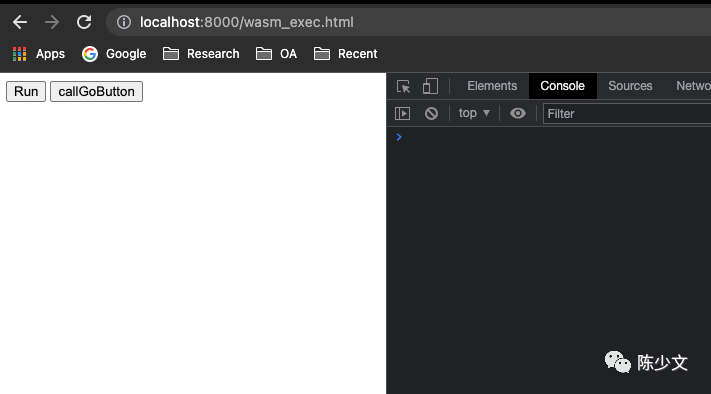
点击 Run 按钮,Go 调用前端对象,输出文本、在页面插入文本。
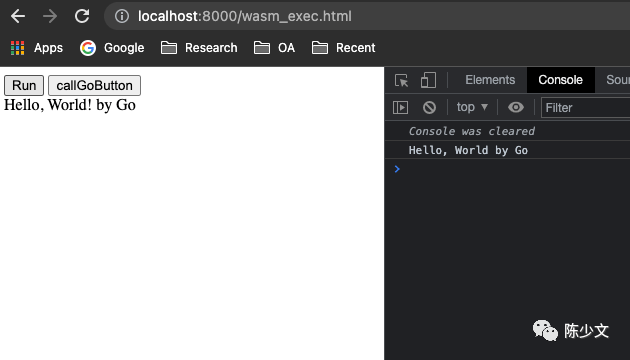
点击 callGoButton,前端调用 Go 函数。
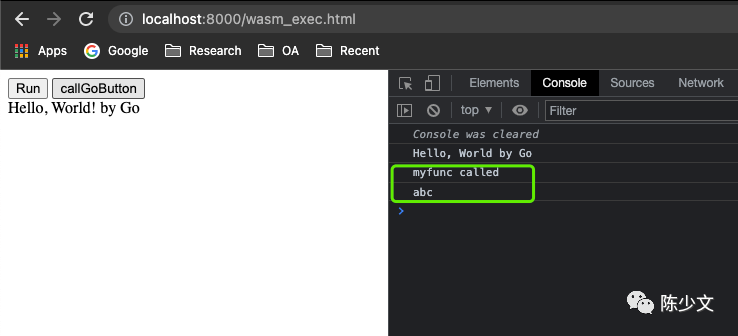
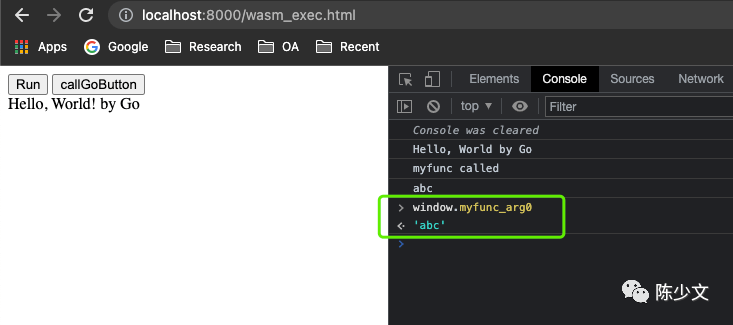
在控制台访问 windows.myfunc_arg0
,获取 Go 在前端对象中设置的值。
7. 总结
本篇主要是在尝试 Go 编写 WebAssembly 的一些方式。如果不进行额外的配置,目前比较快捷的两种方式是:
使用 TingyGo 编写,直接在 WasmEdge 上运行 使用 Go 编写,需要借助 JS 加载,在 Nodejs 上运行
另外,还提供了 Go 1.19 编写 WebAssembly 与 JavaScript 函数、数据交互的一个示例。
文中相关代码都在 https://github.com/shaowenchen/demo/tree/master/wasm-hello-world 。
8. 参考
https://chai2010.cn/post/2022/wasm2022/ https://github.com/wasmerio/wasmer https://github.com/bytecodealliance/wasmtime https://github.com/wasm3/wasm3
