
1. 什么是 kaniko
Google 2018 年发布的 kaniko[1] 是一种在容器或 Kubernetes[2] 集群内无需特权
从 Dockerfile 构建容器镜像的工具。
kaniko 不依赖于 Docker[3] 守护进程,而是完全在用户空间中执行 Dockerfile 中的每个命令,并对所构建的文件系统更改做快照。
2. kaniko 是如何工作的
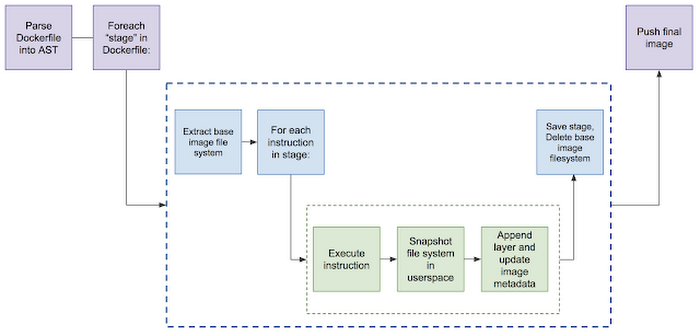
• 1.读取指定的
Dockerfile
。• 2.将基本映像(在FROM指令中指定)提取到容器文件系统中。
• 3.在独立的
Dockerfile
中分别运行每个命令。• 4.每次运行后都会对用户空间文件系统的做快照。
• 5.每次运行时,将快照层附加到基础层。
3. 工作原理
kaniko
作为一个容器镜像运行,它接受三个参数:一个 Dockerfile ,一个构建上下文(context)以及将镜像推送到的镜像仓库。它在执行程序镜像中提取基本镜像的文件系统。然后,在Dockerfile中执行任何命令,快照用户空间中的文件系统。Kaniko在每个命令后都会将一层已更改的文件附加到基本镜像。最后,执行程序将新镜像推送到指定的注册表。由于Kaniko在执行程序镜像的用户空间中完全执行了这些操作,因此它完全避免了在用户计算机上需要任何特权访问。
4. kaniko 构建上下文
kaniko 的构建上下文与您将发送 Docker 守护程序以进行映像构建的构建上下文非常相似;它代表一个包含 Dockerfile 的目录,kaniko 将使用该目录构建您的映像。例如,COPY Dockerfile 中的命令应该引用构建上下文中的文件。
您需要将构建上下文存储在 kaniko 可以访问的地方。运行 kaniko
时,使用--context
带有适当前缀的标志来指定构建上下文的位置:
| Source | Prefix | Example |
| Local Directory | dir://[path to a directory in the kaniko container] | dir:///workspace |
| Local Tar Gz | tar://[path to a .tar.gz in the kaniko container] | tar://path/to/context.tar.gz |
| Standard Input | tar://[stdin] | tar://stdin |
| GCS Bucket | gs://[bucket name]/[path to .tar.gz] | gs://kaniko-bucket/path/to/context.tar.gz |
| S3 Bucket | s3://[bucket name]/[path to .tar.gz] | s3://kaniko-bucket/path/to/context.tar.gz |
| Azure Blob Storage | https://[account].[azureblobhostsuffix]/[container]/[path to .tar.gz] | https://myaccount.blob.core.windows.net/container/path/to/context.tar.gz |
| Git Repository | git://[repository url][#reference][#commit-id] | git://github.com/acme/myproject.git#refs/heads/mybranch# |
关于
Local Directory
的注意事项:此选项是指 kaniko 容器内的目录。如果您希望使用此选项,则需要在构建上下文中将其作为目录挂载到容器中。关于本地 Tar 的注意事项:此选项指的是kaniko
容器中的tar gz
文件。如果您希望使用此选项,则需要在构建上下文中将其作为文件挂载到容器中。
关于标准输入的注意事项:kaniko 允许的唯一标准输入是.tar.gz格式。
如果使用 GCS
或 S3
存储桶,您首先需要创建构建上下文的压缩 tar 并将其上传到您的存储桶。运行后,kaniko 将在开始映像构建之前下载并解压构建上下文的压缩 tar。
要创建压缩的 tar,您可以运行:
tar -C <path to build context> -zcvf context.tar.gz .
然后,将压缩的 tar 复制到您的存储桶中。例如,我们可以使用 gsutil
将压缩的 tar 复制到 GCS 存储桶:
gsutil cp context.tar.gz gs://<bucket name>
5. 准备
• minikube & kubernetes 动手指南[6](点击可直接跳转)
6. 下载 kaniko-demo
• 安装最新 git[7] (点击可直接跳转)
$ mkdir /root/kaniko && cd /root/kaniko
$ git clone https://github.com/Ghostwritten/kaniko-demo.git
$ cd kaniko-demo
7. 常用的 docker 构建方式
$ cat Dockerfile
FROM klakegg/hugo:0.78.2-alpine AS build
RUN apk add -U git
COPY . /src
RUN make init
RUN make build

FROM nginx:1.19.4-alpine
RUN mv /usr/share/nginx/html/index.html /usr/share/nginx/html/old-index.html
COPY --from=build /src/public /usr/share/nginx/html
EXPOSE 80
docker build
构建镜像最常见的方式
$ docker build --tag devops-toolkit .
Sending build context to Docker daemon  18.24MB
Step 1/9 : FROM klakegg/hugo:0.78.2-alpine AS build
 ---> 5729af47368d
Step 2/9 : RUN apk add -U git
 ---> Running in db30d5d0eb9c
fetch http://dl-cdn.alpinelinux.org/alpine/v3.12/main/x86_64/APKINDEX.tar.gz
fetch http://dl-cdn.alpinelinux.org/alpine/v3.12/community/x86_64/APKINDEX.tar.gz
(1/7) Installing ca-certificates (20191127-r4)
(2/7) Installing nghttp2-libs (1.41.0-r0)
(3/7) Installing libcurl (7.79.1-r0)
(4/7) Installing expat (2.2.9-r1)
(5/7) Installing pcre2 (10.35-r0)
(6/7) Installing git (2.26.3-r0)
(7/7) Installing git-bash-completion (2.26.3-r0)
Executing busybox-1.31.1-r19.trigger
Executing ca-certificates-20191127-r4.trigger
OK: 30 MiB in 30 packages
Removing intermediate container db30d5d0eb9c
 ---> 576762099db7
Step 3/9 : COPY . /src
 ---> 1c3e3ef910a4
Step 4/9 : RUN make init
 ---> Running in ff17237c7169
git submodule init
Submodule 'themes/forty' (https://github.com/MarcusVirg/forty) registered for path 'themes/forty'
git submodule update
Cloning into '/src/themes/forty'...
Submodule path 'themes/forty': checked out 'dccea57bd2ed194942080d650671b47b6df4183c'
cp content/img/banner.jpg themes/forty/static/img/.
Removing intermediate container ff17237c7169
 ---> 32545a924c20
Step 5/9 : RUN make build
 ---> Running in d8e1b856a983
hugo
Start building sites …

                   | EN
-------------------+-----
  Pages            | 19
  Paginator pages  |  0
  Non-page files   | 24
  Static files     | 97
  Processed images |  0
  Aliases          |  0
  Sitemaps         |  1
  Cleaned          |  0

Total in 98 ms
Removing intermediate container d8e1b856a983
 ---> 9d667ded40c1
Step 6/9 : FROM nginx:1.19.4-alpine
1.19.4-alpine: Pulling from library/nginx
188c0c94c7c5: Already exists
0ca72de6f957: Pull complete
9dd8e8e54998: Pull complete
f2dc206a393c: Pull complete
85defa007a8b: Pull complete
Digest: sha256:9b22bb6d703d52b079ae4262081f3b850009e80cd2fc53cdcb8795f3a7b452ee
Status: Downloaded newer image for nginx:1.19.4-alpine
 ---> e5dcd7aa4b5e
Step 7/9 : RUN mv /usr/share/nginx/html/index.html /usr/share/nginx/html/old-index.html
 ---> Running in 6b8ba00cb3ac
Removing intermediate container 6b8ba00cb3ac
 ---> 3824704d7e36
Step 8/9 : COPY --from=build /src/public /usr/share/nginx/html
 ---> cf9e66eb77bd
Step 9/9 : EXPOSE 80
 ---> Running in 3599fcdb4646
Removing intermediate container 3599fcdb4646
 ---> 04a5e24fa53e
Successfully built 04a5e24fa53e
Successfully tagged devops-toolkit:latest
8. 验证 docker 构建镜像的条件是什么
我们创建一个关于 docker 的 pod,并尝试在容器内进行构建镜像。
$ cat docker.yaml
---
apiVersion: v1
kind: Pod
metadata:
  name: docker
spec:
  containers:
  - name: docker
    image: docker
    args: ["sleep", "10000"]
  restartPolicy: Never
创建一个名为 docker 的 pod
$ kubectl apply --filename docker.yaml
pod/docker created

#等待
$ kubectl wait --for condition=containersready pod docker
pod/docker condition met

#查看
$ kubectl  get pods
NAME                              READY   STATUS    RESTARTS   AGE
docker                            1/1     Running   0          111s


$  kubectl  exec -ti docker -- sh
/ # apk add -U git
fetch https://dl-cdn.alpinelinux.org/alpine/v3.14/main/x86_64/APKINDEX.tar.gz
fetch https://dl-cdn.alpinelinux.org/alpine/v3.14/community/x86_64/APKINDEX.tar.gz
(1/6) Installing brotli-libs (1.0.9-r5)
(2/6) Installing nghttp2-libs (1.43.0-r0)
(3/6) Installing libcurl (7.79.1-r0)
(4/6) Installing expat (2.4.1-r0)
(5/6) Installing pcre2 (10.36-r0)
(6/6) Installing git (2.32.0-r0)
Executing busybox-1.33.1-r6.trigger
OK: 23 MiB in 28 packages

/ # git clone https://github.com/vfarcic/kaniko-demo.git
Cloning into 'kaniko-demo'...
remote: Enumerating objects: 193, done.
remote: Counting objects: 100% (193/193), done.
remote: Compressing objects: 100% (154/154), done.
remote: Total 193 (delta 36), reused 189 (delta 32), pack-reused 0
Receiving objects: 100% (193/193), 5.92 MiB | 6.96 MiB/s, done.
Resolving deltas: 100% (36/36), done.

/ #cd kaniko-demo
/kaniko-demo # docker image  build --tag devops-toolkit .
Cannot connect to the Docker daemon at unix:///var/run/docker.sock. Is the docker daemon running?


/kaniko-demo # exit
$ kubectl delete -f docker.yaml
结果验证,没有/var/run/docker.sock
无法运行。
9. 验证 docker 容器内可行的构建方式
接下来,将本地/var/run/docker.sock
挂载至容器内再次尝试。
$ cat docker-socket.yaml
---
apiVersion: v1
kind: Pod
metadata:
  name: docker
spec:
  containers:
  - name: docker
    image: docker
    args: ["sleep", "10000"]
    volumeMounts:
    - mountPath: /var/run/docker.sock
      name: docker-socket
  restartPolicy: Never
  volumes:
  - name: docker-socket
    hostPath:
      path: /var/run/docker.sock
再次创建名为 docker 的 pod
$ kubectl  apply -f docker-socket.yaml
$ kubectl  get pods
NAME                              READY   STATUS    RESTARTS      AGE
docker                            1/1     Running   0             5s

#进入容器
$ kubectl  exec -ti docker -- sh
#安装git工具
/ # apk add -U git
fetch https://dl-cdn.alpinelinux.org/alpine/v3.14/main/x86_64/APKINDEX.tar.gz
fetch https://dl-cdn.alpinelinux.org/alpine/v3.14/community/x86_64/APKINDEX.tar.gz
(1/6) Installing brotli-libs (1.0.9-r5)
(2/6) Installing nghttp2-libs (1.43.0-r0)
(3/6) Installing libcurl (7.79.1-r0)
(4/6) Installing expat (2.4.1-r0)
(5/6) Installing pcre2 (10.36-r0)
(6/6) Installing git (2.32.0-r0)
Executing busybox-1.33.1-r6.trigger
OK: 23 MiB in 28 packages

#下载 kaniko-demo
/ # git clone https://github.com/vfarcic/kaniko-demo.git
Cloning into 'kaniko-demo'...
remote: Enumerating objects: 193, done.
remote: Counting objects: 100% (193/193), done.
remote: Compressing objects: 100% (154/154), done.
remote: Total 193 (delta 36), reused 189 (delta 32), pack-reused 0
Receiving objects: 100% (193/193), 5.92 MiB | 1.40 MiB/s, done.
Resolving deltas: 100% (36/36), done.

#docker pod 构建镜像
/kaniko-demo # docker image  build --tag devops-toolkit .
Sending build context to Docker daemon  17.46MB
Step 1/9 : FROM klakegg/hugo:0.78.2-alpine AS build
 ---> 5729af47368d
Step 2/9 : RUN apk add -U git
 ---> Using cache
 ---> 576762099db7
Step 3/9 : COPY . /src
 ---> ebc824abfb73
Step 4/9 : RUN make init
 ---> Running in 09c194a5e09c
git submodule init
Submodule 'themes/forty' (https://github.com/MarcusVirg/forty) registered for path 'themes/forty'
git submodule update
Cloning into '/src/themes/forty'...
Submodule path 'themes/forty': checked out 'dccea57bd2ed194942080d650671b47b6df4183c'
cp content/img/banner.jpg themes/forty/static/img/.
Removing intermediate container 09c194a5e09c
 ---> 53a8ae3671db
Step 5/9 : RUN make build
 ---> Running in 621916c3c908
hugo
Start building sites …

                   | EN
-------------------+-----
  Pages            | 19
  Paginator pages  |  0
  Non-page files   | 24
  Static files     | 97
  Processed images |  0
  Aliases          |  0
  Sitemaps         |  1
  Cleaned          |  0

Total in 168 ms
Removing intermediate container 621916c3c908
 ---> 23802d60ff30
Step 6/9 : FROM nginx:1.19.4-alpine
 ---> e5dcd7aa4b5e
Step 7/9 : RUN mv /usr/share/nginx/html/index.html /usr/share/nginx/html/old-index.html
 ---> Using cache
 ---> 20bef7997cf5
Step 8/9 : COPY --from=build /src/public /usr/share/nginx/html
 ---> Using cache
 ---> 09c4165acba5
Step 9/9 : EXPOSE 80
 ---> Using cache
 ---> d31aae51a63a
Successfully built d31aae51a63a
Successfully tagged devops-toolkit:latest

#登陆 docker.io 仓库
/kaniko-demo # docker login docker.io
Login with your Docker ID to push and pull images from Docker Hub. If you don't have a Docker ID, head over to https://hub.docker.com to create one.
Username: ghostwritten
Password:
WARNING! Your password will be stored unencrypted in /root/.docker/config.json.
Configure a credential helper to remove this warning. See
https://docs.docker.com/engine/reference/commandline/login/#credentials-store

Login Succeeded

#推送镜像入库
/kaniko-demo # docker tag  devops-toolkit:latest docker.io/ghostwritten/devops-toolkit:latest
/kaniko-demo # docker pull docker.io/ghostwritten/devops-toolkit:latest
latest: Pulling from ghostwritten/devops-toolkit
Digest: sha256:f8255a312bc2cdcefa118b21f2f4f67877e7031426e2b96505e2a5a29fd6d8a0
Status: Image is up to date for ghostwritten/devops-toolkit:latest
docker.io/ghostwritten/devops-toolkit:latest
/kaniko-demo # exit
$ kubectl delete -f docker-socket.yaml
这次,我们在docker pod内实现了构建镜像并推送入docker.io
仓库。
接下来用 kaniko
工具 将以上过程实现自动化。
10.Kaniko 构建推送入库
10.1 Git Repository 推送 Docker hub
创建 secrets,关于仓库登陆认证
$ export REGISTRY_SERVER=https://index.docker.io/v1/
$ export REGISTRY_USER=[xxx]
$ export REGISTRY_PASS=[xxx]
$ export REGISTRY_EMAIL=[xxx]
$ kubectl --namespace=default create secret     docker-registry regcred     --docker-server=$REGISTRY_SERVER     --docker-username=$REGISTRY_USER     --docker-password=$REGISTRY_PASS     --docker-email=$REGISTRY_EMAIL
secret/regcred created
编写kaniko-git.yaml
---
apiVersion: v1
kind: Pod
metadata:
  name: kaniko
spec:
  containers:
  - name: kaniko
    #image: gcr.io/kaniko-project/executor:debug
    image: ghostwritten/kaniko-project-executor:debug
    args: ["--context=git://github.com/ghostwritten/kaniko-demo",
            "--destination=ghostwritten/devops-toolkit:1.0.0"]
    volumeMounts:
      - name: kaniko-secret
        mountPath: /kaniko/.docker
  restartPolicy: Never
  volumes:
    - name: kaniko-secret
      secret:
        secretName: regcred
        items:
          - key: .dockerconfigjson
            path: config.json
$ k apply -f kaniko-git.yaml
输出:
$ k logs -f kaniko
Enumerating objects: 193, done.
Counting objects: 100% (15/15), done.
Compressing objects: 100% (11/11), done.
Total 193 (delta 9), reused 4 (delta 4), pack-reused 178
INFO[0005] Resolved base name klakegg/hugo:0.78.2-alpine to build
INFO[0005] Using dockerignore file: /kaniko/buildcontext/.dockerignore
INFO[0005] Retrieving image manifest klakegg/hugo:0.78.2-alpine
INFO[0005] Retrieving image klakegg/hugo:0.78.2-alpine from registry index.docker.io
INFO[0008] Retrieving image manifest nginx:1.19.4-alpine
INFO[0008] Retrieving image nginx:1.19.4-alpine from registry index.docker.io
INFO[0011] Built cross stage deps: map[0:[/src/public]]
INFO[0011] Retrieving image manifest klakegg/hugo:0.78.2-alpine
INFO[0011] Returning cached image manifest
INFO[0011] Executing 0 build triggers
INFO[0011] Building stage 'klakegg/hugo:0.78.2-alpine' [idx: '0', base-idx: '-1']
INFO[0011] Unpacking rootfs as cmd RUN apk add -U git requires it.
INFO[0019] RUN apk add -U git
INFO[0019] Initializing snapshotter ...
INFO[0019] Taking snapshot of full filesystem...
INFO[0026] Cmd: /bin/sh
INFO[0026] Args: [-c apk add -U git]
INFO[0026] Running: [/bin/sh -c apk add -U git]
fetch http://dl-cdn.alpinelinux.org/alpine/v3.12/main/x86_64/APKINDEX.tar.gz
fetch http://dl-cdn.alpinelinux.org/alpine/v3.12/community/x86_64/APKINDEX.tar.gz
(1/7) Installing ca-certificates (20220614-r0)
(2/7) Installing nghttp2-libs (1.41.0-r0)
(3/7) Installing libcurl (7.79.1-r1)
(4/7) Installing expat (2.2.10-r4)
(5/7) Installing pcre2 (10.35-r0)
(6/7) Installing git (2.26.3-r1)
(7/7) Installing git-bash-completion (2.26.3-r1)
Executing busybox-1.31.1-r19.trigger
Executing ca-certificates-20220614-r0.trigger
OK: 30 MiB in 30 packages
INFO[0033] Taking snapshot of full filesystem...
INFO[0037] COPY . /src
INFO[0037] Taking snapshot of files...
INFO[0038] RUN make init
INFO[0038] Cmd: /bin/sh
INFO[0038] Args: [-c make init]
INFO[0038] Running: [/bin/sh -c make init]
git submodule init
Submodule 'themes/forty' (https://github.com/MarcusVirg/forty) registered for path 'themes/forty'
git submodule update
Cloning into '/src/themes/forty'...
Submodule path 'themes/forty': checked out 'dccea57bd2ed194942080d650671b47b6df4183c'
cp content/img/banner.jpg themes/forty/static/img/.
INFO[0043] Taking snapshot of full filesystem...
INFO[0048] RUN make build
INFO[0048] Cmd: /bin/sh
INFO[0048] Args: [-c make build]
INFO[0048] Running: [/bin/sh -c make build]
hugo
Start building sites …

                   | EN
-------------------+-----
  Pages            | 19
  Paginator pages  |  0
  Non-page files   | 24
  Static files     | 97
  Processed images |  0
  Aliases          |  0
  Sitemaps         |  1
  Cleaned          |  0

Total in 195 ms
INFO[0048] Taking snapshot of full filesystem...
INFO[0052] Saving file src/public for later use
INFO[0052] Deleting filesystem...
INFO[0052] Retrieving image manifest nginx:1.19.4-alpine
INFO[0052] Returning cached image manifest
INFO[0052] Executing 0 build triggers
INFO[0052] Building stage 'nginx:1.19.4-alpine' [idx: '1', base-idx: '-1']
INFO[0052] Unpacking rootfs as cmd RUN mv /usr/share/nginx/html/index.html /usr/share/nginx/html/old-index.html requires it.
INFO[0062] RUN mv /usr/share/nginx/html/index.html /usr/share/nginx/html/old-index.html
INFO[0062] Initializing snapshotter ...
INFO[0062] Taking snapshot of full filesystem...
INFO[0064] Cmd: /bin/sh
INFO[0064] Args: [-c mv /usr/share/nginx/html/index.html /usr/share/nginx/html/old-index.html]
INFO[0064] Running: [/bin/sh -c mv /usr/share/nginx/html/index.html /usr/share/nginx/html/old-index.html]
INFO[0064] Taking snapshot of full filesystem...
INFO[0064] COPY --from=build /src/public /usr/share/nginx/html
INFO[0064] Taking snapshot of files...
INFO[0065] EXPOSE 80
INFO[0065] Cmd: EXPOSE
INFO[0065] Adding exposed port: 80/tcp
INFO[0065] Pushing image to ghostwritten/devops-toolkit:1.0.0
INFO[0084] Pushed index.docker.io/ghostwritten/devops-toolkit@sha256:5fd0a9d47fa14e2dcb702497542992a9a180e67505fd858f02c7359bdc34bd68
推送成功。
清理
k delete -f kaniko-git.yaml
10.2 Local Directory 推送 Docker hub
创建 secrets
,关于仓库登陆认证,步骤同上。
本地目录/root/kaniko/kaniko-demo
作为构建空间(workspace)
•
kaniko-dir.yaml
---
apiVersion: v1
kind: Pod
metadata:
  name: kaniko
spec:
  containers:
  - name: kaniko
#    image: gcr.io/kaniko-project/executor:debug
    image: ghostwritten/kaniko-project-executor:latest
    args: ["--dockerfile=/workspace/Dockerfile",
            "--context=dir://workspace",
            "--destination=ghostwritten/devops-toolkit:1.0.0"]
    volumeMounts:
      - name: kaniko-secret
        mountPath: /kaniko/.docker
      - name: workspace
        mountPath: /workspace
  restartPolicy: Never
  volumes:
    - name: kaniko-secret
      secret:
        secretName: regcred
        items:
          - key: .dockerconfigjson
            path: config.json
    - name: workspace
      hostPath:
        path: /root/kaniko/kaniko-demo
创建 kaniko pod
$ k apply -f kaniko-dir.yaml
pod/kaniko created
跟踪kaniko
构建镜像全部日志流程
$ k logs kaniko -f
INFO[0000] Downloading base image klakegg/hugo:0.78.2-alpine
INFO[0005] Extracting layer 0
INFO[0010] Extracting layer 1
INFO[0014] Extracting layer 2
INFO[0015] Taking snapshot of full filesystem...
INFO[0020] RUN apk add -U git
INFO[0020] cmd: /bin/sh
INFO[0020] args: [-c apk add -U git]
fetch http://dl-cdn.alpinelinux.org/alpine/v3.12/main/x86_64/APKINDEX.tar.gz
fetch http://dl-cdn.alpinelinux.org/alpine/v3.12/community/x86_64/APKINDEX.tar.gz
(1/7) Installing ca-certificates (20220614-r0)
(2/7) Installing nghttp2-libs (1.41.0-r0)
(3/7) Installing libcurl (7.79.1-r1)
(4/7) Installing expat (2.2.10-r4)
(5/7) Installing pcre2 (10.35-r0)
(6/7) Installing git (2.26.3-r1)
(7/7) Installing git-bash-completion (2.26.3-r1)
Executing busybox-1.31.1-r19.trigger
Executing ca-certificates-20220614-r0.trigger
OK: 30 MiB in 30 packages
INFO[0057] No files were changed, appending empty layer to config. No layer added to image.
INFO[0057] COPY . /src
INFO[0057] Creating directory /src
INFO[0057] Copying file workspace/.dockerignore to /src/.dockerignore
INFO[0057] Creating directory /src/.git
INFO[0057] Copying file workspace/.git/HEAD to /src/.git/HEAD
INFO[0057] Creating directory /src/.git/branches
INFO[0057] Copying file workspace/.git/config to /src/.git/config
INFO[0057] Copying file workspace/.git/description to /src/.git/description
INFO[0057] Creating directory /src/.git/hooks
...
INFO[0058] Creating directory /src/themes
INFO[0058] Copying file workspace/themes/.DS_Store to /src/themes/.DS_Store
INFO[0058] Creating directory /src/themes/forty
INFO[0058] No files were changed, appending empty layer to config. No layer added to image.
INFO[0058] RUN make init
INFO[0058] cmd: /bin/sh
INFO[0058] args: [-c make init]
git submodule init
Submodule 'themes/forty' (https://github.com/MarcusVirg/forty) registered for path 'themes/forty'
git submodule update
Cloning into '/src/themes/forty'...
Submodule path 'themes/forty': checked out 'dccea57bd2ed194942080d650671b47b6df4183c'
cp content/img/banner.jpg themes/forty/static/img/.
INFO[0063] No files were changed, appending empty layer to config. No layer added to image.
INFO[0063] RUN make build
INFO[0063] cmd: /bin/sh
INFO[0063] args: [-c make build]
hugo
Start building sites …

                   | EN
-------------------+-----
  Pages            | 19
  Paginator pages  |  0
  Non-page files   | 24
  Static files     | 97
  Processed images |  0
  Aliases          |  0
  Sitemaps         |  1
  Cleaned          |  0

Total in 196 ms
INFO[0064] Taking snapshot of full filesystem...
INFO[0068] Adding whiteout for /etc/ssl/certs/ca-cert-Verisign_Class_3_Public_Primary_Certification_Authority_-_G3.pem
INFO[0068] Adding whiteout for /etc/ssl/certs/ca-cert-GeoTrust_Universal_CA.pem
INFO[0068] Adding whiteout for /etc/ssl/certs/ca-cert-Staat_der_Nederlanden_Root_CA_-_G2.pem
......
INFO[0068] Adding whiteout for /etc/ssl/certs/ca-cert-GeoTrust_Primary_Certification_Authority.pem
INFO[0068] Adding whiteout for /etc/ssl/certs/ca-cert-Chambers_of_Commerce_Root_-_2008.pem
INFO[0078] Storing source image from stage 0 at path /kaniko/stages/0
INFO[0094] trying to extract to /kaniko/0
INFO[0094] Extracting layer 0
INFO[0096] Extracting layer 1
INFO[0102] Extracting layer 2
INFO[0105] Extracting layer 3
INFO[0106] Deleting filesystem...
INFO[0108] Downloading base image nginx:1.19.4-alpine
INFO[0112] Extracting layer 0
INFO[0114] Extracting layer 1
INFO[0117] Extracting layer 2
INFO[0118] Extracting layer 3
INFO[0119] Extracting layer 4
INFO[0120] Taking snapshot of full filesystem...
INFO[0129] RUN mv /usr/share/nginx/html/index.html /usr/share/nginx/html/old-index.html
INFO[0129] cmd: /bin/sh
INFO[0129] args: [-c mv /usr/share/nginx/html/index.html /usr/share/nginx/html/old-index.html]
INFO[0129] Taking snapshot of full filesystem...
INFO[0130] Adding whiteout for /usr/share/nginx/html/index.html
INFO[0132] COPY --from=build /src/public /usr/share/nginx/html
INFO[0132] Creating directory /usr/share/nginx/html
INFO[0132] Copying file /kaniko/0/src/public/.DS_Store to /usr/share/nginx/html/.DS_Store
INFO[0132] Copying file /kaniko/0/src/public/404.html to /usr/share/nginx/html/404.html
INFO[0132] Creating directory /usr/share/nginx/html/categories
INFO[0132] Copying file /kaniko/0/src/public/categories/index.html to /usr/share/nginx/html/categories/index.html
......
INFO[0132] Copying file /kaniko/0/src/public/tags/index.html to /usr/share/nginx/html/tags/index.html
INFO[0132] Copying file /kaniko/0/src/public/tags/index.xml to /usr/share/nginx/html/tags/index.xml
INFO[0132] Taking snapshot of files...
INFO[0133] EXPOSE 80
INFO[0133] cmd: EXPOSE
INFO[0133] Adding exposed port: 80/tcp
INFO[0133] No files changed in this command, skipping snapshotting.
INFO[0133] No files were changed, appending empty layer to config. No layer added to image.
2022/11/29 17:05:20 existing blob: sha256:f2dc206a393cd74df3fea6d4c1d3cefe209979e8dbcceb4893ec9eadcc10bc14
2022/11/29 17:05:20 existing blob: sha256:188c0c94c7c576fff0792aca7ec73d67a2f7f4cb3a6e53a84559337260b36964
2022/11/29 17:05:20 existing blob: sha256:85defa007a8b33f817a5113210cca4aca6681b721d4b44dc94928c265959d7d5
2022/11/29 17:05:20 existing blob: sha256:0ca72de6f95718a4bd36e45f03fffa98e53819be7e75cb8cd1bcb0705b845939
2022/11/29 17:05:20 existing blob: sha256:9dd8e8e549988a3e2c521f27f805b7a03d909d185bb01cdb4a4029e5a6702919
2022/11/29 17:05:21 pushed blob sha256:424ba847df207f6ca013a0dfe3b10d028e0d1e52513c77bcbdd8083e64f7a2c8
2022/11/29 17:05:22 pushed blob sha256:1c9dc8a83a9b96fb8d0c177eb4d0f72d0599430874321649c53b5a04bcab85eb
2022/11/29 17:05:34 pushed blob sha256:359b4565665ba87176c012a844b8bd20947ae8c16ebcc3ac2ac5e754fb13ad28
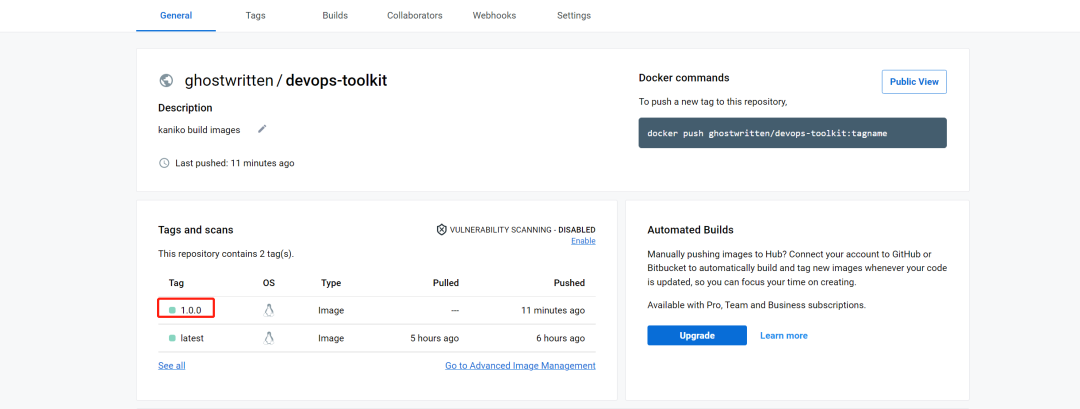
2022/11/29 17:05:34 index.docker.io/ghostwritten/devops-toolkit:1.0.0: digest: sha256:194a89239732f85f23d30ce516edd61177eb0c602cc59369001de9482ae64028 size: 1397
构建并推送成功。
10.3Local Directory 推送私有 Regsitry
创建关于登陆认证的secret(regcred2)
$ harbor-secret-regcred.sh
#!/bin/bash
REGISTRY_SERVER=https://192.168.10.80:5000/v2/
REGISTRY_USER=registryuser
REGISTRY_PASS=registryuserpassword
REGISTRY_EMAIL=1zoxun1@gmail.com
kubectl --namespace=default create secret   docker-registry  regcred2     --docker-server=$REGISTRY_SERVER     --docker-username=$REGISTRY_USER     --docker-password=$REGISTRY_PASS     --docker-email=$REGISTRY_EMAIL

$ bash harbor-secret-regcred.sh
创建 kaniko-dir-registry.yaml
---
apiVersion: v1
kind: Pod
metadata:
  name: kaniko2
spec:
  containers:
  - name: kaniko
    image: ghostwritten/kaniko-project-executor:latest
    args: ["--dockerfile=/workspace/Dockerfile",
            "--context=dir://workspace",
            "--skip-tls-verify",
            "--destination=192.168.10.80:5000/devops-toolkit:1.0.0"]
    volumeMounts:
      - name: kaniko-secret
        mountPath: /kaniko/.docker
      - name: workspace
        mountPath: /workspace
  restartPolicy: Never
  volumes:
    - name: kaniko-secret
      secret:
        secretName: regcred2
        items:
          - key: .dockerconfigjson
            path: config.json
    - name: workspace
      hostPath:
        path: /root/kaniko/kaniko-demo
创建:
k apply -f kaniko-dir-registry.yaml
输出:
$ k logs -f kaniko2
......
INFO[0275] EXPOSE 80
INFO[0275] cmd: EXPOSE
INFO[0275] Adding exposed port: 80/tcp
INFO[0275] No files changed in this command, skipping snapshotting.
INFO[0275] No files were changed, appending empty layer to config. No layer added to image.
2022/12/01 17:21:09 pushed blob sha256:fc8330beeb9ffb5c51a92d48766c252658bbf88461597a63ba97c46faaa78d9b
2022/12/01 17:21:09 pushed blob sha256:ad4f04e8f8bd4ced092141d586ebad5ae549dc84967efc92317377fdf1e7a46a
2022/12/01 17:21:10 pushed blob sha256:85defa007a8b33f817a5113210cca4aca6681b721d4b44dc94928c265959d7d5
2022/12/01 17:21:11 pushed blob sha256:9dd8e8e549988a3e2c521f27f805b7a03d909d185bb01cdb4a4029e5a6702919
2022/12/01 17:21:11 pushed blob sha256:f2dc206a393cd74df3fea6d4c1d3cefe209979e8dbcceb4893ec9eadcc10bc14
2022/12/01 17:21:11 pushed blob sha256:cdf31037b0faf780c5a5d7f385d64fb6144b0518733a033d181b964b372fe391
2022/12/01 17:21:11 pushed blob sha256:188c0c94c7c576fff0792aca7ec73d67a2f7f4cb3a6e53a84559337260b36964
2022/12/01 17:21:13 pushed blob sha256:0ca72de6f95718a4bd36e45f03fffa98e53819be7e75cb8cd1bcb0705b845939
2022/12/01 17:21:13 192.168.10.80:5000/devops-toolkit:1.0.0: digest: sha256:7b2d0899f9b374eb69f92ec8ce578496509d75a804ea39694d55046aa10a9e15 size: 1397
验证是否构建入库
$ curl  -k -u "registryuser:registryuserpassword" https://192.168.10.80:5000/v2/_catalog
{"repositories":["alpine","busybox","devops-toolkit","redis","testuser/fedora-myhttpd"]}

curl  -k -u "registryuser:registryuserpassword" https://192.168.10.80:5000/v2/devops-toolkit/tags/list
{"name":"devops-toolkit","tags":["1.0.0"]}
推送成功。
10.4 Local Directory 推送镜像至私有 Harbor
• Centos 7.9 部署 Harbor 镜像仓库实践[8] (点击可直接跳转)
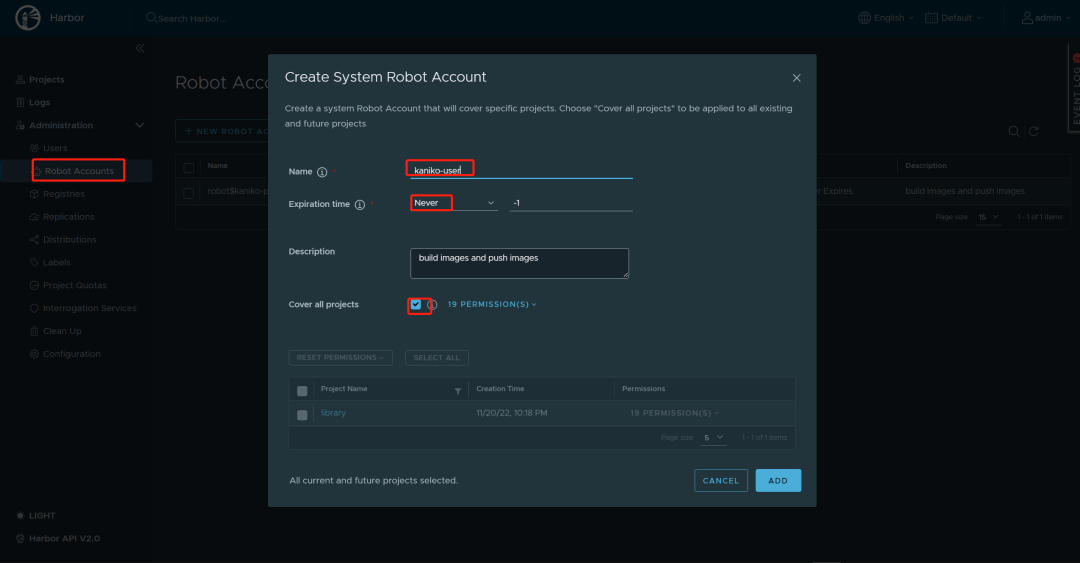
考虑到 CI/CD
的业务特性,这里选用机器人用户,创建推送机器人。
测试登陆
docker login -u 'robot$kaniko-user' -p YxJ3Bje3dKWoHy9EWfQ1PApzijCfvG5m https://harbor.k8s.com
创建 secret
,名为harbor-regcred
,脚本harbor-secret-rgcred.sh
#!/bin/bash

REGISTRY_SERVER=https:harbor.fumai.com/v2/
REGISTRY_USER='robot$kaniko-user'
REGISTRY_PASS=zRPfq79SYQeJtzYDo1radbZYDAqfPa4L
REGISTRY_EMAIL=1zoxun1@gmail.com
kubectl --namespace=default create secret   docker-registry  harbor-regcred     --docker-server=$REGISTRY_SERVER     --docker-username=$REGISTRY_USER     --docker-password=$REGISTRY_PASS     --docker-email=$REGISTRY_EMAIL
创建 secret
$ sh harbor-secret-regcred.sh
$ k get secret harbor-regcred
NAME             TYPE                             DATA   AGE
harbor-regcred   kubernetes.io/dockerconfigjson   1      3m30s

$ kubectl get secret harbor-regcred --output="jsonpath={.data.\.dockerconfigjson}" | base64 -d
{"auths":{"https:harbor.fumai.com/v2/":{"username":"admin","password":"Harbor12345","email":"1zoxun1@gmail.com","auth":"YWRtaW46SGFyYm9yMTIzNDU="}}}
这里还需要给 通过CoreDNS[9] 给 harbor.fumai.com
做一个域名解析。
$  k edit cm -n kube-system coredns
....
       hosts {
           127.0.0.1 host.minikube.internal
           192.168.10.81 harbor.fumai.com   # 添加
           fallthrough
        }
.....
创建 kaniko-dir-harbor.yaml
---
apiVersion: v1
kind: Pod
metadata:
  name: kaniko
spec:
  hostAliases:
  - ip: "192.168.10.81"
    hostnames:
    - "harbor.fumai.com"
  containers:
  - name: kaniko
#    image: gcr.io/kaniko-project/executor:debug
    image: ghostwritten/kaniko-project-executor:debug

    args: ["--dockerfile=/workspace/Dockerfile",
            "--context=dir://workspace",
            "--skip-tls-verify",
            "--destination=harbor.fumai.com/library/devops-toolkit:1.0.0"]
    volumeMounts:
      - name: kaniko-secret
        mountPath: /kaniko/.docker
      - name: workspace
        mountPath: /workspace
      - name: hosts
        mountPath: /etc/hosts
        subPath: hosts
  restartPolicy: Never
  volumes:
    - name: kaniko-secret
      secret:
        secretName: harbor-regcred
        items:
          - key: .dockerconfigjson
            path: config.json
    - name: workspace
      hostPath:
        path: /root/kaniko/kaniko-demo
    - name: hosts
      hostPath:
        path: /etc/hosts
执行:
$ k apply -f kaniko-dir-harbor.yaml

#查看日志
$ k logs -f kaniko
......
INFO[0269] Taking snapshot of files...
INFO[0270] EXPOSE 80
INFO[0270] cmd: EXPOSE
INFO[0270] Adding exposed port: 80/tcp
INFO[0270] No files changed in this command, skipping snapshotting.
INFO[0270] No files were changed, appending empty layer to config. No layer added to image.
2022/12/08 00:46:50 existing blob: sha256:188c0c94c7c576fff0792aca7ec73d67a2f7f4cb3a6e53a84559337260b36964
2022/12/08 00:46:50 existing blob: sha256:0ca72de6f95718a4bd36e45f03fffa98e53819be7e75cb8cd1bcb0705b845939
2022/12/08 00:46:50 existing blob: sha256:9dd8e8e549988a3e2c521f27f805b7a03d909d185bb01cdb4a4029e5a6702919
2022/12/08 00:46:50 existing blob: sha256:f2dc206a393cd74df3fea6d4c1d3cefe209979e8dbcceb4893ec9eadcc10bc14
2022/12/08 00:46:50 existing blob: sha256:85defa007a8b33f817a5113210cca4aca6681b721d4b44dc94928c265959d7d5
2022/12/08 00:46:50 pushed blob sha256:f9bec74bf820b9f4a41c7213263ffb780de1b95008bc112b0b091e84266cccad
2022/12/08 00:46:50 pushed blob sha256:efc9fe50e3a3bba7be0bfdc2afe5c7425eaf5a272e3ba61e957295c714e6b927
2022/12/08 00:46:52 pushed blob sha256:179b791301cd6ca8083e5adcb346d8daa2a0a6ac21fb357b128757602ee1db26
2022/12/08 00:46:52 harbor.fumai.com/library/devops-toolkit:1.0.0: digest: sha256:3a77e618caf751879fce641f96988f9605b377e8421fe5b13aa0e0d694766152 size: 1397
推送镜像入库成功。🥰
10.5 Jenkins Pipeline & kaniko 构建镜像入库
• Minikube & Helm 部署 Jenkins[10] (点击可直接跳转)
podTemplate(name: 'kaniko-python-docker', namespace: 'default', yaml: '''
              kind: Pod
              spec:
                containers:
                - name: kaniko
                #  image: gcr.io/kaniko-project/executor:v1.6.0-debug
                  image: ghostwritten/kaniko-project-executor:v1.6.0-debug
                  imagePullPolicy: Always
                  command:
                  - sleep
                  args:
                  - 99d
                  volumeMounts:
                    - name: jenkins-docker-cfg
                      mountPath: /kaniko/.docker
                volumes:
                - name: jenkins-docker-cfg
                  secret:
                    secretName: regcred
                    items:
                      - key: .dockerconfigjson
                        path: config.json
'''
  ) {

  node(POD_LABEL) {
    stage('Build with Kaniko') {
      git 'https://github.com/Ghostwritten/kaniko-python-docker.git'
      container('kaniko') {
        sh '/kaniko/executor -f `pwd`/Dockerfile -c `pwd` --cache=true --destination=ghostwritten/kaniko-python-docker:v1.0.1'
      }
    }
  }
}
console output
:
Started by user Jenkins Admin
[Pipeline] Start of Pipeline
[Pipeline] podTemplate
[Pipeline] {
[Pipeline] node
Created Pod: minikube2 default/kaniko-python-docker-frnd7-1wnb4
Still waiting to schedule task
‘kaniko-python-docker-frnd7-1wnb4’ is offline
Agent kaniko-python-docker-frnd7-1wnb4 is provisioned from template kaniko-python-docker-frnd7
---
apiVersion: "v1"
kind: "Pod"
metadata:
  annotations:
    buildUrl: "http://192.168.10.26:32000/job/docker/21/"
    runUrl: "job/docker/21/"
  labels:
    jenkins/jenkins-jenkins-agent: "true"
    jenkins/label-digest: "117969f201f5b8afcc688a11799a14d3558b71c0"
    jenkins/label: "docker_21-mlxg4"
  name: "kaniko-python-docker-frnd7-1wnb4"
  namespace: "default"
spec:
  containers:
  - args:
    - "99d"
    command:
    - "sleep"
    image: "ghostwritten/kaniko-project-executor:v1.6.0-debug"
    imagePullPolicy: "Always"
    name: "kaniko"
    volumeMounts:
    - mountPath: "/kaniko/.docker"
      name: "jenkins-docker-cfg"
    - mountPath: "/home/jenkins/agent"
      name: "workspace-volume"
      readOnly: false
  - env:
    - name: "JENKINS_SECRET"
      value: "********"
    - name: "JENKINS_TUNNEL"
      value: "jenkins-agent.jenkins.svc.cluster.local:50000"
    - name: "JENKINS_AGENT_NAME"
      value: "kaniko-python-docker-frnd7-1wnb4"
    - name: "JENKINS_NAME"
      value: "kaniko-python-docker-frnd7-1wnb4"
    - name: "JENKINS_AGENT_WORKDIR"
      value: "/home/jenkins/agent"
    - name: "JENKINS_URL"
      value: "http://192.168.10.26:32000/"
    image: "jenkins/inbound-agent:4.11-1-jdk11"
    name: "jnlp"
    resources:
      limits: {}
      requests:
        memory: "256Mi"
        cpu: "100m"
    volumeMounts:
    - mountPath: "/home/jenkins/agent"
      name: "workspace-volume"
      readOnly: false
  nodeSelector:
    kubernetes.io/os: "linux"
  restartPolicy: "Never"
  volumes:
  - name: "jenkins-docker-cfg"
    secret:
      items:
      - key: ".dockerconfigjson"
        path: "config.json"
      secretName: "regcred"
  - emptyDir:
      medium: ""
    name: "workspace-volume"

Running on kaniko-python-docker-frnd7-1wnb4 in /home/jenkins/agent/workspace/docker
[Pipeline] {
[Pipeline] stage
[Pipeline] { (Build with Kaniko)
[Pipeline] git
The recommended git tool is: NONE
No credentials specified
Cloning the remote Git repository
Cloning repository https://github.com/Ghostwritten/kaniko-python-docker.git
 > git init /home/jenkins/agent/workspace/docker # timeout=10
Fetching upstream changes from https://github.com/Ghostwritten/kaniko-python-docker.git
 > git --version # timeout=10
 > git --version # 'git version 2.30.2'
 > git fetch --tags --force --progress -- https://github.com/Ghostwritten/kaniko-python-docker.git +refs/heads/*:refs/remotes/origin/* # timeout=10
 > git config remote.origin.url https://github.com/Ghostwritten/kaniko-python-docker.git # timeout=10
 > git config --add remote.origin.fetch +refs/heads/*:refs/remotes/origin/* # timeout=10
Avoid second fetch
Checking out Revision 925d4779eb7b4d41840d9daabb5ef5518d65ed1c (refs/remotes/origin/master)
 > git rev-parse refs/remotes/origin/master^{commit} # timeout=10
 > git config core.sparsecheckout # timeout=10
 > git checkout -f 925d4779eb7b4d41840d9daabb5ef5518d65ed1c # timeout=10
 > git branch -a -v --no-abbrev # timeout=10
 > git checkout -b master 925d4779eb7b4d41840d9daabb5ef5518d65ed1c # timeout=10
Commit message: "add kaniko python docker"
First time build. Skipping changelog.
[Pipeline] container
[Pipeline] {
[Pipeline] sh
+ pwd
+ pwd
+ /kaniko/executor -f /home/jenkins/agent/workspace/docker/Dockerfile -c /home/jenkins/agent/workspace/docker '--cache=true' '--destination=ghostwritten/kaniko-python-docker:v1.0.1'
[36mINFO[0m[0002] Retrieving image manifest python:3.8-slim-buster
[36mINFO[0m[0002] Retrieving image python:3.8-slim-buster from registry index.docker.io
[36mINFO[0m[0004] Retrieving image manifest python:3.8-slim-buster
[36mINFO[0m[0004] Returning cached image manifest
[36mINFO[0m[0006] Built cross stage deps: map[]
[36mINFO[0m[0006] Retrieving image manifest python:3.8-slim-buster
[36mINFO[0m[0006] Returning cached image manifest
[36mINFO[0m[0006] Retrieving image manifest python:3.8-slim-buster
[36mINFO[0m[0006] Returning cached image manifest
[36mINFO[0m[0006] Executing 0 build triggers
[36mINFO[0m[0006] Checking for cached layer index.docker.io/ghostwritten/kaniko-python-docker/cache:1c98e3b76b7eea791ef15553919754ea5ea0384db24733375b20585b5abf5c59...
[36mINFO[0m[0008] No cached layer found for cmd RUN pip3 install -r requirements.txt
[36mINFO[0m[0008] Unpacking rootfs as cmd COPY requirements.txt requirements.txt requires it.
[36mINFO[0m[0025] WORKDIR /app
[36mINFO[0m[0025] cmd: workdir
[36mINFO[0m[0025] Changed working directory to /app
[36mINFO[0m[0025] Creating directory /app
[36mINFO[0m[0025] Taking snapshot of files...
[36mINFO[0m[0025] COPY requirements.txt requirements.txt
[36mINFO[0m[0025] Taking snapshot of files...
[36mINFO[0m[0025] RUN pip3 install -r requirements.txt
[36mINFO[0m[0025] Taking snapshot of full filesystem...
[36mINFO[0m[0027] cmd: /bin/sh
[36mINFO[0m[0027] args: [-c pip3 install -r requirements.txt]
[36mINFO[0m[0027] Running: [/bin/sh -c pip3 install -r requirements.txt]
Collecting Flask==2.0.2
  Downloading Flask-2.0.2-py3-none-any.whl (95 kB)
     ━━━━━━━━━━━━━━━━━━━━━━━━━━━━━━━━━━━━━━━ 95.2/95.2 KB 291.8 kB/s eta 0:00:00
Collecting itsdangerous>=2.0
  Downloading itsdangerous-2.1.2-py3-none-any.whl (15 kB)
Collecting Jinja2>=3.0
  Downloading Jinja2-3.1.2-py3-none-any.whl (133 kB)
     ━━━━━━━━━━━━━━━━━━━━━━━━━━━━━━━━━━━━━ 133.1/133.1 KB 119.1 kB/s eta 0:00:00
Collecting Werkzeug>=2.0
  Downloading Werkzeug-2.2.2-py3-none-any.whl (232 kB)
     ━━━━━━━━━━━━━━━━━━━━━━━━━━━━━━━━━━━━━━ 232.7/232.7 KB 54.5 kB/s eta 0:00:00
Collecting click>=7.1.2
  Downloading click-8.1.3-py3-none-any.whl (96 kB)
     ━━━━━━━━━━━━━━━━━━━━━━━━━━━━━━━━━━━━━━━━ 96.6/96.6 KB 30.9 kB/s eta 0:00:00
Collecting MarkupSafe>=2.0
  Downloading MarkupSafe-2.1.1-cp38-cp38-manylinux_2_17_x86_64.manylinux2014_x86_64.whl (25 kB)
Installing collected packages: MarkupSafe, itsdangerous, click, Werkzeug, Jinja2, Flask
Successfully installed Flask-2.0.2 Jinja2-3.1.2 MarkupSafe-2.1.1 Werkzeug-2.2.2 click-8.1.3 itsdangerous-2.1.2
WARNING: Running pip as the 'root' user can result in broken permissions and conflicting behaviour with the system package manager. It is recommended to use a virtual environment instead: https://pip.pypa.io/warnings/venv
WARNING: You are using pip version 22.0.4; however, version 22.3.1 is available.
You should consider upgrading via the '/usr/local/bin/python -m pip install --upgrade pip' command.
[36mINFO[0m[0053] Taking snapshot of full filesystem...
[36mINFO[0m[0056] COPY . .
[36mINFO[0m[0056] Taking snapshot of files...
[36mINFO[0m[0056] Pushing layer index.docker.io/ghostwritten/kaniko-python-docker/cache:1c98e3b76b7eea791ef15553919754ea5ea0384db24733375b20585b5abf5c59 to cache now
[36mINFO[0m[0056] Pushing image to index.docker.io/ghostwritten/kaniko-python-docker/cache:1c98e3b76b7eea791ef15553919754ea5ea0384db24733375b20585b5abf5c59
[36mINFO[0m[0056] CMD [ "python3", "app.py"]
[36mINFO[0m[0056] No files changed in this command, skipping snapshotting.
[33mWARN[0m[0058] error uploading layer to cache: failed to push to destination index.docker.io/ghostwritten/kaniko-python-docker/cache:1c98e3b76b7eea791ef15553919754ea5ea0384db24733375b20585b5abf5c59: HEAD https://index.docker.io/v2/ghostwritten/kaniko-python-docker/cache/blobs/sha256:c3aa9870d3065edb2286cac744c95fb0d2f1c98b2d8a231257314eda7d3598b0: unexpected status code 401 Unauthorized (HEAD responses have no body, use GET for details)
[36mINFO[0m[0058] Pushing image to ghostwritten/kaniko-python-docker:v1.0.1
[36mINFO[0m[0066] Pushed image to 1 destinations
[Pipeline] }
[Pipeline] // container
[Pipeline] }
[Pipeline] // stage
[Pipeline] }
[Pipeline] // node
[Pipeline] }
[Pipeline] // podTemplate
[Pipeline] End of Pipeline
Finished: SUCCESS
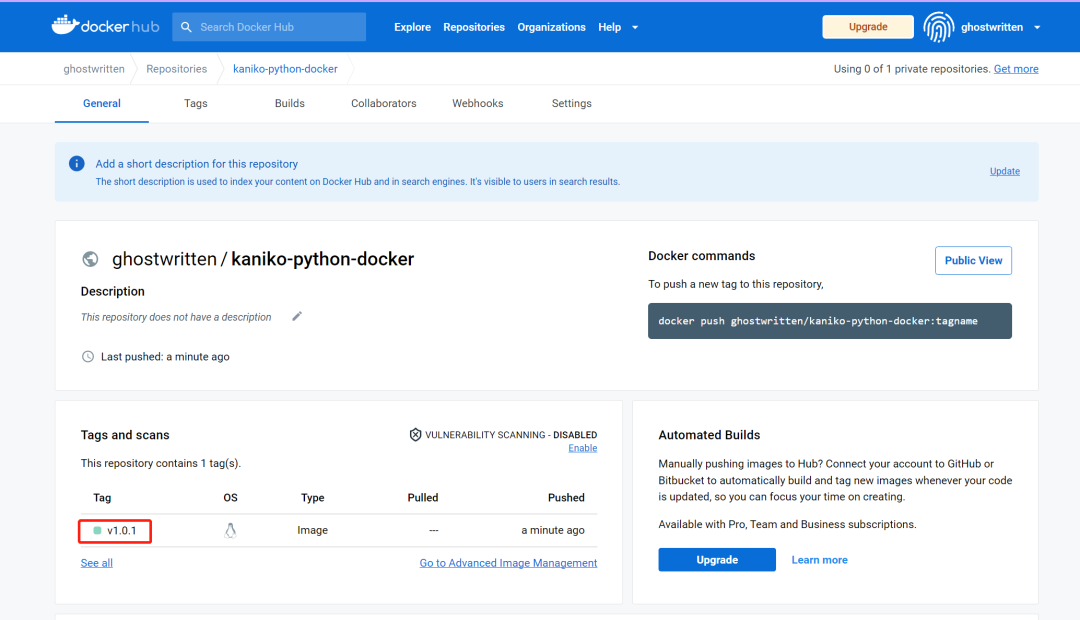
登陆 dockerhub[11] 查看新构建的镜像。
关于 kaniko 工具使用方法到此结束,谢谢。

引用链接
[1]
kaniko: https://github.com/GoogleContainerTools/kaniko#--single-snapshot[2]
Kubernetes: https://kubernetes.io/[3]
Docker: https://www.docker.com/[4]
Centos 7.9.2009: https://ftp.riken.jp/Linux/centos/7.9.2009/isos/x86_64/[5]
Ubuntu 18.04 通过 Minikube 安装 Kubernetes v1.20: https://ghostwritten.blog.csdn.net/article/details/113527867[6]
minikube & kubernetes 动手指南: https://ghostwritten.blog.csdn.net/article/details/123796854[7]
安装最新 git: https://blog.csdn.net/xixihahalelehehe/article/details/125107061[8]
Centos 7.9 部署 Harbor 镜像仓库实践: https://ghostwritten.blog.csdn.net/article/details/128089828[9]
CoreDNS: https://blog.csdn.net/xixihahalelehehe/article/details/113242433[10]
Minikube & Helm 部署 Jenkins: https://blog.csdn.net/xixihahalelehehe/article/details/128166331[11]
dockerhub: https://hub.docker.com/
▲ 点击上方卡片关注K8s技术圈,掌握前沿云原生技术