



暂无图片
暂无图片
暂无图片
暂无图片
暂无图片

云原生丨一文教你基于Debezium与Kafka构建数据同步迁移(建议收藏)!

2130


Cloud Native

ESG服务BU云原生交付中心、云基地

在云原生上的尝试、调研与分享


本期内容 

 Debezium + Kafka 

 实现数据迁移 


在项目中,我们遇到已有数据库现存有大量数据,但需要将全部现存数据同步迁移到新的数据库中,我们应该如何处理呢?


本期我们就基于Debezium与Kafka构建数据同步。


一、安装部署 


 Debezium架构 
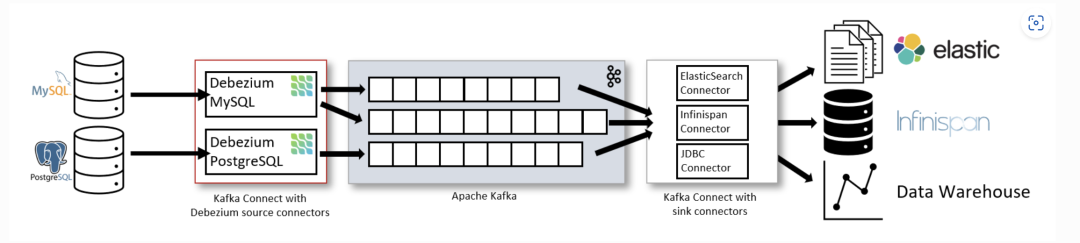


Debezium 是一个基于不同数据库中提供的变更数据捕获功能(例如,PostgreSQL中的逻辑解码)构建的分布式平台。 Debezium是通过Apache Kafka连接部署的


Kafka Connect是一个用于实现和操作的框架运行时。


源连接器,如Debezium,它将数据摄取到Kafka中(在我们的接下来实际的例子中,Debezium将Mysql数据摄取到Kafka中);


接收连接器,它将数据从Kafka主题写入到其他到系统,这个系统可以有多种,在我们例子中,会将Kafka主题写入到PostgreSQL数据库中。


 部署示意图 
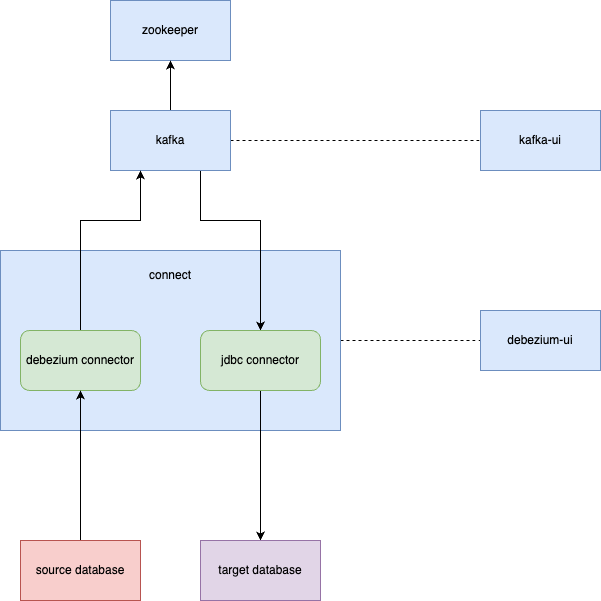


  • Zookeeper:Zookeeper容器,用于构建Kafka环境;

  • Kafka:Kafka容器,数据库的变更信息以topic的形式保存在kafka中;

  • Kafka-ui:kafka的UI页面容器,可以直观的查看kafka中的Brokers,Topics,Consumers等信息;

  • Connect:Debezium的Connect容器,对接Kafka的Connect,通过Source Connector将数据同步到Kafka中,通过Sink Connect消费Kafka的topic消息;

  • Debezium Connector:Source Connector插件,以Jar包的形式部署在Connect中,Debezium自带有MongoDB,MySQL,PostgreSQL,SQL Server,Oracle,Db2连接器;

  • JDBC connector:Sink Connector插件,以Jar包的形式部署在Connect中,本次部署安装的是JDBC连接器,将Kafka上的数据同步到数据库中;

  • Debezium-ui:Debezium connect的ui页面容器。用于创建和显示Source Connector

  • Source Database:数据迁移来源方数据库。本次部署中使用的是MySQL和Postgres(10+版本);

  • Target Database:数据库迁移目标数据库。本次部署中使用的是Postgres。


 安装部署 


本次部署需要先安装Docker。


Debezium使用Docker安装部署,如下⬇


docker-compose.yaml


    version: '2'
    services:
     zookeeper:
       image: quay.io/debezium/zookeeper:2.0
       ports:
         - 2181:2181
         - 2888:2888
         - 3888:3888
     kafka:
       image: quay.io/debezium/kafka:2.0
       ports:
         - 9092:9092
       links:
         - zookeeper
       environment:
         - ZOOKEEPER_CONNECT=zookeeper:2181
     connect:
       image: quay.io/debezium/connect:2.0
       ports:
         - 8083:8083
         - 5005:5005
       links:
         - kafka
       environment:
         - BOOTSTRAP_SERVERS=kafka:9092
         - GROUP_ID=1
         - CONFIG_STORAGE_TOPIC=my_connect_configs
         - OFFSET_STORAGE_TOPIC=my_connect_offsets
         - STATUS_STORAGE_TOPIC=my_source_connect_statuses
     kafka-ui:
       image: provectuslabs/kafka-ui:latest
       ports:
         - "9093:8080"
       environment:
         - KAFKA_CLUSTERS_0_BOOTSTRAPSERVERS=kafka:9092
       links:
         - kafka
     debezium-ui:
       image: debezium/debezium-ui:2.0
       ports:
         - "8080:8080"
       environment:
         - KAFKA_CONNECT_URIS=http://connect:8083
       links:
         - connect


    部署命令:


      docker-compose -f docker-compose.yaml -p debezium up -d


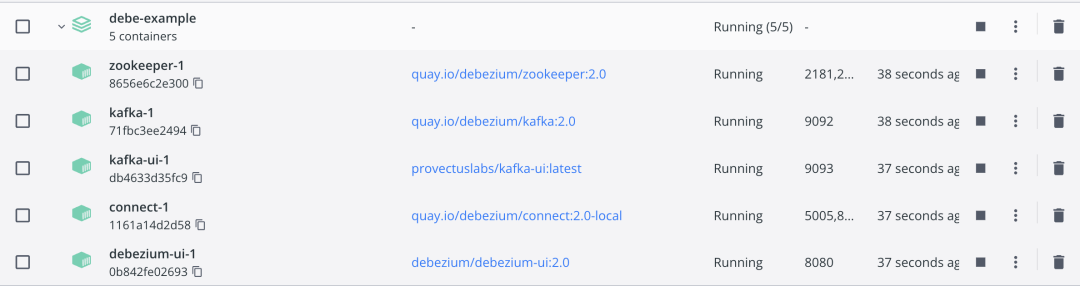
      部署完成后,Docker容器列表,如下:


      Kafka-ui访问地址:http://localhost:9093


      Debezium-ui访问地址:http://localhost:8080


      Source Connector和Sink Connector都是以JAR包的方式,存在于Connect容器的/kafka/connect目录下


      Connect容器自带有Debezium的官方Source Connector:

      debezium-connector-db2

      debezium-connector-mysql

      debezium-connector-postgres

      debezium-connector-vitess

      debezium-connector-mongodb

      debezium-connector-oracle

      debezium-connector-sqlserver


      需要自行注册Sink Connector:Kafka-Connect-JDBC(新建Kafka-Connect-JDBC目录,下载JAR包放入此目录,重启Conenct)。


      注册Sink Connector


        # docker容器中新建kafka-connect-jdbc目录
        docker exec 容器id mkdir kafka/connect/kafka-connect-jdbc
        # 下载jar包到本地
        wget https://packages.confluent.io/maven/io/confluent/kafka-connect-jdbc/5.3.2/kafka-connect-jdbc-5.3.2.jar
        # 拷贝jar包到docker容器
        docker cp kafka-connect-jdbc-5.3.2.jar 容器id:/kafka/connect/kafka-connect-jdbc
        # 重启connect容器
        docker restart 容器id


        二、数据迁移 


        数据迁移经历以下几个步骤:


        1)启动源数据库;


        2)注册Source Connector,Source Connector监听Source Database的数据变动,发布数据到Kafka的Topic中,一个表对应一个Topic,Topic中包含对表中某条记录的某个操作(新增,修改,删除等);


        3)启动目标数据库;


        4)注册Sink Connector,Sink Connector消费Kafka中的Topic,通过JDBC连接到Target Database,根据Topic中的信息,对表记录执行对应操作。


         Postgres迁移到Postgres 


        # 1.启动源数据库-Postgres


        本次部署通过容器的方式启动:


          docker run -d --name source-postgres -p 15432:5432 -e POSTGRES_PASSWORD=123456 -e POSTGRES_USER=debe postgres:12.6


          # 2.注册Source Connecto


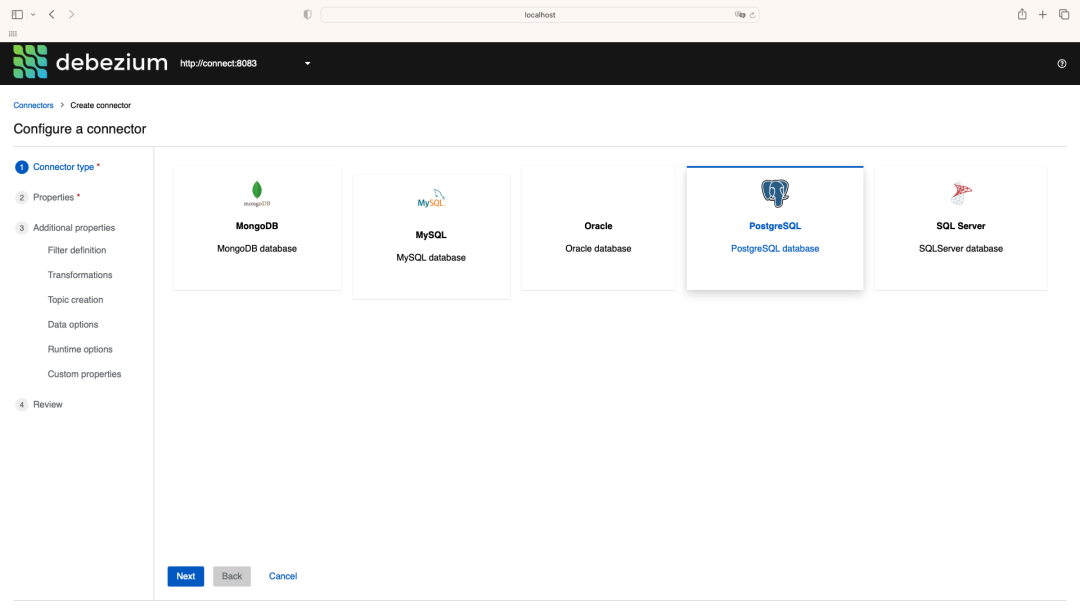
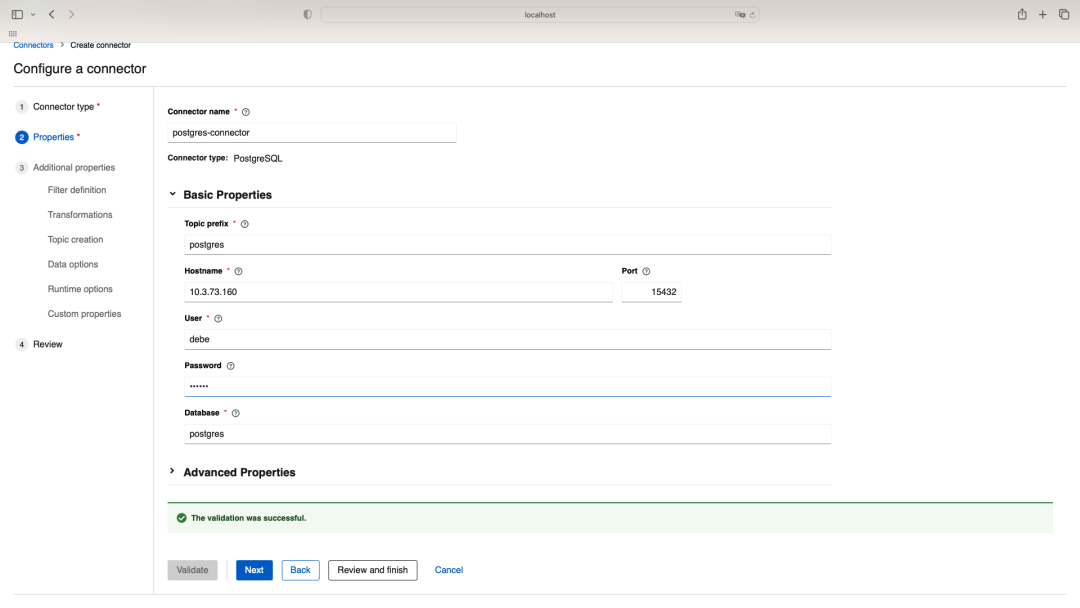
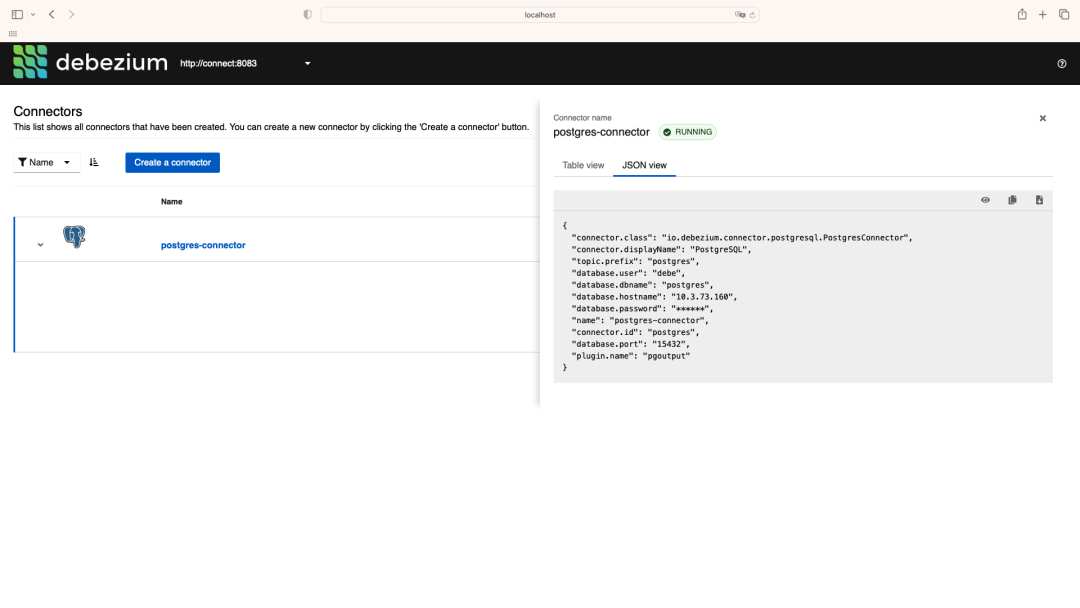
          通过Debezium UI页面进行注册。
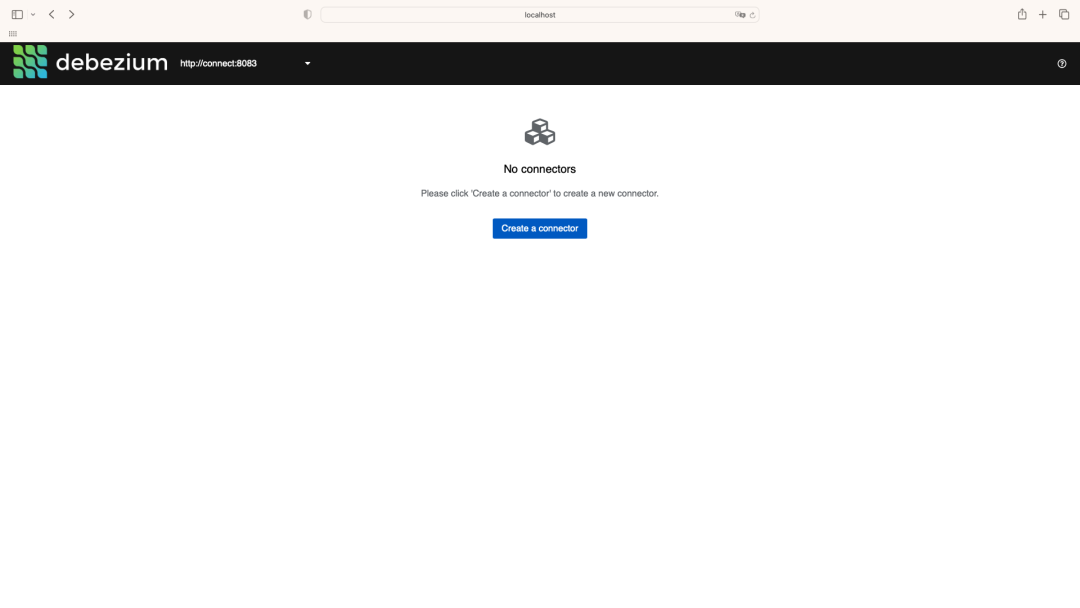


          需要注意的有以下几点:


          • Debezium Postgres类型的Source Connector支持的Postgres需要将wal_level修改为logical;
            修改Postgres中的Postgresql.conf文件中的配置(wal_level = logical)并重启Postgres;


          • Postgres需要支持解码插件,Debezium官方一共提供了两个解码插件:
            Decoderbufs:Debezium默认配置,由Debezium维护;
            Pgoutput:Postgres 10+版本自带;

            使用此插件时,需要配置plugin.name=pgoutput


          # 3.启动目标数据库-Postgre


          本次部署通过容器的方式启动:


            docker run -d --name target-postgres -p 25432:5432 -e POSTGRES_PASSWORD=123456 -e POSTGRES_USER=debe postgres:12.6


            # 4.注册Sink Connector


            通过Connect提供的API进行注册


            新增Connector


              curl -i -X POST -H "Accept:application/json" -H  "Content-Type:application/json" http://localhost:8083/connectors/ -d \
              '{
               "name": "sink-connector-postgres",
               "config": {
                 "connector.class": "io.confluent.connect.jdbc.JdbcSinkConnector",
                 "tasks.max": "1",
                 "topics": "postgres.public.test_source",
                 "connection.url": "jdbc:postgresql://10.3.73.160:25432/postgres?user=debe&password=123456",
                 "transforms": "unwrap",
                 "transforms.unwrap.type": "io.debezium.transforms.ExtractNewRecordState",
                 "transforms.unwrap.drop.tombstones": "false",
                 "auto.create": "true",
                 "insert.mode": "upsert",
                 "delete.enabled": "true",
                 "pk.fields": "id",
                 "pk.mode": "record_key"
               }
              }'


              # 5.验证数据迁移过程


               # 源数据库中的表数据迁移到Kafka


              新建表test_source和test_source1


              test_source&test_source1.sql


                -- test_source
                create table if not exists public.test_source
                (
                   id   integer not null
                       constraint test_source_pk
                           primary key,
                   name varchar(64)
                );

                alter table public.test_source
                   owner to debe;

                insert into public.test_source (id, name) values (1, 'a');
                -- test_source1
                create table if not exists public.test_source1
                (
                   id   integer not null
                       constraint test_source1_pk
                           primary key,
                   name varchar(64)
                );

                alter table public.test_source1
                   owner to debe;

                insert into public.test_source1 (id, name) values (1, 'a1');


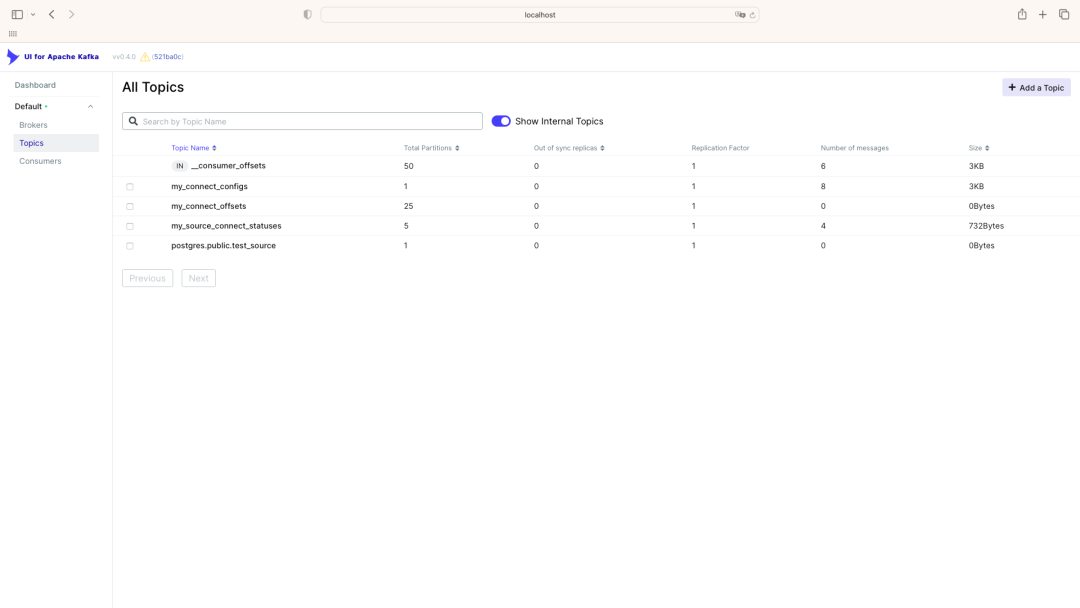
                Kafka新建数据前 ⬇


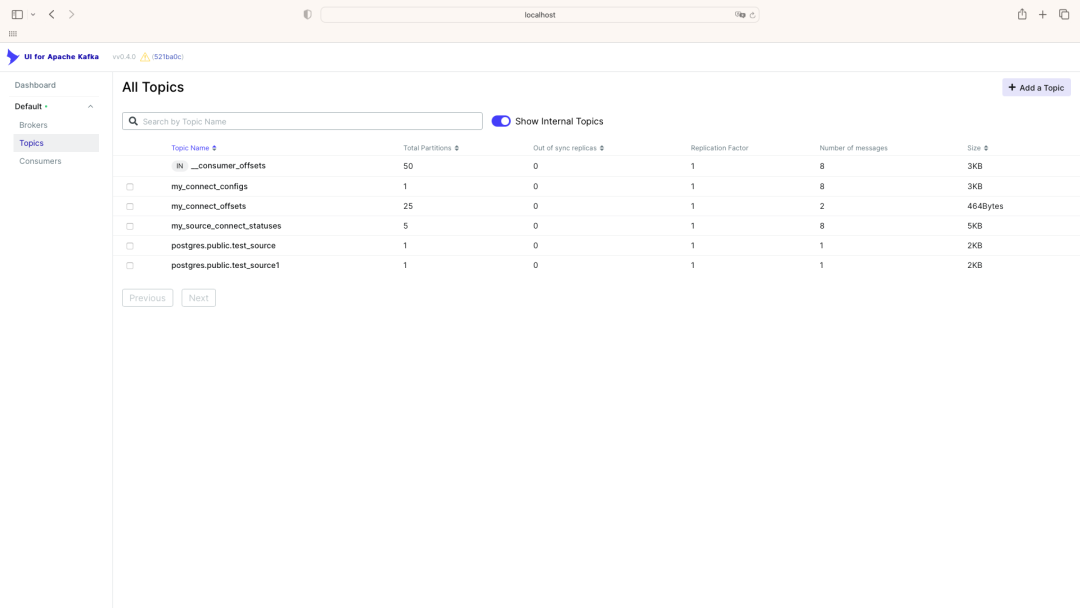
                Kafka新建数据后  ⬇


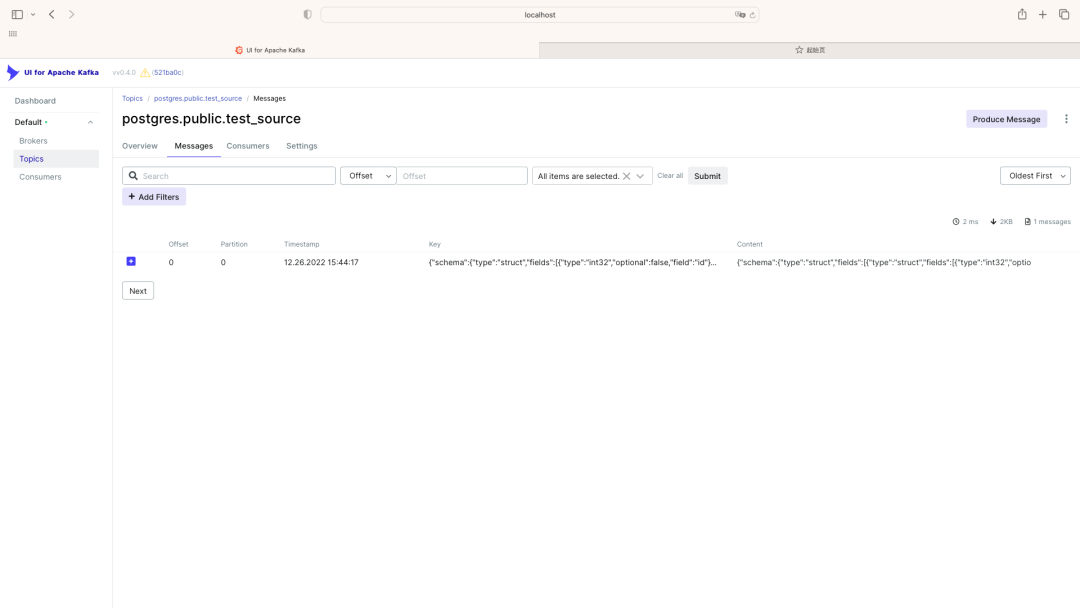
                源数据库中新建表test_source和表test_source1后,Kafka中出现了两个Topic:


                postgres.public.test_source和postgres.public.test_source1,与这两个表一一对应,topic中的message对应着对表中记录的操作(新增1条记录)。


                监听的表可通过连接器配置进行过滤,比如配置"table.include.list": "public.test_source",就只会出现一个Topic:postgres.public.test_source


                 # Kafka中的数据迁移到目标数据库
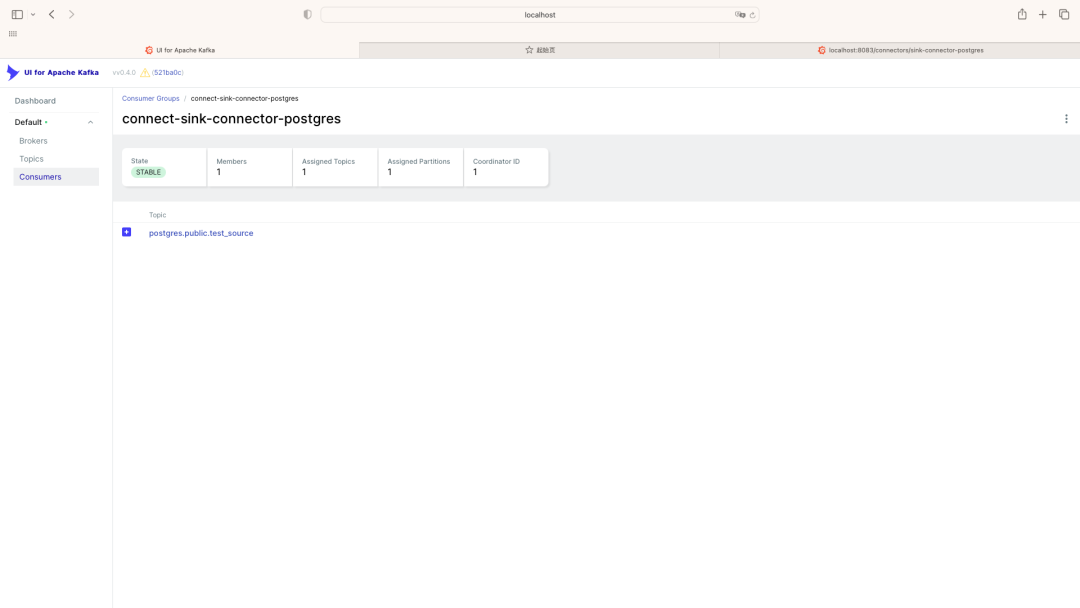


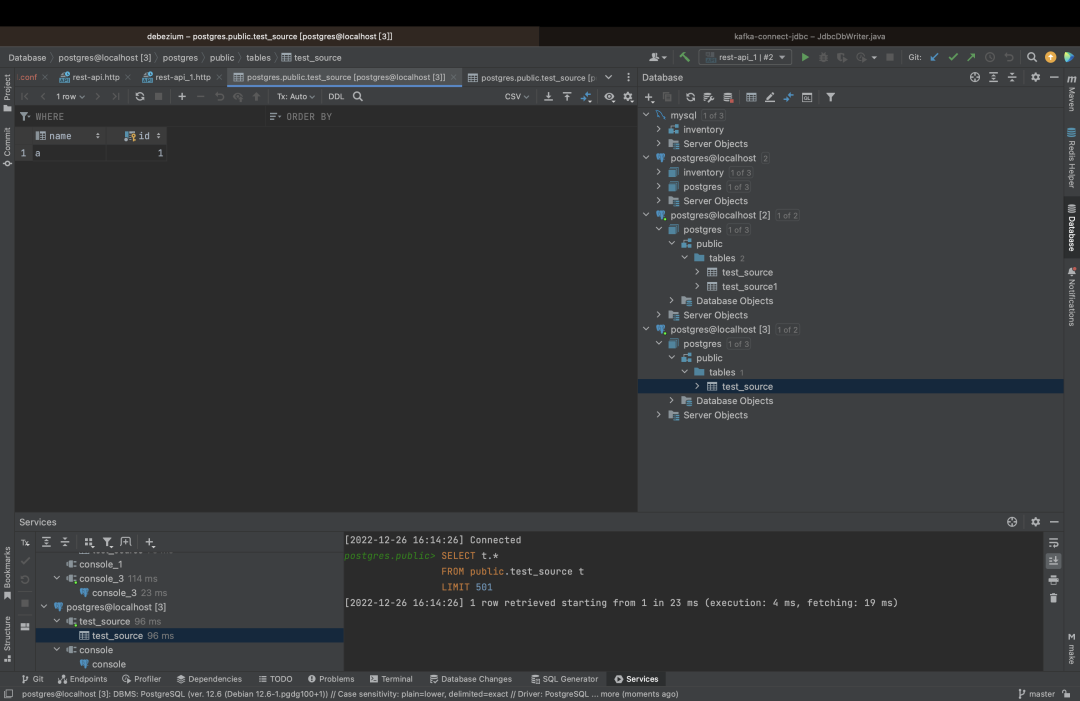
                注册Sink Connector后,Kafka中会新增一个Customer,对postgres.public.test_source进行消费(sink connector配置中的"topics": "postgres.public.test_source"指定);


                对应的源数据库(sink connector配置中的"connection.url": "jdbc:postgresql://10.3.73.160:25432/postgres?user=debe&password=123456"指定)会新增一个表public.test_source,该表中的数据和源数据库中的public.test_source始终保持同步


                 MySQL迁移到PostgresSQL 


                # 1.启动源数据库-mysql


                本次部署通过docker启动:


                  docker run -d --name source-mysql -p 3306:3306 -e MYSQL_ROOT_PASSWORD=debezium -e MYSQL_USER=mysqluser -e MYSQL_PASSWORD=mysqlpw debezium/example-mysql:2.0


                  # 2.注册Source Connector


                   # 启动MySQL数据源连接注册


                  注册MySQL数据源有两种方式:


                  1. 在Debezium UI中直接添加 

                  2. 调用Kafka API 注册


                   # 在Debezium UI中直接添加


                  选择MySQL数据源
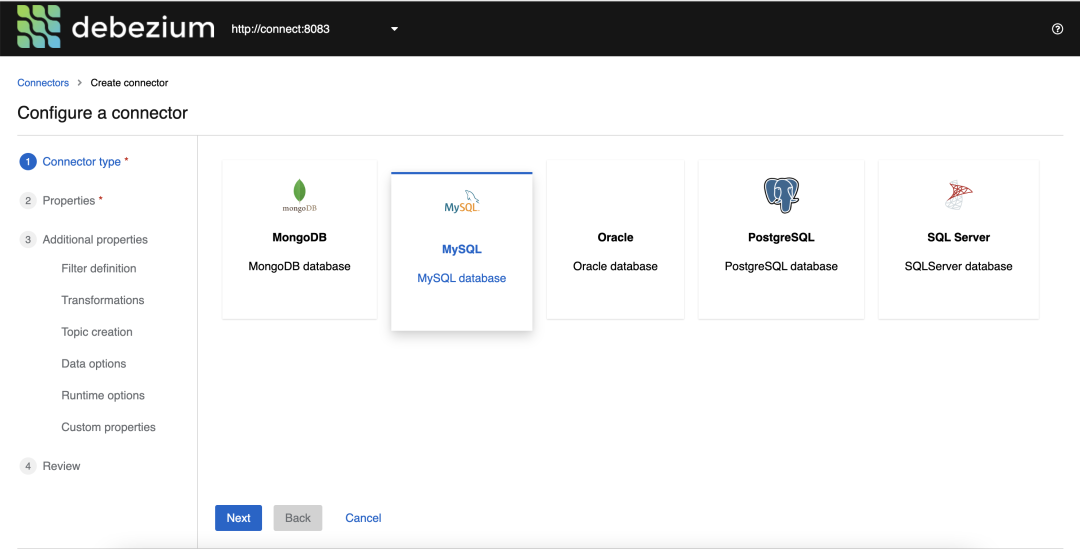


                   # 调用Kafka API注册


                  新增Connector


                    curl -i -X POST -H "Accept:application/json" -H  "Content-Type:application/json" http://localhost:8083/connectors/ -d \
                    '{
                     "name": "inventory-connector",
                     "config": {
                       "connector.class": "io.debezium.connector.mysql.MySqlConnector",
                       "tasks.max": "1",
                       "topic.prefix": "dbserver1",
                       "database.hostname": "mysql",
                       "database.port": "3306",
                       "database.user": "debezium", //数据库用户名
                       "database.password": "dbz",  //数据库密码
                       "database.server.id": "184054",
                       "database.include.list": "inventory",  //数据源覆盖范围
                       "schema.history.internal.kafka.bootstrap.servers": "kafka:9092",
                       "schema.history.internal.kafka.topic": "schema-changes.inventory",
                       "transforms": "route",
                       "transforms.route.type": "org.apache.kafka.connect.transforms.RegexRouter",
                       "transforms.route.regex": "([^.]+)\\.([^.]+)\\.([^.]+)",
                       "transforms.route.replacement": "$3"
                     }
                    }'


                     # 验证Source Connector注册结果


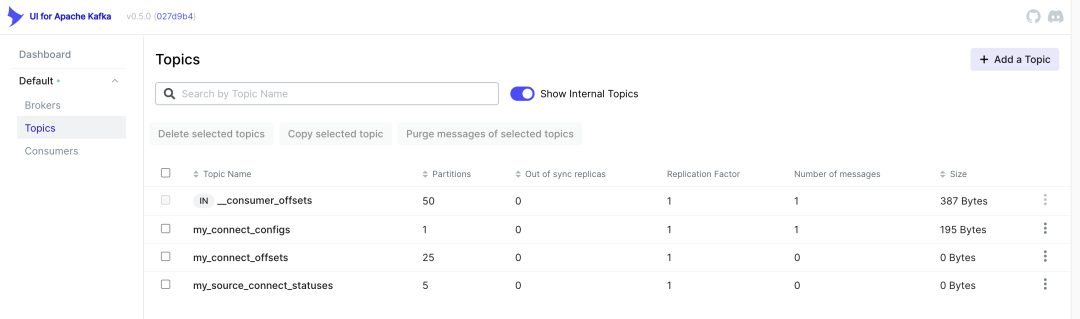
                    注册连接前:


                    注册连接后:
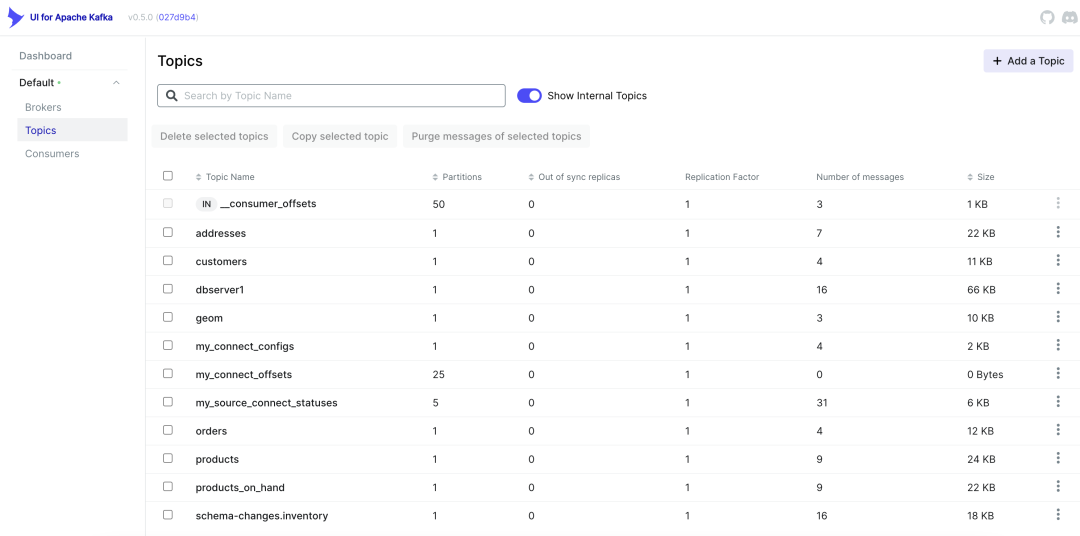


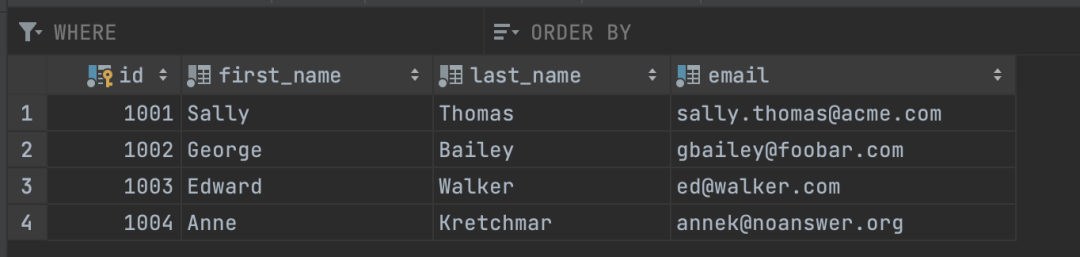
                    多出来的Topics信息是MySQL source表信息,连接MySQL数据库可见表:
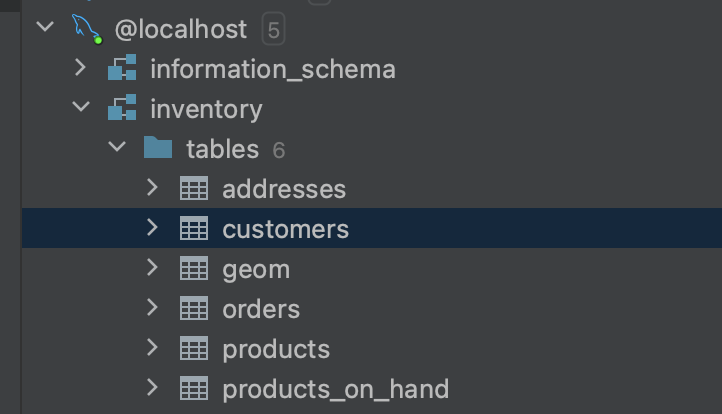


                    UI for Apache Kafka中可以看到Messages同步信息


                    访问Debezium UI(http://localhost:8080/ )可以看到MySQL的连接。
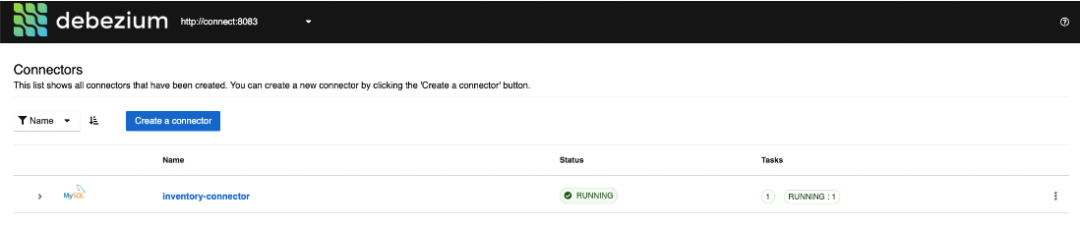


                    # 3.启动目标数据库-Postgres


                    本次部署采用Docker方式启动:


                      docker run -d --name target-postgres -p 5432:5432  -e POSTGRES_USER=postgresuser -e POSTGRES_PASSWORD=postgrespw -e POSTGRES_DB=inventory debezium/postgres:9.6


                      # 4.注册Sink Connector  (通过API接口)


                      新增Connector


                        curl -i -X POST -H "Accept:application/json" -H  "Content-Type:application/json" http://localhost:8083/connectors/ -d \
                        '{
                         "name": "jdbc-sink",
                         "config": {
                           "connector.class": "io.confluent.connect.jdbc.JdbcSinkConnector",
                           "tasks.max": "1",
                           "topics": "customers", //迁移目标主题(这里是按照表来订阅的)
                           "connection.url": "jdbc:postgresql://postgres:5432/inventory?user=postgresuser&password=postgrespw",
                           "transforms": "unwrap",
                           "transforms.unwrap.type": "io.debezium.transforms.ExtractNewRecordState",
                           "transforms.unwrap.drop.tombstones": "false",
                           "auto.create": "true",
                           "insert.mode": "upsert",
                           "delete.enabled": "true",
                           "pk.fields": "id",
                           "pk.mode": "record_key"
                         }
                        }'


                        注册PostgreSQL connector后,不会在Debezium中显示Connector client 信息,但可以在UI for Apache Kafka中看到:



                        # 5.验证数据迁移过程


                        完成安装步骤后,以Customers表为例,做CUD操作语句,实现MySQL数据库同步数据到PostgreSQL 。


                        Mysql 数据库现有数据:
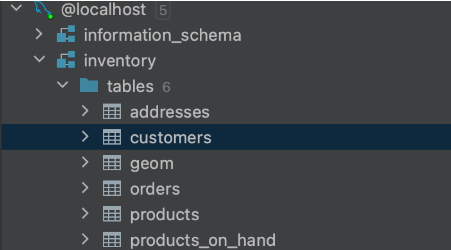


                        PostgreSQL数据库现有数据:
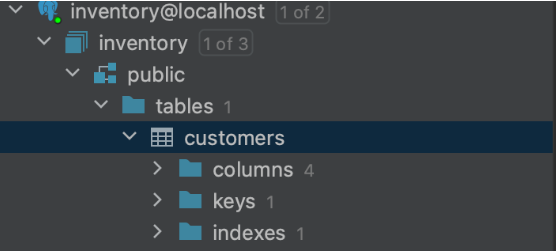


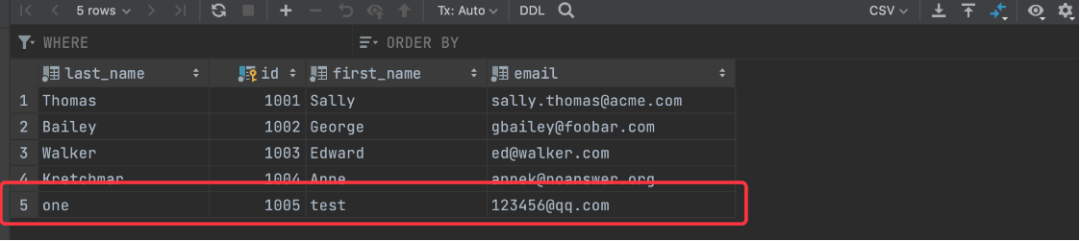
                        手动在MySQL数据库Customers表中添加一条数据 ⬇


                        customers.sql
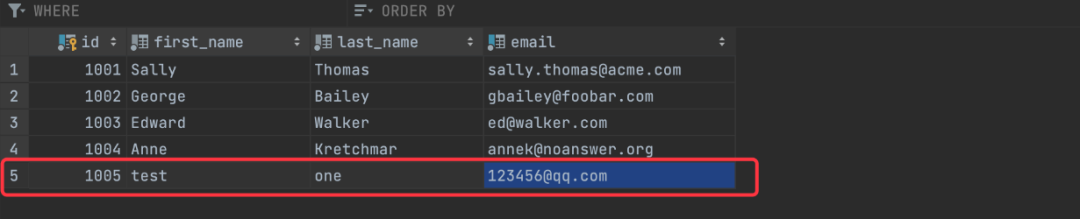

                          insert into customers(id,first_name,last_name,email) values(1005,'test','one','123456@qq.com');


                          在PostgreSQL数据库中Customers多出一条数据:


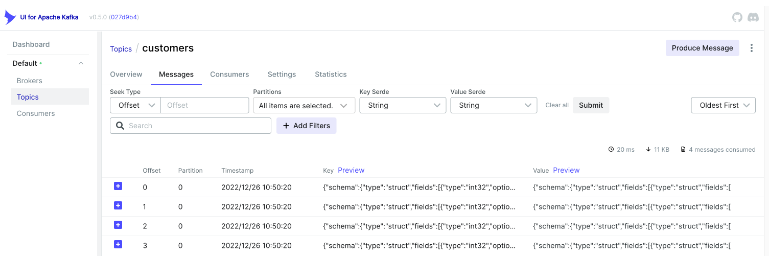
                          Kafka中Messages新增一条数据,完成数据同步:
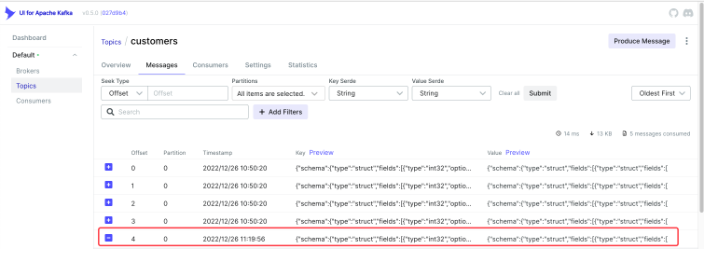


                          可以看到消费如下信息:


                          topics-customers.json


                            {
                            "schema": {
                            "type": "struct",
                            "fields": [
                            {
                            "type": "struct",
                            "fields": [
                            {
                            "type": "int32",
                            "optional": false,
                            "field": "id"
                            },
                            {
                            "type": "string",
                            "optional": false,
                            "field": "first_name"
                            },
                            {
                            "type": "string",
                            "optional": false,
                            "field": "last_name"
                            },
                            {
                            "type": "string",
                            "optional": false,
                            "field": "email"
                            }
                            ],
                            "optional": true,
                            "name": "dbserver1.inventory.customers.Value",
                            "field": "before"
                            },
                            {
                            "type": "struct",
                            "fields": [
                            {
                            "type": "int32",
                            "optional": false,
                            "field": "id"
                            },
                            {
                            "type": "string",
                            "optional": false,
                            "field": "first_name"
                            },
                            {
                            "type": "string",
                            "optional": false,
                            "field": "last_name"
                            },
                            {
                            "type": "string",
                            "optional": false,
                            "field": "email"
                            }
                            ],
                            "optional": true,
                            "name": "dbserver1.inventory.customers.Value",
                            "field": "after"
                            },
                            {
                            "type": "struct",
                            "fields": [
                            {
                            "type": "string",
                            "optional": false,
                            "field": "version"
                            },
                            {
                            "type": "string",
                            "optional": false,
                            "field": "connector"
                            },
                            {
                            "type": "string",
                            "optional": false,
                            "field": "name"
                            },
                            {
                            "type": "int64",
                            "optional": false,
                            "field": "ts_ms"
                            },
                            {
                            "type": "string",
                            "optional": true,
                            "name": "io.debezium.data.Enum",
                            "version": 1,
                            "parameters": {
                            "allowed": "true,last,false,incremental"
                            },
                            "default": "false",
                            "field": "snapshot"
                            },
                            {
                            "type": "string",
                            "optional": false,
                            "field": "db"
                            },
                            {
                            "type": "string",
                            "optional": true,
                            "field": "sequence"
                            },
                            {
                            "type": "string",
                            "optional": true,
                            "field": "table"
                            },
                            {
                            "type": "int64",
                            "optional": false,
                            "field": "server_id"
                            },
                            {
                            "type": "string",
                            "optional": true,
                            "field": "gtid"
                            },
                            {
                            "type": "string",
                            "optional": false,
                            "field": "file"
                            },
                            {
                            "type": "int64",
                            "optional": false,
                            "field": "pos"
                            },
                            {
                            "type": "int32",
                            "optional": false,
                            "field": "row"
                            },
                            {
                            "type": "int64",
                            "optional": true,
                            "field": "thread"
                            },
                            {
                            "type": "string",
                            "optional": true,
                            "field": "query"
                            }
                            ],
                            "optional": false,
                            "name": "io.debezium.connector.mysql.Source",
                            "field": "source"
                            },
                            {
                            "type": "string",
                            "optional": false,
                            "field": "op"
                            },
                            {
                            "type": "int64",
                            "optional": true,
                            "field": "ts_ms"
                            },
                            {
                            "type": "struct",
                            "fields": [
                            {
                            "type": "string",
                            "optional": false,
                            "field": "id"
                            },
                            {
                            "type": "int64",
                            "optional": false,
                            "field": "total_order"
                            },
                            {
                            "type": "int64",
                            "optional": false,
                            "field": "data_collection_order"
                            }
                            ],
                            "optional": true,
                            "name": "event.block",
                            "version": 1,
                            "field": "transaction"
                            }
                            ],
                            "optional": false,
                            "name": "dbserver1.inventory.customers.Envelope",
                            "version": 1
                            },
                            "payload": {
                            "before": null,
                            "after": {
                            "id": 1005,
                            "first_name": "test",
                            "last_name": "one",
                            "email": "123456@qq.com"
                            },
                            "source": {
                            "version": "2.0.1.Final",
                            "connector": "mysql",
                            "name": "dbserver1",
                            "ts_ms": 1672024796000,
                            "snapshot": "false",
                            "db": "inventory",
                            "sequence": null,
                            "table": "customers",
                            "server_id": 223344,
                            "gtid": null,
                            "file": "mysql-bin.000003",
                            "pos": 392,
                            "row": 0,
                            "thread": 16,
                            "query": null
                            },
                            "op": "c",
                            "ts_ms": 1672024796396,
                            "transaction": null
                            }
                            }


                            重要的部分是 “payload” json 中信息:


                            • source 中会展示“版本”,“数据源”等信息;

                            • after 代表变动信息;

                            • “op” 操作信息,例如“c” 代表创建;


                            需要注意的是,结果的json格式是Debezium定义好的格式。


                            Debezium json格式通常前面定义Schema信息,最后才是实际的载荷(payload)信息。


                            详细格式定义可以查看:https://debezium.io/documentation/reference/1.6/connectors/mysql.html


                            通过以上步骤,我们在Docker环境上使用Debezium实现了数据同步到kafaka。


                            本期关于数据同步迁移的内容就到这里了,建议大家收藏学习!~



                            基于Debezium和kafaka

                            实现数据同步迁移的实践

                            感兴趣的小伙伴可以一试~


                            如果你有更好的办法或疑问

                            欢迎加入社群一起讨论哦⬇

                            本期作者 

                             刘健 王凯 



                            更多精彩内容 


                            了解云基地,就现在!


                            IT技术哪家

                            神州数码最在行

                            行业新星后起之秀

                            历史虽不长,但实 力 强


                            文章转载自神州数码云基地,如果涉嫌侵权,请发送邮件至:contact@modb.pro进行举报,并提供相关证据,一经查实,墨天轮将立刻删除相关内容。

                            评论