



软件下载
https://blog.csdn.net/wiserhowe/article/details/120182208
安装环境
1docker rm -f lhrgbase8s
2docker run -itd --name lhrgbase8s -h lhrgbase8s \
3  -p 9088:9088  \
4  -v /sys/fs/cgroup:/sys/fs/cgroup \
5  --privileged=true lhrbest/lhrcentos76:9.2 \
6  /usr/sbin/init
7
8docker  exec -it lhrgbase8s bash
安装前的准备工作
1useradd gbasedbt
2echo "gbasedbt:lhr" | chpasswd
3
4
5
6mkdir -p /opt/gbase
7chown -R gbasedbt.gbasedbt  /opt/gbase
安装GBase 8s数据库
安装软件
GBase 8s数据库安装,支持图形界面方式和控制台的命令行方式。默认的安装方式是控制台命令行方式。如果希望使用图形界面安装,只需要在启动安装程序时,后面加上参数./ids_install -i swing
即可。
安装过程中,会显示产品的License,内容较长,在控制台的命令行方式中,可以连续按5次回车。在图形界面方式中,需要用鼠标拉动界面右侧的滚动条到底部,就可以点那个复选框,确认License了。
在root用户下,进入安装包目录,运行安装命令ids_install,启动安装程序。
1tar xf /soft/GBase8s_ExpressEdition.tar
2./ids_install
3多次回车,输入/opt/gbase
41
52
6回车
过程:
  1[root@lhrgbase8s soft]# tar xf /soft/GBase8s_ExpressEdition.tar
  2[root@lhrgbase8s soft]# ll
  3total 618520
  4drwxr-xr-x 2 lhr  lhr         77 Mar 23  2021 doc
  5-rw-r--r-- 1 root root 316692480 May 17 11:34 GBase8s_ExpressEdition.tar
  6-rwxr-xr-x 1 lhr  lhr  316579352 Mar 23  2021 ids_install
  7-rw-r--r-- 1 lhr  lhr       1864 Mar 23  2021 ids.properties
  8-rwxr-xr-x 1 lhr  lhr      82738 Mar 23  2021 onsecurity
  9[root@lhrgbase8s soft]# ./ids_install
 10Preparing to install...
 11Extracting the JRE from the installer archive...
 12Unpacking the JRE...
 13Extracting the installation resources from the installer archive...
 14Configuring the installer for this system's environment...
 15
 16Launching installer...
 17
 18===============================================================================
 19GBase Software Bundle                            (created with InstallAnywhere)
 20-------------------------------------------------------------------------------
 21
 22Preparing CONSOLE Mode Installation...
 23
 24
 25
 26
 27===============================================================================
 28Getting Started
 29---------------
 30
 31This application  will guide you through the installation of GBase Software
 32Bundle.
 33Copyright General Data Corporation 2014, 2023. All rights reserved.
 34
 351. Release Notes
 36The Release Notes can be found in /soft/doc/ids_unix_relnotes_12.10.html.
 372. Launch Information Center
 38Access the GBase Information Center at http://www.gbase.cn.
 39To Begin Installation, respond to each prompt to proceed to the next step in
 40the installation.
 41If you want to change something on a previous step, type 'back'.
 42You may cancel this installation at any time by typing 'quit'.
 43
 44
 45PRESS <ENTER> TO CONTINUE:
 46
 47
 48
 49===============================================================================
 50License Agreement
 51-----------------
 52
 53Installation and Use of GBase Software Bundle Requires Acceptance of the
 54Following License Agreement:
 55
 56Thank you for choosing GBase product!
 57
 58
 59
 60Please read carefully the following licencing agreement before installing any
 61product: TIANJIN GENERAL DATA TECHNOLOGY CO. LTD. LICENSE AGREEMENT
 62
 63
 64
 65READ THE TERMS OF THIS AGREEMENT AND ANY PROVIDED SUPPLEMENTAL LICENSETERMS
 66(COLLECTIVELY "AGREEMENT") CAREFULLY BEFORE OPENING THE SOFTWAREMEDIA PACKAGE.
 67BY OPENING THE SOFTWARE MEDIA PACKAGE, YOU AGREE TO THE TERMS OF THIS
 68AGREEMENT.  IF YOU ARE ACCESSING THE SOFTWARE ELECTRONICALLY, INDICATE YOUR
 69ACCEPTANCE OF THESE  TERMS. IF YOU DO NOT AGREE TO ALL THESE TERMS, PROMPTLY
 70RETURN THE UNUSED  SOFTWARE TO YOUR PLACE OF PURCHASE FOR A REFUND.
 71
 721. LICENSE TO USE. GeneralData grants you a non-exclusive and non-transferable
 73license for  the internal use only of the accompanying software and
 74documentation and any error corrections  provided by GeneralData(collectively
 75"Software"), by the number of users and the class of  computer hardware for
 76which the corresponding fee has been paid.
 77
 782. RESTRICTIONS. Software is confidential and copyrighted. Title to Software
 79
 80PRESS <ENTER> TO CONTINUE:
 81
 82and all  associated intellectual property rights is retained by GeneralData
 83and/or its licensors. Except as  specifically authorized in any Supplemental
 84License Terms, you may not make copies of Software,  other than a single copy
 85of Software for archival purposes. Unless enforcement is prohibited by
 86applicable law, you may not modify, decompile, or reverse engineer Software.
 87You acknowledge  that Software is not designed, licensed or intended for use in
 88the design, construction, operation  or maintenance of any nuclear facility.
 89GeneralData disclaims any express or implied warranty  of fitness for such
 90uses. No right, title or interest in or to any trademark, service mark, logo or
 91trade name of GeneralData or its licensors is granted under this Agreement.
 92
 933. DISCLAIMER OF WARRANTY. Unless specified in this agreement, all express of
 94implied  conditions, representations and warranties, including any implied
 95warranty of merchantability,  fitness for aparticular purpose or
 96non-infringement are disclaimed, except to theextent that  these disclaimers
 97are held to be legally invalid.
 98
 994. LIMITATION OF LIABILITY. To the extent not prohibited by law, in no event
100will GeneralData  or its licensors be liable for any lost revenue, profit or
101data, or for special, indirect,  consequential, incidental orpunitive damages,
102however caused regardless of the theory of liability,  arising out of or
103related to the use of or inability to use software, even if GeneralData has
104
105PRESS <ENTER> TO CONTINUE:
106
107been  advised of the possibility of such damages. In no event will
108GeneralData's libility to you, whether  incontract, tort(including negligence),
109or otherwise, exceed the amount paid by you for Software  under this Agreement.
110The foregoing limitations will apply even if the above stated warranty  fails
111of itsessential purpose.
112
1135. TERMINATION. This Agreement is effective until terminated. You may terminate
114this  Agreement at any time by destroying all copies of Software. This
115Agreement will terminate  immediately without noticefrom GeneralData if you
116fail to comply with any provision of this  Agreement. Upon Termination, you
117must destroy all copies of Software.
118
119
120
1216. EXPORT REGULATIONS. All Software and technical data delivered under this
122Agreement are  subject to US export control laws and may be subject to export
123or import regulations in other  countries. You agree to comply strictly with
124all such laws and regulations and acknowledge that  you have the responsibility
125to obtain such licenses to export, re-export, or import as may be  required
126after delivery to you.
127
1287. CHINESE GOVERNMENT RESTRICTED. If Software is being acquired by or on behalf
129
130PRESS <ENTER> TO CONTINUE:
131
132of the  Chinese Government, then the Government's rights in Software and
133accompanying documentation  will be only as set forth in this Agreement.
134
1358. GOVERNING LAW. Any action related to this Agreement will be governed by
136Chinese law:  "COPYRIGHT LAW OF THE PEOPLE'S REPUBLIC OF CHINA", "PATENT LAW OF
137THE PEOPLE'S  REPUBLIC OF CHINA", "TRADEMARK LAW OF THE PEOPLE'S REPUBLIC OF
138CHINA", "COMPUTER  SOFTWARE PROTECTION REGULATIONS OF THE PEOPLE'S REPUBLIC OF
139CHINA". No choice of  law rules of any jurisdiction will apply."
140
1419. SEVERABILITY. If any provision of this Agreement is held to be
142unenforceable, this  Agreement will remain in effect with the provision
143omitted, unless omission would frustrate the  intent of the parties, in which
144case this Agreement will immediately terminate.
145
14610. INTEGRATION. This Agreement is the entire agreement between you and
147GeneralData  relating to its subject matter. It supersedes all prior or
148contemporaneous oral or written  communications, proposals, representations and
149warranties and prevails over any conflicting or  additional terms of any quote,
150order, acknowledgment, or other communication between the  parties relating to
151its subject matter during the term of this Agreement. No modification of this
152Agreement will be binding, unless in writing and signed by an authorize
153depresentative of each  party. When the translation document has the different
154
155PRESS <ENTER> TO CONTINUE:
156
157meaning or has the conflicting views with  Chinese original text conflict,
158should take the laws and regulations promulgation unit as well as  the
159GeneralData issue Chinese original text as the standard.
160
161
162
163All trademarks and registered trademarks mentioned herein are the  property of
164their respective owners.
165
166
167
168DO YOU ACCEPT THE TERMS OF THIS LICENSE AGREEMENT? (Y/N): y
169
170
171
172===============================================================================
173Installation Location
174---------------------
175
176Choose location for software installation.
177
178  Default Install Folder: /opt/GBASE/gbase
179
180ENTER AN ABSOLUTE PATH, OR PRESS <ENTER> TO ACCEPT THE DEFAULT
181      : /opt/gbase
182
183INSTALL FOLDER IS: /opt/gbase
184   IS THIS CORRECT? (Y/N): y
185
186
187
188===============================================================================
189Installation or Distribution
190----------------------------
191
192Select the installation type.
193
194Typical: Install the database server with all features and a database server
195that
196is configured with default values. Includes:
197** Client Software Development Kit (CSDK)
198** Java Database Connectivity (JDBC)
199Minimum disk space required: 700-800MB
200
201Custom: Install the database server with specific features and software that
202you need.
203Optionally install a configured database server instance.
204Minimum disk space required: 75 MB (without a server instance)
205
206  ->1- Typical installation
207    2- Custom installation
208    3- Extract the product files (-DLEGACY option)
209    4- Create a RPM package for redistribution
210
211ENTER THE NUMBER FOR YOUR CHOICE, OR PRESS <ENTER> TO ACCEPT THE DEFAULT:: 1
212
213
214
215
216===============================================================================
217Server Instance Creation
218------------------------
219
220Create a server instance?
221
222  ->1- Yes - create an instance
223    2- No - do not create an instance
224
225ENTER THE NUMBER FOR YOUR CHOICE, OR PRESS <ENTER> TO ACCEPT THE DEFAULT:: 2
226
227
228
229
230===============================================================================
231Installation Summary
232--------------------
233
234Please review the following before continuing:
235
236Product Name:
237    GBase Software Bundle
238
239Install Folder:
240    /opt/gbase
241
242Product Features:
243    GBase database server,
244    Base Server,
245    Extensions and tools,
246    J/Foundation,
247    Database extensions,
248    Conversion and reversion support,
249    XML publishing,
250    Demonstration database scripts,
251    Enterprise Replication,
252    Data loading utilities,
253    onunload and onload utilities,
254    dbload utility,
255    Backup and Restore,
256    archecker utility,
257    ON-Bar utility,
258    Interface to Tivoli Storage Manager,
259    Administrative utilities,
260    Performance monitoring utilities,
261    Miscellaneous monitoring utilities,
262    Auditing utilities,
263    Database import and export utilities,
264    JSON Client Support,
265    Global Language Support (GLS),
266    Chinese
267
268Disk Space Information (for Installation Target):
269    Required:  496,188,997 Bytes
270    Available: 338,757,623,808 Bytes
271
272PRESS <ENTER> TO CONTINUE:
273
274
275
276===============================================================================
277Ready To Install
278----------------
279
280InstallAnywhere is now ready to install GBase Software Bundle onto your system
281at the following location:
282
283   /opt/gbase
284
285PRESS <ENTER> TO INSTALL:
286
287
288
289===============================================================================
290Installing...
291-------------
292
293 [==================|==================|==================|==================]
294 [------------------|------------------|------------------|------------------]
295
296
297
298===============================================================================
299Installation Complete
300---------------------
301
302Congratulations! GBase Software Bundle installation is complete.
303
304Product install status:
305GBase: Successful
306GBase Connect: Successful
307
308Main Version: GBase 8s Express Edition
309
310
311For more information about using GBase products, see the GBase Information
312Center at http://www.gbase.cn.
313
314PRESS <ENTER> TO EXIT THE INSTALLER:
315
安装完成。按回车键退出安装程序。
至此,数据库的组件,全部安装完成。
再创建一个数据库实例,就可以工作了。
创建数据库实例
1su - gbasedbt
2sh /opt/gbase/etc/GBaseInit_gbasedbt.sh
在数据库安装目录的etc目录有,有一个GBaseInit_gbasedbt.sh脚本,可以采用向导方式,让我们一步一步,方便地创建一个新的数据库实例。
脚本默认的实例名称为gbaseserver,可以在冒号后面输入希望的名称,也可以直接回车,使用默认的实例名。
说明:实例的名称可以是字母,数字和下划线。
不要用减号,不要用减号,不要用减号。
日志:
  1Initializing Program...OK
  2ENTER THE INSTANCE INFORMATION or PRESS <ENTER> TO ACCEPT THE DEFAULT.
  3
  4ENTER GBASE INSTANCE NAME (GBASEDBTSERVER) [Default:gbaseserver]:
  5
  6SEARCHING FOR GBASE INSTALL FOLDER, PLEASE WAIT FOR SECONDS...
  7GBASE INSTALL FOLDER LIST:
  8 1) /opt/gbase
  9CHOOSE GBASE INSTALL FOLDER(GBASEDBTDIR) [Default:/opt/gbase]:
 10
 11CHOOSE SERVICE IP ADDRESS FROM THE LIST:
 12 1) 172.71.0.31
 13 2) 127.0.0.1
 14ENTER THE NUMBER FOR YOUR CHOICE [Default:172.71.0.31]: 2
 15
 16SPECIFY THE PORT NUMBER FOR GBASE [Default:9088]:
 17
 18INITIALIZE TYPE:
 19 1) TYPICAL -- Initialize the instance with all features configured with default values.
 20 2) CUSTOM  -- Initialize the instance with specific features that you need.
 21ENTER THE NUMBER FOR YOUR CHOICE [Default:1]: 2
 22
 23GBASE CHARACTER SET LIST:
 24 1) en_US.8859-1
 25 2) zh_CN.GB18030-2000
 26 3) zh_CN.utf8
 27ENTER THE NUMBER FOR YOUR CHOICE [Default:1]: 3
 28
 29ENTER THE DATA SPACE PATH [Default:/opt/gbase/gbaseserver_dbs]:
 30
 31ENTER THE LOGICAL LOG DBSPACE SIZE(MB) [Default:10000]: 200
 32
 33ENTER THE PHYSICAL LOG DBSPACE SIZE(MB) [Default:10000]: 200
 34
 35ENTER THE SMART LOB DBSPACE SIZE(MB) [Default:2030]: 100
 36
 37ENTER THE TEMPORARY DBSPACE SIZE(MB) [Default:2030]: 100
 38
 39ENTER "Y" TO START DATABASE ADVANCED SETTINGS, OR ENTER "N" TO ACCEPT DEFAULT VALUES: [Default:N]: y
 40
 41ENTER THE NUMBER OF DATA DBSPACES [Default:1]: 5
 42
 43ENTER THE NUMBER OF TEMP DBSPACES [Default:1]: 3
 44
 45Enter "Y" TO ENABLE ENVIRONMENT GL_USEGLU, OR ENTER "N" TO DISABLE: [Default:N]:
 46
 47INSTANCE SUMMARY:
 48  Instance name:               gbaseserver
 49  GBase install directory:     /opt/gbase
 50  IP address & port:           127.0.0.1:9088
 51  Character set:               zh_CN.utf8
 52  Logical log space size:      200 MB
 53  Physical log space size:     200 MB
 54  Smart LOB space size:        100 MB
 55  Temp DBSpace size:           100 MB
 56  Data path:                   /opt/gbase/gbaseserver_dbs
 57  Data path free size:         323001 MB
 58  The number of data DBSpace:  5
 59  The number of temp DBSpace:  3
 60  Environment GL_USEGLU:       0
 61
 62Enter "Y" to Start database initializing, or Enter "N" to Edit Again: y
 63
 64Touching Chunks...OK
 65Create sqlhosts File:  /opt/gbase/etc/sqlhosts.gbaseserver ...OK
 66Setting Parameters in /opt/gbase/etc/onconfig.gbaseserver :
 67ROOTPATH.ROOTSIZE.DBSERVERNAME.FULL_DISK_INIT.SBSPACENAME.SYSSBSPACENAME.DBSPACETEMP.LOGFILES.MULTIPROCESSOR.VPCLASS.NETTYPE.CLEANERS.DEF_TABLE_LOCKMODE.DIRECT_IO.LOCKS.TAPEDEV.LTAPEDEV.CKPTINTVL.DS_MAX_QUERIES.DS_TOTAL_MEMORY.DS_NONPDQ_QUERY_MEM.PHYSBUFF.LOGBUFF.AUTO_TUNE.MSGPATH.SERVERNUM.ALLOW_NEWLINE.TEMPTAB_NOLOG.DUMPSHMEM.USEOSTIME.STACKSIZE.ON_RECVRY_THREADS.OFF_RECVRY_THREADS.USELASTCOMMITTED.SHMVIRTSIZE.SHMADD.GBASEDBTCONTIME.BUFFERPOOL2K.BUFFERPOOL16K...AUTO_CKPTS.OK
 68Initializing Root DBSpace & Share Memory...OK
 69Creating system database.............OK
 70Creating logical log Dbspace...OK
 71Creating physical log Dbspace...OK
 72Creating smart LOB Dbspace...OK
 73Creating temp Dbspace.1.2.3...OK
 74Creating data Dbspace.1.2.3.4.5...OK
 75Setting dbscheduler...OK
 76Moving physical log...OK
 77Adding 20 logical logs: 1.2.3.4.5.6.7.8.9.10.11.12.13.14.15.16.17.18.19.20...OK
 78Setting data chunks extendable...OK
 79Cleaning logical logs in rootdbs...Your evaluation license will expire on 2024-05-16 00:00:00
 80.Your evaluation license will expire on 2024-05-16 00:00:00
 81.Your evaluation license will expire on 2024-05-16 00:00:00
 82.Your evaluation license will expire on 2024-05-16 00:00:00
 83...OK
 84Database restarting.......Your evaluation license will expire on 2024-05-16 00:00:00
 85OK
 86Creating database: gbasedb...OK
 87
 88Now you can use this URL to connect to gbasedb:
 89jdbc:gbasedbt-sqli://127.0.0.1:9088/gbasedb:GBASEDBTSERVER=gbaseserver;DB_LOCALE=zh_CN.utf8;CLIENT_LOCALE=zh_CN.utf8;NEWCODESET=UTF8,utf8,57372;
 90
 91Version:
 92Your evaluation license will expire on 2024-05-16 00:00:00
 93On-Line -- Up 00:00:40 -- 34673248 Kbytes
 94Build Number:           3.3.0_N303
 95
 96GBase Initializing Finished!
 97
 98Initialize log file : ./InitGBaseDB_202305171147.log
 99
100Press <ENTER> to Exit and Logout...
101
102Killed
选项说明:
1SEARCHING FOR GBASE INSTALL FOLDER, PLEASE WAIT FOR SECONDS...
2GBASE INSTALL FOLDER LIST:
3 1) /opt/gbase
4CHOOSE GBASE INSTALL FOLDER(GBASEDBTDIR) [Default:/opt/gbase]:
安装脚本询问GBase 8s的程序安装在哪个路径下,默认是之前安装时指定的路径。直接回车继续。
1CHOOSE SERVICE IP ADDRESS FROM THE LIST:
2 1) 192.168.254.134
3 2) 127.0.0.1
4 3) 192.168.122.1
5ENTER THE NUMBER FOR YOUR CHOICE [Default:192.168.254.134]:
安装脚本询问服务器的IP地址,输入服务器的IP地址。如果默认的IP地址是希望的IP,直接回车继续。
1SPECIFY THE PORT NUMBER FOR GBASE [Default:9088]:
安装脚本询问数据库监听使用的端口号,默认为9088。使用默认值,回车继续。
1INITIALIZE TYPE:
2 1) TYPICAL -- Initialize the instance with all features configured with default values.
3 2) CUSTOM  -- Initialize the instance with specific features that you need.
4ENTER THE NUMBER FOR YOUR CHOICE [Default:1]: 2
安装脚本询问初始化的类型,选择CUSTOM,输入2,回车继续。
1GBASE CHARACTER SET LIST:
2 1) en_US.8859-1
3 2) zh_CN.GB18030-2000
4 3) zh_CN.utf8
5ENTER THE NUMBER FOR YOUR CHOICE [Default:1]: 3
安装脚本询问数据库使用哪种字符集,此处使用UTF8,输入3,回车继续。
1ENTER THE DATA SPACE PATH [Default:/opt/gbase/gbaseserver_dbs]:
安装脚本询问数据保存在哪个目录中,使用默认值,回车继续。
1ENTER THE LOGICAL LOG DBSPACE SIZE(MB) [Default:4500]: 200
安装脚本询问,保存逻辑日志的数据库空间大小,输入200,回车继续。
说明:这个地方指定的值很大时,数据库会按该值分配磁盘空间,可能用时较长。
1ENTER THE PHYSICAL LOG DBSPACE SIZE(MB) [Default:4500]: 200
安装脚本询问,保存物理日志的数据库空间大小,输入200,回车继续。
说明:这个地方指定的值很大时,数据库会按该值分配磁盘空间,可能用时较长。
1ENTER THE SMART LOB DBSPACE SIZE(MB) [Default:930]: 100
安装脚本询问,保存智能大对象的数据库空间大小,输入100,回车继续。
说明:这个地方指定的值很大时,数据库会按该值分配磁盘空间,可能用时较长。
1ENTER THE TEMPORARY DBSPACE SIZE(MB) [Default:930]: 100
安装脚本询问,保存临时数据的数据库空间大小,输入100,回车继续。
说明:这个地方指定的值很大时,数据库会按该值分配磁盘空间,可能用时较长。
1ENTER "Y" TO START DATABASE ADVANCED SETTINGS, OR ENTER "N" TO ACCEPT DEFAULT VALUES: [Default:N]: y
安装脚本询问我们,是否进行一些高级设置,我们输入y,回车继续。
1ENTER THE NUMBER OF DATA DBSPACES [Default:1]: 5
安装脚本询问我们,创建几个保存数据的数据库空间,输入5,回车继续。
提示:这点很重要,方便后面学习分片表。
1ENTER THE NUMBER OF TEMP DBSPACES [Default:1]: 3
安装脚本询问,创建几个保存临时数据的数据库空间,输入3,回车继续。
1Enter "Y" TO ENABLE ENVIRONMENT GL_USEGLU, OR ENTER "N" TO DISABLE: [Default:N]:
安装脚本询问,是否启用GL_USEGLU,默认不启用,直接回车继续。
 1INSTANCE SUMMARY:
 2  Instance name:               gbaseserver
 3  GBase install directory:     /opt/gbase
 4  IP address & port:           192.168.254.134:9088
 5  Character set:               zh_CN.utf8
 6  Logical log space size:      200 MB
 7  Physical log space size:     200 MB
 8  Smart LOB space size:        100 MB
 9  Temp DBSpace size:           100 MB
10  Data path:                   /opt/gbase/gbaseserver_dbs
11  Data path free size:         44629 MB
12  The number of data DBSpace:  5
13  The number of temp DBSpace:  3
14  Environment GL_USEGLU:       0
15
16Enter "Y" to Start database initializing, or Enter "N" to Edit Again: y
安装脚本列出创建实例的配置信息。输入y,回车继续。
安装脚本开始创建实例。
 1Touching Chunks...OK
 2Create sqlhosts File:  /opt/gbase/etc/sqlhosts.gbaseserver ...OK
 3Setting Parameters in /opt/gbase/etc/onconfig.gbaseserver :
 4ROOTPATH.ROOTSIZE.DBSERVERNAME.FULL_DISK_INIT.SBSPACENAME.SYSSBSPACENAME.DBSPACETEMP.LOGFILES.MULTIPROCESSOR.VPCLASS.NETTYPE.CLEANERS.DEF_TABLE_LOCKMODE.DIRECT_IO.LOCKS.TAPEDEV.LTAPEDEV.CKPTINTVL.DS_MAX_QUERIES.DS_TOTAL_MEMORY.DS_NONPDQ_QUERY_MEM.PHYSBUFF.LOGBUFF.AUTO_TUNE.MSGPATH.SERVERNUM.ALLOW_NEWLINE.TEMPTAB_NOLOG.DUMPSHMEM.USEOSTIME.STACKSIZE.ON_RECVRY_THREADS.OFF_RECVRY_THREADS.USELASTCOMMITTED.SHMVIRTSIZE.SHMADD.GBASEDBTCONTIME.BUFFERPOOL2K.BUFFERPOOL16K...AUTO_CKPTS.OK
 5Initializing Root DBSpace & Share Memory...OK
 6Creating system database.........OK
 7Creating logical log Dbspace...OK
 8Creating physical log Dbspace...OK
 9Creating smart LOB Dbspace...OK
10Creating temp Dbspace.1.2.3...OK
11Creating data Dbspace.1.2.3.4.5...OK
12Setting dbscheduler...OK
13Moving physical log...OK
14Adding 20 logical logs: 1.2.3.4.5.6.7.8.9.10.11.12.13.14.15.16.17.18.19.20...OK
15Setting data chunks extendable...OK
16Cleaning logical logs in rootdbs...Your evaluation license will expire on 2024-02-07 00:00:00
17.Your evaluation license will expire on 2024-02-07 00:00:00
18.Your evaluation license will expire on 2024-02-07 00:00:00
19.Your evaluation license will expire on 2024-02-07 00:00:00
20...OK
21Database restarting.......Your evaluation license will expire on 2024-02-07 00:00:00
22OK
23Creating database: gbasedb...OK
24
25Now you can use this URL to connect to gbasedb:
26jdbc:gbasedbt-sqli://192.168.254.134:9088/gbasedb:GBASEDBTSERVER=gbaseserver;DB_LOCALE=zh_CN.utf8;CLIENT_LOCALE=zh_CN.utf8;NEWCODESET=UTF8,utf8,57372;
27
28Version:
29Your evaluation license will expire on 2024-02-07 00:00:00
30On-Line -- Up 00:00:13 -- 597864 Kbytes
31Build Number:           3.3.0_N303
32
33GBase Initializing Finished!
34
35Initialize log file : ./InitGBaseDB_202302072126.log
36
37Press <ENTER> to Exit and Logout...
至此,数据库实例创建完成。
环境变量
安装脚本会在gbasedbt的Home路径下,自动生成一个名称为profile.gbaseserver的文件,记录了新创建数据库实例需要的环境变量。
 1[gbasedbt@lhrgbase8s ~]$ ls
 2InitGBaseDB_202305171147.log  profile.gbaseserver
 3[gbasedbt@lhrgbase8s ~]$ cat  profile.gbaseserver
 4export GBASEDBTSERVER=gbaseserver
 5export GBASEDBTDIR=/opt/gbase
 6export GBASEDBTSQLHOSTS=/opt/gbase/etc/sqlhosts.gbaseserver
 7export ONCONFIG=onconfig.gbaseserver
 8export PATH=/opt/gbase/bin:$PATH
 9export DB_LOCALE=zh_CN.utf8
10export CLIENT_LOCALE=zh_CN.utf8
11unset GL_USEGLU
可以使用cat命令查看文件的内容。
1cat >> ~/.bashrc <<"EOF"
2
3. ~/profile.gbaseserver
4alias dbaccess='rlwrap dbaccess'
5EOF
6
7source  ~/.bashrc
可以使用env查看环境变量。
1[gbasedbt@lhrgbase8s ~]$ env | grep GBASE
2GBASEDBTSQLHOSTS=/opt/gbase/etc/sqlhosts.gbaseserver
3GBASEDBTSERVER=gbaseserver
4GBASEDBTDIR=/opt/gbase
数据库状态查看与启停
查看GBase 8s的进程信息
GBase 8s启动后,会运行名称为oninit的进程,可以使用ps命令查看。
 1[gbasedbt@lhrgbase8s ~]$ ps -ef | grep oninit
 2gbasedbt  62615      1  0 21:40 ?        00:00:00 oninit -v
 3root      62617  62615  0 21:40 ?        00:00:00 oninit -v
 4root      62618  62617  0 21:40 ?        00:00:00 oninit -v
 5root      62620  62617  0 21:40 ?        00:00:00 oninit -v
 6root      62622  62617  0 21:40 ?        00:00:00 oninit -v
 7root      62624  62617  0 21:40 ?        00:00:00 oninit -v
 8root      62625  62617  0 21:40 ?        00:00:00 oninit -v
 9gbasedbt  62627  62617  0 21:40 ?        00:00:00 oninit -v
10root      62630  62617  0 21:40 ?        00:00:00 oninit -v
11root      62631  62617  0 21:40 ?        00:00:00 oninit -v
12root      62632  62617  0 21:40 ?        00:00:00 oninit -v
13root      62633  62617  0 21:40 ?        00:00:00 oninit -v
14root      62634  62617  0 21:40 ?        00:00:00 oninit -v
15gbasedbt  62960  62755  0 21:44 pts/0    00:00:00 grep --color=auto oninit
查看数据库运行状态
可以使用onstat命令,查看数据库运行状态。
1[gbasedbt@lhrgbase8s ~]$ onstat -
2Your evaluation license will expire on 2024-05-16 00:00:00
3On-Line -- Up 00:51:24 -- 34673248 Kbytes
命令输出显示,当前数据库运行在OnLine状态。
启动数据库
可以使用oninit命令启动数据库。
 1[gbasedbt@lhrgbase8s ~]$ oninit -vy
 2Your evaluation license will expire on 2024-02-07 00:00:00
 3Reading configuration file '/opt/gbase/etc/onconfig.gbaseserver'...succeeded
 4Creating /GBASEDBTTMP/.infxdirs...succeeded
 5Allocating and attaching to shared memory...succeeded
 6Creating resident pool 36470 kbytes...succeeded
 7Creating infos file "/opt/gbase/etc/.infos.gbaseserver"...succeeded
 8Linking conf file "/opt/gbase/etc/.conf.gbaseserver"...succeeded
 9Initializing rhead structure...rhlock_t 65536 (2048K)... rlock_t (26562K)... Writing to infos file...succeeded
10Initialization of Encryption...succeeded
11Initializing ASF...succeeded
12Initializing Dictionary Cache and SPL Routine Cache...succeeded
13Bringing up ADM VP...succeeded
14Creating VP classes...succeeded
15Forking main_loop thread...succeeded
16Initializing DR structures...succeeded
17Forking 1 'soctcp' listener threads...succeeded
18Starting tracing...succeeded
19Initializing 32 flushers...succeeded
20Initializing SDS Server network connections...succeeded
21Initializing log/checkpoint information...succeeded
22Initializing dbspaces...succeeded
23Opening primary chunks...succeeded
24Validating chunks...succeeded
25Initialize Async Log Flusher...succeeded
26Starting B-tree Scanner...succeeded
27Init ReadAhead Daemon...succeeded
28Init DB Util Daemon...succeeded
29Initializing DBSPACETEMP list...succeeded
30Init Auto Tuning Daemon...succeeded
31Checking database partition index...succeeded
32Initializing dataskip structure...succeeded
33Checking for temporary tables to drop...succeeded
34Updating Global Row Counter...succeeded
35Forking onmode_mon thread...succeeded
36Creating periodic thread...succeeded
37Creating periodic thread...succeeded
38Starting scheduling system...succeeded
39Verbose output complete: mode = 5
40[gbasedbt@lhrgbase8s ~]$
启动完成后,可以使用onstat命令查看数据库的运行状态。
1[gbasedbt@lhrgbase8s ~]$ onstat -
2Your evaluation license will expire on 2024-05-16 00:00:00
3On-Line -- Up 00:51:24 -- 34673248 Kbytes
可以使用ps命令,查看操作系统的进程,是否存在oninit进程。
 1[gbasedbt@lhrgbase8s ~]$ ps -ef | grep oninit
 2gbasedbt  63443      1  0 21:52 ?        00:00:00 oninit -vy
 3root      63453  63443  0 21:52 ?        00:00:00 oninit -vy
 4root      63454  63453  0 21:52 ?        00:00:00 oninit -vy
 5root      63456  63453  0 21:52 ?        00:00:00 oninit -vy
 6root      63458  63453  0 21:52 ?        00:00:00 oninit -vy
 7root      63460  63453  0 21:52 ?        00:00:00 oninit -vy
 8root      63461  63453  0 21:52 ?        00:00:00 oninit -vy
 9gbasedbt  63463  63453  0 21:52 ?        00:00:00 oninit -vy
10root      63466  63453  0 21:52 ?        00:00:00 oninit -vy
11root      63467  63453  0 21:52 ?        00:00:00 oninit -vy
12root      63468  63453  0 21:52 ?        00:00:00 oninit -vy
13root      63469  63453  0 21:52 ?        00:00:00 oninit -vy
14root      63470  63453  0 21:52 ?        00:00:00 oninit -vy
15gbasedbt  63539  62755  0 21:53 pts/0    00:00:00 grep --color=auto oninit
停止数据库
可以使用onmode命令,停止数据库的运行。
1[gbasedbt@lhrgbase8s ~]$ onmode -ky
2Your evaluation license will expire on 2024-02-07 00:00:00
使用onstat命令查看数据库状态,显示共享内存没有初始化,数据库处于离线状态。
1[gbasedbt@lhrgbase8s ~]$ onstat -
2Your evaluation license will expire on 2024-02-07 00:00:00
3shared memory not initialized for GBASEDBTSERVER 'gbaseserver'
使用ps命令查看数据库的进程信息,发现没有oninit进程存在。
1[gbasedbt@lhrgbase8s ~]$ ps -ef | grep oninit
2gbasedbt  63654  62755  0 21:55 pts/0    00:00:00 grep --color=auto oninit
验证数据库安装
可以使用客户端工具,验证数据库功能是否正常。
 1[gbasedbt@lhrgbase8s ~]$ dbaccess - -
 2Your evaluation license will expire on 2024-05-16 00:00:00
 3> create database mydb with log;
 4
 5Database created.
 6
 7> database mydb;
 8
 9Database closed.
10
11
12Database selected.
13
14> create table t_user(f_userid int, f_username varchar(50));
15
16Table created.
17
18> insert into t_user values(1,'gbasedbt');
19
201 row(s) inserted.
21
22> select * from t_user;
23
24
25   f_userid f_username
26
27          1 gbasedbt
28
291 row(s) retrieved.
30
31>
32
33Database closed.
验证结果显示,GBase 8s可以创建数据库,创建表,可以插入和查询数据。数据库功能正常。
卸载 GBase 8s
卸载GBase 8s数据库组件与数据
GBase 8s提供了一个卸载程序,用于GBase 8s数据库的卸载。
进入卸载程序的目录
1[gbasedbt@lhrgbase8s ~]$ cd /opt/gbase/uninstall/uninstall_ids/
2[gbasedbt@lhrgbase8s uninstall_ids]$ ll
3total 11668
4-rw-rw-r-- 1 root root 5125894 May 17 11:43 InstallScript.iap_xml
5-rwxr-xr-x 1 root root    1031 May 17 11:46 installvariables.properties
6-rw-rw-r-- 1 root root      66 May 17 11:46 removablesList.txt
7-rw-rw-r-- 1 root root 6727014 May 17 11:43 uninstaller.jar
8-rwxr-xr-x 1 root root   74206 May 17 11:43 uninstallids
9-rwxr-xr-x 1 root root    3402 May 17 11:43 uninstallids.lax
启动卸载程序,开始卸载GBase 8s
 1[gbasedbt@lhrgbase8s uninstall_ids]$ ./uninstallids
 2===============================================================================
 3GBase Software Bundle                            (created with InstallAnywhere)
 4-------------------------------------------------------------------------------
 5
 6Preparing CONSOLE Mode Uninstallation...
 7
 8
 9
10
11===============================================================================
12Uninstall GBase Software Bundle
13-------------------------------
14
15About to uninstall GBase Software Bundle.
16
17In this uninstall process, all GBase Software Bundle products in /opt/gbase
18will be uninstalled.
19It is recommended that you first shutdown all database server instances related
20to this installation prior to uninstalling the product.
21
22PRESS <ENTER> TO CONTINUE:
回车确认
 1===============================================================================
 2Server Uninstall Options
 3------------------------
 4
 5Server action:
 6
 7Important: Choosing to remove all databases will remove all database chunks,
 8environment files, registry entries, and message log files for all database
 9server instances associated with this installation.
10
11  ->1- Retains all databases, but removes all server binaries
12    2- Removes server binaries and all databases associated with them
13
14ENTER THE NUMBER FOR YOUR CHOICE, OR PRESS <ENTER> TO ACCEPT THE DEFAULT::2
需要删除GBase 8s数据库组件和全部的数据库,输入2并回车。
卸载程序开始运行
 1===============================================================================
 2Uninstalling...
 3---------------
 4
 5
 6...*
 7*
 8*************************
 9*************************
10*************************
11************************
12...*
13*
14*************************
15*************************
16*************************
17************************
18...*
19*
20*************************
21*************************
22*************************
23************************
24...*
25*
26*************************
27*************************
28*************************
29************************
30...*
31*
32*************************
33*************************
34*************************
35************************
36...*
37*
38*************************
39*************************
40*************************
41*************************
42
43
44
45===============================================================================
46Uninstall Complete
47------------------
48
49Uninstall is complete for GBase Software Bundle.
50
51Product uninstall status:
52GBase: Successful
GBase 8s数据库卸载成功。
清除残余的目录
由于卸载程序在GBase 8s的安装目录中,因此卸载程序并没有完成清空安装目录,需要手动清除。
1[root@192 uninstall_ids]# cd /opt
2[root@192 opt]# ll
3总用量 0
4drwxr-xr-x. 5 gbasedbt gbasedbt 119 2月   7 22:02 gbase
5drwxr-xr-x. 2 root     root       6 10月 31 2018 rh
6[root@192 opt]# rm -rf gbase
删除gbasedbt用户
执行userdel,删除用户。
1[root@192 opt]# userdel -r gbasedbt
检查确认用户和组是否删除。
1[root@192 opt]# cat /etc/passwd | grep gbasedbt
2[root@192 opt]# cat /etc/group | grep gbasedbt
3[root@192 opt]#
至此,GBase 8s 卸载完成
修改监听地址
修改文件/opt/gbase/etc/sqlhosts.gbaseserver,将127.0.0.1修改为"0.0.0.0"后,然后重启实例后,就可以监听所有地址。
 1[gbasedbt@lhrgbase8s ~]$ ll
 2total 24
 3-rw-rw-r-- 1 gbasedbt gbasedbt 17059 May 17 11:52 InitGBaseDB_202305171147.log
 4-rw-rw-r-- 1 gbasedbt gbasedbt   270 May 17 11:49 profile.gbaseserver
 5[gbasedbt@lhrgbase8s ~]$ cat profile.gbaseserver
 6export GBASEDBTSERVER=gbaseserver
 7export GBASEDBTDIR=/opt/gbase
 8export GBASEDBTSQLHOSTS=/opt/gbase/etc/sqlhosts.gbaseserver
 9export ONCONFIG=onconfig.gbaseserver
10export PATH=/opt/gbase/bin:$PATH
11export DB_LOCALE=zh_CN.utf8
12export CLIENT_LOCALE=zh_CN.utf8
13unset GL_USEGLU
14[gbasedbt@lhrgbase8s ~]$ cat /opt/gbase/etc/sqlhosts.gbaseserver
15gbaseserver onsoctcp 127.0.0.1 9088
16[gbasedbt@lhrgbase8s ~]$
17[gbasedbt@lhrgbase8s ~]$ vi /opt/gbase/etc/sqlhosts.gbaseserver
18[gbasedbt@lhrgbase8s ~]$
19[gbasedbt@lhrgbase8s ~]$
20[gbasedbt@lhrgbase8s ~]$ onmode -ky
21Your evaluation license will expire on 2024-05-16 00:00:00
22[gbasedbt@lhrgbase8s ~]$ oninit -vy
23Your evaluation license will expire on 2024-05-16 00:00:00
24Reading configuration file '/opt/gbase/etc/onconfig.gbaseserver'...succeeded
25Creating /GBASEDBTTMP/.infxdirs...succeeded
26Allocating and attaching to shared memory...succeeded
27Creating resident pool 953930 kbytes...succeeded
28Creating infos file "/opt/gbase/etc/.infos.gbaseserver"...succeeded
29Linking conf file "/opt/gbase/etc/.conf.gbaseserver"...succeeded
30Initializing rhead structure...rhlock_t 524288 (16384K)... rlock_t (929687K)... Writing to infos file...succeeded
31Initialization of Encryption...succeeded
32Initializing ASF...succeeded
33Initializing Dictionary Cache and SPL Routine Cache...succeeded
34Bringing up ADM VP...succeeded
35Creating VP classes...succeeded
36Forking main_loop thread...succeeded
37Initializing DR structures...succeeded
38Forking 1 'soctcp' listener threads...succeeded
39Starting tracing...succeeded
40Initializing 32 flushers...succeeded
41Initializing SDS Server network connections...succeeded
42Initializing log/checkpoint information...succeeded
43Initializing dbspaces...succeeded
44Opening primary chunks...succeeded
45Validating chunks...succeeded
46Initialize Async Log Flusher...succeeded
47Starting B-tree Scanner...succeeded
48Init ReadAhead Daemon...succeeded
49Init DB Util Daemon...succeeded
50Initializing DBSPACETEMP list...succeeded
51Init Auto Tuning Daemon...succeeded
52Checking database partition index...succeeded
53Initializing dataskip structure...succeeded
54Checking for temporary tables to drop...succeeded
55Updating Global Row Counter...succeeded
56Forking onmode_mon thread...succeeded
57Creating periodic thread...succeeded
58Creating periodic thread...succeeded
59Starting scheduling system...succeeded
60Verbose output complete: mode = 5
61[gbasedbt@lhrgbase8s ~]$ onstat -
62Your evaluation license will expire on 2024-05-16 00:00:00
63On-Line -- Up 00:00:45 -- 34673248 Kbytes
64
65[gbasedbt@lhrgbase8s ~]$ netstat -tulnp | grep 9088
66(No info could be read for "-p": geteuid()=1001 but you should be root.)
67tcp        0      0 0.0.0.0:9088            0.0.0.0:*               LISTEN      -
68[gbasedbt@lhrgbase8s ~]$ ll
69total 24
70-rw-rw-r-- 1 gbasedbt gbasedbt 17059 May 17 11:52 InitGBaseDB_202305171147.log
71-rw-rw-r-- 1 gbasedbt gbasedbt   270 May 17 11:49 profile.gbaseserver
72[gbasedbt@lhrgbase8s ~]$ cat profile.gbaseserver
73export GBASEDBTSERVER=gbaseserver
74export GBASEDBTDIR=/opt/gbase
75export GBASEDBTSQLHOSTS=/opt/gbase/etc/sqlhosts.gbaseserver
76export ONCONFIG=onconfig.gbaseserver
77export PATH=/opt/gbase/bin:$PATH
78export DB_LOCALE=zh_CN.utf8
79export CLIENT_LOCALE=zh_CN.utf8
80unset GL_USEGLU
81[gbasedbt@lhrgbase8s ~]$ cat /opt/gbase/etc/sqlhosts.gbaseserver
82gbaseserver onsoctcp 0.0.0.0 9088
83[gbasedbt@lhrgbase8s ~]$
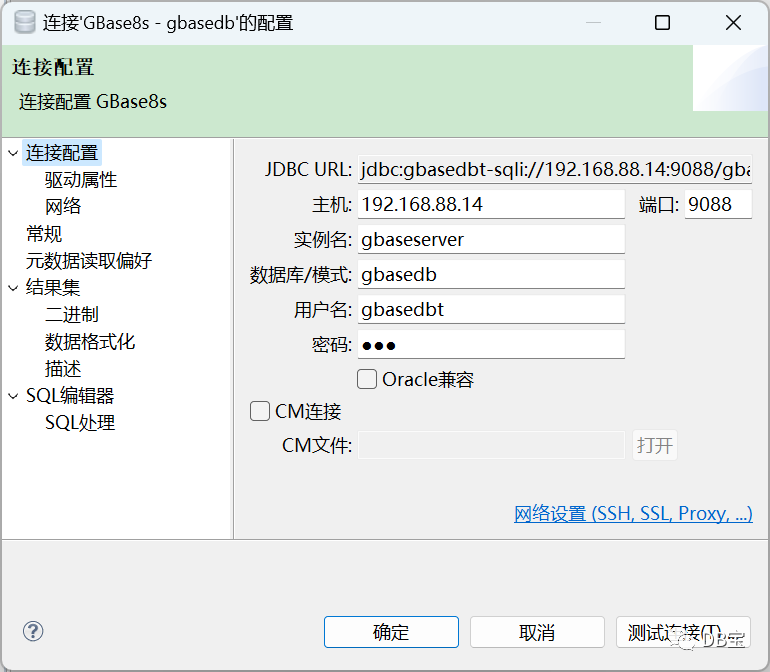
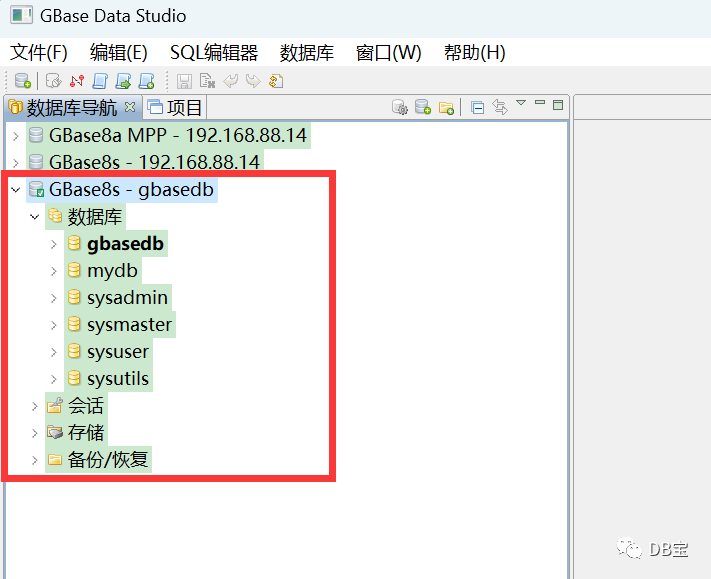
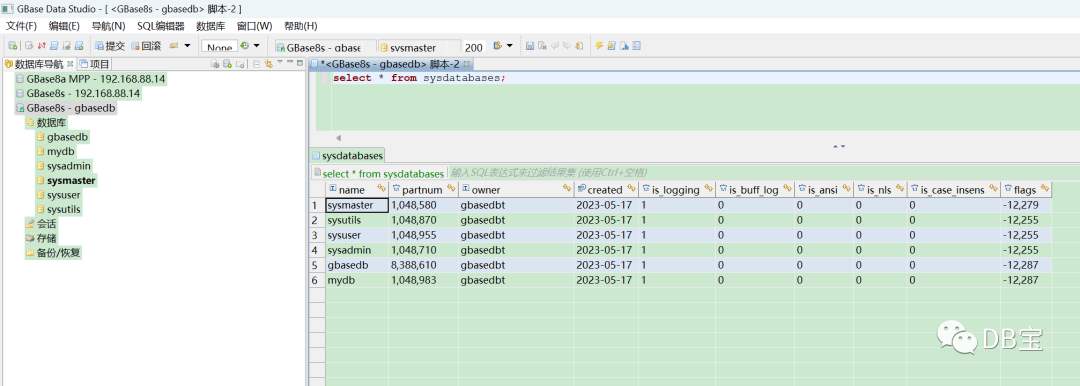
使用客户端GBaseDataStudio.exe 8.5版本 连接
更多请参考:https://www.xmmup.com/nandatongyonggbaseshujukutuxinghuagongjuzhigbasedatastudiojieshao.html
常见问题
安装过程中报“The version file is not exist.”错误
出现这个问题的原因可能为操作系统没有unzip命令。当在使用最小化安装的操作系统上安装GBase 8s时,安装程序先要对一些资源进行解压,由于没有unzip,gzip等一些基本命令,可能导致部分资源没有正确解压,在后续的访问中报如“The version file is not exist”类错误。
GBase 8s使用了商业的安装软件制作程序,商业的安装软件没有处理这些异常,GBase 8s安装程序暂时无法捕获这类异常并处理处理。
 1[root@centos1 install]# ./ids_install
 2Preparing to install...
 3Extracting the JRE from the installer archive...
 4Unpacking the JRE...
 5Extracting the installation resources from the installer archive...
 6Configuring the installer for this system's environment...
 7
 8Launching installer...
 9
10===============================================================================
11GBase Software Bundle                            (created with InstallAnywhere)
12-------------------------------------------------------------------------------
13
14Preparing CONSOLE Mode Installation...
15
16
17
18
19===============================================================================
20Getting Started
21---------------
22
23
24PRESS <ENTER> TO CONTINUE:
25
26
27
28===============================================================================
29The version file is not exist.
30------------------------------
31
32The version file is not exist.
33
34PRESS <ENTER> TO ACCEPT THE FOLLOWING (OK):
35[root@centos1 install]#
36
安装过程中报“The specified installation path is not secure”错误。
出现这个问题的原因可能为:
安装目录被设置了过大的权限,导致其它用户有权限写数据库目录中的文件。这对于一个数据库系统来说,是非常严重的安全问题。建议检查安装目录的权限,并将安装目录及上级目录设置为755的权限。
在使用root用户安装时,指定了一个非root的文件夹,也可能出现上面错误。
The specified installation path is not secure. Either enter a different path or
exit the installation application and run the onsecurity utility.
root: onsecurity "/opt/GBASE/"
Non root: onsecurity -p "/opt/GBASE/"
启动数据库时报共享内存错误
安装好GBase 8s后,启动数据库报“Allocating and attaching to shared memory…FAILED”。出现这个错误主要是申请共享内存失败,需要检查两个方面:
是否已经启动数据库。当数据库实例已经处于运行状态时,再次执行oninit -vy时,会出现这个报错信息。可以使用onstat -命令,检查一下数据库实例的状态。
服务器中是否运行了其它应用程序,占用了大量的服务器内存,导致GBase 8s 在启动时,由于服务器内存不足而报错。可以使用free -g命令检查一下服务器的可用内存数量。
Your evaluation license will expire on 2022-06-09 12:00:00
oninit: Fatal error in shared memory creation
Reading configuration file '/opt/gbase/etc/onconfig.gbaseserver'…succeeded
Creating GBASEDBTTMP/.infxdirs…succeeded
Allocating and attaching to shared memory…FAILED
WARNING: server initialization failed or timed out.
Check the message log, online.log, for errors.
执行SQL语句时报“908: Attempt to connect to database server (gbaseserver_36) failed.”错误。
如果在本地操作GBase 8s 数据库报错,可能是数据库的服务没有启动,可以使用 onstat - 命令查看数据库是否在线。
如果不是访问本机的GBase 8s,需要检查一下安装GBase 8s 的服务器,是否开启了防火墙。请正确配置防火墙或关闭防火墙后再试。
 1[gbasedbt@train ~]$ dbaccess - -
 2Your evaluation license will expire on 2022-06-09 12:00:00
 3> create database demodb with log;
 4
 5  908: Attempt to connect to database server (gbaseserver_36) failed.
 6
 7  201: A syntax error has occurred.
 8Error in line 1
 9Near character position 1
10>
选择一个数据库时报“Database not found or no system permission”
当使用gbasedbt启动dbaccess时,出现上述问题,先检查一下,选择的数据库是否已经创建。
 1> database mydb;
 2
 3Database closed.
 4
 5
 6  329: Database not found or no system permission.
 7
 8  111: ISAM error:  no record found.
 9Error in line 1
10Near character position 12
11>
如何解决dbaccess中不能使用方向键查看历史命令和左右移动问题。
可以使用rlwrap
处理一下。
常用命令
 1dbaccess - -
 2database sysmaster;
 3select DBINFO('version','full') from dual;
 4select * from sysdatabases;
 5select * from sysdbslocale;
 6
 7
 8select * from systables;
 9select tabname,tabtype from systables where tabid >= 100 and tabtype = 'V';
10select * from sysdbspaces;
11select * from sysvplst;
12select * from sysplog;
13select first 3 * from syslogs;
14select * from syssessions;
15
16select * from sysusers;
17
18
19-- 启动和关闭
20onstat -    #查询状态
21oninit -vy  #启动
22onmode -ky  #关闭
23
24
25netstat -tulnp | grep 9088
参考
https://blog.csdn.net/jihui8848/article/details/117996240
