



nginx提供文件浏览功能,界面非常简单。通过添加插件,可以美化页面。
本文是在nginx搭建文件服务器的基础上进行配置的,如果没有环境,可以搜索之前写的文章进行搭建,或者主页对话框输入 【nginx】获取链接下载学习文档!
1
美化前

2
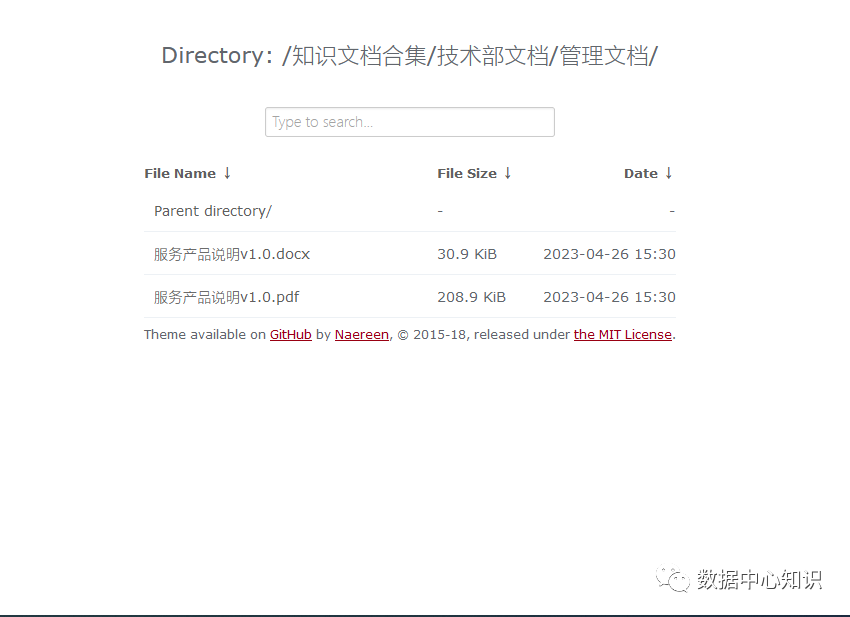
美化后
3
下载ngx-fancyindex
解压ngx-fancyindex
wget https://download.xinac.net/server/nginx/modules/ngx-fancyindex-0.5.2.tar.xz
tar -xf ngx-fancyindex-0.5.2.tar.xz
4
关闭nginx服务
nginx -s quit
5
nginx -V查看之前的configure配置
configure --prefix=/usr/local/nginx --user=nginx --group=nginx --with-http_flv_module --with-http_gzip_static_module --with-http_ssl_module --with-http_v2_module --with-http_dav_module --with-http_stub_status_module --with-threads --with-file-aio
6
利用--add-module 添加模块
/opt/ngx-fancyindex-0.5.2
cd opt/nginx-1.24.0
./configure --prefix=/usr/local/nginx --user=nginx --group=nginx --with-http_flv_module --with-http_gzip_static_module --with-http_ssl_module --with-http_v2_module --with-http_dav_module --with-http_stub_status_module --with-threads --with-file-aio --add-module=/opt/ngx-fancyindex-0.5.2
7
编译安装
make && make install
8
编写配置文件
cd extra/
vi www.webfiles.conf
server { listen 80; server_name www.webfiles.com; charset utf-8,gbk; autoindex on;#开启目录浏览 autoindex_exact_size off;#关闭后,以可读的大小m、k展示 autoindex_format html; #以html风格将目录展示在浏览 autoindex_localtime on; location { root opt/nginx/www/www.webfiles.com; fancyindex on; # 使用fancyindex fancyindex_exact_size off; # 不显示精确大小 fancyindex_time_format "%Y-%m-%d %H:%M";# 文件日期 fancyindex_localtime on;# 使用用户本地时间 fancyindex_name_length 255; fancyindex_default_sort date_desc;}}
9
重启nginx服务
nginx -s reload
10
刷新网页查看效果

11
继续美化界面
wget -O fancytheme.zip https://github.com/Naereen/Nginx-Fancyindex-Theme/archive/master.zip
unzip fancytheme.zip
12
主题的路径要和配置文件中代理的路径相同,/opt/nginx/www/www.webfiles.com
示例
[root@centos7 www.webfiles.com]# lsNginx-Fancyindex-Theme-dark Nginx-Fancyindex-Theme-light 知识文档合集
13
编辑vi www.webfiles.conf
添加以下代码
fancyindex_header "/Nginx-Fancyindex-Theme-light/header.html";fancyindex_footer "/Nginx-Fancyindex-Theme-light/footer.html";fancyindex_ignore "examplefile.html";
14
再次浏览器查看,效果非常不错,带有搜索功能!
文章转载自数据中心知识,如果涉嫌侵权,请发送邮件至:contact@modb.pro进行举报,并提供相关证据,一经查实,墨天轮将立刻删除相关内容。
