



案例说明:
数据库下的sys_filenode.map文件被破坏,导致此数据库无法连接访问。
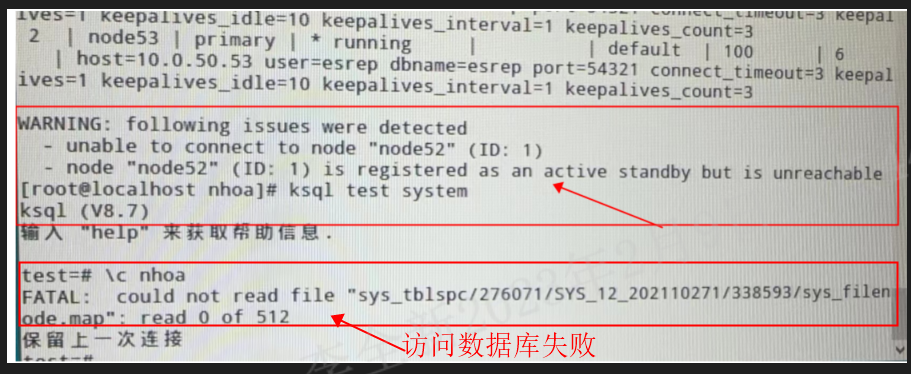
Nail表(内核系统表)Relfilenode的存储机制:
经过研究发现,在数据目录里存在着sys_filenode.map文件,如下所示。
#数据库下sys_filenode.map文件
movead@movead-PC:/h2/kingbase/data/base/12835$ ll sys_filenode.map
-rw-------+ 1 movead movead 512 12月 31 15:10 sys_filenode.map
movead@movead-PC:/h2/kingbase/data/base/12835$

#global下sys_filenode.map文件
movead@movead-PC:/h2/kingbase/data/global$ ll sys_filenode.map
-rw-------+ 1 movead movead 512 12月 31 15:10 sys_filenode.map
movead@movead-PC:/h2/kingbase/data/global$
在global目录下的sys_filenode.map文件里存储了shared表的oid和relfilenode的映射关系,12835目录下存储了OID为12835的数据库里nail表的oid和relfilenode的映射关系。
1、查看当前cluster下的sys_filenode.map文件
[root@node102 data]# find ./ -name *filenode.map
./global/sys_filenode.map
./base/1/sys_filenode.map
./base/12144/sys_filenode.map
./base/12145/sys_filenode.map
./base/12146/sys_filenode.map
./base/16384/sys_filenode.map
2、查看sys_filenode.map文件内容
[root@node102 base]# cd 16384/
[root@node102 16384]# ls -lh sys_filenode.map
-rw------- 1 kingbase kingbase 512 Feb  1 10:56 sys_filenode.map
[root@node102 16384]# mv sys_filenode.map sys_filenode.map.bk

#查看oid=16384数据库的sys_filenode.map
[root@node102 data]# cd base/16384/
[root@node102 16384]# ls -lh sys_filenode.map
-rw------- 1 kingbase kingbase 512 Feb  1 10:56 sys_filenode.map
[root@node102 16384]# hexdump sys_filenode.map
0000000 2717 0059 0016 0000 04eb 0000 04eb 0000
0000010 04e1 0000 04e1 0000 04e7 0000 04e7 0000
0000020 04df 0000 04df 0000 0d80 0000 0d80 0000
0000030 1041 0000 1041 0000 1042 0000 1042 0000
0000040 0b14 0000 0b14 0000 0b15 0000 0b15 0000
0000050 104b 0000 104b 0000 104c 0000 104c 0000
0000060 0a62 0000 0a62 0000 0a63 0000 0a63 0000
0000070 0a66 0000 0a66 0000 0a67 0000 0a67 0000
0000080 0d7f 0000 0d7f 0000 0c5c 0000 0c5c 0000
0000090 0c0d 0000 0c0d 0000 0a82 0000 0a82 0000
00000a0 0a83 0000 0a83 0000 0a8f 0000 0a8f 0000
00000b0 0a90 0000 0a90 0000 0000 0000 0000 0000
00000c0 0000 0000 0000 0000 0000 0000 0000 0000
*
00001f0 0000 0000 0000 0000 da4b a3db 0000 0000
0000200

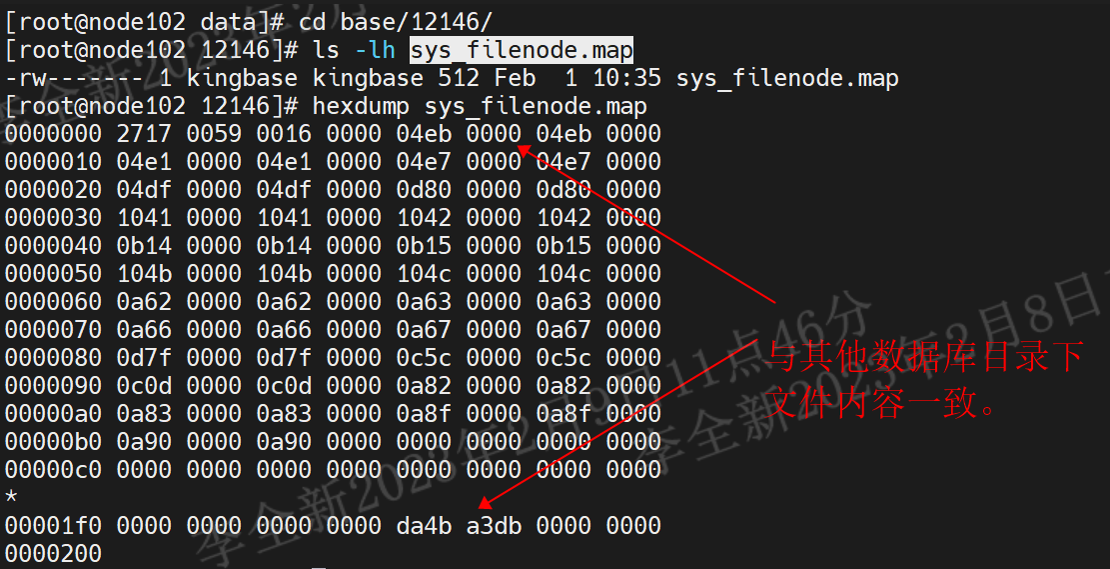
#查看oid=12146数据库的sys_filenode.map
[root@node102 data]# cd base/12146/
[root@node102 12146]# ls -lh sys_filenode.map
-rw------- 1 kingbase kingbase 512 Feb  1 10:35 sys_filenode.map
[root@node102 12146]# hexdump sys_filenode.map
0000000 2717 0059 0016 0000 04eb 0000 04eb 0000
0000010 04e1 0000 04e1 0000 04e7 0000 04e7 0000
0000020 04df 0000 04df 0000 0d80 0000 0d80 0000
0000030 1041 0000 1041 0000 1042 0000 1042 0000
0000040 0b14 0000 0b14 0000 0b15 0000 0b15 0000
0000050 104b 0000 104b 0000 104c 0000 104c 0000
0000060 0a62 0000 0a62 0000 0a63 0000 0a63 0000
0000070 0a66 0000 0a66 0000 0a67 0000 0a67 0000
0000080 0d7f 0000 0d7f 0000 0c5c 0000 0c5c 0000
0000090 0c0d 0000 0c0d 0000 0a82 0000 0a82 0000
00000a0 0a83 0000 0a83 0000 0a8f 0000 0a8f 0000
00000b0 0a90 0000 0a90 0000 0000 0000 0000 0000
00000c0 0000 0000 0000 0000 0000 0000 0000 0000
*
00001f0 0000 0000 0000 0000 da4b a3db 0000 0000
0000200
在两个数据库下文件内容相同:
3、复现sys_filenode.map文件故障
prod=# select oid,datname from pg_database where oid=16384;
  oid  | datname
-------+---------
 16384 | prod
(1 row)

#模拟sys_filenode.map文件故障
[root@node102 base]# cd 16384/
[root@node102 16384]# ls -lh sys_filenode.map
-rw------- 1 kingbase kingbase 512 Feb  1 10:56 sys_filenode.map
[root@node102 16384]# mv sys_filenode.map sys_filenode.map.bk


[kingbase@node102 bin]$ ./ksql -U system test -p 54322
ksql (V8.0)
Type "help" for help.

test=# \c prod
FATAL:  could not open file "base/16384/sys_filenode.map": No such file or directory
Previous connection kept

----如上所示,数据库prod连接失败,但其他数据库连接正常。
4、sys_filenode.map文件故障处理
Tips: 从前面的查看sys_filenode.map内容的操作看,其他数据库的文件和prod库下的文件内容一致,尝试从其他数据库拷贝文件到prod数据目录下。
1)拷贝sys_filenode.map文件
[root@node102 base]# cd 12146
[root@node102 12146]# cp sys_filenode.map ../16384/
[root@node102 12146]# ls -lh ../16384/sys_filenode.map
-rw------- 1 root root 512 Feb  8 14:48 ../16384/sys_filenode.map
[root@node102 12146]# chown kingbase.kingbase ../16384/sys_filenode.map
[root@node102 12146]# ls -lh ../16384/sys_filenode.map
-rw------- 1 kingbase kingbase 512 Feb  8 14:48 ../16384/sys_filenode.map
2)访问prod数据库
test=# \c prod
You are now connected to database "prod" as user "system".
prod=# \d
                 List of relations
 Schema |          Name           | Type  | Owner
--------+-------------------------+-------+--------
 public | sys_stat_statements     | view  | system
 public | sys_stat_statements_all | view  | system
 public | t1                      | table | system
 public | t2                      | table | system
 public | t3                      | table | system
 public | t4                      | table | system
 public | t5                      | table | system
 public | user01                  | table | system
(8 rows)


[kingbase@node102 bin]$ ./ksql -U system test -p 54322
ksql (V8.0)
Type "help" for help.

test=# \c prod
You are now connected to database "prod" as user "system".
prod=# \d
                 List of relations
 Schema |          Name           | Type  | Owner
--------+-------------------------+-------+--------
 public | sys_stat_statements     | view  | system
 public | sys_stat_statements_all | view  | system
 public | t1                      | table | system
 public | t2                      | table | system
 public | t3                      | table | system
 public | t4                      | table | system
 public | t5                      | table | system
 public | user01                  | table | system
(8 rows)

---如上所示,prod数据库可以正常访问。
5、总结
1)对于sys_filenode.map文件的故障,在数据库下的sys_filenode.map文件故障,可以导致当前数据库无法访问,如果其他库文件内容和故障库下的文件内容一致,可以通过copy解决;
2)对于global下sys_filenode.map会造成整个数据库无法连接访问,一般可以尝试通过最近物理备份恢复。
「喜欢这篇文章,您的关注和赞赏是给作者最好的鼓励」
关注作者
【版权声明】本文为墨天轮用户原创内容,转载时必须标注文章的来源(墨天轮),文章链接,文章作者等基本信息,否则作者和墨天轮有权追究责任。如果您发现墨天轮中有涉嫌抄袭或者侵权的内容,欢迎发送邮件至:contact@modb.pro进行举报,并提供相关证据,一经查实,墨天轮将立刻删除相关内容。
