



作者:马顺华
从事运维管理工作多年,目前就职于某科技有限公司,熟悉运维自动化、OceanBase部署运维、MySQL 运维以及各种云平台技术和产品。并已获得OceanBase认证OBCA、OBCP 证书、OpenGauss社区认证结业证书。OceanBase & 墨天轮第二、三、四、五届技术征文大赛,多次获得 一、二、三 等奖,时常在墨天轮发布原创技术文章,并多次被首页推荐。

mysql 8.0 启动后日志报警告信息
一、open_files_limit mysql日志警告信息
1、open_files_limit 只有10000 目前请求已经超过了10010
mysql日志警告信息 [Warning] [MY-010139] [Server] Changed limits: max_open_files: 10000 (requested 10010)
[Warning] [MY-010139] [Server] Changed limits: max_open_files: 10000 (requested 10010)

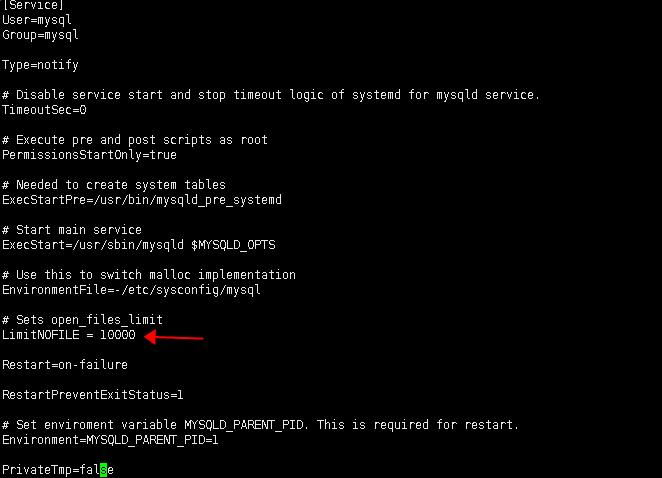
解决办法修改 LimitNOFILE 数值
[root@host-10-101-94-27 log]#  vi /usr/lib/systemd/system/mysqld.service

# Copyright (c) 2015, 2018, Oracle and/or its affiliates. All rights reserved.
#
# This program is free software; you can redistribute it and/or modify
# it under the terms of the GNU General Public License, version 2.0,
# as published by the Free Software Foundation.
#
# This program is also distributed with certain software (including
# but not limited to OpenSSL) that is licensed under separate terms,
# as designated in a particular file or component or in included license
# documentation.  The authors of MySQL hereby grant you an additional
# permission to link the program and your derivative works with the
# separately licensed software that they have included with MySQL.
#
# This program is distributed in the hope that it will be useful,
# but WITHOUT ANY WARRANTY; without even the implied warranty of
# MERCHANTABILITY or FITNESS FOR A PARTICULAR PURPOSE.  See the
# GNU General Public License, version 2.0, for more details.
#
# You should have received a copy of the GNU General Public License
# along with this program; if not, write to the Free Software
# Foundation, Inc., 51 Franklin St, Fifth Floor, Boston, MA 02110-1301  USA
#
# systemd service file for MySQL forking server
#

[Unit]
Description=MySQL Server
Documentation=man:mysqld(8)
Documentation=http://dev.mysql.com/doc/refman/en/using-systemd.html
After=network.target
After=syslog.target

[Install]
WantedBy=multi-user.target

[Service]
User=mysql
Group=mysql

Type=notify

# Disable service start and stop timeout logic of systemd for mysqld service.
TimeoutSec=0

# Execute pre and post scripts as root
PermissionsStartOnly=true

# Needed to create system tables
ExecStartPre=/usr/bin/mysqld_pre_systemd

# Start main service
ExecStart=/usr/sbin/mysqld $MYSQLD_OPTS

# Use this to switch malloc implementation
EnvironmentFile=-/etc/sysconfig/mysql

# Sets open_files_limit
LimitNOFILE = 10000

Restart=on-failure

RestartPreventExitStatus=1

# Set enviroment variable MYSQLD_PARENT_PID. This is required for restart.
Environment=MYSQLD_PARENT_PID=1

PrivateTmp=false
原 LimitNOFILE = 10000
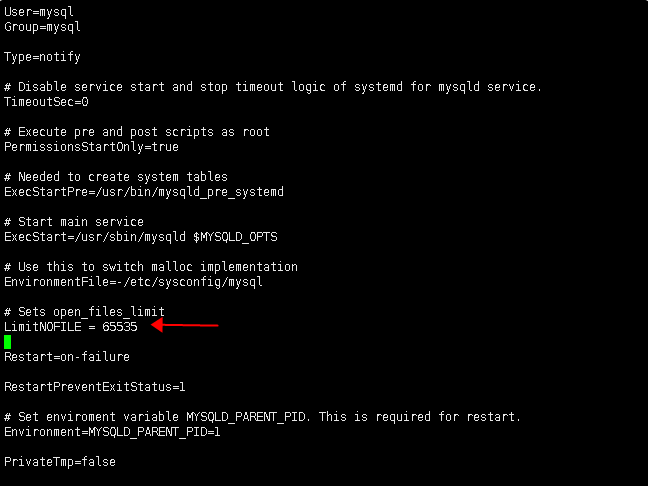
修改为 LimitNOFILE = 65535
2、重新加载服务配置文件
[root@mysqldb2 ~]# systemctl daemon-reload
3、重启mysql服务
[root@mysqldb2 ~]# systemctl restart mysqld.service
4、登录检查
mysql -uroot -p
[root@host log]# mysql -uroot -p
Enter password:
Welcome to the MySQL monitor.  Commands end with ; or \g.
Your MySQL connection id is 8
Server version: 8.0.16 MySQL Community Server - GPL

Copyright (c) 2000, 2019, Oracle and/or its affiliates. All rights reserved.

Oracle is a registered trademark of Oracle Corporation and/or its
affiliates. Other names may be trademarks of their respective
owners.

Type 'help;' or '\h' for help. Type '\c' to clear the current input statement.

mysql>  show variables like '%open%';
+----------------------------+-------+
| Variable_name              | Value |
+----------------------------+-------+
| have_openssl               | YES   |
| innodb_open_files          | 4000  |
| mysqlx_port_open_timeout   | 0     |
| open_files_limit           | 65535 |
| table_open_cache           | 4000  |
| table_open_cache_instances | 16    |
+----------------------------+-------+
6 rows in set (0.01 sec)

mysql>
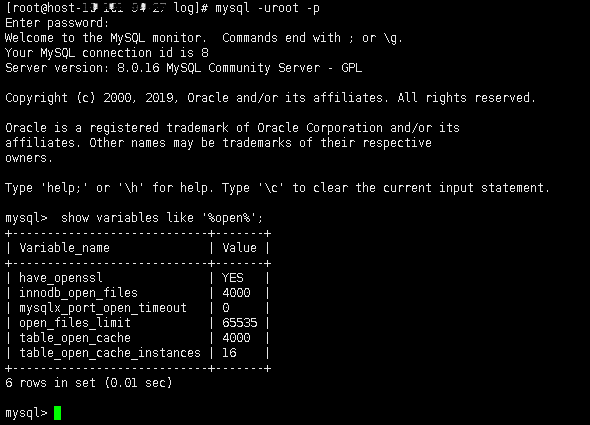
已经修改为:open_files_limit | 65535 |
二、table_open_cache 日志警告信息
[Warning] [MY-010142] [Server] Changed limits: table_open_cache: 3995 (requested 4000)
1、open_cache 只有3995 目前请求已经超过了4000
2023-05-18T10:38:43.865941+08:00 0 [Warning] [MY-010142] [Server] Changed limits: table_open_cache: 3995 (requested 4000)

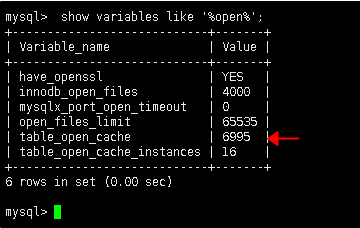
2、解决办法修改 open_cache 3995 数值为 6995
mysql> set global table_open_cache=6995;
Query OK, 0 rows affected (0.00 sec)

mysql>
3、查看修改后的状态
mysql>  show variables like '%open%';
+----------------------------+-------+
| Variable_name              | Value |
+----------------------------+-------+
| have_openssl               | YES   |
| innodb_open_files          | 4000  |
| mysqlx_port_open_timeout   | 0     |
| open_files_limit           | 65535 |
| table_open_cache           | 6995  |
| table_open_cache_instances | 16    |
+----------------------------+-------+
6 rows in set (0.00 sec)

mysql>
「喜欢这篇文章,您的关注和赞赏是给作者最好的鼓励」
关注作者
【版权声明】本文为墨天轮用户原创内容,转载时必须标注文章的来源(墨天轮),文章链接,文章作者等基本信息,否则作者和墨天轮有权追究责任。如果您发现墨天轮中有涉嫌抄袭或者侵权的内容,欢迎发送邮件至:contact@modb.pro进行举报,并提供相关证据,一经查实,墨天轮将立刻删除相关内容。
