



前言
我们在日常开发中,会遇到一些,执行优化器没有生成最优的执行计划,此时我们的DBA或者开发者,希望在SQL中有一种可以手工干预执行计划生成的,方式。如果是做过Oracle的小伙伴肯定会想起hint的功能,当然了我们的PG也是支持该功能的,只是需要我们的pg_hint_plan插件的支持,今天来跟大家简单分享一下pg_hint_plan插件的使用。
插件下载地址:https://github.com/ossc-db/pg_hint_plan/releases大家需要根据自己所需要适配的数据库版本,进行下载使用。
安装
解压缩源码包

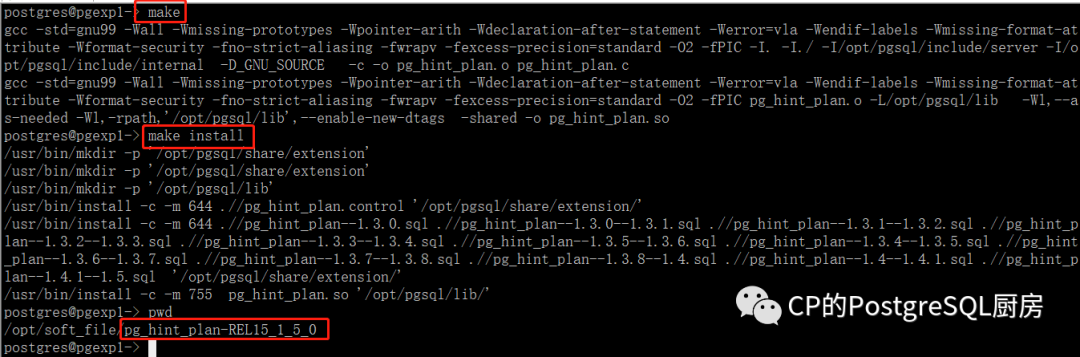
编译安装
配置
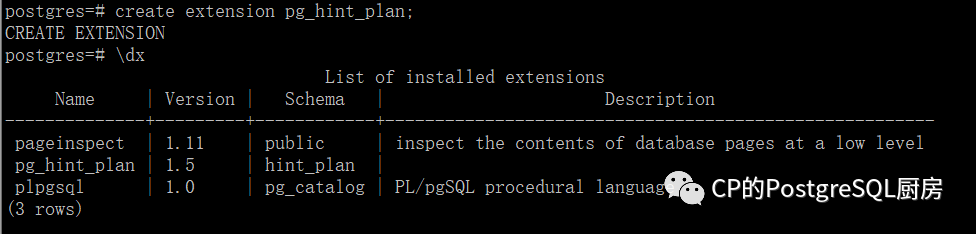
由于我这个是实验环境,所以直接配置到了实例一级。配置到实例一级之后,所有的实例中的数据库,都需要创建扩展create extension pg_hint_plan;

pg_hint使用概要
pg_hint_plan
使得在 SQL 注释中使用所谓的“提示”来调整 PostgreSQL 执行计划成为可能,比如/*+ SeqScan(a) */
.
PostgreSQL 使用基于成本的优化器,它利用数据统计,而不是静态规则。规划器(优化器)对一条SQL语句的每一种可能的执行计划进行成本估算,最终执行成本最低的执行计划。规划器尽最大努力选择最好的最佳执行计划,但并不总是完美的,因为它没有计算数据的某些属性,例如,列之间的相关性。
基本用法pg_hint_plan读取目标 SQL 语句给出的特殊形式的注释中的提示短语。特殊形式以字符序列开始"/\*+",以"\*/". 提示短语由提示名称和后面用括号括起来并用空格分隔的参数组成。为了便于阅读,每个提示短语都可以用新行分隔。在下面的示例中,选择哈希连接作为连接方法并 pgbench_accounts使用顺序扫描方法进行扫描。postgres=# *+postgres*# <b>HashJoin(a b)</b>postgres*# <b>SeqScan(a)</b>postgres*# */postgres-# EXPLAIN SELECT *postgres-# FROM pgbench_branches bpostgres-# JOIN pgbench_accounts a ON b.bid = a.bidpostgres-# ORDER BY a.aid;QUERY PLAN---------------------------------------------------------------------------------------Sort (cost=31465.84..31715.84 rows=100000 width=197)Sort Key: a.aid-> <b>Hash Join</b> (cost=1.02..4016.02 rows=100000 width=197)Hash Cond: (a.bid = b.bid)-> <b>Seq Scan on pgbench_accounts a</b> (cost=0.00..2640.00 rows=100000 width=97)-> Hash (cost=1.01..1.01 rows=1 width=100)-> Seq Scan on pgbench_branches b (cost=0.00..1.01 rows=1 width=100)(7 rows)postgres=#
提示表上以特殊形式在注释中描述了提示。这在无法编辑查询的情况下很不方便。在这种情况下,提示可以放在一个名为 的特殊表中"hint_plan.hints"。该表由以下列组成。柱子 描述id 用于标识提示行的唯一编号。此列按顺序自动填充。norm_query_string 模式与要提示的查询匹配。查询中的常量必须替换为“?” 如以下示例所示。空白在模式中很重要。application_name application_name应用提示的会话的值。下面示例中的提示适用于从 psql 连接的会话。空字符串表示任何application_name.hints 提示短语。这一定是一系列排除周围注释标记的提示。以下示例显示如何使用提示表进行操作。postgres=# INSERT INTO hint_plan.hints(norm_query_string, application_name, hints)postgres-# VALUES (postgres(# 'EXPLAIN (COSTS false) SELECT * FROM t1 WHERE t1.id = ?;',postgres(# '',postgres(# 'SeqScan(t1)'postgres(# );INSERT 0 1postgres=# UPDATE hint_plan.hintspostgres-# SET hints = 'IndexScan(t1)'postgres-# WHERE id = 1;UPDATE 1postgres=# DELETE FROM hint_plan.hintspostgres-# WHERE id = 1;DELETE 1postgres=#提示表为创建者用户所有,创建时具有默认权限。期间CREATE EXTENSION。表提示优先于评论命中。提示的类型根据对象的种类以及它们如何影响计划,提示短语分为六种类型。扫描方式、连接方式、连接顺序、行号校正、并行查询、GUC设置。您将在提示列表中看到每种类型的提示短语列表。扫描方法提示扫描方法提示在目标表上强制执行特定的扫描方法。pg_hint_plan通过别名识别目标表(如果有)。他们是 SeqScan,IndexScan等等,在这种提示中。扫描提示对普通表、继承表、UNLOGGED表、临时表和系统目录有效。外部(外部)表、表函数、VALUES 子句、CTE、视图和子查询不受影响。postgres=# *+postgres*# SeqScan(t1)postgres*# IndexScan(t2 t2_pkey)postgres*# */postgres-# SELECT * FROM table1 t1 JOIN table table2 t2 ON (t1.key = t2.key);加入方法的提示连接方法提示强制执行涉及指定表的连接的连接方法。这只能影响普通表、继承表、UNLOGGED 表、临时表、外部(外部)表、系统目录、表函数、VALUES 命令结果和 CTE 允许在参数列表中的连接。但是连接视图和子查询不受影响。加入订单提示此提示“Leading”强制执行两个或多个表的连接顺序。有两种强制执行方式。一种是强制执行特定的连接顺序,但不限制每个连接级别的方向。另一个强制执行连接方向。详情见提示列表。postgres=# *+postgres*# NestLoop(t1 t2)postgres*# MergeJoin(t1 t2 t3)postgres*# Leading(t1 t2 t3)postgres*# */postgres-# SELECT * FROM table1 t1postgres-# JOIN table table2 t2 ON (t1.key = t2.key)postgres-# JOIN table table3 t3 ON (t2.key = t3.key);行号更正提示此提示“Rows”纠正了来自计划器限制的连接行号错误估计。postgres=# *+ Rows(a b #10) */ SELECT... ; Sets rows of join result to 10postgres=# *+ Rows(a b +10) */ SELECT... ; Increments row number by 10postgres=# *+ Rows(a b -10) */ SELECT... ; Subtracts 10 from the row number.postgres=# *+ Rows(a b *10) */ SELECT... ; Makes the number 10 times larger.平行计划提示此提示Parallel对扫描强制执行并行执行配置。第三个参数指定执行的强度。soft意味着 pg_hint_plan只改变max_parallel_worker_per_gather而把所有其他的留给计划者。hard更改其他计划器参数以强制应用该数字。这会影响普通表、继承父表、未记录的表和系统目录。外部表、表函数、值子句、CTE、视图和子查询不受影响。视图的内部表可以通过其真实名称/别名指定为目标对象。以下示例显示查询在每个表上的执行方式不同。postgres=# explain /*+ Parallel(c1 3 hard) Parallel(c2 5 hard) */SELECT c2.a FROM c1 JOIN c2 ON (c1.a = c2.a);QUERY PLAN-------------------------------------------------------------------------------Hash Join (cost=2.86..11406.38 rows=101 width=4)Hash Cond: (c1.a = c2.a)-> Gather (cost=0.00..7652.13 rows=1000101 width=4)Workers Planned: 3-> Parallel Seq Scan on c1 (cost=0.00..7652.13 rows=322613 width=4)-> Hash (cost=1.59..1.59 rows=101 width=4)-> Gather (cost=0.00..1.59 rows=101 width=4)Workers Planned: 5-> Parallel Seq Scan on c2 (cost=0.00..1.59 rows=59 width=4)postgres=# EXPLAIN /*+ Parallel(tl 5 hard) */ SELECT sum(a) FROM tl;QUERY PLAN-----------------------------------------------------------------------------------Finalize Aggregate (cost=693.02..693.03 rows=1 width=8)-> Gather (cost=693.00..693.01 rows=5 width=8)Workers Planned: 5-> Partial Aggregate (cost=693.00..693.01 rows=1 width=8)-> Parallel Seq Scan on tl (cost=0.00..643.00 rows=20000 width=4)GUC参数临时设置Set提示在计划时更改 GUC 参数。查询规划中显示的 GUC 参数 可以对规划产生预期的影响,除非任何其他提示与规划器方法配置参数冲突。同一 GUC 参数提示中的最后一个生效。的 GUC 参数 pg_hint_plan也可以通过此提示进行设置,但它不会像您期望的那样工作。有关详细信息,请参阅限制。postgres=# /*+ Set(random_page_cost 2.0) */postgres-# SELECT * FROM table1 t1 WHERE key = 'value';...(guc-parameters-for-pg_hint_plan)=GUC参数为pg_hint_plan下面的 GUC 参数会影响pg_hint_plan.参数名称 描述 默认pg_hint_plan.enable_hint 真正的恩布尔pg_hint_plan。onpg_hint_plan.enable_hint_table True 启用表提示。true或false。offpg_hint_plan.parse_messages 指定提示解析错误的日志级别。有效值为error, warning, notice, info, log, debug。INFOpg_hint_plan.debug_print 控制调试打印和详细程度。有效值是off、on和detailed。verbose offpg_hint_plan.message_level 指定调试打印的消息级别。有效值为error, warning, notice, info, log, debug。INFO
参考
https://github.com/ossc-db/pg_hint_plan
文章转载自CP的PostgreSQL厨房,如果涉嫌侵权,请发送邮件至:contact@modb.pro进行举报,并提供相关证据,一经查实,墨天轮将立刻删除相关内容。
