



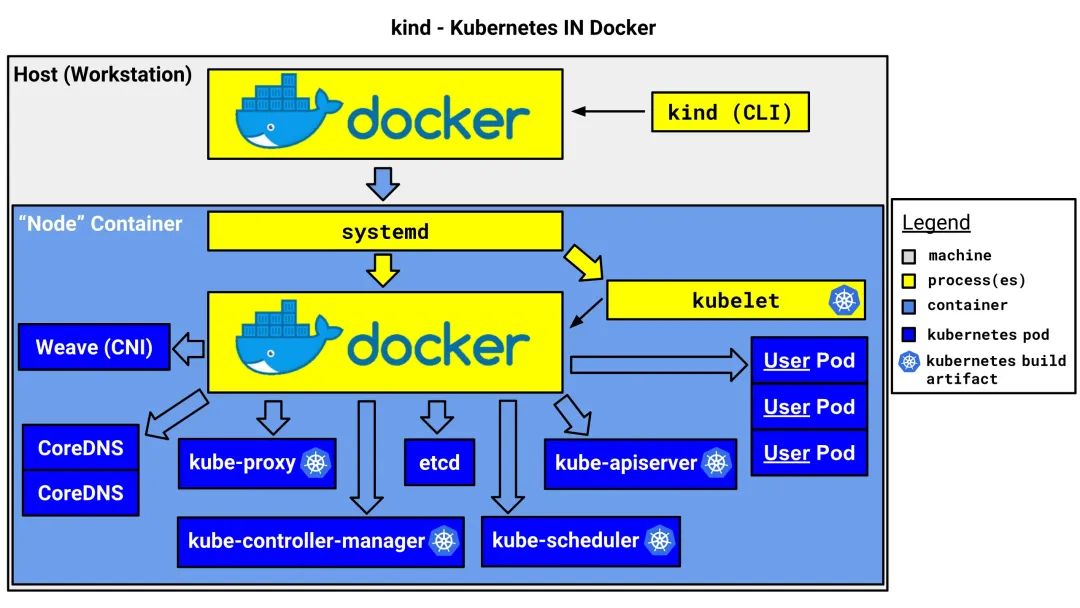
kind is a tool for running local Kubernetes clusters using Docker container “nodes”.kind was primarily designed for testing Kubernetes itself, but may be used for local development or CI.
Kind 用途
安装部署
1. 部署安装工具包
apt install -y net-tools tcpdump chrony bridge-utils tree wget iftop ethtool curl
2. 关闭swap
sed -ri 's/.*swap.*/#&/' etc/fstab
swapoff -a
3. 修改内核参数
# vi etc/sysctl.conf
net.ipv4.ip_forward = 1
net.bridge.bridge-nf-call-ip6tables = 1
net.bridge.bridge-nf-call-iptables = 1
net.bridge.bridge-nf-call-arptables = 1
fs.inotify.max_user_instances=1024
fs.inotify.max_user_watches=524288
fs.file-max=524288
# vim etc/security/limits.conf
root soft nofile 655350
root hard nofile 655350
* soft nofile 655350
* hard nofile 655350
4. 添加阿里的repo
apt-get update && apt-get install -y apt-transport-https

apt upgrade -y
curl https://mirrors.aliyun.com/kubernetes/apt/doc/apt-key.gpg | apt-key add -
tee /etc/apt/sources.list.d/kubernetes.list <<-'EOF'
deb https://mirrors.aliyun.com/kubernetes/apt/ kubernetes-xenial main
EOF
apt-get update
5. 安装Docker并配置启动
curl -fsSL https://download.docker.com/linux/ubuntu/gpg | sudo apt-key add -
sudo add-apt-repository "deb [arch=amd64] https://download.docker.com/linux/ubuntu $(lsb_release -cs) stable"
sudo apt update
sudo apt install docker-ce docker-ce-cli containerd.io
mkdir -p /etc/docker
cat <<EOF > /etc/docker/daemon.json
{
  "registry-mirrors": ["https://xxxx.mirror.aliyuncs.com"]
}
EOF
systemctl daemon-reload
systemctl restart docker
systemctl enable docker
6. 部署kind 工具
curl -Lo ./kind https://kind.sigs.k8s.io/dl/v0.18.0/kind-linux-amd64
chmod +x ./kind
sudo mv ./kind /usr/local/bin/kind
kind 使用
1. 简单配置文件
kind: Cluster
apiVersion: kind.x-k8s.io/v1alpha4
name: testkind1
networking:
  disableDefaultCNI: true
  podSubnet: "10.244.0.0/16"
  serviceSubnet: "10.96.0.0/12"
  apiServerAddress: "0.0.0.0"
  apiServerPort: 6543
  kubeProxyMode: "ipvs"
containerdConfigPatches:
- |-
  [plugins."io.containerd.grpc.v1.cri".registry.mirrors."k8s.gcr.io"]
    endpoint = ["https://registry.aliyuncs.com/google_containers"]
  [plugins."io.containerd.grpc.v1.cri".registry.mirrors."gcr.io"]
    endpoint = ["https://registry.aliyuncs.com/google_containers"]
  [plugins."io.containerd.grpc.v1.cri".registry.mirrors."quay.io"]
    endpoint = ["https://quay-mirror.aliyuncs.com"]
nodes:
- role: control-plane
- role: worker
- role: worker
官网:https://kind.sigs.k8s.io/docs/user/configuration/
2. 部署命令
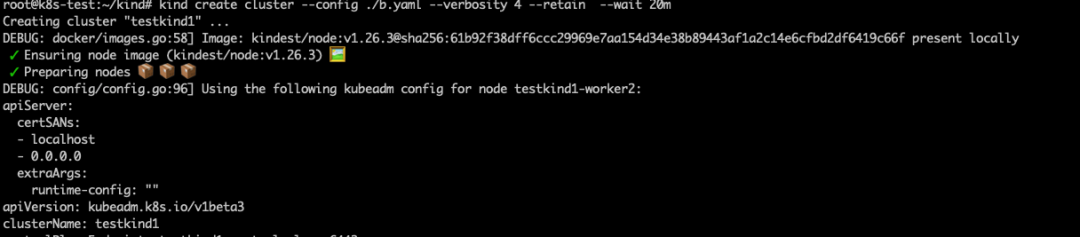
--wait 20m:k8s部署时间默认等待Ready 4m0s,如果下载镜像慢的话,有可能会失败,这里设置20m,但要注意一个问题,如果你配置文件中指定了disableDefaultCNI: true,不使用默认插件的话,这个如果再设置了--wait 20m,那么就会等待很长时间。如下图

docker exec -it testkind1-control-plane /bin/bash kubectl apply -f https://raw.githubusercontent.com/flannel-io/flannel/master/Documentation/kube-flannel.yml

3. 查看kind创建的集群
root@k8s-test:~/kind# kind get clusters |grep test
testkind1
root@k8s-test:~/kind#
4. 查看集群配置并导出
root@k8s-test:~/kind# kind get kubeconfig --name testkind1 > /root/.kube/config
root@k8s-test:~/kind#
或者
root@k8s-test:~/kind# kind export kubeconfig --name testkind1
Set kubectl context to "kind-testkind1"
root@k8s-test:~/kind#
5. 查看集群node节点列表
root@k8s-test:~/kind# kind get nodes --name testkind1
testkind1-control-plane
testkind1-worker
testkind1-worker2
root@k8s-test:~/kind#
6. 解决kind创建集群中无法下载镜像问题
kind load docker-image registry.k8s.io/metrics-server/metrics-server:v0.6.3 --name <集群名称>
7. 解决kind创建集群的master节点无法调度
kubectl get nodes --no-headers -o custom-columns=NAME:.metadata.name |grep control-plane
kubectl taint nodes $controller_node node-role.kubernetes.io/master:NoSchedule-
kubectl get nodes -owide
总结
本文主要总结下kind的简单使用,方便快速创建一套可用集群进行测试或学习。
文章转载自Linux点滴运维实践,如果涉嫌侵权,请发送邮件至:contact@modb.pro进行举报,并提供相关证据,一经查实,墨天轮将立刻删除相关内容。
