





/**
 * Mapper类
 * 示例: hello hadoop hadoop --> (hello, 1), (hadoop, 1), (hadoop, 1)
 */
public class WordCountMapper extends Mapper<LongWritable, Text, Text, IntWritable> {
    private static final Text KEY = new Text();
    private static final IntWritable VAL = new IntWritable(1); // 指定value为数字1
    protected void map(LongWritable key, Text value, Context context) throws IOException, InterruptedException {
        // 将数据行转为字符串
        String line = value.toString();
        // 指定分隔符并分割数据
        String[] words = line.split(" ");
        // 将数据写入下一阶段
        for (String word : words) {
            KEY.set(word);
            context.write(KEY, VAL);
        }
    }
}
2、WordCountReducer.java
/**
 * Reducer类
 * 示例: (hello, 1), (hadoop, 1), (hadoop, 1) --> (hello, 1), (hadoop, 2)
 */
public class WordCountReducer extends Reducer<Text, IntWritable, Text, IntWritable> {
    private static final IntWritable VAL = new IntWritable();
    protected void reduce(Text KEY, Iterable<IntWritable> value, Context context) throws IOException, InterruptedException {
        // 定义计数器
        int counter = 0;
        // 将相同的单词累计
        for (IntWritable num : value) {
            counter += num.get();
            // 或者使用 counter ++ ;
        }
        // 设置value值并写入下一阶段
        VAL.set(counter);
        context.write(KEY, VAL);
    }
}
3、WordCountMain.java
public class WordCountMain {
    public static void main(String[] args) throws IOException, ClassNotFoundException, InterruptedException {
        // 实例化任务
        Job job = Job.getInstance(new Configuration());
        // 设置启动类
        job.setJarByClass(WordCountMain.class);
        // 设置Mapper类以及Map的输出类型
        job.setMapperClass(WordCountMapper.class);
        job.setMapOutputKeyClass(Text.class);
        job.setMapOutputValueClass(IntWritable.class);
        // 设置Reducer类以及Reduce的输出类型
        job.setReducerClass(WordCountReducer.class);
        job.setOutputKeyClass(Text.class);
        job.setOutputValueClass(IntWritable.class);
        // 设置文件输入输出路径
        FileInputFormat.setInputPaths(job, args[0]);
        FileOutputFormat.setOutputPath(job, new Path(args[1]));
        // 任务执行
        boolean res = job.waitForCompletion(true);
        System.exit(res ? 0 : 1);
    }
}
如何使用IDEA将Maven项目进行打包?文章,或在本公众号后台回复关键词
20230117获取该图文),并上传至服务器中的
/usr/local/hadoop/jar路径下,同时开启HDFS和Yarn集群,在本地新建一个文本文件,示例如下。
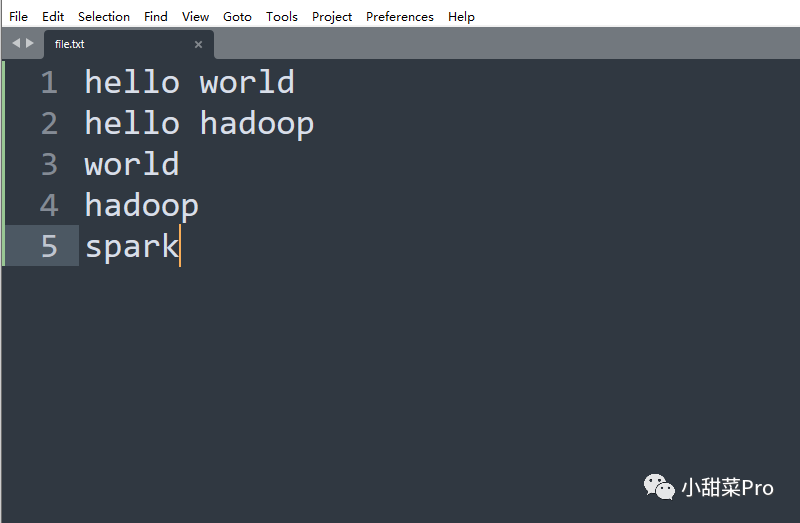
/root路径下,然后使用
$HADOOP_HOME/bin/hadoop fs -put root/file.txt Mapreduce/WordCount/input命令上传到HDFS文件系统的
/Mapreduce/WordCount/input路径中,若HDFS中没有该路径,使用
$HADOOP_HOME/bin/hadoop fs -mkdir -p Mapreduce/WordCount/input命令进行创建,最后使用
$HADOOP_HOME/bin/hadoop jar usr/local/hadoop/jar/wordcount.jar Mapreduce/WordCount/input/* Mapreduce/WordCount/output命令运行程序。
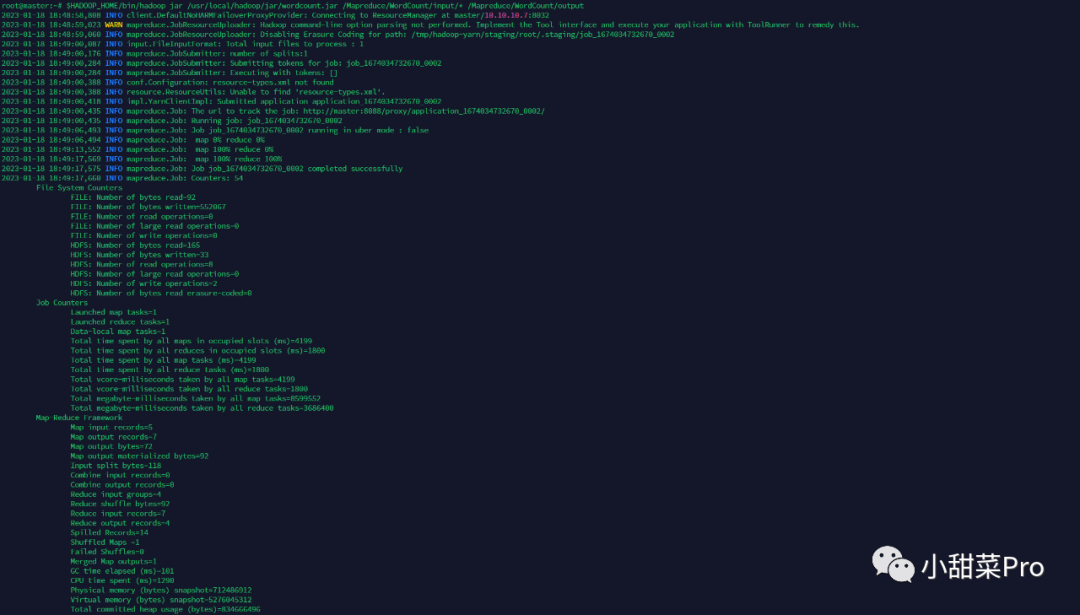
$HADOOP_HOME/bin/hadoop fs -cat Mapreduce/WordCount/output/part-r-00000命令查看运行结果。

以上为WordCount经典案例,下面介绍一个词频统计的应用场景:统计网站日志数据每分钟的浏览量。
https://www.kaggle.com/datasets/eliasdabbas/web-server-access-logs,该数据为某在线购物商店Web服务器日志数据,示例数据为
40.77.167.129 - - [22/Jan/2019:03:56:17 +0330] "GET image/23488/productModel/150x150 HTTP/1.1" 200 2654 "-" "Mozilla/5.0 (compatible; bingbot/2.0; +http://www.bing.com/bingbot.htm)" "-",文件的每一行为一条数据,将数据的日期进行提取,然后再像词频统计一样进行运算,此案例只需将词频统计案例的map阶段的代码进行修改即可,reduce阶段代码不变,具体代码如下。
public class weblogMapper extends Mapper<LongWritable, Text, Text, IntWritable> {
    private static final Text KEY = new Text();
    private static final IntWritable VAL = new IntWritable(1); // 指定value为数字1
    protected void map(LongWritable key, Text value, Context context) throws IOException, InterruptedException {
        // 将数据行转为字符串
        String line = value.toString();
        // 获取时间字段
        String date = line.split(" ")[3].substring(1);
        // 将时间中的秒数去除
        String date2 = date.substring(0, date.length() - 3);
        // 设置KEY
        KEY.set(date2);
        // 将数据写入下一阶段
        context.write(KEY, VAL);
    }
}
/usr/local/hadoop/jar路径下,同时将数据文件上传至服务器中的
/root路径下,使用
$HADOOP_HOME/bin/hadoop fs -put /root/access.log /Mapreduce/WebLogWordCount/input命令将数据文件上传至HDFS文件系统的
/Mapreduce/WebLogWordCount/input路径,使用
$HADOOP_HOME/bin/hadoop jar /usr/local/hadoop/jar/wordcount-weblog.jar /Mapreduce/WebLogWordCount/input/* /Mapreduce/WebLogWordCount/output命令启动程序。
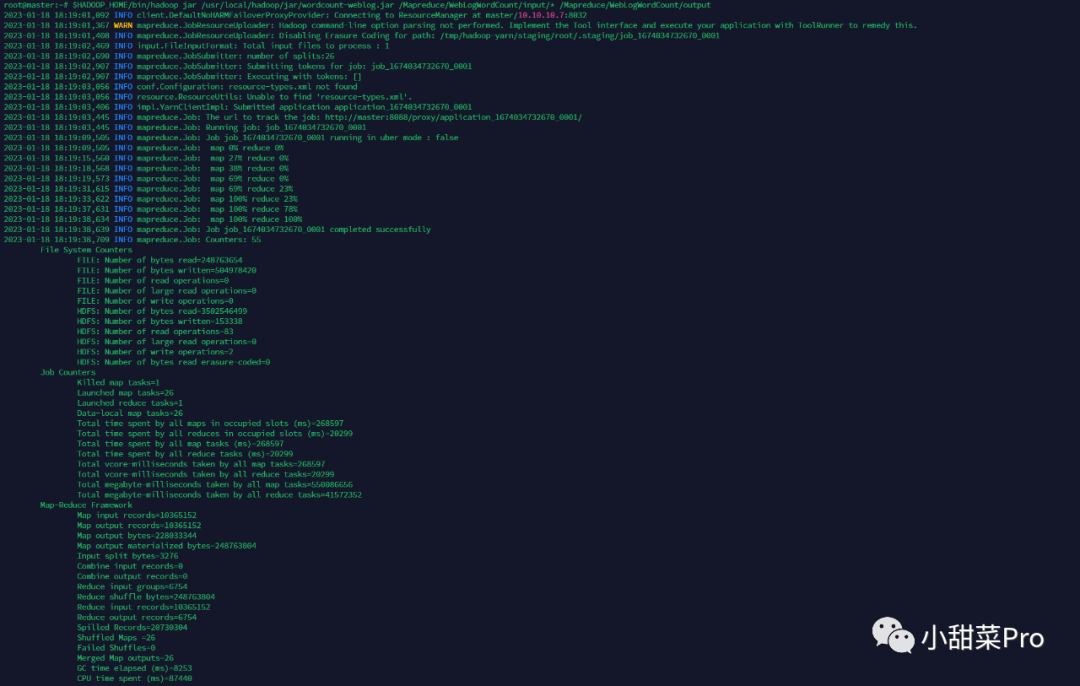
$HADOOP_HOME/bin/hadoop fs -cat /Mapreduce/WebLogWordCount/output/part-r-00000命令查看运行结果。
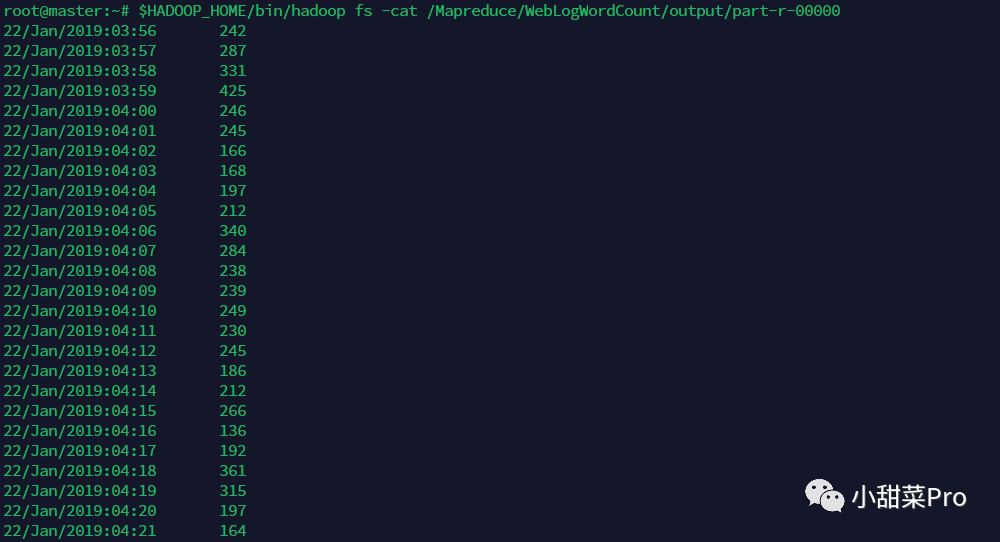
本文介绍了词频统计经典案例,并在其基础上介绍了它的实际应用场景,以上就是本期分享的全部内容,想要获取本文中的代码及全部数据,请在公众号后台回复关键词20230119
,若各位小伙伴有什么不懂的问题也可以直接在公众号后台回复,感谢观看!
文章转载自小甜菜Pro,如果涉嫌侵权,请发送邮件至:contact@modb.pro进行举报,并提供相关证据,一经查实,墨天轮将立刻删除相关内容。
