



cayley可以使用多种后端存储,那么如何使用mysql作为后端存储呢,首先我们看下如何配置:
store:# backend to usebackend: mysql# address or path for the databaseaddress: "root:@tcp(localhost:3306)/cayley?loc=Local&charset=utf8mb4&collation=utf8mb4_general_ci"# open database in read-only moderead_only: false# backend-specific optionsoptions:nosync: falsequery:timeout: 30sload:ignore_duplicates: falseignore_missing: falsebatch: 10000
backend设置成mysql,并且指定dsn即可,接着我们使用mysql作为后端存储导入数据:
首先创建数据库cayley
% mysql.server startStarting MySQL.. SUCCESS!% mysql -urootWelcome to the MySQL monitor. Commands end with ; or \g.mysql> create database cayley;
初始化下看看是否成功
% ../cayley/cayley init -c cayley_example.ymlI0528 23:40:40.065734 81480 command.go:915] Cayley version: v0.8.x-dev (dev snapshot)I0528 23:40:40.066011 81480 command.go:915] using config file: cayley_example.ymlI0528 23:40:40.066107 81480 database.go:71] using backend "mysql" (root:@tcp(localhost:3306)/cayley?loc=Local&charset=utf8mb4&collation=utf8mb4_general_ci)
检查下,发现已经创建了两个表
mysql> use cayley;Reading table information for completion of table and column namesYou can turn off this feature to get a quicker startup with -ADatabase changedmysql> show tables;+------------------+| Tables_in_cayley |+------------------+| nodes || quads |+------------------+2 rows in set (0.00 sec)
这两个表分别存了顶点和四元祖
mysql> show create table nodes\G*************************** 1. row ***************************Table: nodesCreate Table: CREATE TABLE `nodes` (`hash` binary(20) NOT NULL,`refs` int NOT NULL,`value` blob,`value_string` text,`datatype` text,`language` text,`iri` tinyint(1) DEFAULT NULL,`bnode` tinyint(1) DEFAULT NULL,`value_int` bigint DEFAULT NULL,`value_bool` tinyint(1) DEFAULT NULL,`value_float` double DEFAULT NULL,`value_time` datetime(6) DEFAULT NULL,PRIMARY KEY (`hash`)) ENGINE=InnoDB DEFAULT CHARSET=utf8mb4 COLLATE=utf8mb4_0900_ai_ci1 row in set (0.02 sec)
show create table quads\G*************************** 1. row ***************************Table: quadsCreate Table: CREATE TABLE `quads` (`horizon` bigint unsigned NOT NULL AUTO_INCREMENT,`subject_hash` binary(20) NOT NULL,`predicate_hash` binary(20) NOT NULL,`object_hash` binary(20) NOT NULL,`label_hash` binary(20) DEFAULT NULL,`ts` timestamp NULL DEFAULT NULL,PRIMARY KEY (`horizon`),UNIQUE KEY `horizon` (`horizon`),UNIQUE KEY `spo_unique` (`subject_hash`,`predicate_hash`,`object_hash`),UNIQUE KEY `spol_unique` (`subject_hash`,`predicate_hash`,`object_hash`,`label_hash`),KEY `label_hash_fk` (`label_hash`),KEY `spo_index` (`subject_hash`,`predicate_hash`,`object_hash`),KEY `ops_index` (`object_hash`,`predicate_hash`,`subject_hash`),KEY `pos_index` (`predicate_hash`,`object_hash`,`subject_hash`),KEY `osp_index` (`object_hash`,`subject_hash`,`predicate_hash`),CONSTRAINT `label_hash_fk` FOREIGN KEY (`label_hash`) REFERENCES `nodes` (`hash`),CONSTRAINT `object_hash_fk` FOREIGN KEY (`object_hash`) REFERENCES `nodes` (`hash`),CONSTRAINT `predicate_hash_fk` FOREIGN KEY (`predicate_hash`) REFERENCES `nodes` (`hash`),CONSTRAINT `subject_hash_fk` FOREIGN KEY (`subject_hash`) REFERENCES `nodes` (`hash`)) ENGINE=InnoDB AUTO_INCREMENT=314 DEFAULT CHARSET=utf8mb4 COLLATE=utf8mb4_0900_ai_ci1 row in set (0.00 sec)
导入数据
../cayley/cayley load -c cayley_example.yml -i ../cayley/data/**nq --alsologtostderr=trueI0528 23:43:00.003584 82856 command.go:915] Cayley version: v0.8.x-dev (dev snapshot)I0528 23:43:00.006404 82856 command.go:915] using config file: cayley_example.ymlI0528 23:43:00.008158 82856 database.go:91] using backend "mysql" (root:@tcp(localhost:3306)/cayley?loc=Local&charset=utf8mb4&collation=utf8mb4_general_ci)
查看下存储数据
mysql> select * from nodes limit 1\G*************************** 1. row ***************************hash: 0x278A31F9BA54E8D73ADBC4F1AE82B1D2442DE516refs: 3value: NULLvalue_string: NULLdatatype: NULLlanguage: NULLiri: NULLbnode: NULLvalue_int: NULLvalue_bool: 1value_float: NULLvalue_time: NULL1 row in set (0.00 sec)
当然也可以开启http服务来访问cayley
../cayley/cayley http -c cayley_example.yml --host=0.0.0.0:64210
浏览器打开http://127.0.0.1:64210/,可以看到
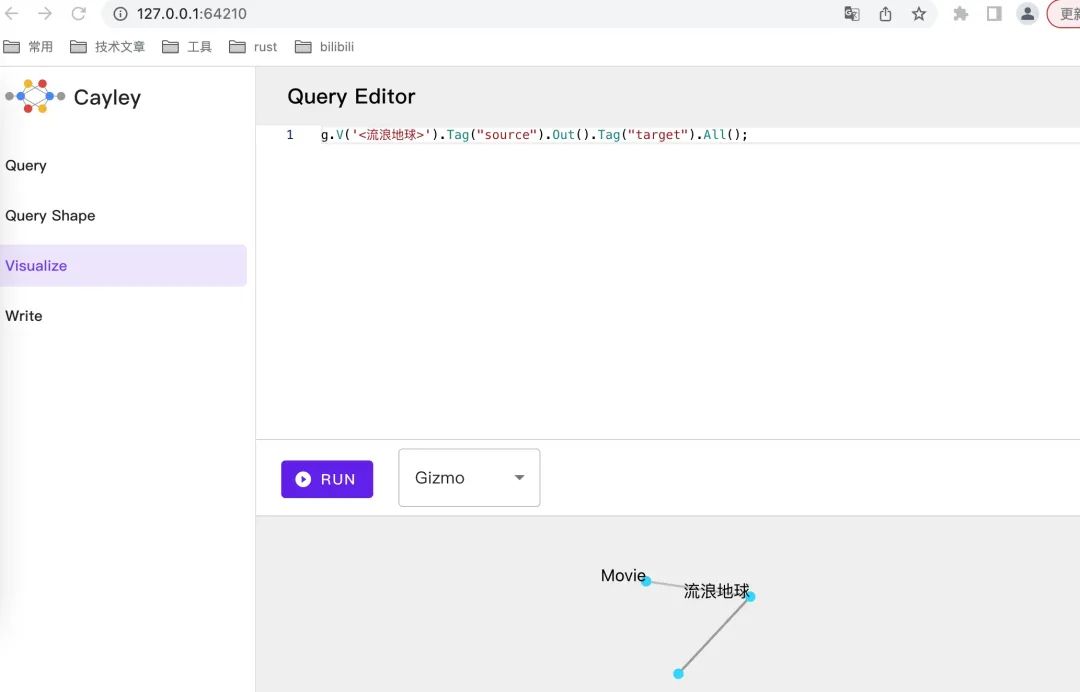
那么如何使用go来操作我们的图数据库呢
package mainimport ("fmt""log""github.com/cayleygraph/cayley"_ "github.com/cayleygraph/cayley/graph/sql/mysql""github.com/cayleygraph/quad")func main() {// Create a brand new graph// store, err := cayley.NewGraph("sql", "root:@tcp(localhost:3306)/cayley?loc=Local&charset=utf8mb4&collation=utf8mb4_general_ci", nil)store, err := cayley.NewGraph("mysql", "root:@tcp(localhost:3306)/cayley?loc=Local&charset=utf8mb4&collation=utf8mb4_general_ci", nil)if err != nil {log.Fatalln(err)}store.AddQuad(quad.Make("phrase of the day", "is of course", "Hello World!", "label1"))store.AddQuad(quad.Make("Hello World!", "is of course", "Hello World1!", "label2"))store.AddQuad(quad.Make("Hello World1!", "is course", "Hello World2!", "label2"))// Now we create the path, to get to our datap := cayley.StartPath(store, quad.String("phrase of the day")).Out(quad.String("is of course")).Out(quad.String("is of course")).Out(quad.String("is course"))// Now we iterate over results. Arguments:// 1. Optional context used for cancellation.// 2. Flag to optimize query before execution.// 3. Quad store, but we can omit it because we have already built path with it.err = p.Iterate(nil).EachValue(nil, func(value quad.Value) {nativeValue := quad.NativeOf(value) // this converts RDF values to normal Go typesfmt.Println(nativeValue)})if err != nil {log.Fatalln(err)}}
运行下
% go run ./test/cayley/exp5/main.goHello World2!
总结下,图数据库其实是图到持久化存储的一种迁移实现,我们知道图有两种数据结构可以来表示,邻接表和邻接矩阵。图数据其实是邻接矩阵的形式存储的,同时利用了邻接矩阵的稀疏性,存储了订单和边,对应了两个表node和quad。实现上,图数据库有专用存储和借用三方存储两种形式。cayley是借用第三方存储实现的。它在上层封装了迭代器,并且封装了gizmo查询和graphql等,方便我们更加直观处理图相关逻辑。


文章转载自golang算法架构leetcode技术php,如果涉嫌侵权,请发送邮件至:contact@modb.pro进行举报,并提供相关证据,一经查实,墨天轮将立刻删除相关内容。
