




前言
每次安装一些Python软件的时候,总是会备受折磨,因为我的服务器没办法直接连接外网。对于能上外网的机器,安装起来及其简单,直接使用pip安装,在安装过程中发现依赖就会自动去download。然后就能省去很多麻烦。但是很多生产环境,是不能联网的。在这上面安装就难多了,需要解决各类依赖的问题。
今天终于把patroni安装上去了,遇到的问题,在这里给大家总结一下。我基本上是都是纯手工安装和编译的。
安装Python3和相关patroni依赖
首先我们先安装python3,安装python3需要安装一些软件包,这些包用本地安装源就能安装上。
yum install gcc openssl-devel bzip2-devel libffi-devel -y
下载Python3版本,下载地址:https://www.python.org/ftp/python/,直接下载最新版3.95,下载完后上传到服务器进行编译安装。
tar -xzf Python-3.9.5.tgzcd Python-3.9.5./configure --enable-optimizations
这里说下,编译的时候最好不要使用--enable-shared,有一些安装文档使用了--enable-shared,这似乎是不妥的,为了严谨一些,官方的文档的说法如下:
The problem is, that on most Unix systems (with the notable exception of Mac OS X), the path to shared libraries is not an absolute path. So, if you install Python in a non-standard location, which is the right thing to do so as not to interfere with a system Python of the same version, you will need to configure in the path to the shared library or supply it via an environment variable at run time, like LD_LIBRARY_PATH. You may be better off avoiding --enable-shared; it's easy to run into problems like this with it.
From Python Issue27685, Issue 27685: altinstall with --enable-shared showing incorrect behaviour
make altinstall
这里建议使用altinstall,altinstall将跳过创建python链接和手册页链接的操作。如果使用make install,在系统中将会有两个不同版本的Python在/usr/bin/目录中,往往会导致一些干扰上的问题。
具体可以参考
https://stackoverflow.com/questions/16018463/difference-in-details-between-make-install-and-make-altinstall
python3安装是很顺利的,编译安装情况下自动给你安装了setuptools和pip,都是最新版的。
Installing collected packages: setuptools, pipSuccessfully installed pip-21.1.1 setuptools-56.0.0WARNING: Running pip as root will break packages and permissions. You should install packages reliably by using venv: https://pip.pypa.io/warnings/venv[root@133e0e204e206 Python-3.9.5]# python3.9Python 3.9.5 (default, May 11 2021, 14:47:18) [GCC 4.8.5 20150623 (Red Hat 4.8.5-16)] on linuxType "help", "copyright", "credits" or "license" for more information.>>> [root@133e0e204e206 Python-3.9.5]# pip3.9 --versionpip 21.1.1 from /usr/local/lib/python3.9/site-packages/pip (python 3.9)
这样我们的python3.9和pip3.9就安装好了。
接下来的问题是,我这个环境上用postgres用户没办法执行pip。直接报ModuleNotFoundError: No module named 'pip._internal'
[root@133e0e204e206 ~]# su - postgresLast login: Wed May 12 11:21:02 CST 2021 on pts/1[postgres@133e0e204e206 ~]$ pip3.9 Traceback (most recent call last): File "/usr/local/bin/pip3.9", line 5, in <module> from pip._internal.cli.main import mainModuleNotFoundError: No module named 'pip._internal'[postgres@133e0e204e206 ~]$ exit
参考了一下https://stackoverflow.com/questions/49940813/pip-no-module-named-internal,把python3.9目录权限修改了一下就能使用postgresql用户执行pip了。
[root@133e0e204e206 ~]# cd /usr/local/lib[root@133e0e204e206 lib]# ls -l total 33212-rwxr-xr-x 1 root root 33993360 May 12 11:05 libpython3.9.adrwxr-xr-x 2 root root 54 May 12 11:05 pkgconfigdrwxr-xr-x 36 root root 8192 May 12 11:05 python3.9[root@133e0e204e206 lib]# chmod -R 755 python3.9/[root@133e0e204e206 lib]# ls -ltotal 33212-rwxr-xr-x 1 root root 33993360 May 12 11:05 libpython3.9.adrwxr-xr-x 2 root root 54 May 12 11:05 pkgconfigdrwxr-xr-x 36 root root 8192 May 12 11:05 python3.9[root@133e0e204e206 lib]# su - postgres[postgres@133e0e204e206 ~]$ pip3.9 --versionpip 21.1.1 from /usr/local/lib/python3.9/site-packages/pip (python 3.9)
接下来下载psycopg2_binary,直接下载最新安装包,选择支持python3.9的,https://pypi.org/project/psycopg2-binary/#files
这里需要说明的是,如果下载的有whl文件版本,建议优先选择。
[postgres@133e0e204e206 app]$ pip3.9 install --user psycopg2_binary-2.8.6-cp39-cp39-manylinux1_x86_64.whl Processing ./psycopg2_binary-2.8.6-cp39-cp39-manylinux1_x86_64.whlInstalling collected packages: psycopg2-binarySuccessfully installed psycopg2-binary-2.8.6
然后安装python-etcd,说实话这个是真的麻烦,我是没什么好办法,
一个比较好的建议是:先在自己虚拟机上安装一下,然后把需要的依赖记下来。
我在虚拟机用pip3安装如下所示。
[root@localhost ~]# pip3 install python-etcd --user WARNING: Running pip install with root privileges is generally not a good idea. Try `pip3 install --user` instead.Collecting python-etcd Downloading https://files.pythonhosted.org/packages/a1/da/616a4d073642da5dd432e5289b7c1cb0963cc5dde23d1ecb8d726821ab41/python-etcd-0.4.5.tar.gzCollecting urllib3>=1.7.1 (from python-etcd) Downloading https://files.pythonhosted.org/packages/09/c6/d3e3abe5b4f4f16cf0dfc9240ab7ce10c2baa0e268989a4e3ec19e90c84e/urllib3-1.26.4-py2.py3-none-any.whl (153kB) 100% |████████████████████████████████| 153kB 1.1MB/s Collecting dnspython>=1.13.0 (from python-etcd) Downloading https://files.pythonhosted.org/packages/f5/2d/ae9e172b4e5e72fa4b3cfc2517f38b602cc9ba31355f9669c502b4e9c458/dnspython-2.1.0-py3-none-any.whl (241kB) 100% |████████████████████████████████| 245kB 387kB/s Installing collected packages: urllib3, dnspython, python-etcd Running setup.py install for python-etcd ... doneSuccessfully installed dnspython-2.1.0 python-etcd-0.4.5 urllib3-1.26.4s
这里分别需要的依赖为:urllib3, dnspython,它安装了2个wel文件。我们下载下来上传到服务器安装。
https://files.pythonhosted.org/packages/09/c6/d3e3abe5b4f4f16cf0dfc9240ab7ce10c2baa0e268989a4e3ec19e90c84e/urllib3-1.26.4-py2.py3-none-any.whlhttps://files.pythonhosted.org/packages/f5/2d/ae9e172b4e5e72fa4b3cfc2517f38b602cc9ba31355f9669c502b4e9c458/dnspython-2.1.0-py3-none-any.whl[postgres@133e0e204e206 app]$ pip3.9 install --user --force-reinstall dnspython-2.1.0-py3-none-any.whl Processing ./dnspython-2.1.0-py3-none-any.whlInstalling collected packages: dnspythonSuccessfully installed dnspython-2.1.0[postgres@133e0e204e206 app]$ pip3.9 install --user urllib3-1.26.4-py2.py3-none-any.whl Processing ./urllib3-1.26.4-py2.py3-none-any.whlInstalling collected packages: urllib3Successfully installed urllib3-1.26.4
两个依赖包安装完成后,可以安装python-etcd-0.45了。这个版本是真low啊。
https://files.pythonhosted.org/packages/a1/da/616a4d073642da5dd432e5289b7c1cb0963cc5dde23d1ecb8d726821ab41/python-etcd-0.4.5.tar.gz
之所以说它low,是因为这个作者从2017年来就停止了更新,python-etcd 0.4.5就是当下的最终版本。
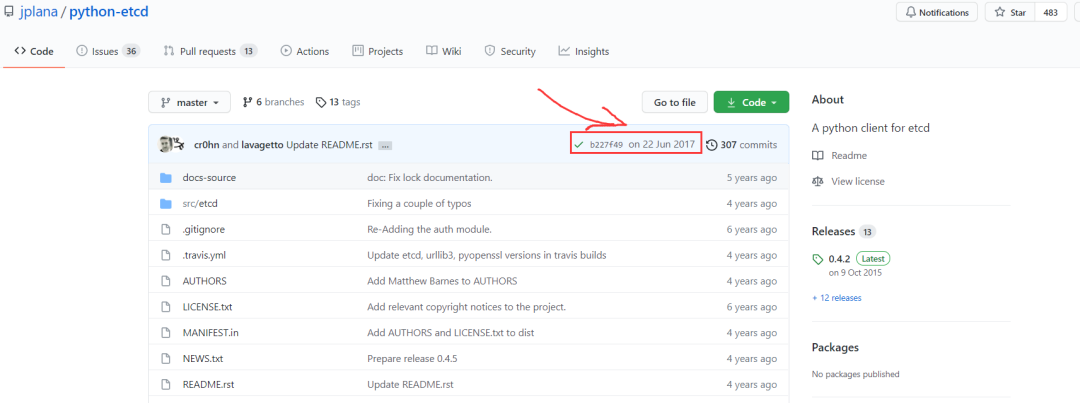
而现在早已经进入到了python-etcd3的时代。
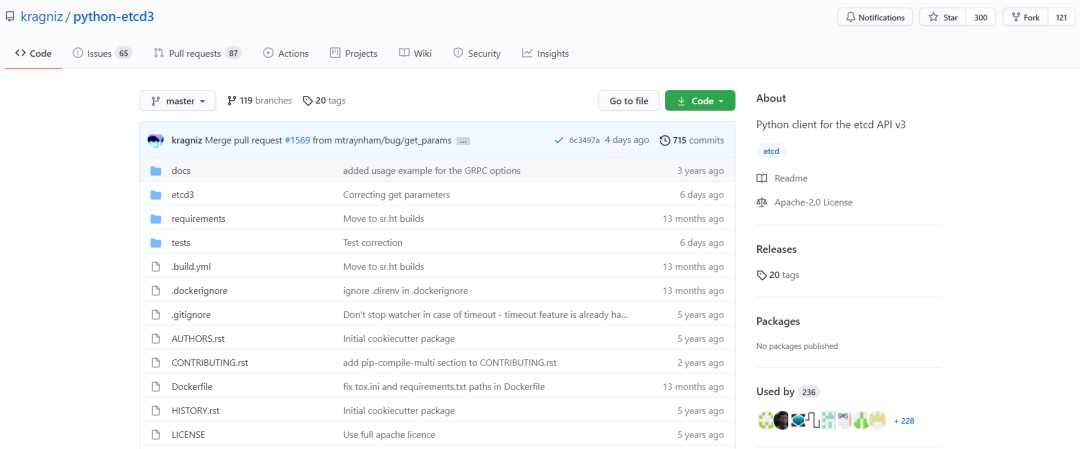
那么我们能不能直接上python-etcd3,这又是一个及其烦的事情(我劝你放弃吧),因为这玩意pip都安装不了,直接用python安装,需要一堆的依赖,我尝试了一下就放弃了。
接下来就是安装patroni,还是老方法,找个虚拟机先观察一番。
[postgres@localhost ~]$ pip3 install --user patroniCollecting patroni Using cached https://files.pythonhosted.org/packages/4c/e0/138a751d7141cfedee5e8dd98fa4e2a6d760dfa70dd9c830ad2dc754e883/patroni-2.0.2-py3-none-any.whlRequirement already satisfied: PyYAML in ./.local/lib/python3.6/site-packages (from patroni)Collecting ydiff>=1.2.0 (from patroni) Using cached https://files.pythonhosted.org/packages/1e/ed/e25e1f4fffbdfd0446f1c45504759e54676da0cde5a844d201181583fce4/ydiff-1.2.tar.gzRequirement already satisfied: urllib3!=1.21,>=1.19.1 in ./.local/lib/python3.6/site-packages (from patroni)Collecting psutil>=2.0.0 (from patroni) Using cached https://files.pythonhosted.org/packages/e1/b0/7276de53321c12981717490516b7e612364f2cb372ee8901bd4a66a000d7/psutil-5.8.0.tar.gzRequirement already satisfied: prettytable>=0.7 in /usr/local/lib/python3.6/site-packages (from patroni)Collecting python-dateutil (from patroni) Using cached https://files.pythonhosted.org/packages/d4/70/d60450c3dd48ef87586924207ae8907090de0b306af2bce5d134d78615cb/python_dateutil-2.8.1-py2.py3-none-any.whlRequirement already satisfied: click>=4.1 in ./.local/lib/python3.6/site-packages (from patroni)Requirement already satisfied: six>=1.7 in ./.local/lib/python3.6/site-packages (from patroni)Requirement already satisfied: wcwidth in /usr/local/lib/python3.6/site-packages (from prettytable>=0.7->patroni)Requirement already satisfied: importlib-metadata; python_version < "3.8" in /usr/local/lib/python3.6/site-packages (from prettytable>=0.7->patroni)Requirement already satisfied: typing-extensions>=3.6.4; python_version < "3.8" in /usr/local/lib/python3.6/site-packages (from importlib-metadata; python_version < "3.8"->prettytable>=0.7->patroni)Requirement already satisfied: zipp>=0.5 in /usr/local/lib/python3.6/site-packages (from importlib-metadata; python_version < "3.8"->prettytable>=0.7->patroni)Installing collected packages: ydiff, psutil, python-dateutil, patroni Running setup.py install for ydiff ... done Running setup.py install for psutil ... doneSuccessfully installed patroni-2.0.2 psutil-5.8.0 python-dateutil-2.8.1 ydiff-1.2
可以看到这次的依赖包更多了,你说你如何在服务器上盲目的安装,会碰无数的壁。ydiff、psutil、python-dateutil。
我当前已经安装的包如下:
[postgres@133e0e204e206 app]$ pip3.9 list Package Version--------------- -------dnspython 2.1.0pip 21.1.1psycopg2-binary 2.8.6python-etcd 0.4.5setuptools 56.0.0setuptools-scm 6.0.1urllib3 1.26.4
先安装ydiff和psutil,这两个没有依赖,比较好安装。
[postgres@133e0e204e206 ydiff-1.2]$ python3.9 setup.py install --user[postgres@133e0e204e206 psutil-5.8.0]$ python3.9 setup.py install --user[postgres@133e0e204e206 psutil-5.8.0]$ pip3.9 list Package Version--------------- -------dnspython 2.1.0pip 21.1.1psutil 5.8.0psycopg2-binary 2.8.6python-etcd 0.4.5setuptools 56.0.0setuptools-scm 6.0.1urllib3 1.26.4ydiff 1.2
然后安装python_dateutil的时候,这里需要依赖six,six>=1.5
[postgres@133e0e204e206 app]$ pip3.9 install --user python_dateutil-2.8.1-py2.py3-none-any.whl Processing ./python_dateutil-2.8.1-py2.py3-none-any.whlWARNING: Retrying (Retry(total=0, connect=None, read=None, redirect=None, status=None)) after connection broken by 'NewConnectionError('<pip._vendor.urllib3.connection.HTTPSConnection object at 0x2af5276e8e50>: Failed to establish a new connection: [Errno -2] Name or service not known')': /simple/six/ERROR: Could not find a version that satisfies the requirement six>=1.5 (from python-dateutil) (from versions: none)ERROR: No matching distribution found for six>=1.5
下载six 1.16的whl安装包,直接安装好。
[postgres@133e0e204e206 app]$ pip3.9 install --user six-1.16.0-py2.py3-none-any.whl Processing ./six-1.16.0-py2.py3-none-any.whlInstalling collected packages: sixSuccessfully installed six-1.16.0
然后再一次安装python_dateutil包。顺利搞定。
[postgres@133e0e204e206 app]$ pip3.9 install --user python_dateutil-2.8.1-py2.py3-none-any.whlProcessing ./python_dateutil-2.8.1-py2.py3-none-any.whlRequirement already satisfied: six>=1.5 in /home/postgres/.local/lib/python3.9/site-packages (from python-dateutil==2.8.1) (1.16.0)Installing collected packages: python-dateutilSuccessfully installed python-dateutil-2.8.1
最后就是安装patroni包了,最新版2.0.2。安装提示如下。
[postgres@133e0e204e206 app]$ pip3.9 install --user patroni-2.0.2-py3-none-any.whl Processing ./patroni-2.0.2-py3-none-any.whlRequirement already satisfied: urllib3!=1.21,>=1.19.1 in /home/postgres/.local/lib/python3.9/site-packages (from patroni==2.0.2) (1.26.4)Requirement already satisfied: six>=1.7 in /home/postgres/.local/lib/python3.9/site-packages (from patroni==2.0.2) (1.16.0)Requirement already satisfied: ydiff>=1.2.0 in /home/postgres/.local/lib/python3.9/site-packages (from patroni==2.0.2) (1.2)WARNING: Retrying (Retry(total=4, connect=None, read=None, redirect=None, status=None)) after connection broken by 'NewConnectionError('<pip._vendor.urllib3.connection.HTTPSConnection object at 0x2aed909cc460>: Failed to establish a new connection: [Errno -2] Name or service not known')': /simple/click/ERROR: Could not find a version that satisfies the requirement click>=4.1 (from patroni) (from versions: none)ERROR: No matching distribution found for click>=4.1
缺少依赖click。
[postgres@133e0e204e206 app]$ pip3.9 install --user click-8.0.0-py3-none-any.whl Processing ./click-8.0.0-py3-none-any.whlInstalling collected packages: clickSuccessfully installed click-8.0.0
继续安装,这次缺少的是prettytable。
[postgres@133e0e204e206 app]$ pip3.9 install --user patroni-2.0.2-py3-none-any.whl Processing ./patroni-2.0.2-py3-none-any.whlRequirement already satisfied: urllib3!=1.21,>=1.19.1 in /home/postgres/.local/lib/python3.9/site-packages (from patroni==2.0.2) (1.26.4)Requirement already satisfied: six>=1.7 in /home/postgres/.local/lib/python3.9/site-packages (from patroni==2.0.2) (1.16.0)Requirement already satisfied: click>=4.1 in /home/postgres/.local/lib/python3.9/site-packages (from patroni==2.0.2) (8.0.0)WARNING: Retrying (Retry(total=4, connect=None, read=None, redirect=None, status=None)) after connection broken by 'NewConnectionError('<pip._vendor.urllib3.connection.HTTPSConnection object at 0x2b4b4bdcf460>: Failed to establish a new connection: [Errno -2] Name or service not known')': /simple/prettytable/WARNING: Retrying (Retry(total=3, connect=None, read=None, redirect=None, status=None)) after connection broken by 'NewConnectionError('<pip._vendor.urllib3.connection.HTTPSConnection object at 0x2b4b4bdcf190>: Failed to establish a new connection: [Errno -2] ERROR: Could not find a version that satisfies the requirement prettytable>=0.7 (from patroni) (from versions: none)ERROR: No matching distribution found for prettytable>=0.7
继续装prettytable又需要wcwidth。这一路下来就和俄罗斯套娃一样环环套。
[postgres@133e0e204e206 app]$ pip3.9 install --user prettytable-2.1.0-py3-none-any.whl Processing ./prettytable-2.1.0-py3-none-any.whlWARNING: Retrying (Retry(total=4, connect=None, read=None, redirect=None, status=None)) after connection broken by 'NewConnectionError('<pip._vendor.urllib3.connection.HTTPSConnection object at 0x2aadcfc9d4c0>: Failed to establish a new connection: [Errno -2] Name or service not known')': /simple/wcwidth/ERROR: Could not find a version that satisfies the requirement wcwidth (from prettytable) (from versions: none)ERROR: No matching distribution found for wcwidth
安装上了wcwidth。
[postgres@133e0e204e206 app]$ pip3.9 install --user wcwidth-0.2.5-py2.py3-none-any.whl Processing ./wcwidth-0.2.5-py2.py3-none-any.whlInstalling collected packages: wcwidthSuccessfully installed wcwidth-0.2.5
然后就可以顺利安装prettytable
[postgres@133e0e204e206 app]$ pip3.9 install --user prettytable-2.1.0-py3-none-any.whl Processing ./prettytable-2.1.0-py3-none-any.whlRequirement already satisfied: wcwidth in /home/postgres/.local/lib/python3.9/site-packages (from prettytable==2.1.0) (0.2.5)Installing collected packages: prettytableSuccessfully installed prettytable-2.1.0
再次安装patroni,还需要PyYAML
[postgres@133e0e204e206 app]$ pip3.9 install --user patroni-2.0.2-py3-none-any.whl Processing ./patroni-2.0.2-py3-none-any.whlRequirement already satisfied: six>=1.7 in /home/postgres/.local/lib/python3.9/site-packages (from patroni==2.0.2) (1.16.0)Requirement already satisfied: click>=4.1 in /home/postgres/.local/lib/python3.9/site-packages (from patroni==2.0.2) (8.0.0)Requirement already satisfied: urllib3!=1.21,>=1.19.1 in /home/postgres/.local/lib/python3.9/site-packages (from patroni==2.0.2) (1.26.4)'NewConnectionError('<pip._vendor.urllib3.connection.HTTPSConnection object at 0x2b8723d3da90>: Failed to establish a new connection: [Errno -2] Name or service not known')': /simple/pyyaml/ERROR: Could not find a version that satisfies the requirement PyYAML (from patroni) (from versions: none)ERROR: No matching distribution found for PyYAML
安装PyYAML
[postgres@133e0e204e206 app]$ pip3.9 install --user PyYAML-5.4.1-cp39-cp39-manylinux1_x86_64.whl Processing ./PyYAML-5.4.1-cp39-cp39-manylinux1_x86_64.whlInstalling collected packages: PyYAMLSuccessfully installed PyYAML-5.4.1
这次终于安装成功了,而且说实话还挺完美的。所有的组件都显示Requirement already satisfied。
[postgres@133e0e204e206 app]$ pip3.9 install --user patroni-2.0.2-py3-none-any.whl Processing ./patroni-2.0.2-py3-none-any.whlRequirement already satisfied: psutil>=2.0.0 in /home/postgres/.local/lib/python3.9/site-packages/psutil-5.8.0-py3.9-linux-x86_64.egg (from patroni==2.0.2) (5.8.0)Requirement already satisfied: click>=4.1 in /home/postgres/.local/lib/python3.9/site-packages (from patroni==2.0.2) (8.0.0)Requirement already satisfied: urllib3!=1.21,>=1.19.1 in /home/postgres/.local/lib/python3.9/site-packages (from patroni==2.0.2) (1.26.4)Requirement already satisfied: ydiff>=1.2.0 in /home/postgres/.local/lib/python3.9/site-packages (from patroni==2.0.2) (1.2)Requirement already satisfied: prettytable>=0.7 in /home/postgres/.local/lib/python3.9/site-packages (from patroni==2.0.2) (2.1.0)Requirement already satisfied: PyYAML in /home/postgres/.local/lib/python3.9/site-packages (from patroni==2.0.2) (5.4.1)Requirement already satisfied: python-dateutil in /home/postgres/.local/lib/python3.9/site-packages (from patroni==2.0.2) (2.8.1)Requirement already satisfied: six>=1.7 in /home/postgres/.local/lib/python3.9/site-packages (from patroni==2.0.2) (1.16.0)Requirement already satisfied: wcwidth in /home/postgres/.local/lib/python3.9/site-packages (from prettytable>=0.7->patroni==2.0.2) (0.2.5)Installing collected packages: patroniSuccessfully installed patroni-2.0.2
感觉手工安装的比虚拟机安装的还要好那么一点点。最后整个需要的包如下:
[postgres@133e0e204e206 app]$ pip3.9 listPackage Version--------------- -------click 8.0.0dnspython 2.1.0patroni 2.0.2pip 21.1.1prettytable 2.1.0psutil 5.8.0psycopg2-binary 2.8.6python-dateutil 2.8.1python-etcd 0.4.5PyYAML 5.4.1setuptools 56.0.0setuptools-scm 6.0.1six 1.16.0urllib3 1.26.4wcwidth 0.2.5ydiff 1.2
后记
Python3的依赖环境就安装到这儿。有点麻烦,但是感觉成果还可以。总结下来安装patroni。需要安装的依赖如下:
--python3
--psycopg2_binary
--python-etcd
依赖urllib3, dnspython --patroni
安装python-dateutil,依赖six
安装ydiff、psutil
安装prettytable,依赖wcwidth,
安装PyYAML
安装click
虽然有点儿折腾,但是搞一遍顺了,基本上以后在安装这些也能很快的玩转了。
下载whl包的网站:
https://pypi.org/
