



简介
官网:https://www.centos.org/centos-stream/
CentOS项目今后将只专注于CentOS Stream,作为红帽企业Linux的上游/开发分支。发行方鼓励CentOS 8用户开始向CentOS Stream 8过渡。同时,红帽还表示,英特尔将在CentOS Stream上与他们和社区合作。红帽还谈到Facebook在他们的数据中心使用CentOS Stream的衍生产品。
CentOS Stream并不是CentOS Linux的替代品;相反,它是一个自然的、不可避免的下一步,从而实现项目的目标,即进一步推进企业Linux创新。
Centos Stream 是 Centos 8 之后一个滚动发布的 Linux 发行版。
在2021年年底,Centos 8 将会停止维护,届时 Centos Stream 将作为RHEL的上游分支进行持续更新。
在红帽开源开发模式中,红帽在发布红帽企业 Linux 新版本前,会先在 CentOS Stream 上开发红帽企业 Linux 源代码,使 CentOS Stream 成为红帽企业 Linux 未来版本的预览。
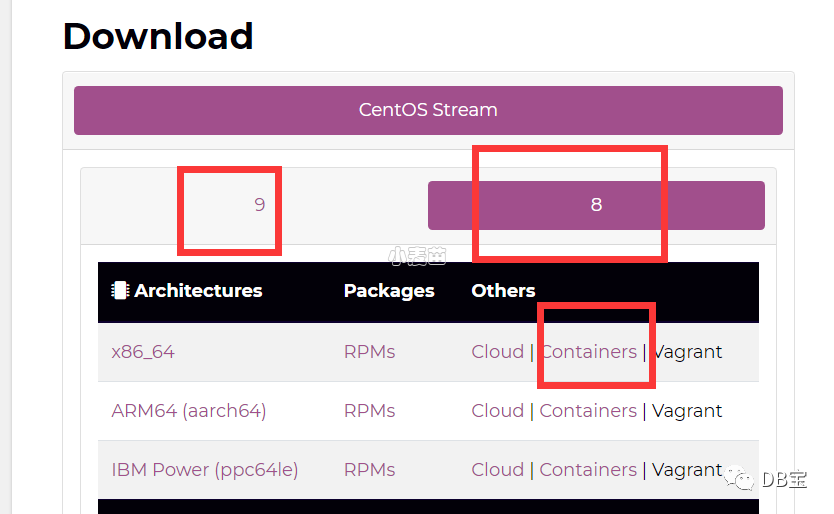
因此我们在学习centos系统的时候要下载:CentOS Stream
阿里云提供的镜像地址在国内,下载速度上肯定要比国外的地址快很多。
阿里云镜像地址会定期同步官网镜像,能够保持一个比较新的镜像。
阿里云镜像地址足够安全,镜像里面不会有一些非法脚本。相对于不不知名的第三方小网站对比,你不知道镜像里面会不会放一些后门啥的。
阿里云镜像站官网:https://developer.aliyun.com/mirror/
阿里云centos Stream镜像地址:https://mirrors.aliyun.com/cent
https://mirrors.aliyun.com/centos-stream/9-stream/
https://mirrors.aliyun.com/centos/8-stream/
下载的时候注意下8-stream和9-stream的路径不同。
CentOS Linux 8转换到CentOS Stream 8
可以将8.3及其以上版本的CentOS Linux 8转换到CentOS Stream 8:
1dnf --disablerepo '*' --enablerepo extras swap centos-linux-repos centos-stream-repos
2dnf distro-sync
参考:https://www.cnblogs.com/wswind/p/14109290.html
docker版本
https://quay.io/repository/centos/centos?tab=tags
1docker pull quay.io/centos/centos:stream8
2docker pull quay.io/centos/centos:stream9
3
4
5
6
7docker run -itd --name lhrcentosstream8 -h lhrcentosstream8 --privileged=true quay.io/centos/centos:stream8 /usr/sbin/init
8docker run -itd --name lhrcentosstream9 -h lhrcentosstream9 --privileged=true quay.io/centos/centos:stream9 sh
yum源
centos 8 默认是会读取centos.org的mirrorlist的,所以一般来说是不需要配置镜像的。
如果你的网络访问mirrorlist有问题,才需要另外配置
相关镜像配置,请参考各镜像站的相关帮助
https://developer.aliyun.com/mirror/centos
https://mirrors.tuna.tsinghua.edu.cn/help/centos/
http://mirrors.ustc.edu.cn/help/centos.html
https://mirrors.huaweicloud.com/
本教程中mirrors.aliyun.com地址也可替换为其他镜像源地址,一般来说区别不大,如:mirrors.tuna.tsinghua.edu.cn repo.huaweicloud.com
官方教程如下,注意此处下载的不是Stream版本的repo
1curl -o /etc/yum.repos.d/CentOS-Base.repo http://mirrors.aliyun.com/repo/Centos-8.repo
2sed -i -e '/mirrors.cloud.aliyuncs.com/d' -e '/mirrors.aliyuncs.com/d' /etc/yum.repos.d/CentOS-Base.repo
需要注意的此处下载的Base.repo中附带了AppStream等其他源地址,而CentOS 8原版是分拆为多个文件分别管理的。
阿里云还新增了PowerTools、centosplus等仓储地址。并将本地gpgkey路径改为了网络地址https://mirrors.aliyun.com/centos/RPM-GPG-KEY-CentOS-Official
CentOS 8 Stream base源
 1# `sed`的 `-i.bak`参数会自动备份所替换的文件,可放心使用。
 2# 出现问题可通过 `rename -- .bak '' *.bak` 进行批量还原
 3
 4sudo sed -i.bak \
 5-e 's|^mirrorlist=|#mirrorlist=|' \
 6-e 's|^#baseurl=|baseurl=|' \
 7-e 's|http://mirror.centos.org|https://mirrors.aliyun.com|' \
 8/etc/yum.repos.d/CentOS-*.repo
 9
10sudo dnf makecache
CentOS 8 Stream epel源
https://developer.aliyun.com/mirror/epel
 1dnf install epel-release epel-next-release -y
 2
 3
 4sudo sed -i.bak \
 5-e 's|^metalink|#metalink|' \
 6-e 's|^#baseurl=|baseurl=|' \
 7-e 's|download.example/pub|mirrors.aliyun.com|' \
 8/etc/yum.repos.d/epel*.repo
 9
10
11
12sudo dnf makecache
CentOS 9 stream 启用epel源
 1# centos 9 基础源
 2sed -i 's|metalink|#metalink|g' /etc/yum.repos.d/*.repo
 3sed -i '/name=CentOS Stream $releasever - BaseOS/a baseurl=https://mirrors.aliyun.com/centos-stream/$stream/BaseOS/$basearch/os/' /etc/yum.repos.d/*.repo
 4sed -i '/name=CentOS Stream $releasever - AppStream/a baseurl=https://mirrors.aliyun.com/centos-stream/$stream/AppStream/$basearch/os/' /etc/yum.repos.d/*.repo
 5sed -i '/name=CentOS Stream $releasever - Extras packages/a baseurl=https://mirrors.aliyun.com/centos-stream/SIGs/$stream/extras/$basearch/extras-common/' /etc/yum.repos.d/*.repo
 6sed -i '/name=CentOS Stream $releasever - CRB/a baseurl=https://mirrors.aliyun.com/centos-stream/9-stream/CRB/x86_64/os/' /etc/yum.repos.d/*.repo
 7
 8
 9
10# centos 9 stream 版本
11
12
13dnf install 'dnf-command(config-manager)'
14dnf config-manager --set-enabled crb
15dnf install epel-release epel-next-release -y
16
17sudo dnf makecache
18
19
20-- 或
21sudo dnf install https://dl.fedoraproject.org/pub/epel/epel-release-latest-9.noarch.rpm
22sudo dnf install https://dl.fedoraproject.org/pub/epel/epel-next-release-latest-9.noarch.rpm
23
24
25
26sudo sed -i.bak \
27-e 's|^metalink|#metalink|' \
28-e 's|^#baseurl=|baseurl=|' \
29-e 's|download.example/pub|mirrors.aliyun.com|' \
30/etc/yum.repos.d/epel*.repo
31
32
33
34sudo dnf makecache
35
36
37
38# RHEL 9.0
39subscription-manager repos --enable codeready-builder-for-rhel-9-$(arch)-rpms
40dnf install https://dl.fedoraproject.org/pub/epel/epel-release-latest-9.noarch.rpm
41
42
43# AlmaLinux 9
44dnf config-manager --set-enabled crb
45dnf install epel-release
46
配置中科大源:
  1[baseos]
  2name=CentOS Stream $releasever - BaseOS
  3#metalink=https://mirrors.centos.org/metalink?repo=centos-baseos-$stream&arch=$basearch&protocol=https,http
  4# 配置为中科大源
  5baseurl=https://mirrors.ustc.edu.cn/centos-stream/9-stream/BaseOS/x86_64/os/
  6gpgkey=file:///etc/pki/rpm-gpg/RPM-GPG-KEY-centosofficial
  7gpgcheck=1
  8repo_gpgcheck=0
  9metadata_expire=6h
 10countme=1
 11enabled=1
 12
 13[baseos-debuginfo]
 14name=CentOS Stream $releasever - BaseOS - Debug
 15#metalink=https://mirrors.centos.org/metalink?repo=centos-baseos-debug-$stream&arch=$basearch&protocol=https,http
 16# 配置为中科大源
 17baseurl=https://mirrors.ustc.edu.cn/centos-stream/9-stream/BaseOS/x86_64/debug/tree/
 18gpgkey=file:///etc/pki/rpm-gpg/RPM-GPG-KEY-centosofficial
 19gpgcheck=1
 20repo_gpgcheck=0
 21metadata_expire=6h
 22enabled=0
 23
 24[baseos-source]
 25name=CentOS Stream $releasever - BaseOS - Source
 26#metalink=https://mirrors.centos.org/metalink?repo=centos-baseos-source-$stream&arch=source&protocol=https,http
 27# 配置为中科大源
 28baseurl=https://mirrors.ustc.edu.cn/centos-stream/9-stream/BaseOS/source/tree/
 29gpgkey=file:///etc/pki/rpm-gpg/RPM-GPG-KEY-centosofficial
 30gpgcheck=1
 31repo_gpgcheck=0
 32metadata_expire=6h
 33enabled=0
 34
 35[appstream]
 36name=CentOS Stream $releasever - AppStream
 37#metalink=https://mirrors.centos.org/metalink?repo=centos-appstream-$stream&arch=$basearch&protocol=https,http
 38# 配置为中科大源
 39baseurl=https://mirrors.ustc.edu.cn/centos-stream/9-stream/AppStream/x86_64/os/
 40gpgkey=file:///etc/pki/rpm-gpg/RPM-GPG-KEY-centosofficial
 41gpgcheck=1
 42repo_gpgcheck=0
 43metadata_expire=6h
 44countme=1
 45enabled=1
 46
 47[appstream-debuginfo]
 48name=CentOS Stream $releasever - AppStream - Debug
 49#metalink=https://mirrors.centos.org/metalink?repo=centos-appstream-debug-$stream&arch=$basearch&protocol=https,http
 50# 配置为中科大源
 51baseurl=https://mirrors.ustc.edu.cn/centos-stream/9-stream/AppStream/x86_64/debug/tree/
 52gpgkey=file:///etc/pki/rpm-gpg/RPM-GPG-KEY-centosofficial
 53gpgcheck=1
 54repo_gpgcheck=0
 55metadata_expire=6h
 56enabled=0
 57
 58[appstream-source]
 59name=CentOS Stream $releasever - AppStream - Source
 60#metalink=https://mirrors.centos.org/metalink?repo=centos-appstream-source-$stream&arch=source&protocol=https,http
 61# 配置为中科大源
 62baseurl=https://mirrors.ustc.edu.cn/centos-stream/9-stream/AppStream/source/tree/
 63gpgkey=file:///etc/pki/rpm-gpg/RPM-GPG-KEY-centosofficial
 64gpgcheck=1
 65repo_gpgcheck=0
 66metadata_expire=6h
 67enabled=0
 68
 69[crb]
 70name=CentOS Stream $releasever - CRB
 71#metalink=https://mirrors.centos.org/metalink?repo=centos-crb-$stream&arch=$basearch&protocol=https,http
 72# 配置为中科大源
 73baseurl=https://mirrors.ustc.edu.cn/centos-stream/9-stream/CRB/x86_64/os/
 74gpgkey=file:///etc/pki/rpm-gpg/RPM-GPG-KEY-centosofficial
 75gpgcheck=1
 76repo_gpgcheck=0
 77metadata_expire=6h
 78countme=1
 79enabled=0
 80
 81[crb-debuginfo]
 82name=CentOS Stream $releasever - CRB - Debug
 83#metalink=https://mirrors.centos.org/metalink?repo=centos-crb-debug-$stream&arch=$basearch&protocol=https,http
 84# 配置为中科大源
 85baseurl=https://mirrors.ustc.edu.cn/centos-stream/9-stream/CRB/x86_64/debug/tree/
 86gpgkey=file:///etc/pki/rpm-gpg/RPM-GPG-KEY-centosofficial
 87gpgcheck=1
 88repo_gpgcheck=0
 89metadata_expire=6h
 90enabled=0
 91
 92[crb-source]
 93name=CentOS Stream $releasever - CRB - Source
 94#metalink=https://mirrors.centos.org/metalink?repo=centos-crb-source-$stream&arch=source&protocol=https,http
 95# 配置为中科大源
 96baseurl=https://mirrors.ustc.edu.cn/centos-stream/9-stream/CRB/source/tree/
 97gpgkey=file:///etc/pki/rpm-gpg/RPM-GPG-KEY-centosofficial
 98gpgcheck=1
 99repo_gpgcheck=0
100metadata_expire=6h
101enabled=0
redhat 9.0 创建本地yum源
 11.iso文件方式
 2
 3$ sudo mkdir /var/repo
 4$ sudo mount -o loop rhel-baseos-9.0-x86_64-dvd.iso /var/repo/
 5
 62.DVD光驱方式
 7
 8$ sudo mount /dev/sr0 /var/repo/
 9
103.编写repo
11
12$ sudo vi /etc/yum.repos.d/rhel9-local.repo
13[Local-BaseOS]
14name=Red Hat Enterprise Linux 9 - BaseOS
15metadata_expire=-1
16gpgcheck=1
17enabled=1
18baseurl=file:///var/repo//BaseOS/
19gpgkey=file:///etc/pki/rpm-gpg/RPM-GPG-KEY-redhat-release
20[Local-AppStream]
21name=Red Hat Enterprise Linux 9 - AppStream
22metadata_expire=-1
23gpgcheck=1
24enabled=1
25baseurl=file:///var/repo//AppStream/
26gpgkey=file:///etc/pki/rpm-gpg/RPM-GPG-KEY-redhat-release
27
284.清理缓存
29
30$ sudo dnf clean all
31$ sudo subscription-manager clean
32
33警告信息 This system is not registered with an entitlement(系统没有注册权限)。为了抑制这个警告信息,编辑文件 /etc/yum/pluginconf.d/subscription-manager.conf,将参数 enabled=1 改为 enabled=0
34
35$ sudo vi /etc/yum/pluginconf.d/subscription-manager.conf
36
37[main]
38enabled=0
39
405.查看仓库
41
42$ sudo dnf repolist
43
446.安装测试
45
46$ sudo dnf install nfs-utils  lrzsz
dnf fastest mirror
如果你不希望像上文那样固定配置某一个镜像地址,也可以使用fastest mirror功能,由dnf自动搜索使用最快的镜像地址。
centos8的dnf中已集成了此功能,在centos7的yum中这是需要单独安装插件使用的。
可以先ping一下mirrorlist.centos.org看能否ping通:ping mirrorlist.centos.org
1#修改配置
2echo 'fastestmirror=True' >> /etc/dnf/dnf.conf
3
4#使用
5sudo dnf makecache
CentOS镜像配置默认地址
记录一下8 Stream修改前的BaseOS.repo原始地址
1mirrorlist=http://mirrorlist.centos.org/?release=$stream&arch=$basearch&repo=BaseOS&infra=$infra
2#baseurl=http://mirror.centos.org/$contentdir/$stream/BaseOS/$basearch/os/
docker-ce
centos 8 安装docker及兼容性问题处理,请见另一篇文章:https://www.cnblogs.com/wswind/p/centos-8-install-docker.html
CentOS Stream
CentOS 8 宣布21年底停止支持,升级至CentOS Stream:https://www.cnblogs.com/wswind/p/14109290.html
可替代CentOS的发行版
基于RHEL的其他分支版本汇总:https://www.cnblogs.com/wswind/p/14630346.html
参考
https://zhuanlan.zhihu.com/p/473659762
https://www.cnblogs.com/wswind/p/11751829.html
