



Database In-Memory feature works in an Oracle Active Data Guard environment.
dataguard 支持内存列存储但是又限制条件,仅支持一体机和云平台。
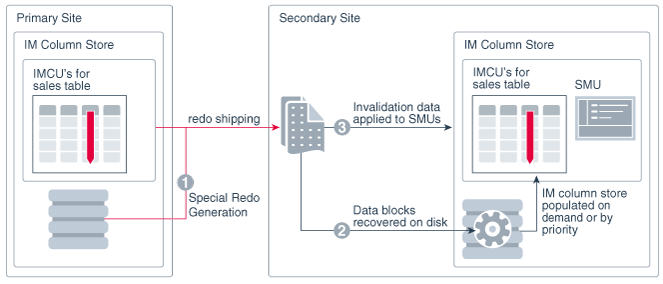
Starting in Oracle Database 12c Release 2 (12.2.0.1), Oracle Database In-Memory is supported in an Oracle Active Data Guard environment using Oracle Engineered Systems or Oracle Cloud Platform as a Service
#前提条件
Prerequisites
You must meet the following requirements:
The standby database must run on an Oracle Engineered System or in Oracle Cloud Platform as a Service.
The
COMPATIBLEinitialization parameter must be12.2.0or greater.To populate different objects in each database, configure the appropriate services.
#配置方式
To configure IM column stores in an Oracle Active Data Guard environment:
Set the
INMEMORY_SIZEinitialization parameter on the database instances that will contain an IM column store.Follow these guidelines:
To configure IM column stores on the primary and standby databases, set
INMEMORY_SIZEon both database instances.To configure IM column stores on the standby database only, set
INMEMORY_SIZEon the standby database instance.
Ensure that the
INMEMORY_ADG_ENABLEDinitialization parameter is set toTRUE(default) on the standby database instance.- Optionally, if you want to enable Multi-Instance Redo Apply with the IM column store, set the
ENABLE_IMC_WITH_MIRAinitialization parameter toTRUE. On the primary database, execute DDL statements with the
INMEMORYattribute.The task depends on where the IM column stores exist, and in which IM column stores you want the objects to be populated:
To populate an object on the standby database only, then set the
INMEMORYattribute with aDISTRIBUTE FOR SERVICEclause that specifies a valid service running only on the standby database.During redo transfer, the standby database receives this DDL statement from the primary database. Population occurs on the standby database in the normal way. For example, if
saleshas theINMEMORYattribute and priorityNONE, then the table must undergo a full scan for population to occur.To populate an object on the primary database only, then set the
INMEMORYattribute with aDISTRIBUTE FOR SERVICEclause that specifies a valid service running only on the primary database.To populate an object on both primary and standby databases, then perform one of the following actions:
Do not set the
DISTRIBUTE FOR SERVICEclause.Set
DISTRIBUTE FOR SERVICE servicename, whereservicenameis a service that is running on both the primary and standby databases.Set
DISTRIBUTE FOR SERVICE DEFAULTso that the object is eligible for population on all instances specified with thePARALLEL_INSTANCE_GROUPinitialization parameter.Set
DISTRIBUTE FOR SERVICE ALLso that the object is eligible for population on all instances, regardless of the setting of thePARALLEL_INSTANCE_GROUPinitialization parameter.
Population of an object occurs on the primary or standby database according to the priority setting. For example, if
saleson the standby database has priorityNONE, then a query of the standby database that triggers a full scan ofsalespopulates this table in the standby IM column store.
参考地址:
