前段时间学习了Redis,一直在忙着工作和一些其他的事情,这两天有空了,就把这学习到的技术分享出来给大家,谢谢
Redis是什么?
Redis的特点
Redis使用场景
Redis数据类型
一、.Redis是什么?
Redis是一个完全免费开源的,基于内存的高性能的key-value存储系统,可以用作数据库、缓存和消息中间件。支持多种类型的数据结构.
Redis内置数据持久化、LRU驱动事件、事物、主从复制、哨兵机制、集群、自动分区、lua脚本提供高可用性..
Redis全称为:Remote Dictionary Server (远程数据服务)
Redis是一种非关系型数据库
二、Redis的特点
Redis以内存作为数据存储介质,读写数据的效率极高。速度快:使用标准c语言编写,所有数据在内存存储,读速度:110000次/s 写速度:81000次/s
Redis跟memcache不同的是,储存在Redis中的数据是持久化的,断电或重启,数据也不会丢失。
Redis的存储分为内存存储、磁盘存储和log文件。
Redis可以从磁盘重新将数据加载到内存中,也可以通过配置文件对其进行配置,因此,redis才能实现持久化。
Redis支持主从模式,可以配置集群,更利于支撑大型的项目。
Redis是单线程:一次只能执行一条命令,拒绝长命令(因为Redis基于内存,不牵扯磁盘IO操作限制)
三、Redis应用场景
缓存: 配合关系型数据库做高速缓存(string),会话缓存(最常用)
消息队列
活动排行榜,计数器: 用户点赞,评论数,投票,网站访问量,点击率等(zset)
发布,订阅消息(消息通知)
商品列表,评论列表
分布式锁: 分布式环境下,访问共享资源(string)
分布式session: 分布式环境下,需要session共享(string)
用户信息,发布文章信息等(hash)
朋友圈,微博时间线,自动补全联系人(list)
抽奖系统,给用户添加标签,给标签添加用户、共同关注
GEO(计算两地距离,外卖小哥距你还有多少米)
四、Redis数据类型(这里的案例都是用C#控制台程序做的,不是特别全面)
Redis有五种数据类型(String,Hash,Set,ZSet,List )
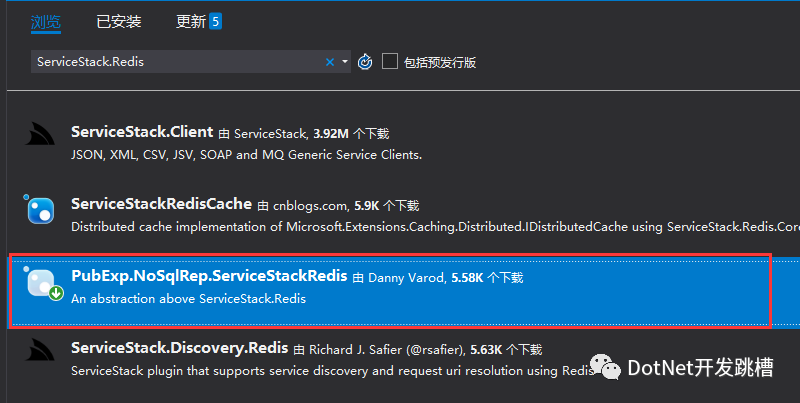
首先搭建一个控制台应用程序,添加应用(Nuget里面去找)如图:
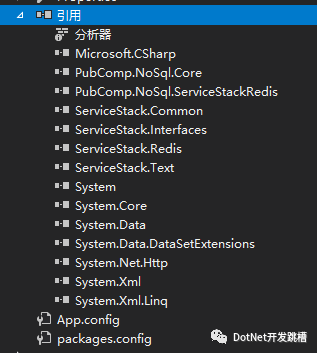
就会得到相应的引用
1.String

/// <summary>
/// string
/// </summary>
public static void TestString()
{
    using (RedisClient client = new RedisClient("127.0.0.1", 6379))
    {
        //清空Redis里面的所有缓存
        client.FlushAll();
        //存储
        client.Set<string>("name", "admin");
        client.Set("password", "123456");
        //读取
        string name = client.Get<string>("name");
        string pwd = client.Get<string>("password");
        Console.WriteLine(name);
        Console.WriteLine(pwd);
    }
}
//结果如图
2.Hash
/// <summary>
/// Hash
/// </summary>
public static void TestHash()
{
    using (RedisClient client = new RedisClient("127.0.0.1", 6379))
    {
        //清空Redis里面的所有缓存
        client.FlushAll();
        //配置数据
        Dictionary<string, string> dictionary = new Dictionary<string, string>();
        dictionary.Add("a", "1");
        dictionary.Add("b", "2");
        dictionary.Add("c", "3");
        dictionary.Add("d", "4");
        dictionary.Add("e", "5");
        //缓存
        client.SetRangeInHash("dictionary", dictionary);
        //追加
        client.SetEntryInHash("dictionary", "666", "fgh");
        //获取存入的数据
        Dictionary<string, string> hashData = client.GetAllEntriesFromHash("dictionary");

        foreach (var item in hashData)
        {
            Console.WriteLine($"Key是:{item.Key}------Vaule值是:{item.Value}");
        }
    }
}
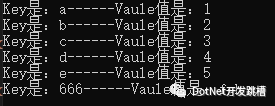
//结果如图
3.Set
/// <summary>
/// Set
/// </summary>
public static void TestSet()
{
    using (RedisClient client = new RedisClient("127.0.0.1", 6379))
    {
        //清空Redis里面的所有缓存
        client.FlushAll();
        client.AddItemToSet("微信A", "好友A");
        client.AddItemToSet("微信A", "好友B");
        client.AddItemToSet("微信A", "好友C");
        client.AddItemToSet("微信A", "好友D");
        client.AddItemToSet("微信A", "好友2");

        client.AddItemToSet("微信B", "好友1");
        client.AddItemToSet("微信B", "好友A");
        client.AddItemToSet("微信B", "好友D");
        client.AddItemToSet("微信B", "好友F");
        client.AddItemToSet("微信B", "好友G");
        //获取交集(获取相同的好友)
        var setunion = client.GetIntersectFromSets("微信A", "微信B");
        Console.WriteLine("微信A和微信B的共同好友为:");
        foreach (var item in setunion)
        {
            Console.WriteLine(item);
        }
    }
}
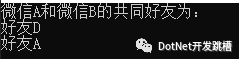
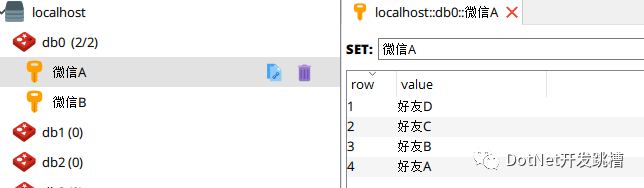
//结果为


//这是缓存客户端看到的缓存内容


 4.Zset
 /// <summary>
 /// Zset
 /// </summary>
 public static void TestZSet()
 {
     using (RedisClient client = new RedisClient("127.0.0.1", 6379))
     {
         //清空Redis里面的所有缓存
         client.FlushAll();
         client.AddItemToSortedSet("主播安妮", "粉丝1", 50);
         client.AddItemToSortedSet("主播安妮", "粉丝2", 20);
         client.AddItemToSortedSet("主播安妮", "粉丝3", 68);
         client.AddItemToSortedSet("主播安妮", "粉丝4", 31);
         client.IncrementItemInSortedSet("主播安妮", "粉丝4", new Random().Next(200, 500));
         var TopList = client.GetAllItemsFromSortedSetDesc("主播安妮");
         Console.WriteLine("刷礼物排行榜为");
         foreach (var item in TopList)
         {
             Console.WriteLine(item);
         }
     }
 }
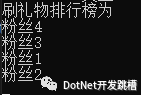
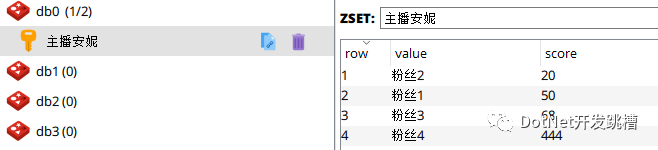
//结果为
5.List
/// <summary>
/// List
/// </summary>
public static void TestList()
{
    using (RedisClient client = new RedisClient("127.0.0.1", 6379))
    {
        //清空Redis里面的所有缓存
        redisClient.FlushAll();
        //队(在前面加入)
        client.EnqueueItemOnList("QueueList", "打印任务1");
        client.EnqueueItemOnList("QueueList", "打印任务2");
        client.EnqueueItemOnList("QueueList", "打印任务3");
        client.EnqueueItemOnList("QueueList", "打印任务4");
        //获取QueueList缓存个数
        long q = client.GetListCount("QueueList");
        for (int i = 0; i < q; i++)
        {
            //【先进先出】取值的时候先取 “入栈操作1-->2-->3-->4”
            Console.WriteLine("QueueList出队值:{0}", client.DequeueItemFromList("QueueList"));
        }

        Console.WriteLine("---------------------------------------------------------------");

        //栈(在后面加入)
        client.PushItemToList("StackList", "入栈操作1");
        client.PushItemToList("StackList", "入栈操作2");
        client.PushItemToList("StackList", "入栈操作3");
        client.PushItemToList("StackList", "入栈操作4");
        long p = client.GetListCount("StackList");
        for (int i = 0; i < p; i++)
        {
            //【后进先出】取值的时候先取 “入栈操作4-->3-->2-->1”
            Console.WriteLine("StackList出栈值:{0}", client.PopItemFromList("StackList"));
        }
    }
}
//结果
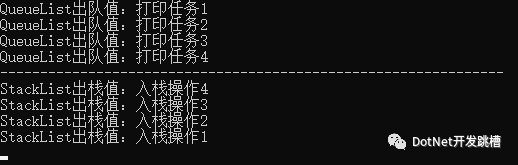
//这个比较复杂一点,需要结合输出值对应着看
出处:
https://www.cnblogs.com/loushengjie/archive/2020/08/04/13434642.html
版权申明:本文来源于网友收集或网友提供,如果有侵权,请转告版主或者留言,本公众号立即删除。