Redis是一款开源的、高性能的键-值存储(key-value store)。它常被称作是一款数据结构服务器(data structure server)。Redis的键值可以包括字符串(strings)、哈希(hashes)、列表(lists)、集合(sets)和 有序集合(sorted sets)等数据类型。 对于这些数据类型,你可以执行原子操作。例如:对字符串进行附加操作(append);递增哈希中的值;向列表中增加元素;计算集合的交集、并集与差集 等。
为了获得优异的性能,Redis采用了内存中(in-memory)数据集(dataset)的方式。根据使用场景的不同,你可以每隔一段时间将数据集转存到磁盘上来持久化数据,或者在日志尾部追加每一条操作命令。
Redis同样支持主从复制(master-slave replication),并且具有非常快速的非阻塞首次同步(non-blocking first synchronization)、网络断开自动重连等功能。同时Redis还具有其它一些特性,其中包括简单的check-and-set机制、 pub/sub和配置设置等,以便使得Redis能够表现得更像缓存(cache)。
Redis还提供了丰富的客户端,以便支持现阶段流行的大多数编程语言。详细的支持列表可以参看Redis官方文档:http://redis.io clients。Redis自身使用ANSI C来编写,并且能够在不产生外部依赖(external dependencies)的情况下运行在大多数POSIX系统上,例如:Linux、*BSD、OS X和Solaris等。
Redis 由四个可执行文件:redis-benchmark、redis-cli、redis-server、redis-stat 这四个文件,加上一个redis.conf就构成了整个redis的最终可用包。它们的作用如下:
redis-server:Redis服务器的daemon启动程序
redis-cli:Redis命令行操作工具。当然,你也可以用telnet根据其纯文本协议来操作
redis-benchmark:Redis性能测试工具,测试Redis在你的系统及你的配置下的读写性能
redis-stat:Redis状态检测工具,可以检测Redis当前状态参数及延迟状况
现在就可以启动redis了,redis只有一个启动参数,就是他的配置文件路径。
首选,你先得开启redis-server,否则无法连接服务:
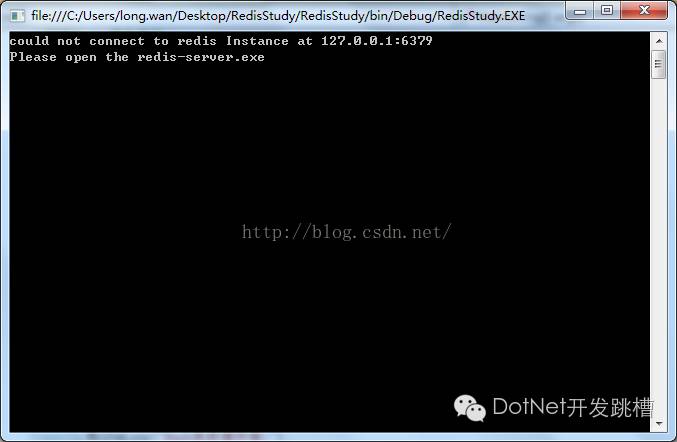
打开redis-server:
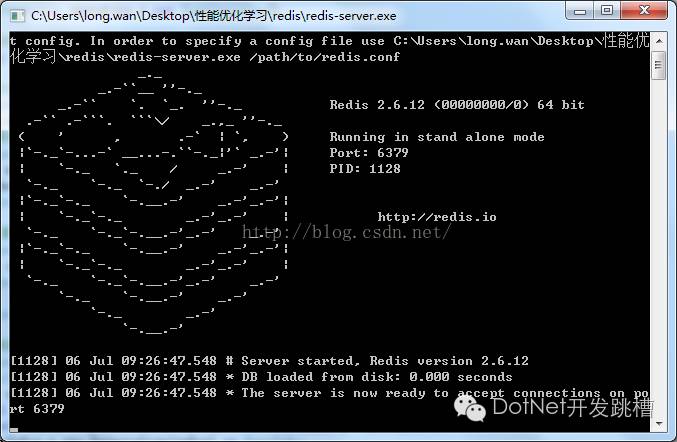
接下来你就可以调用Redis的属性来进行数据的存储及获取:

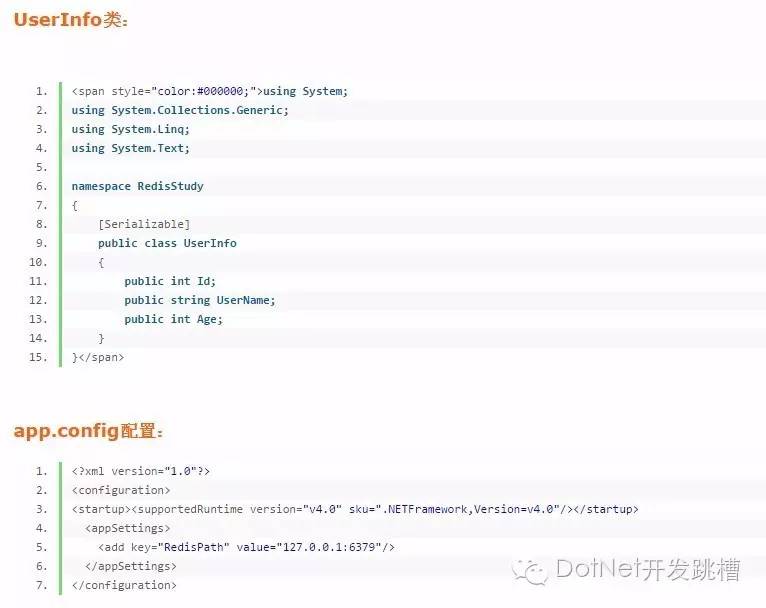
关键性代码:
using System;
using System.Collections.Generic;
using System.Linq;
using System.Text;
using ServiceStack.Redis;
using ServiceStack.Redis.Support;
namespace RedisStudy
{
class Program
{
static void Main(string[] args)
{
try
{
获取Redis操作接口
IRedisClient Redis = RedisManager.GetClient();
//Hash表操作
HashOperator operators = new HashOperator();
//移除某个缓存数据
bool isTrue = Redis.Remove("additemtolist");
//将字符串列表添加到redis
List<string> storeMembers = new List<string>() { "韩梅梅", "李雷", "露西" };
storeMembers.ForEach(x => Redis.AddItemToList("additemtolist", x));
//得到指定的key所对应的value集合
Console.WriteLine("得到指定的key所对应的value集合:");
var members = Redis.GetAllItemsFromList("additemtolist");
members.ForEach(s => Console.WriteLine("additemtolist :" + s));
Console.WriteLine("");
// 获取指定索引位置数据
Console.WriteLine("获取指定索引位置数据:");
var item = Redis.GetItemFromList("additemtolist", 2);
Console.WriteLine(item);
Console.WriteLine("");
//将数据存入Hash表中
Console.WriteLine("Hash表数据存储:");
UserInfo userInfos = new UserInfo() { UserName = "李雷", Age = 45 };
var ser = new ObjectSerializer(); //位于namespace ServiceStack.Redis.Support;
bool results = operators.Set<byte[]>("userInfosHash", "userInfos", ser.Serialize(userInfos));
byte[] infos = operators.Get<byte[]>("userInfosHash", "userInfos");
userInfos = ser.Deserialize(infos) as UserInfo;
Console.WriteLine("name=" + userInfos.UserName + " age=" + userInfos.Age);
Console.WriteLine("");
//object序列化方式存储
Console.WriteLine("object序列化方式存储:");
UserInfo uInfo = new UserInfo() { UserName = "张三", Age = 12 };
bool result = Redis.Set<byte[]>("uInfo", ser.Serialize(uInfo));
UserInfo userinfo2 = ser.Deserialize(Redis.Get<byte[]>("uInfo")) as UserInfo;
Console.WriteLine("name=" + userinfo2.UserName + " age=" + userinfo2.Age);
Console.WriteLine("");
//存储值类型数据
Console.WriteLine("存储值类型数据:");
Redis.Set<int>("my_age", 12);//或Redis.Set("my_age", 12);
int age = Redis.Get<int>("my_age");
Console.WriteLine("age=" + age);
Console.WriteLine("");
//序列化列表数据
Console.WriteLine("列表数据:");
List<UserInfo> userinfoList = new List<UserInfo> {
new UserInfo{UserName="露西",Age=1,Id=1},
new UserInfo{UserName="玛丽",Age=3,Id=2},
};
Redis.Set<byte[]>("userinfolist_serialize", ser.Serialize(userinfoList));
List<UserInfo> userList = ser.Deserialize(Redis.Get<byte[]>("userinfolist_serialize")) as List<UserInfo>;
userList.ForEach(i =>
{
Console.WriteLine("name=" + i.UserName + " age=" + i.Age);
});
//释放内存
Redis.Dispose();
operators.Dispose();
Console.ReadKey();
}
catch (Exception ex)
{
Console.WriteLine(ex.Message.ToString());
Console.WriteLine("Please open the redis-server.exe ");
Console.ReadKey();
}
}
}
}
RedisManager类:
using System;
using System.Collections.Generic;
using System.Linq;
using System.Text;
using ServiceStack.Redis;
namespace RedisStudy
{
/// <summary>
/// RedisManager类主要是创建链接池管理对象的
/// </summary>
public class RedisManager
{
/// <summary>
/// redis配置文件信息
/// </summary>
private static string RedisPath = System.Configuration.ConfigurationSettings.AppSettings["RedisPath"];
private static PooledRedisClientManager _prcm;
/// <summary>
/// 静态构造方法,初始化链接池管理对象
/// </summary>
static RedisManager()
{
CreateManager();
}
/// <summary>
/// 创建链接池管理对象
/// </summary>
private static void CreateManager()
{
_prcm = CreateManager(new string[] { RedisPath }, new string[] { RedisPath });
}
private static PooledRedisClientManager CreateManager(string[] readWriteHosts, string[] readOnlyHosts)
{
//WriteServerList:可写的Redis链接地址。
//ReadServerList:可读的Redis链接地址。
//MaxWritePoolSize:最大写链接数。
//MaxReadPoolSize:最大读链接数。
//AutoStart:自动重启。
//LocalCacheTime:本地缓存到期时间,单位:秒。
//RecordeLog:是否记录日志,该设置仅用于排查redis运行时出现的问题,如redis工作正常,请关闭该项。
//RedisConfigInfo类是记录redis连接信息,此信息和配置文件中的RedisConfig相呼应
// 支持读写分离,均衡负载
return new PooledRedisClientManager(readWriteHosts, readOnlyHosts, new RedisClientManagerConfig
{
MaxWritePoolSize = 5, // “写”链接池链接数
MaxReadPoolSize = 5, // “读”链接池链接数
AutoStart = true,
});
}
private static IEnumerable<string> SplitString(string strSource, string split)
{
return strSource.Split(split.ToArray());
}
/// <summary>
/// 客户端缓存操作对象
/// </summary>
public static IRedisClient GetClient()
{
if (_prcm == null)
{
CreateManager();
}
return _prcm.GetClient();
}
}
}
RedisOperatorBase类:
using System;
using System.Collections.Generic;
using System.Linq;
using System.Text;
using ServiceStack.Redis;
namespace RedisStudy
{
/// <summary>
/// RedisOperatorBase类,是redis操作的基类,继承自IDisposable接口,主要用于释放内存
/// </summary>
public abstract class RedisOperatorBase : IDisposable
{
protected IRedisClient Redis { get; private set; }
private bool _disposed = false;
protected RedisOperatorBase()
{
Redis = RedisManager.GetClient();
}
protected virtual void Dispose(bool disposing)
{
if (!this._disposed)
{
if (disposing)
{
Redis.Dispose();
Redis = null;
}
}
this._disposed = true;
}
public void Dispose()
{
Dispose(true);
GC.SuppressFinalize(this);
}
/// <summary>
/// 保存数据DB文件到硬盘
/// </summary>
public void Save()
{
Redis.Save();
}
/// <summary>
/// 异步保存数据DB文件到硬盘
/// </summary>
public void SaveAsync()
{
Redis.SaveAsync();
}
}
}
HashOperator类:
using System;
using System.Collections.Generic;
using System.Linq;
using System.Text;
using ServiceStack.Text;
namespace RedisStudy
{
/// <summary>
/// HashOperator类,是操作哈希表类。继承自RedisOperatorBase类
/// </summary>
public class HashOperator : RedisOperatorBase
{
public HashOperator() : base() { }
/// <summary>
/// 判断某个数据是否已经被缓存
/// </summary>
public bool Exist<T>(string hashId, string key)
{
return Redis.HashContainsEntry(hashId, key);
}
/// <summary>
/// 存储数据到hash表
/// </summary>
public bool Set<T>(string hashId, string key, T t)
{
var value = JsonSerializer.SerializeToString<T>(t);
return Redis.SetEntryInHash(hashId, key, value);
}
/// <summary>
/// 移除hash中的某值
/// </summary>
public bool Remove(string hashId, string key)
{
return Redis.RemoveEntryFromHash(hashId, key);
}
/// <summary>
/// 移除整个hash
/// </summary>
public bool Remove(string key)
{
return Redis.Remove(key);
}
/// <summary>
/// 从hash表获取数据
/// </summary>
public T Get<T>(string hashId, string key)
{
string value = Redis.GetValueFromHash(hashId, key);
return JsonSerializer.DeserializeFromString<T>(value);
}
/// <summary>
/// 获取整个hash的数据
/// </summary>
public List<T> GetAll<T>(string hashId)
{
var result = new List<T>();
var list = Redis.GetHashValues(hashId);
if (list != null && list.Count > 0)
{
list.ForEach(x =>
{
var value = JsonSerializer.DeserializeFromString<T>(x);
result.Add(value);
});
}
return result;
}
/// <summary>
/// 设置缓存过期
/// </summary>
public void SetExpire(string key, DateTime datetime)
{
Redis.ExpireEntryAt(key, datetime);
}
}
}