






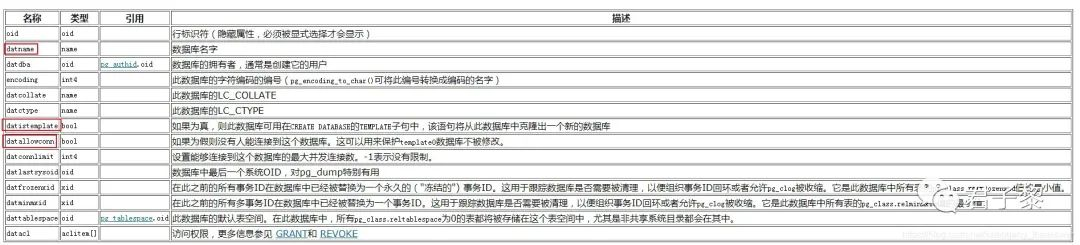
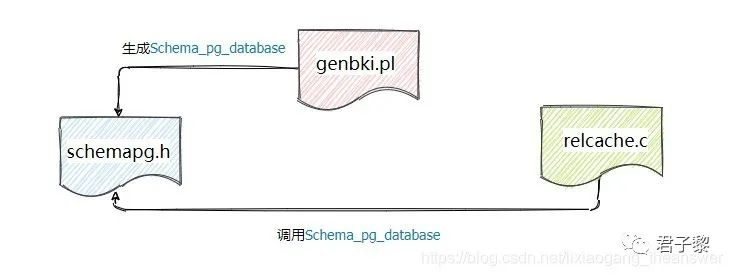
#define Schema_pg_database \{ 1262, {"oid"}, 26, -1, 4, 1, 0, -1, -1, true, 'p', 'i', true, false, false, '\0', '\0', false, true, 0, 0 }, \{ 1262, {"datname"}, 19, -1, NAMEDATALEN, 2, 0, -1, -1, false, 'p', 'c', true, false, false, '\0', '\0', false, true, 0, 950 }, \{ 1262, {"datdba"}, 26, -1, 4, 3, 0, -1, -1, true, 'p', 'i', true, false, false, '\0', '\0', false, true, 0, 0 }, \{ 1262, {"encoding"}, 23, -1, 4, 4, 0, -1, -1, true, 'p', 'i', true, false, false, '\0', '\0', false, true, 0, 0 }, \{ 1262, {"datcollate"}, 19, -1, NAMEDATALEN, 5, 0, -1, -1, false, 'p', 'c', true, false, false, '\0', '\0', false, true, 0, 950 }, \{ 1262, {"datctype"}, 19, -1, NAMEDATALEN, 6, 0, -1, -1, false, 'p', 'c', true, false, false, '\0', '\0', false, true, 0, 950 }, \{ 1262, {"datistemplate"}, 16, -1, 1, 7, 0, -1, -1, true, 'p', 'c', true, false, false, '\0', '\0', false, true, 0, 0 }, \{ 1262, {"datallowconn"}, 16, -1, 1, 8, 0, -1, -1, true, 'p', 'c', true, false, false, '\0', '\0', false, true, 0, 0 }, \{ 1262, {"datconnlimit"}, 23, -1, 4, 9, 0, -1, -1, true, 'p', 'i', true, false, false, '\0', '\0', false, true, 0, 0 }, \{ 1262, {"datlastsysoid"}, 26, -1, 4, 10, 0, -1, -1, true, 'p', 'i', true, false, false, '\0', '\0', false, true, 0, 0 }, \{ 1262, {"datfrozenxid"}, 28, -1, 4, 11, 0, -1, -1, true, 'p', 'i', true, false, false, '\0', '\0', false, true, 0, 0 }, \{ 1262, {"datminmxid"}, 28, -1, 4, 12, 0, -1, -1, true, 'p', 'i', true, false, false, '\0', '\0', false, true, 0, 0 }, \{ 1262, {"dattablespace"}, 26, -1, 4, 13, 0, -1, -1, true, 'p', 'i', true, false, false, '\0', '\0', false, true, 0, 0 }, \{ 1262, {"datacl"}, 1034, -1, -1, 14, 1, -1, -1, false, 'x', 'i', false, false, false, '\0', '\0', false, true, 0, 0 }
template0和template1数据库的datistemplate字段值是t,而postgres数据库的datistemplate字段值是f。表明template[0,1]这两个数据库是模板数据库,而postgres非模板数据库。
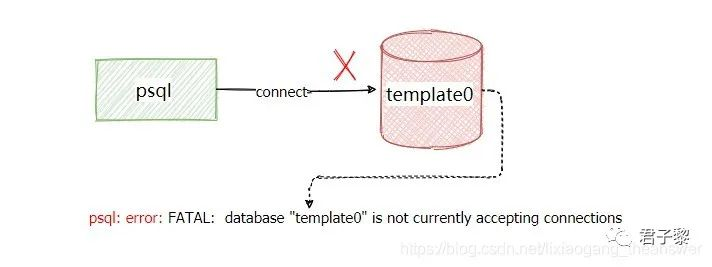
postgres和template1数据库的datallowconn字段为t,而template0数据库f。表明数据库postgres和template1是允许用户(包括psql)连接,而template0不允许连接。
[root@Thor postgresql-13.2]# psql -p 9998 -U postgres -d template0;psql: error: FATAL: database "template0" is not currently accepting connections
postgres数据库是应用程序连接的默认数据库。它只是模板数据库template1的一个副本,如有必要,可以将其删除并重新创建。
CREATE DATABASE语句创建数据库时,实际上是通过复制template1模板数据库得到。
template1=# select *from pg_database; oid | datname | datdba | encoding | datcollate | datctype | datistemplate | datallowconn | datconnlimit | datlastsysoid | datfrozenxid | datminmxid | dattablespace | datacl-------+-----------+--------+----------+-------------+-------------+---------------+--------------+--------------+---------------+--------------+------------+---------------+------------------------------------- 13580 | postgres | 10 | 6 | en_US.UTF-8 | en_US.UTF-8 | f | t | -1 | 13579 | 478 | 1 | 1663 | 1 | template1 | 10 | 6 | en_US.UTF-8 | en_US.UTF-8 | t | t | -1 | 13579 | 478 | 1 | 1663 | {=c/postgres,postgres=CTc/postgres} 13579 | template0 | 10 | 6 | en_US.UTF-8 | en_US.UTF-8 | t | f | -1 | 13579 | 478 | 1 | 1663 | {=c/postgres,postgres=CTc/postgres}(3 rows)template1=# update pg_database set datallowconn = 't' where oid = 13579;UPDATE 1[root@Thor postgresql-13.2]# psql -p 9998 -U postgres -d template0;psql (13.2)Type "help" for help.

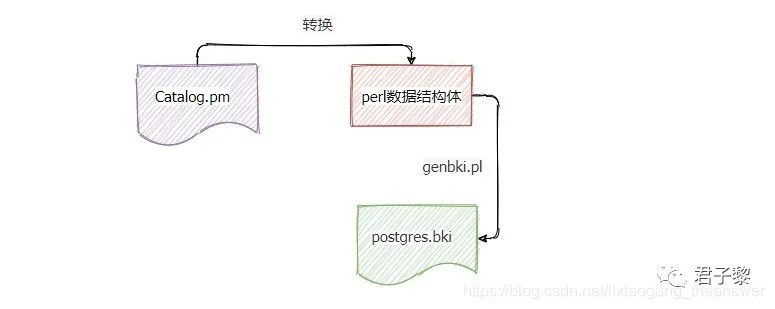

# PostgreSQL 13create pg_proc 1255 bootstrap rowtype_oid 81 ( oid = oid , proname = name , . . . //省略若干 proacl = _aclitem ). . . //省略若干insert ( 33 charout 11 10 12 1 0 0 0 f f f t f i s 1 0 2275 18 _null_ _null_ _null_ _null_ _null_ charout _null_ _null_ _null_ )
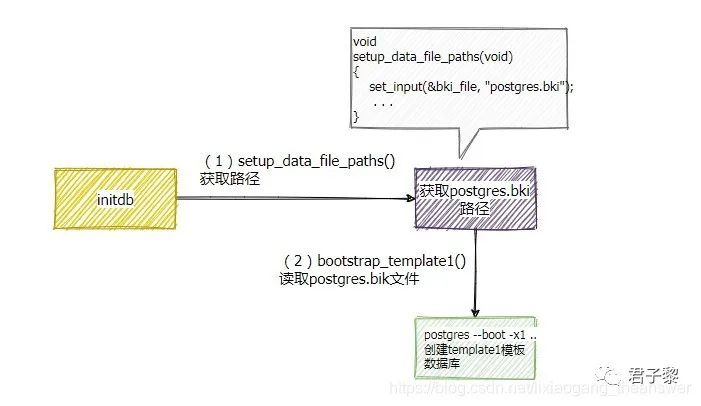
postgres=# \c template1;You are now connected to database "template1" as user "postgres".
template1=# CREATE TABLE TEST(id SERIAL PRIMARY KEY, name VARCHAR(20));CREATE TABLEtemplate1=# \d+ List of relations Schema | Name | Type | Owner | Persistence | Size | Description--------+-------------+----------+----------+-------------+------------+------------- public | test | table | postgres | permanent | 0 bytes | public | test_id_seq | sequence | postgres | permanent | 8192 bytes | (2 rows)
template1=# INSERT INTO TEST(name) VALUES ('1');INSERT 0 1template1=# INSERT INTO TEST(name) VALUES ('2');INSERT 0 1template1=# INSERT INTO TEST(name) VALUES ('3');INSERT 0 1template1=# INSERT INTO TEST(name) VALUES ('4');INSERT 0 1template1=# INSERT INTO TEST(name) VALUES ('5');INSERT 0 1
template1=# SELECT *FROM TEST; id | name----+------ 1 | 1 2 | 2 3 | 3 4 | 4 5 | 5(5 rows)
template1=# \l List of databases Name | Owner | Encoding | Collate | Ctype | Access privileges-----------+----------+----------+-------------+-------------+----------------------- postgres | postgres | UTF8 | en_US.UTF-8 | en_US.UTF-8 | template0 | postgres | UTF8 | en_US.UTF-8 | en_US.UTF-8 | =c/postgres + | | | | | postgres=CTc/postgres template1 | postgres | UTF8 | en_US.UTF-8 | en_US.UTF-8 | =c/postgres + | | | | | postgres=CTc/postgres(3 rows)template1=# CREATE DATABASE db_test;CREATE DATABASEtemplate1=# \c db_test ;You are now connected to database "db_test" as user "postgres".db_test=# \d+ List of relations Schema | Name | Type | Owner | Persistence | Size | Description--------+-------------+----------+----------+-------------+------------+------------- public | test | table | postgres | permanent | 8192 bytes | public | test_id_seq | sequence | postgres | permanent | 8192 bytes |(2 rows)db_test=# SELECT *FROM test; id | name----+------ 1 | 1 2 | 2 3 | 3 4 | 4 5 | 5(5 rows)
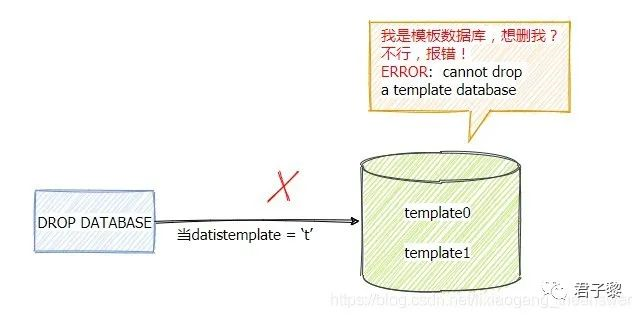
template1=# select  datistemplate from pg_database where datname = 'template1'; datistemplate--------------- t(1 row)template1=# DROP DATABASE template1;
ERROR:  cannot drop a template database





新闻|Babelfish使PostgreSQL直接兼容SQL Server应用程序

更多新闻资讯,行业动态,技术热点,请关注中国PostgreSQL分会官方网站
https://www.postgresqlchina.com
中国PostgreSQL分会生态产品
https://www.pgfans.cn
中国PostgreSQL分会资源下载站
https://www.postgreshub.cn

点击此处阅读原文
↓↓↓
文章转载自开源软件联盟PostgreSQL分会,如果涉嫌侵权,请发送邮件至:contact@modb.pro进行举报,并提供相关证据,一经查实,墨天轮将立刻删除相关内容。
