




本文参考官方的README[1] 实践,并做的笔记。
环境准备
我比较喜欢使用brew[2], 如果没有安装的话,
安装 brew
/bin/bash -c "$(curl -fsSL https://raw.githubusercontent.com/Homebrew/install/HEAD/install.sh)"
我没有使用系统自带的 Python 3.9.6 测试,而是安装Minconda[3]后采用 Python 3.11 进行的测试。
安装 Miniconda
brew install miniconda
创建虚拟环境
conda create -n glm python=3.11
conda activate glm
安装 PyTorch
对于搭载了 Apple Silicon 或者 AMD GPU 的 Mac,可以使用 MPS 后端来在 GPU 上运行 ChatGLM2-6B。需要参考 Apple 的 官方说明 安装 PyTorch-Nightly(正确的版本号应该是 2.x.x.dev2023xxxx,而不是 2.x.x),
pip3 install --pre torch torchvision torchaudio --extra-index-url https://download.pytorch.org/whl/nightly/cpu
测试下是否安装成功,
import torch
if torch.backends.mps.is_available():
    mps_device = torch.device("mps")
    x = torch.ones(1, device=mps_device)
    print (x)
else:
    print ("MPS device not found.")

#返回
tensor([1.], device='mps:0')
下载源代码,并安装依赖
git clone https://github.com/THUDM/ChatGLM2-6B src
pip install -r  src/requirements.txt
下载模型到本地
目前在 MacOS 上只支持从本地加载模型[4],所以我们需要先把模型下载到本地,
从 Hugging Face Hub 下载模型需要先安装 Git LFS[5],
安装 Git LFS
brew install git-lfs
git lfs install
下载模型到本地
如果可以正常访问 Hugging Face,并且速度可以,推荐下面的方法,
git clone https://huggingface.co/THUDM/chatglm2-6b
如果不幸如我,浙江联通最近竟然无法访问 Hugging Face,推荐这样做,
GIT_LFS_SKIP_SMUDGE=1 git clone https://huggingface.co/THUDM/chatglm2-6b
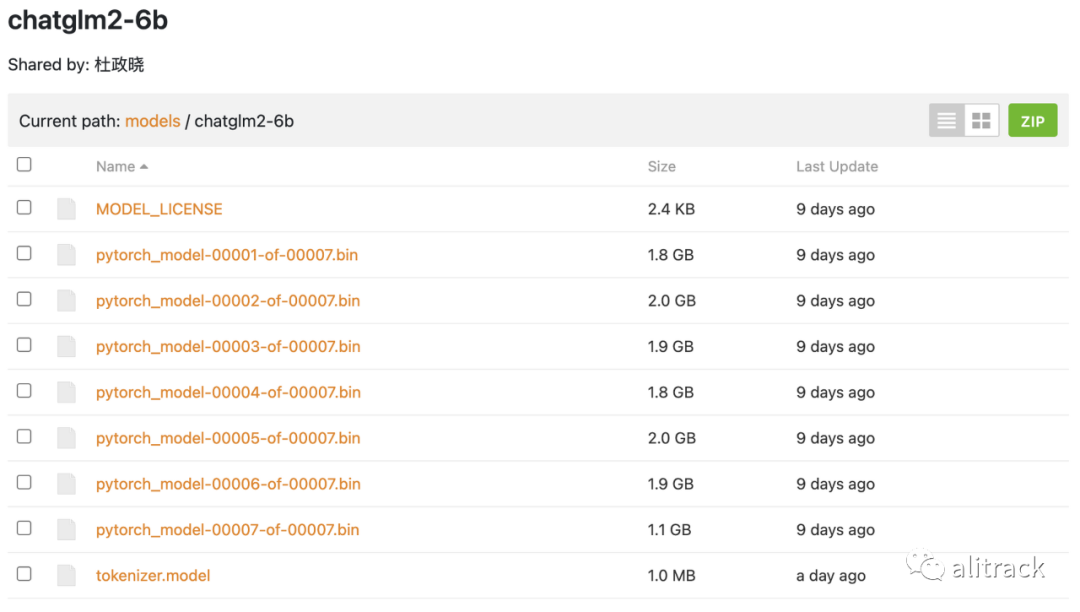
然后从这里[6]手动下载模型参数文件,并将下载的文件替换到本地的 chatglm2-6b 目录下。
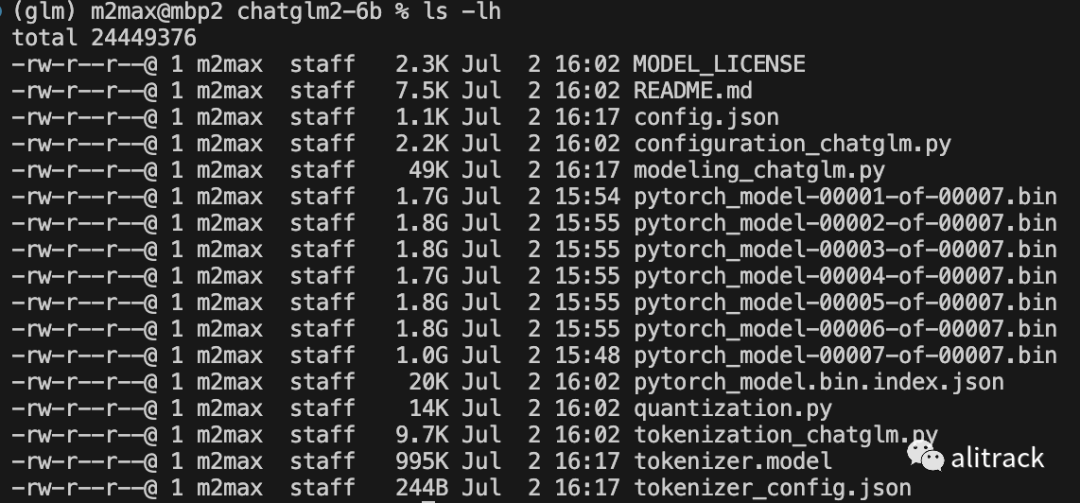
准备好的本地模型目录是这样
测试
from transformers import AutoTokenizer, AutoModel
PRETRAINED_MODEL_NAME_OR_PATH ="./chatglm2-6b/"
#将代码中的模型加载改为从本地加载,并使用 mps 后端
tokenizer = AutoTokenizer.from_pretrained(PRETRAINED_MODEL_NAME_OR_PATH, trust_remote_code=True)
model = AutoModel.from_pretrained(PRETRAINED_MODEL_NAME_OR_PATH, trust_remote_code=True).to('mps')
model = model.eval()
response, history = model.chat(tokenizer, "你好", history=[])
print(response)
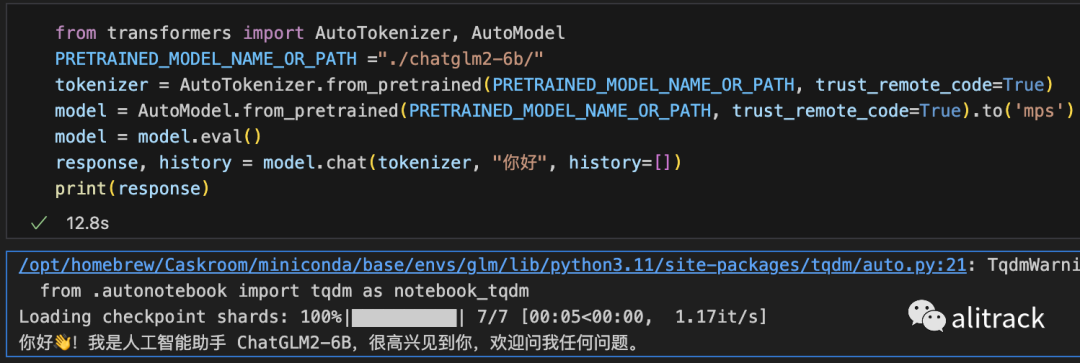
加载半精度的 ChatGLM2-6B 模型需要大概 13GB 内存。内存较小的机器(比如 16GB 内存的 MacBook Pro),在空余内存不足的情况下会使用硬盘上的虚拟内存,导致推理速度严重变慢。此时可以使用量化后的模型 chatglm2-6b-int4。因为 GPU 上量化的 kernel 是使用 CUDA 编写的,因此无法在 MacOS 上使用,只能使用 CPU 进行推理。为了充分使用 CPU 并行,还需要单独安装 OpenMP[7]。
我内存是 32G,没有测试 chatglm2-6b-int4。
网页版本 demo
需要修改的地方很少 将代码中的模型加载改为从本地加载,并使用 mps 后端
from transformers import AutoModel, AutoTokenizer
import gradio as gr
import mdtex2html
PRETRAINED_MODEL_NAME_OR_PATH ="./chatglm2-6b/"
tokenizer = AutoTokenizer.from_pretrained(PRETRAINED_MODEL_NAME_OR_PATH, trust_remote_code=True)
model = AutoModel.from_pretrained(PRETRAINED_MODEL_NAME_OR_PATH, trust_remote_code=True).to('mps')
model = model.eval()
"""Override Chatbot.postprocess"""
def postprocess(self, y):
if y is None:
return []
for i, (message, response) in enumerate(y):
y[i] = (
None if message is None else mdtex2html.convert((message)),
None if response is None else mdtex2html.convert(response),
)
return y
gr.Chatbot.postprocess = postprocess
def parse_text(text):
"""copy from https://github.com/GaiZhenbiao/ChuanhuChatGPT/"""
lines = text.split("\n")
lines = [line for line in lines if line != ""]
count = 0
for i, line in enumerate(lines):
if "```" in line:
count += 1
items = line.split('`')
if count % 2 == 1:
lines[i] = f'<pre><code class="language-{items[-1]}">'
else:
lines[i] = f'<br></code></pre>'
else:
if i > 0:
if count % 2 == 1:
line = line.replace("`", "\`")
line = line.replace("<", "<")
line = line.replace(">", ">")
line = line.replace(" ", " ")
line = line.replace("*", "*")
line = line.replace("_", "_")
line = line.replace("-", "-")
line = line.replace(".", ".")
line = line.replace("!", "!")
line = line.replace("(", "(")
line = line.replace(")", ")")
line = line.replace("$", "$")
lines[i] = "<br>"+line
text = "".join(lines)
return text
def predict(input, chatbot, max_length, top_p, temperature, history, past_key_values):
chatbot.append((parse_text(input), ""))
for response, history, past_key_values in model.stream_chat(tokenizer, input, history, past_key_values=past_key_values,
return_past_key_values=True,
max_length=max_length, top_p=top_p,
temperature=temperature):
chatbot[-1] = (parse_text(input), parse_text(response))
yield chatbot, history, past_key_values
def reset_user_input():
return gr.update(value='')
def reset_state():
return [], [], None
with gr.Blocks() as demo:
gr.HTML("""<h1 align="center">ChatGLM2-6B</h1>""")
chatbot = gr.Chatbot()
with gr.Row():
with gr.Column(scale=4):
with gr.Column(scale=12):
user_input = gr.Textbox(show_label=False, placeholder="Input...", lines=10).style(
container=False)
with gr.Column(min_width=32, scale=1):
submitBtn = gr.Button("Submit", variant="primary")
with gr.Column(scale=1):
emptyBtn = gr.Button("Clear History")
max_length = gr.Slider(0, 32768, value=8192, step=1.0, label="Maximum length", interactive=True)
top_p = gr.Slider(0, 1, value=0.8, step=0.01, label="Top P", interactive=True)
temperature = gr.Slider(0, 1, value=0.95, step=0.01, label="Temperature", interactive=True)
history = gr.State([])
past_key_values = gr.State(None)
submitBtn.click(predict, [user_input, chatbot, max_length, top_p, temperature, history, past_key_values],
[chatbot, history, past_key_values], show_progress=True)
submitBtn.click(reset_user_input, [], [user_input])
emptyBtn.click(reset_state, outputs=[chatbot, history, past_key_values], show_progress=True)
demo.queue().launch(share=False, inbrowser=True)
API
from fastapi import FastAPI, Request
from transformers import AutoTokenizer, AutoModel
import uvicorn, json, datetime
import torch

PRETRAINED_MODEL_NAME_OR_PATH ="./chatglm2-6b/"

def torch_gc():
    with torch.device("mps:0"):
        torch.mps.empty_cache()

app = FastAPI()


@app.post("/")
async def create_item(request: Request):
    global model, tokenizer
    json_post_raw = await request.json()
    json_post = json.dumps(json_post_raw)
    json_post_list = json.loads(json_post)
    prompt = json_post_list.get('prompt')
    history = json_post_list.get('history')
    max_length = json_post_list.get('max_length')
    top_p = json_post_list.get('top_p')
    temperature = json_post_list.get('temperature')
    response, history = model.chat(tokenizer,
                                   prompt,
                                   history=history,
                                   max_length=max_length if max_length else 2048,
                                   top_p=top_p if top_p else 0.7,
                                   temperature=temperature if temperature else 0.95)
    now = datetime.datetime.now()
    time = now.strftime("%Y-%m-%d %H:%M:%S")
    answer = {
        "response": response,
        "history": history,
        "status": 200,
        "time": time
    }
    log = "[" + time + "] " + '", prompt:"' + prompt + '", response:"' + repr(response) + '"'
    print(log)
    torch_gc()
    return answer


if __name__ == '__main__':
    tokenizer = AutoTokenizer.from_pretrained(PRETRAINED_MODEL_NAME_OR_PATH, trust_remote_code=True)
    model = AutoModel.from_pretrained(PRETRAINED_MODEL_NAME_OR_PATH, trust_remote_code=True).to('mps')
    model.eval()
    uvicorn.run(app, host='0.0.0.0', port=8000, workers=1)
测试效果,

OpenAI API
# coding=utf-8
# Implements API for ChatGLM2-6B in OpenAI's format. (https://platform.openai.com/docs/api-reference/chat)
# Usage: python openai_api.py
# Visit http://localhost:8000/docs for documents.


import time
import torch
import uvicorn
from pydantic import BaseModel, Field
from fastapi import FastAPI, HTTPException
from fastapi.middleware.cors import CORSMiddleware
from contextlib import asynccontextmanager
from starlette.responses import StreamingResponse
from typing import Any, Dict, List, Literal, Optional, Union
from transformers import AutoTokenizer, AutoModel

PRETRAINED_MODEL_NAME_OR_PATH ="./chatglm2-6b/"

@asynccontextmanager
async def lifespan(app: FastAPI): # collects GPU memory
    yield
    torch.mps.empty_cache()
    # if torch.cuda.is_available():
    #     torch.cuda.empty_cache()
    #     torch.cuda.ipc_collect()


app = FastAPI(lifespan=lifespan)

app.add_middleware(
    CORSMiddleware,
    allow_origins=["*"],
    allow_credentials=True,
    allow_methods=["*"],
    allow_headers=["*"],
)

class ModelCard(BaseModel):
    id: str
    object: str = "model"
    created: int = Field(default_factory=lambda: int(time.time()))
    owned_by: str = "owner"
    root: Optional[str] = None
    parent: Optional[str] = None
    permission: Optional[list] = None


class ModelList(BaseModel):
    object: str = "list"
    data: List[ModelCard] = []


class ChatMessage(BaseModel):
    role: Literal["user", "assistant", "system"]
    content: str


class DeltaMessage(BaseModel):
    role: Optional[Literal["user", "assistant", "system"]] = None
    content: Optional[str] = None


class ChatCompletionRequest(BaseModel):
    model: str
    messages: List[ChatMessage]
    temperature: Optional[float] = None
    top_p: Optional[float] = None
    max_length: Optional[int] = None
    stream: Optional[bool] = False


class ChatCompletionResponseChoice(BaseModel):
    index: int
    message: ChatMessage
    finish_reason: Literal["stop", "length"]


class ChatCompletionResponseStreamChoice(BaseModel):
    index: int
    delta: DeltaMessage
    finish_reason: Optional[Literal["stop", "length"]]


class ChatCompletionResponse(BaseModel):
    model: str
    object: Literal["chat.completion", "chat.completion.chunk"]
    choices: List[Union[ChatCompletionResponseChoice, ChatCompletionResponseStreamChoice]]
    created: Optional[int] = Field(default_factory=lambda: int(time.time()))


@app.get("/v1/models", response_model=ModelList)
async def list_models():
    global model_args
    model_card = ModelCard(id="gpt-3.5-turbo")
    return ModelList(data=[model_card])


@app.post("/v1/chat/completions", response_model=ChatCompletionResponse)
async def create_chat_completion(request: ChatCompletionRequest):
    global model, tokenizer

    if request.messages[-1].role != "user":
        raise HTTPException(status_code=400, detail="Invalid request")
    query = request.messages[-1].content

    prev_messages = request.messages[:-1]
    if len(prev_messages) > 0 and prev_messages[0].role == "system":
        query = prev_messages.pop(0).content + query

    history = []
    if len(prev_messages) % 2 == 0:
        for i in range(0, len(prev_messages), 2):
            if prev_messages[i].role == "user" and prev_messages[i+1].role == "assistant":
                history.append([prev_messages[i].content, prev_messages[i+1].content])

    if request.stream:
        generate = predict(query, history, request.model)
        return StreamingResponse(generate, media_type="text/event-stream")

    response, _ = model.chat(tokenizer, query, history=history)
    choice_data = ChatCompletionResponseChoice(
        index=0,
        message=ChatMessage(role="assistant", content=response),
        finish_reason="stop"
    )

    return ChatCompletionResponse(model=request.model, choices=[choice_data], object="chat.completion")


async def predict(query: str, history: List[List[str]], model_id: str):
    global model, tokenizer

    choice_data = ChatCompletionResponseStreamChoice(
        index=0,
        delta=DeltaMessage(role="assistant"),
        finish_reason=None
    )
    chunk = ChatCompletionResponse(model=model_id, choices=[choice_data], object="chat.completion.chunk")
    yield "data: {}\n\n".format(chunk.json(exclude_unset=True, ensure_ascii=False))

    current_length = 0

    for new_response, _ in model.stream_chat(tokenizer, query, history):
        if len(new_response) == current_length:
            continue

        new_text = new_response[current_length:]
        current_length = len(new_response)

        choice_data = ChatCompletionResponseStreamChoice(
            index=0,
            delta=DeltaMessage(content=new_text),
            finish_reason=None
        )
        chunk = ChatCompletionResponse(model=model_id, choices=[choice_data], object="chat.completion.chunk")
        yield "data: {}\n\n".format(chunk.json(exclude_unset=True, ensure_ascii=False))

    choice_data = ChatCompletionResponseStreamChoice(
        index=0,
        delta=DeltaMessage(),
        finish_reason="stop"
    )
    chunk = ChatCompletionResponse(model=model_id, choices=[choice_data], object="chat.completion.chunk")
    yield "data: {}\n\n".format(chunk.json(exclude_unset=True, ensure_ascii=False))


if __name__ == "__main__":
    tokenizer = AutoTokenizer.from_pretrained(PRETRAINED_MODEL_NAME_OR_PATH, trust_remote_code=True)
    model = AutoModel.from_pretrained(PRETRAINED_MODEL_NAME_OR_PATH, trust_remote_code=True).to('mps')
    # 多显卡支持,使用下面两行代替上面一行,将num_gpus改为你实际的显卡数量
    # from utils import load_model_on_gpus
    # model = load_model_on_gpus("THUDM/chatglm2-6b", num_gpus=2)
    model.eval()

    uvicorn.run(app, host='0.0.0.0', port=8000, workers=1)
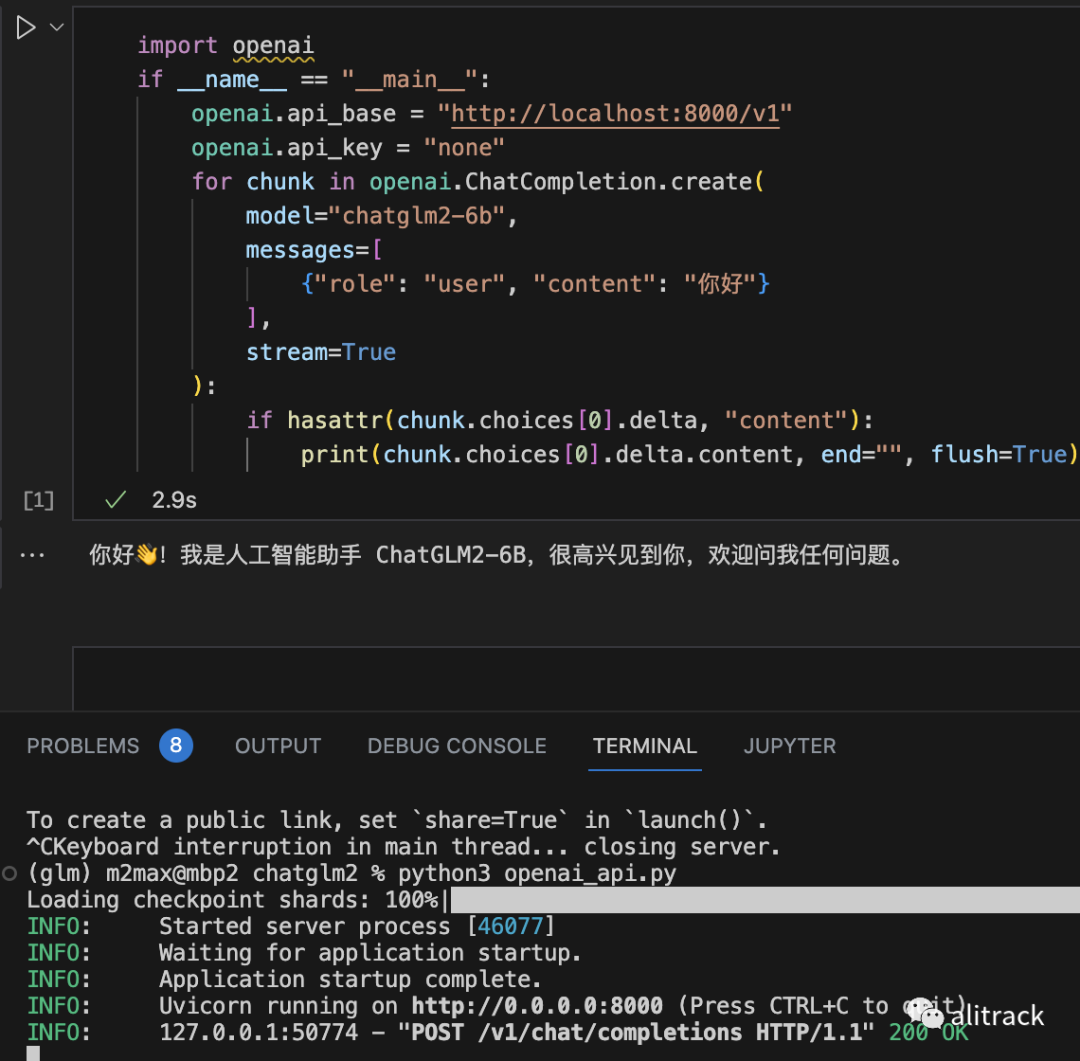
测试效果
import openai
if __name__ == "__main__":
    openai.api_base = "http://localhost:8000/v1"
    openai.api_key = "none"
    for chunk in openai.ChatCompletion.create(
        model="chatglm2-6b",
        messages=[
            {"role": "user", "content": "你好"}
        ],
        stream=True
    ):
        if hasattr(chunk.choices[0].delta, "content"):
            print(chunk.choices[0].delta.content, end="", flush=True)
要测试上面的代码,记得安装 openai,
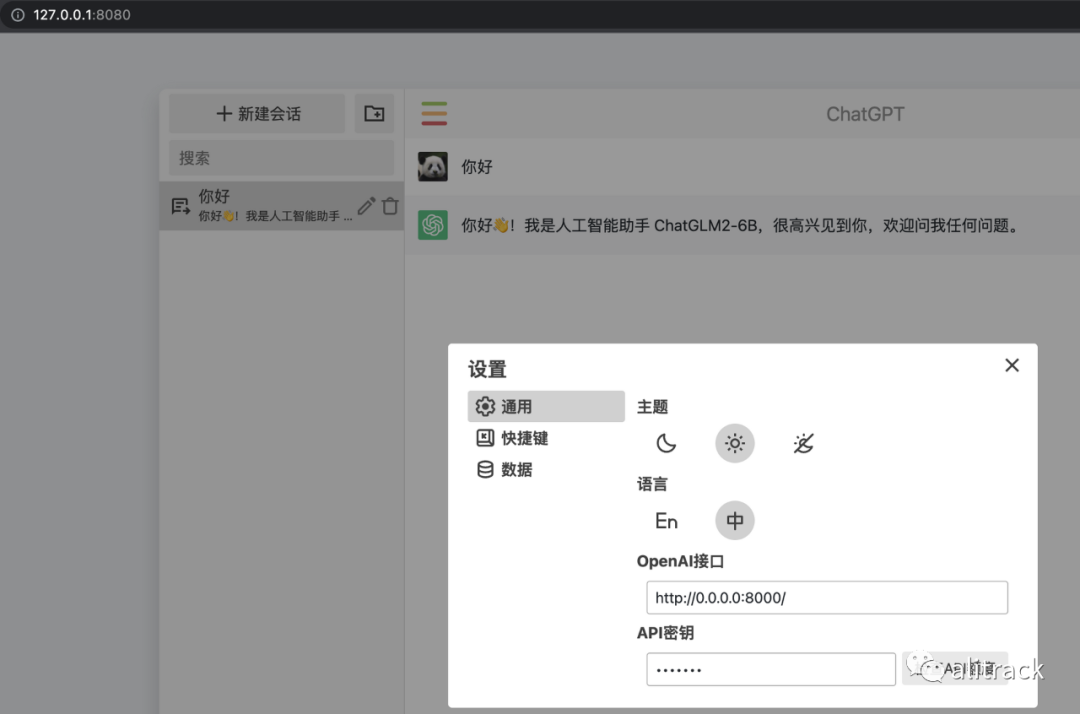
经测试,chatgpt-web,[8]只要稍做修改,就可以使用 ChatGLM2-6B,
参考资料
README: https://github.com/THUDM/ChatGLM2-6B/blob/main/README.md
[2]brew: https://brew.sh/
[3]Minconda: https://docs.conda.io/en/latest/miniconda.html
[4]从本地加载模型: https://github.com/THUDM/ChatGLM2-6B/blob/main/README.md#%E4%BB%8E%E6%9C%AC%E5%9C%B0%E5%8A%A0%E8%BD%BD%E6%A8%A1%E5%9E%8B
[5]安装 Git LFS: https://docs.github.com/zh/repositories/working-with-files/managing-large-files/installing-git-large-file-storage
[6]这里: https://cloud.tsinghua.edu.cn/d/674208019e314311ab5c/
[7]单独安装 OpenMP: https://github.com/THUDM/ChatGLM2-6B/blob/main/FAQ.md#q1
[8]chatgpt-web,: https://github.com/xqdoo00o/chatgpt-web
