



TutorialsPoint Sed 教程
来源:易百教程
Sed教程
Sed表示流编辑器(Stream Editor)的缩写。这是一个简单但功能强大的工具,分析文本,并无缝地转换它。 SED是在1973-1974年由贝尔实验室的李E. McMahon开发。如今,它运行在所有主要的操作系统。
McMahon编写了一个通用的面向行的编辑器,它最终成为sed。sed借用语法和ed编辑许多有用的功能。自成立开始,就对正则表达式有所支持。sed接受来自文件以及管道的输入。此外,它也可以接受来自标准输入的数据流的输入。
sed是自由软件由基金会(FSF)维护,它是由GNU/ Linux分发。因此,它通常被称为GNU sed的。对于新手用户,sed语法看起来神秘。但是,一旦熟悉了它的语法,就可以使用sed的几行脚本解决许多复杂的任务。
sed典型用途
sed可以有许多不同的方式使用,例如:
- 文本替换
- 选择性打印的文本文件
- 一个就地文本文件的编辑
- 文本文件的非交互式的编辑等等。
sed环境设置 - Sed教程
本章介绍如何在GNU/ Linux系统中设置sed环境。
安装使用软件包管理器
一般情况下,sed默认提供在大多数的GNU/ Linux发行版。使用该命令,以确定其是否存在于您的系统上。如果没有,那么在基于Debian GNU/ Linux可以使用apt包管理器,如下所示安装sed:
[root]# sudo apt-get install sed
安装后,确保sed可以通过命令行访问。
[root]# sed --versio
执行上面的代码,会得到如下结果:
sed (GNU sed) 4.2.2
Copyright (C) 2012 Free Software Foundation, Inc.
License GPLv3+: GNU GPL version 3 or later <http://gnu.org/licenses/gpl.htmll>.
This is free software: you are free to change and redistribute it.
There is NO WARRANTY, to the extent permitted by law.
Written by Jay Fenlason, Tom Lord, Ken Pizzini,
and Paolo Bonzini.
GNU sed home page: <http://www.gnu.org/software/sed/>.
General help using GNU software: <http://www.gnu.org/gethelp/>.
E-mail bug reports to: <bug-sed@gnu.org>.
Be sure to include the word "sed" somewhere in the "Subject:" field.
同样,基于GNU/Linux的RPM安装sed,用yum包管理器,如下所示:
[root]# yum -y install sed
安装后,确保 sed 可以通过命令行访问。
[root]# sed --version
执行上面的代码,会得到如下结果:
GNU sed version 4.2.1
Copyright (C) 2009 Free Software Foundation, Inc.
This is free software; see the source for copying conditions. There is NO
warranty; not even for MERCHANTABILITY or FITNESS FOR A PARTICULAR PURPOSE,
to the extent permitted by law.
GNU sed home page: <http://www.gnu.org/software/sed/>.
General help using GNU software: <http://www.gnu.org/gethelp/>.
E-mail bug reports to:<bug-gnu-utils@gnu.org>.
Be sure to include the word "sed" somewhere in the "Subject:" field.
从源代码安装
由于GNU sed是GNU计划的一部分,它的源代码都可以免费下载。我们已经看到了如何使用软件包管理器安装sed。现在,了解如何从源代码安装sed。
下面安装适用于任何的GNU/Linux软件,和大多数其他可自由使用的程序。下面是安装步骤:
第1步 - 从一个真实的地方下载的源代码。命令行实用程序wget服务于这个目的。
[root]# wget ftp://ftp.gnu.org/gnu/sed/sed-4.2.2.tar.bz2
第2步 - 解压缩和解压下载的源代码。
[root]# tar xvf sed-4.2.2.tar.bz2
第3步 - 更改进入目录并运行配置。
[root]# ./configure
第4步 - 一旦成功完成,配置生成Makefile文件。编译源代码,使用 make命令。
[root]# make
第5步 - 可以运行测试套件,以确保构建是干净的。这是一个可选步骤。
[root]# make check
第6步 - 最后,安装sed实用工具。请确保有超级用户的权限。
[root]# sudo make install
我们已经成功编译并安装sed。通过执行 sed 命令,作如下验证:
[root]# sed --version
执行上面的代码,会得到如下结果:
sed (GNU sed) 4.2.2
Copyright (C) 2012 Free Software Foundation, Inc.
License GPLv3+: GNU GPL version 3 or later <http://gnu.org/licenses/gpl.htmll>.
This is free software: you are free to change and redistribute it.
There is NO WARRANTY, to the extent permitted by law.
Written by Jay Fenlason, Tom Lord, Ken Pizzini,
and Paolo Bonzini.
GNU sed home page: <http://www.gnu.org/software/sed/>.
General help using GNU software: <http://www.gnu.org/gethelp/>.
E-mail bug reports to: <bug-sed@gnu.org>.
Be sure to include the word "sed" somewhere in the "Subject:" field.
sed工作流程 - Sed教程
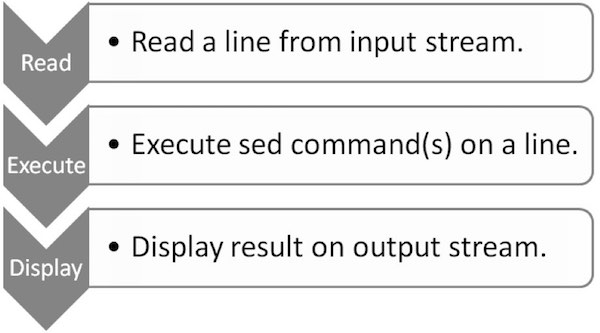
本章将解释sed究竟如何工作的。要成为一个专家级的sed用户,需要知道它的内部执行和结构。sed遵循一个简单的工作流:读取,执行和显示。下图描绘了工作流程。
读取
sed从输入流(文件,管道,或标准输入)读取,并将其存储在其内部的缓冲模式称为缓冲行。
执行
所有sed命令顺序地对模式缓冲区使用。默认情况下,sed命令都适用于所有行(全局),除非指定行寻址。
显示
sed发送(修改)的内容到输出数据流。在发送数据后,模式缓冲器是空的。这个过程一直重复,直到文件被耗尽。
示例
让我们创建一个文本文件quote.txt包含引用著名作家Paulo Coelho。
[jerry]$ vi quote.txt
There is only one thing that makes a dream impossible to achieve: the fear of failure.
- Paulo Coelho, The Alchemist
为了了解sed的工作流程,让我们使用sed显示该文件的内容quote.txt。这个例子模仿cat命令。
[jerry]$ sed '' quote.txt
当执行上面的代码,就会产生下面的结果。
There is only one thing that makes a dream impossible to achieve: the fear of failure.
在上面的例子中,quote.txt输入文件名和在此之前,有一对单引号的暗示sed 命令。让我们解读此操作。
第一sed从输入文件quote.txt读取并将其存储在它的模式缓冲区行。然后它适用sed关于模型缓冲区命令。在我们的例子中没有sed 命令在那里,因此是对模式缓冲区未进行任何操作。最后删除,并打印在标准输出模式缓冲区中的内容。是不是很简单?
在下面的例子中,sed 接受来自标准输入流输入。
[jerry]$ sed ''
当执行上面的代码,它会提示我们输入从标准输入一些文字。因此,让我们进入一个文本行,如下所示:
There is only one thing that makes a dream impossible to achieve: the fear of failure.
输入该行后,当我们按下输入产生以下结果:
There is only one thing that makes a dream impossible to achieve: the fear of failure.
要从使用的sed会话退出,按下键盘上的 ctrl-D (^D).
Sed基本语法 - Sed教程
sed使用简单,我们可以提供sed命令直接在命令行或具有sed命令的文本文件的形式。本教程讲解调用sed的例子,有这两种方法:
Sed 命令行
以下是我们可以指定单引号在命令行sed命令的格式如下:
sed [-n] [-e] 'command(s)' files
例子
考虑一下我们有一个文本文件books.txt待处理,它有以下内容:
1) A Storm of Swords, George R. R. Martin, 1216
2) The Two Towers, J. R. R. Tolkien, 352
3) The Alchemist, Paulo Coelho, 197
4) The Fellowship of the Ring, J. R. R. Tolkien, 432
5) The Pilgrimage, Paulo Coelho, 288
6) A Game of Thrones, George R. R. Martin, 864
首先,让我们不带任何命令使用sed文件的完整显示内容如下:
[jerry]$ sed '' books.txt
执行上面的代码,会得到如下结果:
1) A Storm of Swords, George R. R. Martin, 1216
2) The Two Towers, J. R. R. Tolkien, 352
3) The Alchemist, Paulo Coelho, 197
4) The Fellowship of the Ring, J. R. R. Tolkien, 432
5) The Pilgrimage, Paulo Coelho, 288
6) A Game of Thrones, George R. R. Martin, 864
现在,我们从上述文件中显示将看到sed的delete命令删除某些行。让我们删除了第一,第二和第五行。在这里,要删除给定的三行,我们已经指定了三个单独的命令带有-e选项。
[jerry]$ sed -e '1d' -e '2d' -e '5d' books.txt
执行上面的代码,会得到如下结果:
3) The Alchemist, Paulo Coelho, 197
4) The Fellowship of the Ring, J. R. R. Tolkien, 432
6) A Game of Thrones, George R. R. Martin, 864
sed脚本文件
下面是第二种形式,我们可以提供一个sed脚本文件sed命令:
sed [-n] -f scriptfile files
首先,创建一个包含在一个单独的行的文本commands.txt文件,每次一行为每个sed命令,如下图所示:
1d
2d
5d
现在,我们可以指示sed从文本文件中读取指令和执行操作。这里,我们实现相同的结果,如图在上述的例子。
[jerry]$ sed -f commands.txt books.txt
执行上面的代码,会得到如下结果:
3) The Alchemist, Paulo Coelho, 197
4) The Fellowship of the Ring, J. R. R. Tolkien, 432
6) A Game of Thrones,George R. R. Martin, 864
sed标准选项
sed支持可从命令行提供下列标准选择。
-n 选项
这是模式缓冲区的缺省打印选项。 GNU sed解释器提供--quiet,--silent选项作为 -n选项的替代。
例如,下面 sed 命令不显示任何输出:
[jerry]$ sed -n '' quote.txt
-e 选项
-e选项的编辑选项。通过使用此选项,可以指定多个命令。例如,下面 sed 命令打印每行两次:
[jerry]$ sed -e '' -e 'p' quote.txt
执行上面的代码,会得到如下结果:
There is only one thing that makes a dream impossible to achieve: the fear of failure.
There is only one thing that makes a dream impossible to achieve: the fear of failure.
- Paulo Coelho, The Alchemist
- Paulo Coelho, The Alchemist
-f 选项
-f选项是用来提供包含sed命令的文件。例如,我们可以按如下方法通过文件指定一个打印命令:
[jerry]$ echo "p" > commands.txt
[jerry]$ sed -n -f commands quote.txt
执行上面的代码,会得到如下结果:
There is only one thing that makes a dream impossible to achieve: the fear of failure.
- Paulo Coelho, The Alchemist
Sed循环 - Sed教程
像其他的编程语言,sed还提供了一个循环和分支工具来控制程序的执行流程。本教程将探讨如何使用sed的循环和分支。
sed循环的工作原理类似于现代编程语言中的goto语句。 sed可以跳转到标记标签的行并继续执行下面提供该标签的剩余命令。
以下是对在sed定义一个标签的语法。在这里,冒号后的名称(:)暗示的标签名称。
:label
:start
:end
:up
要跳转到一个特定的标签,我们可以使用 b 命令后面跟标签名称。如果标签的名称省略,则 sed 跳转到 sed 文件的末尾。
考虑一下我们有一个待处理文本文件books.txt ,它有以下内容:
A Storm of Swords
George R. R. Martin
The Two Towers
J. R. R. Tolkien
The Alchemist
Paulo Coelho
The Fellowship of the Ring
J. R. R. Tolkien
The Pilgrimage
Paulo Coelho
A Game of Thrones
George R. R. Martin
下面的例子是连接书名,并在一行用逗号分隔作者姓名。然后,它会搜索模式“Paulo”。如果能够匹配,它打印一个连字符(- )在该行的前面,否则跳转到打印行打印标签。
[jerry]$ sed -n '
h;n;H;x
s/\n/, /
/Paulo/!b Print
s/^/- /
:Print
p' books.txt
执行上面的代码,会得到如下结果:
A Storm of Swords, George R. R. Martin
The Two Towers, J. R. R. Tolkien
- The Alchemist, Paulo Coelho
The Fellowship of the Ring, J. R. R. Tolkien
- The Pilgrimage, Paulo Coelho
A Game of Thrones, George R. R. Martin
初看起来,上面的脚本可能看起来神秘。让我们看看这是什么情况。
- 最初sed读入模式缓冲区第一行即书名和保持缓冲区保持为空。后执行-h命令模式缓冲区被复制到保留缓冲区。现在,这两个缓冲区包含了本书即标题. A Storm of Swords. 接下来n命令打印当前的模式缓冲区(在本例中没有打印出来,因为-n选项),清除当前图形缓冲区读取输入的下一行。现在模式缓冲区包含George R. R. Martin。
- 第三个命令跳到仅当模式不匹配,否则取代是由第四指令执行的标签Print。
- :Print 仅仅是一个标签名,p是打印命令。
为了提高可读性,每个sed命令被放置在一个单独的行。然而,人们可以选择将所有命令在一行中,如下所示:
[jerry]$ sed -n 'h;n;H;x;s/\n/, /;/Paulo/!b Print; s/^/- /; :Print;p' books.txt
执行上面的代码,会得到如下结果:
A Storm of Swords, George R. R. Martin
The Two Towers, J. R. R. Tolkien
- The Alchemist, Paulo Coelho
The Fellowship of the Ring, J. R. R. Tolkien
- The Pilgrimage, Paulo Coelho
A Game of Thrones, George R. R. Martin
Sed分支 - Sed教程
可以用t命令创建分支。 t 命令跳转到标签,只有在以前的替换命令是成功的。让我们以前面的章节同样的例子,但不是打印一个连字符(- ),现在我们印刷四连字符。下面的例子演示了 t 命令的用法。
[jerry]$ sed -n '
h;n;H;x
s/\n/, /
:Loop
/Paulo/s/^/-/
/----/!t Loop
p' books.txt
当执行上面的代码,就会产生下面的结果。
A Storm of Swords, George R. R. Martin
The Two Towers, J. R. R. Tolkien
----The Alchemist, Paulo Coelho
The Fellowship of the Ring, J. R. R. Tolkien
----The Pilgrimage, Paulo Coelho
A Game of Thrones, George R. R. Martin
我们已经讨论了在前面的章节中的第一个命令。第三个命令定义一个标签循环。第四命令上前置的连字符( - ),如果该行包含字符串“Paulo”和t命令重复这一过程,直到有四个连字符位于行的开头。
为了提高可读性,每个 sed 命令写在一个单独的行。否则,我们可以写一行一个 sed 如下:
[jerry]$ sed -n 'h;n;H;x; s/\n/, /; :Loop;/Paulo/s/^/-/; /----/!t Loop; p' books.txt
当执行上面的代码,就会产生下面的结果。
A Storm of Swords, George R. R. Martin
The Two Towers, J. R. R. Tolkien
----The Alchemist, Paulo Coelho
The Fellowship of the Ring, J. R. R. Tolkien
----The Pilgrimage, Paulo Coelho
A Game of Thrones, George R. R. Martin
sed模式缓冲区 - Sed教程
我们对任何文件进行基本操作,显示其内容。为了达到这个目的,我们可以用打印的模式缓冲区的打印命令。本教程将介绍更多的模式缓冲区,以及如何打印使用相关模式缓冲区不同运算符的文件的内容。
考虑一下我们有一个文本文件books.txt待处理,它有以下内容:
1) A Storm of Swords, George R. R. Martin, 1216
2) The Two Towers, J. R. R. Tolkien, 352
3) The Alchemist, Paulo Coelho, 197
4) The Fellowship of the Ring, J. R. R. Tolkien, 432
5) The Pilgrimage, Paulo Coelho, 288
6) A Game of Thrones, George R. R. Martin, 864
Sed p 命令
我们可以用Sed 'p'命令来打印指定文件的内容。下面是一个简单的命令来打印文件 books.txt 的内容。
[jerry]$ sed 'p' books.txt
当执行上面的代码,就会产生下面的结果。
1) A Storm of Swords, George R. R. Martin, 1216
1) A Storm of Swords, George R. R. Martin, 1216
2) The Two Towers, J. R. R. Tolkien, 352
2) The Two Towers, J. R. R. Tolkien, 352
3) The Alchemist, Paulo Coelho, 197
3) The Alchemist, Paulo Coelho, 197
4) The Fellowship of the Ring, J. R. R. Tolkien, 432
4) The Fellowship of the Ring, J. R. R. Tolkien, 432
5) The Pilgrimage, Paulo Coelho, 288
5) The Pilgrimage, Paulo Coelho, 288
6) A Game of Thrones, George R. R. Martin, 864
6) A Game of Thrones, George R. R. Martin, 864
让我们找出为什么每个行被打印两次。实际上,在默认情况下,sed打印模式缓冲区的内容。此外,我们已明确地接入命令部分 print 命令。因此,每行打印了两次。Sed有一个-n选项来抑制模式缓冲区的默认打印。让我们试试下面的命令:
[jerry]$ sed -n 'p' books.txt
当执行上面的代码,就会产生下面的结果。
1) A Storm of Swords, George R. R. Martin, 1216
2) The Two Towers, J. R. R. Tolkien, 352
3) The Alchemist, Paulo Coelho, 197
4) The Fellowship of the Ring, J. R. R. Tolkien, 432
5) The Pilgrimage, Paulo Coelho, 288
6) A Game of Thrones, George R. R. Martin, 864
Sed 地址范围
默认情况下,sed在所有行上操作。但是,可以强制sed只在某些行上使用。例如,在下面的例子中,sed只运行在第三行。在这个例子中,我们指定 sed 命令前一个地址范围。
[jerry]$ sed -n '3p' books.txt
当执行上面的代码,就会产生下面的结果。
3) The Alchemist, Paulo Coelho, 197
Sed comma 命令
下面的代码打印2〜5。这里我们使用了逗号(,)运算符指定的地址范围内的所有行:
[jerry]$ sed -n '2,5 p' books.txt
当执行上面的代码,就会产生下面的结果。
2) The Two Towers, J. R. R. Tolkien, 352
3) The Alchemist, Paulo Coelho, 197
4) The Fellowship of the Ring, J. R. R. Tolkien, 432
5) The Pilgrimage, Paulo Coelho, 288
Sed $ 运算符
我们可以使用美元符号$运算符来打印该文件的最后一行,如下所示:
[jerry]$ sed -n '$ p' books.txt
当执行上面的代码,就会产生下面的结果。
6) A Game of Thrones, George R. R. Martin, 864
但是,我们也可以使用美元符号($)来指定一个地址范围。下面的例子打印通过第3行到最后一行。
[jerry]$ sed -n '3,$ p' books.txt
当执行上面的代码,就会产生下面的结果。
3) The Alchemist, Paulo Coelho, 197
4) The Fellowship of the Ring, J. R. R. Tolkien, 432
5) The Pilgrimage, Paulo Coelho, 288
6) A Game of Thrones, George R. R. Martin, 864
Sed 加操作
sed的加号(+)运算符可以用来与逗号(,)运算符。例如M,+ n将打印的行数M,以下示例开始打印从第2行开始到下一个4行:
[jerry]$ sed -n '2,+4 p' books.txt
当执行上面的代码,就会产生下面的结果。
2) The Two Towers, J. R. R. Tolkien, 352
3) The Alchemist, Paulo Coelho, 197
4) The Fellowship of the Ring, J. R. R. Tolkien, 432
5) The Pilgrimage, Paulo Coelho, 288
6) A Game of Thrones, George R. R. Martin, 864
Sed 波浪线运算符
或者,我们也可以使用波浪符号(〜)运算符指定的地址范围。它采用M〜n形式。这表明 sed 应该开始行数M和处理每n(次)行。例如,50〜5行号50,55,60,65,等等。让我们从打印的文件只有奇数行。
[jerry]$ sed -n '1~2 p' books.txt
当执行上面的代码,就会产生下面的结果。
1) A Storm of Swords, George R. R. Martin, 1216
3) The Alchemist, Paulo Coelho, 197
5) The Pilgrimage, Paulo Coelho, 288
下面的代码仅打印偶数行的文件。
[jerry]$ sed -n '2~2 p' books.txt
当执行上面的代码,就会产生下面的结果。
2) The Two Towers, J. R. R. Tolkien, 352
4) The Fellowship of the Ring, J. R. R. Tolkien, 432
6) A Game of Thrones, George R. R. Martin, 864
Sed模式范围 - Sed教程
本教程介绍如何sed处理一个模式范围。模式范围可以是一个简单的文本或复杂的正则表达式。我们将开始使用下列内容的文本文件books.txt:
1) A Storm of Swords, George R. R. Martin, 1216
2) The Two Towers, J. R. R. Tolkien, 352
3) The Alchemist, Paulo Coelho, 197
4) The Fellowship of the Ring, J. R. R. Tolkien, 432
5) The Pilgrimage, Paulo Coelho, 288
6) A Game of Thrones, George R. R. Martin, 864
下面的例子打印的作者所有书籍 Paulo Coelho
[jerry]$ sed -n '/Paulo/ p' books.txt
执行上面的代码,会得到如下结果:
3) The Alchemist, Paulo Coelho, 197
5) The Pilgrimage, Paulo Coelho, 288
Sed通常运行在每一行,并只打印那些符合使用模式的给定条件的行。
我们还可以将一个模式范围,地址范围。下面的例子打印起始行具有Alchemist 的第一行匹配,直到第五行。
[jerry]$ sed -n '/Alchemist/, 5 p' books.txt
执行上面的代码,会得到如下结果:
3) The Alchemist, Paulo Coelho, 197
4) The Fellowship of the Ring, J. R. R. Tolkien, 432
5) The Pilgrimage, Paulo Coelho, 288
可以使用美元符号($)发现的模式第一次出现后打印的所有行。下面的示例查找字符串Fellowship的第一次出现,并立即打印该文件中的其余行
[jerry]$ sed -n '/The/,$ p' books.txt
执行上面的代码,会得到如下结果:
4) The Fellowship of the Ring, J. R. R. Tolkien, 432
5) The Pilgrimage, Paulo Coelho, 288
6) A Game of Thrones, George R. R. Martin, 864
也可以指定多个模式范围使用逗号(,)运算符。下面的例子打印所有模式 Two 和 Pilgrimage 之间存在的行。
[jerry]$ sed -n '/Two/, /Pilgrimage/ p' books.txt
执行上面的代码,会得到如下结果:
2) The Two Towers, J. R. R. Tolkien, 352
3) The Alchemist, Paulo Coelho, 197
4) The Fellowship of the Ring, J. R. R. Tolkien, 432
5) The Pilgrimage, Paulo Coelho, 288
此外,我们还可以在模式范围使用的加号(+)运算。下面的例子中发现模式Two第一次出现,并打印它之后的下一个4行。
[jerry]$ sed -n '/Two/, +4 p' books.txt
执行上面的代码,会得到如下结果:
2) The Two Towers, J. R. R. Tolkien, 352
3) The Alchemist, Paulo Coelho, 197
4) The Fellowship of the Ring, J. R. R. Tolkien, 432
5) The Pilgrimage, Paulo Coelho, 288
6) A Game of Thrones, George R. R. Martin, 864
在这里,只给出了几个例子来熟悉sed。可以自己结合上面例子写几个例子试试。
Sed基本命令 - Sed教程
本教程将介绍一些有用的sed命令和使用示例。考虑一下我们有一个文本文件books.txt待处理,它有以下内容:
1) A Storm of Swords, George R. R. Martin, 1216
2) The Two Towers, J. R. R. Tolkien, 352
3) The Alchemist, Paulo Coelho, 197
4) The Fellowship of the Ring, J. R. R. Tolkien, 432
5) The Pilgrimage, Paulo Coelho, 288
6) A Game of Thrones, George R. R. Martin, 864
删除 d 命令
sed删除命令用 d 字符表示,并将其用于删除从一个给定的模式缓冲器的一行或多行。以下是 sed 删除命令的基本语法:
[address1[,address2]]d
这里address1和address2分别为起始和结束地址,其可以是行号或模式串。这两个地址是可选参数,如果不提供它们作为前缀-d命令,那么它会删除,如下图所示所有行:
[jerry]$ sed 'd' books.txt
上面的命令将删除所有传递给 sed 的行并且没有行数据会打印在屏幕上。
下面指示 sed 只在某些行上使用。下面的例子中只删除4行。
[jerry]$ sed '4d' books.txt
执行上面的代码,会得到如下结果:
1) A Storm of Swords, George R. R. Martin, 1216
2) The Two Towers, J. R. R. Tolkien, 352
3) The Alchemist, Paulo Coelho, 197
5) The Pilgrimage, Paulo Coelho, 288
6) A Game of Thrones, George R. R. Martin, 864
此外,sed也接受用逗号分隔地址范围(,)。可以指示sed 删除N1到N2行。例如,下面的例子将删除从2到4的所有行。
[jerry]$ sed '2,4d' books.txt
执行上面的代码,会得到如下结果:
1) A Storm of Swords, George R. R. Martin, 1216
5) The Pilgrimage, Paulo Coelho, 288
6) A Game of Thrones, George R. R. Martin, 864
也可以指定模式作为地址。下面的示例删除作者是 Paulo Coelho的所有书籍。
[jerry]$ sed '/Paulo Coelho/d' books.txt
执行上面的代码,会得到如下结果:
1) A Storm of Swords, George R. R. Martin, 1216
2) The Two Towers, J. R. R. Tolkien, 352
4) The Fellowship of the Ring, J. R. R. Tolkien, 432
6) A Game of Thrones, George R. R. Martin, 864
也可以使用文本模式指定一个地址范围。下面的示例删除模式Storm 和Fellowship之间的所有行。
[jerry]$ sed '/Storm/,/Fellowship/d' books.txt
5) The Pilgrimage, Paulo Coelho, 288
6) A Game of Thrones, George R. R. Martin, 864
> 可以使用美元符号($),加号(+),和波浪符号(〜)运算符使用sed -d命令删除。
写入w 命令
sed的写命令是由 w 字符表示,并且它用于存储模式缓冲区的一个文件中内容。以下是sed 写命令的基本语法:
[address1[,address2]]w
这里,address1 和 address2 分别是模式缓冲存储器的起始和结束地址,该地址可以是行号或模式串。这两个地址是可选参数,如果不提供它们的前缀给w命令,那么它将存储完整的模式缓冲区到给定的文件,如下所示:
[jerry]$ sed -n 'w books.bak' books.txt
上面的命令将创建另一个名为books.bak的文件。这是books.txt文件复制文件。
sed允许创建包含源文件只有某些行的文件。以下命令是副本只从books.txt偶数行数据到books.bak文件。
[jerry]$ sed -n '2~2w books.bak' books.txt
如果将检查books.bak文件的内容,那么它将有以下几行:
2) The Two Towers, J. R. R. Tolkien, 352
4) The Fellowship of the Ring, J. R. R. Tolkien, 432
6) A Game of Thrones, George R. R. Martin, 864
也可以指定模式作为地址。下面的例子中存储作者为 Paulo Coelho 的所有书籍。
[jerry]$ sed -n -e '/Paulo Coelho/w books.bak' books.txt
如果将检查books.bak文件的内容,那么它将有以下几行:
3) The Alchemist, Paulo Coelho, 197
5) The Pilgrimage, Paulo Coelho, 288
追加 a 命令
任何一个文本编辑器的最有用的操作是提供附/追加功能。sed通过其由一个字符表示追加命令支持该操作。以下是sed追加命令的基本语法:
[address]a 'text to be appended'
这里的地址是模式缓冲区地址,可以是行号或模式字符串来表示,其中的文本将被追加的位置。以下是追加后的行数4新书项命令。
[jerry]$ sed '4a 7) Adultry, Paulo Coelho, 234' books.txt
执行上面的代码,会得到如下结果:
1) A Storm of Swords, George R. R. Martin, 1216
2) The Two Towers, J. R. R. Tolkien, 352
3) The Alchemist, Paulo Coelho, 197
4) The Fellowship of the Ring, J. R. R. Tolkien, 432
7) Adultry, Paulo Coelho, 234
5) The Pilgrimage, Paulo Coelho, 288
6) A Game of Thrones, George R. R. Martin, 864
可以使用$符号插入的文件结束后面的行,如下所示:
[jerry]$ sed '$a 7) Adultry, Paulo Coelho, 234' books.txt
执行上面的代码,会得到如下结果:
1) A Storm of Swords, George R. R. Martin, 1216
2) The Two Towers, J. R. R. Tolkien, 352
3) The Alchemist, Paulo Coelho, 197
4) The Fellowship of the Ring, J. R. R. Tolkien, 432
5) The Pilgrimage, Paulo Coelho, 288
6) A Game of Thrones, George R. R. Martin, 864
7) Adultry, Paulo Coelho, 234
除了行数,还可以使用文本模式指定一个地址。例如,下面的例子匹配字符串后追加文本The Alchemist.
[jerry]$ sed '/The Alchemist/a 7) Adultry, Paulo Coelho, 234' books.txt
执行上面的代码,会得到如下结果:
1) A Storm of Swords, George R. R. Martin, 1216
2) The Two Towers, J. R. R. Tolkien, 352
3) The Alchemist, Paulo Coelho, 197
7) Adultry, Paulo Coelho, 234
4) The Fellowship of the Ring, J. R. R. Tolkien, 432
5) The Pilgrimage, Paulo Coelho, 288
6) A Game of Thrones, George R. R. Martin, 864
修改 c 命令
sed提供更改或更换用c字符来表示命令。此命令可以帮助更换新文本的现有行。以下是 sed 改变命令的基本语法:
[address1[,address2]]c 'Next text'
这里,address1 和 address2 分别是模式缓冲区的起始和结束地址,该地址可以是行号或模式串。这两个地址是可选参数,如果不提供前缀,则该命令将替换为新文本的每一行,如下所示:
[jerry]$ sed 'c This is new text' books.txt
执行上面的代码,会得到如下结果:
This is new text
This is new text
This is new text
This is new text
This is new text
This is new text
下面是示例替换一些其他文本的第三行。
[jerry]$ sed '3 c 3) Adultry, Paulo Coelho, 324' books.txt
执行上面的代码,会得到如下结果:
1) A Storm of Swords, George R. R. Martin, 1216
2) The Two Towers, J. R. R. Tolkien, 352
3) Adultry, Paulo Coelho, 324
4) The Fellowship of the Ring, J. R. R. Tolkien, 432
5) The Pilgrimage, Paulo Coelho, 288
6) A Game of Thrones, George R. R. Martin, 864
还可以指定要匹配并采用c运算符的帮助下替换模式如下:
[jerry]$ sed '/The Alchemist/c 3) Adultry, Paulo Coelho, 324' books.txt
执行上面的代码,会得到如下结果:
1) A Storm of Swords, George R. R. Martin, 1216
2) The Two Towers, J. R. R. Tolkien, 352
3) Adultry, Paulo Coelho, 324
4) The Fellowship of the Ring, J. R. R. Tolkien, 432
5) The Pilgrimage, Paulo Coelho, 288
6) A Game of Thrones, George R. R. Martin, 864
sed 还允许替换多行以及一行。下面的示例是从第4行到第6行,将它们替换为新的文本。
[jerry]$ sed '4, 6c 4) Adultry, Paulo Coelho, 324' books.txt
执行上面的代码,会得到如下结果:
1) A Storm of Swords, George R. R. Martin, 1216
2) The Two Towers, J. R. R. Tolkien, 352
3) The Alchemist, Paulo Coelho, 197
4) Adultry, Paulo Coelho, 324
插入 i 命令
插入命令工作起来作为追加的方式相同。唯一的区别在于,它插入一个特定位置之前的行。以下是sed的插入命令的基本语法:
[address]i 'Text to be inserted'
这里地址是模式缓冲区地址,可以用行号或模式串来表示,其中的文本将被插入的位置。下面是插入第4行之前的一本新书项命令。
[jerry]$ sed '4 i 7) Adultry, Paulo Coelho, 324' books.txt
执行上面的代码,会得到如下结果:
1) A Storm of Swords, George R. R. Martin, 1216
2) The Two Towers, J. R. R. Tolkien, 352
3) The Alchemist, Paulo Coelho, 197
7) Adultry, Paulo Coelho, 324
4) The Fellowship of the Ring, J. R. R. Tolkien, 432
5) The Pilgrimage, Paulo Coelho, 288
6) A Game of Thrones, George R. R. Martin, 864
在一个文件的开头插入文本,提供的行地址为1.下列命令说明这一点:
[jerry]$ sed '1 i 7) Adultry, Paulo Coelho, 324' books.txt
执行上面的代码,会得到如下结果:
7) Adultry, Paulo Coelho, 324
1) A Storm of Swords, George R. R. Martin, 1216
2) The Two Towers, J. R. R. Tolkien, 352
3) The Alchemist, Paulo Coelho, 197
4) The Fellowship of the Ring, J. R. R. Tolkien, 432
5) The Pilgrimage, Paulo Coelho, 288
6) A Game of Thrones, George R. R. Martin, 864
下面的命令插入的最后一行前行。
[jerry]$ sed '$ i 7) Adultry, Paulo Coelho, 324' books.txt
执行上面的代码,会得到如下结果:
1) A Storm of Swords, George R. R. Martin, 1216
2) The Two Towers, J. R. R. Tolkien, 352
3) The Alchemist, Paulo Coelho, 197
4) The Fellowship of the Ring, J. R. R. Tolkien, 432
5) The Pilgrimage, Paulo Coelho, 288
7) Adultry, Paulo Coelho, 324
6) A Game of Thrones, George R. R. Martin, 864
转换 y 命令
sed提供一个命令转换到字符,它表示为y。它通过位置转换字符。以下是sed转换命令基本语法:
[address1[,address2]]y/list-1/list-2/
注意,转换是基于字符的,从列表1到可用的字符在表2中的位置是相同的位置和两个列表必须是明确的字符列表。正则表达式和字符集是不支持的。此外,表1和表2的尺寸必须相同。
下面的示例将大写字母为小写字母:
[jerry]$ echo "BCDAFE" | sed 'y/ABCDEF/abcdef/'
执行上面的代码,会得到如下结果:
bcdafe
Sed l 命令
sed使用 -l 命令可以在文本显示隐藏字符。例如,\t制表符和$符结束行。下面给出的是sed的 i 命令的语法。
[address1[,address2]]l
or
[address1[,address2]]l [len]
现在,在 books.txt 输入一个标签空间,并尝试使用 l 命令显示的内容:
[jerry]$ sed -n 'l' books.txt
执行上面的代码,会得到如下结果:
1)**\t**A Storm of Swords, George R. R. Martin, 1216 $
2) The Two Towers, J. R. R. Tolkien, 352 $
3) The Alchemist, Paulo Coelho, 197 $
4) The Fellowship of the Ring, J. R. R. Tolkien, 432 $
5) The Pilgrimage, Paulo Coelho, 288 $
6) A Game of Thrones, George R. R. Martin, 864$
类似于其他sed的命令,它也接受行号和模式作为地址。
可以指示sed的一定字符数之后进行换行。下面的例子25个字符后换行。
[jerry]$ sed -n 'l 25' books.txt
执行上面的代码,会得到如下结果:
1) A Storm of Swords,Geo\
rge R. R. Martin,1216$
2) The Two Towers,J. R. \
R. Tolkien,352$
3) The Alchemist,Paulo C\
oelho,197$
4) The Fellowship of the\
Ring,J. R. R. Tolkien,4\
32$
5) The Pilgrimage,Paulo \
Coelho,288$
6) A Game of Thrones,Geo\
rge R. R. Martin ,864$
缠绕限0意味着永远断行,除非有一个新行字符。下面简单的命令说明了这一点。
[jerry]$ sed -n 'l 0' books.txt
执行上面的代码,会得到如下结果:
1) A Storm of Swords,George R. R. Martin,1216$
2) The Two Towers,J. R. R. Tolkien,352$
3) The Alchemist,Paulo Coelho,197$
4) The Fellowship of the Ring,J. R. R. Tolkien,432$
5) The Pilgrimage,Paulo Coelho,288$
6) A Game of Thrones,George R. R. Martin,864$
退出 q 命令
退出命令表示 sed 退出当前执行流程,它是由q命令表示。以下是 sed 的基本语法退出命令:
[address]q
[address]q [value]
需要注意的是退出命令不接受地址范围,它仅支持一个地址。默认情况下,Sed如下读取,执行和重复的工作流程;但退出命令时只是停止当前执行并退出来。
以下是命令从该文件的第3行打印。
[jerry]$ sed '3 q' books.txt
在执行上面的代码,会得到如下结果:
1) A Storm of Swords, George R. R. Martin, 1216
2) The Two Towers, J. R. R. Tolkien, 352
3) The Alchemist, Paulo Coelho, 197
还可以使用文本模式,而不是行号。当一个给定的模式匹配成功如下命令退出。
[jerry]$ sed '/The Alchemist/ q' books.txt
在执行上面的代码,会得到如下结果:
1) A Storm of Swords, George R. R. Martin, 1216
2) The Two Towers, J. R. R. Tolkien, 352
3) The Alchemist, Paulo Coelho, 197
除了这一点,sed还可以接受,可用于作为退出状态值。以下命令显示了它的退出状态为100。
[jerry]$ sed '/The Alchemist/q 100' books.txt
在执行上面的代码,会得到如下结果:
1) A Storm of Swords, George R. R. Martin, 1216
2) The Two Towers, J. R. R. Tolkien, 352
3) The Alchemist, Paulo Coelho, 197
现在让我们验证的退出状态。
[jerry]$ echo $?
在执行上面的代码,会得到如下结果:
100
读取 r 命令
可以让Sed读取文件的内容,并显示在一个特定的条件相匹配。读指令由r操作者来表示。以下是Sed的基本语法读取命令:
[address]r file
让我们用一个简单的例子了解它。创建一个名为junk.txt示例文件。
[jerry]$ echo "This is junk text." > junk.txt
下面的命令指示Sed来读取 junk.txt 的内容,在第三行之后插入。
[jerry]$ sed '3 r junk.txt' books.txt
在执行上面的代码,会得到如下结果:
1) A Storm of Swords, George R. R. Martin, 1216
2) The Two Towers, J. R. R. Tolkien, 352
3) The Alchemist, Paulo Coelho, 197
This is junk text.
4) The Fellowship of the Ring, J. R. R. Tolkien, 432
5) The Pilgrimage, Paulo Coelho, 288
6) A Game of Thrones, George R. R. Martin, 864
下面的命令在第三,第四和第五行之后插入 junk.txt 内容。
[jerry]$ sed '3, 5r junk.txt' books.txt
在执行上面的代码,得到如下结果:
1) A Storm of Swords, George R. R. Martin, 1216
2) The Two Towers, J. R. R. Tolkien, 352
3) The Alchemist, Paulo Coelho, 197
This is junk text.
4) The Fellowship of the Ring, J. R. R. Tolkien, 432
This is junk text.
5) The Pilgrimage, Paulo Coelho, 288
This is junk text.
6) A Game of Thrones, George R. R. Martin, 864
类似其他的sed命令,读取命令也接受模式作为地址。例如,下面的命令插入junk.txt 文件内容时,所述模式匹配成功。
[jerry]$ sed '/Paulo/ r junk.txt' books.txt
在执行上面的代码,会得到如下结果:
1) A Storm of Swords, George R. R. Martin, 1216
2) The Two Towers, J. R. R. Tolkien, 352
3) The Alchemist, Paulo Coelho, 197
This is junk text.
4) The Fellowship of the Ring, J. R. R. Tolkien, 432
5) The Pilgrimage, Paulo Coelho, 288
This is junk text.
6) A Game of Thrones, George R. R. Martin, 864
执行 e 命令
我们可以从Sed使用执行命令,执行外部命令,它是通过电子邮件操作符表示。以下是Sed执行命令的基本语法:
[address1[,address2]]e [command]
这里,address1 和 address2是模式缓冲存储器的地址,该地址可以为行号或模式字符串,及命令将执行一个给定的地址。
例如,下面的 sed 命令是当遇到从给定的文件中的第三行之前执行 UNIX 日期命令。
[jerry]$ sed '3 e date' books.txt
当执行上面的代码,会得到如下结果:
1) A Storm of Swords, George R. R. Martin, 1216
2) The Two Towers, J. R. R. Tolkien, 352
Sun Sep 7 18:04:49 IST 2014
3) The Alchemist, Paulo Coelho, 197
4) The Fellowship of the Ring, J. R. R. Tolkien, 432
5) The Pilgrimage, Paulo Coelho, 288
6) A Game of Thrones, George R. R. Martin, 864
类似其他的命令,它也可以接受模式作为地址。例如,下面示例执行date命令,当一个模式匹配成功。注意,每一个模式匹配后,首先执行该命令,然后将模式缓冲区的内容显示。
[jerry]$ sed '/Paulo/ e date' books.txt
当执行上面的代码,会得到如下结果:
1) A Storm of Swords, George R. R. Martin, 1216
2) The Two Towers, J. R. R. Tolkien, 352
Sun Sep 7 18:06:04 IST 2014
3) The Alchemist, Paulo Coelho, 197
4) The Fellowship of the Ring, J. R. R. Tolkien, 432
Sun Sep 7 18:06:04 IST 2014
5) The Pilgrimage, Paulo Coelho, 288
6) A Game of Thrones, George R. R. Martin, 864
当 e 之后没有命令提供,它将该模式缓冲区的内容作为一个外部命令。为了说明这一点,创建一些简单的命令在 commands.txt 的文件中。
[jerry]$ echo -e "date\ncal\nuname" > commands.txt
[jerry]$ cat commands.txt
当执行上面的代码,会得到如下结果:
date
cal
uname
从文件的命令不言自明。下面简单的例子,提供了一个使用 sed 脚本的命令:
[jerry]$ sed 'e' commands.txt
当执行上面的代码,会得到如下结果:
Sun Sep 7 18:14:20 IST 2014
September 2014
Su Mo Tu We Th Fr Sa
1 2 3 4 5 6
7 8 9 10 11 12 13
14 15 16 17 18 19 20
21 22 23 24 25 26 27
28 29 30
Linux
正如其他sed命令,在执行命令也接受地址的所有的有效范围。
杂项命令
默认情况下,sed操作在一行上,但是它也可以在多行上操作。多行命令由大写字母表示。例如,多行命令不同的是,N个命令不清除并打印模式空间。相反,它增加了一个新行(\n),在当前的模式空间的末端,并从输入文件中的下一行追加到当前模式空间,并与Sed的标准流量通过执行Sed命令的其余部分将继续。下面给出的是N命令的语法。
[address1[,address2]]N
稍微修改 books.txt 文件。现在,文件中包含的书名后面跟着它的作者姓名。修改完毕后我们的文件看起来像这样:
A Storm of Swords
George R. R. Martin
The Two Towers
J. R. R. Tolkien
The Alchemist
Paulo Coelho
The Fellowship of the Ring
J. R. R. Tolkien
The Pilgrimage
Paulo Coelho
A Game of Thrones
George R. R. Martin
让我们打印一个逗号分隔的书名和各自的作者名单。下面的例子说明了这一点。
[jerry]$ sed 'N; s/\n/,/g' books.txt
当执行上面的代码,会得到如下结果:
A Storm of Swords, George R. R. Martin
The Two Towers, J. R. R. Tolkien
The Alchemist, Paulo Coelho
The Fellowship of the Ring, J. R. R. Tolkien
The Pilgrimage, Paulo Coelho
A Game of Thrones, George R. R. Martin
了解上面的例子如何工作。 n命令读取第一行,即Storm 模式缓冲区,并追加\n接着的下一行。模式空间现在包含Swords\nGeorge R. R. Martin。在接下来的步骤中,我们用逗号替换换行符。
就像 p 这样的命令,我们有一个 P 命令打印的第一部分(最多嵌入的换行符)由 N 命令创建的多行模式空间。下面给出的是 P 命令的语法,它类似于p命令。
[address1[,address2]]P
在前面的例子中,我们看到了N命令创建的书名和作者的新一行 - 分隔的列表。打印它仅第一部分,即,这本书的标题。下面的命令说明了这一点。
[jerry]$ sed -n 'N;P' books.txt
当执行上面的代码,会得到如下结果:
A Storm of Swords
The Two Towers
The Alchemist
The Fellowship of the Ring
The Pilgrimage
A Game of Thrones
请注意,在不存在 N,它的行为相同于 p 命令。下面简单的命令说明了这种情况。
[jerry]$ sed -n 'P' books.txt
当执行上面的代码,会得到如下结果:
A Storm of Swords
George R. R. Martin
The Two Towers
J. R. R. Tolkien
The Alchemist
Paulo Coelho
The Fellowship of the Ring
J. R. R. Tolkien
The Pilgrimage
Paulo Coelho
A Game of Thrones
George R. R. Martin
除了这一点,Sed还提供了用于检查版本的一个 v 命令。如果所提供的版本大于所述安装 sed 的版本,然后命令执行失败。请注意,此选项是GNU具体,可能无法与Sed的其他版本的工作。下面给出的是 v 命令的语法。
[address1[,address2]]v [version]
首先,找出Sed的当前版本。
[jerry]$ sed --version
当执行上面的代码,会得到如下结果:
sed (GNU sed) 4.2.2
在下面的例子中,Sed版本高于4.2.2版本,因此sed命令中止执行。
[jerry]$ sed 'v 4.2.3' books.txt
当执行上面的代码,会得到如下结果:
sed: -e expression #1, char 7: expected newer version of sed
但是,如果所提供的版本是小于或等于4.2.2版本,则命令会按预期工作。
[jerry]$ sed 'v 4.2.2' books.txt
当执行上面的代码,会得到如下结果:
A Storm of Swords
George R. R. Martin
The Two Towers
J. R. R. Tolkien
The Alchemist
Paulo Coelho
The Fellowship of the Ring
J. R. R. Tolkien
The Pilgrimage
Paulo Coelho
A Game of Thrones George R. R. Martin
Sed特殊字符 - Sed教程
Sed提供了被当作命令两个特殊字符。本章说明了这两个特殊字符的使用。尝试使用这些命令,考虑有一个文本文件books.txt待处理,它有以下内容:
1) A Storm of Swords, George R. R. Martin, 1216
2) The Two Towers, J. R. R. Tolkien, 352
3) The Alchemist, Paulo Coelho, 197
4) The Fellowship of the Ring, J. R. R. Tolkien, 432
5) The Pilgrimage, Paulo Coelho, 288
6) A Game of Thrones, George R. R. Martin, 864
= 命令
=命令将行号后跟其标准输出流的内容。下面给出的是=命令的语法:
[address1[,address2]]=
这里address1 和 address2分别为起始和结束地址,其可以是行号或模式串。这两个地址是可选参数,如果不提供它们作为前缀=命令,如下图所示,将打印的所有行的行号:
[jerry]$ sed '=' books.txt
当执行上面的代码,会得到如下结果:
1
1) A Storm of Swords, George R. R. Martin, 1216
2
2) The Two Towers, J. R. R. Tolkien, 352
3
3) The Alchemist, Paulo Coelho, 197
4
4) The Fellowship of the Ring, J. R. R. Tolkien, 432
5
5) The Pilgrimage, Paulo Coelho, 288
6
6) A Game of Thrones, George R. R. Martin, 864
下面的命令打印首4行的行号和剩余不带行号:
[jerry]$ sed '1,4=' books.txt
当执行上面的代码,会得到如下结果:
1
1) A Storm of Swords, George R. R. Martin, 1216
2
2) The Two Towers, J. R. R. Tolkien, 352
3
3) The Alchemist, Paulo Coelho, 197
4
4) The Fellowship of the Ring, J. R. R. Tolkien, 432
5) The Pilgrimage, Paulo Coelho, 288
6) A Game of Thrones, George R. R. Martin, 864
下面的例子打印包含模式“Paulo”的行号。
[jerry]$ sed '/Paulo/=' books.txt
当执行上面的代码,会得到如下结果:
1) A Storm of Swords, George R. R. Martin, 1216
2) The Two Towers, J. R. R. Tolkien, 352
3
3) The Alchemist, Paulo Coelho, 197
4) The Fellowship of the Ring, J. R. R. Tolkien, 432
5
5) The Pilgrimage, Paulo Coelho, 288
6) A Game of Thrones, George R. R. Martin, 864
下面的例子将打印仅在最后一行的行号:
[jerry]$ sed '$=' books.txt
当执行上面的代码,会得到如下结果:
1) A Storm of Swords, George R. R. Martin, 1216
2) The Two Towers, J. R. R. Tolkien, 352
3) The Alchemist, Paulo Coelho, 197
4) The Fellowship of the Ring, J. R. R. Tolkien, 432
5) The Pilgrimage, Paulo Coelho, 288
6
6) A Game of Thrones, George R. R. Martin, 864
下面的例子仅打印对所有行的行号:
[jerry]$ sed -n '=' books.txt
当执行上面的代码,会得到如下结果:
1
2
3
4
5
6
下面的例子打印文件中的行的总数:
[jerry]$ sed -n '$=' books.txt
当执行上面的代码,会得到如下结果:
6
& 命令
Sed 支持特殊字符和存储匹配的模式,每当一个模式匹配成功。它经常被用于替代命令。看看如何能够利用这种高效的特点。
在book.txt文件中的每一行编号。添加词语数量在每一行的开头。下面的例子说明了这一点:
[jerry]$ sed 's/[[:digit:]]/Book number &/' books.txt
当执行上面的代码,会得到如下结果:
Book number 1) A Storm of Swords, George R. R. Martin, 1216
Book number 2) The Two Towers, J. R. R. Tolkien, 352
Book number 3) The Alchemist, Paulo Coelho, 197
Book number 4) The Fellowship of the Ring, J. R. R. Tolkien, 432
Book number 5) The Pilgrimage, Paulo Coelho, 288
Book number 6) A Game of Thrones, George R. R. Martin, 864
这个例子是很简单的。首先寻找一个数字,这是行号的第一次出现(这就是为什么使用[[:数字:]])和桑达自动存储在特殊字符和匹配模式。在第二步骤中,我们将插入每个匹配的模式,也就是说,每行之前之前词语的数量。
再举一个例子。在book.txt文件,最后一个数字是书的页数。在这之前加上“Pages=”。要做到这一点,找到数字的最后一次出现,并用“Pages=&”代替。这里,&存储匹配模式,即,页面的数量
[jerry]$ sed 's/[[:digit:]]*$/Pages = &/' books.txt
当执行上面的代码,会得到如下结果:
1) A Storm of Swords, George R. R. Martin, Pages = 1216
2) The Two Towers, J. R. R. Tolkien, Pages = 352
3) The Alchemist, Paulo Coelho, Pages = 197
4) The Fellowship of the Ring, J. R. R. Tolkien, Pages = 432
5) The Pilgrimage, Paulo Coelho,Pages = 288
6) A Game of Thrones, George R. R. Martin, Pages = 864
从目前来看,只记得[[:数字:]]* $找到数字的最后出现。在该章中的“正则表达式中,我们将探讨更多的正则表达式。
Sed字符串 - Sed教程
本教程将介绍一些字符串处理的重要sed命令。考虑我们有一个文本文件books.txt 要处理,它有以下内容:
1) A Storm of Swords, George R. R. Martin, 1216
2) The Two Towers, J. R. R. Tolkien, 352
3) The Alchemist, Paulo Coelho, 197
4) The Fellowship of the Ring, J. R. R. Tolkien, 432
5) The Pilgrimage, Paulo Coelho, 288
6) A Game of Thrones, George R. R. Martin, 864
替换命令
“查找和替换”文本替换操作字符串最常见。下面给出的是替换命令的语法:
[address1[,address2]]s/pattern/replacement/[flags]
这里,address1 和 address2分别是起始和结束地址,它可以是行号或模式串。这两个地址是可选参数。
该模式是要替换的替换字符串的字符串。此外,也可以指定可选的标志,以增强功能。
以下是 sed 命令替换所有books.txt 用逗号与竖线(|)。
[jerry]$ sed 's/,/ | /' books.txt
执行上面的代码,得到如下结果:
1) A Storm of Swords | George R. R. Martin, 1216
2) The Two Towers | J. R. R. Tolkien, 352
3) The Alchemist | Paulo Coelho, 197
4) The Fellowship of the Ring | J. R. R. Tolkien, 432
5) The Pilgrimage | Paulo Coelho, 288
6) A Game of Thrones | George R. R. Martin, 864
如果仔细观察,只有第一个逗号替换,第二保持原样。为什么呢?只要模式匹配,Sed 替换为替换字符串并且移动到下一行。默认情况下,它仅替换第一次出现。要替换所有出现的,使用Sed全局标志(g)如下:
[jerry]$ sed 's/,/ | /g' books.txt
执行上面的代码,得到如下结果:
1) A Storm of Swords | George R. R. Martin | 1216
2) The Two Towers | J. R. R. Tolkien | 352
3) The Alchemist | Paulo Coelho | 197
4) The Fellowship of the Ring | J. R. R. Tolkien | 432
5) The Pilgrimage | Paulo Coelho | 288
6) A Game of Thrones | George R. R. Martin | 864
可以指示Sed执行文本替换,只有当一个模式匹配成功。下面的示例替换逗号(,)用竖线(|)仅当行包含模式。
[jerry]$ sed '/The Pilgrimage/ s/,/ | /g' books.txt
执行上面的代码,得到如下结果:
1) A Storm of Swords, George R. R. Martin, 1216
2) The Two Towers, J. R. R. Tolkien, 352
3) The Alchemist, Paulo Coelho, 197
4) The Fellowship of the Ring, J. R. R. Tolkien, 432
5) The Pilgrimage | Paulo Coelho | 288
6) A Game of Thrones, George R. R. Martin, 864
Sed 也可以取代的模式发生的特定事件。替换逗号(,)以竖线的唯一的第二个实例(|)。下面是在sed命令(或标志的地方),当前匹配的第二个出现的有多少。
[jerry]$ sed 's/,/ | /2' books.txt
执行上面的代码,得到如下结果:
1) A Storm of Swords, George R. R. Martin | 1216
2) The Two Towers, J. R. R. Tolkien | 352
3) The Alchemist, Paulo Coelho | 197
4) The Fellowship of the Ring, J. R. R. Tolkien | 432
5) The Pilgrimage,Paulo Coelho | 288
6) A Game of Thrones, George R. R. Martin | 864
可以使用P标志,如下打印不仅改变的行:
[jerry]$ sed -n 's/Paulo Coelho/PAULO COELHO/p' books.txt
执行上面的代码,得到如下结果:
3) The Alchemist, PAULO COELHO, 197
5) The Pilgrimage, PAULO COELHO, 288
可以在另一个文件中保存更改的行。为了实现这种结果,可以使用 w 标志如下所示:
[jerry]$ sed -n 's/Paulo Coelho/PAULO COELHO/w junk.txt' books.txt
现在 junk.txt 文件已全部更改的文件。让我们验证 junk.txt 文件的内容。
[jerry]$ cat junk.txt
执行上面的代码,得到如下结果:
3) The Alchemist, PAULO COELHO, 197
5) The Pilgrimage, PAULO COELHO, 288
执行不区分大小写的替换,可以使用i标志,这意味着忽略大小写。下面的例子执行不区分大小写的替换。
[jerry]$ sed -n 's/pAuLo CoElHo/PAULO COELHO/pi' books.txt
执行上面的代码,得到如下结果:
3) The Alchemist, PAULO COELHO, 197
5) The Pilgrimage, PAULO COELHO, 288
非标分隔符
通常,反斜杠(/)作为分隔符,但有时是用其它支持定界符以用 sed 更方便。
到目前为止,我们已经使用了只有反斜杠(/)字符作为分隔符,但我们也可以使用竖线(|),at符号(@),插入符号(^),感叹号作为分隔符(!)。下面的示例演示了如何使用其他字符作为分隔符。
下面的例子使用竖线(|)作为分隔符:
[jerry]$ echo "/bin/sed" | sed 's|/bin/sed|/home/jerry/src/sed/sed-4.2.2/sed|'
执行上面的代码,得到如下结果:
/home/jerry/src/sed/sed-4.2.2/sed
同样,我们可以用“at”符号(@)使用作为分隔符,如下所示:
[jerry]$ echo "/bin/sed" | sed 's@/bin/sed@/home/jerry/src/sed/sed-4.2.2/sed@'
执行上面的代码,得到如下结果:
/home/jerry/src/sed/sed-4.2.2/sed
同样,我们可以使用插入符号(^)作为分隔符,如下所示:
[jerry]$ echo "/bin/sed" | sed 's^/bin/sed^/home/jerry/src/sed/sed-4.2.2/sed^'
执行上面的代码,得到如下结果:
/home/jerry/src/sed/sed-4.2.2/sed
同样,我们可以使用感叹号作为分隔符如下(!):
[jerry]$ echo "/bin/sed" | sed 's!/bin/sed!/home/jerry/src/sed/sed-4.2.2/sed!'
执行上面的代码,得到如下结果:
/home/jerry/src/sed/sed-4.2.2/sed
创建一个子串
我们学到了强大的替换命令。看看是否可以找到一个匹配的文本字符串。了解如何用一个例子来说明。
看看下面的文字:
[jerry]$ echo "Three One Two"
假设我们要安排成一个序列。意味着,它应该打印一份,再两个,最后三个。下面的单行代码执行。
[jerry]$ echo "Three One Two" | sed 's|\(\w\+\) \(\w\+\) \(\w\+\)|\2 \3 \1|'
sed 子串可以通过使用分组操作员指定,并且它必须以转义字符作为前缀,即\(和\)。
在这里,\ w是一个正则表达式匹配任何字母或下划线和“+”号来匹配多个字符。换句话说,正则表达式 (\w+)从输入串中的单个字相匹配。
这个子串由\N,N是子串号转介。因此,\2打印第二子串,即一个; \3打印第三子串,即两种;和\1打印第一子,即Three
让我们分开这些话通过逗号(,)并相应修改则表达式。
[jerry]$ echo "Three,One,Two" | sed 's|\(\w\+\),\(\w\+\),\(\w\+\)|\2,\3,\1|'
执行上面的代码,得到如下结果:
One,Two,Three
字符串替换标志
GNU Sed 提供可在替换字符串中使用一些特殊的转义序列。请注意,这些字符串替换标志是GNU具体指定,可能无法与Sed其他变种进行工作。在这里,我们将讨论的字符串替换标志。
\L 标识
当在替换字符串中指定\L,它把该单词的所有剩余的字符,\L以小写字符。例如,字符“ULO”被视为小写字符。
[jerry]$ sed -n 's/Paulo/PA\LULO/p' books.txt
执行上面的代码,得到如下结果:
3) The Alchemist, PAulo Coelho, 197
5) The Pilgrimage, PAulo Coelho, 288
\u 标识
\u被替换字符串指定,它把后\u,如大写字符前的字符。在下面的例子中,\u字符为'a'和'o'之前使用。因此,Sed将这些字符转为大写字母。
[jerry]$ sed -n 's/Paulo/p\uaul\uo/p' books.txt
执行上面的代码,得到如下结果:
3) The Alchemist, pAulO Coelho, 197
5) The Pilgrimage, pAulO Coelho, 288
\U 标识
当\U在替换字符串中指定,把单词的所有剩余的字符\U后为大写字母。
[jerry]$ sed -n 's/Paulo/\Upaulo/p' books.txt
执行上面的代码,得到如下结果:
3) The Alchemist, PAULO Coelho, 197
5) The Pilgrimage, PAULO Coelho, 288
\E 标识
\E标志应使用\L或\U。它标志\L或\U开始停止转换。在下面的例子中,只有第一个字被替换为大写字母。
[jerry]$ sed -n 's/Paulo Coelho/\Upaulo \Ecoelho/p' books.txt
执行上面的代码,得到如下结果:
3) The Alchemist, PAULO coelho, 197
5) The Pilgrimage, PAULO coelho, 288
Sed管理模式 - Sed教程
我们已经讨论了使用模式和保持缓冲区。现在我们就来探讨更多关于它们使用的例子。
n 命令
n命令打印出模式缓冲区的内容,清除模式缓冲器,读取下一行到模式缓冲区,并在其上施加命令。下面给出的是 n命令的语法。
[address1[,address2]]n
下面是一个使用它打印指定的文件的内容n命令一个简单的例子:
[jerry]$ sed 'n' books.txt
当执行上面的代码,它会列出下来的文件 books.text 内容:
1) A Storm of Swords, George R. R. Martin, 1216
2) The Two Towers, J. R. R. Tolkien, 352
3) The Alchemist, Paulo Coelho, 197
4) The Fellowship of the Ring, J. R. R. Tolkien, 432
5) The Pilgrimage, Paulo Coelho, 288
6) A Game of Thrones, George R. R. Martin, 864
让我们考虑有n个前3个 sed命令和正经过两个sed命令如下:
Sed command #1
Sed command #2
Sed command #3
n command
Sed command #4
Sed command #5
这里,Sed应用于前三个命令对模式缓冲存储器,清除模式缓冲器,读取下一行到模式缓冲区,然后添加在第四和第五指令就可以了。
保持缓冲器保存的数据,但用sed命令不能在保持缓冲器直接应用。因此,我们需要使保持缓冲器数据转换成模式缓冲区。Sed提供了x 命令模式和保持缓冲区的内容。下面的命令说明x命令。
让我们稍微修 改books.txt 文件。该文件包含书名其次是它们的作者名称如下:
A Storm of Swords
George R. R. Martin
The Two Towers
J. R. R. Tolkien
The Alchemist
Paulo Coelho
The Fellowship of the Ring
J. R. R. Tolkien
The Pilgrimage
Paulo Coelho
A Game of Thrones
George R. R. Martin
让我们交换两个缓冲区的内容。例如,下面的示例打印的作者只名称。
[jerry]$ sed -n 'x;n;p' books.txt
在执行上面的代码,会得到如下结果:
George R. R. Martin
J. R. R. Tolkien
Paulo Coelho
J. R. R. Tolkien
Paulo Coelho
George R. R. Martin
让我们来了解此命令的工作原理。
- 最初,Sed读取第一行,即A Storm of Swords入模式缓冲区中。
- x 命令移动该行保持缓冲区。
- n 读取下一行,即,George R. R. Martin到模式缓冲区。
- 将控制传递到该命令后跟n打印出模式缓冲区的内容。
- 这个过程一直重复,直到文件被读完。
现在让我们印刷,这将导致印刷书籍的标题前交换缓冲区的内容。
[jerry]$ sed -n 'x;n;x;p' books.txt
执行上面的代码,得到如下结果:
A Storm of Swords
The Two Towers
The Alchemist
The Fellowship of the Ring
The Pilgrimage
A Game of Thrones
h 命令
h命令处理保持缓冲区。从模式缓冲区,以保持它的缓冲区拷贝数据。从保持现有的缓存数据被覆盖。需要注意的是-h命令不动的数据,它只是复制数据。因此,复制的数据保持,因为它是在模式缓冲区。下面给出的是-h命令的语法。
[address1[,address2]]h
下面的命令打印标题-作家Paulo Coelho。
[jerry]$ sed -n '/Paulo/!h; /Paulo/{x;p}' books.txt
执行上面的代码,得到如下结果:
The Alchemist
The Pilgrimage
H 命令
h命令破坏了保持缓冲器以前的内容。这并不总是可以接受的,因为有时我们需要保留的内容。为了这个目的,sed提供了通过添加一个新行,在所述端部追加的内容,以保持缓冲器为H命令。 h和H的命令之间的唯一差别是,保持缓冲器前者重写数据,而后来的数据追加到保持缓冲器。它的语法类似于这是如下的h命令:
[address1[,address2]]H
让我们再举一个例子。而不是仅打印书名这一次,打印其作者的名字了。下面的例子打印书名后面的作者姓名。
[jerry]$ sed -n '/Paulo/!h; /Paulo/{H;x;p}' books.txt
执行上面的代码,得到如下结果:
The Alchemist
Paulo Coelho
The Pilgrimage
Paulo Coelho
g 命令
我们学会了如何复制/追加模式缓冲区中的内容保存缓冲区。我们可以执行相反的功能呢?肯定是的!为了这个目的,Sed提供 g 命令其副本从保持缓冲器到模式缓冲区中的数据。而复制,从模式空间现有的数据被覆盖。下面给出了g命令的语法。
[address1[,address2]]g
让我们考虑相同的例子- 在打印的书名和作者。这一次,我们将首先打印的作者和下一行,相应的题书的名字。下面的命令打印的作者Paulo Coelho,其次是它的书名的名字。
[jerry]$ sed -n '/Paulo/!h; /Paulo/{p;g;p}' books.txt
执行上面的代码,会得到如下结果:
Paulo Coelho
The Alchemist
Paulo Coelho
The Pilgrimage
G 命令
同样,我们可以追加保持缓冲器中的内容到模式缓冲区。Sed提供G指令它通过添加一个新行,在末尾追加内容到图案缓冲区。它的语法是类似于g命令是如下:
[address1[,address2]]G
现在,就让我们来它打印的作者Paulo Coelho随后其书名名称前面的例子。为了达到同样的效果,请执行以下sed命令。
[jerry]$ sed -n '/Paulo/!h; /Paulo/{G;p}' books.txt
执行上面的代码,会得到如下结果:
Paulo Coelho
The Alchemist
Paulo Coelho
The Pilgrimage
可以修改上面的例子中,只需更换G指令之前,缓冲区的内容如下显示书名后面他们的作者:
[jerry]$ sed -n '/Paulo/!h; /Paulo/{x;G;p}' books.txt
执行上面的代码,会得到如下结果:
The Alchemist
Paulo Coelho
The Pilgrimage
Paulo Coelho
Sed正则表达式 - Sed教程
sed是强大,高效的处理正则表达式。一些复杂的任务,可以解决简单的正则表达式。任何命令行专家都知道正则表达式的威力。
本教程介绍了标准的正则表达式,POSIX类的正则表达式和元字符。考虑我们有一个文本文件 books.txt 将被处理,它有以下内容:
A Storm of Swords, George R. R. Martin
The Two Towers, J. R. R. Tolkien
The Alchemist, Paulo Coelho
The Fellowship of the Ring, J. R. R. Tolkien
The Pilgrimage, Paulo Coelho
A Game of Thrones, George R. R. Martin
标准的正则表达式
行开始 (^)
插入符号(^)符号用于一行的开始匹配。下面的例子打印所有的启动与模式“the”行。
[jerry]$ sed -n '/^The/ p' books.txt
执行上面的代码,会得到如下结果:
The Two Towers, J. R. R. Tolkien
The Alchemist, Paulo Coelho
The Fellowship of the Ring, J. R. R. Tolkien
The Pilgrimage, Paulo Coelho
行尾 ($)
行尾是由美元符号($)符号表示。下面的例子打印“Coelho”结尾的行。
[jerry]$ sed -n '/Coelho$/ p' books.txt
执行上面的代码,会得到如下结果:
The Alchemist, Paulo Coelho
The Pilgrimage, Paulo Coelho
单个字符(.)
点(.)匹配除行字符结尾的任何单个字符。下面的例子打印所有三个字母的单词字符 “t” 结尾。
[jerry]$ echo -e "cat\nbat\nrat\nmat\nbatting\nrats\nmats" | sed -n '/^..t$/p'
执行上面的代码,会得到如下结果:
cat
bat
rat
mat
匹配字符集合 ([])
字符集是用方括号([])表示。它用来匹配只有1个之中的几个字符。下面的例子匹配模式“Call”和“Tall”,而不是“Ball”。
[jerry]$ echo -e "Call\nTall\nBall" | sed -n '/[CT]all/ p'
执行上面的代码,会得到如下结果:
Call
Tall
独有集 ()
当使用的字符集使用时,插入符否定集在方括号字符。只有下面的示例打印“Ball”。
[jerry]$ echo -e "Call\nTall\nBall" | sed -n '/[^CT]all/ p'
执行上面的代码,会得到如下结果:
Ball
字符范围 ([-])
当被提供的字符范围,则正则表达式匹配在方括号中指定的范围内的任何字符。下面的例子匹配“Call”和“Tall”,而不是“Ball”。
[jerry]$ echo -e "Call\nTall\nBall" | sed -n '/[C-Z]all/ p'
执行上面的代码,会得到如下结果:
Call
Tall
现在,让我们修改范围为“A-P”,并观察结果。
[jerry]$ echo -e "Call\nTall\nBall" | sed -n '/[A-P]all/ p'
执行上面的代码,会得到如下结果:
Call
Ball
零到一次出现 (\?)
问号(\?)匹配零个或一个匹配前面的字符。下面的例子匹配“Behaviour”和“Behavior”。在这里,我们通过使用“\?”使“u”作为一个可选的字符。
[jerry]$ echo -e "Behaviour\nBehavior" | sed -n '/Behaviou\?r/ p'
执行上面的代码,会得到如下结果:
Behaviour
Behavior
一次或多次出现 (+)
加号(+)匹配前面的字符出现一次或多次。下面的例子匹配“2”出现一次或多次。
[jerry]$ echo -e "111\n22\n123\n234\n456\n222" | sed -n '/2\+/ p'
执行上面的代码,会得到如下结果:
22
123
234
222
零或多次出现 (*)
星号(*)匹配零个或多个发生了前面的字符。下面的例子匹配"ca", "cat", "catt"等依此类推。
[jerry]$ echo -e "ca\ncat" | sed -n '/cat*/ p'
执行上面的代码,会得到如下结果:
ca
cat
n个重复 {n}
{n}表达完全一致的“n”出现前面的字符。下面的例子打印只有三个数字。但在这之前,你需要创建以下文件,该文件仅包含数字。考虑 numbers.txt 有以下内容:
1
10
100
1000
10000
100000
1000000
10000000
100000000
1000000000
现在让我们编写 Sed 表达式。在这里,对花括号中的“\”字符转义。
[jerry]$ sed -n '/^[0-9]\{3\}$/ p' numbers.txt
执行上面的代码,会得到如下结果:
100
最少出现n个 {n,}
{n,} 表达式匹配,至少是“n”出现前面的字符。下面的例子打印大于或等于5个数字的所有数字。
[jerry]$ sed -n '/^[0-9]\{5,\}$/ p' numbers.txt
执行上面的代码,会得到如下结果:
10000
100000
1000000
10000000
100000000
1000000000
M到N次出现 {m, n}
{m, n} 表达式匹配,至少是“M”和最“N”出现前面的字符。下面的例子打印所有具有至少5个数字,但不超过8位的数字。
[jerry]$ sed -n '/^[0-9]\{5,8\}$/ p' numbers.txt
执行上面的代码,会得到如下结果:
10000
100000
1000000
10000000
管道(|)
管道符的行为类似于逻辑或运算。它从管的两侧相匹配的条目。下面的例子要么匹配"str1" 和 "str3"。这里,一对括号和管道 (|) 由“\”字符转义。
[jerry]$ echo -e "str1\nstr2\nstr3\nstr4" | sed -n '/str\(1\|3\)/ p'
执行上面的代码,会得到如下结果:
str1
str3
字符转义
有哪些有在Sed有特殊含义的特殊字符。例如,用“\n”表示换行,回车被为“\r”表示,依此类推。要使用这些字符转换成普通的ASCII,我们必须使用反斜杠(\)字符转义。本章说明了转义特殊字符。
转义 "\"
下面的例子匹配的模式“\”。
[jerry]$ echo 'str1\str2' | sed -n '/\\/ p'
执行上面的代码,会得到如下结果:
str1\str2
转义 "\n"
下面的示例将新行字符匹配。
[jerry]$ echo 'str1\nstr2' | sed -n '/\\n/ p'
执行上面的代码,会得到如下结果:
str1\nstr2
转义 "\r"
下面的例子回车匹配。
[jerry]$ echo 'str1\rstr2' | sed -n '/\\r/ p'
执行上面的代码,会得到如下结果:
str1\rstr2
转义"\dnnn"
这个匹配一个字符的十进制ASCII码值是“nnn”。下面的例子中只匹配字符“a”。
[jerry]$ echo -e "a\nb\nc" | sed -n '/\d97/ p'
执行上面的代码,会得到如下结果:
a
转义 "\onnn"
这个匹配字符的八进制ASCII码值是“nnn”。下面的例子仅匹配字符“b”。
[jerry]$ echo -e "a\nb\nc" | sed -n '/\o142/ p'
执行上面的代码,会得到如下结果:
b
这个匹配字符的十六进制ASCII码值是“nnn”。下面的例子中只匹配字符“c”。
[jerry]$ echo -e "a\nb\nc" | sed -n '/\x63/ p'
执行上面的代码,会得到如下结果:
c
正则表达式POSIX类
有哪些有Sed 特殊的含义一定的保留字。这些保留字被称为POSIX类正则表达式。本节介绍Sed支持POSIX类。
[:alnum:]
这意味着按字母和数字字符。下面的例子只匹配“One”和“123”,但不匹配制表符。
[jerry]$ echo -e "One\n123\n\t" | sed -n '/[[:alnum:]]/ p'
执行上面的代码,会得到如下结果:
One
123
[:alpha:]
这意味着只有字母字符。下面的例子只匹配单词“One”。
[jerry]$ echo -e "One\n123\n\t" | sed -n '/[[:alpha:]]/ p'
执行上面的代码,会得到如下结果:
One
[:blank:]
这意味着空白字符可以是任何空格或制表符。下面的例子只匹配制表符。
[jerry]$ echo -e "One\n123\n\t" | sed -n '/[[:space:]]/ p' | cat -vte
执行上面的代码,会得到如下结果:
^I$
注意,该命令“cat -vte”用于显示制表符(^ I)中。
[:digit:]
这意味着只有小数。下面的例子只匹配数字“123”。
[jerry]$ echo -e "abc\n123\n\t" | sed -n '/[[:digit:]]/ p'
执行上面的代码,会得到如下结果:
123
[:lower:]
这意味着只有小写字母。下面的例子只匹配“one”。
[jerry]$ echo -e "one\nTWO\n\t" | sed -n '/[[:lower:]]/ p'
执行上面的代码,会得到如下结果:
one
[:upper:]
这意味着只有大写字母。下面的例子只匹配 "TWO".
[jerry]$ echo -e "one\nTWO\n\t" | sed -n '/[[:upper:]]/ p'
执行上面的代码,会得到如下结果:
TWO
[:punct:]
它意味着标点符号包括非空格或字母数字字符
[jerry]$ echo -e "One,Two\nThree\nFour" | sed -n '/[[:punct:]]/ p'
执行上面的代码,会得到如下结果:
One,Two
[:space:]
这意味着空格字符。下面的例子说明了这一点。
[jerry]$ echo -e "One\n123\f\t" | sed -n '/[[:space:]]/ p' | cat -vte
执行上面的代码,会得到如下结果:
123^L^I$
元字符
像传统的正则表达式,Sed也支持特殊字符。这些是Perl风格正则表达式。需要注意的是元字符的支持是GNU Sed,可能无法与Sed的其他变种的工作。让我们详细讨论的元字符。
单词边界 (\b)
“\b”元字符的字边界匹配。例如,“\bthe\b”匹配“the”而不是"these", "there", "they", "then", 依此类推。下面的例子说明了这一点。
[jerry]$ echo -e "these\nthe\nthey\nthen" | sed -n '/\bthe\b/ p'
执行上面的代码,会得到如下结果:
the
非单词边界(\B)
“\B”元字符匹配非单词边界。例如,“the\B”匹配“,这些”these“和“they”而不是“the”。下面的例子说明了这一点。
[jerry]$ echo -e "these\nthe\nthey" | sed -n '/the\B/ p'
执行上面的代码,会得到如下结果:
these
they
单空白 (\s)
“\s”元字符意味着单个空格字符。下面的例子匹配“Line\t1”,但不匹配“Line1”。
[jerry]$ echo -e "Line\t1\nLine2" | sed -n '/Line\s/ p'
执行上面的代码,会得到如下结果:
Line 1
单非空白 (\S)
“\S”元字符意味着单个空格字符。下面的例子匹配“Line2”,但不匹配“Line\t1”。
[jerry]$ echo -e "Line\t1\nLine2" | sed -n '/Line\S/ p'
执行上面的代码,会得到如下结果:
Line2
单字字符 (\w)
“\W”元字符意味着单个单词字符,即字母字符,数字和下划线(_)。下面的例子说明了这一点。
[jerry]$ echo -e "One\n123\n1_2\n&;#" | sed -n '/\w/ p'
执行上面的代码,会得到如下结果:
One
123
1_2
单非单词字符 (\W)
“\W”元字符意味着一个非单词字符,以“\w”正好相反。下面的例子说明了这一点。
[jerry]$ echo -e "One\n123\n1_2\n&;#" | sed -n '/\W/ p'
On executing the above code, you get the following result:
&;#
模式空间的开始 (`)
“\”'元字符意味着将模式空间的开始位置。下面的例子只匹配单词“One”。
[jerry]$ echo -e "One\nTwo One" | sed -n '/\`One/ p'
执行上面的代码,会得到如下结果:
One
Sed实用功能 - Sed教程
SED是一个了不起的工具,它允许多种方式来解决问题。 GNU/ Linux提供了许多有用的实用程序来执行日常的日常任务。让我们模拟使用Sed几个实用程序。
考虑我们有一个文本文件books.txt将要被处理,它有以下内容:
A Storm of Swords, George R. R. Martin
The Two Towers, J. R. R. Tolkien
The Alchemist, Paulo Coelho
The Fellowship of the Ring, J. R. R. Tolkien
The Pilgrimage, Paulo Coelho
A Game of Thrones, George R. R. Martin
Cat 命令
在下面的示例中,每行被打印作为默认工作流程的一部分。
[jerry]$ sed '' books.txt
执行上面的代码,会得到如下结果:
A Storm of Swords, George R. R. Martin
The Two Towers, J. R. R. Tolkien
The Alchemist, Paulo Coelho
The Fellowship of the Ring, J. R. R. Tolkien
The Pilgrimage, Paulo Coelho
A Game of Thrones, George R. R. Martin
下面的示例使用打印命令来显示文件内容。
[jerry]$ sed -n 'p' books.txt
执行上面的代码,会得到如下结果:
A Storm of Swords, George R. R. Martin
The Two Towers, J. R. R. Tolkien
The Alchemist, Paulo Coelho
The Fellowship of the Ring, J. R. R. Tolkien
The Pilgrimage, Paulo Coelho
A Game of Thrones, George R. R. Martin
删除空行
在以下示例中,“^$”意味着空行,并且当一个模式匹配成功的空行被删除。
[jerry]$ echo -e "Line #1\n\n\nLine #2" | sed '/^$/d'
执行上面的代码,会得到如下结果:
Line #1
Line #2
同样,下面的例子打印仅当它是一个非空的行。
[jerry]$ echo -e "Line #1\n\n\nLine #2" | sed -n '/^$/!p'
执行上面的代码,会得到如下结果:
Line #1
Line #2
从C++程序中删除注释行
我们创建一个简单的C++程序。
#include <iostream>
using namespace std;
int main(void)
{
// Displays message on stdout.
cout >> "Hello, World !!!" >> endl;
return 0; // Return success.
}
现在,删除使用下面的正则表达式的注释行。
[jerry]$ sed 's|//.*||g' hello.cpp
执行上面的代码,会得到如下结果:
#include <iostream>
using namespace std;
int main(void)
{
cout >> "Hello, World !!!" >> endl;
return 0;
}
添加注释在某些行前
下面的示例中的行号3〜5之前添加注释。
[jerry]$ sed '3,5 s/^/#/' hello.sh
执行上面的代码,会得到如下结果:
#!/bin/bash
#pwd
#hostname
#uname -a
who
who -r
lsb_release -a
wc -l 命令
Unix的"wc -l" 命令的计数存在于文件中的行数。下面的sed表达式模拟相同。
[jerry]$ sed -n '$ =' hello.sh
执行上面的代码,会得到如下结果:
8
head 命令
默认情况下,Unix的head命令打印前3行的文件。让我们模拟Sed相同的行为。
[jerry]$ sed '3 q' books.txt
执行上面的代码,会得到如下结果:
A Storm of Swords, George R. R. Martin
The Two Towers, J. R. R. Tolkien
The Alchemist, Paulo Coelho
tail -1 命令
Unix的“tail -1”打印文件的最后一行。下面的语法显示了模拟。
[jerry]$ sed -n '$p' books.txt
执行上面的代码,会得到如下结果:
A Game of Thrones, George R. R. Martin
dos2unix 命令
在DOS环境下,换行符是由CR/LF字符的组合表示。 “DOS2UNIX”命令下面的模拟将一个DOS换行符UNIX换行符。在GNU/Linux中,这个角色往往被视为“^M”(控制M)字符。
[jerry]$ echo -e "Line #1\r\nLine #2\r" > test.txt
[jerry]$ file test.txt
执行上面的代码,会得到如下结果:
test.txt: ASCII text, with CRLF line terminators
让我们用Sed模拟命令。
# Press "ctrl+v" followed "ctrl+m" to generate
[jerry]$ sed 's/^M$//' test.txt > new.txt
"^M" character.
[jerry]$ file new.txt
执行上面的代码,会得到如下结果:
new.txt: ASCII text
现在让我们显示该文件的内容。
[jerry]$ cat -vte new.txt
执行上面的代码,会得到如下结果:
Line #1$
Line #2$
unix2dos 命令
类似“dos2unix”,有“unix2dos”命令,它把UNIX换行符到DOS换行符。下面的例子显示了模拟相同。
[jerry]$ echo -e "Line #1\nLine #2" > test.txt
[jerry]$ file test.txt
执行上面的代码,会得到如下结果:
test.txt: ASCII text
让我们用Sed模拟命令。
[jerry]$ sed 's/$/\r/' test.txt > new.txt
[jerry]$ file new.txt
执行上面的代码,会得到如下结果:
new.txt: ASCII text, with CRLF line terminators
现在让我们显示该文件的内容。
Now let us display the file contents.
执行上面的代码,会得到如下结果:
Line #1^M$
Line #2^M$
cat -E 命令
“cat -E”命令行显示了由美元符号($)字符结束。下面sed的例子模拟相同。
[jerry]$ echo -e "Line #1\nLine #2" > test.txt
[jerry]$ cat -E test.txt
执行上面的代码,会得到如下结果:
Line #1$
Line #2$
让我们用Sed模拟命令。
[jerry]$ sed 's|$|&$|' test.txt
执行上面的代码,会得到如下结果:
Line #1$
Line #2$
cat -ET 命令
“cat -ET”命令显示每行的末尾美元($)符号,并显示TAB字符“^I”。下面的例子显示使用Sed的“cat -ET”命令模拟。
[jerry]$ echo -e "Line #1\tLine #2" > test.txt
[jerry]$ cat -ET test.txt
执行上面的代码,会得到如下结果:
Line #1^ILine #2$
让我们用Sed模拟命令。
[jerry]$ sed -n 'l' test.txt | sed 'y/\\t/^I/'
执行上面的代码,会得到如下结果:
Line #1^ILine #2$
nl 命令
“nl”命令简单的数字文件的行。以下sed脚本来模拟这种行为。
[jerry]$ echo -e "Line #1\nLine #2" > test.txt
[jerry]$ sed = test.txt | sed 'N;s/\n/\t/'
执行上面的代码,会得到如下结果:
1 Line #1
2 Line #2
第一Sed 表达式打印行号随后其内容,所述第二Sed 表达式融合这两行,并转换换行符到TAB字符。
cp 命令
"cp"命令创建文件的另一个副本。以下sed脚本来模拟这种行为。
[jerry]$ sed -n 'w dup.txt' data.txt
[jerry]$ diff data.txt dup.txt
[jerry]$ echo $?
执行上面的代码,会得到如下结果:
0
expand 命令
“expand”命令TAB字符转换为空格。下面的代码显示了模拟。
[jerry]$ echo -e "One\tTwo\tThree" > test.txt
[jerry]$ expand test.txt > expand.txt
[jerry]$ sed 's/\t/ /g' test.txt > new.txt
[jerry]$ diff new.txt expand.txt
[jerry]$ echo $?
执行上面的代码,会得到如下结果:
0
tee 命令
“tee”命令可以将数据输出到标准输出流和文件。下面给出的是“tee”命令的模拟。
[jerry]$ echo -e "Line #1\nLine #2" | tee test.txt
Line #1
Line #2
让我们用Sed模拟命令。
[jerry]$ sed -n 'p; w new.txt' test.txt
执行上面的代码,会得到如下结果:
Line #1
Line #2
cat -s 命令
UNIXcat -s”命令禁止重复空洞的输出行。下面的代码显示“cat -s”命令的模拟。
[jerry]$ echo -e "Line #1\n\n\n\nLine #2\n\n\nLine #3" > test.txt
[jerry]$ cat -s test.txt
执行上面的代码,会得到如下结果:
Line #1
Line #2
Line #3
让我们用Sed模拟命令。
[jerry]$ sed '1s/^$//p;/./,/^$/!d' test.txt
执行上面的代码,会得到如下结果:
Line #1
Line #2
Line #3
grep 命令
默认情况下,“grep”命令打印一行时,模式匹配成功。下面的代码显示了模拟。
[jerry]$ echo -e "Line #1\nLine #2\nLine #3" > test.txt
[jerry]$ grep "Line #1" test.txt
执行上面的代码,会得到如下结果:
Line #1
让我们用Sed模拟命令。
[jerry]$ sed -n '/Line #1/p' test.txt
执行上面的代码,会得到如下结果:
Line #1
grep -v 命令
默认情况下,“grep-v”命令打印一行时,模式匹配失败。下面的代码显示了模拟。
[jerry]$ echo -e "Line #1\nLine #2\nLine #3" > test.txt
[jerry]$ grep -v "Line #1" test.txt
执行上面的代码,会得到如下结果:
Line #2
Line #3
让我们用Sed模拟命令。
[jerry]$ sed -n '/Line #1/!p' test.txt
执行上面的代码,会得到如下结果:
Line #2
Line #3
tr 命令
"tr"命令转换的字符。下面给出的是它的模拟。
[jerry]$ echo "ABC" | tr "ABC" "abc"
执行上面的代码,会得到如下结果:
abc
让我们用Sed模拟命令。
[jerry]$ echo "ABC" | sed 'y/ABC/abc/'
执行上面的代码,会得到如下结果:
abc
