



早上刚上班就遇到几个问题,其中有几套rac出现了相似的故障,即业务反应监听无法连接,环境均是11.2.0.4 两节点的rac,登录环境查看时发现如下特定:
监听服务无public地址
CRS磁盘组宕机
crsd进程丢失
一、问题分析
1、查看监听状态及集群状态
PPS[root@amlsdb01 ~]#su - gridgrid@amlsdb02:/home/grid$ lsnrctl statusLSNRCTL for Linux: Version 11.2.0.4.0 - Production on 08-MAR-2021 09:11:28Copyright (c) 1991, 2013, Oracle. All rights reserved.Connecting to (DESCRIPTION=(ADDRESS=(PROTOCOL=IPC)(KEY=LISTENER)))STATUS of the LISTENER------------------------Alias LISTENERVersion TNSLSNR for Linux: Version 11.2.0.4.0 - ProductionStart Date 11-JAN-2021 08:37:04Uptime 56 days 0 hr. 34 min. 23 secTrace Level offSecurity ON: Local OS AuthenticationSNMP OFFListener Parameter File home/db/grid/11.2.0/network/admin/listener.oraListener Log File /home/db/grid/diag/tnslsnr/amlsdb01/listener/alert/log.xmlListening Endpoints Summary...(DESCRIPTION=(ADDRESS=(PROTOCOL=ipc)(KEY=LISTENER)))(DESCRIPTION=(ADDRESS=(PROTOCOL=tcp)(HOST=10.6.81.165)(PORT=1521)))Services Summary...Service "+ASM" has 1 instance(s).Instance "+ASM1", status READY, has 1 handler(s) for this service...Service "amldb" has 1 instance(s).Instance "amldb1", status READY, has 1 handler(s) for this service...Service "amldbXDB" has 1 instance(s).Instance "amldb1", status READY, has 1 handler(s) for this service...The command completed successfullygrid@amlsdb01:/home/grid$grid@amlsdb01:/home/grid$ crsctl stat res -tCRS-4535: Cannot communicate with Cluster Ready ServicesCRS-4000: Command Status failed, or completed with errors.
监听服务里只有VIP地址,没有public IP,集群状态无法查看。
2、查看hosts及私网
grid@amlsdb01:/home/grid$ cat /etc/hosts127.0.0.1 localhost localhost.localdomain localhost4 localhost4.localdomain4::1 localhost localhost.localdomain localhost6 localhost6.localdomain6#Public IP address10.6.81.121 amlsdb0110.6.81.122 amlsdb02#Virtual IP address10.6.81.165 amlsdb01-vip10.6.81.166 amlsdb02-vip# Private IP address6.81.121.1 amlsdb01-pri6.81.121.2 amlsdb02-pri#SCAN IP address10.6.81.167 amlsdb-scangrid@amlsdb01:/home/grid$ ping 6.81.121.1PING 6.81.121.1 (6.81.121.1) 56(84) bytes of data.64 bytes from 6.81.121.1: icmp_seq=1 ttl=64 time=0.028 ms64 bytes from 6.81.121.1: icmp_seq=2 ttl=64 time=0.024 ms^C--- 6.81.121.1 ping statistics ---2 packets transmitted, 2 received, 0% packet loss, time 1350msrtt min/avg/max/mdev = 0.024/0.026/0.028/0.002 msgrid@amlsdb01:/home/grid$ ping 6.81.121.2PING 6.81.121.2 (6.81.121.2) 56(84) bytes of data.64 bytes from 6.81.121.2: icmp_seq=1 ttl=64 time=0.205 ms64 bytes from 6.81.121.2: icmp_seq=2 ttl=64 time=0.205 ms^C--- 6.81.121.2 ping statistics ---2 packets transmitted, 2 received, 0% packet loss, time 1557msrtt min/avg/max/mdev = 0.205/0.205/0.205/0.000 msgrid@amlsdb01:/home/grid$
私网两个节点均可以互相ping通。
3、分析集群日志
2021-03-03 15:21:25.384:[ohasd(48740)]CRS-1301:Oracle High Availability Service started on node amlsdb01.2021-03-03 15:21:25.384:[ohasd(48740)]CRS-8017:location: /etc/oracle/lastgasp has 2 reboot advisory log files, 0 were announced and 0 errors occurred2021-03-03 15:21:28.718:[/home/db/grid/11.2.0/bin/orarootagent.bin(48842)]CRS-2302:Cannot get GPnP profile. Error CLSGPNP_NO_DAEMON (GPNPD daemon is not running).2021-03-03 15:21:33.103:[gpnpd(48948)]CRS-2328:GPNPD started on node amlsdb01.2021-03-03 15:21:35.529:[cssd(49014)]CRS-1713:CSSD daemon is started in clustered mode2021-03-03 15:21:37.347:[ohasd(48740)]CRS-2767:Resource state recovery not attempted for 'ora.diskmon' as its target state is OFFLINE2021-03-03 15:21:55.235:[cssd(49014)]CRS-1707:Lease acquisition for node amlsdb01 number 1 completed2021-03-03 15:21:56.487:[cssd(49014)]CRS-1605:CSSD voting file is online: /dev/asmdisk3-crs; details in /home/db/grid/11.2.0/log/amlsdb01/cssd/ocssd.log.2021-03-03 15:21:56.492:[cssd(49014)]CRS-1605:CSSD voting file is online: /dev/asmdisk2-crs; details in /home/db/grid/11.2.0/log/amlsdb01/cssd/ocssd.log.2021-03-03 15:21:56.498:[cssd(49014)]CRS-1605:CSSD voting file is online: /dev/asmdisk1-crs; details in /home/db/grid/11.2.0/log/amlsdb01/cssd/ocssd.log.2021-03-03 15:22:00.024:[cssd(49014)]CRS-1601:CSSD Reconfiguration complete. Active nodes are amlsdb01 amlsdb02 .2021-03-03 15:22:02.537:[ctssd(49443)]CRS-2403:The Cluster Time Synchronization Service on host amlsdb01 is in observer mode.2021-03-03 15:22:02.785:[ctssd(49443)]CRS-2407:The new Cluster Time Synchronization Service reference node is host amlsdb02.2021-03-03 15:22:02.786:[ctssd(49443)]CRS-2401:The Cluster Time Synchronization Service started on host amlsdb01.2021-03-03 15:22:04.523:[ohasd(48740)]CRS-2767:Resource state recovery not attempted for 'ora.diskmon' as its target state is OFFLINE[client(49523)]CRS-10001:03-Mar-21 15:22 ACFS-9391: Checking for existing ADVM/ACFS installation.[client(49528)]CRS-10001:03-Mar-21 15:22 ACFS-9392: Validating ADVM/ACFS installation files for operating system.[client(49530)]CRS-10001:03-Mar-21 15:22 ACFS-9393: Verifying ASM Administrator setup.[client(49533)]CRS-10001:03-Mar-21 15:22 ACFS-9308: Loading installed ADVM/ACFS drivers.[client(49536)]CRS-10001:03-Mar-21 15:22 ACFS-9154: Loading 'oracleoks.ko' driver.[client(49564)]CRS-10001:03-Mar-21 15:22 ACFS-9154: Loading 'oracleadvm.ko' driver.[client(49619)]CRS-10001:03-Mar-21 15:22 ACFS-9154: Loading 'oracleacfs.ko' driver.[client(49680)]CRS-10001:03-Mar-21 15:22 ACFS-9327: Verifying ADVM/ACFS devices.[client(49682)]CRS-10001:03-Mar-21 15:22 ACFS-9156: Detecting control device '/dev/asm/.asm_ctl_spec'.[client(49686)]CRS-10001:03-Mar-21 15:22 ACFS-9156: Detecting control device '/dev/ofsctl'.[client(49691)]CRS-10001:03-Mar-21 15:22 ACFS-9322: completed2021-03-03 15:22:17.813:[ctssd(49443)]CRS-2409:The clock on host amlsdb01 is not synchronous with the mean cluster time. No action has been taken as the Cluster Time Synchronization Service is running in observer mode.2021-03-03 15:22:26.488:[crsd(50046)]CRS-1012:The OCR service started on node amlsdb01.2021-03-03 15:22:26.608:[evmd(49463)]CRS-1401:EVMD started on node amlsdb01.2021-03-03 15:22:27.662:[crsd(50046)]CRS-1201:CRSD started on node amlsdb01.2021-03-03 15:22:28.406:[/home/db/grid/11.2.0/bin/oraagent.bin(50167)]CRS-5011:Check of resource "amldb" failed: details at "(:CLSN00007:)" in "/home/db/grid/11.2.0/log/amlsdb01/agent/crsd/oraagent_oracle/oraagent_oracle.log"2021-03-03 15:22:33.554:[crsd(50046)]CRS-2772:Server 'amlsdb01' has been assigned to pool 'Generic'.2021-03-03 15:22:33.636:[crsd(50046)]CRS-2772:Server 'amlsdb01' has been assigned to pool 'ora.amlsdb'.2021-03-03 15:22:33.636:[crsd(50046)]CRS-2772:Server 'amlsdb01' has been assigned to pool 'ora.amldb'.2021-03-03 15:23:15.321:[crsd(50046)]CRS-2807:Resource 'ora.amlsdb.db' failed to start automatically.2021-03-03 15:23:15.321:[crsd(50046)]CRS-2807:Resource 'ora.amlsdb02.vip' failed to start automatically.2021-03-03 15:52:18.167:[ctssd(49443)]CRS-2409:The clock on host amlsdb01 is not synchronous with the mean cluster time. No action has been taken as the Cluster Time Synchronization Service is running in observer mode.2021-03-03 16:22:18.523:[ctssd(49443)]CRS-2409:The clock on host amlsdb01 is not synchronous with the mean cluster time. No action has been taken as the Cluster Time Synchronization Service is running in observer mode.2021-03-03 18:09:17.415:[cssd(49014)]CRS-1719:Cluster Synchronization Service daemon (CSSD) clssnmvDiskPingThread not scheduled for 9180 msecs.2021-03-03 18:09:25.714:[cssd(49014)]CRS-1719:Cluster Synchronization Service daemon (CSSD) clssnmvDiskPingThread not scheduled for 17480 msecs.2021-03-03 18:09:33.716:[cssd(49014)]CRS-1719:Cluster Synchronization Service daemon (CSSD) clssnmvDiskPingThread not scheduled for 25480 msecs.2021-03-03 18:16:43.836:[ctssd(49443)]CRS-2409:The clock on host amlsdb01 is not synchronous with the mean cluster time. No action has been taken as the Cluster Time Synchronization Service is running in observer mode.。。。。。上述日志每隔半个小时报一次2021-03-03 21:23:03.456:[client(24951)]CRS-10051:CVU found following errors with Clusterware setup : PRVF-7532 : 节点 "amlsdb01" 上缺少程序包 "pdksh"PRVF-5415 : 检查以确定 NTP 守护程序或服务是否运行失败PRVG-1101 : SCAN 名称 "amlsdb-scan" 无法解析PRVF-4657 : "amlsdb-scan" (IP 地址: 10.6.81.167) 的名称解析设置检查失败PRVF-4664 : 发现与 SCAN 名称 "amlsdb-scan" 不一致的名称解析条目2021-03-03 22:30:46.767:[ctssd(49443)]CRS-2409:The clock on host amlsdb01 is not synchronous with the mean cluster time. No action has been taken as the Cluster Time Synchronization Service is running in observer mode.。。。。。以上日志持续输出,直到3月5号,开始报如下错误:2021-03-05 19:23:25.900:[ctssd(49443)]CRS-2409:The clock on host amlsdb01 is not synchronous with the mean cluster time. No action has been taken as the Cluster Time Synchronization Service is running in observer mode.2021-03-05 19:37:37.006:[crsd(50046)]CRS-1006:The OCR location +CRS is inaccessible. Details in /home/db/grid/11.2.0/log/amlsdb01/crsd/crsd.log.2021-03-05 19:37:37.007:[crsd(50046)]CRS-1006:The OCR location +CRS is inaccessible. Details in /home/db/grid/11.2.0/log/amlsdb01/crsd/crsd.log.2021-03-05 19:37:58.350:[/home/db/grid/11.2.0/bin/orarootagent.bin(50179)]CRS-5822:Agent '/home/db/grid/11.2.0/bin/orarootagent_root' disconnected from server. Details at (:CRSAGF00117:) {0:5:122} in /home/db/grid/11.2.0/log/amlsdb01/agent/crsd/orarootagent_root/orarootagent_root.log.2021-03-05 19:37:58.352:[/home/db/grid/11.2.0/bin/oraagent.bin(50163)]CRS-5822:Agent '/home/db/grid/11.2.0/bin/oraagent_grid' disconnected from server. Details at (:CRSAGF00117:) {0:1:7} in /home/db/grid/11.2.0/log/amlsdb01/agent/crsd/oraagent_grid/oraagent_grid.log.2021-03-05 19:37:58.353:[/home/db/grid/11.2.0/bin/scriptagent.bin(50190)]CRS-5822:Agent '/home/db/grid/11.2.0/bin/scriptagent_grid' disconnected from server. Details at (:CRSAGF00117:) {0:7:10} in /home/db/grid/11.2.0/log/amlsdb01/agent/crsd/scriptagent_grid/scriptagent_grid.log.2021-03-05 19:37:58.354:[/home/db/grid/11.2.0/bin/oraagent.bin(50305)]CRS-5822:Agent '/home/db/grid/11.2.0/bin/oraagent_oracle' disconnected from server. Details at (:CRSAGF00117:) {0:9:12324} in /home/db/grid/11.2.0/log/amlsdb01/agent/crsd/oraagent_oracle/oraagent_oracle.log.2021-03-05 19:37:58.355:[ohasd(48740)]CRS-2765:Resource 'ora.crsd' has failed on server 'amlsdb01'.2021-03-05 19:37:59.681:[crsd(42690)]CRS-1013:The OCR location in an ASM disk group is inaccessible. Details in /home/db/grid/11.2.0/log/amlsdb01/crsd/crsd.log.2021-03-05 19:37:59.689:[crsd(42690)]CRS-0804:Cluster Ready Service aborted due to Oracle Cluster Registry error [PROC-26: Error while accessing the physical storage]. Details at (:CRSD00111:) in /home/db/grid/11.2.0/log/amlsdb01/crsd/crsd.log.2021-03-05 19:38:00.381:[ohasd(48740)]CRS-2765:Resource 'ora.crsd' has failed on server 'amlsdb01'.
可以看到2021-03-03 15:21:25启动集群,2021-03-03 15:52:18时钟同步异常,集群及observer模式运行。从上述日志可以看出,最开始是集群时间出了问题。直到2021-03-05 19:37:37报错crs出现问题,OCR所在的磁盘组+CRS不通,导致crsd服务无法正常服务,具体信息在trace日志/home/db/grid/11.2.0/log/amlsdb01/crsd/crsd.log。
关于ctss我们知道如下特点:
1)可以采用操作系统的NTP服务,也可以使用Oracle自带的服务ctss,如果ntp没有启用,那么Oracle会自动启用自己的ctssd进程。
2)NTP和CTSS是可以共存的,且NTP的优先级要高于CTSS。
3)如果系统中同时有NTP和CTSS,那么集群的时间是由NTP同步的,CTSS会处于观望(Observer)模式,只有当集群关闭所有的NTP服务,CTSS才会处于激活(Active)模式。在一个集群中,只要有一个节点的ntp处于活动状态,那么集群的所有节点的CTSS都会处于激活(Active)模式
需要注意的是,要让CTSS处于激活(Active)模式,则不仅要关闭ntp服务(/sbin/service ntpd stop),还要删除/etc/ntp.conf文件(mv /etc/ntp.conf /etc/ntp.conf.bak),否则不能启用CTSS。
4、trace日志分析
2021-03-05 17:08:35.897: [UiServer][2071967488]{1:18733:4024} Sending message to PE. ctx= 0x7fc73001a290, Client PID: 497802021-03-05 17:08:35.898: [ CRSPE][2074068736]{1:18733:4024} Cmd : 0x7fc73411ff00 : flags: EVENT_TAG | FORCE_TAG | QUEUE_TAG2021-03-05 17:08:35.898: [ CRSPE][2074068736]{1:18733:4024} Processing PE command id=4081. Description: [Stop Resource : 0x7fc73411ff00]2021-03-05 17:08:35.898: [ CRSPE][2074068736]{1:18733:4024} Expression Filter : (((NAME == ora.CRS.dg) AND (LAST_SERVER == amlsdb01)) AND (STATE != OFFLINE))2021-03-05 17:08:35.898: [ CRSPE][2074068736]{1:18733:4024} Expression Filter : (((NAME == ora.CRS.dg) AND (LAST_SERVER == amlsdb01)) AND (STATE != OFFLINE))2021-03-05 17:08:35.899: [ CRSPE][2074068736]{1:18733:4024} Attribute overrides for the command: USR_ORA_OPI = true;2021-03-05 17:08:35.899: [ CRSPE][2074068736]{1:18733:4024} Filtering duplicate ops: server [] state [OFFLINE]2021-03-05 17:08:35.899: [ CRSPE][2074068736]{1:18733:4024} Op 0x7fc734126800 has 6 WOs2021-03-05 17:08:35.900: [ CRSPE][2074068736]{1:18733:4024} RI [ora.CRS.dg amlsdb01 1] new target state: [OFFLINE] old value: [ONLINE]2021-03-05 17:08:35.900: [ CRSPE][2074068736]{1:18733:4024} RI [ora.CRS.dg amlsdb01 1] new internal state: [STOPPING] old value: [STABLE]2021-03-05 17:08:35.900: [ CRSPE][2074068736]{1:18733:4024} Sending message to agfw: id = 854452021-03-05 17:08:35.900: [ CRSPE][2074068736]{1:18733:4024} CRS-2673: Attempting to stop 'ora.CRS.dg' on 'amlsdb01'2021-03-05 17:08:35.900: [ CRSOCR][2688939776]{1:18733:4024} Multi Write Batch processing...2021-03-05 17:08:35.900: [ AGFW][2691041024]{1:18733:4024} Agfw Proxy Server received the message: RESOURCE_STOP[ora.CRS.dg amlsdb01 1] ID 4099:854452021-03-05 17:08:35.900: [ AGFW][2691041024]{1:18733:4024} Agfw Proxy Server forwarding the message: RESOURCE_STOP[ora.CRS.dg amlsdb01 1] ID 4099:85445 to the agent /home/db/grid/11.2.0/bin/oraagent_grid2021-03-05 17:08:35.901: [UiServer][2071967488]{1:18733:4024} Container [ Name: ORDERMESSAGE:TextMessage[CRS-2673: Attempting to stop 'ora.CRS.dg' on 'amlsdb01']MSGTYPE:TextMessage[3]OBJID:TextMessage[ora.CRS.dg amlsdb01 1]WAIT:TextMessage[0]]2021-03-05 17:08:35.901: [ COMMCRS][2071967488]clscsendx: (0x7fc7480e7f60) Connection not active
可以看到crs磁盘组被停掉了。
5、asm日志分析
Wed Mar 03 15:22:12 2021NOTE: No asm libraries found in the systemMEMORY_TARGET defaulting to 1128267776.* instance_number obtained from CSS = 1, checking for the existence of node 0...* node 0 does not exist. instance_number = 1Starting ORACLE instance (normal)LICENSE_MAX_SESSION = 0LICENSE_SESSIONS_WARNING = 0Initial number of CPU is 4Number of processor cores in the system is 4Number of processor sockets in the system is 2Private Interface 'eth1:1' configured from GPnP for use as a private interconnect.[name='eth1:1', type=1, ip=169.254.151.227, mac=00-50-56-9f-41-e2, net=169.254.0.0/16, mask=255.255.0.0, use=haip:cluster_interconnect/62]Public Interface 'eth0' configured from GPnP for use as a public interface.[name='eth0', type=1, ip=10.6.81.121, mac=00-50-56-9f-15-c4, net=10.6.81.0/24, mask=255.255.255.0, use=public/1]Public Interface 'eth0:1' configured from GPnP for use as a public interface.[name='eth0:1', type=1, ip=10.6.81.167, mac=00-50-56-9f-15-c4, net=10.6.81.0/24, mask=255.255.255.0, use=public/1]Public Interface 'eth0:3' configured from GPnP for use as a public interface.[name='eth0:3', type=1, ip=10.6.81.165, mac=00-50-56-9f-15-c4, net=10.6.81.0/24, mask=255.255.255.0, use=public/1]Picked latch-free SCN scheme 3Using LOG_ARCHIVE_DEST_1 parameter default value as /home/db/grid/11.2.0/dbs/archAutotune of undo retention is turned on.LICENSE_MAX_USERS = 0SYS auditing is disabledNOTE: Volume support enabledStarting up:Oracle Database 11g Enterprise Edition Release 11.2.0.4.0 - 64bit ProductionWith the Real Application Clusters and Automatic Storage Management options.ORACLE_HOME = /home/db/grid/11.2.0System name: LinuxNode name: amlsdb01Release: 2.6.32-431.el6.x86_64Version: #1 SMP Sun Nov 10 22:19:54 EST 2013Machine: x86_64VM name: VMWare Version: 6Using parameter settings in server-side spfile +CRS/amlsdb-cluster/asmparameterfile/registry.253.939411949System parameters with non-default values:large_pool_size = 12Minstance_type = "asm"remote_login_passwordfile= "EXCLUSIVE"asm_diskstring = "/dev/asm*"asm_diskgroups = "DATA"asm_power_limit = 1diagnostic_dest = "/home/db/oracle"Cluster communication is configured to use the following interface(s) for this instance169.254.151.227cluster interconnect IPC version:Oracle UDP/IP (generic)IPC Vendor 1 proto 2。。。。。。NOTE: GMON heartbeating for grp 1GMON querying group 1 at 4 for pid 23, osid 49857NOTE: cache opening disk 0 of grp 1: CRS_0000 path:/dev/asmdisk1-crsNOTE: F1X0 found on disk 0 au 2 fcn 0.0NOTE: cache opening disk 1 of grp 1: CRS_0001 path:/dev/asmdisk2-crsNOTE: F1X0 found on disk 1 au 2 fcn 0.0NOTE: cache opening disk 2 of grp 1: CRS_0002 path:/dev/asmdisk3-crsNOTE: F1X0 found on disk 2 au 2 fcn 0.0NOTE: cache mounting (first) normal redundancy group 1/0x8093464B (CRS)* allocate domain 1, invalid = TRUEkjbdomatt send to inst 2NOTE: attached to recovery domain 1NOTE: cache recovered group 1 to fcn 0.572NOTE: redo buffer size is 256 blocks (1053184 bytes)NOTE: LGWR attempting to mount thread 1 for diskgroup 1 (CRS)Process LGWR (pid 49809) is running at high priority QoS for Exadata I/ONOTE: LGWR found thread 1 closed at ABA 11.73NOTE: LGWR mounted thread 1 for diskgroup 1 (CRS)NOTE: LGWR opening thread 1 at fcn 0.572 ABA 12.74NOTE: cache mounting group 1/0x8093464B (CRS) succeededNOTE: cache ending mount (success) of group CRS number=1 incarn=0x8093464bGMON querying group 2 at 5 for pid 23, osid 49857NOTE: cache opening disk 0 of grp 2: DATA_0000 path:/dev/asmdisk1-dataNOTE: F1X0 found on disk 0 au 2 fcn 0.90688862NOTE: cache opening disk 1 of grp 2: DATA_0001 path:/dev/asmdisk2-dataNOTE: cache opening disk 2 of grp 2: DATA_0002 path:/dev/asmdisk3-dataNOTE: cache opening disk 3 of grp 2: DATA_0003 path:/dev/asmdisk4-dataNOTE: cache opening disk 4 of grp 2: DATA_0004 path:/dev/asmdisk5-dataNOTE: cache opening disk 5 of grp 2: DATA_0005 path:/dev/asmdisk6-dataNOTE: cache opening disk 6 of grp 2: DATA_0006 path:/dev/asmdisk7-dataNOTE: cache opening disk 7 of grp 2: DATA_0007 path:/dev/asmdisk8-dataNOTE: cache mounting (not first) external redundancy group 2/0x4533464C (DATA)kjbdomatt send to inst 2NOTE: attached to recovery domain 2NOTE: redo buffer size is 256 blocks (1053184 bytes)NOTE: LGWR attempting to mount thread 1 for diskgroup 2 (DATA)NOTE: LGWR found thread 1 closed at ABA 966.8944NOTE: LGWR mounted thread 1 for diskgroup 2 (DATA)NOTE: LGWR opening thread 1 at fcn 0.136958502 ABA 967.8945NOTE: cache mounting group 2/0x4533464C (DATA) succeededNOTE: cache ending mount (success) of group DATA number=2 incarn=0x4533464cNOTE: Instance updated compatible.asm to 11.2.0.0.0 for grp 1SUCCESS: diskgroup CRS was mountedNOTE: Instance updated compatible.asm to 11.2.0.0.0 for grp 2SUCCESS: diskgroup DATA was mountedSUCCESS: ALTER DISKGROUP ALL MOUNT /* asm agent call crs *//* {0:0:2} */SQL> ALTER DISKGROUP ALL ENABLE VOLUME ALL /* asm agent *//* {0:0:2} */SUCCESS: ALTER DISKGROUP ALL ENABLE VOLUME ALL /* asm agent *//* {0:0:2} */Wed Mar 03 15:22:25 2021NOTE: [crsd.bin@amlsdb01 (TNS V1-V3) 50046] opening OCR fileStarting background process ASMBWed Mar 03 15:22:26 2021ASMB started with pid=25, OS id=50071Wed Mar 03 15:22:26 2021NOTE: client +ASM1:+ASM registered, osid 50073, mbr 0x0Wed Mar 03 15:22:26 2021WARNING: failed to online diskgroup resource ora.CRS.dg (unable to communicate with CRSD/OHASD)Wed Mar 03 15:22:26 2021NOTE: Attempting voting file refresh on diskgroup CRSNOTE: Refresh completed on diskgroup CRS. Found 3 voting file(s).NOTE: Voting file relocation is required in diskgroup CRSNOTE: Attempting voting file relocation on diskgroup CRSNOTE: Successful voting file relocation on diskgroup CRSWARNING: failed to online diskgroup resource ora.DATA.dg (unable to communicate with CRSD/OHASD)Wed Mar 03 15:22:42 2021NOTE: client amlsdb1:amlsdb registered, osid 50519, mbr 0x1NOTE: ASM client amlsdb1:amlsdb disconnected unexpectedly.NOTE: check client alert log.NOTE: Trace records dumped in trace file /home/db/oracle/diag/asm/+asm/+ASM1/trace/+ASM1_ora_50519.trcWed Mar 03 15:22:54 2021NOTE: client amldb1:amldb registered, osid 50820, mbr 0x1Wed Mar 03 15:23:28 2021ALTER SYSTEM SET local_listener=' (DESCRIPTION=(ADDRESS_LIST=(ADDRESS=(PROTOCOL=TCP)(HOST=10.6.81.165)(PORT=1521))))' SCOPE=MEMORY SID='+ASM1';Fri Mar 05 17:08:05 2021WARNING: Waited 15 secs for write IO to PST disk 0 in group 1.WARNING: Waited 15 secs for write IO to PST disk 1 in group 1.WARNING: Waited 15 secs for write IO to PST disk 2 in group 1.WARNING: Waited 15 secs for write IO to PST disk 0 in group 1.WARNING: Waited 15 secs for write IO to PST disk 1 in group 1.WARNING: Waited 15 secs for write IO to PST disk 2 in group 1.Fri Mar 05 17:08:05 2021NOTE: process _b000_+asm1 (130862) initiating offline of disk 0.509851336 (CRS_0000) with mask 0x7e in group 1NOTE: process _b000_+asm1 (130862) initiating offline of disk 1.509851335 (CRS_0001) with mask 0x7e in group 1NOTE: process _b000_+asm1 (130862) initiating offline of disk 2.509851334 (CRS_0002) with mask 0x7e in group 1NOTE: checking PST: grp = 1GMON checking disk modes for group 1 at 8 for pid 27, osid 130862ERROR: no read quorum in group: required 2, found 0 disksNOTE: checking PST for grp 1 done.NOTE: initiating PST update: grp = 1, dsk = 0/0x1e63b6c8, mask = 0x6a, op = clearNOTE: initiating PST update: grp = 1, dsk = 1/0x1e63b6c7, mask = 0x6a, op = clearNOTE: initiating PST update: grp = 1, dsk = 2/0x1e63b6c6, mask = 0x6a, op = clearGMON updating disk modes for group 1 at 9 for pid 27, osid 130862ERROR: no read quorum in group: required 2, found 0 disksFri Mar 05 17:08:05 2021NOTE: cache dismounting (not clean) group 1/0x8093464B (CRS)WARNING: Offline for disk CRS_0000 in mode 0x7f failed.WARNING: Offline for disk CRS_0001 in mode 0x7f failed.NOTE: messaging CKPT to quiesce pins Unix process pid: 130864, image: oracle@amlsdb01 (B001)WARNING: Offline for disk CRS_0002 in mode 0x7f failed.Fri Mar 05 17:08:05 2021NOTE: halting all I/Os to diskgroup 1 (CRS)Fri Mar 05 17:08:05 2021NOTE: LGWR doing non-clean dismount of group 1 (CRS)NOTE: LGWR sync ABA=12.76 last written ABA 12.76Fri Mar 05 17:08:05 2021NOTE: No asm libraries found in the systemFri Mar 05 17:08:05 2021kjbdomdet send to inst 2detach from dom 1, sending detach message to inst 2ASM Health Checker found 1 new failuresFri Mar 05 17:08:05 2021List of instances:1 2Dirty detach reconfiguration started (new ddet inc 1, cluster inc 28)Global Resource Directory partially frozen for dirty detach* dirty detach - domain 1 invalid = TRUE0 GCS resources traversed, 0 cancelledDirty Detach Reconfiguration completefreeing rdom 1Fri Mar 05 17:08:05 2021WARNING: dirty detached from domain 1NOTE: cache dismounted group 1/0x8093464B (CRS)SQL> alter diskgroup CRS dismount force /* ASM SERVER:2157135435 */Fri Mar 05 17:08:05 2021NOTE: cache deleting context for group CRS 1/0x8093464bGMON dismounting group 1 at 10 for pid 28, osid 130864NOTE: Disk CRS_0000 in mode 0x7f marked for de-assignmentNOTE: Disk CRS_0001 in mode 0x7f marked for de-assignmentNOTE: Disk CRS_0002 in mode 0x7f marked for de-assignmentNOTE:Waiting for all pending writes to complete before de-registering: grpnum 1Fri Mar 05 17:08:35 2021SUCCESS: diskgroup CRS was dismountedSUCCESS: alter diskgroup CRS dismount force /* ASM SERVER:2157135435 */SUCCESS: ASM-initiated MANDATORY DISMOUNT of group CRSFri Mar 05 17:08:35 2021NOTE: diskgroup resource ora.CRS.dg is offlineFri Mar 05 17:08:35 2021Errors in file /home/db/oracle/diag/asm/+asm/+ASM1/trace/+ASM1_ora_50069.trc:ORA-15078: ASM diskgroup was forcibly dismountedErrors in file /home/db/oracle/diag/asm/+asm/+ASM1/trace/+ASM1_ora_50069.trc:ORA-15078: ASM diskgroup was forcibly dismounted
从asm日志可以看出,Wed Mar 03 15:22:12 2021的时候启动的asm实例,到Fri Mar 05 17:08:05 2021,group1的三块盘超时15秒,失去响应,crs磁盘组被强制dismount了。也就是说在这个时候,才是真正导致的最开始反馈的故障现象,crs无法识别到OCR,crsd服务出现问题,导致的业务无法连接到监听。但是为啥磁盘连接会超时呢?
6、主机日志分析
从主机日志可以看出,磁盘IO超时时间段,networkmanager启动过网卡,由此怀疑是由于私网网卡重启,但是日志没有明确显示,或者虚拟机还是存储存在问题,联系虚拟机和存储工程师排查,没有检查出异常。
二、问题处理
1、时钟同步的问题
可以看到集群日志报错是时钟同步出现了问题,因为该故障当时处理的时候查看两个节点时间是同步的,由于紧急,随机重启了集群,没有深入分析,先列出如下分析思路。
检查分析
1)检查两个节点时间是否存在差异
ssh rac-2 date
date
2)检查OS的NTPD服务
# service ntpd status
ntpd is stopped
3)检查ctssd的运行情况
su - grid
crsctl stat res ora.ctssd -init
4) 借助crs的cluvfy工具诊断ctss错误的原因
cluvfy comp clocksync -n all -verbose
处理
为了解决时钟同步的问题,可以用以下方法解决(两个节点都执行)
方法一:
1)停用ctssd (grid用户执行)
crsctl stop resource ora.ctssd -init
2) 停止ntpd (root用户执行)
stopsrc -s xntpd
3) 启动ntpd,加入”-X“ 模式 (root用户执行,启动需几分钟)
startsrc -s xntpd -a "-X"
4) 启动ctssd (grid 用户执行)
crsctl start resource ora.ctssd -init
方法二:
要让CTSS处于激活(Active)模式,则不仅要关闭ntp服务(/sbin/service ntpd stop),还要删除/etc/ntp.conf文件(mv /etc/ntp.conf /etc/ntp.conf.bak),否则不能启用CTSS。
该案例中检查ntp服务是stop状态,通过mv ntp配置文件使ctss处理active状态,具体步骤如下:
1)检查ctss状态
crsctl check ctss
2)移动ntp配置文件
mv /etc/ntp.conf /etc/ntp.conf.bak
3)再次检查ctss状态
crsctl check ctss
4)检查ctss服务
crsctl stat res ora.ctssd -t -init
发现已经是active状态了,集群日志也显示active了。本次以该方法处理,详细过程如下:
2、CRS磁盘组force dismount的问题
1)由于主机日志有显示networkmanager频繁让网卡重启,所以停掉networkmanager。
2)默认ASM 有个Delayed ASM PST heart beats的时间为15秒,超过15秒会被dismount,在dg的冗余配置成external redundanccy下可避免被dismount(normal/high redundancy 会发生这种情况)。asm有个隐藏参数会设置响应时间的长短,ASM diskgroup dismount with "Waited 15 secs for write IO to PST" (Doc ID 1581684.1)。
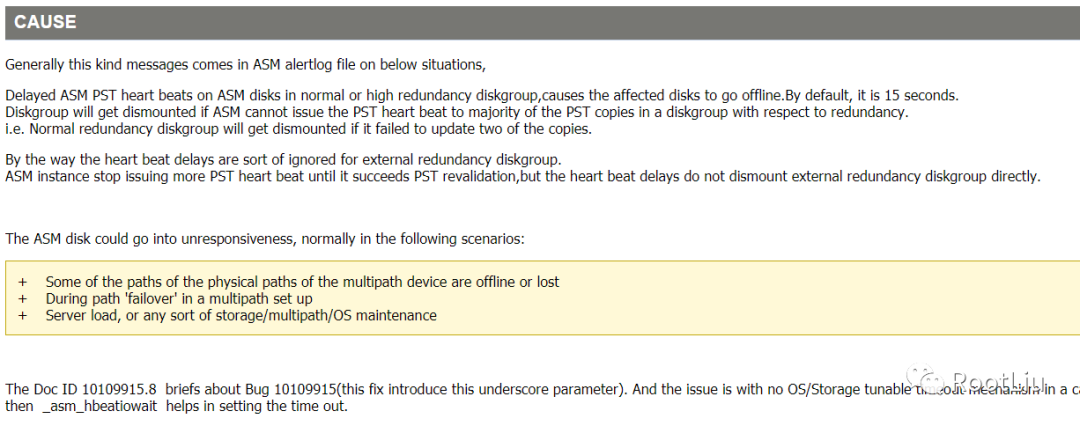
上述mos描述可以得知:
a、集群会定期检查磁盘心跳,通信是否正常,通 ocssd进程检测。
b、检测针对normal和high冗余模式,对于external冗余,不会遇到这个错误;
c、默认情况是15s超时,也就是说15s磁盘组还是没有对ASM实例响应的话,就会dismount磁盘组。
出现这种情况的几个场景:
a、多路径设备的物理路径中的某些路径丢失。
b、failover过程中。
c、存储/多路径/ OS维护过程中。
针对该问题的解决办法是修改隐藏参数_asm_hbeatiowait
SQL> set lines 300SQL> show parameter asmNAME TYPE VALUE------------------------------------ ---------------------- ------------------------------asm_diskgroups string DATA, CRSasm_diskstring string /dev/asm*asm_power_limit integer 1asm_preferred_read_failure_groups stringEnter value for par: hbeaold 1: select x.ksppinm name, y.ksppstvl value, y.ksppstdf isdefault, decode(bitand(y.ksppstvf,7),1,'MODIFIED',4,'SYSTEM_MOD','FALSE') ismod, decode(bitand(y.ksppstvf,2),2,'TRUE','FALSE') isadj from sys.x$ksppi x, sys.x$ksppcv y where x.inst_id = userenv('Instance') and y.inst_id = userenv('Instance') and x.indx = y.indx and x.ksppinm like '%_&par%' order by translate(x.ksppinm, ' _', ' ')new 1: select x.ksppinm name, y.ksppstvl value, y.ksppstdf isdefault, decode(bitand(y.ksppstvf,7),1,'MODIFIED',4,'SYSTEM_MOD','FALSE') ismod, decode(bitand(y.ksppstvf,2),2,'TRUE','FALSE') isadj from sys.x$ksppi x, sys.x$ksppcv y where x.inst_id = userenv('Instance') and y.inst_id = userenv('Instance') and x.indx = y.indx and x.ksppinm like '%_hbea%' order by translate(x.ksppinm, ' _', ' ')NAME VALUE ISDEFAULT ISMOD ISADJ---------------------------------------- -------------------- ------------------ -------------------- ----------_asm_hbeatiowait 15 TRUE FALSE FALSE_asm_hbeatwaitquantum 2 TRUE FALSE FALSESQL>
设置参数:
SQL> alter system set "_asm_hbeatiowait"=120 scope=spfile;
System altered.
SQL> exit
最后重启集群服务后所有服务正常,监听服务也正常。
三、总结
1、集群时钟同步方式可以有两种,使用系统ntp或者自己的ctss。两者可以共存,如果系统中同时有NTP和CTSS,那么集群的时间是由NTP同步的,CTSS会处于观望(Observer)模式,只有当集群关闭所有的NTP服务,CTSS才会处于激活(Active)模式。在一个集群中,只要有一个节点的ntp处于活动状态,那么集群的所有节点的CTSS都会处于激活(Active)模式。
2、磁盘心跳检测超时默认是15秒,单在AIX上,rw_timeout设置会影响此设置,默认设置为30秒。
3、crs磁盘dismount后集群和数据库实例不一定宕机。
