



第四章表查询
【目标】
了解emp表,dept表的结构,以及salgrade表结构
掌握简单的查询 *****
掌握复杂的查询 *****
掌握分页查询 *****
【内容】
一Emp表,dept表,salgrade表结构
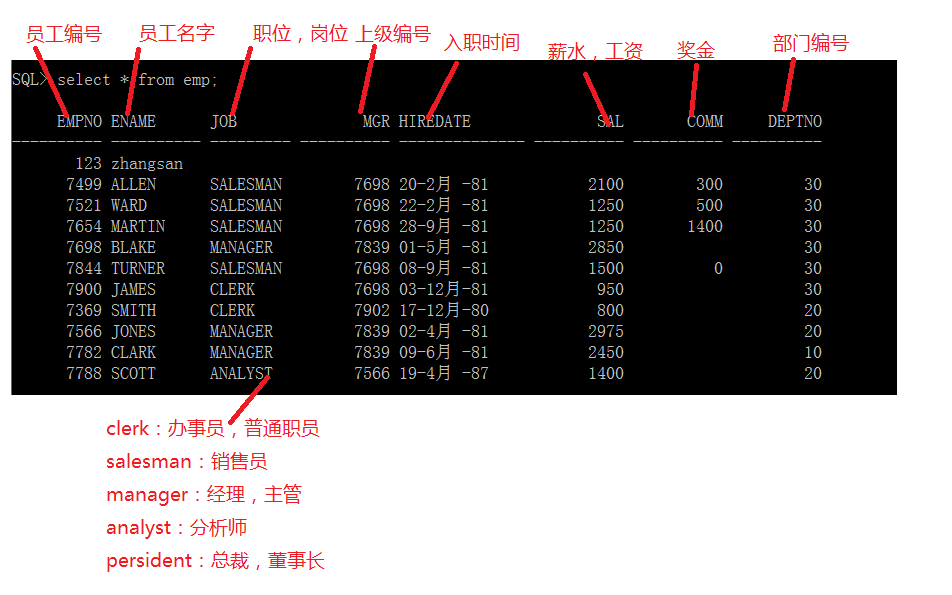
emp员工表的结构
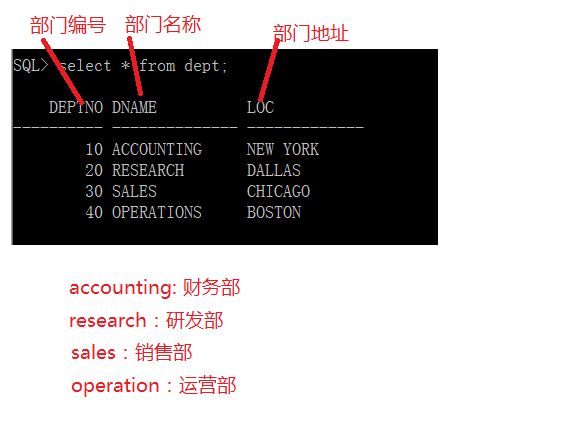
Dept部门表结构:
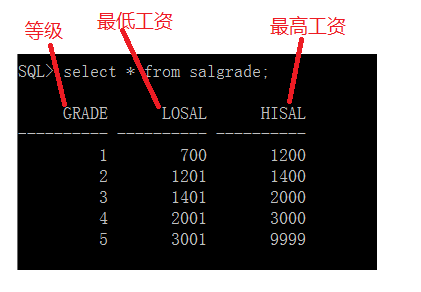
Salgrade:工资级别表
二简单查询
快速建表:
Create table emp1 as select * from emp;
简单的查询
1. 查看表结构 desc表名;
Desc emp;
2.查询所有的数据
Select * from emp;
3.查询指定列
Select empno,ename from emp;
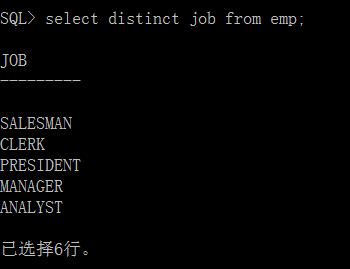
4查询数据并取消重复的列
Select distinct job from emp;
5查询时给列取别名
Select列名 as“列别名”,列名2…from表名;(as可以有,也可以没有)
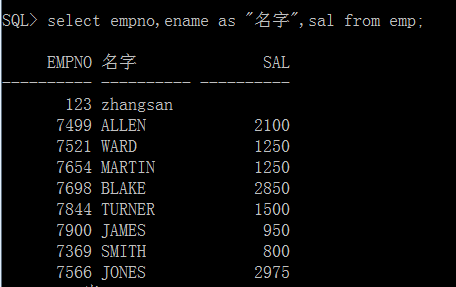
查询emp表的empno,ename,sal,并将ename命名为”名字”
Select empno,ename,sal from emp;
Select empno “编号”,enameas “名字”,salfrom emp;
6查询null的数据
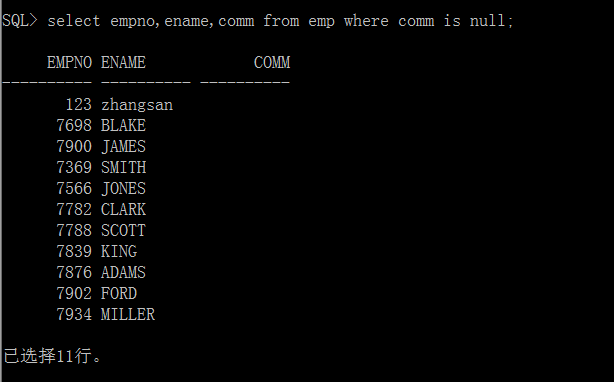
Select empno,ename,commfrom emp where comm is null;
7.Oracle中字符串的连接
查询emp表的员工信息,并且让结构显示为“ename担任的 job职务”
Oracle中字符串连接:||
Selectename || ‘担任’|| job ||’职务’from emp;
使用算术表达式查询
+ - *
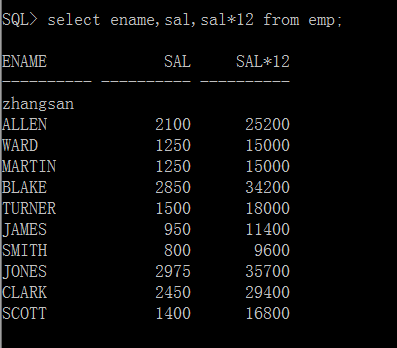
案例1:查询emp表中每个员工的基本年薪(12*工资)
Select ename,sal,sal*12 from emp;
案例2:查询emp表中每个员工的年薪(12月工资+12个月奖金)
年薪= sal*12 +comm * 12=(sal+comm)*12
Select ename,sal,comm,(sal+comm) *12 “年薪”From emp;
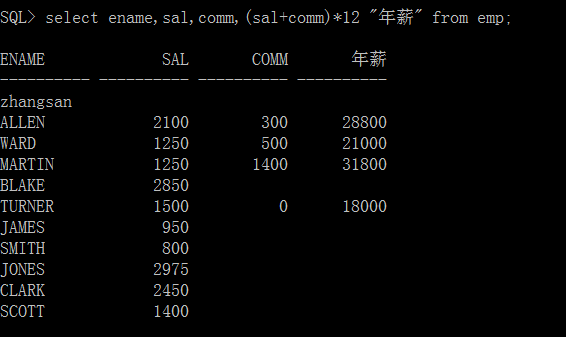
结果:没有奖金的人年薪也没有,因为在oracle中任何数据和null数据运算的结构都是null。
Nvl():默认运算
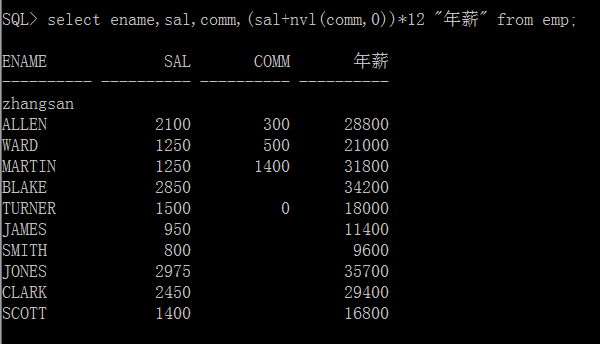
判断comm是否为null,若为null,就给0,nvl(comm,0)selectename,sal,comm,(sal+nvl(comm,0))*12 “年薪”from emp;
使用比较运算符
=, >, <, >=,<=,!=,<>,any(任一),all(所有的)
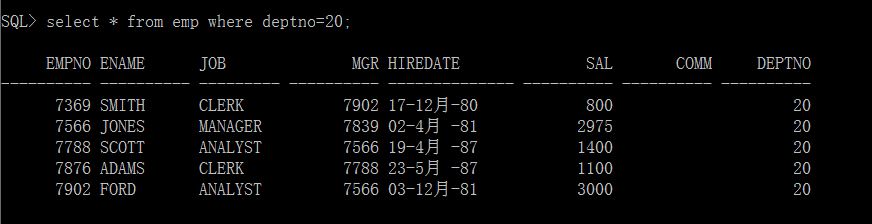
查询emp表中部门编号是20的员工信息
Select * from emp where deptno=20;
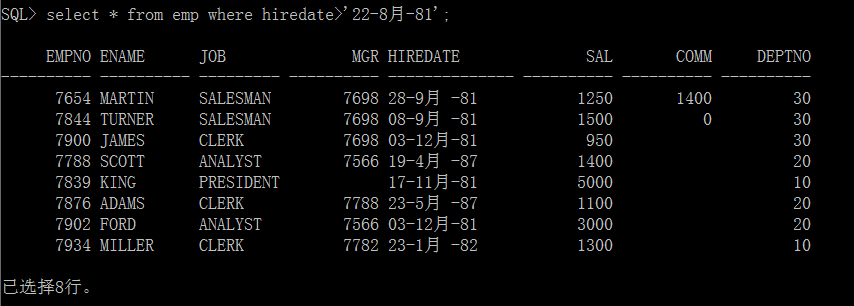
查询emp表中在22-8月-81之后入职的员工信息。
Select * from emp where hiredate>’22-8月-81’;
查询薪水大于等于 1250的员工信息;
Select * from emp where sal >= 1250;
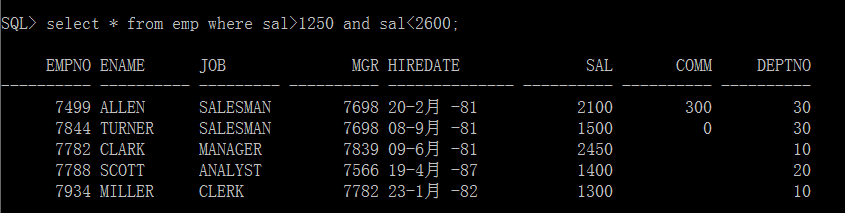
查询薪水大于1250小于2600的员工信息;
Select * from emp where sal>1250 andsal<2600;
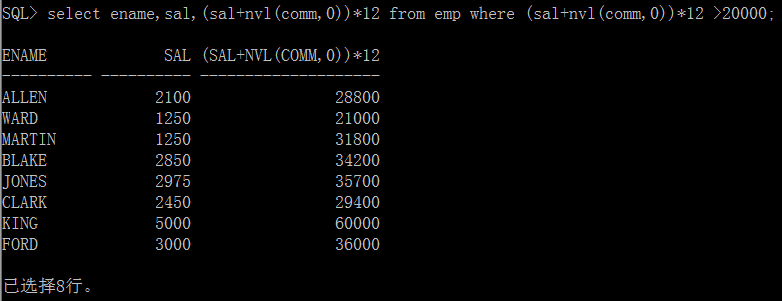
查询emp表中年薪大于20000的员工信息
Select ename,sal ,(sal+nvl(comm,0))*12 from emp where(sal+nvl(comm,0))*12 > 20000;
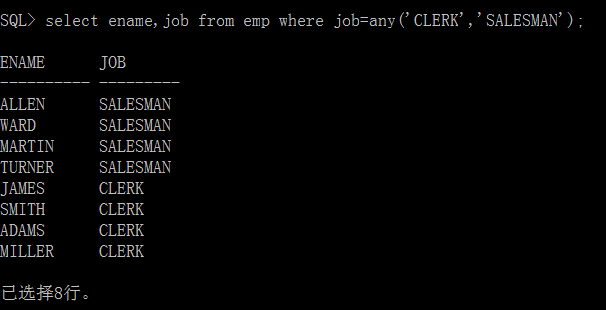
查询emp表中职位为CLERK或者SALESMAN中任意一个的姓名,职位
Select ename,job from emp where job = any(‘CLERK’,’SALESMAN’);
使用逻辑运算符查询
And,or,not,between.. and….,in
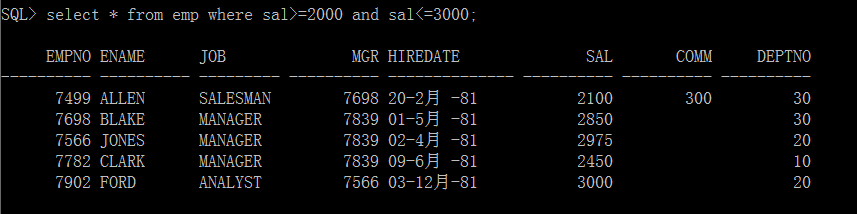
查询出emp表中工资在2000到3000之间的员工信息
Select * from emp where sal>=2000 and sal<=3000;
查询编号为7369,7499,7788的员工信息;
方法一:Select* from emp where empno=7369 or empno=7499 or empno=7788;

方法二:select* from emp where empno in(7369,7499,7788);

查询emp表中工作岗位job不是MANAGER的员工信息
Select * from emp where job !=’MANAGER’;

查询emp表中20号部门中工资高于或者等于2000的员工信息
Select * from emp where deptno=20 and sal>=2000;

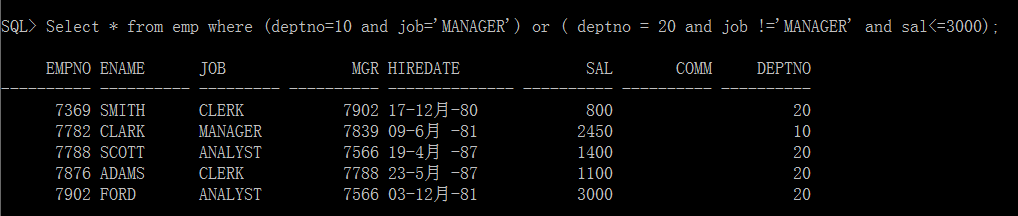
查询emp表中10号部门中所有经理,和20号部门中不是经理但是工资低于3000的员工信息。
select * from emp where (deptno=10 and job=’MANAGER’) or ( deptno= 20 and job !=’MANAGER’ and sal<=3000);
查询emp表中入职时间早于1981年6月30日,并且工作岗位是经理,但是工资低于3000的员工信息。

模糊查询 like:
_: 代表的是任意一个字符
%:代表是0到多个任意字符
语法:select列名1,列名2from 表名 where字段 like条件;
查询emp表中姓名第一个字母是S的员工信息
S****
Select * from emp where ename like ‘S%’;

查询emp表中姓名第二个字母是L的员工信息;
*L****
Select * from emp where ename like ‘_L%’;

查询emp表中姓名最后一个字母是N的员工信息
Select * from emp where ename like ‘%N’;

查询emp表中姓名包含A字母的员工信息;
***A***
查询emp表中姓名不包含A字母的员工信息;
Select * from emp where ename not like‘%A%’;
查询emp表中姓名长度为5个字母的员工信息;
_____
Select * from emp where ename like ‘_____’;
排序 order by [asc/desc]
Asc: 从小到大,从低到高,可以省略
Desc: 从大到小,从高到低
查询emp表中员工信息,并按照工资从低到高排序
Select * from emp order by sal asc;
Select * from emp order by sal;
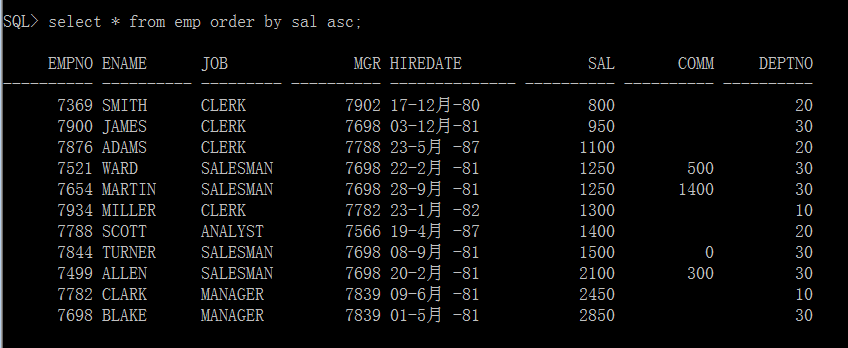 2.查询emp表中员工的信息,并按照部门从小到大,在部门内按照工资从大到小排序。
Select * from emp order by deptno asc,sal desc;
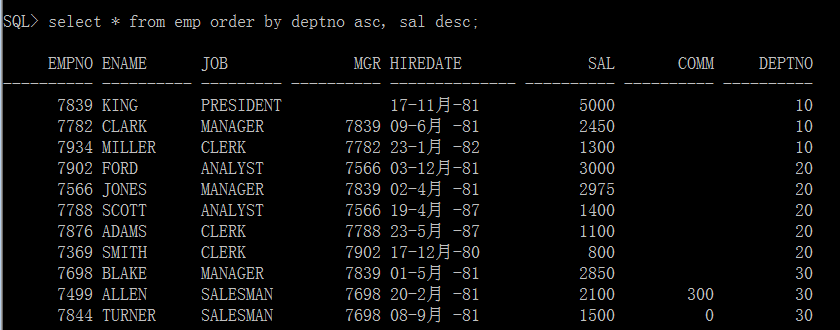
查询emp表中员工的信息,并按照年薪(包括奖金)升序排列。
(Sal + nvl(comm,0))*12
Select ename,sal,(sal + nvl(comm,0))*12 as “年薪”from emp order by “年薪”asc;
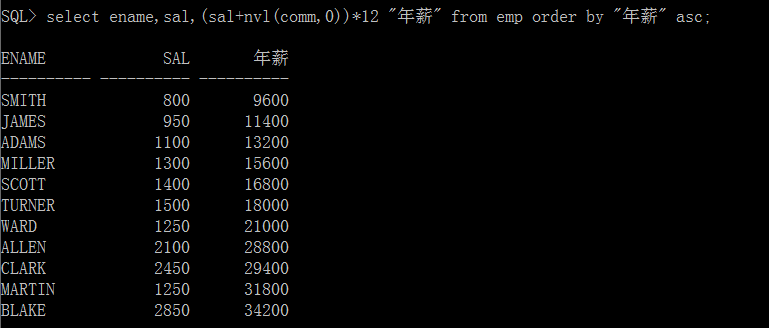
查询emp表中员工的信息,按照部门从大到小的顺序,并按照工资从大到小的顺序
Select * from emp order by deptno desc, sal desc;
分组查询
使用聚合函数/分组函数:max,min,avg,count,sum
查询emp表中工资最高
Select max(sal) from emp;
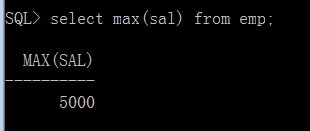
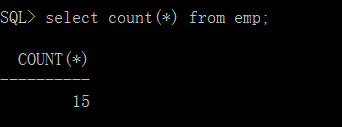
查询emp表中有多少条数据
Select count(*) from emp;
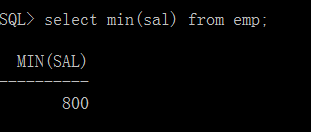
查询emp表中最低工资
Select min(sal) from emp;
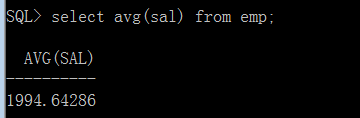
查询emp表中平均工资
Select avg(sal) from emp;
查询emp表中工资综合
Select sum(sal) from emp;
查询emp表中工资最高的员工信息
Select ename,sal from emp where sal=max(sal);
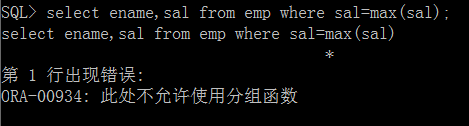
Select ename,sal from emp where sal=( select max(sal) from emp);

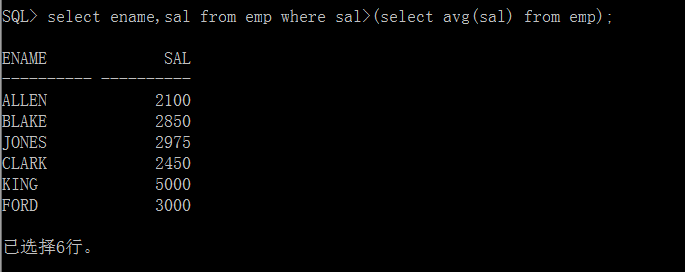
查询工资高于平均工资的员工姓名,工资
查询平均工资
Select avg(sal) from emp;
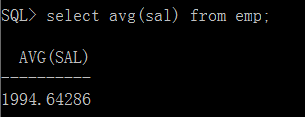
2)查询工资大于平均工资的员工信息
Select ename,sal from emp where sal>( Select avg(sal) from emp);
使用group by 和having
Group by 用于将信息划分为组,对组进行分组运算。
Groupby 后出现的列表项一定要在select后出现。
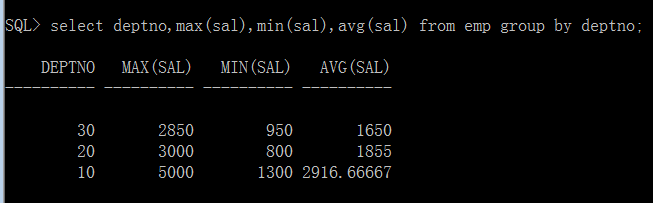
查询出每个部门的最高,最低,平均工资
Select deptno,max(sal),min(sal),avg(sal) from emp group by deptno;
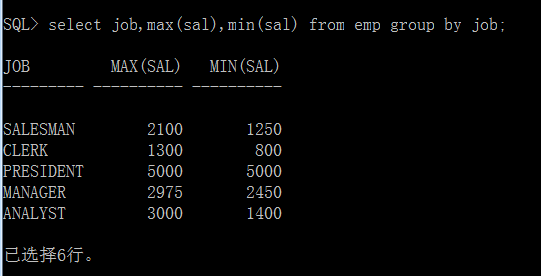
查询不同岗位的最高工资和最低工资.
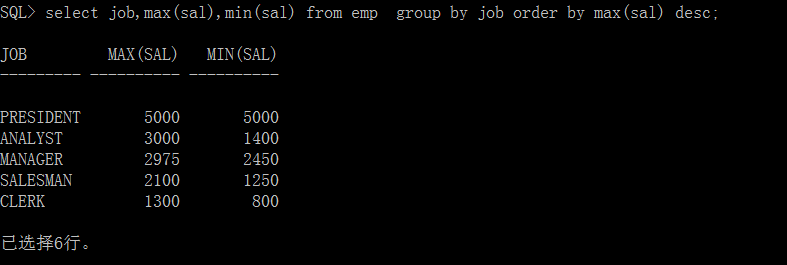
Select job,max(sal),min(sal) from emp group by job;
查询不同岗位的最高工资,最低工资,根据最高工资从高到底排序。
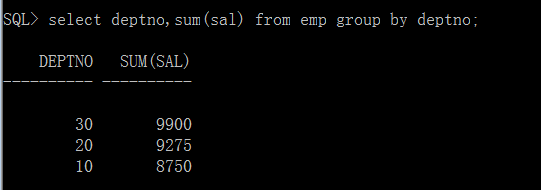
查询emp表中每个部门工资总和
Select deptno,sum(sal) from emp group by deptno;
Having:指定group by子句的检索条件。
查询出平均工资高于2000的部门
select deptno, avg(sal) from emp group by deptno;
select deptno, avg(sal) from emp group by deptno having avg(sal) >2000;

查询出平均工资高于2000的工作岗位
查询不同岗位的平均工资,平均工资高于1500的岗位信息,并且平均工资按照从低到高的排序。
Group by, having, order by
查询出不同岗位的平均工资
Select job, avg(sal) from emp group by job;
平均工资高于1500的岗位信息
Select job, avg(sal) from emp group by job havingavg(sal)>1500;
平均工资高于1500的岗位信息按照低到高工资排序
Select job, avg(sal) from emp group byjob having avg(sal)>1500order by avg(sal) asc;
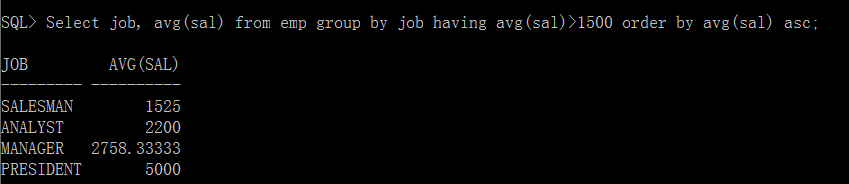
当groupby,having,order by 同时出现的时候,顺序groupby——>having——>order by
三Oracle中的复杂查询
多表查询
在实际情况下,查询一张表不能满足要求,此时就需要查询多张表.
如果是n个表查询,至少要有n-1个条件才不会出现笛卡尔积的情况。
2张表,至少需要一个条件
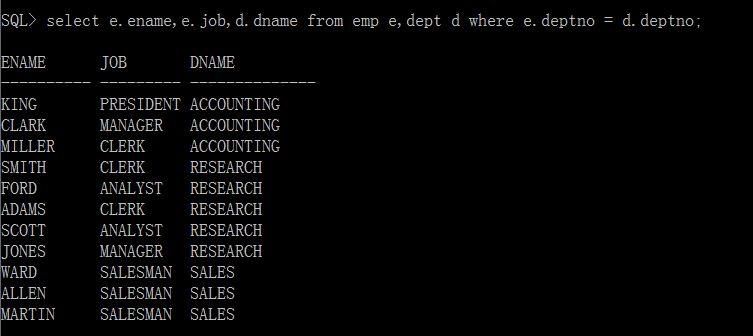
查询emp表和dept表中每个员工的姓名,工作,部门名
Select ename,job,dname from emp,dept whereemp.deptno = dept.deptno;
规范写法:
Select emp.ename ,emp.job,dept.dname fromemp,dept where emp.deptno = dept.deptno;
表起别名
Select e.ename, e.job, d.dname from empe,dept d where e.deptno = d.deptno;
查询10号部门中员工的编号,员工姓名,工资,部门名
Select e.empno, e.ename, e.sal, d.dname fromemp e,dept d where e.deptno = d.deptno and e.deptno = 10;

