



Patroni 为什么没有停止的功能
说实话,这个问题我也是比较纳闷的。很多高可用程序都拥有startup/stop的选项,但是Patroni没有这些选项。
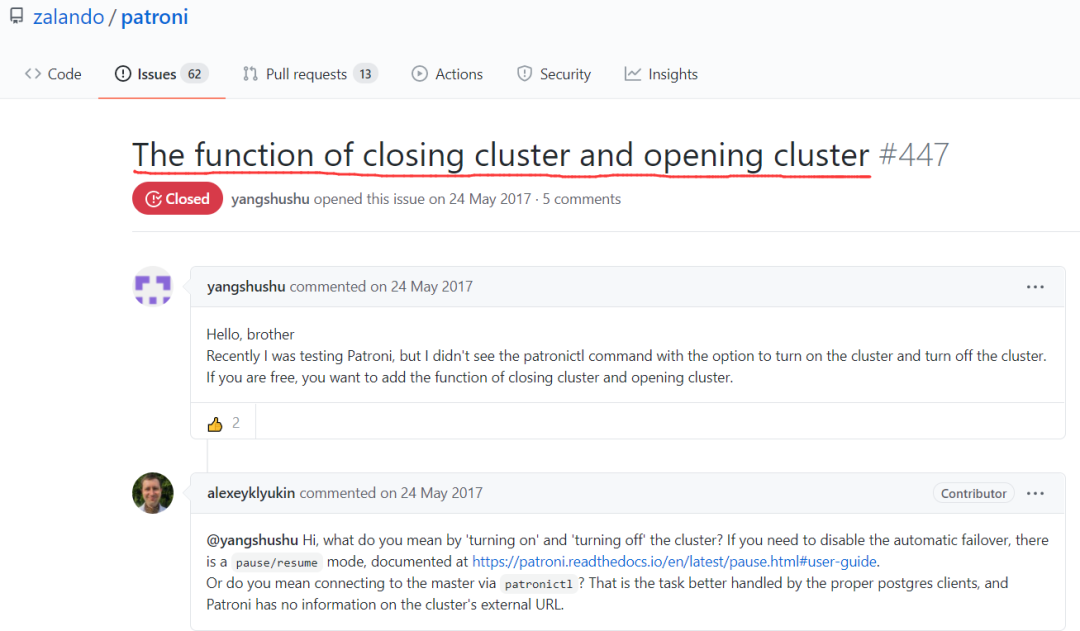
因为开发软件的人认为Patroni 的主要目的和任务是运行高可用集群,停止和启动它是非常奇怪的事。而且从技术上来说,因为它通过在Patroni节点上运行的REST API进行通信,所以无法停止。
我个人觉得还有一个点Patroni他要和Etcd和watchdog进行通信,所以停止它确实不推荐。但是能不能手工停呢?我个人试过,只要把你的数据库关闭,然后在把Patroni进程kill也是可行的。但是有watchdog的情况就不清楚了,毕竟需要给狗投食,所以建议最好先关闭watchdog。
Patroni的维护模式
而Patroni使用paused选项就可以进入维护模式,接下来我们来测试一下维护模式。
[postgres@133e0e204e206 ~]$ patronictl -c /etc/patroni.yml list+ Cluster: patnori-test (6962171552537974697) --+----+-----------+| Member | Host | Role | State | TL | Lag in MB |+-----------+---------------+---------+---------+----+-----------+| postgres1 | 133.0.204.206 | Leader | running | 15 | || postgres2 | 133.0.204.207 | Replica | running | 15 | 0 || postgres3 | 133.0.204.208 | Replica | running | 15 | 0 |+-----------+---------------+---------+---------+----+-----------+[postgres@133e0e204e206 ~]$ patronictl -c /etc/patroni.yml pauseSuccess: cluster management is paused[postgres@133e0e204e206 ~]$ patronictl -c /etc/patroni.yml list+ Cluster: patnori-test (6962171552537974697) --+----+-----------+| Member | Host | Role | State | TL | Lag in MB |+-----------+---------------+---------+---------+----+-----------+| postgres1 | 133.0.204.206 | Leader | running | 15 | || postgres2 | 133.0.204.207 | Replica | running | 15 | 0 || postgres3 | 133.0.204.208 | Replica | running | 15 | 0 |+-----------+---------------+---------+---------+----+-----------+ Maintenance mode: on
我们在Leader节点打开维护模式。现在我们就能够正常的关闭Patroni节点了。
[postgres@133e0e204e206 ~]$ ps -ef | grep patronipostgres 24311 1 0 Jun03 ? 00:03:28 /usr/local/bin/python3.9 /home/postgres/.local/bin/patroni /etc/patroni.ymlpostgres 30373 26101 0 16:00 pts/1 00:00:00 grep --color=auto patroni[postgres@133e0e204e206 ~]$ kill -9 24311
关闭了Patroni节点之后,在Replica节点上查询集群状态。
[postgres@133e0e204e207 ~]$ patronictl -c /etc/patroni.yml list+ Cluster: patnori-test (6962171552537974697) --+----+-----------+-----------------+| Member | Host | Role | State | TL | Lag in MB | Pending restart |+-----------+---------------+---------+---------+----+-----------+-----------------+| postgres2 | 133.0.204.207 | Replica | running | 15 | 0 | * || postgres3 | 133.0.204.208 | Replica | running | 15 | 0 | * |+-----------+---------------+---------+---------+----+-----------+-----------------+ Maintenance mode: on
可以看到另外两个节点,没发生自动故障转移。数据库仍然保持稳定的运行。
你登录leader节点的postgresql数据库,可以正常执行操作,没发生切换。
[postgres@133e0e204e206 ~]$ psqlpsql (13.2)Type "help" for help.postgres=# select pg_is_in_recovery(); pg_is_in_recovery ------------------- f(1 row)
此时我们就可以对Patroni进行升级等一系列维护操作,不会影响集群的使用,但是如果接下来出现问题,就需要你手工进行故障转移了。
还有一个应用场景是你可能要停止你的数据库进行维护,但是Patroni会自动立马迅速的拉起它,或者是进行故障转移,此时你不想让它拉起来。你也可以把状态设置成维护模式,然后停止数据库。我们来测试一下。
假设我现在的leader在节点3上。
[postgres@133e0e204e206 ~]$ patronictl -c /etc/patroni.yml list+ Cluster: patnori-test (6962171552537974697) --+----+-----------+-----------------+| Member | Host | Role | State | TL | Lag in MB | Pending restart |+-----------+---------------+---------+---------+----+-----------+-----------------+| postgres1 | 133.0.204.206 | Replica | running | 16 | 0 | || postgres2 | 133.0.204.207 | Replica | running | 16 | 0 | * || postgres3 | 133.0.204.208 | Leader | running | 16 | | * |+-----------+---------------+---------+---------+----+-----------+-----------------+
我先把节点3进入到维护模式。
[postgres@133e0e204e208 ~]$ patronictl -c /etc/patroni.yml pauseSuccess: cluster management is paused
然后我把节点3的数据库停止。
[postgres@133e0e204e208 ~]$ psqlpsql (13.2)Type "help" for help.postgres=# select pg_is_in_recovery(); pg_is_in_recovery ------------------- f(1 row)postgres=# \q[postgres@133e0e204e208 ~]$ pg_ctl stopwaiting for server to shut down.... doneserver stopped
此时我把主库shutdown了,在维护模式下,数据库并没有被立马拉起来,也没有发生failover。
[postgres@133e0e204e208 ~]$ patronictl -c /etc/patroni.yml list+ Cluster: patnori-test (6962171552537974697) --+----+-----------+-----------------+| Member | Host | Role | State | TL | Lag in MB | Pending restart |+-----------+---------------+---------+---------+----+-----------+-----------------+| postgres1 | 133.0.204.206 | Replica | running | 16 | 0 | || postgres2 | 133.0.204.207 | Replica | running | 16 | 0 | * || postgres3 | 133.0.204.208 | Replica | stopped | | unknown | * |+-----------+---------------+---------+---------+----+-----------+-----------------+ Maintenance mode: on
整个数据库集群,另外两个从库都只能是只读状态。我们可以在主库上做一些维护操作了,维护完了在把主库启动。最后把Patroni维护模式关闭,整个集群就完好如初。
[postgres@133e0e204e208 ~]$ pg_ctl startwaiting for server to start....2021-06-07 17:09:00.200 CST [4283] LOG: redirecting log output to logging collector process2021-06-07 17:09:00.200 CST [4283] HINT: Future log output will appear in directory "log". doneserver started[postgres@133e0e204e208 ~]$ patronictl -c /etc/patroni.yml list+ Cluster: patnori-test (6962171552537974697) --+----+-----------+-----------------+| Member | Host | Role | State | TL | Lag in MB | Pending restart |+-----------+---------------+---------+---------+----+-----------+-----------------+| postgres1 | 133.0.204.206 | Replica | running | 16 | 0 | || postgres2 | 133.0.204.207 | Replica | running | 16 | 0 | * || postgres3 | 133.0.204.208 | Leader | running | 16 | | * |+-----------+---------------+---------+---------+----+-----------+-----------------+ Maintenance mode: on [postgres@133e0e204e208 ~]$ patronictl -c /etc/patroni.yml resumeSuccess: cluster management is resume[postgres@133e0e204e208 ~]$ patronictl -c /etc/patroni.yml list+ Cluster: patnori-test (6962171552537974697) --+----+-----------+| Member | Host | Role | State | TL | Lag in MB |+-----------+---------------+---------+---------+----+-----------+| postgres1 | 133.0.204.206 | Replica | running | 16 | 0 || postgres2 | 133.0.204.207 | Replica | running | 16 | 0 || postgres3 | 133.0.204.208 | Leader | running | 16 | |+-----------+---------------+---------+---------+----+-----------+
后记
维护模式还是很重要的,不然咱们稍微想动一下,就有可能导致整个集群发生故障转移,这不要背维护的锅了吗?所以掌握Patroni的维护模式,就能够方便的进行各种维护任务。
参考链接:
https://github.com/zalando/patroni/issues/447
