



1. FORMAT的应用
1)外部数据插入ClickHouse数据库
clickhouse-client --port 9000 -u default -h 127.0.0.1 --query="INSERT INTO test FORMAT CSV" < /home/clickhouse/test.csv
cat home/clickhouse/test.csv | clickhouse-client --port 9000 -u default -h 127.0.0.1 --query="INSERT INTO test FORMAT CSV" --input_format_allow_errors_num=100000
2)直接查询外部数据,
需要在clickhouse-client中查询。示例如下:
clickhouse-client --port 9000 -u default -h 127.0.0.1 --password='clickhouse@123' --query="select count() from like" --external --file=/home/clickhouse/cluster.csv --name=like --format=CSV --types="String,UInt32,UInt32,UInt32,String,String,UInt16,UInt8,String,String"
这里的format是配合表引擎中小数据表引擎-External data来使用。其实就是给外部数据建了个临时表然后查询。
ClickHouse官网详细解释
https://clickhouse.tech/docs/en/engines/table-engines/special/external-data/
3)数据查询结果写入外部文件中
需要在clickhouse-client中查询,数据是写入到client端,而不是服务器端。什么意思呢?clickhouse-client启动的时候是可以带host和port参数的,也就是我可以A机器上的客户端连接B机器上的服务端,数据会写入到A机器上面。另外,http连接的情况是不支持写入的。
示例如下:
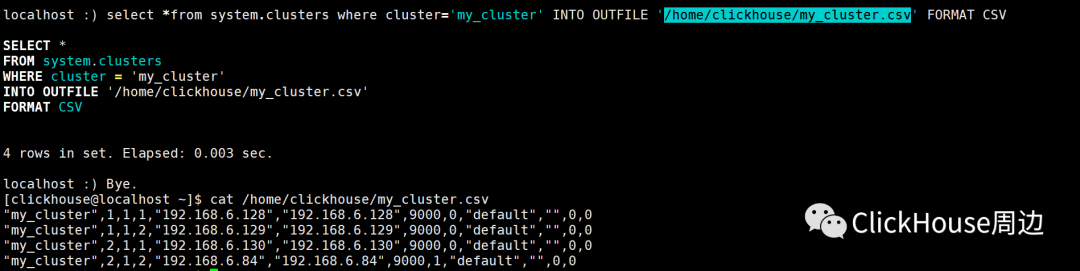
4)查询结果打印到Terminal的显示格式
语法和显示效果示例如下:
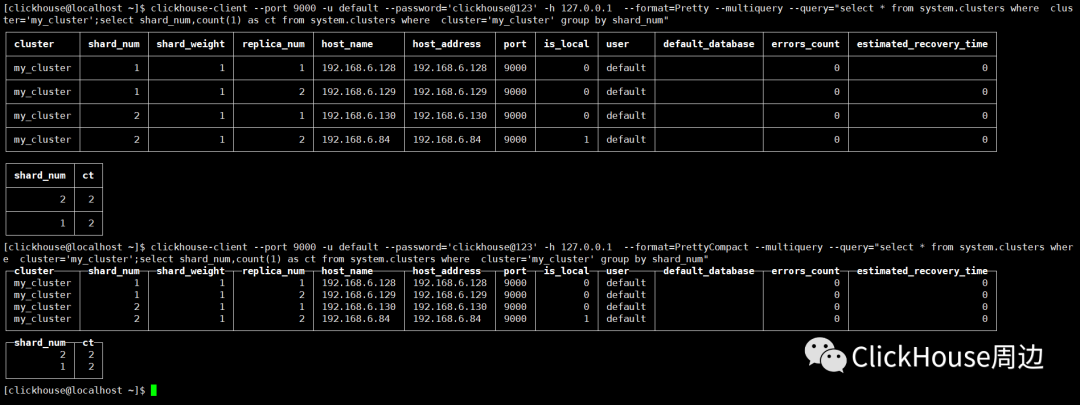

2. FORMAT支持的种类
ClickHouse官网详细解释 Formats for Input and Output Data
https://clickhouse.tech/docs/en/interfaces/formats/
| Format | INSERT | SELECT |
|---|---|---|
| TabSeparated | ✔ | ✔ |
| TabSeparatedRaw | ✗ | ✔ |
| TabSeparatedWithNames | ✔ | ✔ |
| TabSeparatedWithNamesAndTypes | ✔ | ✔ |
| CSV | ✔ | ✔ |
| CSVWithNames | ✔ | ✔ |
| Values | ✔ | ✔ |
| Vertical | ✗ | ✔ |
| VerticalRaw | ✗ | ✔ |
| JSON | ✗ | ✔ |
| JSONCompact | ✗ | ✔ |
| JSONEachRow | ✔ | ✔ |
| TSKV | ✔ | ✔ |
| Pretty | ✗ | ✔ |
| PrettyCompact | ✗ | ✔ |
| PrettyCompactMonoBlock | ✗ | ✔ |
| PrettyNoEscapes | ✗ | ✔ |
| PrettySpace | ✗ | ✔ |
| RowBinary | ✔ | ✔ |
| Native | ✔ | ✔ |
| Null | ✗ | ✔ |
| XML | ✗ | ✔ |
| CapnProto | ✔ | ✔ |

文章转载自 ClickHouse周边,如果涉嫌侵权,请发送邮件至:contact@modb.pro进行举报,并提供相关证据,一经查实,墨天轮将立刻删除相关内容。
