



写在前面
通过之前MQTT系列-Eclipse.Paho源码分析(二)-消息的发送与接收的介绍,相信仔细阅读过的小伙伴已经对Eclipse.Paho内部发送和订阅消息的流程有了一个较为清晰的认识,今天我们就把剩下的边角料扫一扫,也就是Eclipse.Paho作为客户端是如何进行容灾补偿和心跳的相关介绍。
心跳机制
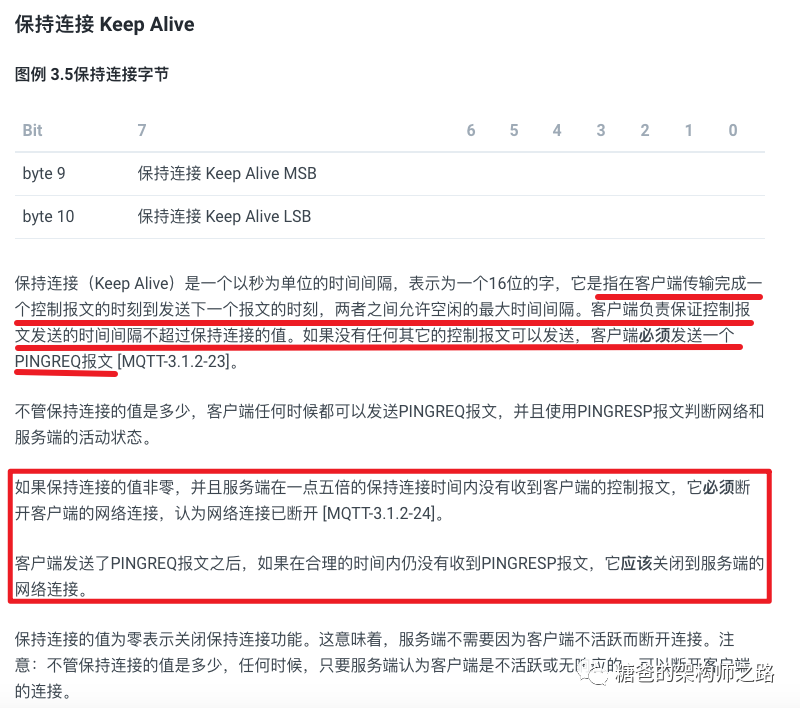
简单来说,就是在创建连接时发送的CONNECT控制报文中,在第九和第十字节会携带客户端与服务端的最大连接时长,如果超过这个时间,服务端和客户端会各自做一些相应的处理。但是这样会有一个问题,当客户端在超过最大连接时长的时间段内确实没有消息上送至服务器,此时服务器是无法判断因为客户端出现故障导致的还是确实没有收到消息导致的。所以MQTT协议中规定了PINGREQ和PINGRESP两种控制类型的报文用来处理上述情况,即如果客户端真的没有消息上送,你也要定时给我发送一个PINGREQ类型的报文告诉我你还活着,我服务器收到后会即使回送一个PINGRESP报文告诉客户端我收到了,这就是一条心跳消息。
TimerPingSender:使用了Java的原生定时工具Timer
ScheduledExecutorPingSender:基于线程池的定时任务调
public MqttAsyncClient(String serverURI, String clientId, MqttClientPersistence persistence) throws MqttException {// 构造方法中创建 TimerPingSenderthis(serverURI, clientId, persistence, new TimerPingSender());}
public interface MqttPingSender {/*** Initial method. Pass interal state of current client in.* @param comms The core of the client, which holds the state information for pending and in-flight messages.*/// 初始化心跳发送器void init(ClientComms comms);/*** Start ping sender. It will be called after connection is success.*/// 心跳开始void start();/*** Stop ping sender. It is called if there is any errors or connection shutdowns.*/// 心跳终止void stop();/*** Schedule next ping in certain delay.* @param delayInMilliseconds delay in milliseconds.*/// 触发下一次心跳void schedule(long delayInMilliseconds);}
init() 心跳初始化
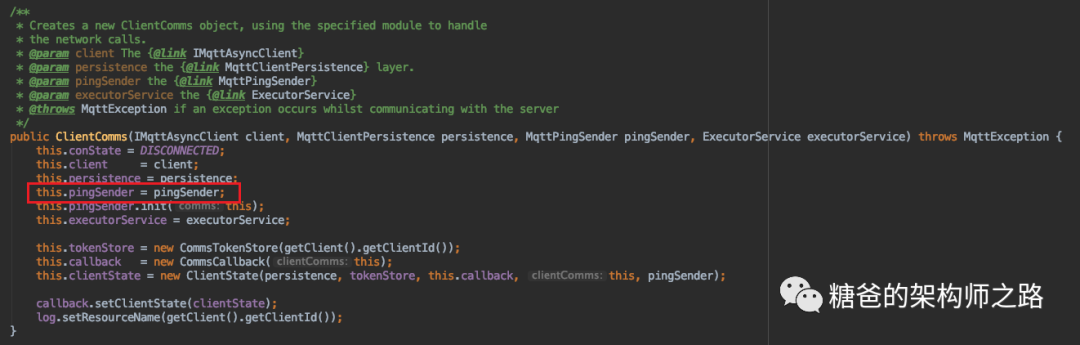
public void init(ClientComms comms) {if (comms == null) {throw new IllegalArgumentException("ClientComms cannot be null.");}// 包装ClientComms对象this.comms = comms;}
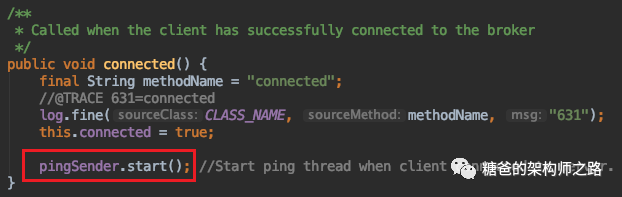
客户端与服务端建立连接后,服务端会响应一个CONNACK类型的报文,所以在消息接收线程中,如果判断是这种类型的报文,会创建Timer并开始心跳
protected void notifyReceivedAck(MqttAck ack) throws MqttException {if (token == null) {...} else if (ack instanceof MqttPubRec) {...} else if (ack instanceof MqttPubAck || ack instanceof MqttPubComp) {...} else if (ack instanceof MqttPingResp) {...} else if (ack instanceof MqttConnack) {int rc = ((MqttConnack) ack).getReturnCode();if (rc == 0) {synchronized (queueLock) {if (cleanSession) {clearState();// Add the connect token back in so that users can be// notified when connect completes.tokenStore.saveToken(token,ack);}inFlightPubRels = 0;actualInFlight = 0;restoreInflightMessages();// 开启PingSenderconnected();}}...}
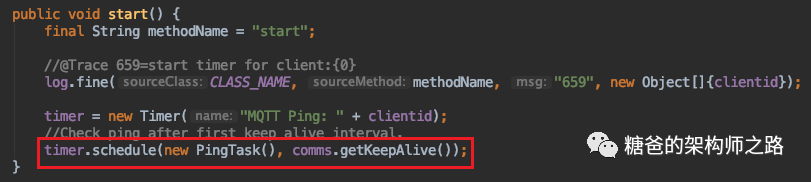

public MqttToken checkForActivity(IMqttActionListener pingCallback) throws MqttException {synchronized (quiesceLock) {if (quiescing) {return null;}}MqttToken token = null;long nextPingTime = this.keepAlive;if (connected && this.keepAlive > 0) {long time = System.nanoTime();int delta = 100000;synchronized (pingOutstandingLock) {if (pingOutstanding > 0 && (time - lastInboundActivity >= keepAlive + delta)) {// 异常1throw ExceptionHelper.createMqttException(MqttException.REASON_CODE_CLIENT_TIMEOUT);}if (pingOutstanding == 0 && (time - lastOutboundActivity >= 2*keepAlive)) {// 异常2throw ExceptionHelper.createMqttException(MqttException.REASON_CODE_WRITE_TIMEOUT);}if ((pingOutstanding == 0 && (time - lastInboundActivity >= keepAlive - delta)) ||(time - lastOutboundActivity >= keepAlive - delta)) {token = new MqttToken(clientComms.getClient().getClientId());if(pingCallback != null){token.setActionCallback(pingCallback);}tokenStore.saveToken(token, pingCommand);pendingFlows.insertElementAt(pingCommand, 0);nextPingTime = getKeepAlive();notifyQueueLock();}else {log.fine(CLASS_NAME, methodName, "634", null);nextPingTime = Math.max(1, getKeepAlive() - (time - lastOutboundActivity));}}log.fine(CLASS_NAME, methodName,"624", new Object[]{Long.valueOf(nextPingTime)});pingSender.schedule(nextPingTime);}return token;}
PingOutStanding:表示待确认的PINGREQ的报文数量,即我们上一章提到的心跳出站计数器,当心跳消息发送成功后这个变量的值会增加1,收到PINGRESP确认报文后这个变量的值会减1,但是不会小于0
lastInboundActivity:表示客户端最近一次收到服务端的报文的时间
lastOutboundActivity:表示客户端最近一次成功发送报文的时间
delta:考虑到System.currentTimeMillis()不精确,paho通过增加一个缓冲时间来减少ping包的发送频率。默认为100000微妙
下面说下处理心跳的具体流程:
如果已经连接到服务器,且心跳时间keepAlive的值大于0,则会尝试走ping报文发送流程。
先判断是否出现异常,异常有两种情况:
发送PINGREQ报文后(pingOutStanding > 0),在 keepAlive + delta 时间间隔内未从服务端收到报文,则会抛出超时异常,抛出异常后,客户端会断开和服务端的连接
如果在 2倍的keepAlive时间间隔内,客户端既没有成功发送过PINGREQ报文也没有成功发送过其他报文,客户端认为到broker的连接已经断开,则会抛出超时异常,抛出异常后,客户端会断开和服务端的连接
未抛出异常,正常发送,计算下次ping的时间间隔
如果在 keepAlive - delta 时间间隔内既没法送过也没收到过心跳消息
或者
最近一次消息(不一定是心跳消息)时间间隔超过 keepAlive - delta ,则向broker发送PINGREQ报文,否则执行2
条件1满足表示暂时不需要发送 PINGREQ 报文,经过
Math.max(1, getKeepAlive() - (time - lastOutboundActivity))
时间后再检查。
发送了PINGREQ报文,但在 keepAlive + delta 内未收到服务端的任何数据包
在2 * keepAlive 内未成功发送过任何数据包
重连与消息重发机制
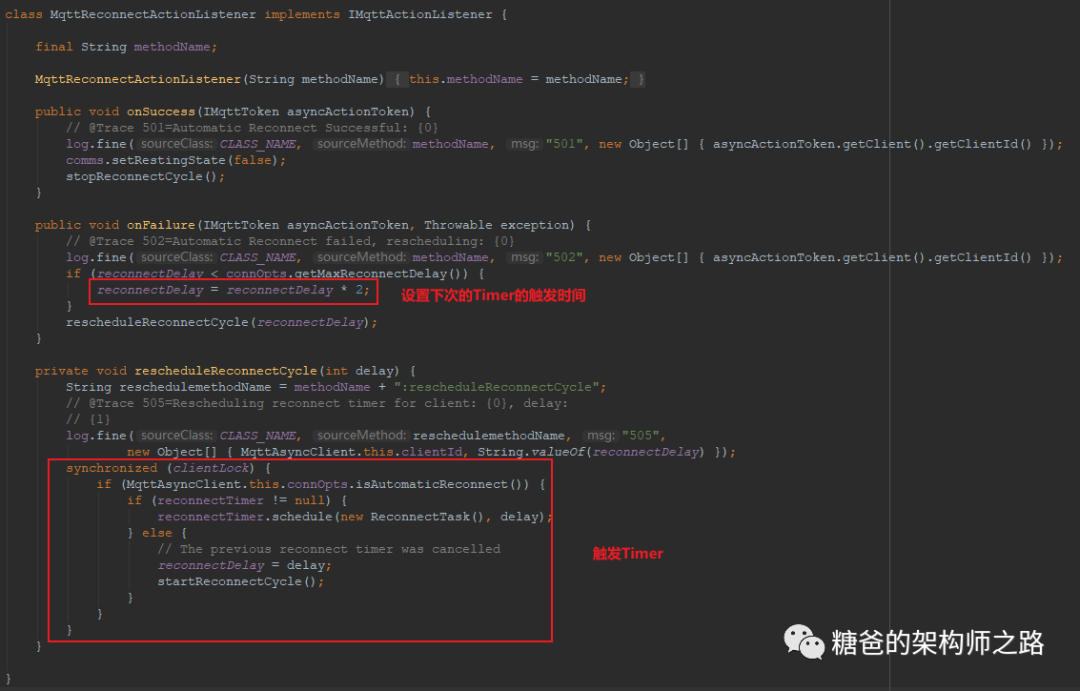
private void startReconnectCycle() {reconnectTimer = new Timer("MQTT Reconnect: " + clientId);reconnectTimer.schedule(new ReconnectTask(), reconnectDelay);}
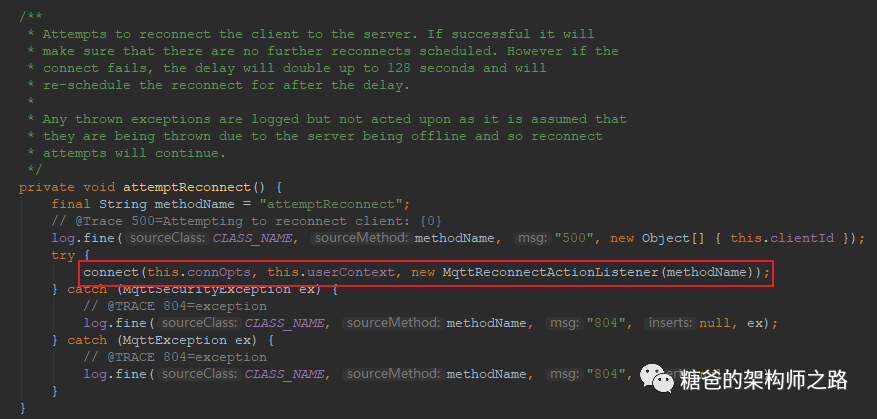
public IMqttToken connect(MqttConnectOptions options, Object userContext, IMqttActionListener callback)throws MqttException, MqttSecurityException {// 判断当前的连接状态,只有当前z状态为已断开,即isDisconnected// 才会继续执行final String methodName = "connect";if (comms.isConnected()) {throw ExceptionHelper.createMqttException(MqttException.REASON_CODE_CLIENT_CONNECTED);}if (comms.isConnecting()) {throw new MqttException(MqttException.REASON_CODE_CONNECT_IN_PROGRESS);}if (comms.isDisconnecting()) {throw new MqttException(MqttException.REASON_CODE_CLIENT_DISCONNECTING);}if (comms.isClosed()) {throw new MqttException(MqttException.REASON_CODE_CLIENT_CLOSED);}if (options == null) {options = new MqttConnectOptions();}this.connOpts = options;this.userContext = userContext;// 设置网络资源以及连接属性final boolean automaticReconnect = options.isAutomaticReconnect();new Object[] { Boolean.valueOf(options.isCleanSession()), Integer.valueOf(options.getConnectionTimeout()),Integer.valueOf(options.getKeepAliveInterval()), options.getUserName(),((null == options.getPassword()) ? "[null]" : "[notnull]"),((null == options.getWillMessage()) ? "[null]" : "[notnull]"), userContext, callback });comms.setNetworkModules(createNetworkModules(serverURI, options));// 设置重连回调comms.setReconnectCallback(new MqttReconnectCallback(automaticReconnect));MqttToken userToken = new MqttToken(getClientId());// 设置连接监听器ConnectActionListener connectActionListener = new ConnectActionListener(this, persistence, comms, options,userToken, userContext, callback, reconnecting);userToken.setActionCallback(connectActionListener);userToken.setUserContext(this);if (this.mqttCallback instanceof MqttCallbackExtended) {connectActionListener.setMqttCallbackExtended((MqttCallbackExtended) this.mqttCallback);}comms.setNetworkModuleIndex(0);// 触发连接connectActionListener.connect();return userToken;}
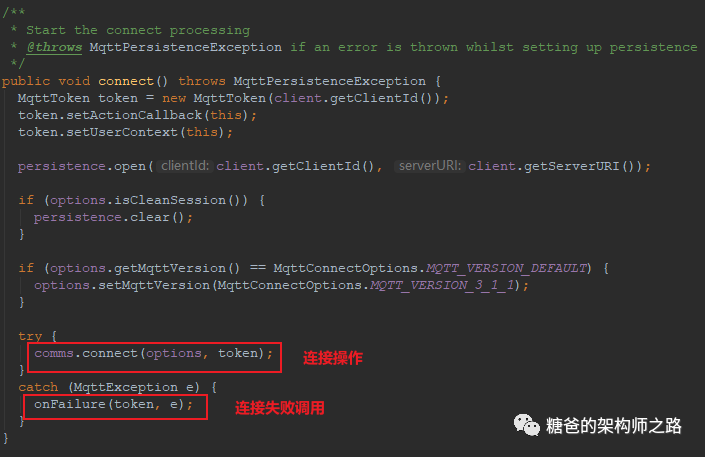
public void onFailure(IMqttToken token, Throwable exception) {int numberOfURIs = comms.getNetworkModules().length;int index = comms.getNetworkModuleIndex();// 轮询设置的其他Broker,并尝试连接if ((index + 1) < numberOfURIs || (originalMqttVersion == MqttConnectOptions.MQTT_VERSION_DEFAULT && options.getMqttVersion() == MqttConnectOptions.MQTT_VERSION_3_1_1)) {if (originalMqttVersion == MqttConnectOptions.MQTT_VERSION_DEFAULT) {if (options.getMqttVersion() == MqttConnectOptions.MQTT_VERSION_3_1_1) {options.setMqttVersion(MqttConnectOptions.MQTT_VERSION_3_1);}else {options.setMqttVersion(MqttConnectOptions.MQTT_VERSION_3_1_1);comms.setNetworkModuleIndex(index + 1);}}else {// 将游标 + 1,方便下一次直接取出地址集合的下一个元素comms.setNetworkModuleIndex(index + 1);}try {connect();}catch (MqttPersistenceException e) {// 递归调用,此时onFailure(token, e); // try the next URI in the list}}// 如果都不成功,触发回调进行下一次重连尝试操作。else {if (originalMqttVersion == MqttConnectOptions.MQTT_VERSION_DEFAULT) {options.setMqttVersion(MqttConnectOptions.MQTT_VERSION_DEFAULT);}MqttException ex;if (exception instanceof MqttException) {ex = (MqttException) exception;}else {ex = new MqttException(exception);}userToken.internalTok.markComplete(null, ex);userToken.internalTok.notifyComplete();userToken.internalTok.setClient(this.client); // fix bug 469527 - maybe should be set elsewhere?if (userCallback != null) {userToken.setUserContext(userContext);// MqttReconnectActionListener.onFailure();userCallback.onFailure(userToken, exception);}}}
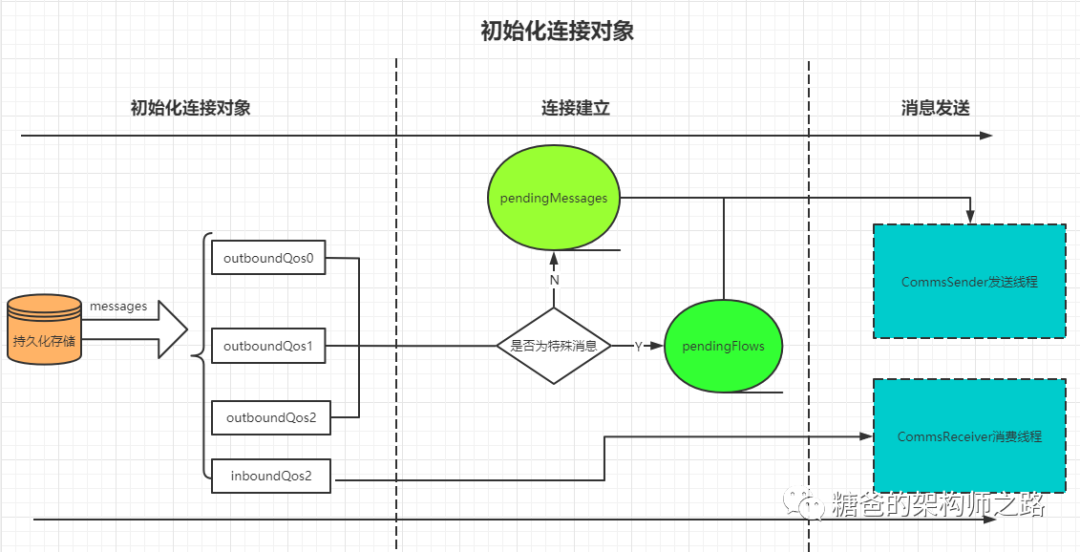
在初始化连接对象阶段,会将消息从持久化存储恢复到出站队列
在建立连接后(收到CONNACK类型报文)根据消息类型将消息从出站队列放到发送队列或特殊消息队列中进行发送
下面看一下具体代码
protected void restoreState() throws MqttException {Enumeration messageKeys = persistence.keys();MqttPersistable persistable;String key;int highestMsgId = nextMsgId;Vector orphanedPubRels = new Vector();// while循环内存中的所有key,并根据key取出对应的message.while (messageKeys.hasMoreElements()) {key = (String) messageKeys.nextElement();persistable = persistence.get(key);// 将消息从持久化存储加载到内存中MqttWireMessage message = restoreMessage(key, persistable);if (message != null) {// 将消息进行分类,根据messageid+前缀将消息放入不同的出站队列中if (key.startsWith(PERSISTENCE_RECEIVED_PREFIX)) {inboundQoS2.put( Integer.valueOf(message.getMessageId()),message);} else if (key.startsWith(PERSISTENCE_SENT_PREFIX)) {MqttPublish sendMessage = (MqttPublish) message;highestMsgId = Math.max(sendMessage.getMessageId(), highestMsgId);if (persistence.containsKey(getSendConfirmPersistenceKey(sendMessage))) {MqttPersistable persistedConfirm = persistence.get(getSendConfirmPersistenceKey(sendMessage));MqttPubRel confirmMessage = (MqttPubRel) restoreMessage(key, persistedConfirm);if (confirmMessage != null) {outboundQoS2.put( Integer.valueOf(confirmMessage.getMessageId()), confirmMessage);} else {}} else {sendMessage.setDuplicate(true);if (sendMessage.getMessage().getQos() == 2) {outboundQoS2.put( Integer.valueOf(sendMessage.getMessageId()),sendMessage);} else {outboundQoS1.put( Integer.valueOf(sendMessage.getMessageId()),sendMessage);}}MqttDeliveryToken tok = tokenStore.restoreToken(sendMessage);tok.internalTok.setClient(clientComms.getClient());// 缓存到id使用映射表inUsedIds中inUseMsgIds.put( Integer.valueOf(sendMessage.getMessageId()), Integer.valueOf(sendMessage.getMessageId()));} else if(key.startsWith(PERSISTENCE_SENT_BUFFERED_PREFIX)){MqttPublish sendMessage = (MqttPublish) message;highestMsgId = Math.max(sendMessage.getMessageId(), highestMsgId);if(sendMessage.getMessage().getQos() == 2){outboundQoS2.put( Integer.valueOf(sendMessage.getMessageId()),sendMessage);} else if(sendMessage.getMessage().getQos() == 1){outboundQoS1.put( Integer.valueOf(sendMessage.getMessageId()),sendMessage);} else {outboundQoS0.put( Integer.valueOf(sendMessage.getMessageId()), sendMessage);persistence.remove(key);}MqttDeliveryToken tok = tokenStore.restoreToken(sendMessage);tok.internalTok.setClient(clientComms.getClient());// 缓存到id使用映射表inUsedIds中inUseMsgIds.put( Integer.valueOf(sendMessage.getMessageId()), Integer.valueOf(sendMessage.getMessageId()));} else if (key.startsWith(PERSISTENCE_CONFIRMED_PREFIX)) {MqttPubRel pubRelMessage = (MqttPubRel) message;if (!persistence.containsKey(getSendPersistenceKey(pubRelMessage))) {orphanedPubRels.addElement(key);}}}}messageKeys = orphanedPubRels.elements();while(messageKeys.hasMoreElements()) {key = (String) messageKeys.nextElement();persistence.remove(key);}nextMsgId = highestMsgId;}
上面的代码中要注意的就是highedstMsgId这个变量,这个变量既是定义新发送消息的初始MessageId,也是被持久化的所有消息中的最大MessageId。这样做的目的是为了保证MessageId唯一。举个例子,如果有二十条消息持久化在内存中等待发送,其中最大的MessageId为100,那么将这二十条消息发送完成后,如果需要再发送新的消息,此时新消息的MessageId的初始值就不能从0开始,因为有可能会和持久化的消息中的MessageId重复,为了避免这种情况,所以会将持久化消息中messageId的最大值作为新发送消息的初始值来使用。
将消息加载在出站队列后,客户端就会和服务端建立连接,连接成功的动作为收到CONNACK类型报文,所以需要去看消费线程CommsReceiver。当收到ACK后,会调用ClientState.notifyReceiveAck()进行处理,当判断消息类型为CONNACK时,会调用restoreInflightMessage()处理出站消息队列中的消息,具体实现如下
private void restoreInflightMessages() {pendingMessages = new Vector(this.maxInflight);pendingFlows = new Vector();Enumeration keys = outboundQoS2.keys();// 取出outboundQoS2队列中的消息取出根据类型放到pendingMessages或// pendingFlows中,并且优先级设置为最高while (keys.hasMoreElements()) {Object key = keys.nextElement();MqttWireMessage msg = (MqttWireMessage) outboundQoS2.get(key);if (msg instanceof MqttPublish) {msg.setDuplicate(true);insertInOrder(pendingMessages, (MqttPublish)msg);} else if (msg instanceof MqttPubRel) {insertInOrder(pendingFlows, (MqttPubRel)msg);}}// 取出outboundQoS1队列中的消息取出根据类型放到pendingMessages或// pendingFlows中,并且优先级设置为最高keys = outboundQoS1.keys();while (keys.hasMoreElements()) {Object key = keys.nextElement();MqttPublish msg = (MqttPublish)outboundQoS1.get(key);msg.setDuplicate(true);insertInOrder(pendingMessages, msg);}keys = outboundQoS0.keys();// 取出outboundQoS0队列中的消息取出根据类型放到pendingMessages或// pendingFlows中,并且优先级设置为最高while(keys.hasMoreElements()){Object key = keys.nextElement();MqttPublish msg = (MqttPublish)outboundQoS0.get(key);insertInOrder(pendingMessages, msg);}// 最后使用排序法,将消息根据messageId进行排序this.pendingFlows = reOrder(pendingFlows);this.pendingMessages = reOrder(pendingMessages);}
通过五个章节的讲解,小伙伴们应该对MQTT协议以及针对Java的客户端实现Eclipse.Paho中间件有了一个比较清晰地了解,当然在使用过程当中,还是会有一些边边角角的问题,包括MQTT作为数据传输时的高并发和海量数据的应对和处理,不同的业务场景也会对应不同的架构设计,这里我也是抛砖引玉,还有很多更优秀的方案等待我们去探索,继续加油吧~~~
完结~撒花~~

