



商品列表页的开发涉及大部分 DRF 的基础知识,接下来就以商品列表页的开发来介绍 DRF,从Django 最底层的View 开始,到最终用 DRF 的ViewSet来实现。
1、DRF 安装
在虚拟环境中安装 DRF。
pip install djangorestframework
pip install markdown
pip install django-filter
pip install django-guardian
把 rest_framework 加入到 settings 的 INSTALLED_APPS 中:
INSTALLED_APPS = [
   ...
   'rest_framework',
]
配置 DRF 登录的路由
urlpatterns = [
   ...
   path('api-auth/', include('rest_framework.urls'))
]
2、APIView
DRF 的 APIView 继承自 Django 的 View,在此基础上实现了不少功能。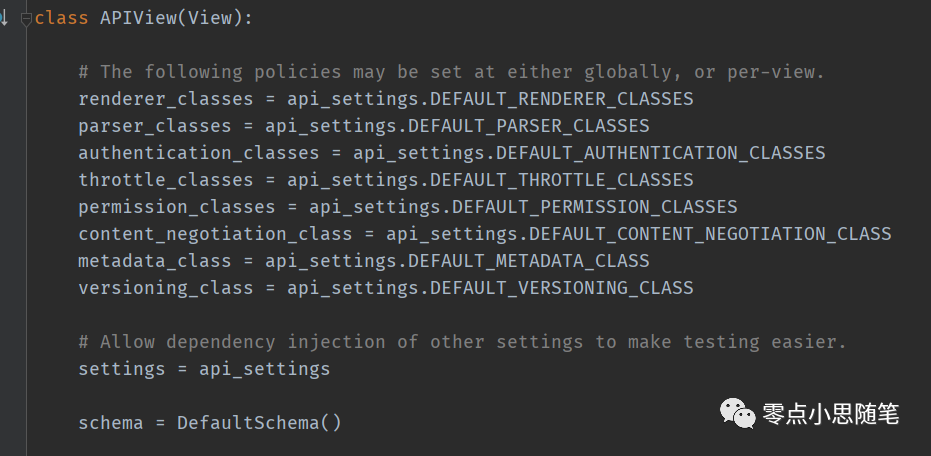
使用 DRF 的 APIView 和 serializers 实现列表页。
2.1、views:
from rest_framework import status
from rest_framework.views import APIView
from rest_framework.response import Response

from .models import Goods
from .serializers import GoodsSerializer


class GoodsListView(APIView):
   """
   List all goods.
   """
   def get(self, request, format=None):
       goods = Goods.objects.all()
       # goods 为列表,所以要设置 many=True
       data_serializer = GoodsSerializer(goods, many=True)
       return Response(data_serializer.data)

   def post(self, request, format=None):
       serializer = GoodsSerializer(data=request.data)
       if serializer.is_valid():
           serializer.save()
           return Response(serializer.data, status=status.HTTP_201_CREATED)
       return Response(serializer.errors, status=status.HTTP_400_BAD_REQUEST)
使用 DRF 的 serializers 序列化。 使用 DRF 的 Response 返回数据。
2.2、serializers:
serializers.Serializer
from rest_framework import serializers


class GoodsSerializer(serializers.Serializer):
   id = serializers.IntegerField(read_only=True)
   is_hot = serializers.BooleanField(required=False)
   name = serializers.CharField(max_length=300, verbose_name="商品名")
   click_num = serializers.IntegerField(default=0, verbose_name="点击数量")
serializers.ModelSerializer
class GoodsSerializer(serializers.ModelSerializer):
   class Meta:
       model = Goods
       # fields = ('id', name', 'click_num', 'is_hot')
       fields = "__all__"
all:取出 model 里的所有字段。
ModelSerializer 的写法比 Serializer 更简洁。
如果需要外键的详细信息,可以用 ModelSerializer 的嵌套用法:
class GoodsImageSerializer(serializers.ModelSerializer):
   class Meta:
       model = GoodsCategory
       fields = "__all__"


class GoodsSerializer(serializers.ModelSerializer):
   category = CategorySerializer()

   class Meta:
       model = Goods
       # fields = ('name', 'click_num', 'market_price', 'add_time')
       fields = "__all__"
这样就可以在接口中看到外键信息。
3、mixins.* 与 generics.*
这里用比 APIView 更上层的方法来实现,可以让代码更加简洁。
generics.GenericAPIView 继承自 APIView。
3.1、
class GoodsListView(mixins.ListModelMixin, mixins.CreateModelMixin, mixins.UpdateModelMixin, mixins.DestroyModelMixin,
                   generics.GenericAPIView):
   """
   List all goods.
   """
   queryset = Goods.objects.all()
   serializer_class = GoodsSerializer

   # 必须重载以下函数
   def get(self, request, *args, **kwargs):
       return self.list(request, *args, **kwargs)

   def post(self, request, *args, **kwargs):
       return self.create(request, *args, **kwargs)

   def put(self, request, *args, **kwargs):
       return self.update(request, *args, **kwargs)

   def delete(self, request, *args, **kwargs):
       return self.destroy(request, *args, **kwargs)
3.2、
要重载函数,看起来还是不够简洁,要是能把这些方法给封装起来就好了。
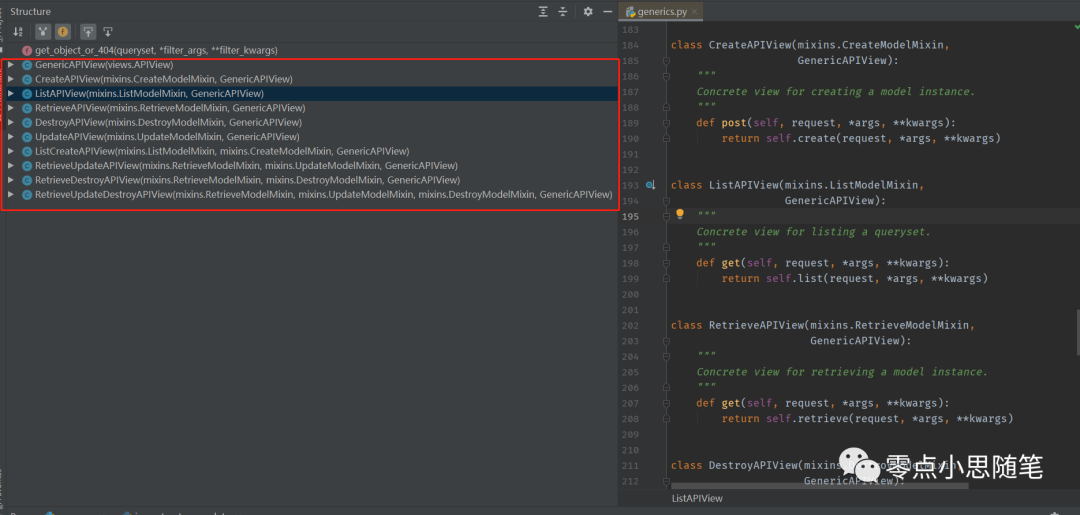
ListAPIView 封装了 get 方法。 RetrieveAPIView 封装了 get 方法。 CreateAPIView 封装了 post 方法。 DestroyAPIView 封装了 delete 方法。 UpdateAPIView 封装了 put 和 patch 方法。 ListCreateAPIView 组合封装了 get 、 post 方法。 RetrieveDestroyAPIView 组合封装了 get 、 delete 方法。 RetrieveUpdateAPIView 组合封装了 get 、 put、patch 方法。 RetrieveUpdateDestroyAPIView 组合封装了 get 、 put、patch、 delete 方法。
3.3、
那么现在实现列表页就简洁多了,直接继承 ListAPIView。
class GoodsListView(generics.ListAPIView):
   """
   List all goods.
   """
   queryset = Goods.objects.all()
   serializer_class = GoodsSerializer
实际工作中,根据业务需要,使用不同的 APIView 组合即可。
4、viewsets.*
这里使用比 APIView 更高级的用法来实现商品列表页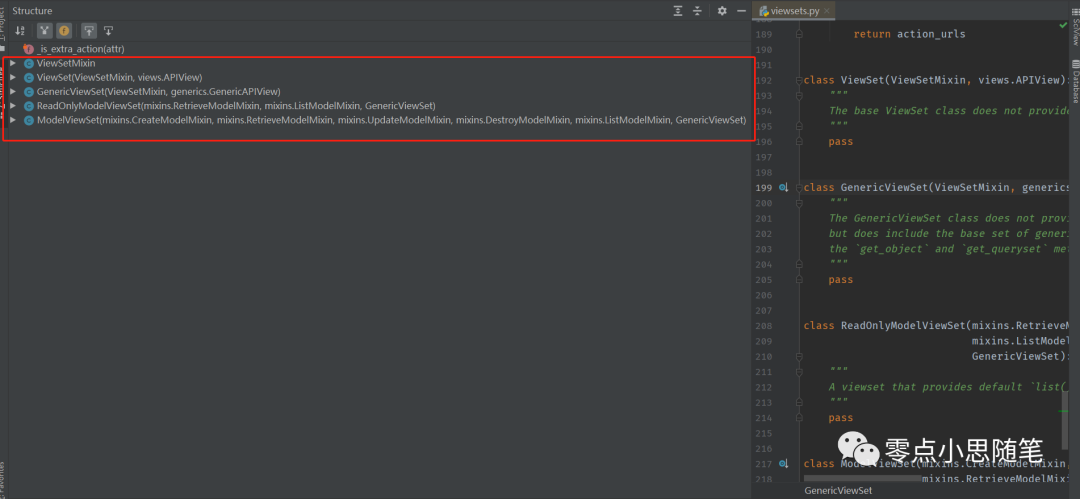 列表页
列表页
from rest_framework import viewsets

class GoodsListViewSet(mixins.ListModelMixin, viewsets.GenericViewSet):
    """
    list:
      商品列表页
    """
    queryset = Goods.objects.all()
    serializer_class = GoodsSerializer
    pagination_class = GoodsPagination
ViewSets 和 Routers 是配合起来使用的。
from .views import GoodsViewSet
from rest_framework import renderers

snippet_list = GoodsViewSet.as_view({
    'get': 'list',
})
还有没有更好的 router 配置呢?
from rest_framework.routers import DefaultRouter

router = DefaultRouter()
# 配置商品url
router.register(r'goods', views.GoodsViewSet)

urlpatterns = [
    path('', include(router.urls)),
]
这是常用的 router 绑定方案。
5、自定义分页
列表页的数据通常是需要分页的,DRF 实现分页也很简单。
from rest_framework.pagination import PageNumberPagination

class GoodsPagination(PageNumberPagination):
    """
    自定义分页功能
    """
    page_size = 10
    page_size_query_param = 'page_size'
    page_query_param = "pageNo"
    max_page_size = 30

class GoodsListViewSet(mixins.ListModelMixin, viewsets.GenericViewSet):
    """
    list:
      商品列表页
    """
    queryset = Goods.objects.all()
    # 序列化
    serializer_class = GoodsSerializer
    # 分页
    pagination_class = GoodsPagination
上面介绍了那么多列表页的开发方法,最主要的是介绍 viewsets 这种方案。
继承关系:
        GenericViewSet(viewset)   -- drf
            GenericAPIView        -- drf
                APIView           -- drf
                    View          --django
mixin:
        CreateModelMixin
        ListModelMixin
        RetrieveModelMixin
        UpdateModelMixin
        DestroyModelMixin
文章转载自零点小思随笔,如果涉嫌侵权,请发送邮件至:contact@modb.pro进行举报,并提供相关证据,一经查实,墨天轮将立刻删除相关内容。
