




思路
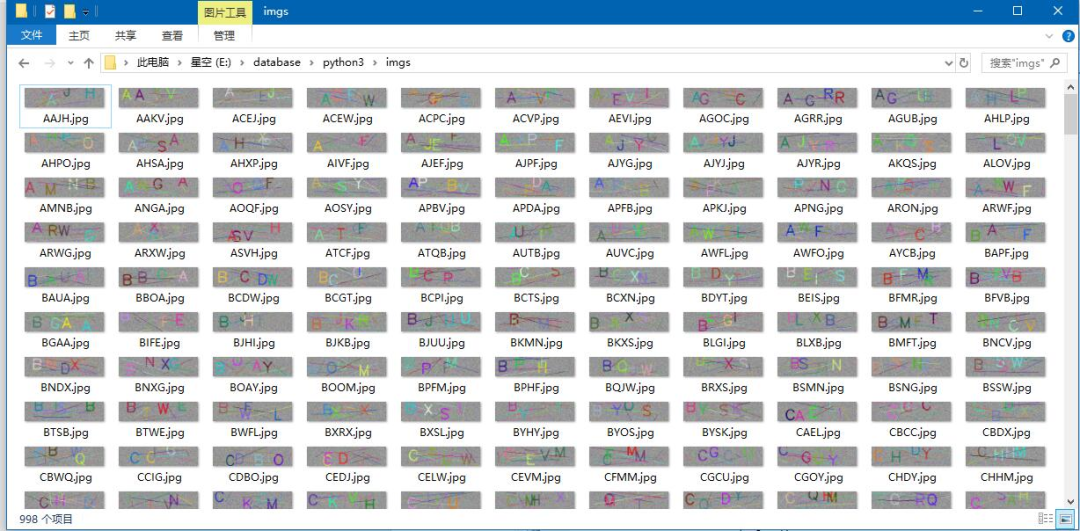
基本思路是使用opencv来把随机生成的字符,和随机生成的线段,放到一个随机生成的图像中去。
感谢各友的鼓励与支持🌹🌹🌹,往期文章都在最后梳理出来了(●'◡'●)
👇👇👇👇👇👇👇👇👇👇👇👇👇👇👇👇👇👇👇👇👇👇👇👇👇👇👇👇👇👇👇👇👇
代码一
import cv2import numpy as npline_num = 10pic_num = 1000path = "./imgs/"def randcolor():return (np.random.randint(0,255),np.random.randint(0,255),np.random.randint(0,255))def randchar():return chr(np.random.randint(65,90))def randpos(x_start,x_end,y_start,y_end):return (np.random.randint(x_start,x_end),np.random.randint(y_start,y_end))img_heigth = 60img_width = 240for i in range(pic_num):img_name = ""#生成一个随机矩阵,randint(low[, high, size, dtype])img = np.random.randint(100,200,(img_heigth,img_width, 3), np.uint8)#显示图像#cv2.imshow("ranImg",img)x_pos = 0y_pos = 25for i in range(4):char = randchar()img_name += charcv2.putText(img,char,(np.random.randint(x_pos,x_pos + 50),np.random.randint(y_pos,y_pos + 35)),cv2.FONT_HERSHEY_SIMPLEX,1.5,randcolor(),2,cv2.LINE_AA)x_pos += 45#cv2.imshow("res",img)#添加线段for i in range(line_num):img = cv2.line(img,randpos(0,img_width,0,img_heigth),randpos(0,img_width,0,img_heigth),randcolor(),np.random.randint(1,2))#cv2.imshow("line",img)cv2.imwrite(path + img_name + ".jpg",img)#cv2.waitKey(0)#cv2.destroyAllWindows()
结果
代码二
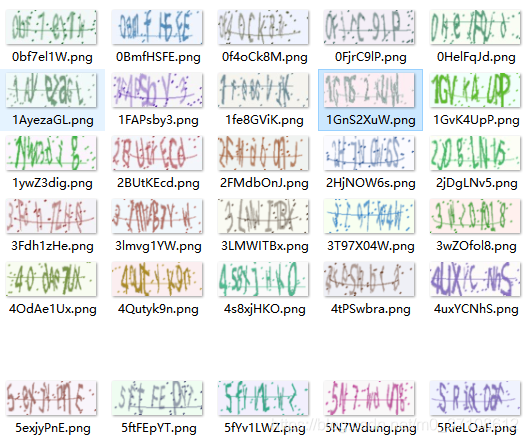
import osimport random# captcha是用于生成验证码图片的库,可以 pip install captcha 来安装它from captcha.image import ImageCaptchadef random_captcha_text(num):# 验证码列表captcha_text = []for i in range(10): # 0-9数字captcha_text.append(str(i))for i in range(65, 91): # 对应从“A”到“Z”的ASCII码captcha_text.append(chr(i))for i in range(97, 123): #对应从“a”到“z”的ASCII码captcha_text.append(chr(i))# 从list中随机获取6个元素,作为一个片断返回example = random.sample(captcha_text, num)# 将列表里的片段变为字符串并返回verification_code = ''.join(example)return verification_code# 生成字符对应的验证码def generate_captcha_image():image = ImageCaptcha()#获得随机生成的验证码captcha_text = random_captcha_text(8)#把验证码列表转为字符串captcha_text = ''.join(captcha_text)#生成验证码path='E:/pycharm/验证码识别/code/test/'if not os.path.exists(path):print("目录不存在!,已自动创建" )os.makedirs(path)print("生成的验证码的图片为:", captcha_text)image.write(captcha_text, path + captcha_text + '.png')if __name__ == '__main__':number=1000for i in range(number):generate_captcha_image()
结果
「❤️ 感谢大家」
如果你觉得这篇内容对你挺有有帮助的话:
点赞支持下吧,让更多的人也能看到这篇内容(收藏不点赞,都是耍流氓 -_-) 欢迎在留言区与我分享你的想法,也欢迎你在留言区记录你的思考过程。 觉得不错的话,也可以阅读近期梳理的文章(感谢鼓励与支持🌹🌹🌹):
老铁,三连支持一下,好吗?↓↓↓




点分享

点点赞

点在看
文章转载自做一个柔情的程序猿,如果涉嫌侵权,请发送邮件至:contact@modb.pro进行举报,并提供相关证据,一经查实,墨天轮将立刻删除相关内容。
