



点击蓝字
关注我们
 ,今天
,今天 ,来,音乐走起。
rm -rf *

今天就继续从这个命令讲起,来讲与文件目录操作有关的命令。
rm其实就是remove ,-rf表示强制删除目录,而"/"则是根目录。在Windows上也许有C盘、D盘,但在Linux上一切都来源于"/",且一切都是文件。所以对文件与目录的操作也可谓重中之重。至于"*"则是通配符,这里略过。

[tom@csbebetter ~]$ pwd/home/tom
[tom@csbebetter ~]$ cd etc[tom@csbebetter etc]$ cd -/home/tom
[tom@csbebetter ]$ ls -altotal 68dr-xr-xr-x. 18 root root 4096 Jan 20 20:05 .dr-xr-xr-x. 18 root root 4096 Jan 20 20:05 ..-rw-r--r-- 1 root root 0 Dec 28 03:41 .autorelabellrwxrwxrwx. 1 root root 7 Dec 28 11:37 bin -> usr/bindr-xr-xr-x. 5 root root 4096 Dec 28 11:49 bootdrwxr-xr-x 19 root root 2960 Jan 20 20:05 devdrwxr-xr-x. 76 root root 4096 Jan 20 20:44 etcdrwxr-xr-x. 3 root root 4096 Jan 20 20:38 homelrwxrwxrwx. 1 root root 7 Dec 28 11:37 lib -> usr/liblrwxrwxrwx. 1 root root 9 Dec 28 11:37 lib64 -> usr/lib64drwx------. 2 root root 16384 Dec 28 11:37 lost+founddrwxr-xr-x. 2 root root 4096 Apr 11 2018 mediadrwxr-xr-x. 2 root root 4096 Apr 11 2018 mntdrwxr-xr-x. 2 root root 4096 Apr 11 2018 optdr-xr-xr-x 84 root root 0 Jan 20 20:05 procdr-xr-x---. 7 root root 4096 Jan 20 22:09 rootdrwxr-xr-x 23 root root 620 Jan 20 22:08 runlrwxrwxrwx. 1 root root 8 Dec 28 11:37 sbin -> usr/sbindrwxr-xr-x. 2 root root 4096 Apr 11 2018 srvdr-xr-xr-x 13 root root 0 Jan 21 04:05 sysdrwxrwxrwt. 9 root root 4096 Jan 21 03:13 tmpdrwxr-xr-x. 13 root root 4096 Dec 28 11:37 usrdrwxr-xr-x. 19 root root 4096 Dec 28 03:41 var
cat命令:查看纯文本文件(内容较少)
more命令:查看纯文本文件(内容较多)
head命令:查看纯文本文件的前n行,下为查看该文件的前20行。
head -n 20 initial-setup-ks.cfg
[tom@csbebetter ~]$ stat txt.txtFile: ‘txt.txt’Size: 25 Blocks: 8 IO Block: 4096 regular fileDevice: fd01h/64769d Inode: 1314827 Links: 1Access: (0664/-rw-rw-r--) Uid: ( 1000/ tom) Gid: ( 1000/ tom)Access: 2021-01-21 10:25:00.498812018 +0800Modify: 2021-01-21 10:25:00.498812018 +0800Change: 2021-01-21 10:25:00.498812018 +0800Birth: -
[tom@csbebetter ~]$ diff -c txt.txt txt1.txt*** txt.txt 2021-01-21 10:25:00.498812018 +0800--- txt1.txt 2021-01-21 10:27:33.647650289 +0800****************** 1,3 ****hello worldtom! hey guys--- 1,3 ----hello worldtom! hey guys!
)[tom@csbebetter ~]$ touch -d "1999-02-08 11:11" txt1.txt[tom@csbebetter ~]$ ls -ltotal 8-rw-rw-r-- 1 tom tom 26 Feb 8 1999 txt1.txt-rw-rw-r-- 1 tom tom 25 Jan 21 10:25 txt.txt
[tom@csbebetter ~]$ mkdir -p Music/netmusic[tom@csbebetter ~]$ lsMusic txt1.txt txt.txt[tom@csbebetter ~]$ cd Music/[tom@csbebetter Music]$ lsnetmusic
[tom@csbebetter ~]$ file txt.txttxt.txt: ASCII text
-t, --list 列出归档内容-c, --create 创建一个新归档-x, --extract, --get 从归档中解压出文件-z, --gzip, --gunzip, --ungzip 通过 gzip 过滤归档-v, --verbose 详细地列出处理的文件-f, --file=ARCHIVE 使用归档文件或 ARCHIVE 设备

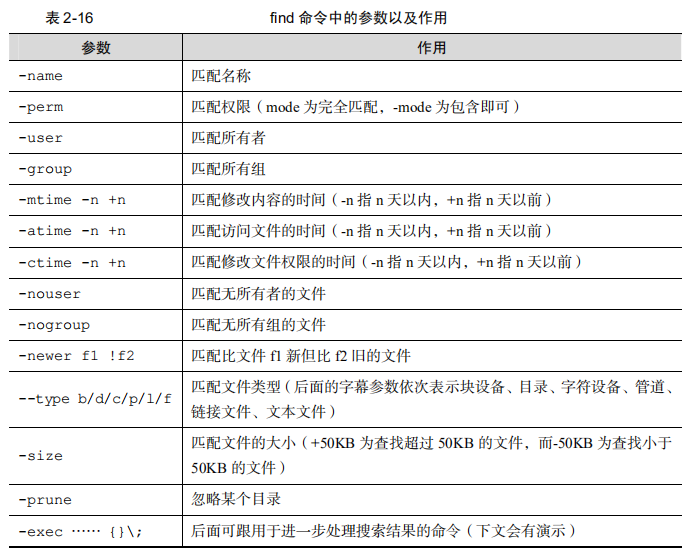
说到查找命令,find命令肯定不能少。
就这么多了,感谢浏览。
谢谢大家。

扫码关注我们
微信号|赤子孤独
文章转载自赤子孤独,如果涉嫌侵权,请发送邮件至:contact@modb.pro进行举报,并提供相关证据,一经查实,墨天轮将立刻删除相关内容。
