



一、MHA架构的介绍
1、简介
MHA(Master HA)是一款开源的 MySQL 高可用软件,它由日本DeNA公司youshimaton(现就职于Facebook公司)开发的一套比较成熟的MySQL高可用方案,它为MySQL主从复制架构提供了三种故障转移方式:自动故障转移(主库宕机)、手动故障转移(主库宕机)、手动在线灾备切换(主库正常)。在MySQL故障切换过程中,MHA能做到在0~30秒之内自动完成数据库的故障切换操作,并且在进行故障切换的过程中,MHA能在最大程度上保证数据的一致性,以达到真正意义上的高可用。
2、MHA组成部分
MHA由两部分组成:MHA Manager(管理节点)和MHA Node(数据节点)。
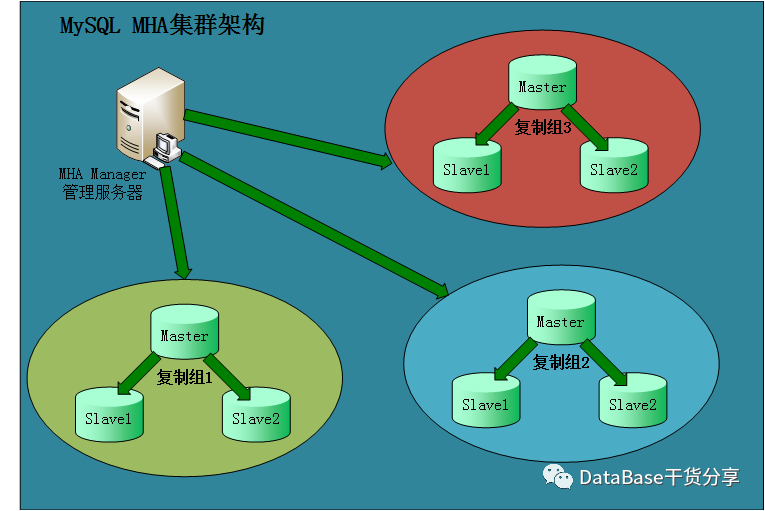
MHA Manager可以单独部署在一台独立的机器上管理多个master-slave集群,也可以部署在一台slave节点上。MHA Node运行在每台MySQL服务器上,所以需要在每服务器上都安装成功,MHA Manager会定时探测集群中的master节点,当master出现故障时,它可以自动将最新数据的slave提升为新的master,然后将所有其他的slave重新指向新的master。整个故障转移过程对应用程序完全透明。
目前MHA主要支持一主多从的架构,要搭建MHA,要求一个复制集群中必须最少有三台数据库服务器,一主二从,即一台充当master,一台充当备用master,另外一台充当从库。
Manager工具包主要包括以下几个工具:
masterha_check_ssh 检查MHA的SSH配置状况masterha_check_repl 检查MySQL复制状况masterha_manger 启动MHAmasterha_check_status 检测当前MHA运行状态masterha_master_monitor 检测master是否宕机masterha_master_switch 控制故障转移(自动或者手动)masterha_conf_host 添加或删除配置的server信息
Node工具包主要包括以下几个工具:
save_binary_logs 保存和复制master的二进制日志apply_diff_relay_logs 识别差异的中继日志事件并将其差异的事件应用于其他的slavepurge_relay_logs 清除中继日志(不会阻塞SQL线程)
注:这些工具通常由MHA Manager的脚本触发,无需人为操作
3、MHA架构图
4、MHA实现原理
(1)从宕机崩溃的master保存二进制日志事件(binlog events);
(2)识别含有最新更新的slave;
(3)应用差异的中继日志(relay log)到其他的slave;
(4)应用从master保存的二进制日志事件(binlog events);
(5)提升一个slave为新的master;
(6)使其他的slave连接新的master进行复制;
二、MHA架构的搭建
1、测试环境IP配置
| 机器名称 | IP | 服务器角色 | 备注 |
| Manager | 192.168.232.45 | MHA Manager服务器 | 操作系统redhat7.5 |
| node1 | 192.168.232.42 | MySQL主节点 | 操作系统redhat7.5;MySQL5.7.22 |
| node2 | 192.168.232.43 | MySQL从节点1 | 操作系统redhat7.5;MySQL5.7.22 |
| node3 | 192.168.232.44 | MySQL从节点2 | 操作系统redhat7.5;MySQL5.7.22 |
2、配置IP映射
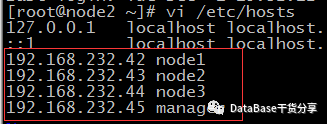
在各节点的/etc/hosts文件中配置如下内容:
192.168.232.42 node1192.168.232.43 node2192.168.232.44 node3192.168.232.45 manager
3、配置4台机器ssh免密互通环境
(1)在node1,node2,node3,manager 4台机器上生成秘钥
命令:ssh-keygen -t rsa
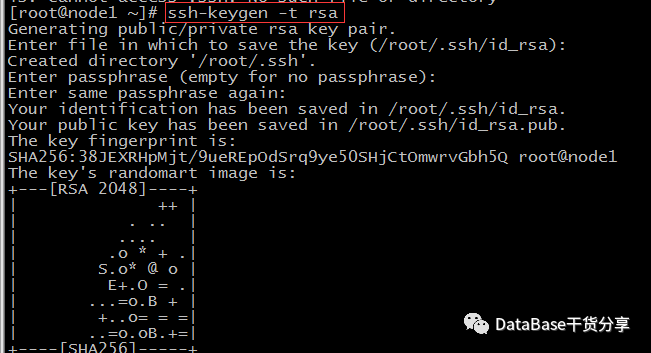
注:出现的交互,直接enter就行
(2)将4台机器的公钥都先拷贝到manager机器上
命令:ssh-copy-id 192.168.232.45
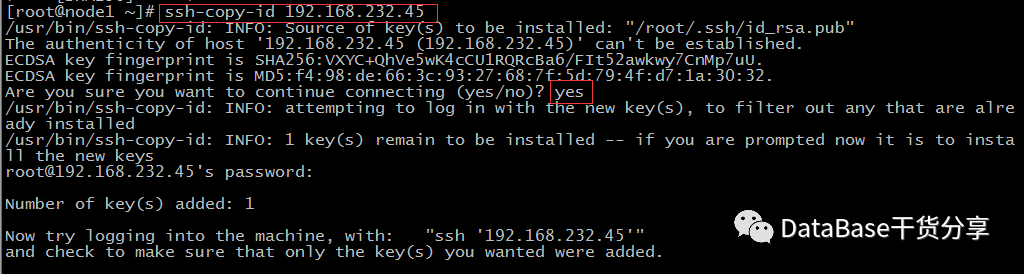
注:上面2步操作在管理节点上(192.168.232.45)上也需要操作
(3)查看管理节点机器下的~/.ssh/authorized_keys下是否有4台机器的公钥,并拷贝到另外3台机器
命令:
cat ~/.ssh/authorized_keysscp ~/.ssh/authorized_keys root@192.168.232.42:~/.ssh/authorized_keysscp ~/.ssh/authorized_keys root@192.168.232.43:~/.ssh/authorized_keysscp ~/.ssh/authorized_keys root@192.168.232.44:~/.ssh/authorized_keys
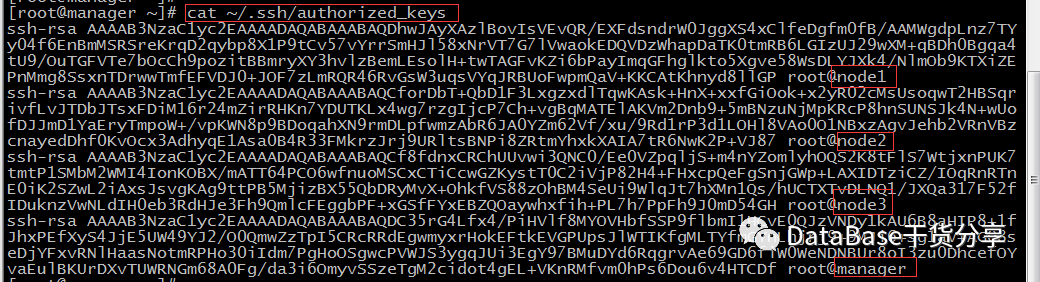
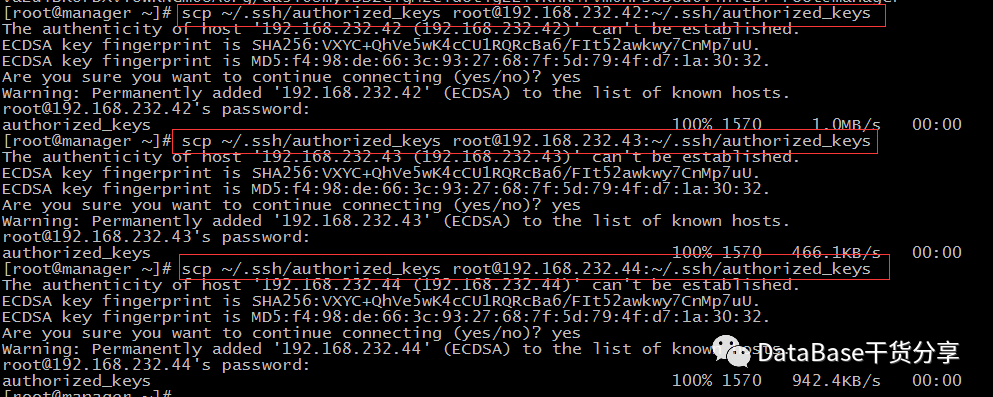
(4)测试是否可以免密登录
命令:
ssh 192.168.232.42ssh 192.168.232.43ssh 192.168.232.44
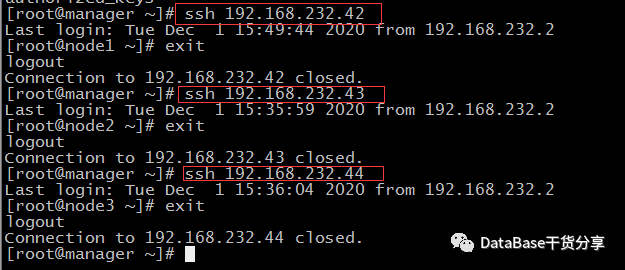
注:每个节点都测试通过就OK了,最好在其他3个节点都登录一下,因为是拷贝过去的公钥,第一次可能需要交互一下输入yes,下次就不需要了

4、搭建一主多从的复制架构
(1)配置master节点的/etc/my.cnf
[mysqld]datadir=/mysql/mysql5.7/databasedir=/mysql/mysql5.7socket=/tmp/mysql.sockuser=mysqlport=3308character-set-server=utf8# skip-grant-tables# Disabling symbolic-links is recommended to prevent assorted security riskssymbolic-links=0server-id = 1 复制集群中的各节点的id,三个节点不能一样log-bin = mysql-bin 开启二进制日志relay-log = relay-log 开启中继日志skip_name_resolve 关闭名称解析(不是必须的)binlog-do-db=customer 要同步的数据库名称binlog-ignore-db=mysql 需要忽略的数据库binlog-ignore-db=information_schemabinlog-ignore-db=performance_schemabinlog-ignore-db=sysauto-increment-increment=10auto-increment-offset=1replicate-do-db=customerreplicate-ignore-db=mysqlreplicate-ignore-db=information_schemareplicate-ignore-db=performance_schemareplicate-ignore-db=syslog-slave-updates = 1 使得更新的数据写入二进制日志中[mysqld_safe]log-error=/mysql/mysql5.7/log/mysqld.log#pid-file=/mysql/mysql5.7/run/mysqld/mysqld.pid
注:修改完配置文件,需要重启才能生效
(2)配置slave1和slave2节点的/etc/my.cnf
[mysqld]datadir=/mysql/mysql5.7/databasedir=/mysql/mysql5.7socket=/tmp/mysql.sockuser=mysqlport=3308character-set-server=utf8# skip-grant-tables# Disabling symbolic-links is recommended to prevent assorted security riskssymbolic-links=0server-id = 2 复制集群中的各节点的id,三个节点不能一样log-bin = mysql-bin 开启二进制日志relay-log = relay-log 开启中继日志binlog_format = row 复制模式使用行模式relay_log_purge = 0 是否自动清空不再需要的中继日志skip_name_resolve 关闭名称解析(不是必须的)read-only=0 启用只读binlog-do-db=customer 要同步的数据库名称binlog-ignore-db=mysql 需要忽略的数据库binlog-ignore-db=information_schemabinlog-ignore-db=performance_schemabinlog-ignore-db=sysauto-increment-increment=10auto-increment-offset=1replicate-do-db=customerreplicate-ignore-db=mysqlreplicate-ignore-db=information_schemareplicate-ignore-db=performance_schemareplicate-ignore-db=syslog-slave-updates = 1 使得更新的数据写入二进制日志中[mysqld_safe]log-error=/mysql/mysql5.7/log/mysqld.log#pid-file=/mysql/mysql5.7/run/mysqld/mysqld.pid
注:修改完配置文件,需要重启才能生效
(3)在3个节点上都创建用于同步的用户
命令:
mysql> grant replication slave on *.* to 'repl_user1'@'192.168.232.%' identified by '$a123456';Query OK, 0 rows affected, 1 warning (0.05 sec)mysql> flush privileges;Query OK, 0 rows affected (0.02 sec)mysql> select user,host from user;+---------------+---------------+| user | host |+---------------+---------------+| root | % || repl_user1 | 192.168.232.% || mysql.session | localhost || mysql.sys | localhost |+---------------+---------------+4 rows in set (0.01 sec)mysql>
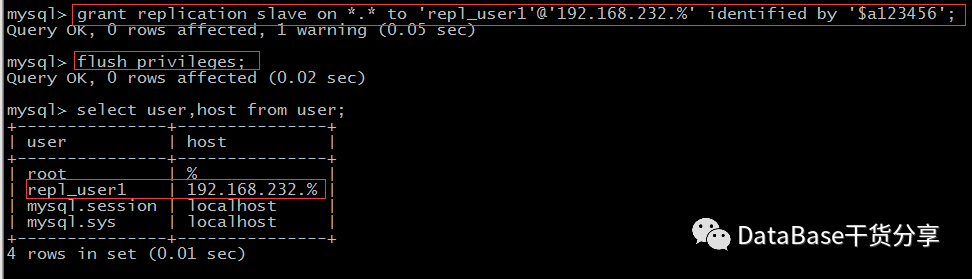
注:因为每个节点都有可能成为master,所以3个节点上都需要创建同步的用户,我这里host配置为192.168.232.%意思是192.168.232.网段可以使用该用户。
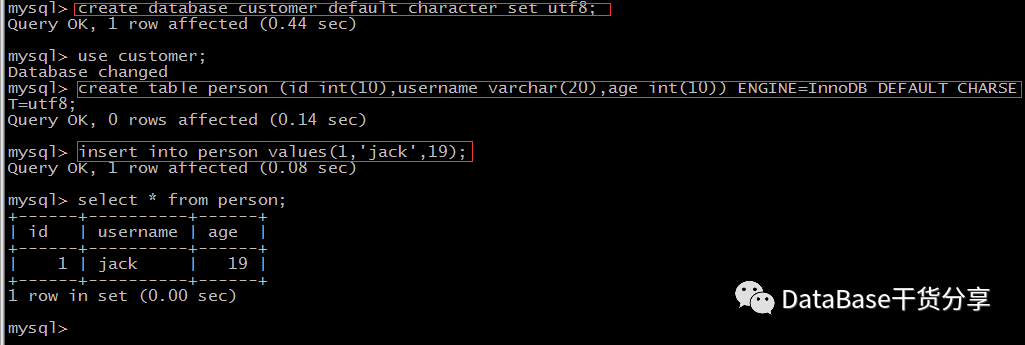
(4)主节点上创建测试库customer和测试表
mysql> create database customer default character set utf8;Query OK, 1 row affected (0.44 sec)mysql> use customer;Database changedmysql> create table person (id int(10),username varchar(20),age int(10)) ENGINE=InnoDB DEFAULT CHARSET=utf8;Query OK, 0 rows affected (0.14 sec)mysql> insert into person values(1,'jack',19);Query OK, 1 row affected (0.08 sec)mysql> select * from person;+------+----------+------+| id | username | age |+------+----------+------+| 1 | jack | 19 |+------+----------+------+1 row in set (0.00 sec)mysql>
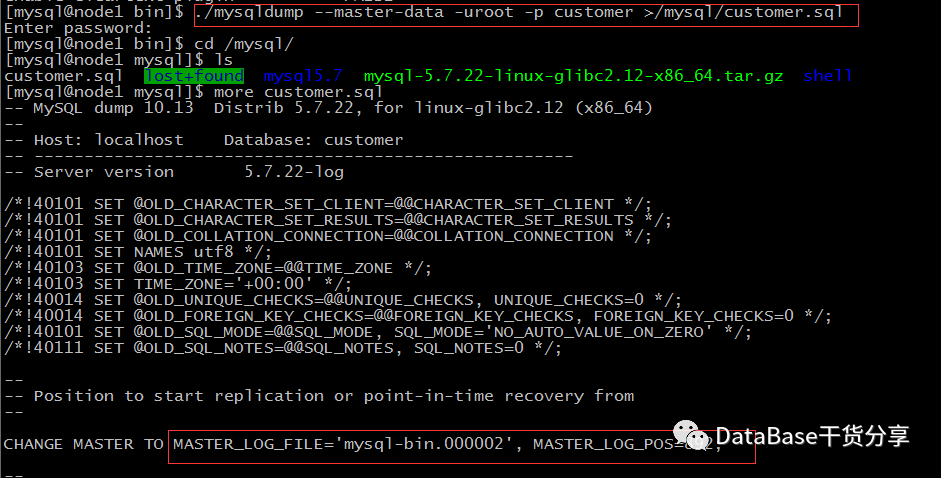
(5)导出customer库的数据,并copy到其他2个节点
命令:
./mysqldump --master-data -uroot -p customer >/mysql/customer.sql
注:--master-data :加上该选项,
在生成的dump文件中就会将二进制的信息写入到输出文件中,
比如MASTER_LOG_FILE 和 MASTER_LOG_POS
(6)把master节点的dump备份文件拷贝到2个slave节点上并恢复数据库
--1、拷贝到node2和node3[mysql@node1 mysql]$ scp customer.sql mysql@192.168.232.43:/mysqlmysql@192.168.232.43's password:customer.sql 100% 2031 696.1KB/s 00:00[mysql@node1 mysql]$ scp customer.sql mysql@192.168.232.44:/mysqlmysql@192.168.232.44's password:customer.sql 100% 2031 617.9KB/s 00:00--2、node2上恢复数据库mysql> create database customer default character set utf8;Query OK, 1 row affected (0.35 sec)mysql> exitBye[mysql@node2 ~]$ mysql -uroot -p customer < /mysql/customer.sqlEnter password:[mysql@node2 ~]$ mysql -uroot -pEnter password:Welcome to the MySQL monitor. Commands end with ; or \g.Your MySQL connection id is 4Server version: 5.7.22-log MySQL Community Server (GPL)Copyright (c) 2000, 2018, Oracle and/or its affiliates. All rights reserved.Oracle is a registered trademark of Oracle Corporation and/or itsaffiliates. Other names may be trademarks of their respectiveowners.Type 'help;' or '\h' for help. Type '\c' to clear the current input statement.mysql> select * from customer.person;+------+----------+------+| id | username | age |+------+----------+------+| 1 | jack | 19 |+------+----------+------+1 row in set (0.01 sec)mysql>--3、node3上恢复数据库mysql> create database customer default character set utf8;Query OK, 1 row affected (0.07 sec)mysql> exitBye[mysql@node3 ~]$ mysql -uroot -p customer < /mysql/customer.sqlEnter password:[mysql@node3 ~]$ mysql -uroot -pEnter password:Welcome to the MySQL monitor. Commands end with ; or \g.Your MySQL connection id is 4Server version: 5.7.22-log MySQL Community Server (GPL)Copyright (c) 2000, 2018, Oracle and/or its affiliates. All rights reserved.Oracle is a registered trademark of Oracle Corporation and/or itsaffiliates. Other names may be trademarks of their respectiveowners.Type 'help;' or '\h' for help. Type '\c' to clear the current input statement.mysql> select * from customer.person;+------+----------+------+| id | username | age |+------+----------+------+| 1 | jack | 19 |+------+----------+------+1 row in set (0.01 sec)mysql>
注:slave节点上恢复数据库之前,需要先把库创建好
(7)查看master节点的binary日志名和偏移量
命令:
mysql> show master status\G*************************** 1. row ***************************File: mysql-bin.000002Position: 892Binlog_Do_DB: customerBinlog_Ignore_DB: mysql,information_schema,performance_schema,sysExecuted_Gtid_Set:1 row in set (0.00 sec)mysql>
注:也可以去我们备份出的dump里查看,如果生产上master节点还有业务连进来,就要以dump文件里的File和Position为准了
(8)在2个slave节点开启主从同步
命令:
mysql> CHANGE MASTER TO-> MASTER_HOST='192.168.232.42',-> MASTER_USER='repl_user1',-> MASTER_PORT=3308,-> MASTER_PASSWORD='$a123456',-> MASTER_LOG_FILE='mysql-bin.000002',-> MASTER_LOG_POS=892;Query OK, 0 rows affected, 2 warnings (0.59 sec)mysql>
(9)开启2个slave节点的同步,查看slave的状态
mysql> start slave;Query OK, 0 rows affected (0.02 sec)mysql> show slave status\G*************************** 1. row ***************************Slave_IO_State: Waiting for master to send eventMaster_Host: 192.168.232.42Master_User: repl_user1Master_Port: 3308Connect_Retry: 60Master_Log_File: mysql-bin.000002Read_Master_Log_Pos: 892Relay_Log_File: relay-log.000002Relay_Log_Pos: 320Relay_Master_Log_File: mysql-bin.000002Slave_IO_Running: YesSlave_SQL_Running: YesReplicate_Do_DB: customerReplicate_Ignore_DB: mysql,information_schema,performance_schema,sysReplicate_Do_Table:Replicate_Ignore_Table:Replicate_Wild_Do_Table:Replicate_Wild_Ignore_Table:Last_Errno: 0Last_Error:Skip_Counter: 0Exec_Master_Log_Pos: 892Relay_Log_Space: 521Until_Condition: NoneUntil_Log_File:Until_Log_Pos: 0Master_SSL_Allowed: NoMaster_SSL_CA_File:Master_SSL_CA_Path:Master_SSL_Cert:Master_SSL_Cipher:Master_SSL_Key:Seconds_Behind_Master: 0Master_SSL_Verify_Server_Cert: NoLast_IO_Errno: 0Last_IO_Error:Last_SQL_Errno: 0Last_SQL_Error:Replicate_Ignore_Server_Ids:Master_Server_Id: 1Master_UUID: 5eb9dc85-2d68-11eb-acf4-000c29cddf72Master_Info_File: /mysql/mysql5.7/data/master.infoSQL_Delay: 0SQL_Remaining_Delay: NULLSlave_SQL_Running_State: Slave has read all relay log; waiting for more updatesMaster_Retry_Count: 86400Master_Bind:Last_IO_Error_Timestamp:Last_SQL_Error_Timestamp:Master_SSL_Crl:Master_SSL_Crlpath:Retrieved_Gtid_Set:Executed_Gtid_Set:Auto_Position: 0Replicate_Rewrite_DB:Channel_Name:Master_TLS_Version:1 row in set (0.00 sec)mysql>
(10)在master节点插入数据,看slave节点是否同步
--1、master节点mysql> use customer;Reading table information for completion of table and column namesYou can turn off this feature to get a quicker startup with -ADatabase changedmysql> insert into person values(2,'rose',56);Query OK, 1 row affected (0.01 sec)mysql> select * from person;+------+----------+------+| id | username | age |+------+----------+------+| 1 | jack | 19 || 2 | rose | 56 |+------+----------+------+2 rows in set (0.00 sec)mysql>--2、slave节点[mysql@node2 ~]$ mysql -uroot -pEnter password:Welcome to the MySQL monitor. Commands end with ; or \g.Your MySQL connection id is 7Server version: 5.7.22-log MySQL Community Server (GPL)Copyright (c) 2000, 2018, Oracle and/or its affiliates. All rights reserved.Oracle is a registered trademark of Oracle Corporation and/or itsaffiliates. Other names may be trademarks of their respectiveowners.Type 'help;' or '\h' for help. Type '\c' to clear the current input statement.mysql> select * from customer.person;+------+----------+------+| id | username | age |+------+----------+------+| 1 | jack | 19 || 2 | rose | 56 |+------+----------+------+2 rows in set (0.00 sec)mysql>--3、master节点查看slavemysql> show slave hosts;+-----------+------+------+-----------+--------------------------------------+| Server_id | Host | Port | Master_id | Slave_UUID |+-----------+------+------+-----------+--------------------------------------+| 3 | | 3308 | 1 | 0b8c9b28-3143-11eb-b7bf-000c2927b3e8 || 2 | | 3308 | 1 | 2aa26dac-2df4-11eb-b45c-000c29c918c1 |+-----------+------+------+-----------+--------------------------------------+2 rows in set (0.00 sec)
注:数据已经可以同步,主从架构已经搭建完成。
5、搭建MHA
(1)安装MHA包
* manager节点和node节点都需要安装:mha4mysql-node-0.58-0.el7.centos.noarch.rpm
[root@node1 cdrom]# cd mysql/mha/[root@node1 mha]# lltotal 36-rw-r--r--. 1 mysql mysql 36328 Nov 28 15:57 mha4mysql-node-0.58-0.el7.centos.noarch.rpm[root@node1 mha]# yum install -y mha4mysql-node-0.58-0.el7.centos.noarch.rpmLoaded plugins: langpacks, product-id, search-disabled-repos, subscription-managerThis system is not registered with an entitlement server. You can use subscription-manager to register.Examining mha4mysql-node-0.58-0.el7.centos.noarch.rpm: mha4mysql-node-0.58-0.el7.centos.noarchMarking mha4mysql-node-0.58-0.el7.centos.noarch.rpm to be installedResolving Dependencies--> Running transaction check---> Package mha4mysql-node.noarch 0:0.58-0.el7.centos will be installed--> Finished Dependency ResolutionDependencies Resolved=====================================================================================================Package Arch Version Repository Size=====================================================================================================Installing:mha4mysql-node noarch 0.58-0.el7.centos mha4mysql-node-0.58-0.el7.centos.noarch 106 kTransaction Summary=====================================================================================================Install 1 PackageTotal size: 106 kInstalled size: 106 kDownloading packages:Running transaction checkRunning transaction testTransaction test succeededRunning transactionInstalling : mha4mysql-node-0.58-0.el7.centos.noarch 1/1Verifying : mha4mysql-node-0.58-0.el7.centos.noarch 1/1Installed:mha4mysql-node.noarch 0:0.58-0.el7.centosComplete![root@node1 mha]# rpm -qa | grep mhamha4mysql-node-0.58-0.el7.centos.noarch[root@node1 mha]#
注:mha4mysql-node是依赖mariadb-libs和perl-DBD-MySQL这2个包的,系统一般会自带,如果安装mysql的时候删除了,需要使用本地yum源再安装一次即可,错误如下:
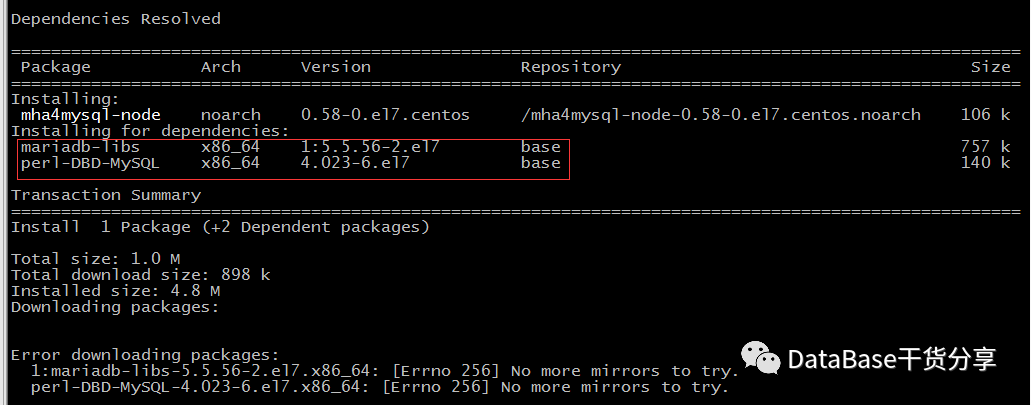
* manager节点需另外安装:mha4mysql-manager-0.58-0.el7.centos.noarch.rpm
mha4mysql-manager依赖的包:
perl-Config-Tiny-2.14-7.el7.noarch.rpmperl-Email-Date-Format-1.002-15.el7.noarch.rpmperl-Log-Dispatch-2.41-2.2.noarch.rpmperl-Mail-Sender-0.8.23-1.el7.noarch.rpmperl-Mail-Sendmail-0.79-21.el7.noarch.rpmperl-MIME-Lite-3.030-1.el7.noarch.rpmperl-MIME-Types-1.38-2.el7.noarch.rpmperl-Parallel-ForkManager-1.18-2.el7.noarch.rpm
注:上面这些依赖安装完成后,
mha4mysql-manager才能安装成功
perl-Log-Dispatch-2.41-2.2.noarch.rpm包安装的时候,
可能还需要安装其他依赖的包,那些包本地yum源中都有,只需要配置好本地yum源即可安装成功,错误如下:
Installing:perl-Log-Dispatch noarch 2.41-2.2 perl-Log-Dispatch-2.41-2.2.noarch 121 kInstalling for dependencies:perl-Class-Load noarch 0.20-3.el7 base 27 kperl-Data-OptList noarch 0.107-9.el7 base 23 kperl-List-MoreUtils x86_64 0.33-9.el7 base 58 kperl-MailTools noarch 2.12-2.el7 base 108 kperl-Module-Implementation noarch 0.06-6.el7 base 17 kperl-Module-Runtime noarch 0.013-4.el7 base 19 kperl-Net-SMTP-SSL noarch 1.01-13.el7 base 9.1 kperl-Package-DeprecationManager noarch 0.13-7.el7 base 19 kperl-Package-Stash noarch 0.34-2.el7 base 34 kperl-Package-Stash-XS x86_64 0.26-3.el7 base 31 kperl-Params-Util x86_64 1.07-6.el7 base 38 kperl-Params-Validate x86_64 1.08-4.el7 base 69 kperl-Sub-Install noarch 0.926-6.el7 base 21 kperl-Sys-Syslog x86_64 0.33-3.el7 base 42 kperl-Try-Tiny noarch 0.12-2.el7 base 23 kTransaction Summary=====================================================================================================Install 1 Package (+15 Dependent packages)Total size: 659 kTotal download size: 538 kInstalled size: 1.1 MDownloading packages:Error downloading packages:perl-Sub-Install-0.926-6.el7.noarch: [Errno 256] No more mirrors to try.perl-Module-Implementation-0.06-6.el7.noarch: [Errno 256] No more mirrors to try.perl-Params-Validate-1.08-4.el7.x86_64: [Errno 256] No more mirrors to try.perl-Package-DeprecationManager-0.13-7.el7.noarch: [Errno 256] No more mirrors to try.perl-Module-Runtime-0.013-4.el7.noarch: [Errno 256] No more mirrors to try.perl-MailTools-2.12-2.el7.noarch: [Errno 256] No more mirrors to try.perl-Package-Stash-XS-0.26-3.el7.x86_64: [Errno 256] No more mirrors to try.perl-Params-Util-1.07-6.el7.x86_64: [Errno 256] No more mirrors to try.perl-Package-Stash-0.34-2.el7.noarch: [Errno 256] No more mirrors to try.perl-Sys-Syslog-0.33-3.el7.x86_64: [Errno 256] No more mirrors to try.perl-Data-OptList-0.107-9.el7.noarch: [Errno 256] No more mirrors to try.perl-List-MoreUtils-0.33-9.el7.x86_64: [Errno 256] No more mirrors to try.perl-Net-SMTP-SSL-1.01-13.el7.noarch: [Errno 256] No more mirrors to try.perl-Try-Tiny-0.12-2.el7.noarch: [Errno 256] No more mirrors to try.perl-Class-Load-0.20-3.el7.noarch: [Errno 256] No more mirrors to try.[root@manager rpm]# yum install -y mha4mysql-manager-0.58-0.el7.centos.noarch.rpmLoaded plugins: langpacks, product-id, search-disabled-repos, subscription-managerThis system is not registered with an entitlement server. You can use subscription-manager to register.Examining mha4mysql-manager-0.58-0.el7.centos.noarch.rpm: mha4mysql-manager-0.58-0.el7.centos.noarchMarking mha4mysql-manager-0.58-0.el7.centos.noarch.rpm to be installedResolving Dependencies--> Running transaction check---> Package mha4mysql-manager.noarch 0:0.58-0.el7.centos will be installed--> Finished Dependency ResolutionDependencies Resolved=====================================================================================================Package Arch Version Repository Size=====================================================================================================Installing:mha4mysql-manager noarch 0.58-0.el7.centos mha4mysql-manager-0.58-0.el7.centos.noarch 328 kTransaction Summary=====================================================================================================Install 1 PackageTotal size: 328 kInstalled size: 328 kDownloading packages:Running transaction checkRunning transaction testTransaction test succeededRunning transactionInstalling : mha4mysql-manager-0.58-0.el7.centos.noarch 1/1Verifying : mha4mysql-manager-0.58-0.el7.centos.noarch 1/1Installed:mha4mysql-manager.noarch 0:0.58-0.el7.centosComplete![root@manager rpm]#
* 安装包已上传到百度云盘,可自行下载:
链接:https://pan.baidu.com/s/1YQ-1HkSbBbMOjt5SFI9FKw提取码:n0fm
(2)在3个节点上创建拥有管理权的用户
命令:
mysql> grant all on *.* to 'mhaadmin'@'192.168.232.%' identified by '123456';Query OK, 0 rows affected, 1 warning (0.01 sec)mysql> flush privileges;Query OK, 0 rows affected (0.00 sec)mysql> select user,host from user;+---------------+---------------+| user | host |+---------------+---------------+| root | % || mhaadmin | 192.168.232.% || repl_user1 | 192.168.232.% || mysql.session | localhost || mysql.sys | localhost |+---------------+---------------+5 rows in set (0.00 sec)mysql>
注:以上命令,3个节点都执行
(3)配置mha.cnf文件
* 配置文件的位置:/etc/mha_master/mha.cnf
* 配置文件的内容如下:
[server default]user=mhaadmin //mha管理用户password=123456 //mha管理密码manager_workdir=/mha //mha自己的工作路径manager_log=/mha/log/mha_manager.log //mha的日志路径remote_workdir=/mysql/mha //远程主机的工作目录ssh_user=root //ssh免密登录的用户repl_user=repl_user1 //数据库主从复制的用户repl_password=$a123456 //数据库主从复制用户的密码ping_interval=1 //ping间隔时长[server1] //节点1hostname=192.168.232.42ssh_port=22port=3308master_binlog_dir=/mysql/mysql5.7/datacandidate_master=1 //将来可不可以成为master的候选节点[server2]hostname=192.168.232.43ssh_port=22port=3308master_binlog_dir=/mysql/mysql5.7/datacandidate_master=1[server3]hostname=192.168.232.44ssh_port=22port=3308master_binlog_dir=/mysql/mysql5.7/datacandidate_master=1
(4)MHA检测各节点之间ssh互信是否ok
[root@manager mha_master]# masterha_check_ssh -conf=/etc/mha_master/mha.cnfWed Dec 2 17:37:21 2020 - [warning] Global configuration file /etc/masterha_default.cnf not found. Skipping.Wed Dec 2 17:37:21 2020 - [info] Reading application default configuration from /etc/mha_master/mha.cnf..Wed Dec 2 17:37:21 2020 - [info] Reading server configuration from /etc/mha_master/mha.cnf..Wed Dec 2 17:37:21 2020 - [info] Starting SSH connection tests..Wed Dec 2 17:37:25 2020 - [debug]Wed Dec 2 17:37:22 2020 - [debug] Connecting via SSH from root@192.168.232.44(192.168.232.44:22) to root@192.168.232.42(192.168.232.42:22)..Wed Dec 2 17:37:23 2020 - [debug] ok.Wed Dec 2 17:37:23 2020 - [debug] Connecting via SSH from root@192.168.232.44(192.168.232.44:22) to root@192.168.232.43(192.168.232.43:22)..Wed Dec 2 17:37:24 2020 - [debug] ok.Wed Dec 2 17:37:25 2020 - [debug]Wed Dec 2 17:37:21 2020 - [debug] Connecting via SSH from root@192.168.232.42(192.168.232.42:22) to root@192.168.232.44(192.168.232.44:22)..Wed Dec 2 17:37:22 2020 - [debug] ok.Wed Dec 2 17:37:22 2020 - [debug] Connecting via SSH from root@192.168.232.42(192.168.232.42:22) to root@192.168.232.43(192.168.232.43:22)..Wed Dec 2 17:37:24 2020 - [debug] ok.Wed Dec 2 17:37:26 2020 - [debug]Wed Dec 2 17:37:22 2020 - [debug] Connecting via SSH from root@192.168.232.43(192.168.232.43:22) to root@192.168.232.42(192.168.232.42:22)..Wed Dec 2 17:37:23 2020 - [debug] ok.Wed Dec 2 17:37:23 2020 - [debug] Connecting via SSH from root@192.168.232.43(192.168.232.43:22) to root@192.168.232.44(192.168.232.44:22)..Wed Dec 2 17:37:25 2020 - [debug] ok.Wed Dec 2 17:37:26 2020 - [info] All SSH connection tests passed successfully.[root@manager mha_master]#
(5)MHA检测MySQL复制集群连接配置是否OK
[root@manager mha_master]# masterha_check_repl -conf=/etc/mha_master/mha.cnfWed Dec 2 17:58:45 2020 - [warning] Global configuration file /etc/masterha_default.cnf not found. Skipping.Wed Dec 2 17:58:45 2020 - [info] Reading application default configuration from /etc/mha_master/mha.cnf..Wed Dec 2 17:58:45 2020 - [info] Reading server configuration from /etc/mha_master/mha.cnf..Wed Dec 2 17:58:45 2020 - [info] MHA::MasterMonitor version 0.58.Wed Dec 2 17:58:46 2020 - [info] GTID failover mode = 0Wed Dec 2 17:58:46 2020 - [info] Dead Servers:Wed Dec 2 17:58:46 2020 - [info] Alive Servers:Wed Dec 2 17:58:46 2020 - [info] 192.168.232.42(192.168.232.42:3308)Wed Dec 2 17:58:46 2020 - [info] 192.168.232.43(192.168.232.43:3308)Wed Dec 2 17:58:46 2020 - [info] 192.168.232.44(192.168.232.44:3308)Wed Dec 2 17:58:46 2020 - [info] Alive Slaves:Wed Dec 2 17:58:46 2020 - [info] 192.168.232.43(192.168.232.43:3308) Version=5.7.22-log (oldest major version between slaves) log-bin:enabledWed Dec 2 17:58:46 2020 - [info] Replicating from 192.168.232.42(192.168.232.42:3308)Wed Dec 2 17:58:46 2020 - [info] Primary candidate for the new Master (candidate_master is set)Wed Dec 2 17:58:46 2020 - [info] 192.168.232.44(192.168.232.44:3308) Version=5.7.22-log (oldest major version between slaves) log-bin:enabledWed Dec 2 17:58:46 2020 - [info] Replicating from 192.168.232.42(192.168.232.42:3308)Wed Dec 2 17:58:46 2020 - [info] Primary candidate for the new Master (candidate_master is set)Wed Dec 2 17:58:46 2020 - [info] Current Alive Master: 192.168.232.42(192.168.232.42:3308)Wed Dec 2 17:58:46 2020 - [info] Checking slave configurations..Wed Dec 2 17:58:46 2020 - [info] read_only=1 is not set on slave 192.168.232.43(192.168.232.43:3308).Wed Dec 2 17:58:46 2020 - [info] read_only=1 is not set on slave 192.168.232.44(192.168.232.44:3308).Wed Dec 2 17:58:46 2020 - [info] Checking replication filtering settings..Wed Dec 2 17:58:46 2020 - [info] binlog_do_db= customer, binlog_ignore_db= information_schema,mysql,performance_schema,sysWed Dec 2 17:58:46 2020 - [info] Replication filtering check ok.Wed Dec 2 17:58:46 2020 - [info] GTID (with auto-pos) is not supportedWed Dec 2 17:58:46 2020 - [info] Starting SSH connection tests..Wed Dec 2 17:58:50 2020 - [info] All SSH connection tests passed successfully.Wed Dec 2 17:58:50 2020 - [info] Checking MHA Node version..Wed Dec 2 17:58:51 2020 - [info] Version check ok.Wed Dec 2 17:58:51 2020 - [info] Checking SSH publickey authentication settings on the current master..Wed Dec 2 17:58:52 2020 - [info] HealthCheck: SSH to 192.168.232.42 is reachable.Wed Dec 2 17:58:52 2020 - [info] Master MHA Node version is 0.58.Wed Dec 2 17:58:52 2020 - [info] Checking recovery script configurations on 192.168.232.42(192.168.232.42:3308)..Wed Dec 2 17:58:52 2020 - [info] Executing command: save_binary_logs --command=test --start_pos=4 --binlog_dir=/mysql/mysql5.7/data --output_file=/mysql/mha/save_binary_logs_test --manager_version=0.58 --start_file=mysql-bin.000002Wed Dec 2 17:58:52 2020 - [info] Connecting to root@192.168.232.42(192.168.232.42:22)..Creating /mysql/mha if not exists.. ok.Checking output directory is accessible or not..ok.Binlog found at /mysql/mysql5.7/data, up to mysql-bin.000002Wed Dec 2 17:58:53 2020 - [info] Binlog setting check done.Wed Dec 2 17:58:53 2020 - [info] Checking SSH publickey authentication and checking recovery script configurations on all alive slave servers..Wed Dec 2 17:58:53 2020 - [info] Executing command : apply_diff_relay_logs --command=test --slave_user='mhaadmin' --slave_host=192.168.232.43 --slave_ip=192.168.232.43 --slave_port=3308 --workdir=/mysql/mha --target_version=5.7.22-log --manager_version=0.58 --relay_log_info=/mysql/mysql5.7/data/relay-log.info --relay_dir=/mysql/mysql5.7/data/ --slave_pass=xxxWed Dec 2 17:58:53 2020 - [info] Connecting to root@192.168.232.43(192.168.232.43:22)..Checking slave recovery environment settings..Opening /mysql/mysql5.7/data/relay-log.info ... ok.Relay log found at /mysql/mysql5.7/data, up to relay-log.000002Temporary relay log file is /mysql/mysql5.7/data/relay-log.000002Checking if super_read_only is defined and turned on.. not present or turned off, ignoring.Testing mysql connection and privileges..mysql: [Warning] Using a password on the command line interface can be insecure.done.Testing mysqlbinlog output.. done.Cleaning up test file(s).. done.Wed Dec 2 17:58:54 2020 - [info] Executing command : apply_diff_relay_logs --command=test --slave_user='mhaadmin' --slave_host=192.168.232.44 --slave_ip=192.168.232.44 --slave_port=3308 --workdir=/mysql/mha --target_version=5.7.22-log --manager_version=0.58 --relay_log_info=/mysql/mysql5.7/data/relay-log.info --relay_dir=/mysql/mysql5.7/data/ --slave_pass=xxxWed Dec 2 17:58:54 2020 - [info] Connecting to root@192.168.232.44(192.168.232.44:22)..Checking slave recovery environment settings..Opening /mysql/mysql5.7/data/relay-log.info ... ok.Relay log found at /mysql/mysql5.7/data, up to relay-log.000002Temporary relay log file is /mysql/mysql5.7/data/relay-log.000002Checking if super_read_only is defined and turned on.. not present or turned off, ignoring.Testing mysql connection and privileges..mysql: [Warning] Using a password on the command line interface can be insecure.done.Testing mysqlbinlog output.. done.Cleaning up test file(s).. done.Wed Dec 2 17:58:55 2020 - [info] Slaves settings check done.Wed Dec 2 17:58:55 2020 - [info]192.168.232.42(192.168.232.42:3308) (current master)+--192.168.232.43(192.168.232.43:3308)+--192.168.232.44(192.168.232.44:3308)Wed Dec 2 17:58:55 2020 - [info] Checking replication health on 192.168.232.43..Wed Dec 2 17:58:55 2020 - [info] ok.Wed Dec 2 17:58:55 2020 - [info] Checking replication health on 192.168.232.44..Wed Dec 2 17:58:55 2020 - [info] ok.Wed Dec 2 17:58:55 2020 - [warning] master_ip_failover_script is not defined.Wed Dec 2 17:58:55 2020 - [warning] shutdown_script is not defined.Wed Dec 2 17:58:55 2020 - [info] Got exit code 0 (Not master dead).MySQL Replication Health is OK.
可能遇到的错误:
Wed Dec 2 17:39:22 2020 - [info] Connecting to root@192.168.232.44(192.168.232.44:22)..Can't exec "mysqlbinlog": No such file or directory at /usr/share/perl5/vendor_perl/MHA/BinlogManager.pm line 106.mysqlbinlog version command failed with rc 1:0, please verify PATH, LD_LIBRARY_PATH, and client optionsat /usr/bin/apply_diff_relay_logs line 532.Wed Dec 2 17:39:22 2020 - [error][/usr/share/perl5/vendor_perl/MHA/MasterMonitor.pm, ln208] Slaves settings check failed!Wed Dec 2 17:39:22 2020 - [error][/usr/share/perl5/vendor_perl/MHA/MasterMonitor.pm, ln416] Slave configuration failed.Wed Dec 2 17:39:22 2020 - [error][/usr/share/perl5/vendor_perl/MHA/MasterMonitor.pm, ln427] Error happened on checking configurations. at /usr/bin/masterha_check_repl line 48.Wed Dec 2 17:39:22 2020 - [error][/usr/share/perl5/vendor_perl/MHA/MasterMonitor.pm, ln525] Error happened on monitoring servers.Wed Dec 2 17:39:22 2020 - [info] Got exit code 1 (Not master dead).MySQL Replication Health is NOT OK!
解决办法:
这个问题是因为没有执行mysqlbinlog的软链接导致的,所以创建软链接即可(三个数据节点都执行)
[root@node1 .ssh]# ln -s /mysql/mysql5.7/bin/mysqlbinlog /usr/local/bin/mysqlbinlog[root@node1 .ssh]# ln -s /mysql/mysql5.7/bin/mysql /usr/local/bin/mysql
(6)启动MHA(也可以不启动,不启动的话就不能自动故障转移了)
--1、启动mha[root@manager mha]# nohup masterha_manager --conf=/etc/mha_master/mha.cnf & >/mha/log/mha_manager.log[1] 2374--2、查看mha的状态[root@manager mha]# masterha_check_status --conf=/etc/mha_master/mha.cnfmha (pid:2374) is running(0:PING_OK), master:192.168.232.42--3、停止mha[root@manager mha]# masterha_stop --conf=/etc/mha_master/mha.cnfStopped mha successfully.[1]+ Exit 1 nohup masterha_manager --conf=/etc/mha_master/mha.cnf[root@manager mha]# masterha_check_status --conf=/etc/mha_master/mha.cnfmha is stopped(2:NOT_RUNNING).
到这一步,整个MySQL的MHA高可用架构已经搭建完成了,接下来我们就测试一下是否可以实现故障转移吧。
三、MHA故障转移测试
1、自动故障转移(主库宕机)
注:自动故障转移,MHA的状态必须是running状态

(1)关闭主节点服务器
因为现在主节点在node1(192.168.232.42)上,直接重启服务器。
(2)查看MHA日志
192.168.232.43(192.168.232.43:3308): Resetting slave info succeeded.Master failover to 192.168.232.43(192.168.232.43:3308) completed successfully.
注:现在主节点已经变成了node2(192.168.232.43)了
(3)查看新主节点和slave节点的状态
--1、node2节点上查看mysql> show master status\G*************************** 1. row ***************************File: mysql-bin.000005Position: 154Binlog_Do_DB: customerBinlog_Ignore_DB: mysql,information_schema,performance_schema,sysExecuted_Gtid_Set:1 row in set (0.00 sec)mysql> show slave hosts;+-----------+------+------+-----------+--------------------------------------+| Server_id | Host | Port | Master_id | Slave_UUID |+-----------+------+------+-----------+--------------------------------------+| 3 | | 3308 | 2 | 0b8c9b28-3143-11eb-b7bf-000c2927b3e8 |+-----------+------+------+-----------+--------------------------------------+1 row in set (0.00 sec)--2、node3节点上查看mysql> show slave status\G*************************** 1. row ***************************Slave_IO_State: Waiting for master to send eventMaster_Host: 192.168.232.43Master_User: repl_user1Master_Port: 3308Connect_Retry: 60Master_Log_File: mysql-bin.000005Read_Master_Log_Pos: 154Relay_Log_File: relay-log.000002Relay_Log_Pos: 320Relay_Master_Log_File: mysql-bin.000005Slave_IO_Running: YesSlave_SQL_Running: YesReplicate_Do_DB: customerReplicate_Ignore_DB: mysql,information_schema,performance_schema,sys
注:
* 发现192.168.232.43变成了主节点,192.168.232.44变成了从节点,自动转移成功。
* 故障转移成功后,MHA将会自动停止,使用masterha_check_status会看到如下提示:

* 原来的主节点(node1)机器重启后,不会自动和新主同步数据,这个时候最好重新备份一下,重新把该机器加入到现有的主从架构中。
由于我这里是测试环境,没有新增数据,所以直接执行一下change master把node1加入到现有的主从架构里,恢复了
--1、node1上执行change mastermysql> CHANGE MASTER TO-> MASTER_HOST='192.168.232.43',-> MASTER_USER='repl_user1',-> MASTER_PORT=3308,-> MASTER_PASSWORD='$a123456',-> MASTER_LOG_FILE='mysql-bin.000005',-> MASTER_LOG_POS=154;Query OK, 0 rows affected, 2 warnings (0.02 sec)--2、启用复制mysql> start slave-> ;Query OK, 0 rows affected (0.00 sec)mysql> show slave status\G*************************** 1. row ***************************Slave_IO_State: Waiting for master to send eventMaster_Host: 192.168.232.43Master_User: repl_user1Master_Port: 3308Connect_Retry: 60Master_Log_File: mysql-bin.000005Read_Master_Log_Pos: 154Relay_Log_File: relay-log.000002Relay_Log_Pos: 320Relay_Master_Log_File: mysql-bin.000005Slave_IO_Running: YesSlave_SQL_Running: YesReplicate_Do_DB: customerReplicate_Ignore_DB: mysql,information_schema,performance_schema,sys
2、手动故障转移(主库宕机)
注:该场景是在没有启动MHA的情况下,主库宕机了,手动故障转移到其他slave节点。
(1)查看mha监控的状态(mha要是stopped状态)
[root@manager mha]# masterha_check_status --conf=/etc/mha_master/mha.cnfmha is stopped(2:NOT_RUNNING).
(2)停止主库,模拟宕机
--1、停止主库[mysql@node2 ~]$ service mysql stopShutting down MySQL............ SUCCESS!--2、查看node1从节点的状态mysql> show slave status\G*************************** 1. row ***************************Slave_IO_State: Reconnecting after a failed master event readMaster_Host: 192.168.232.43Master_User: repl_user1Master_Port: 3308Connect_Retry: 60Master_Log_File: mysql-bin.000005Read_Master_Log_Pos: 154Relay_Log_File: relay-log.000002Relay_Log_Pos: 320Relay_Master_Log_File: mysql-bin.000005Slave_IO_Running: ConnectingSlave_SQL_Running: YesReplicate_Do_DB: customerReplicate_Ignore_DB: mysql,information_schema,performance_schema,sys--3、查看node3从节点的状态mysql> show slave status\G*************************** 1. row ***************************Slave_IO_State: Reconnecting after a failed master event readMaster_Host: 192.168.232.43Master_User: repl_user1Master_Port: 3308Connect_Retry: 60Master_Log_File: mysql-bin.000005Read_Master_Log_Pos: 154Relay_Log_File: relay-log.000002Relay_Log_Pos: 320Relay_Master_Log_File: mysql-bin.000005Slave_IO_Running: ConnectingSlave_SQL_Running: YesReplicate_Do_DB: customerReplicate_Ignore_DB: mysql,information_schema,performance_schema,sys
注:2个slave节点的Slave_IO_Running线程的状态已经变成了Connecting状态
(3)手动故障转移到其他slave节点
[root@manager mha]# masterha_master_switch --master_state=dead --conf=/etc/mha_master/mha.cnf --dead_master_host=192.168.232.43 --dead_master_port=3308 --new_master_host=192.168.232.42 --new_master_port=3308 --ignore_last_failover--dead_master_ip=<dead_master_ip> is not set. Using 192.168.232.43.Fri Dec 4 10:25:59 2020 - [warning] Global configuration file /etc/masterha_default.cnf not found. Skipping.Fri Dec 4 10:25:59 2020 - [info] Reading application default configuration from /etc/mha_master/mha.cnf..Fri Dec 4 10:25:59 2020 - [info] Reading server configuration from /etc/mha_master/mha.cnf..Fri Dec 4 10:25:59 2020 - [info] MHA::MasterFailover version 0.58.Fri Dec 4 10:25:59 2020 - [info] Starting master failover.Fri Dec 4 10:25:59 2020 - [info]Fri Dec 4 10:25:59 2020 - [info] * Phase 1: Configuration Check Phase..Fri Dec 4 10:25:59 2020 - [info]Fri Dec 4 10:26:01 2020 - [info] GTID failover mode = 0Fri Dec 4 10:26:01 2020 - [info] Dead Servers:Fri Dec 4 10:26:01 2020 - [info] 192.168.232.43(192.168.232.43:3308)Fri Dec 4 10:26:01 2020 - [info] Checking master reachability via MySQL(double check)...Fri Dec 4 10:26:01 2020 - [info] ok.Fri Dec 4 10:26:01 2020 - [info] Alive Servers:Fri Dec 4 10:26:01 2020 - [info] 192.168.232.42(192.168.232.42:3308)Fri Dec 4 10:26:01 2020 - [info] 192.168.232.44(192.168.232.44:3308)Fri Dec 4 10:26:01 2020 - [info] Alive Slaves:Fri Dec 4 10:26:01 2020 - [info] 192.168.232.42(192.168.232.42:3308) Version=5.7.22-log (oldest major version between slaves) log-bin:enabledFri Dec 4 10:26:01 2020 - [info] Replicating from 192.168.232.43(192.168.232.43:3308)Fri Dec 4 10:26:01 2020 - [info] Primary candidate for the new Master (candidate_master is set)Fri Dec 4 10:26:01 2020 - [info] 192.168.232.44(192.168.232.44:3308) Version=5.7.22-log (oldest major version between slaves) log-bin:enabledFri Dec 4 10:26:01 2020 - [info] Replicating from 192.168.232.43(192.168.232.43:3308)Fri Dec 4 10:26:01 2020 - [info] Primary candidate for the new Master (candidate_master is set)Master 192.168.232.43(192.168.232.43:3308) is dead. Proceed? (yes/NO): yesFri Dec 4 10:26:07 2020 - [info] Starting Non-GTID based failover.Fri Dec 4 10:26:07 2020 - [info]Fri Dec 4 10:26:07 2020 - [info] ** Phase 1: Configuration Check Phase completed.Fri Dec 4 10:26:07 2020 - [info]Fri Dec 4 10:26:07 2020 - [info] * Phase 2: Dead Master Shutdown Phase..Fri Dec 4 10:26:07 2020 - [info]Fri Dec 4 10:26:08 2020 - [info] HealthCheck: SSH to 192.168.232.43 is reachable.Fri Dec 4 10:26:08 2020 - [info] Forcing shutdown so that applications never connect to the current master..Fri Dec 4 10:26:08 2020 - [warning] master_ip_failover_script is not set. Skipping invalidating dead master IP address.Fri Dec 4 10:26:08 2020 - [warning] shutdown_script is not set. Skipping explicit shutting down of the dead master.Fri Dec 4 10:26:08 2020 - [info] * Phase 2: Dead Master Shutdown Phase completed.Fri Dec 4 10:26:08 2020 - [info]Fri Dec 4 10:26:08 2020 - [info] * Phase 3: Master Recovery Phase..Fri Dec 4 10:26:08 2020 - [info]Fri Dec 4 10:26:08 2020 - [info] * Phase 3.1: Getting Latest Slaves Phase..Fri Dec 4 10:26:08 2020 - [info]Fri Dec 4 10:26:08 2020 - [info] The latest binary log file/position on all slaves is mysql-bin.000005:154Fri Dec 4 10:26:08 2020 - [info] Latest slaves (Slaves that received relay log files to the latest):Fri Dec 4 10:26:08 2020 - [info] 192.168.232.42(192.168.232.42:3308) Version=5.7.22-log (oldest major version between slaves) log-bin:enabledFri Dec 4 10:26:08 2020 - [info] Replicating from 192.168.232.43(192.168.232.43:3308)Fri Dec 4 10:26:08 2020 - [info] Primary candidate for the new Master (candidate_master is set)Fri Dec 4 10:26:08 2020 - [info] 192.168.232.44(192.168.232.44:3308) Version=5.7.22-log (oldest major version between slaves) log-bin:enabledFri Dec 4 10:26:08 2020 - [info] Replicating from 192.168.232.43(192.168.232.43:3308)Fri Dec 4 10:26:08 2020 - [info] Primary candidate for the new Master (candidate_master is set)Fri Dec 4 10:26:08 2020 - [info] The oldest binary log file/position on all slaves is mysql-bin.000005:154Fri Dec 4 10:26:08 2020 - [info] Oldest slaves:Fri Dec 4 10:26:08 2020 - [info] 192.168.232.42(192.168.232.42:3308) Version=5.7.22-log (oldest major version between slaves) log-bin:enabledFri Dec 4 10:26:08 2020 - [info] Replicating from 192.168.232.43(192.168.232.43:3308)Fri Dec 4 10:26:08 2020 - [info] Primary candidate for the new Master (candidate_master is set)Fri Dec 4 10:26:08 2020 - [info] 192.168.232.44(192.168.232.44:3308) Version=5.7.22-log (oldest major version between slaves) log-bin:enabledFri Dec 4 10:26:08 2020 - [info] Replicating from 192.168.232.43(192.168.232.43:3308)Fri Dec 4 10:26:08 2020 - [info] Primary candidate for the new Master (candidate_master is set)Fri Dec 4 10:26:08 2020 - [info]Fri Dec 4 10:26:08 2020 - [info] * Phase 3.2: Saving Dead Master's Binlog Phase..Fri Dec 4 10:26:08 2020 - [info]Fri Dec 4 10:26:09 2020 - [info] Fetching dead master's binary logs..Fri Dec 4 10:26:09 2020 - [info] Executing command on the dead master 192.168.232.43(192.168.232.43:3308): save_binary_logs --command=save --start_file=mysql-bin.000005 --start_pos=154 --binlog_dir=/mysql/mysql5.7/data --output_file=/mysql/mha/saved_master_binlog_from_192.168.232.43_3308_20201204102559.binlog --handle_raw_binlog=1 --disable_log_bin=0 --manager_version=0.58Creating /mysql/mha if not exists.. ok.Concat binary/relay logs from mysql-bin.000005 pos 154 to mysql-bin.000005 EOF into /mysql/mha/saved_master_binlog_from_192.168.232.43_3308_20201204102559.binlog ..Binlog Checksum enabledDumping binlog format description event, from position 0 to 154.. ok.Dumping effective binlog data from /mysql/mysql5.7/data/mysql-bin.000005 position 154 to tail(177).. ok.Binlog Checksum enabledConcat succeeded.saved_master_binlog_from_192.168.232.43_3308_20201204102559.binlog 100% 177 84.5KB/s 00:00Fri Dec 4 10:26:11 2020 - [info] scp from root@192.168.232.43:/mysql/mha/saved_master_binlog_from_192.168.232.43_3308_20201204102559.binlog to local:/mha/saved_master_binlog_from_192.168.232.43_3308_20201204102559.binlog succeeded.Fri Dec 4 10:26:11 2020 - [info] HealthCheck: SSH to 192.168.232.42 is reachable.Fri Dec 4 10:26:12 2020 - [info] HealthCheck: SSH to 192.168.232.44 is reachable.Fri Dec 4 10:26:13 2020 - [info]Fri Dec 4 10:26:13 2020 - [info] * Phase 3.3: Determining New Master Phase..Fri Dec 4 10:26:13 2020 - [info]Fri Dec 4 10:26:13 2020 - [info] Finding the latest slave that has all relay logs for recovering other slaves..Fri Dec 4 10:26:13 2020 - [info] All slaves received relay logs to the same position. No need to resync each other.Fri Dec 4 10:26:13 2020 - [info] 192.168.232.42 can be new master.Fri Dec 4 10:26:13 2020 - [info] New master is 192.168.232.42(192.168.232.42:3308)Fri Dec 4 10:26:13 2020 - [info] Starting master failover..Fri Dec 4 10:26:13 2020 - [info]From:192.168.232.43(192.168.232.43:3308) (current master)+--192.168.232.42(192.168.232.42:3308)+--192.168.232.44(192.168.232.44:3308)To:192.168.232.42(192.168.232.42:3308) (new master)+--192.168.232.44(192.168.232.44:3308)Starting master switch from 192.168.232.43(192.168.232.43:3308) to 192.168.232.42(192.168.232.42:3308)? (yes/NO): yesFri Dec 4 10:26:18 2020 - [info] New master decided manually is 192.168.232.42(192.168.232.42:3308)Fri Dec 4 10:26:18 2020 - [info]Fri Dec 4 10:26:18 2020 - [info] * Phase 3.4: New Master Diff Log Generation Phase..Fri Dec 4 10:26:18 2020 - [info]Fri Dec 4 10:26:18 2020 - [info] This server has all relay logs. No need to generate diff files from the latest slave.Fri Dec 4 10:26:18 2020 - [info] Sending binlog..saved_master_binlog_from_192.168.232.43_3308_20201204102559.binlog 100% 177 147.3KB/s 00:00Fri Dec 4 10:26:19 2020 - [info] scp from local:/mha/saved_master_binlog_from_192.168.232.43_3308_20201204102559.binlog to root@192.168.232.42:/mysql/mha/saved_master_binlog_from_192.168.232.43_3308_20201204102559.binlog succeeded.Fri Dec 4 10:26:19 2020 - [info]Fri Dec 4 10:26:19 2020 - [info] * Phase 3.5: Master Log Apply Phase..Fri Dec 4 10:26:19 2020 - [info]Fri Dec 4 10:26:19 2020 - [info] *NOTICE: If any error happens from this phase, manual recovery is needed.Fri Dec 4 10:26:19 2020 - [info] Starting recovery on 192.168.232.42(192.168.232.42:3308)..Fri Dec 4 10:26:19 2020 - [info] Generating diffs succeeded.Fri Dec 4 10:26:19 2020 - [info] Waiting until all relay logs are applied.Fri Dec 4 10:26:19 2020 - [info] done.Fri Dec 4 10:26:19 2020 - [info] Getting slave status..Fri Dec 4 10:26:19 2020 - [info] This slave(192.168.232.42)'s Exec_Master_Log_Pos equals to Read_Master_Log_Pos(mysql-bin.000005:154). No need to recover from Exec_Master_Log_Pos.Fri Dec 4 10:26:19 2020 - [info] Connecting to the target slave host 192.168.232.42, running recover script..Fri Dec 4 10:26:19 2020 - [info] Executing command: apply_diff_relay_logs --command=apply --slave_user='mhaadmin' --slave_host=192.168.232.42 --slave_ip=192.168.232.42 --slave_port=3308 --apply_files=/mysql/mha/saved_master_binlog_from_192.168.232.43_3308_20201204102559.binlog --workdir=/mysql/mha --target_version=5.7.22-log --timestamp=20201204102559 --handle_raw_binlog=1 --disable_log_bin=0 --manager_version=0.58 --slave_pass=xxxFri Dec 4 10:26:20 2020 - [info]MySQL client version is 5.7.22. Using --binary-mode.Applying differential binary/relay log files /mysql/mha/saved_master_binlog_from_192.168.232.43_3308_20201204102559.binlog on 192.168.232.42:3308. This may take long time...Applying log files succeeded.Fri Dec 4 10:26:20 2020 - [info] All relay logs were successfully applied.Fri Dec 4 10:26:20 2020 - [info] Getting new master's binlog name and position..Fri Dec 4 10:26:20 2020 - [info] mysql-bin.000006:154Fri Dec 4 10:26:20 2020 - [info] All other slaves should start replication from here. Statement should be: CHANGE MASTER TO MASTER_HOST='192.168.232.42', MASTER_PORT=3308, MASTER_LOG_FILE='mysql-bin.000006', MASTER_LOG_POS=154, MASTER_USER='repl_user1', MASTER_PASSWORD='xxx';Fri Dec 4 10:26:20 2020 - [warning] master_ip_failover_script is not set. Skipping taking over new master IP address.Fri Dec 4 10:26:20 2020 - [info] ** Finished master recovery successfully.Fri Dec 4 10:26:20 2020 - [info] * Phase 3: Master Recovery Phase completed.Fri Dec 4 10:26:20 2020 - [info]Fri Dec 4 10:26:20 2020 - [info] * Phase 4: Slaves Recovery Phase..Fri Dec 4 10:26:20 2020 - [info]Fri Dec 4 10:26:20 2020 - [info] * Phase 4.1: Starting Parallel Slave Diff Log Generation Phase..Fri Dec 4 10:26:20 2020 - [info]Fri Dec 4 10:26:20 2020 - [info] -- Slave diff file generation on host 192.168.232.44(192.168.232.44:3308) started, pid: 4477. Check tmp log /mha/192.168.232.44_3308_20201204102559.log if it takes time..Fri Dec 4 10:26:21 2020 - [info]Fri Dec 4 10:26:21 2020 - [info] Log messages from 192.168.232.44 ...Fri Dec 4 10:26:21 2020 - [info]Fri Dec 4 10:26:20 2020 - [info] This server has all relay logs. No need to generate diff files from the latest slave.Fri Dec 4 10:26:21 2020 - [info] End of log messages from 192.168.232.44.Fri Dec 4 10:26:21 2020 - [info] -- 192.168.232.44(192.168.232.44:3308) has the latest relay log events.Fri Dec 4 10:26:21 2020 - [info] Generating relay diff files from the latest slave succeeded.Fri Dec 4 10:26:21 2020 - [info]Fri Dec 4 10:26:21 2020 - [info] * Phase 4.2: Starting Parallel Slave Log Apply Phase..Fri Dec 4 10:26:21 2020 - [info]Fri Dec 4 10:26:21 2020 - [info] -- Slave recovery on host 192.168.232.44(192.168.232.44:3308) started, pid: 4479. Check tmp log /mha/192.168.232.44_3308_20201204102559.log if it takes time..saved_master_binlog_from_192.168.232.43_3308_20201204102559.binlog 100% 177 126.2KB/s 00:00Fri Dec 4 10:26:23 2020 - [info]Fri Dec 4 10:26:23 2020 - [info] Log messages from 192.168.232.44 ...Fri Dec 4 10:26:23 2020 - [info]Fri Dec 4 10:26:21 2020 - [info] Sending binlog..Fri Dec 4 10:26:22 2020 - [info] scp from local:/mha/saved_master_binlog_from_192.168.232.43_3308_20201204102559.binlog to root@192.168.232.44:/mysql/mha/saved_master_binlog_from_192.168.232.43_3308_20201204102559.binlog succeeded.Fri Dec 4 10:26:22 2020 - [info] Starting recovery on 192.168.232.44(192.168.232.44:3308)..Fri Dec 4 10:26:22 2020 - [info] Generating diffs succeeded.Fri Dec 4 10:26:22 2020 - [info] Waiting until all relay logs are applied.Fri Dec 4 10:26:22 2020 - [info] done.Fri Dec 4 10:26:22 2020 - [info] Getting slave status..Fri Dec 4 10:26:22 2020 - [info] This slave(192.168.232.44)'s Exec_Master_Log_Pos equals to Read_Master_Log_Pos(mysql-bin.000005:154). No need to recover from Exec_Master_Log_Pos.Fri Dec 4 10:26:22 2020 - [info] Connecting to the target slave host 192.168.232.44, running recover script..Fri Dec 4 10:26:22 2020 - [info] Executing command: apply_diff_relay_logs --command=apply --slave_user='mhaadmin' --slave_host=192.168.232.44 --slave_ip=192.168.232.44 --slave_port=3308 --apply_files=/mysql/mha/saved_master_binlog_from_192.168.232.43_3308_20201204102559.binlog --workdir=/mysql/mha --target_version=5.7.22-log --timestamp=20201204102559 --handle_raw_binlog=1 --disable_log_bin=0 --manager_version=0.58 --slave_pass=xxxFri Dec 4 10:26:22 2020 - [info]MySQL client version is 5.7.22. Using --binary-mode.Applying differential binary/relay log files /mysql/mha/saved_master_binlog_from_192.168.232.43_3308_20201204102559.binlog on 192.168.232.44:3308. This may take long time...Applying log files succeeded.Fri Dec 4 10:26:22 2020 - [info] All relay logs were successfully applied.Fri Dec 4 10:26:22 2020 - [info] Resetting slave 192.168.232.44(192.168.232.44:3308) and starting replication from the new master 192.168.232.42(192.168.232.42:3308)..Fri Dec 4 10:26:22 2020 - [info] Executed CHANGE MASTER.Fri Dec 4 10:26:22 2020 - [info] Slave started.Fri Dec 4 10:26:23 2020 - [info] End of log messages from 192.168.232.44.Fri Dec 4 10:26:23 2020 - [info] -- Slave recovery on host 192.168.232.44(192.168.232.44:3308) succeeded.Fri Dec 4 10:26:23 2020 - [info] All new slave servers recovered successfully.Fri Dec 4 10:26:23 2020 - [info]Fri Dec 4 10:26:23 2020 - [info] * Phase 5: New master cleanup phase..Fri Dec 4 10:26:23 2020 - [info]Fri Dec 4 10:26:23 2020 - [info] Resetting slave info on the new master..Fri Dec 4 10:26:23 2020 - [info] 192.168.232.42: Resetting slave info succeeded.Fri Dec 4 10:26:23 2020 - [info] Master failover to 192.168.232.42(192.168.232.42:3308) completed successfully.Fri Dec 4 10:26:23 2020 - [info]----- Failover Report -----mha: MySQL Master failover 192.168.232.43(192.168.232.43:3308) to 192.168.232.42(192.168.232.42:3308) succeededMaster 192.168.232.43(192.168.232.43:3308) is down!Check MHA Manager logs at manager for details.Started manual(interactive) failover.The latest slave 192.168.232.42(192.168.232.42:3308) has all relay logs for recovery.Selected 192.168.232.42(192.168.232.42:3308) as a new master.192.168.232.42(192.168.232.42:3308): OK: Applying all logs succeeded.192.168.232.44(192.168.232.44:3308): This host has the latest relay log events.Generating relay diff files from the latest slave succeeded.192.168.232.44(192.168.232.44:3308): OK: Applying all logs succeeded. Slave started, replicating from 192.168.232.42(192.168.232.42:3308)192.168.232.42(192.168.232.42:3308): Resetting slave info succeeded.Master failover to 192.168.232.42(192.168.232.42:3308) completed successfully.
注:
* 要加上-ignore_last_failover参数,否则会报错
* 转移的过程中,有2次交互式的提示,第一次是让确认现在的主节点是否已经dead,第二次是确认是否要转移到某个节点。
(4)查看新主和slave节点
--1、node1节点上查看mysql> show master status\G*************************** 1. row ***************************File: mysql-bin.000006Position: 154Binlog_Do_DB: customerBinlog_Ignore_DB: mysql,information_schema,performance_schema,sysExecuted_Gtid_Set:1 row in set (0.00 sec)mysql> show slave hosts;+-----------+------+------+-----------+--------------------------------------+| Server_id | Host | Port | Master_id | Slave_UUID |+-----------+------+------+-----------+--------------------------------------+| 3 | | 3308 | 1 | 0b8c9b28-3143-11eb-b7bf-000c2927b3e8 |+-----------+------+------+-----------+--------------------------------------+1 row in set (0.00 sec)--2、node3节点上查看mysql> show slave status\G*************************** 1. row ***************************Slave_IO_State: Waiting for master to send eventMaster_Host: 192.168.232.42Master_User: repl_user1Master_Port: 3308Connect_Retry: 60Master_Log_File: mysql-bin.000006Read_Master_Log_Pos: 154Relay_Log_File: relay-log.000002Relay_Log_Pos: 320Relay_Master_Log_File: mysql-bin.000006Slave_IO_Running: YesSlave_SQL_Running: YesReplicate_Do_DB: customerReplicate_Ignore_DB: mysql,information_schema,performance_schema,sys
注:通过主从的状态发现已经手动故障成功,新的主变成了node1,有一个slave节点是node3。
3、手动在线灾备切换(主库正常)
注:通过第二步的切换,现在主节点已经变成了node1,同样的方式把node2重新添加到现在的主从复制中。
(1)查看mha监控的状态(mha要是stopped状态)
[root@manager mha]# masterha_check_status --conf=/etc/mha_master/mha.cnfmha is stopped(2:NOT_RUNNING).
如果mha是running状态的话,切换会报错,如下:
Fri Dec 4 10:45:31 2020 - [info] Executing FLUSH NO_WRITE_TO_BINLOG TABLES. This may take long time..Fri Dec 4 10:45:31 2020 - [info] ok.Fri Dec 4 10:45:31 2020 - [info] Checking MHA is not monitoring or doing failover..Fri Dec 4 10:45:31 2020 - [error][/usr/share/perl5/vendor_perl/MHA/MasterRotate.pm, ln143] Getting advisory lock failed on the current master. MHA Monitor runs on the current master. Stop MHA Manager/Monitor and try again.Fri Dec 4 10:45:31 2020 - [error][/usr/share/perl5/vendor_perl/MHA/ManagerUtil.pm, ln177] Got ERROR: at /usr/bin/masterha_master_switch line 53.
(2)手动在线切换
[root@manager mha]# masterha_master_switch --conf=/etc/mha_master/mha.cnf --master_state=alive --new_master_host=192.168.232.43 --new_master_port=3308 --orig_master_is_new_slave --running_updates_limit=100Fri Dec 4 10:50:57 2020 - [info] MHA::MasterRotate version 0.58.Fri Dec 4 10:50:57 2020 - [info] Starting online master switch..Fri Dec 4 10:50:57 2020 - [info]Fri Dec 4 10:50:57 2020 - [info] * Phase 1: Configuration Check Phase..Fri Dec 4 10:50:57 2020 - [info]Fri Dec 4 10:50:57 2020 - [warning] Global configuration file /etc/masterha_default.cnf not found. Skipping.Fri Dec 4 10:50:57 2020 - [info] Reading application default configuration from /etc/mha_master/mha.cnf..Fri Dec 4 10:50:57 2020 - [info] Reading server configuration from /etc/mha_master/mha.cnf..Fri Dec 4 10:50:58 2020 - [info] GTID failover mode = 0Fri Dec 4 10:50:58 2020 - [info] Current Alive Master: 192.168.232.42(192.168.232.42:3308)Fri Dec 4 10:50:58 2020 - [info] Alive Slaves:Fri Dec 4 10:50:58 2020 - [info] 192.168.232.43(192.168.232.43:3308) Version=5.7.22-log (oldest major version between slaves) log-bin:enabledFri Dec 4 10:50:58 2020 - [info] Replicating from 192.168.232.42(192.168.232.42:3308)Fri Dec 4 10:50:58 2020 - [info] Primary candidate for the new Master (candidate_master is set)Fri Dec 4 10:50:58 2020 - [info] 192.168.232.44(192.168.232.44:3308) Version=5.7.22-log (oldest major version between slaves) log-bin:enabledFri Dec 4 10:50:58 2020 - [info] Replicating from 192.168.232.42(192.168.232.42:3308)Fri Dec 4 10:50:58 2020 - [info] Primary candidate for the new Master (candidate_master is set)It is better to execute FLUSH NO_WRITE_TO_BINLOG TABLES on the master before switching. Is it ok to execute on 192.168.232.42(192.168.232.42:3308)? (YES/no): yesFri Dec 4 10:51:00 2020 - [info] Executing FLUSH NO_WRITE_TO_BINLOG TABLES. This may take long time..Fri Dec 4 10:51:00 2020 - [info] ok.Fri Dec 4 10:51:00 2020 - [info] Checking MHA is not monitoring or doing failover..Fri Dec 4 10:51:00 2020 - [info] Checking replication health on 192.168.232.43..Fri Dec 4 10:51:00 2020 - [info] ok.Fri Dec 4 10:51:00 2020 - [info] Checking replication health on 192.168.232.44..Fri Dec 4 10:51:00 2020 - [info] ok.Fri Dec 4 10:51:00 2020 - [info] 192.168.232.43 can be new master.Fri Dec 4 10:51:00 2020 - [info]From:192.168.232.42(192.168.232.42:3308) (current master)+--192.168.232.43(192.168.232.43:3308)+--192.168.232.44(192.168.232.44:3308)To:192.168.232.43(192.168.232.43:3308) (new master)+--192.168.232.44(192.168.232.44:3308)+--192.168.232.42(192.168.232.42:3308)Starting master switch from 192.168.232.42(192.168.232.42:3308) to 192.168.232.43(192.168.232.43:3308)? (yes/NO): yesFri Dec 4 10:51:08 2020 - [info] Checking whether 192.168.232.43(192.168.232.43:3308) is ok for the new master..Fri Dec 4 10:51:08 2020 - [info] ok.Fri Dec 4 10:51:08 2020 - [info] 192.168.232.42(192.168.232.42:3308): SHOW SLAVE STATUS returned empty result. To check replication filtering rules, temporarily executing CHANGE MASTER to a dummy host.Fri Dec 4 10:51:08 2020 - [info] 192.168.232.42(192.168.232.42:3308): Resetting slave pointing to the dummy host.Fri Dec 4 10:51:08 2020 - [info] ** Phase 1: Configuration Check Phase completed.Fri Dec 4 10:51:08 2020 - [info]Fri Dec 4 10:51:08 2020 - [info] * Phase 2: Rejecting updates Phase..Fri Dec 4 10:51:08 2020 - [info]master_ip_online_change_script is not defined. If you do not disable writes on the current master manually, applications keep writing on the current master. Is it ok to proceed? (yes/NO): yesFri Dec 4 10:51:14 2020 - [info] Locking all tables on the orig master to reject updates from everybody (including root):Fri Dec 4 10:51:14 2020 - [info] Executing FLUSH TABLES WITH READ LOCK..Fri Dec 4 10:51:14 2020 - [info] ok.Fri Dec 4 10:51:14 2020 - [info] Orig master binlog:pos is mysql-bin.000006:154.Fri Dec 4 10:51:14 2020 - [info] Waiting to execute all relay logs on 192.168.232.43(192.168.232.43:3308)..Fri Dec 4 10:51:14 2020 - [info] master_pos_wait(mysql-bin.000006:154) completed on 192.168.232.43(192.168.232.43:3308). Executed 0 events.Fri Dec 4 10:51:14 2020 - [info] done.Fri Dec 4 10:51:14 2020 - [info] Getting new master's binlog name and position..Fri Dec 4 10:51:14 2020 - [info] mysql-bin.000007:154Fri Dec 4 10:51:14 2020 - [info] All other slaves should start replication from here. Statement should be: CHANGE MASTER TO MASTER_HOST='192.168.232.43', MASTER_PORT=3308, MASTER_LOG_FILE='mysql-bin.000007', MASTER_LOG_POS=154, MASTER_USER='repl_user1', MASTER_PASSWORD='xxx';Fri Dec 4 10:51:14 2020 - [info]Fri Dec 4 10:51:14 2020 - [info] * Switching slaves in parallel..Fri Dec 4 10:51:14 2020 - [info]Fri Dec 4 10:51:14 2020 - [info] -- Slave switch on host 192.168.232.44(192.168.232.44:3308) started, pid: 5263Fri Dec 4 10:51:14 2020 - [info]Fri Dec 4 10:51:15 2020 - [info] Log messages from 192.168.232.44 ...Fri Dec 4 10:51:15 2020 - [info]Fri Dec 4 10:51:14 2020 - [info] Waiting to execute all relay logs on 192.168.232.44(192.168.232.44:3308)..Fri Dec 4 10:51:14 2020 - [info] master_pos_wait(mysql-bin.000006:154) completed on 192.168.232.44(192.168.232.44:3308). Executed 0 events.Fri Dec 4 10:51:14 2020 - [info] done.Fri Dec 4 10:51:14 2020 - [info] Resetting slave 192.168.232.44(192.168.232.44:3308) and starting replication from the new master 192.168.232.43(192.168.232.43:3308)..Fri Dec 4 10:51:14 2020 - [info] Executed CHANGE MASTER.Fri Dec 4 10:51:14 2020 - [info] Slave started.Fri Dec 4 10:51:15 2020 - [info] End of log messages from 192.168.232.44 ...Fri Dec 4 10:51:15 2020 - [info]Fri Dec 4 10:51:15 2020 - [info] -- Slave switch on host 192.168.232.44(192.168.232.44:3308) succeeded.Fri Dec 4 10:51:15 2020 - [info] Unlocking all tables on the orig master:Fri Dec 4 10:51:15 2020 - [info] Executing UNLOCK TABLES..Fri Dec 4 10:51:15 2020 - [info] ok.Fri Dec 4 10:51:15 2020 - [info] Starting orig master as a new slave..Fri Dec 4 10:51:15 2020 - [info] Resetting slave 192.168.232.42(192.168.232.42:3308) and starting replication from the new master 192.168.232.43(192.168.232.43:3308)..Fri Dec 4 10:51:15 2020 - [info] Executed CHANGE MASTER.Fri Dec 4 10:51:15 2020 - [info] Slave started.Fri Dec 4 10:51:15 2020 - [info] All new slave servers switched successfully.Fri Dec 4 10:51:15 2020 - [info]Fri Dec 4 10:51:15 2020 - [info] * Phase 5: New master cleanup phase..Fri Dec 4 10:51:15 2020 - [info]Fri Dec 4 10:51:15 2020 - [info] 192.168.232.43: Resetting slave info succeeded.Fri Dec 4 10:51:15 2020 - [info] Switching master to 192.168.232.43(192.168.232.43:3308) completed successfully.
(3)查看新主和slave节点
--1、查看主节点(node2)的状态mysql> show master status\G*************************** 1. row ***************************File: mysql-bin.000007Position: 154Binlog_Do_DB: customerBinlog_Ignore_DB: mysql,information_schema,performance_schema,sysExecuted_Gtid_Set:1 row in set (0.00 sec)mysql> show slave hosts;+-----------+------+------+-----------+--------------------------------------+| Server_id | Host | Port | Master_id | Slave_UUID |+-----------+------+------+-----------+--------------------------------------+| 1 | | 3308 | 2 | 5eb9dc85-2d68-11eb-acf4-000c29cddf72 || 3 | | 3308 | 2 | 0b8c9b28-3143-11eb-b7bf-000c2927b3e8 |+-----------+------+------+-----------+--------------------------------------+2 rows in set (0.00 sec)--2、查看slave1(node1)节点的状态mysql> show slave status\G*************************** 1. row ***************************Slave_IO_State: Waiting for master to send eventMaster_Host: 192.168.232.43Master_User: repl_user1Master_Port: 3308Connect_Retry: 60Master_Log_File: mysql-bin.000007Read_Master_Log_Pos: 154Relay_Log_File: relay-log.000002Relay_Log_Pos: 320Relay_Master_Log_File: mysql-bin.000007Slave_IO_Running: YesSlave_SQL_Running: YesReplicate_Do_DB: customerReplicate_Ignore_DB: mysql,information_schema,performance_schema,sys--3、查看slave2(node3)节点的状态mysql> show slave status\G*************************** 1. row ***************************Slave_IO_State: Waiting for master to send eventMaster_Host: 192.168.232.43Master_User: repl_user1Master_Port: 3308Connect_Retry: 60Master_Log_File: mysql-bin.000007Read_Master_Log_Pos: 154Relay_Log_File: relay-log.000002Relay_Log_Pos: 320Relay_Master_Log_File: mysql-bin.000007Slave_IO_Running: YesSlave_SQL_Running: YesReplicate_Do_DB: customerReplicate_Ignore_DB: mysql,information_schema,performance_schema,sys
在线转移成功!!!
以上就是这篇文章的全部内容了,希望本文的内容对大家的学习或者工作能带来一定的帮助,如果有疑问大家可以留言交流,谢谢!
