




今天需要在服务器创建一个数据泵导出脚本,并实现自动执行,下面是我的详细教程;
【查看服务是否启动】
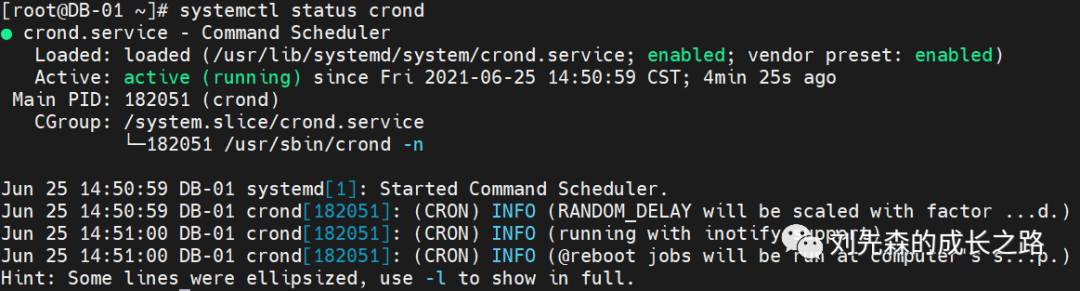
【如果没有启动,执行】
【创建backup.sh脚本】
vi backup.sh
【添加脚本内容】
#!/bin/sh# ################################################################### Powered by Ironfo# ################################################################### Oracle Environment settingsexport ORACLE_BASE=/home/u01/app/tgkprodexport ORACLE_HOME=$ORACLE_BASE/product/12.1.0/dbhome_1export ORACLE_SID=tgkprodexport TNS_ADMIN=$ORACLE_HOME#export NLS_LANG=SIMPLIFIED CHINESE_CHINA.AL32UTF8export PATH=$PATH:$ORACLE_HOME/bin:$PATHsource etc/profileusa='TGK'usr='REP'tm=$(date '+%Y%m%d%H%M%S')dt=/home/oracle/db_backup/tt#可以创建数据泵目录directory,这里指定默认的目录#SQL>CREATE DIRECTORY dump_backup_dir as '/u01/oradata/dump_backup_dir';#SQL>grant read,write on directory dump_backup_dir to user;DMP_FILE=PH_$(date +%Y%m%d_%H%M%S).dmpLOG_FILE=PH_$(date +%Y%m%d_%H%M%S).log## Let's start with an export of the databaseexpdp user/pwd@orcl schemas=schema_name DUMPFILE=$DMP_FILE logfile=$LOG_FILE compression=all;#expdp user/pwd@orcl schemas=schema_name DIRECTORY=$dump_backup_dir DUMPFILE=$DMP_FILE logfile=$LOG_FILE compression=all parallel=3;# 这里的2个说明,用户名和密码换成自己的,我这里是备份表空间。# parallel 这个参数是控制并行度的,默认是1,但对于数据库比较大的时候,可以设置parallel,这样可以较少备份的#时间,但是设置并行会耗CPU 资源,如果CPU 资源比较紧张的话,就不要设了。## Just to be safe (with space), we'll compress the export file# 压缩dmp 文件,较少对空间的占用#compress *.dmp## Let's delete the backups and logs that are more than 1 days old# 删除2天前PH_开头的dmp文件#cd $backup_dirfind $backup_dir -mtime +2 -name "PH_*" -exec rm -f {} \;# That's all
:wq 保存并退出
【设置权限】
chmod 777 ./backup.sh
【添加定时任务】
crontab -e##每天4.30,12点,18点 各执行一次30 4,12,18 * * * home/oracle/db_backup/backup.sh
【查看定时任务】

【拓展】
crontab命令
语法 : crontab 参数
常用参数 :
crontab -u #指定用户的cron信息
crontab -l #列出当前用户下的cron服务的信息
crontab -u user -l #列出指定用户的cron服务的信息
crontab -r #删除cron服务
crontab -e #编辑cron服务
crontab -r -u user #删除指定用户的定时任务
【定时任务规则】
首先来看下任务的格式(如图):


下面我们来举一些例子
#每晚的20:30重加载nginx30 20 * * * /usr/local/nginx/sbin/nginx -s reload#每月1、10、15日的5:30重加载nginx30 5 1,10,15 * * /usr/local/nginx/sbin/nginx -s reload#每天20: 00至22 : 00之间每隔30分钟重加载nginx0,30 20-22 * * * /usr/local/nginx/sbin/nginx -s reload每星期六的10 : 00 pm 重加载nginx0 22* * 6 /usr/local/nginx/sbin/nginx -s reload#每一小时重加载一次nginx0 */1 * * * /usr/local/nginx/sbin/nginx -s reload
常用cron表达式:每五分钟执行 */5 * * * *每小时执行 0 * * * *每天执行 0 0 * * *每周执行 0 0 * * 0每月执行 0 0 1 * *每年执行 0 0 1 1 *
个人笔记日常整理记录,会坚持长期分享共同努力~!
文章转载自刘先森的成长之路,如果涉嫌侵权,请发送邮件至:contact@modb.pro进行举报,并提供相关证据,一经查实,墨天轮将立刻删除相关内容。
