




Innotop是一款十分强大的MySQL监控工具,用perl所写,通过文本模式展示MysQL服务器和Innodb的运行状况。
下载地址:https://github.com/innotop/innotop
Github上提供两种版本,一种是开发版(innotop-master),一种是稳定版(innotop-gtid)。在这里,我们使用的是开发版。
注意:网上提供的下载地址是http://code.google.com/p/innotop/,但这个是原先的维护地址,该项目现已迁移到Github上,而且,innotop-1.9.0.tar.gz这个版本也测试了下(google code上面的最新版本是1.9.1),很多功能都无法使用,可能与MySQL的版本有关,建议还是直接从Github上下载。
# unzip innotop-master.zip
# cd innotop-master
# perl Makefile.PL
Checking if your kit is complete...
Looks good Warning: prerequisite Term::ReadKey 2.1 not found. Writing Makefile for innotop
报以上错误,缺少ReadKey包。
# yum search ReadKey --注意:基本上缺失的Perl Module都可以通常yum获取

Loaded plugins: fastestmirror
Loading mirror speeds from cached hostfile * base: centos.ustc.edu.cn * extras: centos.ustc.edu.cn * updates: centos.ustc.edu.cn================================================= N/S matched: ReadKey ==================================================perl-TermReadKey.x86_64 : A perl module for simple terminal control

  Name and summary matches only, use "search all" for everything.
# yum install -y perl-TermReadKey
# perl Makefile.PL
Writing Makefile for innotop
# make install
cp innotop blib/script/innotop/usr/bin/perl -MExtUtils::MY -e 'MY->fixin(shift)' -- blib/script/innotop
Manifying blib/man1/innotop.1Installing /usr/local/share/man/man1/innotop.1Installing /usr/local/bin/innotop
Appending installation info to usr/lib64/perl5/perllocal.pod
首先我们通过innotop --help查看其常见的启动参
# innotop --help
Usage: innotop <options> <innodb-status-file>

  --[no]color   -C   Use terminal coloring (default)  --config      -c   Config file to read  --count            Number of updates before exiting  --delay       -d   Delay between updates in seconds  --help             Show this help message  --host        -h   Connect to host  --[no]inc     -i   Measure incremental differences  --mode        -m   Operating mode to start in
  --nonint      -n   Non-interactive, output tab-separated fields  --password    -p   Password to use for connection  --port        -P   Port number to use for connection  --skipcentral -s   Skip reading the central configuration file
  --socket      -S   MySQL socket to use for connection  --spark            Length of status sparkline (default 10)  --timestamp   -t   Print timestamp in -n mode (1: per iter; 2: per line)  --user        -u   User for login if not current user  --version          Output version information and exit  --write       -w   Write running configuration into home directory if no config files were loaded
其中,
-d:多久时间更新一次
-h:连接的主机名
-p:连接的端口
-S:socket的位置
-u:连接的用户
熟悉MysQL的童鞋不难理解。
登录进来后,默认是Dashboard。Innotop支持多种模式,Dashboard只是其中一种模式。通过“?”键我们可以查看所有模式
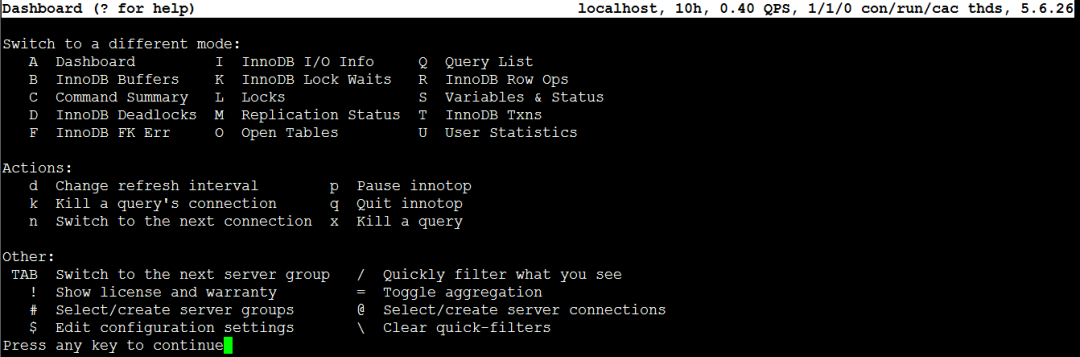
通过上述字母可切换到不同的状态下。
1. # man innotop
2. # perldoc innotop
有两种方式:
一、直接在innotop交互式界面中添加,步骤如下:
# innotop
进入到交互式界面后,点击@键,会进入到连接配置界面

下面开始填写,主要有以下几项:
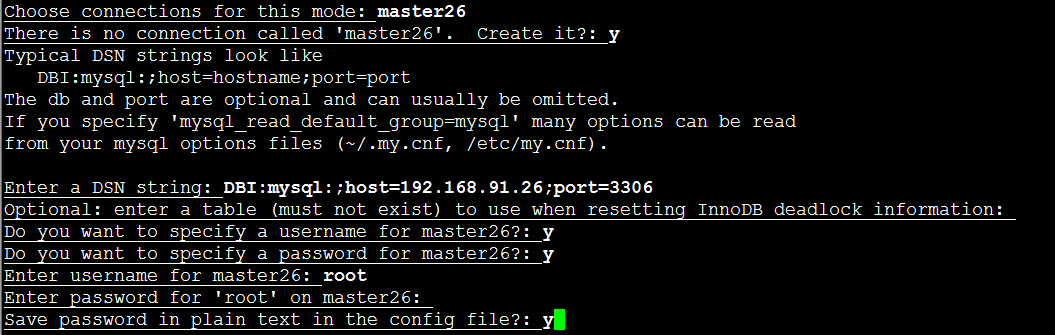
说明如下:
Choose connections for this mode:选择连接,如果连接不存在,则手动创建。所以下面会有提示“There is no connection called 'master26',create it?:”。
填写y,然后回车,会提示填写DSN string,按格式来即可。
其中在Enter password这一项需要注意,你输入密码的时候光标没有动,但实际上它是有输入,输入完毕,直接回车即可。
对于该种方法,简单,在监控机器较少的情况下,比较适用,但该方法的弊端在于一旦退出innotop,所有的配置信息都会丢失,重新进入,需重新配置。
所以,推荐的方法如下。
二、利用配置文件
# innotop --write,进入交互式界面后退出。会在当前目录下生成一个.innotop/innotop.conf
# ls .innotop/innotop.conf plugins
# vim .innotop/innotop.conf
该配置文件中有关连接的配置信息,默认有一个localhost。
[connections] localhost=user= have_user= have_pass= dsn=DBI:mysql:;
host=localhost;mysql_read_default_group=client savepass=
dl_table=test.innotop_dl[/connections]
当然,这个对我们编辑自己的配置信息没有多大用处,可以删除掉。
在此,可根据第一种方式添加一个connection信息,然后根据该信息进行相应的编辑。
以第一种方式中的master26为例,添加后,innotop.conf中的信息如下:
[connections]
localhost=user= have_user= have_pass= dsn=DBI:mysql:;
host=localhost;mysql_read_default_group=client
savepass= dl_table=test.innotop_dl master26=user=root have_user=1 pass=123 have_pass=1
dsn=DBI:mysql:;host=192.168.91.26;port=3306 savepass=
1
[/connections]
根据实际生产的需求,编辑innotop.conf文件。
[connections]

master26=user=root have_user=1 pass=123 have_pass=1 dsn=DBI:mysql:;host=192.168.91.26;port=3306 savepass=1slave25=user=root have_user=1 pass=123 have_pass=1 dsn=DBI:mysql:;host=192.168.91.25;port=3306 savepass=1slave22=user=root have_user=1 pass=123 have_pass=1 dsn=DBI:mysql:;host=192.168.91.22;port=3306 savepass=1[/connections]
启动innotop,默认监控的是master26的信息。

可通过“n”或“@”选择相应的服务器。
好虽好,但不够直观,我们希望本例中三个服务器的信息能显示在一个屏幕里,这样就不需要进行来回的切换,更直观。这里,就需要用到SERVER GROUPS的功能。
顾名思义,就是讲服务器进行分组,这种信息展示的粒度就不在是服务器,而是整个组了。
同样有两种方式添加:
一、直接在innotop交互式界面中添加
使用“#”键,首先创建组的名字,然后添加服务器,如下所示:

二、编辑配置文件
[server_groups]

master-slave=master26 slave22 slave25

[/server_groups]
下面,我们来看看集群显示的效果
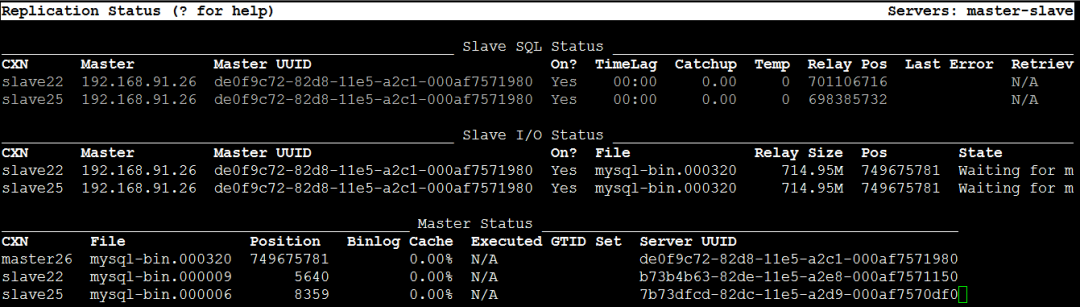
对于监控主从集群的状况,完全够用。
注意:在innotop交互式界面中配置完毕后,需退出innotop,再进入,不然就不会显示CXN列。
1. 可能有人有疑虑,将密码保存到配置文件中,是否不安全,尤其是在生产环境下。其实,密码也可以不保存在配置文件中,配置如下:
[connections]

server144=user=root have_user=1 have_pass=1 dsn=DBI:mysql:;host=192.168.244.144;port=3306 savepass= dl_table=[/connections]
如果是在innotop交互式界面中添加,则最后一步Save password in plain text in the config file?: 写“n”即可。
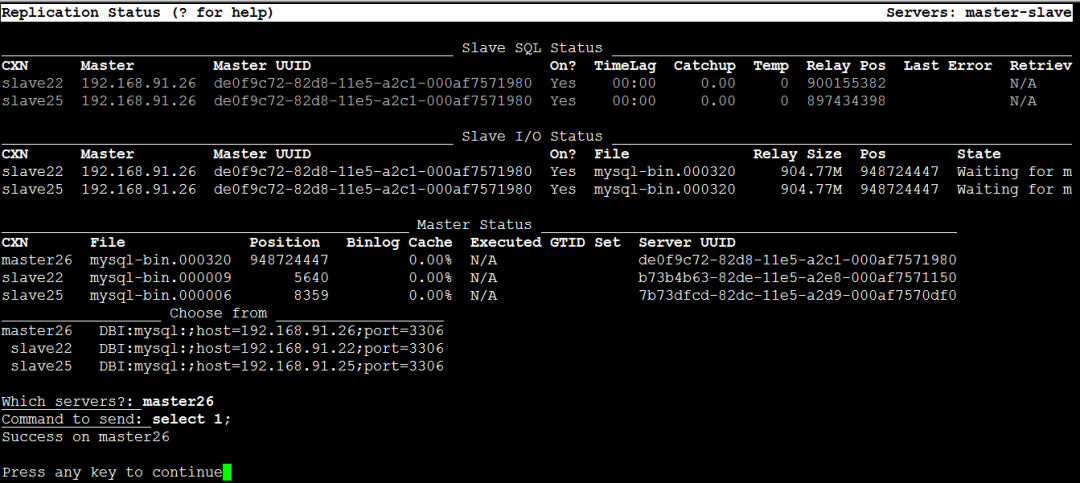
2. 除了上述功能,innotop还是蛮强大的。譬如在M模式,即Replication Status下,可通过“o”键给服务器发送命令。如下所示:
Anyway,Innotop功能还是及其强大的,大家慢慢琢磨吧~
目前1000+人已关注加入我们



扫描二维码获取
更多精彩
大森玩测试

转载自:http://t.hk.uy/ge2
“在看”点一点
见者有份 好事发生😊
👇👇👇
