



接上一篇 【PG】CentOS7源码安装PostgreSQL13.3 ,这次记录一下PG数据库的手工启停方式。
本文主要源自墨天轮的一套非常好的快速上手视频,推荐观看原版视屏及博客!
视频链接:PostgreSQL DBA快速上手教程
作者博客:http://www.knockatdatabase.com/category/postgresql/
官方文档:https://www.postgresql.org/docs/current/install-procedure.html
一、检查数据库运行状态
1. 通过查看后台进程的状态判断
[postgres@pxk ~]$ ps -ef|grep postgres
postgres  23491      1  0 10:58 ?        00:00:00 /data/postgres/13.3/bin/postgres -D /data/postgres/13.3/data
postgres  23493  23491  0 10:58 ?        00:00:00 postgres: checkpointer
postgres  23494  23491  0 10:58 ?        00:00:00 postgres: background writer
postgres  23495  23491  0 10:58 ?        00:00:00 postgres: walwriter
postgres  23496  23491  0 10:58 ?        00:00:00 postgres: autovacuum launcher
postgres  23497  23491  0 10:58 ?        00:00:00 postgres: stats collector
postgres  23498  23491  0 10:58 ?        00:00:00 postgres: logical replication launcher
postgres  28714 119284  0 11:09 pts/1    00:00:00 ps -ef
postgres  28715 119284  0 11:09 pts/1    00:00:00 grep --color=auto postgres
root     119283 119117  0 10:09 pts/1    00:00:00 su - postgres
postgres 119284 119283  0 10:09 pts/1    00:00:00 -bash
可见有若干postgres进程
- pid=23491是核心进程
- postgres: checkpointer 检查点进程。同比O的CKPT进程
- postgres: background writer 数据库写进程。将shared buffer中脏数据写回磁盘,同比O的DBWn
- postgres: walwriter 日志写进程。同比O的LGWR
- postgres: autovacuum launcher 垃圾回收进程
- postgres: stats collector 统计信息收集进程
- postgres: logical replication launcher 逻辑复制进程
可以观察到上述后台进程都是pid=23491的核心进程的子进程,其父进程号都是23491
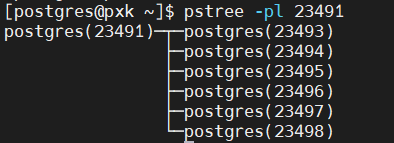
2. 通过pg_ctl查看状态
pg_ctl status

二、PG启动命令
想要正确启动Linux服务器上的PostgreSQL数据库,我们依赖于pg_ctl命令,和PGDATA这个环境变量。
--查看pg_ctl路径
which pg_ctl

--最简单的启动,启动日志输出到屏幕上
pg_ctl start

--启动日志指定输出到日志文件中
pg_ctl start -l /home/postgres/startup.log

--完整启动语句,-D 参数指定数据库集群的根路径。由于之前已配置PGDATA环境变量,所以可以在命令行上省略
pg_ctl start -D /data/postgres/13.3/data/ -l /home/postgres/startup.log
--启动的日志输出
[postgres@pxk ~]$ pg_ctl start
waiting for server to start....2021-07-03 11:44:03.102 CST [45613] LOG:  starting PostgreSQL 13.3 on x86_64-pc-linux-gnu, compiled by gcc (GCC) 4.8.5 20150623 (Red Hat 4.8.5-44), 64-bit
2021-07-03 11:44:03.102 CST [45613] LOG:  listening on IPv4 address "0.0.0.0", port 5432
2021-07-03 11:44:03.102 CST [45613] LOG:  listening on IPv6 address "::", port 5432
2021-07-03 11:44:03.105 CST [45613] LOG:  listening on Unix socket "/tmp/.s.PGSQL.5432"
2021-07-03 11:44:03.110 CST [45614] LOG:  database system was shut down at 2021-07-03 11:43:52 CST
2021-07-03 11:44:03.113 CST [45613] LOG:  database system is ready to accept connections
 done
server started
三、PG关闭命令
-- -m 是mode的意思,这里的fast相当于O中的 shutdown immediate
pg_ctl stop -m fast

--关闭日志输出
[postgres@pxk ~]$ pg_ctl stop -m fast
waiting for server to shut down....2021-07-03 12:13:25.047 CST [45613] LOG:  received fast shutdown request
2021-07-03 12:13:25.048 CST [45613] LOG:  aborting any active transactions
2021-07-03 12:13:25.048 CST [45613] LOG:  background worker "logical replication launcher" (PID 45620) exited with exit code 1
2021-07-03 12:13:25.048 CST [45615] LOG:  shutting down
2021-07-03 12:13:25.054 CST [45613] LOG:  database system is shut down
 done
server stopped
注意一下关于重启/关闭模式的描述:
| 选项 | 描述 | 同比Oracle |
|---|---|---|
| smart | 在所有会话断开后关闭 | shutdown normal |
| fast | 干净的关闭数据库,回滚相关未提交事务 | shutdown immediate |
| immediate | 不等待会话结束,直接关闭,启动时需要实例恢复 | shutdown abort |
我试了一下immediate 选项关闭:
[postgres@pxk ~]$ pg_ctl stop -m immediate
waiting for server to shut down....2021-07-03 12:40:47.595 CST [73192] LOG:  received immediate shutdown request
--下行显示警告:由于另一个服务器进程奔溃,中止连接,不知道这个“另一个服务器进程”是啥
2021-07-03 12:40:47.596 CST [73197] WARNING:  terminating connection because of crash of another server process
--下行显示细节:postmaster(查了一下先理解为主进程)命令该服务器进程回滚当前事务并退出,因为另一个服务器进程异常退出,可能损坏了共享内存
2021-07-03 12:40:47.596 CST [73197] DETAIL:  The postmaster has commanded this server process to roll back the current transaction and exit, because another server process exited abnormally and possibly corrupted shared memory.
2021-07-03 12:40:47.596 CST [73197] HINT:  In a moment you should be able to reconnect to the database and repeat your command.
2021-07-03 12:40:47.598 CST [73192] LOG:  database system is shut down
 done
server stopped


[postgres@pxk ~]$ pg_ctl start
waiting for server to start....2021-07-03 12:50:40.194 CST [78188] LOG:  starting PostgreSQL 13.3 on x86_64-pc-linux-gnu, compiled by gcc (GCC) 4.8.5 20150623 (Red Hat 4.8.5-44), 64-bit
2021-07-03 12:50:40.194 CST [78188] LOG:  listening on IPv4 address "0.0.0.0", port 5432
2021-07-03 12:50:40.194 CST [78188] LOG:  listening on IPv6 address "::", port 5432
2021-07-03 12:50:40.196 CST [78188] LOG:  listening on Unix socket "/tmp/.s.PGSQL.5432"
2021-07-03 12:50:40.199 CST [78189] LOG:  database system was interrupted; last known up at 2021-07-03 12:41:09 CST
--提示数据库没有正确关闭,开始自动恢复
2021-07-03 12:50:40.207 CST [78189] LOG:  database system was not properly shut down; automatic recovery in progress
--读取redo恢复,at 后面
2021-07-03 12:50:40.208 CST [78189] LOG:  redo starts at 0/15BB210
2021-07-03 12:50:40.209 CST [78189] LOG:  invalid record length at 0/15D3558: wanted 24, got 0
2021-07-03 12:50:40.209 CST [78189] LOG:  redo done at 0/15D3520
2021-07-03 12:50:40.223 CST [78188] LOG:  database system is ready to accept connections
 done
server started
四、pg_ctl的使用
通过pg_ctl --help 查看帮助信息
[postgres@pxk ~]$ pg_ctl -help
pg_ctl: invalid option -- 'h'
Try "pg_ctl --help" for more information.
[postgres@pxk ~]$ pg_ctl --help
pg_ctl is a utility to initialize, start, stop, or control a PostgreSQL server.

Usage:
  pg_ctl init[db]   [-D DATADIR] [-s] [-o OPTIONS]
  pg_ctl start      [-D DATADIR] [-l FILENAME] [-W] [-t SECS] [-s]
                    [-o OPTIONS] [-p PATH] [-c]
  pg_ctl stop       [-D DATADIR] [-m SHUTDOWN-MODE] [-W] [-t SECS] [-s]
  pg_ctl restart    [-D DATADIR] [-m SHUTDOWN-MODE] [-W] [-t SECS] [-s]
                    [-o OPTIONS] [-c]
  pg_ctl reload     [-D DATADIR] [-s]
  pg_ctl status     [-D DATADIR]
  pg_ctl promote    [-D DATADIR] [-W] [-t SECS] [-s]
  pg_ctl logrotate  [-D DATADIR] [-s]
  pg_ctl kill       SIGNALNAME PID

Common options:
  -D, --pgdata=DATADIR   location of the database storage area
  -s, --silent           only print errors, no informational messages
  -t, --timeout=SECS     seconds to wait when using -w option
  -V, --version          output version information, then exit
  -w, --wait             wait until operation completes (default)
  -W, --no-wait          do not wait until operation completes
  -?, --help             show this help, then exit
If the -D option is omitted, the environment variable PGDATA is used.

Options for start or restart:
  -c, --core-files       allow postgres to produce core files
  -l, --log=FILENAME     write (or append) server log to FILENAME
  -o, --options=OPTIONS  command line options to pass to postgres
                         (PostgreSQL server executable) or initdb
  -p PATH-TO-POSTGRES    normally not necessary

Options for stop or restart:
  -m, --mode=MODE        MODE can be "smart", "fast", or "immediate"

Shutdown modes are:
  smart       quit after all clients have disconnected
  fast        quit directly, with proper shutdown (default)
  immediate   quit without complete shutdown; will lead to recovery on restart

Allowed signal names for kill:
  ABRT HUP INT KILL QUIT TERM USR1 USR2

Report bugs to <pgsql-bugs@lists.postgresql.org>.
PostgreSQL home page: <https://www.postgresql.org/>
简单的PG启停说明结束


「喜欢这篇文章,您的关注和赞赏是给作者最好的鼓励」
关注作者
【版权声明】本文为墨天轮用户原创内容,转载时必须标注文章的来源(墨天轮),文章链接,文章作者等基本信息,否则作者和墨天轮有权追究责任。如果您发现墨天轮中有涉嫌抄袭或者侵权的内容,欢迎发送邮件至:contact@modb.pro进行举报,并提供相关证据,一经查实,墨天轮将立刻删除相关内容。
