



JAVA连接HBase客户端
工具类:HbaseUtil
package cn._doit19.hbase.utils;import org.apache.hadoop.conf.Configuration;import org.apache.hadoop.hbase.Cell;import org.apache.hadoop.hbase.CellUtil;import org.apache.hadoop.hbase.HBaseConfiguration;import org.apache.hadoop.hbase.TableName;import org.apache.hadoop.hbase.client.*;import org.apache.hadoop.hbase.util.Bytes;import java.io.IOException;/*** @author:tom* @Date:Created in 16:36 2020/11/24* 工具类*/public class HbaseUtil {static Connection conn = null;static {//创建连接对象Configuration conf = HBaseConfiguration.create();conf.set("hbase.zookeeper.quorum", "linux01:2181,linux02:2181,linux03:2181");try {conn = ConnectionFactory.createConnection(conf);} catch (IOException e) {e.printStackTrace();}}public static Table getTable(String tableName) throws Exception {TableName tbName = TableName.valueOf(tableName);return conn.getTable(tbName);}public static Connection getConn() {return conn;}public static void showData(Result result) {while (result.advance()) {Cell cell = result.current();String row = Bytes.toString(CellUtil.cloneRow(cell));String cf = Bytes.toString(CellUtil.cloneFamily(cell));String qualifier = Bytes.toString(CellUtil.cloneQualifier(cell));String val = Bytes.toString(CellUtil.cloneValue(cell));System.out.println(row + "--->" + cf + "--->" + qualifier + "--->" + val);}}public static Admin getAdmin() throws Exception {return conn.getAdmin();}}
创建表
package cn._doit19.hbase.day01;import cn._doit19.hbase.utils.HbaseUtil;import org.apache.hadoop.hbase.TableName;import org.apache.hadoop.hbase.client.*;/*** @author:tom* @Date:Created in 17:44 2020/11/24* 创建表*/public class Demo03 {public static void main(String[] args) throws Exception {Admin admin = HbaseUtil.getAdmin();TableDescriptorBuilder tb_builder = TableDescriptorBuilder.newBuilder(TableName.valueOf("test_a".getBytes()));ColumnFamilyDescriptorBuilder cf_builder = ColumnFamilyDescriptorBuilder.newBuilder("cf1".getBytes());ColumnFamilyDescriptor cf_desc = cf_builder.build();tb_builder.setColumnFamily(cf_desc);TableDescriptor tb_desc = tb_builder.build();admin.createTable(tb_desc);}}
Scan 'table_name' 扫描表 数据 可添加参数 精准扫描查询
package cn._doit19.hbase.day01;import cn._doit19.hbase.utils.HbaseUtil;import org.apache.hadoop.hbase.client.Result;import org.apache.hadoop.hbase.client.ResultScanner;import org.apache.hadoop.hbase.client.Scan;import org.apache.hadoop.hbase.client.Table;import java.util.Iterator;/*** @author:tom* @Date:Created in 11:56 2020/11/25* scan ‘tab_name’*/public class Demo04 {public static void main(String[] args) throws Exception {//获取表对象Table table = HbaseUtil.getTable("tb_imp");//scan 扫描表,获取所有的数据Scan scan = new Scan();//添加了列族和属性 只要表中所有的 info列族的age属性scan.addColumn("info".getBytes(), "age".getBytes());ResultScanner scanner = table.getScanner(scan);Iterator<Result> iterator = scanner.iterator();while (iterator.hasNext()) {Result res = iterator.next();HbaseUtil.showData(res);}}}
put 时的数据结构 put 'table_name','rowKey','cf_name:qualifier','value'
package cn._doit19.hbase.day01;import org.apache.hadoop.hbase.Cell;import org.apache.hadoop.hbase.CellUtil;import org.apache.hadoop.hbase.client.Put;import java.util.List;import java.util.Map;import java.util.NavigableMap;import java.util.Set;/*** @author:tom* @Date:Created in 15:58 2020/11/25* put 数据结构*/public class PutDetails {public static void main(String[] args) throws Exception {//put方法//put 'a','rk001','cf1:qualifier','value'//一个rowKey 对应多个单元格 List<Cell> 单元格(cf:qualifier)// Table tb_user = HbaseUtil.getTable("tb_user");Put put = new Put("rk001".getBytes());NavigableMap<byte[], List<Cell>> familyCellMap = put.getFamilyCellMap();Set<Map.Entry<byte[], List<Cell>>> entries = familyCellMap.entrySet();//k,v 一个rowKey 对应多个单元格 List<Cell>for (Map.Entry<byte[], List<Cell>> entry : entries) {//列族String cfName = new String(entry.getKey());List<Cell> cells = entry.getValue();for (Cell cell : cells) {//每个单元格的属性String qualifier = new String(CellUtil.cloneQualifier(cell));//每个单元格的值String value = new String(CellUtil.cloneValue(cell));}}// tb_user.put(put);}}
HBase写入数据原理解析
写入数据原理图
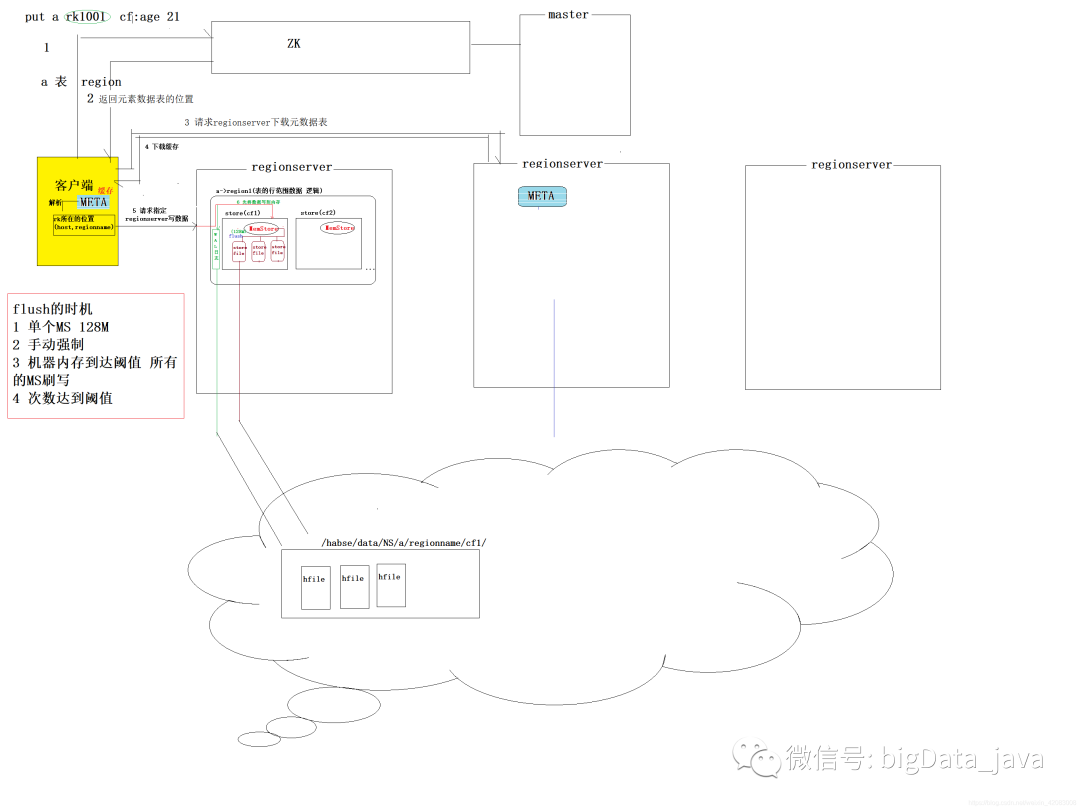
步骤解析
单个的MemoryStore的内存达到128M
手动强制进行flush
机器的内存达到阈值 所有的memorystore将会被flush走
次数达到阈值
HBase读取数据原理解析
读取数据原理图

步骤解析
文章转载自Hadoop大数据开发,如果涉嫌侵权,请发送邮件至:contact@modb.pro进行举报,并提供相关证据,一经查实,墨天轮将立刻删除相关内容。
