



ZooKeeper在分布式系统上用的非常多,包括HDFS, HBase, Kafka, YARN, ClickHouse等都借助ZooKeeper实现服务的高可用性。这里介绍ZooKeeper分布式集群的安装和配置。
安装JDK
首先需要安装JDK
下载安装包
ZooKeeper官网[1]
目前最新的ZooKeeper稳定版是3.6.3,可以通过以下地址找到离自己最近的镜像站点下载安装包。https://www.apache.org/dyn/closer.lua/zookeeper/zookeeper-3.6.3/apache-zookeeper-3.6.3-bin.tar.gz
比如,清华大学的镜像下载地址。https://mirrors.tuna.tsinghua.edu.cn/apache/zookeeper/zookeeper-3.6.3/apache-zookeeper-3.6.3-bin.tar.gz
下载后校验一下安装包的完整性,可以与官网sha512值[2]比对。
[root@centos1 ~]# sha512sum apache-zookeeper-3.6.3-bin.tar.gz3f7b1b7d9cf5647d52ad0076c922e108fa956e986b5624667c493cf6d8ff09d3ca88f623c79a799fe49c72e868cb3c9d0f77cb69608de74a183b2cbad10bc827 apache-zookeeper-3.6.3-bin.tar.gz
安装和配置
# 解压tar -zxf apache-zookeeper-3.6.3-bin.tar.gz -C /usr/localchown -R root:root /usr/local/apache-zookeeper-3.6.3-binln -s /usr/local/apache-zookeeper-3.6.3-bin /usr/local/zookeeper
# 设置环境变量vi /etc/profile# ZooKeeperexport ZOOKEEPER_HOME=/usr/local/zookeeperexport PATH=$PATH:$ZOOKEEPER_HOME/binsource /etc/profile
# 修改配置文件cd /usr/local/zookeeper/confcp zoo_sample.cfg zoo.cfgvi zoo.cfg
将zoo.cfg按照实际情况修改,比如以下是我三节点集群的配置。
# The number of milliseconds of each ticktickTime=2000# The number of ticks that the initial# synchronization phase can takeinitLimit=10# The number of ticks that can pass between# sending a request and getting an acknowledgementsyncLimit=5# the directory where the snapshot is stored.# do not use tmp for storage, /tmp here is just# example sakes.dataDir=/var/lib/zookeeperdataLogDir=/var/lib/zookeeper# the port at which the clients will connectclientPort=2181# the maximum number of client connections.# increase this if you need to handle more clients#maxClientCnxns=60## Be sure to read the maintenance section of the# administrator guide before turning on autopurge.## http://zookeeper.apache.org/doc/current/zookeeperAdmin.html#sc_maintenance## The number of snapshots to retain in dataDir#autopurge.snapRetainCount=3# Purge task interval in hours# Set to "0" to disable auto purge feature#autopurge.purgeInterval=1## Metrics Providers## https://prometheus.io Metrics Exporter#metricsProvider.className=org.apache.zookeeper.metrics.prometheus.PrometheusMetricsProvider#metricsProvider.httpPort=7000#metricsProvider.exportJvmInfo=trueserver.1=centos1:2888:3888server.2=centos2:2888:3888server.3=centos3:2888:3888
# 创建数据目录和日志目录mkdir -p /var/lib/zookeepermkdir -p /var/log/zookeeper# centos1echo "1" > /var/lib/zookeeper/myid# centos2echo "2" > /var/lib/zookeeper/myid# centos3echo "3" > /var/lib/zookeeper/myid
# 启动ZooKeeperzkServer.sh start# 查询ZooKeeper服务状态zkServer.sh status# 客户端连接ZooKeeperzkCli.sh -server 127.0.0.1:2181

可以看到启动了两个follower,一个leader



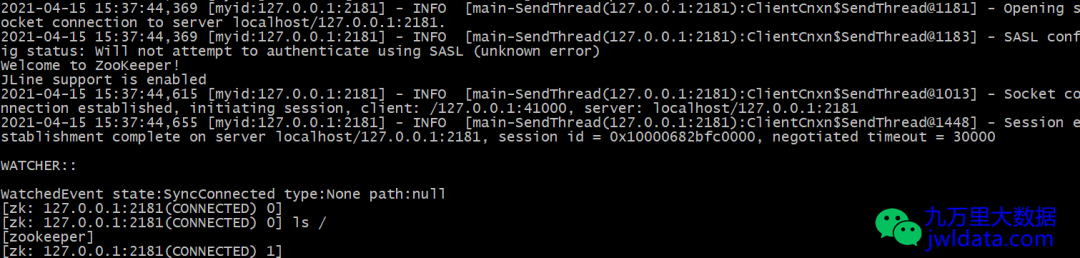
测试ZooKeeper
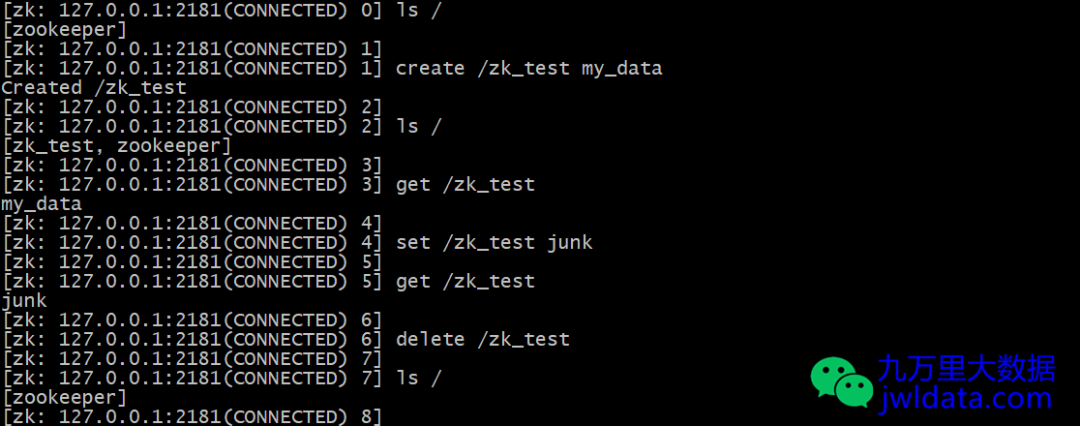
ls /# 创建一个znode,关联字符串为my_datacreate /zk_test my_data# 获取这个znode关联的数据get /zk_test# 重新设置znode的关联数据set /zk_test junk# 删除znodedelete /zk_test
欢迎关注我的公众号“九万里大数据”,原创技术文章第一时间推送。欢迎访问原创技术博客网站 jwldata.com[3],排版更清晰,阅读更爽快。

引用链接
[1]
ZooKeeper官网: https://zookeeper.apache.org/releases.html[2]
官网sha512值: https://downloads.apache.org/zookeeper/zookeeper-3.6.3/apache-zookeeper-3.6.3-bin.tar.gz.sha512[3]
jwldata.com: https://www.jwldata.com
