



ClickHouse也可以做分布式部署,拥有shard和replica的概念,类似elasticsearch,但是在配置上面要复杂许多,之前介绍过单节点ClickHouse的安装[1]和ClickHouse导入测试数据集[2],这里在此基础上继续介绍ClickHouse集群化安装配置,创建一个分布式表,并往分布式表里导入测试数据。
3shards_1replicas
3分片1副本,也就是数据被打散到3个分片中,但总副本只有1份。这种一般是为了充分利用分布式计算的能力,但不考虑高可用性。
配置ClickHouse
在三个ClickHouse节点上,找到remote_servers配置项追加perftest_3shards_1replicas配置。注意,三个节点都需要配置。
vi /etc/clickhouse-server/config.xml
<remote_servers>............<perftest_3shards_1replicas><shard><replica><host>ctkf01</host><port>9020</port></replica></shard><shard><replica><host>ctkf02</host><port>9020</port></replica></shard><shard><replica><host>ctkf03</host><port>9020</port></replica></shard></perftest_3shards_1replicas></remote_servers>
重启ClickHouse
systemctl restart clickhouse-server
创建分布式表
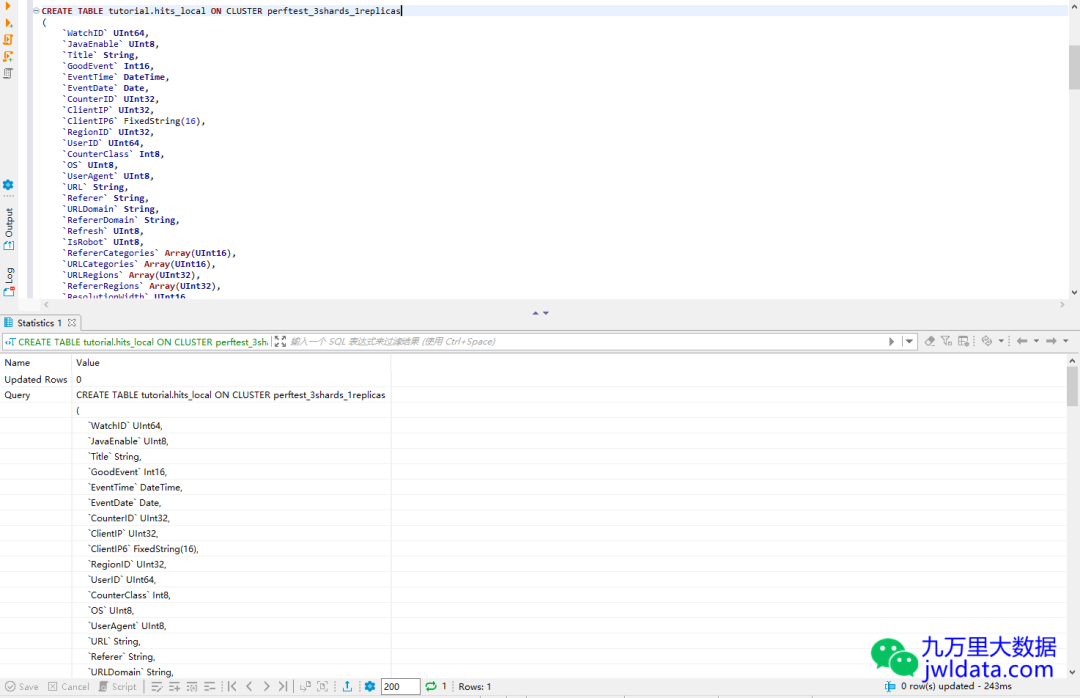
任意选择一个ClickHouse节点比如ctkf01,创建本地表。通过在建表语句中指定ON CLUSTER perftest_3shards_1replicas语法,会自动在另外两个ClickHouse节点上创建本地表。
CREATE TABLE tutorial.hits_local ON CLUSTER perftest_3shards_1replicas(`WatchID` UInt64,`JavaEnable` UInt8,`Title` String,`GoodEvent` Int16,`EventTime` DateTime,`EventDate` Date,`CounterID` UInt32,`ClientIP` UInt32,`ClientIP6` FixedString(16),`RegionID` UInt32,`UserID` UInt64,`CounterClass` Int8,`OS` UInt8,`UserAgent` UInt8,`URL` String,`Referer` String,`URLDomain` String,`RefererDomain` String,`Refresh` UInt8,`IsRobot` UInt8,`RefererCategories` Array(UInt16),`URLCategories` Array(UInt16),`URLRegions` Array(UInt32),`RefererRegions` Array(UInt32),`ResolutionWidth` UInt16,`ResolutionHeight` UInt16,`ResolutionDepth` UInt8,`FlashMajor` UInt8,`FlashMinor` UInt8,`FlashMinor2` String,`NetMajor` UInt8,`NetMinor` UInt8,`UserAgentMajor` UInt16,`UserAgentMinor` FixedString(2),`CookieEnable` UInt8,`JavascriptEnable` UInt8,`IsMobile` UInt8,`MobilePhone` UInt8,`MobilePhoneModel` String,`Params` String,`IPNetworkID` UInt32,`TraficSourceID` Int8,`SearchEngineID` UInt16,`SearchPhrase` String,`AdvEngineID` UInt8,`IsArtifical` UInt8,`WindowClientWidth` UInt16,`WindowClientHeight` UInt16,`ClientTimeZone` Int16,`ClientEventTime` DateTime,`SilverlightVersion1` UInt8,`SilverlightVersion2` UInt8,`SilverlightVersion3` UInt32,`SilverlightVersion4` UInt16,`PageCharset` String,`CodeVersion` UInt32,`IsLink` UInt8,`IsDownload` UInt8,`IsNotBounce` UInt8,`FUniqID` UInt64,`HID` UInt32,`IsOldCounter` UInt8,`IsEvent` UInt8,`IsParameter` UInt8,`DontCountHits` UInt8,`WithHash` UInt8,`HitColor` FixedString(1),`UTCEventTime` DateTime,`Age` UInt8,`Sex` UInt8,`Income` UInt8,`Interests` UInt16,`Robotness` UInt8,`GeneralInterests` Array(UInt16),`RemoteIP` UInt32,`RemoteIP6` FixedString(16),`WindowName` Int32,`OpenerName` Int32,`HistoryLength` Int16,`BrowserLanguage` FixedString(2),`BrowserCountry` FixedString(2),`SocialNetwork` String,`SocialAction` String,`HTTPError` UInt16,`SendTiming` Int32,`DNSTiming` Int32,`ConnectTiming` Int32,`ResponseStartTiming` Int32,`ResponseEndTiming` Int32,`FetchTiming` Int32,`RedirectTiming` Int32,`DOMInteractiveTiming` Int32,`DOMContentLoadedTiming` Int32,`DOMCompleteTiming` Int32,`LoadEventStartTiming` Int32,`LoadEventEndTiming` Int32,`NSToDOMContentLoadedTiming` Int32,`FirstPaintTiming` Int32,`RedirectCount` Int8,`SocialSourceNetworkID` UInt8,`SocialSourcePage` String,`ParamPrice` Int64,`ParamOrderID` String,`ParamCurrency` FixedString(3),`ParamCurrencyID` UInt16,`GoalsReached` Array(UInt32),`OpenstatServiceName` String,`OpenstatCampaignID` String,`OpenstatAdID` String,`OpenstatSourceID` String,`UTMSource` String,`UTMMedium` String,`UTMCampaign` String,`UTMContent` String,`UTMTerm` String,`FromTag` String,`HasGCLID` UInt8,`RefererHash` UInt64,`URLHash` UInt64,`CLID` UInt32,`YCLID` UInt64,`ShareService` String,`ShareURL` String,`ShareTitle` String,`ParsedParams` Nested(Key1 String,Key2 String,Key3 String,Key4 String,Key5 String,ValueDouble Float64),`IslandID` FixedString(16),`RequestNum` UInt32,`RequestTry` UInt8)ENGINE = MergeTree()PARTITION BY toYYYYMM(EventDate)ORDER BY (CounterID, EventDate, intHash32(UserID))SAMPLE BY intHash32(UserID)
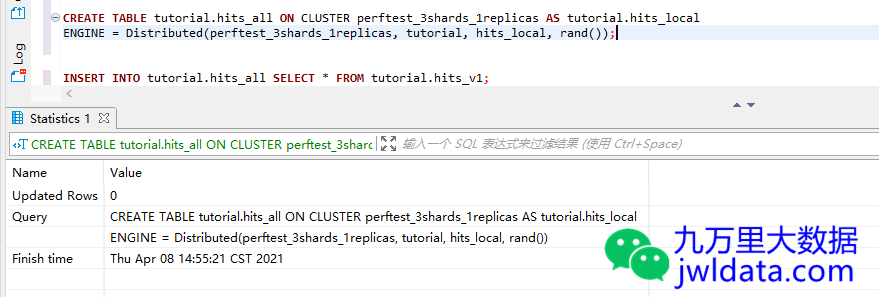
任意选择一个ClickHouse节点比如ctkf01,创建分布式表。通过在建表语句中指定ON CLUSTER perftest_3shards_1replicas语法,会自动在另外两个ClickHouse节点上创建分布式表。分布式表在ClickHouse中表现为视图形式。
CREATE TABLE tutorial.hits_all ON CLUSTER perftest_3shards_1replicas AS tutorial.hits_localENGINE = Distributed(perftest_3shards_1replicas, tutorial, hits_local, rand())
往分布式表中导入测试数据。
INSERT INTO tutorial.hits_all SELECT * FROM tutorial.hits_v1
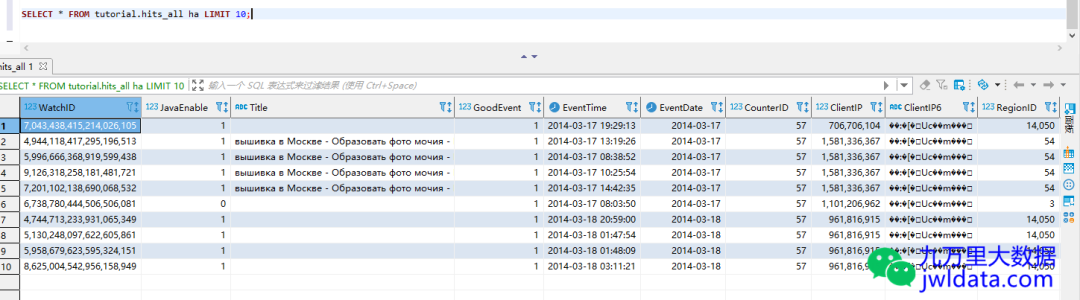
等导入完成后,比较三个节点上hits_local记录数和hits_all记录数,可以看到三个节点的hits_local记录数之和等于hits_all记录数,也等于hits_v1记录数。
| host | tutorial.hits_local记录数 | tutorial.hits_all记录数 | tutorial.hits_v1记录数 |
| ctkf01 | 2957526 | 8873898 | 8873898 |
| ctkf02 | 2957749 | 8873898 | |
| ctkf03 | 2958623 | 8873898 |
2957526+2957749+2958623=8873898
2shards_2replicas
2分片2副本,也就是数据被打散到2个分片中,总副本有2份。这种充分利用了分布式计算的能力,也考虑了高可用性。一般生产环境都是这种多分片多副本的形式。多副本需要借助于ZooKeeper实现高可用,ClickHouse官方推荐生产环境单独搭建ZooKeeper集群,在ZK集群上也不要跑其他程序。
配置ClickHouse
vi /etc/clickhouse-server/config.xml
<remote_servers>............<perftest_2shards_2replicas><shard><!-- Optional. Shard weight when writing data. Default: 1. --><weight>1</weight><!-- Optional. Whether to write data to just one of the replicas. Default: false (write data to all replicas). --><internal_replication>true</internal_replication><replica><!-- Optional. Priority of the replica for load balancing (see also load_balancing setting). Default: 1 (less value has more priority). --><priority>1</priority><host>ctkf01</host><port>9020</port></replica><replica><host>ctkf02</host><port>9020</port></replica></shard><shard><internal_replication>true</internal_replication><replica><host>ctkf03</host><port>9020</port></replica><replica><host>ctkf04</host><port>9020</port></replica></shard></perftest_2shards_2replicas></remote_servers>
<zookeeper><node><host>ctkf01</host><port>2181</port></node><node><host>ctkf02</host><port>2181</port></node><node><host>ctkf03</host><port>2181</port></node></zookeeper>
<macros><layer>01</layer><shard>01</shard><replica>ctkf01</replica></macros>
ClickHouse支持使用macros宏定义变量,可以使得建表语句保持统一。注意,这个macros配置每个节点不同,需要单独配置。 以下是另外三个节点的macros配置。其他如remote_servers和zookeeper配置都是一样的。ctkf02节点
<macros><layer>01</layer><shard>01</shard><replica>ctkf02</replica></macros>
ctkf03节点
<macros><layer>01</layer><shard>02</shard><replica>ctkf03</replica></macros>
ctkf04节点
<macros><layer>01</layer><shard>02</shard><replica>ctkf04</replica></macros>
重启ClickHouse
systemctl restart clickhouse-server
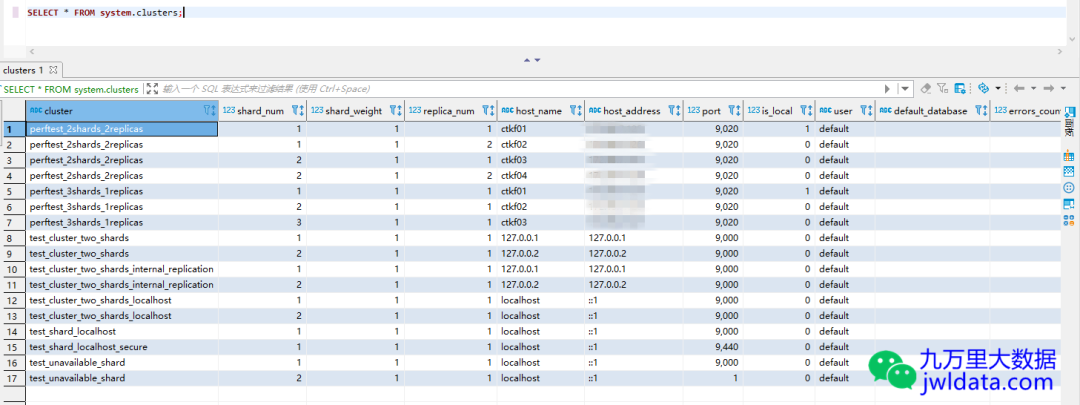
可以通过系统表查询remote_servers的配置是否生效。
SELECT * FROM system.clusters
创建分布式表
创建本地表,同样指定ON CLUSTER perftest_2shards_2replicas,只需要在一个节点上运行建表语句即可。
CREATE TABLE tutorial.hits_replica ON CLUSTER perftest_2shards_2replicas(`WatchID` UInt64,`JavaEnable` UInt8,`Title` String,`GoodEvent` Int16,`EventTime` DateTime,`EventDate` Date,`CounterID` UInt32,`ClientIP` UInt32,`ClientIP6` FixedString(16),`RegionID` UInt32,`UserID` UInt64,`CounterClass` Int8,`OS` UInt8,`UserAgent` UInt8,`URL` String,`Referer` String,`URLDomain` String,`RefererDomain` String,`Refresh` UInt8,`IsRobot` UInt8,`RefererCategories` Array(UInt16),`URLCategories` Array(UInt16),`URLRegions` Array(UInt32),`RefererRegions` Array(UInt32),`ResolutionWidth` UInt16,`ResolutionHeight` UInt16,`ResolutionDepth` UInt8,`FlashMajor` UInt8,`FlashMinor` UInt8,`FlashMinor2` String,`NetMajor` UInt8,`NetMinor` UInt8,`UserAgentMajor` UInt16,`UserAgentMinor` FixedString(2),`CookieEnable` UInt8,`JavascriptEnable` UInt8,`IsMobile` UInt8,`MobilePhone` UInt8,`MobilePhoneModel` String,`Params` String,`IPNetworkID` UInt32,`TraficSourceID` Int8,`SearchEngineID` UInt16,`SearchPhrase` String,`AdvEngineID` UInt8,`IsArtifical` UInt8,`WindowClientWidth` UInt16,`WindowClientHeight` UInt16,`ClientTimeZone` Int16,`ClientEventTime` DateTime,`SilverlightVersion1` UInt8,`SilverlightVersion2` UInt8,`SilverlightVersion3` UInt32,`SilverlightVersion4` UInt16,`PageCharset` String,`CodeVersion` UInt32,`IsLink` UInt8,`IsDownload` UInt8,`IsNotBounce` UInt8,`FUniqID` UInt64,`HID` UInt32,`IsOldCounter` UInt8,`IsEvent` UInt8,`IsParameter` UInt8,`DontCountHits` UInt8,`WithHash` UInt8,`HitColor` FixedString(1),`UTCEventTime` DateTime,`Age` UInt8,`Sex` UInt8,`Income` UInt8,`Interests` UInt16,`Robotness` UInt8,`GeneralInterests` Array(UInt16),`RemoteIP` UInt32,`RemoteIP6` FixedString(16),`WindowName` Int32,`OpenerName` Int32,`HistoryLength` Int16,`BrowserLanguage` FixedString(2),`BrowserCountry` FixedString(2),`SocialNetwork` String,`SocialAction` String,`HTTPError` UInt16,`SendTiming` Int32,`DNSTiming` Int32,`ConnectTiming` Int32,`ResponseStartTiming` Int32,`ResponseEndTiming` Int32,`FetchTiming` Int32,`RedirectTiming` Int32,`DOMInteractiveTiming` Int32,`DOMContentLoadedTiming` Int32,`DOMCompleteTiming` Int32,`LoadEventStartTiming` Int32,`LoadEventEndTiming` Int32,`NSToDOMContentLoadedTiming` Int32,`FirstPaintTiming` Int32,`RedirectCount` Int8,`SocialSourceNetworkID` UInt8,`SocialSourcePage` String,`ParamPrice` Int64,`ParamOrderID` String,`ParamCurrency` FixedString(3),`ParamCurrencyID` UInt16,`GoalsReached` Array(UInt32),`OpenstatServiceName` String,`OpenstatCampaignID` String,`OpenstatAdID` String,`OpenstatSourceID` String,`UTMSource` String,`UTMMedium` String,`UTMCampaign` String,`UTMContent` String,`UTMTerm` String,`FromTag` String,`HasGCLID` UInt8,`RefererHash` UInt64,`URLHash` UInt64,`CLID` UInt32,`YCLID` UInt64,`ShareService` String,`ShareURL` String,`ShareTitle` String,`ParsedParams` Nested(Key1 String,Key2 String,Key3 String,Key4 String,Key5 String,ValueDouble Float64),`IslandID` FixedString(16),`RequestNum` UInt32,`RequestTry` UInt8)ENGINE = ReplicatedMergeTree('/clickhouse/tables/{shard}/{database}/hits_replica','{replica}')PARTITION BY toYYYYMM(EventDate)ORDER BY (CounterID, EventDate, intHash32(UserID))SAMPLE BY intHash32(UserID)
使用zookeeper-client命令,进入ZK CLI模式,查看ZooKeeper上路径/clickhouse/tables/01/tutorial/hits_replica/replicas和/clickhouse/tables/02/tutorial/hits_replica/replicas,可以看到在ZooKeeper上已经有了对应的shard和replica元数据信息。
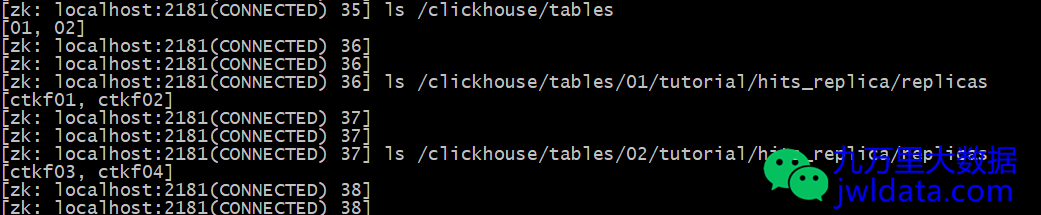
创建分布式表,指定ON CLUSTER perftest_2shards_2replicas,只需要在一个节点上运行建表语句即可。
CREATE TABLE tutorial.hits_replica_all ON CLUSTER perftest_2shards_2replicas AS tutorial.hits_replicaENGINE = Distributed(perftest_2shards_2replicas, tutorial, hits_replica, rand())
往分布式表导入测试数据。
INSERT INTO tutorial.hits_replica_all SELECT * FROM tutorial.hits_v1
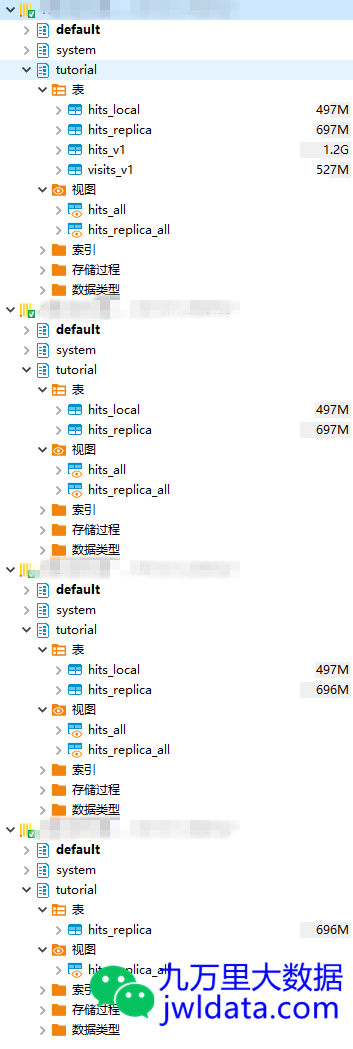
| host | tutorial.hits_replica记录数 | tutorial.hits_replica_all记录数 | tutorial.hits_v1 |
| ctkf01 | 4438760 | 8873898 | 8873898 |
| ctkf02 | 4438760 | 8873898 | |
| ctkf03 | 4435138 | 8873898 | |
| ctkf04 | 4435138 | 8873898 |
4438760+4435138=8873898
等导入完成后,比较四个节点上hits_replica记录数和hits_replica_all记录数,可以看到编号不同的两个分片如ctkf01和ctkf03的hits_replical记录数之和等于hits_replica_all记录数,也等于hits_v1记录数。而编号相同的分片如ctkf01和ctkf02的hits_replical记录数相等。这些记录数也从侧面验证了ClickHouse集群的分布式和高可用的特性。
欢迎关注我的公众号“九万里大数据”,原创技术文章第一时间推送。欢迎访问原创技术博客网站 jwldata.com[3],排版更清晰,阅读更爽快。

引用链接
[1]
单节点ClickHouse的安装: https://www.jwldata.com/archives/85.html[2]
ClickHouse导入测试数据集: https://www.jwldata.com/archives/104.html[3]
jwldata.com: https://www.jwldata.com
