



CREATE VIEW view_name AS select ...
""" 创建视图

创建视图
CREATE VIEW view_name AS select ...

删除视图
DROP VIEW view_name

清除多余空间
VACUUM

the statistics of this file:
lines(count)    understand_level(h/m/l)    classes(count)    functions(count)    fields(count)
000000000065    ----------------------l    00000000000000    0000000000000001    ~~~~~~~~~~~~~
"""

import time
import sqlite3

__author__ = '与C同行'


def print_pretty_outcome(cursor):
    print('-' * 80)
    all_outcome = cursor.fetchall()
    for column_desc in cursor.description:
        print(f'{column_desc[0]:<20}', end='')
    print()
    for item in all_outcome:
        for cell in item:
            try:
                print(f'{cell:<20}', end='')
            except TypeError:
                cell = 'None'
                print(f'{cell:<20}', end='')
        print()
    print('-' * 80)
    print()


if __name__ == '__main__':
    print(f'当前时间:{time.ctime()}')
    print()

    conn = sqlite3.connect('learn.db')
    c = conn.cursor()
    print('创建视图')
    c.execute('create view partial_col as select name, achievement from report_tb')
    print('视图创建成功')

    print()
    print('使用视图查询')
    c.execute('select * from partial_col where achievement > 60')
    print_pretty_outcome(c)
    print('删除视图')
    c.execute('drop view partial_col')
    print('视图删除成功')

    print()
    print('清除多余空间')
    c.execute('vacuum')
    print('清除多余空间成功')

    c.close()
    conn.close()
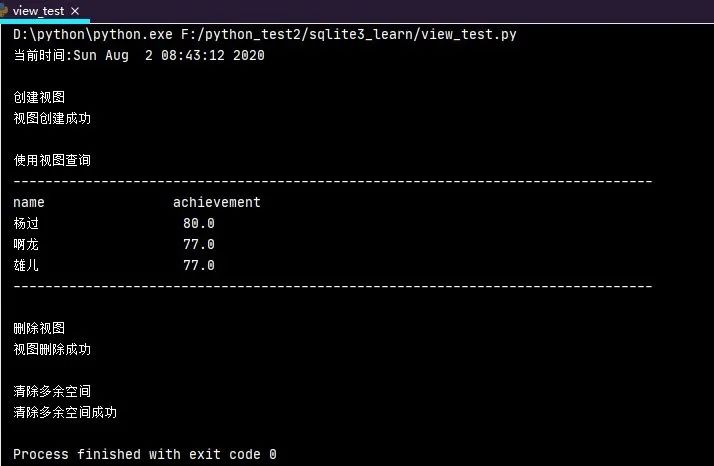
使用视图查询和使用表格查询几乎一模一样,并没有太大的区别,如果想删除视图,使用drop view view_name
即可。最近先把sqlite数据库的东西出完,返校了再讲其他的,望见谅。

文章转载自与C同行,如果涉嫌侵权,请发送邮件至:contact@modb.pro进行举报,并提供相关证据,一经查实,墨天轮将立刻删除相关内容。
