



昨天写了单元格对象的查找Find
其语法为
Range.Find(What,[After],[LookIn],[LookAt],[SearchOrder],[SearchDirection],[MatchCase],[MatchByte],[SearchFormat])
小编是这样记的,抄…如下图,在单元格后面写上.Find会自动弹出所有参数...

检测了两遍,好像没抄错...
翻译成中文也就是
单元格.Find (查找值,[开始位置],[查找范围类型],[匹配模式],[查找方式行或者列],[查找方向前或者后],[是否大小写],[全角或半角],[查找格式])
参数中中括号[]为可选参数,也就是说除了查找值必须要写,其余的均可省略
平时使用的比较多的也就是这两个...
Range.Find(What查找值,Lookat匹配模式)
其实查找和替换,会查找了自然就会替换了...
Range.Replace (What,Replacement,[LookAt],[SearchOrder],[MatchCase],[MatchByte],[SearchFormat],[ReplaceFormat])
又抄了一遍,翻译成中文
Range.Replace(查找值,替换值,匹配模式,查找方式,是否大小写,全角半角,按格式搜索,按格式替换)
继昨天写的那个小窗体,小编又改了下
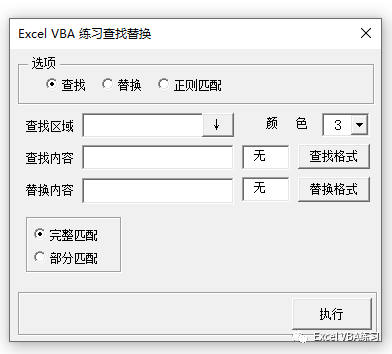
小编晚上按着查找的窗体画了下,大致如上图...明天估计就变样了
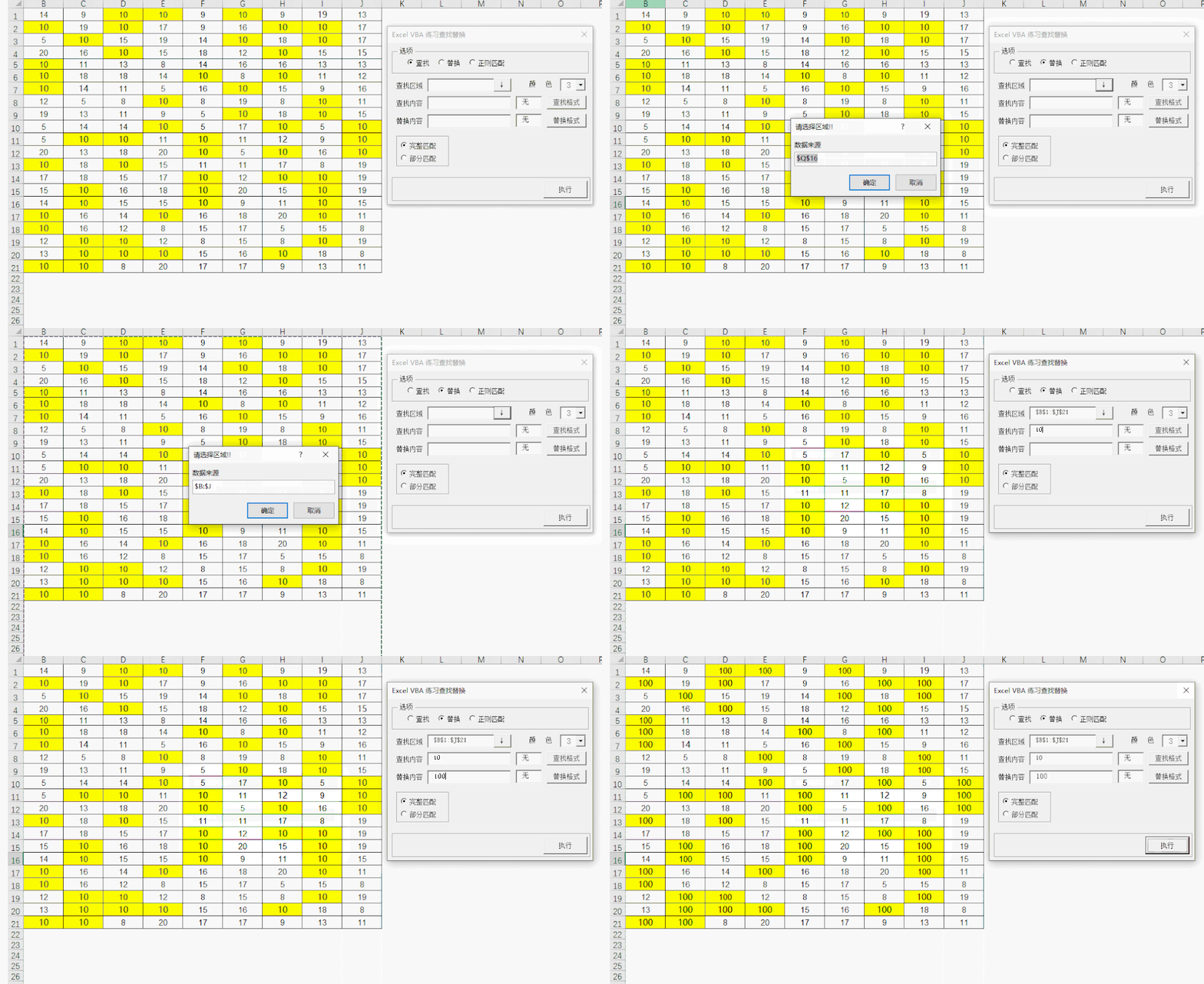
代码如下
Option ExplicitDim FindCell As Range, ReplaceCell As RangePrivate Sub UserForm_Initialize() '初始化窗体Dim intX&Dim aRes(1 To 56)For intX = 1 To 56aRes(intX) = intXNextWith MeWith .颜色.Font.Size = 11.List = aRes.ListIndex = 2End With.查找.Value = True.完整.Value = True.查找格式.TextAlign = 1.替换格式.TextAlign = 1.查找格式.Text = "无".替换格式.Text = "无"Set FindCell = NothingSet ReplaceCell = NothingEnd WithEnd SubPrivate Sub 查找颜色_Click()Set FindCell = Application.InputBox("从单元格选择颜色格式", "选择指定查找颜色", , , , , , 8)With Me.查找格式.BackColor = ColorToRGB(FindCell(1)).Text = "预览"End WithEnd SubPrivate Sub 区域选择_Click() '区域选择Dim Rng As RangeSet Rng = Application.InputBox("数据来源", "请选择区域!!", ActiveCell.Address, , , , , 8)If Rng Is Nothing Then Exit SubSet Rng = Intersect(Rng, Rng.Parent.UsedRange)Me.区域.Value = Rng.AddressEnd SubPrivate Sub 替换颜色_Click()Set ReplaceCell = Application.InputBox("从单元格选择颜色格式", "选择指定查找颜色", , , , , , 8)With Me.替换格式.BackColor = ColorToRGB(ReplaceCell(1)).Text = "预览"End WithEnd SubPrivate Sub 执行_Click()If Me.查找.Value ThenCall Find_ValueElseIf Me.替换.Value ThenCall Replace_ValueEnd IfEnd SubSub Find_Value()Dim Rng As Range, Cell As Range, RngData As RangeDim strAddress$, strVal, strMatch$On Error Resume NextIf Me.区域.Text = "" Then Exit SubSet RngData = Range(Me.区域.Text)strVal = Trim(Me.查找内容.Text)strMatch = IIf(Me.完整.Value, xlWhole, xlPart) '匹配模式With RngDataIf Len(strVal) Then.Interior.ColorIndex = 0 '初始化背景色Set Cell = .Find(What:=strVal, LookIn:=xlValues, LookAt:=strMatch)If Cell Is Nothing Then MsgBox "[" & RngData.Address & "]区域中并无" & strVal, 64: Exit SubstrAddress = Cell.Address '记录第一个单元格地址DoIf Rng Is Nothing ThenSet Rng = Cell '初始化ElseSet Rng = Union(Rng, Cell) '合并End IfSet Cell = .FindNext(Cell) '查找下一个Loop Until Cell.Address = strAddressRng.Interior.ColorIndex = Me.颜色.Text '标记背景颜色Me.标记.Caption = "总共找到了" & Rng.Count & "个<<" & strVal & ">>" '写入找到多少个ElseIf Not FindCell Is Nothing ThenApplication.FindFormat.Clear '清除原有格式With Application.FindFormat '设置格式.Font.Name = FindCell.Name '查找字体.Font.Bold = FindCell.Font.Bold '是否粗体.Interior.ColorIndex = FindCell.Interior.ColorIndex '查找背景色End WithSet Cell = .Find(What:="", LookIn:=xlFormulas, LookAt:=strMatch, SearchFormat:=True)If Cell Is Nothing Then MsgBox "[" & RngData.Address & "]区域中并无" & strVal, 64: Exit SubstrAddress = Cell.AddressDoIf Rng Is Nothing ThenSet Rng = Cell '初始化ElseSet Rng = Union(Rng, Cell) '合并End IfSet Cell = .Find(What:="", After:=Cell, SearchFormat:=True) '查找下一个Loop Until Cell.Address = strAddressRng.Select '选中Me.标记.Caption = "总共找到了" & Rng.Count & "个相同的格式" '写入找到多少个ElseMsgBox "请输入查找内容", 64, "出错"End IfEnd WithEnd SubSub Replace_Value()Dim RngData As RangeDim strVal, strMatch$If Me.区域.Text = "" Then Exit SubSet RngData = Range(Me.区域.Text)strVal = Trim(Me.查找内容.Text)If Len(strVal) ThenWith RngDatastrMatch = IIf(Me.完整.Value, xlWhole, xlPart) '匹配模式.Replace What:=strVal, replacement:=Trim(Me.替换内容.Text), LookAt:=strMatchEnd WithElseIf Not ReplaceCell Is Nothing ThenWith Application.FindFormat.Clear '清除原有查找格式.ReplaceFormat.Clear '清除原有替换格式With .FindFormat '设置查找格式.Font.Size = FindCell.Font.Size.Font.ColorIndex = FindCell.Font.ColorIndex.Font.Name = FindCell.Font.Name.Interior.ColorIndex = FindCell.Interior.ColorIndexEnd WithWith .ReplaceFormat '设置替换格式.Font.Size = ReplaceCell.Font.Size.Font.ColorIndex = ReplaceCell.Font.ColorIndex.Font.Name = ReplaceCell.Font.Name.Interior.ColorIndex = ReplaceCell.Interior.ColorIndexEnd WithEnd WithRngData.Replace What:="", replacement:="", LookAt:=xlPart, SearchFormat:=True, ReplaceFormat:=TrueElseMsgBox "请输入查找内容", 64, "出错"End IfEnd SubFunction ColorToRGB(Rng As Range) '转换RGBDim M&, R&, G&, B&M = Rng.Interior.ColorR = M Mod 256G = M \ 256 Mod 256B = M \ 256 ^ 2 Mod 26ColorToRGB = RGB(R, G, B)End Function
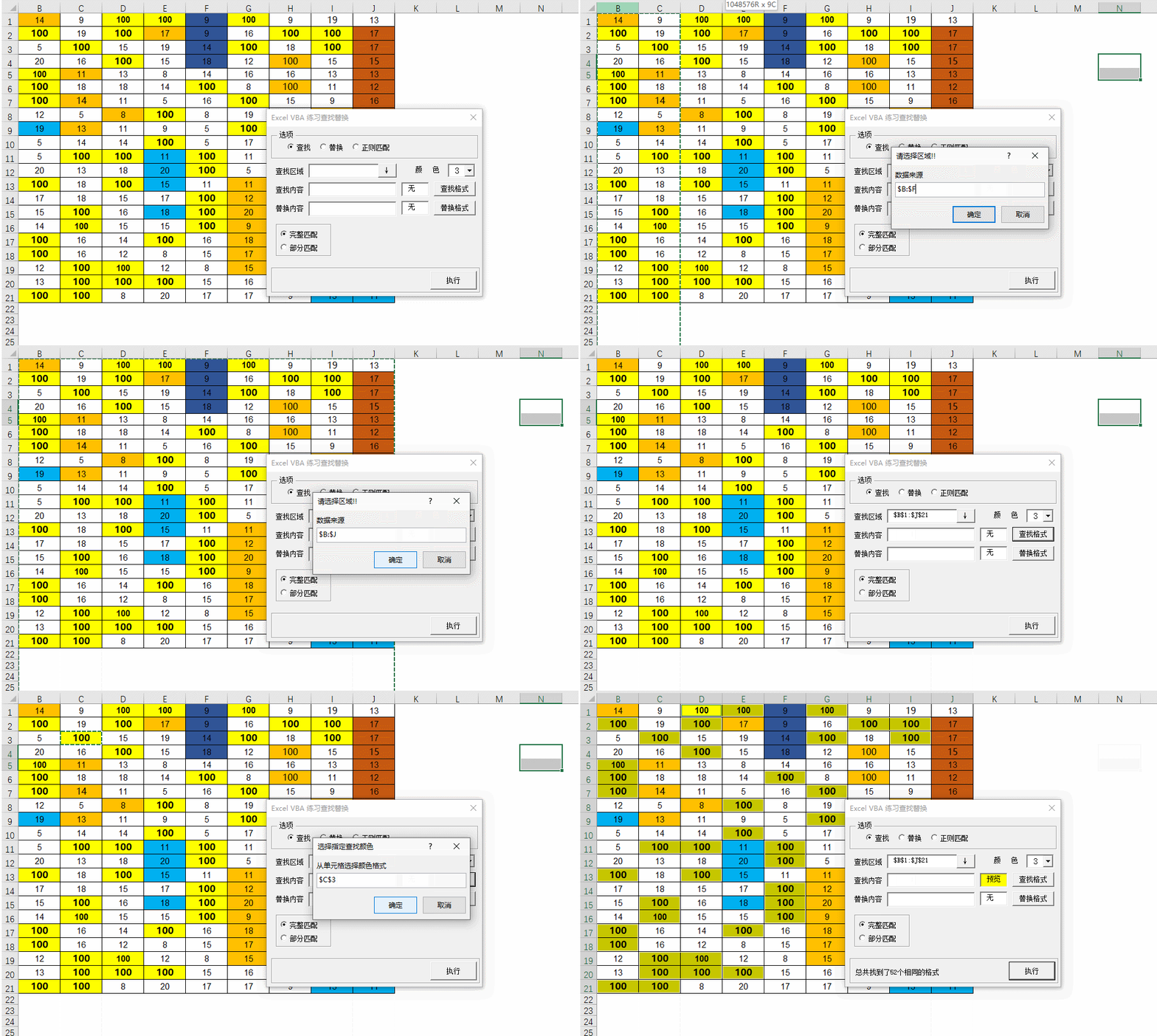
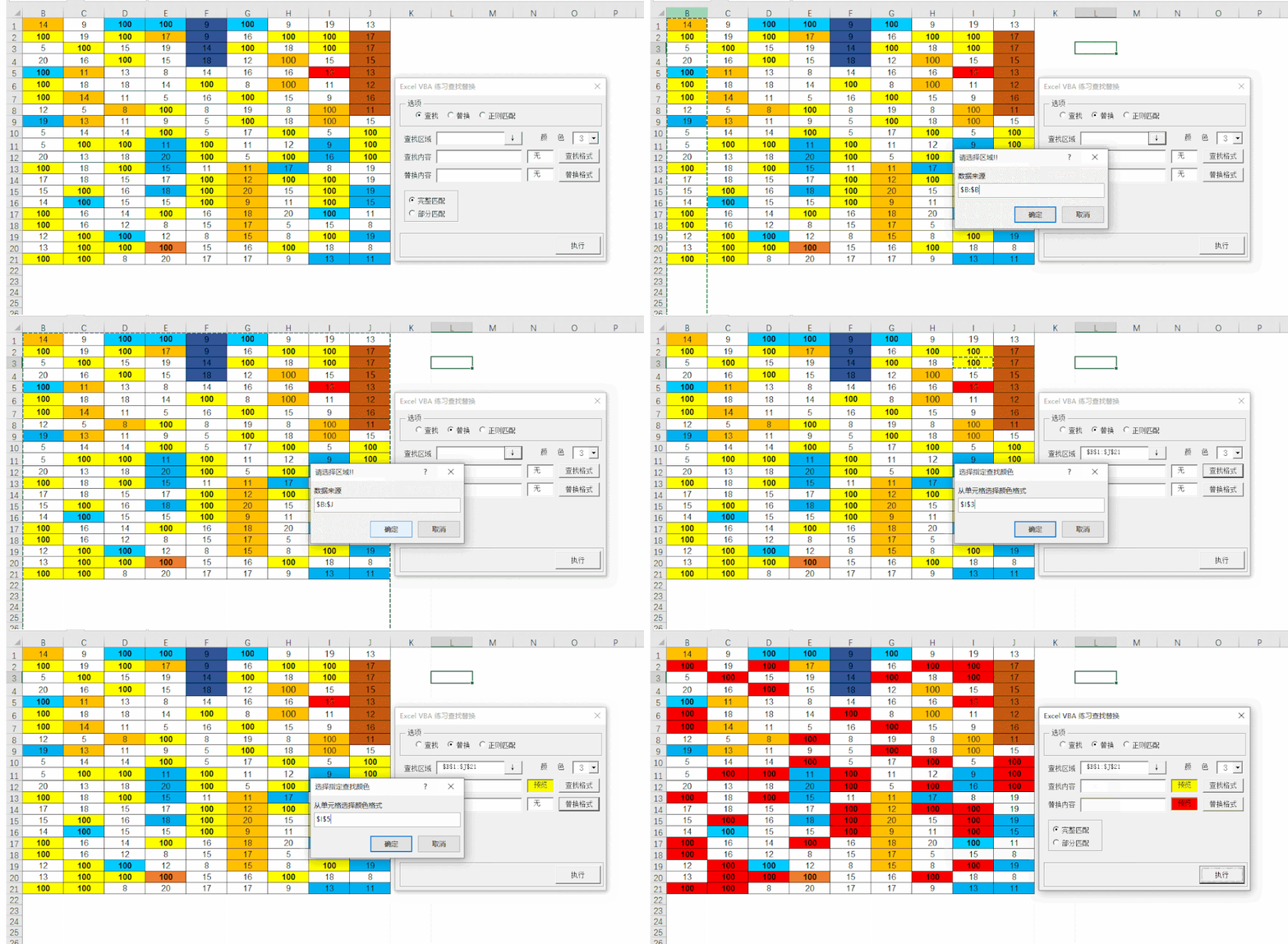
代码有可能偏长,这次小编把格式也做进去了
替换的代码比较简单,也就是第118行中代码
.Replace What:=strVal, replacement:=Trim(Me.替换内容.Text), LookAt:=strMatch
替换实际上也可以使用Find,最后的单元格对象=值
Rng.Interior.ColorIndex = Me.颜色.Text
更改为
Rng=指定值
格式查找
替换格式
今天就到这了,明天继续画
示例文件下载
链接:https://pan.baidu.com/s/1Yw8BpUtojrg4jyhEEUdsxw
提取码:abcd
收工!
如果小伙伴有好的思路,可以在小编的公众号留言发给小编研究下
文章觉得有用,点个赞+在看,你的每一次点赞和转发就是小编原创的动力
关注公众号 ↓
文章转载自Excel VBA练习,如果涉嫌侵权,请发送邮件至:contact@modb.pro进行举报,并提供相关证据,一经查实,墨天轮将立刻删除相关内容。
