

暂无图片
暂无图片
暂无图片
暂无图片
暂无图片

Hbase之Phoenix SQL查询利器

开源拾椹 2021-07-16
1844

HBase在大数据生态圈中的位置

   提到大数据的存储,大多数人首先联想到的是 Hadoop 和 Hadoop 中的 HDFS 模块。大家熟知的 Spark、以及 Hadoop 的 MapReduce,可以理解为一种计算框架。而 HDFS,我们可以认为是为计算框架服务的存储层。因此不管是 Spark 还是 MapReduce,都需要使用 HDFS 作为默认的持久化存储层。那么 HBase 又是什么,可以用在哪里,解决什么样的问题?简单地,我们可以认为 HBase 是一种类似于数据库的存储层,也就是说 HBase 适用于结构化的存储。并且 HBase 是一种列式的分布式数据库,不过这里也要注意 HBase 底层依旧依赖 HDFS 来作为其物理存储,这点类似于 Hive。


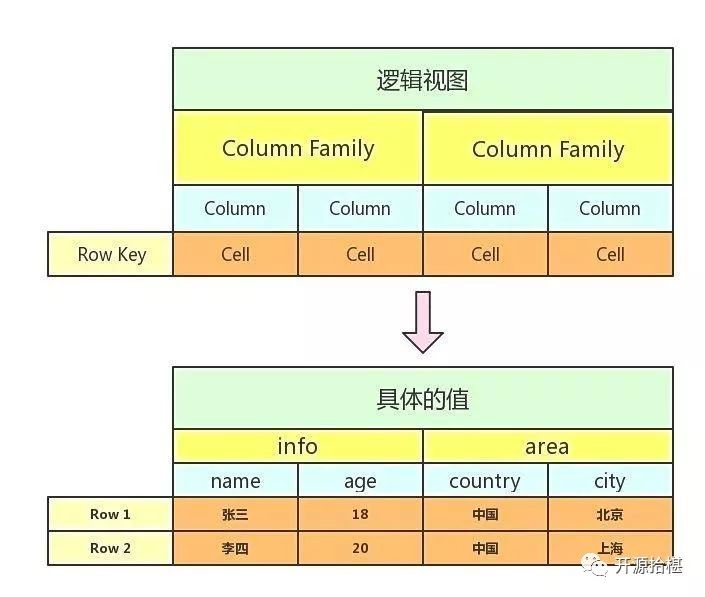
HBase是k-v数据库,HBase Table由rowkey,family,column,timestap确定一个单元格,可以表示为(rowkey+family+column+timestamp)->cell,(rowkey+family+column+timestamp)可以理解为Key,cell可以理解为value,rowkey在HBase中标识每行数据的唯一标识符,family是列族,column是列族下的列的限定符,一个family下有多个column,HBase中的每个单元格cell都存在版本version,默认的version标识策略为时间戳,也就是上面的timestamp,每一个rowkey对应的数据可以存在多个版本。实际上HBase的逻辑存储结构如下。
HBase环境安装


HBase依赖于Hadoop作为底层支持,笔者在这里为了方便演示,选择Hadoop,HBase伪分布式进行安装。


下载Hadoop2.7.3,HBase1.3.5版本的安装包,系统环境为centos7.5。Hadoop HBase依赖JDK,所以优先安装好JDK。


解压hadoop安装包

    tar -zxvf hadoop-2.7.3-bin.tar.gz -C opt/software/hadoop

    配置hadoop-env.sh

      vim /opt/software/hadoop/etc/hadoop/hadoop-env.sh


      export JAVA_HOME=/opt/software/java

      保存退出

        source opt/software/hadoop/etc/hadoop/hadoop-env.sh

        配置core-site.xml  在configuration标签中加入以下配置

          vim /opt/software/hadoop/etc/hadoop/core-site.xml


            <property>
            <name>fs.defaultFS</name>
            <value>hdfs://localhost:9000</value>
            </property>

            配置hdfs-site.xml

              vim opt/software/hadoop/etc/hadoop/hdfs-site.xml

              在configuration标签中加入以下配置

                <property>
                <name>dfs.replication</name>
                <value>1</value>
                </property>
                <!-- Hadoop 的Web UI端口配置 -->
                <property>
                <name>dfs.http.address</name>
                <value>0.0.0.0:8777</value>
                </property>


                <property>
                <name>dfs.namenode.name.dir</name>
                <value>file:/usr/local/hadoop/tmp/dfs/name</value>
                </property>
                <property>
                <name>dfs.datanode.data.dir</name>
                <value>file:/usr/local/hadoop/tmp/dfs/data</value>
                </property>

                配置SSH免登录,hadoop各个节点直接通信是通过SSH通信,所以以下步骤可省略。因为是伪分布式单节点安装

                  ssh-keygen -t rsa -P '' -f ~/.ssh/id_rsa
                  cat ~/.ssh/id_rsa.pub >> ~/.ssh/authorized_keys
                  chmod 0600 ~/.ssh/authorized_keys
                    ssh localhost


                    格式化文件系统

                      bin/hdfs namenode -format

                      启动文件系统

                        sbin/start-dfs.sh

                        使用JPS查看文件系统是否启动


                        配置mapred-site.xml

                                 <property>
                          <name>yarn.nodemanager.aux-services</name>
                          <value>mapreduce_shuffle</value>
                          </property>

                          启动yarn

                            sbin/start-yarn.sh

                            JPS查看Hadoop进程。


                            HBase安装


                            解压HBase安装包 ,进入conf配置HBase参数,打开hbase-env.sh

                              export JAVA_HOME=/opt/software/java
                              export HBASE_CLASSPATH=opt/software/hbase/conf
                              export HBASE_MANAGES_ZK=true

                              配置conf/hbase-site.xml,在configuration中加入以下配置


                                        <property>
                                <name>hbase.cluster.distributed</name>
                                <value>true</value>
                                </property>
                                <property>
                                <name>hbase.rootdir</name>
                                <value>hdfs://localhost:9000/hbase</value>
                                </property>
                                <!-- Hbase的web UI端口 -->
                                <property>
                                <name>hbase.master.info.port</name>
                                <value>8171</value>
                                </property>


                                启动Hbase

                                  ./bin/start-hbase.sh

                                  在HDFS查看HBase文件,如果有以下项就说明启动成功

                                    >> hadoop fs -ls /hbase


                                    drwxr-xr-x - root supergroup 0 2017-11-13 15:41 hbase/.tmp
                                    drwxr-xr-x - root supergroup 0 2017-11-13 15:41 hbase/MasterProcWALs
                                    drwxr-xr-x - root supergroup 0 2017-11-13 15:42 hbase/WALs
                                    drwxr-xr-x - root supergroup 0 2017-11-13 15:56 hbase/archive
                                    drwxr-xr-x - root supergroup 0 2017-11-13 15:22 hbase/data
                                    -rw-r--r-- 3 root supergroup 42 2017-11-13 15:22 hbase/hbase.id
                                    -rw-r--r-- 3 root supergroup 7 2017-11-13 15:22 hbase/hbase.version
                                    drwxr-xr-x - root supergroup 0 2017-11-13 16:30 hbase/oldWALs

                                    jps查看进程

                                      27137 HRegionServer
                                      15782 NodeManager
                                      22139 DataNode
                                      22683 SecondaryNameNode
                                      26844 HQuorumPeer
                                      21842 NameNode
                                      27607 Jps
                                      15380 ResourceManager
                                      26959 HMaster

                                      到此Hadoop HBase伪分布式安装成功


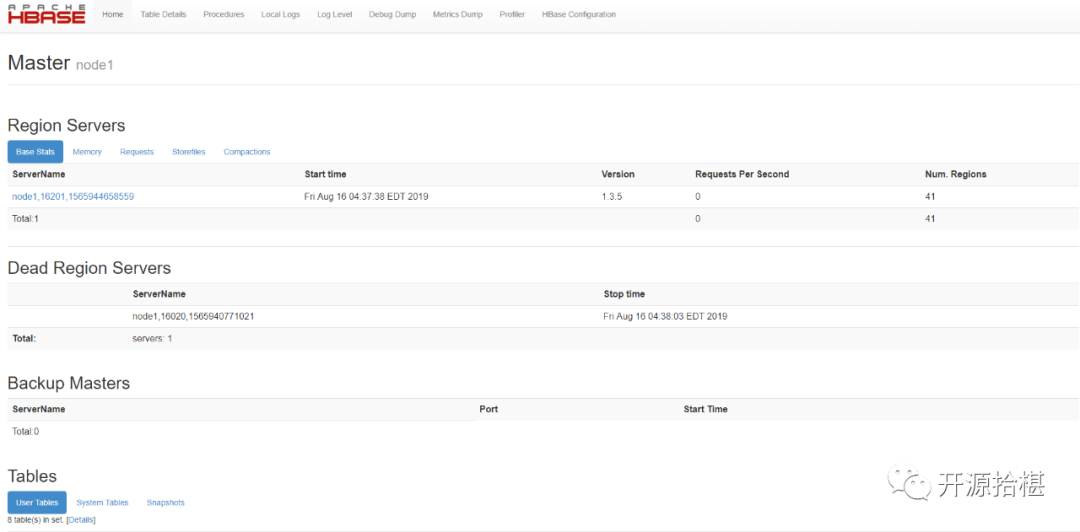
                                      访问HBase可视化界面http://ip:8171 

                                      HBase提供了Java客户端

                                        <dependency>
                                        <groupId>org.apache.hbase</groupId>
                                        <artifactId>hbase-client</artifactId>
                                        <version>1.3.5</version>
                                        </dependency>

                                        由于HBase的API过于复杂,尤其针对于大数据业务来说,在进行查询某一项指标的时候是非常不便于操作的。先简单介绍下 HBase的Java API

                                          org.apache.hadoop.hbase.client.Connection 连接对象
                                          org.apache.hadoop.hbase.client.HTable HBase表格对象
                                          org.apache.hadoop.conf.Configuration HBase配置对象

                                          先使用Java API创建一个HBase的配置对象。

                                            package com.planet.data.basic.config.db.hbase;


                                            import com.planet.data.basic.config.global.GlobalConfiguration;
                                            import org.apache.flink.configuration.UnmodifiableConfiguration;
                                            import org.apache.hadoop.conf.Configuration;
                                            import org.apache.hadoop.hbase.HBaseConfiguration;


                                            import java.util.Properties;


                                            /**
                                            * @author maxuefeng
                                            * @since 2019/8/10
                                            */
                                            public class HBaseConfig {


                                            public static HBaseConfig hBaseConfig = new HBaseConfig();


                                            private Configuration hadoopConfiguration = HBaseConfiguration.create();


                                            private org.apache.flink.configuration.Configuration flinkHBaseConfiguration
                                            = new UnmodifiableConfiguration(new org.apache.flink.configuration.Configuration());


                                            private HBaseConfig() {


                                            // 配置Hadoop Configuration
                                            Properties props = props();
                                            props.forEach((key, value) -> hadoopConfiguration.set(String.valueOf(key), String.valueOf(value)));


                                            // 配置Flink Configuration
                                            flinkHBaseConfiguration.addAllToProperties(props);
                                            }


                                            private Properties props() {
                                            Properties props = new Properties();
                                            props.setProperty("hbase.zookeeper.property.clientPort", (String) GlobalConfiguration.get("hbase.zookeeper.property.clientPort"));
                                            props.setProperty("hbase.zookeeper.quorum", (String) GlobalConfiguration.get("hbase.zookeeper.quorum"));
                                            props.setProperty("hbase.master", (String) GlobalConfiguration.get("hbase.master"));
                                            props.setProperty("hbase.defaults.for.version.skip", (String) GlobalConfiguration.get("hbase.defaults.for.version.skip"));
                                            props.setProperty("hbase.rpc.timeout", (String) GlobalConfiguration.get("hbase.rpc.timeout"));
                                            return props;
                                            }


                                            public org.apache.flink.configuration.Configuration getFlinkHBaseConfiguration() {
                                            return this.flinkHBaseConfiguration;
                                            }


                                            public Configuration getHadoopConfiguration() {
                                            return this.hadoopConfiguration;
                                            }
                                            }

                                            在properties中存放的是HBase的配置属性。


                                            简单封装一个类操作HBase。

                                              /**
                                              * @author maxuefeng
                                              * @since 2019/8/2
                                              */
                                              public class HTableFork {
                                              private static Admin admin;


                                              private static Connection connection;


                                              private HTableFork() throws IOException {
                                              connection = ConnectionFactory.createConnection(HBaseConfig.hBaseConfig.getHadoopConfiguration());
                                              admin = connection.getAdmin();
                                              }
                                              }

                                              创建表

                                                public static Map.Entry<Boolean, String> create(String tableName, List<String> columnFamilies, Boolean ifExistDisableAndDelete) {
                                                try {
                                                // 表名
                                                TableName tableNameObj = TableName.valueOf(tableName);


                                                // 表格是否存在
                                                if (tableExists(tableNameObj).getKey()) {
                                                if (ifExistDisableAndDelete) {
                                                deleteTable(tableNameObj);
                                                } else {
                                                return REnTry.of(Boolean.FALSE, String.format("表格%s已经存在了,不可重复创建", tableName));
                                                }
                                                }


                                                HTableDescriptor tableDescriptor = new HTableDescriptor(tableNameObj, new HTableDescriptor(tableNameObj));
                                                // 添加列族
                                                columnFamilies.forEach(f->tableDescriptor.addFamily(new HColumnDescriptor(f)));


                                                // 创建
                                                admin.createTable(tableDescriptor);


                                                return REnTry.of(Boolean.TRUE, null);
                                                } catch (IOException e) {
                                                return REnTry.of(Boolean.FALSE, e.getMessage());
                                                }
                                                }

                                                表删除也是类似,数据查询确实HBase Java API client最大的短板。在之前也提到了,HBase是Key-Value结构存储的数据库,我们只能根据rowkey去查询数据。并且每一个cell单元格的数据都对应了一个版本。数据可查询,但是难于查询的结果进行组装。


                                                我们尝试下使用Java API封装一个简单的查询,返回定义为

                                                List<com.google.common.collect.Table<String, String, String>>

                                                Table是一个三元组,有三个泛型,前两个Key确定最后一个Value的值。


                                                代码如下


                                                     public static ResultScanner baseScan(String tableName, String family, List<String> columns, String startRow, String endRow, Long minStamp, Long maxStamp) throws IOException {


                                                  Table table = connection.getTable(TableName.valueOf(tableName));


                                                  Scan scan = new Scan();


                                                  scan.setMaxVersions();


                                                  if (startRow != null) {
                                                  // scan.withStartRow(startRow.getBytes(), true);
                                                  scan.setStartRow(startRow.getBytes());
                                                  }


                                                  if (endRow != null) {
                                                  // scan.withStopRow(endRow.getBytes(), true);
                                                  scan.setStopRow(endRow.getBytes());
                                                  } else if (startRow != null) {
                                                  logger.warn("may be query result is not right!");
                                                  }


                                                  if (columns != null) {
                                                  columns.forEach(c -> scan.addColumn(Bytes.toBytes(family), c.getBytes()));
                                                  }


                                                  if (minStamp != null && maxStamp == null) {
                                                  scan.setTimeRange(minStamp, System.currentTimeMillis());
                                                  } else if (minStamp == null && maxStamp != null) {
                                                  scan.setTimeRange(0L, maxStamp);
                                                  } else if (maxStamp == null) {
                                                  scan.setTimeRange(0L, System.currentTimeMillis());
                                                  }
                                                  return table.getScanner(scan);
                                                  }
                                                  public static List<com.google.common.collect.Table<String, String, String>> get(String tableName, String family, List<String> columns,
                                                  long minStamp, long maxStamp, String startRow, String endRow) throws IOException {
                                                  ResultScanner resultScanner = baseScan(tableName, family, columns, startRow, endRow, minStamp, maxStamp);
                                                  List<com.google.common.collect.Table<String, String, String>> returnValue = new ArrayList<>();


                                                  resultScanner.forEach(r -> {
                                                  NavigableMap<byte[], NavigableMap<byte[], NavigableMap<Long, byte[]>>> resultMap = r.getMap();
                                                  resultMap.forEach((key1, value1) ->
                                                  value1.forEach(
                                                  (key2, value2) -> value2.forEach(
                                                  (timestamp, value3) -> {
                                                  com.google.common.collect.Table<String, String, String> singleTable = HashBasedTable.create(1, 1);
                                                  singleTable.put(StringHelper.of(key1), StringHelper.of(key2), StringHelper.of(value3));
                                                  returnValue.add(singleTable);
                                                  })));
                                                  });
                                                  return returnValue;
                                                  }

                                                  HBase默认每一个cell在取出的时候默认的是最后一个版本的。打印结果数据正常,但是Table中不能存放版本数据,应该说每一行的数据看作一个版本,但是组装成Table无法满足。


                                                  我们再次尝试封装的返回结果为元组tuple类型。前三个泛型参数代表列族,列限定符,对应的value,版本version。

                                                    @Deprecated
                                                    public static Map<String, List<Tuple4<String, String, String, Long>>> getMoreWithStamp1(
                                                    String tableName, String family, List<String> columns,
                                                    Long minStamp, Long maxStamp, String startRow, String endRow) throws IOException {


                                                    ResultScanner resultScanner = baseScan(tableName, family, columns, startRow, endRow, minStamp, maxStamp);


                                                    Map<String, List<Tuple4<String, String, String, Long>>> returnValue = new HashMap<>();


                                                    resultScanner.forEach(r -> {


                                                    NavigableMap<byte[], NavigableMap<byte[], NavigableMap<Long, byte[]>>> resultMap = r.getMap();
                                                    List<Tuple4<String, String, String, Long>> re = new ArrayList<>();


                                                    // key1 is column family
                                                    resultMap.forEach((key1, value1) ->


                                                    value1.forEach(
                                                    (key2, value2) -> value2.forEach(
                                                    (timestamp, value3) -> {
                                                    Tuple4<String, String, String, Long> tuple4 = new Tuple4<>(
                                                    // 列族
                                                    StringHelper.of(key1),
                                                    // 列限定符
                                                    StringHelper.of(key2),
                                                    // cell value
                                                    StringHelper.of(value3),
                                                    // 版本号
                                                    timestamp);
                                                    re.add(tuple4);
                                                    })));
                                                    // 加入rowKey
                                                    returnValue.put(StringHelper.of(r.getRow()), re);
                                                    });
                                                    return returnValue;
                                                    }

                                                    虽然打印结果是正确的,但是返回的数据结构过于零散。还是不利于大数据业务操作。


                                                    那我们最后一次再进行尝试返回cell类型数据。首先自定义cell,如下

                                                      package io.jopen.core.common.model;


                                                      public class HTableCell {
                                                      private String rowKey;
                                                      private String familyAndQualifier;
                                                      private Long version;
                                                      private String val;


                                                      public HTableCell(String rowKey, String familyAndQualifier, Long version, String val) {
                                                      this.rowKey = rowKey;
                                                      this.familyAndQualifier = familyAndQualifier;
                                                      this.version = version;
                                                      this.val = val;
                                                      }


                                                      public HTableCell() {
                                                      }


                                                      public String getRowKey() {
                                                      return this.rowKey;
                                                      }


                                                      public void setRowKey(String rowKey) {
                                                      this.rowKey = rowKey;
                                                      }


                                                      public String getFamilyAndQualifier() {
                                                      return this.familyAndQualifier;
                                                      }


                                                      public void setFamilyAndQualifier(String familyAndQualifier) {
                                                      this.familyAndQualifier = familyAndQualifier;
                                                      }


                                                      public Long getVersion() {
                                                      return this.version;
                                                      }


                                                      public void setVersion(Long version) {
                                                      this.version = version;
                                                      }


                                                      public String getVal() {
                                                      return this.val;
                                                      }


                                                      public void setVal(String val) {
                                                      this.val = val;
                                                      }


                                                      public String toString() {
                                                      return "HTableCell{rowKey='" + this.rowKey + '\'' + ", familyAndQualifier='" + this.familyAndQualifier + '\'' + ", version=" + this.version + ", val='" + this.val + '\'' + '}';
                                                      }
                                                      }

                                                      注意familyAndQualifier 这个属性我们使用family和column合并为一个,表示为family-column,降低数据结构的组装复杂性。

                                                        public static Map<String, List<HTableCell>> getWithLastVersion(
                                                        String tableName, String family, List<String> columns,
                                                        Long minStamp, Long maxStamp, String startRow, String endRow) throws IOException {


                                                        ResultScanner resultScanner = baseScan(tableName, family, columns, startRow, endRow, minStamp, maxStamp);
                                                        Map<String, List<HTableCell>> returnValue = new HashMap<>();


                                                        for (Result result : resultScanner) {


                                                        List<Cell> cells = result.listCells();
                                                        List<HTableCell> hTableCells = exchange(cells);
                                                        returnValue.put(new String(result.getRow()), hTableCells);


                                                        }
                                                        return returnValue;
                                                        }


                                                        public static HTableCell exchange(Cell cell) {
                                                        String rowKey = new String(cell.getRowArray(), cell.getRowOffset(), cell.getRowLength());
                                                        String family = new String(cell.getFamilyArray(), cell.getFamilyOffset(), cell.getFamilyLength());
                                                        String qualifier = new String(cell.getQualifierArray(), cell.getQualifierOffset(), cell.getQualifierLength());
                                                        String value = new String(cell.getValueArray(), cell.getValueOffset(), cell.getValueLength());
                                                        long timestamp = cell.getTimestamp();
                                                        return new HTableCell(rowKey, family + "-" + qualifier, timestamp, value);
                                                        }


                                                            public static List<HTableCell> exchange(List<Cell> cells) {
                                                                List<HTableCell> returnValue = new ArrayList<>();
                                                        if (cells == null)
                                                                    return returnValue;
                                                        for (Cell cell : cells) {
                                                        returnValue.add(exchange(cell));
                                                        }
                                                        return returnValue;
                                                        }

                                                        返回结果依然正常,但是组装的结构也还是很零散,也不利于大数据业务指标查询。


                                                        HBase是NOSQL,目前已经存在很成熟的将NOSQL转换为SQL的数据仓库工具,比如hive,phoenix;hive是基于hdfs和hbase的,而phoenix是基于hbase的SQL中间层,可以很好的解决HBase Java API过于复杂的问题。


                                                        phoenix安装


                                                        官网下载HBase对应的安装包,解压,测试环境无需配置。


                                                        将phoenix的phoenix-4.14.2-HBase-1.3-server.jar复制到hbase的lib目录,并且重启Hbase服务。


                                                        进入phoenix客户端操作HBase,命令行最后面加上本地zookeeper环境的ip和端口。


                                                          ./bin/sqlline.py 192.168.1.1:2181

                                                          进入以下界面,查看HBase中所有表格

                                                            !tables

                                                            可以看到HBase中的所有已经建的表格。


                                                            创建表格

                                                              CREATETABLE IF NOT EXISTS my_table ( id char(10) not null primary key, value integer);

                                                              数据查询

                                                                select * from user where uid = 'U9912KG7F'

                                                                可以感受到与SQL一样,唯一不同的插入和修改用的同一条命令upsert.


                                                                使用Java API操作Phoenix


                                                                加入依赖

                                                                          <dependency>
                                                                  <groupId>org.apache.phoenix</groupId>
                                                                  <artifactId>phoenix-core</artifactId>
                                                                  <version>4.13.1-HBase-1.3</version>
                                                                  </dependency>

                                                                  操作demo


                                                                    package com.planet.bigdata.hbase.phoenix;


                                                                    import com.google.common.collect.ImmutableList;
                                                                    import com.planet.phoenix.hbase.PhoenixHBaseDataStoreApiImpl;
                                                                    import com.planet.phoenix.hbase.mapper.PhoenixProjectedResultMapper;
                                                                    import com.planet.phoenix.hbase.query.PhoenixHBaseQueryExecutor;
                                                                    import com.planet.phoenix.hbase.translator.PhoenixHBaseQueryTranslator;
                                                                    import com.planet.phoenix.mapper.EntityPropertiesMappingContext;
                                                                    import com.planet.phoenix.mapper.EntityPropertiesResolver;
                                                                    import com.planet.phoenix.query.QuerySelect;
                                                                    import com.planet.phoenix.query.builder.QueryBuilder;
                                                                    import org.apache.phoenix.trace.PhoenixMetricsSink;
                                                                    import org.junit.Test;


                                                                    import java.sql.*;


                                                                    /**
                                                                    * @author maxuefeng
                                                                    * @see PhoenixMetricsSink
                                                                    * @see org.apache.phoenix.trace.TraceWriter
                                                                    * @since 2019/8/15
                                                                    */
                                                                    public class SQLAPITest {


                                                                    static {
                                                                    try {
                                                                    Class.forName("org.apache.phoenix.jdbc.PhoenixDriver");
                                                                    } catch (ClassNotFoundException e) {
                                                                    e.printStackTrace();
                                                                    }
                                                                    }


                                                                    @Test
                                                                    public void simpleTest() throws SQLException {


                                                                    /*
                                                                    * 指定数据库地址,格式为 jdbc:phoenix:Zookeeper 地址
                                                                    * 如果 HBase 采用 Standalone 模式或者伪集群模式搭建,则 HBase 默认使用内置的 Zookeeper,默认端口为 2181
                                                                    */
                                                                    Connection connection = DriverManager.getConnection("jdbc:phoenix:node1:2181");
                                                                    PreparedStatement statement = connection.prepareStatement("SELECT * FROM user_commodity_weight");
                                                                    ResultSet resultSet = statement.executeQuery();


                                                                    while (resultSet.next()) {
                                                                    System.out.println(resultSet.getString("uid") + " ");
                                                                    }


                                                                    statement.close();
                                                                    connection.close();
                                                                    }
                                                                    }

                                                                    跟正常的JDBC一样,但是驱动不同,地址url也有区别,其他大同小异。但是这样子写也很麻烦,可以使用JDBC进行封装以下,但感觉还是要写SQL,大数据业务中很容易出错误。在这里笔者推荐一个稚嫩的开源项目pho,部分不常用功能没有完善,但是可以简化写SQL的工作。源代码开放,按照个人需求修改也很方便。整体思想和Java EE的ORM查询一样


                                                                    github地址

                                                                      https://github.com/eHarmony/pho

                                                                      克隆下来放到你的项目里面,实体类代码


                                                                        package com.planet.bigdata.hbase.phoenix;


                                                                        import com.google.code.morphia.annotations.Entity;
                                                                        import com.google.code.morphia.annotations.Property;
                                                                        import lombok.*;


                                                                        /**
                                                                        * @author maxuefeng
                                                                        * @since 2019/8/01
                                                                        */
                                                                        @Entity(value = "user_commodity_weight")
                                                                        @AllArgsConstructor
                                                                        @NoArgsConstructor
                                                                        @ToString
                                                                        @Getter
                                                                        @Setter
                                                                        public class UserCommodityWeight {


                                                                        @Property(value = "uid")
                                                                        public String uid;


                                                                        @Property(value = "commodity_id")
                                                                        public String commodityId;


                                                                        @Property(value = "weight")
                                                                        public Double weight;
                                                                        }

                                                                        查询demo


                                                                              String url = "jdbc:phoenix:node1:2181";


                                                                          @Test
                                                                          public void testSimpleQuery() throws Exception {


                                                                          EntityPropertiesMappingContext context = new EntityPropertiesMappingContext(ImmutableList.of("com.planet.bigdata.hbase.phoenix.UserCommodityWeight"));


                                                                          EntityPropertiesResolver resolver = new EntityPropertiesResolver(context);


                                                                          PhoenixHBaseQueryTranslator translator = new PhoenixHBaseQueryTranslator(resolver);
                                                                          PhoenixProjectedResultMapper resultMapper = new PhoenixProjectedResultMapper(resolver);
                                                                          PhoenixHBaseQueryExecutor queryExecutor = new PhoenixHBaseQueryExecutor(translator, resultMapper);
                                                                          PhoenixHBaseDataStoreApiImpl dataStoreApi = new PhoenixHBaseDataStoreApiImpl(url, queryExecutor);


                                                                          QuerySelect<UserCommodityWeight, UserCommodityWeight> querySelect = QueryBuilder.builderFor(UserCommodityWeight.class).build();


                                                                          Iterable<UserCommodityWeight> commodityWeights = dataStoreApi.findAll(querySelect);


                                                                          for (UserCommodityWeight commodityWeight : commodityWeights) {
                                                                          System.err.println(commodityWeight.toString());
                                                                          }
                                                                          }


                                                                          拓展:Phoenix也可以跟mybatis整合行程真正的OCR查询。


                                                                          好了,本次笔者就分享到这里,感觉读者用心阅读。


                                                                          扫二维码加技术讨论群



                                                                          文章转载自开源拾椹,如果涉嫌侵权,请发送邮件至:contact@modb.pro进行举报,并提供相关证据,一经查实,墨天轮将立刻删除相关内容。

                                                                          评论
