



需求:

常规做法:
A. Navicat数据传输功能
适用场景:小表,非数据库专业人员。
B.pg_dump 工具,最专业的,最原生的导出工具
适用场景:专业数据库人员,0出错。
C.psql(COPY) 指令
适用场景:单表 and 数据量破千万大表
主要介绍copy在线和离线迁移大数据量表:
在线迁移:
步骤一:A库必须和B库网络上必须互通,ssh登录B库服务器,使用psql工具连接数据库A。
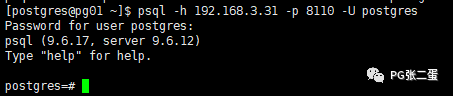
步骤二:切换表所在数据库

步骤三:发送copy table data 指令:

copy egis.ds_gps_history_citus_test to '/home/postgres/ds_gps_history_citus_test.txt';
释义:将A服务器上dsdb库下egis schema里表ds_gps_history_citus_test数据拷贝到B服务器上/home/postgres/ds_gps_history_citus_test.txt文件里
步骤四:在B上重建表结构,从A上获取表的定义语句,在B上相应数据库下建表。同时在B上灌入步骤三导出的数据。
灌入指令

copy ds_gps_history_citus_test from '/home/postgres/ds_gps_history_citus_test.txt';
释义:将文件/home/postgres/ds_gps_history_citus_test.txt数据灌入表ds_gps_history_citus_test 中。
离线迁移:
离线迁移和在线迁移最大不同点在于A服务器和B服务器之间网络不通,最常见的场景是现场大表数据拿回公司测试环境。
步骤一:
ssh登录A库,发送copy table data 指令
步骤二:
从A服务器上取出文件/home/postgres/ds_gps_history_citus_test.txt
步骤三:
将文件上传公司环境B
步骤四:
ssh登录B库,建表and 灌入数据
最后附上COPY语法。此COPY指令仅在psql工具中使用:
Command: COPY
Description: copy data between a file and a table
Syntax:
COPY table_name [ ( column_name [, ...] ) ]
FROM { 'filename' | PROGRAM 'command' | STDIN }
[ [ WITH ] ( option [, ...] ) ]
COPY { table_name [ ( column_name [, ...] ) ] | ( query ) }
TO { 'filename' | PROGRAM 'command' | STDOUT }
[ [ WITH ] ( option [, ...] ) ]
where option can be one of:
FORMAT format_name
OIDS [ boolean ]
FREEZE [ boolean ]
DELIMITER 'delimiter_character'
NULL 'null_string'
HEADER [ boolean ]
QUOTE 'quote_character'
ESCAPE 'escape_character'
FORCE_QUOTE { ( column_name [, ...] ) | * }
FORCE_NOT_NULL ( column_name [, ...] )
FORCE_NULL ( column_name [, ...] )
ENCODING 'encoding_name'
