一.什么是Shiro?
Apach Shiro是一个开源的轻量级的Java安全框架,提供了身份验证,授权,密码管理,会话管理等功能,相对于Spring Security,Shiro框架更加直观,易用。针对Spring Boot,Shiro官方提供了shiro-spring-boot-web-starter用来简化Shiro在Spring Boot中的配置。
二.在项目中创建一个新的模块并添加依赖 完成配置
<dependency><groupId>org.apache.shiro</groupId><artifactId>shiro-spring-boot-web-starter</artifactId><version>1.4.0</version></dependency><dependency><groupId>org.springframework.boot</groupId><artifactId>spring-boot-starter-thymeleaf</artifactId></dependency><dependency><groupId>com.github.theborakompanioni</groupId><artifactId>thymeleaf-extras-shiro</artifactId><version>2.0.0</version></dependency>
第一个依赖:shiro-spring-boot-web-starter中已经依赖了spring-boot-starter-web。
第二个依赖:使用thymeleaf依赖
第三个依赖:为了在Thymeleaf中使用shiro标签,因此引入了thymeleaf-extras-shiro依赖。
在resource中的新建application.yml文件 并添加以下配置
shiro:enabled: trueweb:enabled: trueloginUrl: /loginsuccessUrl: /indexunauthorizedUrl: /unauthorizedsessionManager:sessionIdCookieEnabled: truesessionIdUrlRewritingEnabled: true
10行:表示是否允许通过URL参数实现会话跟踪,如果网站支持Cookie,可以关闭此选项,默认为true
9行:表示是否允许通过Cookie实现会话跟踪。
三.编写业务代码
添加config文件夹 编写配置类ShiroConfig
package com.hancecoder.shiro_login.config;import at.pollux.thymeleaf.shiro.dialect.ShiroDialect;import org.apache.shiro.realm.Realm;import org.apache.shiro.realm.text.TextConfigurationRealm;import org.apache.shiro.spring.web.config.DefaultShiroFilterChainDefinition;import org.apache.shiro.spring.web.config.ShiroFilterChainDefinition;import org.springframework.context.annotation.Bean;import org.springframework.context.annotation.Configuration;@Configurationpublic class ShiroConfig {@Beanpublic Realm realm(){TextConfigurationRealm realm=new TextConfigurationRealm();realm.setUserDefinitions("zhihan=123,user\n admin=123,admin");realm.setRoleDefinitions("admin=read,write\n user=read");return realm;}@Beanpublic ShiroFilterChainDefinition shiroFilterChainDefinition(){DefaultShiroFilterChainDefinition chainDefinition=new DefaultShiroFilterChainDefinition();chainDefinition.addPathDefinition("/login","anon");chainDefinition.addPathDefinition("dologin","anon");chainDefinition.addPathDefinition("/logout","logout");chainDefinition.addPathDefinition("/**","authc");return chainDefinition;}@Beanpublic ShiroDialect shiroDialect(){return new ShiroDialect();}}
代码解释:
两个关键Bean :Realm和ShiroFilterChainDefinition,shiroDialect 则是为了支持Thymeleaf的使用Shiro标签。
Realm可以自定义,也可以使用现成的,该demo没有配置数据库的连接。
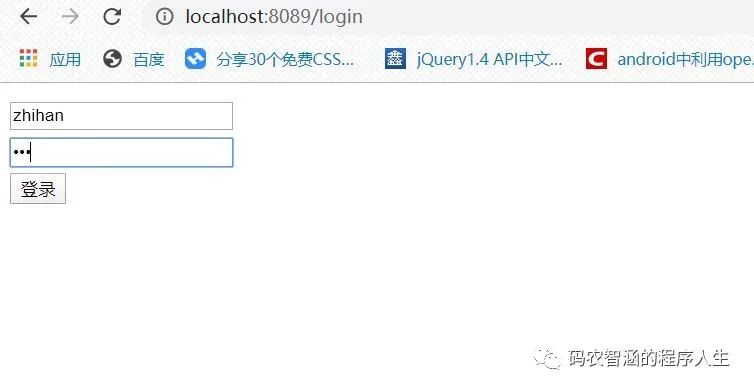
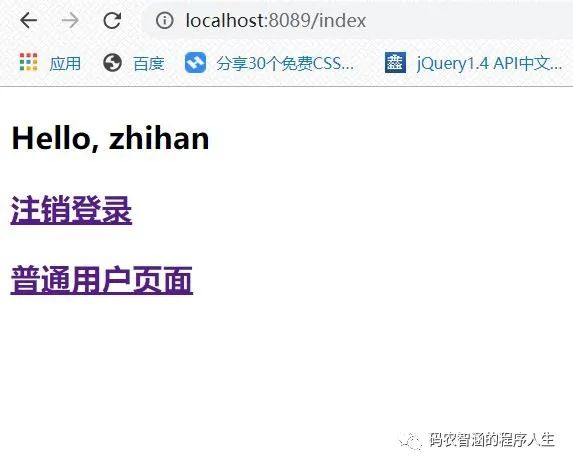
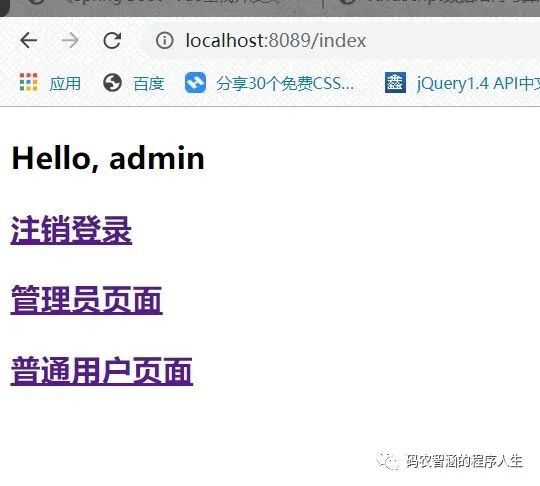
直接配置两个静态用户:zhihan/123+admin/123
ShiroFilterChainDefinition 配置了基本的过滤规则。
配置登录接口和页面访问接口
package com.hancecoder.shiro_login.controller;import org.apache.shiro.SecurityUtils;import org.apache.shiro.authc.AuthenticationException;import org.apache.shiro.authc.UsernamePasswordToken;import org.apache.shiro.authz.annotation.Logical;import org.apache.shiro.authz.annotation.RequiresRoles;import org.apache.shiro.subject.Subject;import org.springframework.stereotype.Controller;import org.springframework.ui.Model;import org.springframework.web.bind.annotation.GetMapping;import org.springframework.web.bind.annotation.PostMapping;@Controllerpublic class UserCOntroller {@PostMapping("/doLogin")public String doLogin(String username, String password, Model model){UsernamePasswordToken token=new UsernamePasswordToken(username,password);Subject subject= SecurityUtils.getSubject();try {subject.login(token);}catch (AuthenticationException e){model.addAttribute("error","用户名或者密码输入错误!");return "login";}return "redirect:/index";}@RequiresRoles("admin")@GetMapping("/admin")public String admin(){return "admin";}@RequiresRoles(value = {"admin","user"},logical = Logical.OR)@GetMapping("/user")public String user(){return "user";}}
对于其他不需要角色就能访问的接口,需要在WebMvc中配置
package com.hancecoder.shiro_login.config;import org.springframework.web.servlet.config.annotation.ViewControllerRegistry;import org.springframework.web.servlet.config.annotation.WebMvcConfigurer;@Configurationpublic class WebMvcConfig implements WebMvcConfigurer {@Overridepublic void addViewControllers(ViewControllerRegistry registry) {registry.addViewController("/login").setViewName("/login");registry.addViewController("/index").setViewName("/index");registry.addViewController("/unauthorized").setViewName("/unauthorized");}}
创建全局异常处理器进行全局异常处理。本demo主要处理授权处理异常
package com.hancecoder.shiro_login.controller;import org.apache.shiro.authz.AuthorizationException;import org.springframework.web.bind.annotation.ControllerAdvice;import org.springframework.web.bind.annotation.ExceptionHandler;import org.springframework.web.servlet.ModelAndView;@ControllerAdvicepublic class ExceptionController {@ExceptionHandler(AuthorizationException.class)public ModelAndView error(AuthorizationException e){ModelAndView mv=new ModelAndView("unauthorized");mv.addObject("error",e.getMessage());return mv;}}
代码解释:
当用户访问未授权页面时,就会跳转到unauthorized页面并警告它 携带出错信息
继续编写五个html页面(主要是看一下thymeleaf的使用)
<!DOCTYPE html><html lang="en" xmlns:shiro="http://www.pollix.at/thymeleaf/shiro"><head><meta charset="UTF-8"><title>index</title></head><body><h3>Hello, <shiro:principal/></h3><h3><a href="/logout">注销登录</a></h3><h3><a shiro:hasRole="admin" href="/admin">管理员页面</a></h3><h3><a shiro:hasAnyRoles="admin,user" href="/user">普通用户页面</a></h3></body></html>
<!DOCTYPE html><html lang="en"><head><meta charset="UTF-8"><title>admin</title></head><body><h1>管理员页面</h1></body></html>
<!DOCTYPE html><html lang="en" xmlns:th="http://www.thymeleaf.org"><head><meta charset="UTF-8"><title>login</title></head><body><div><form action="/doLogin" method="post"><input type="text" name="username"><br><input type="password" name="password"><br><div th:text="${error}"></div><input type="submit" value="登录"></form></div></body></html>
<!DOCTYPE html><html lang="en" xmlns:th="http://www.thymeleaf.org"><head><meta charset="UTF-8"><title>未授权</title></head><body><div><h3>未获授权,非法访问</h3><!--/*@thymesVar id="error" type=""*/--><h3 th:text="${error}"></h3></div></body></html>
<!DOCTYPE html><html lang="en"><head><meta charset="UTF-8"><title>user</title></head><body><h1>普通用户页面</h1></body></html>