



https://dev.mysql.com/downloads/repo/yum MySQL 官网
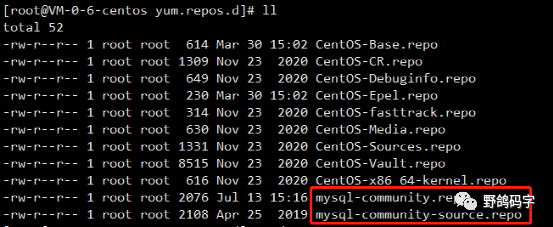
下载完后,执行下面命令,就可以在服务器上添加 MySQL Yum 源配置
yum localinstall mysql80-community-release-el7-3.noarch.rpm
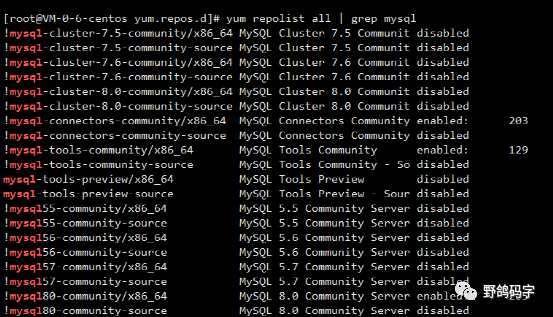
yum repolist all | grep mysql
yum repolist enabled | grep "mysql.*-community.*"

yum-config-manager --disable mysql80-communityyum-config-manager --enable mysql57-community
# Enable to use MySQL 5.5[mysql55-community]name=MySQL 5.5 Community Serverbaseurl=http://repo.mysql.com/yum/mysql-5.5-community/el/7/$basearch/enabled=0gpgcheck=1gpgkey=file:///etc/pki/rpm-gpg/RPM-GPG-KEY-mysql# Enable to use MySQL 5.6[mysql56-community]name=MySQL 5.6 Community Serverbaseurl=http://repo.mysql.com/yum/mysql-5.6-community/el/7/$basearch/enabled=0gpgcheck=1gpgkey=file:///etc/pki/rpm-gpg/RPM-GPG-KEY-mysql# Enable to use MySQL 5.7[mysql57-community]name=MySQL 5.7 Community Serverbaseurl=http://repo.mysql.com/yum/mysql-5.7-community/el/7/$basearch/enabled=0gpgcheck=1gpgkey=file:///etc/pki/rpm-gpg/RPM-GPG-KEY-mysql[mysql80-community]name=MySQL 8.0 Community Serverbaseurl=http://repo.mysql.com/yum/mysql-8.0-community/el/7/$basearch/enabled=1gpgcheck=1gpgkey=file:///etc/pki/rpm-gpg/RPM-GPG-KEY-mysql### 后续还有配置 ###
3、删除本地默认安装的 MySQL
MySQL 除了自己的发行版本外,还有其他的第三方分支版本,比如 MariaDB,一般 CentOS 系统服务器上会默认安装这个版本的数据库,如果存在,需要先删掉,先用下面命令查看
rpm -qa | grep mariadb
rpm -e --nodeps mariadb-XXX -- 其中 XXX 表示不同版本
yum install mysql-community-server
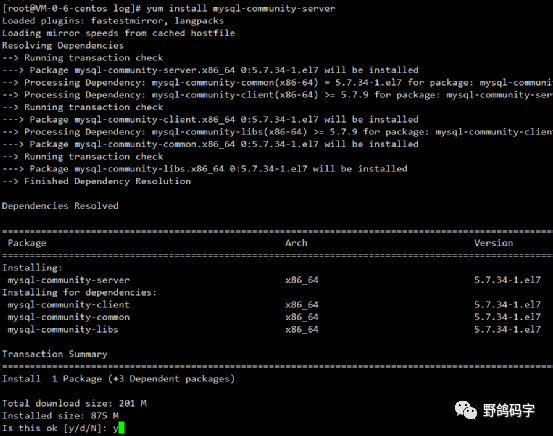
mysql-community-server
mysql-community-client
mysql-community-common
mysql-community-libs
systemctl start mysqld.service
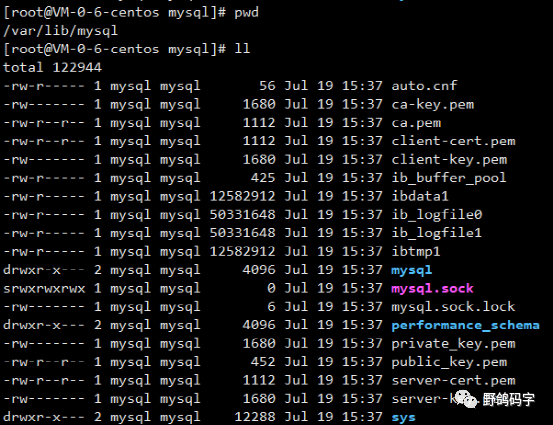
cat var/log/mysqld.log | grep "temporary password"
mysql -uroot -p'temporary password'
ALTER USER 'root'@'localhost' IDENTIFIED BY '重置的密码';
yum localinstall mysql80-community-release-el7-3.noarch.rpmyum-config-manager --disable mysql80-communityyum-config-manager --enable mysql57-communityyum install mysql-community-serversystemctl start mysqld.service
yum remove mysql
rpm -qa | grep mysql
优点:方便,只用少许命令就可以安装完成
缺点:需要联网安装,因为要下载安装包;只能安装对应版本的最新版,比如我上面安装的就是 MySQL 5.7.34,那如果我想安装 MySQL 5.7.28 就不行了
文章转载自野鸽码字,如果涉嫌侵权,请发送邮件至:contact@modb.pro进行举报,并提供相关证据,一经查实,墨天轮将立刻删除相关内容。
