小知识:绣花理论当一个人的职业生涯开始时,或者是职业生涯处于低谷时,他都必须努力借助他人的“资源”并主动义务或只取比市场更低的价格去为提供资源的人工作,在这个工作过程中,完成自己技能、关系、资金(或其他资源)的积累,求得个人人力资本质的飞跃,以获取职业发展的成功。

简介
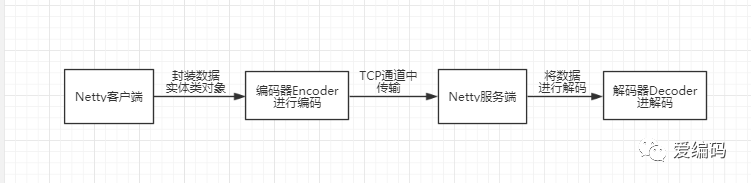
Netty中,通讯的双方建立连接后,会把数据按照ByteBuf的方式进行传输,例如http协议中,就是通过HttpRequestDecoder对ByteBuf数据流进行处理,转换成http的对象。
实现的原理是通过Encoder把java对象转换成ByteBuf流进行传输,通过Decoder把ByteBuf转换成java对象进行处理,处理逻辑如下图所示:
步骤
制定协议(如表头,内容字节大小,内容,校验位等)
写好编码器Encoder,将数据进行编码的操作。
写好解码器Decoder,将数据进行解码的操作。
服务端和客户端的Handler处理类中处理数据。
Netty服务端和客户端的pipline中添加编解码器。
实现
1.制定协议(如表头,内容字节大小,内容,校验位等)
自定义传输的实体类,其实本质上你可以将它当做自定义的协议。这里为了方便入门,就没有写正式的协议。我这里主要是走个整体流程,至于其他的查看后面的参考文章。
public class UavEntity implements Serializable{

    private String id;//id
    private String name;//名称
    private String brand;//品牌


    public String getId() {
        return id;
    }

    public void setId(String id) {
        this.id = id;
    }

    public String getName() {
        return name;
    }

    public void setName(String name) {
        this.name = name;
    }

    public String getBrand() {
        return brand;
    }

    public void setBrand(String brand) {
        this.brand = brand;
    }


    @Override
    public String toString() {
        return "UavEntity{" +
                "id='" + id + '\'' +
                ", name='" + name + '\'' +
                ", brand='" + brand + '\'' +
                '}';
    }
}
2.编码器Encoder
主要工作是将对象转换为字节写进Channel中。
public class UavEncoder extends MessageToByteEncoder<UavEntity> {

    @Override
    protected void encode(ChannelHandlerContext ctx, UavEntity msg, ByteBuf out) throws Exception {
        byte[] datas = ByteObjConverter.ObjectToByte(msg);
        out.writeBytes(datas);
        ctx.flush();
    }
}
3.解码器Decoder
主要是从读取bytebuf中的字节数据,将其转换为对象实体。
public class UavDecoder extends ByteToMessageDecoder {
    @Override
    protected void decode(ChannelHandlerContext ctx, ByteBuf in, List<Object> out) throws Exception {

        byte[] bytes = new byte[in.readableBytes()];
        in.readBytes(bytes);
        Object obj = ByteObjConverter.ByteToObject(bytes);
        out.add(obj);
    }

}
编解码工具类ByteObjConverter
public class ByteObjConverter {

    public static Object ByteToObject(byte[] bytes) {
        Object obj = null;
        ByteArrayInputStream bi = new ByteArrayInputStream(bytes);
        ObjectInputStream oi = null;
        try {
            oi = new ObjectInputStream(bi);
            obj = oi.readObject();
        } catch (Exception e) {
            e.printStackTrace();
        } finally {
            try {
                bi.close();
            } catch (IOException e) {
                e.printStackTrace();
            }
            try {
                oi.close();
            } catch (IOException e) {
                e.printStackTrace();
            }
        }
        return obj;
    }

    public static byte[] ObjectToByte(Object obj) {
        byte[] bytes = null;
        ByteArrayOutputStream bo = new ByteArrayOutputStream();
        ObjectOutputStream oo = null;
        try {
            oo = new ObjectOutputStream(bo);
            oo.writeObject(obj);
            bytes = bo.toByteArray();
        } catch (Exception e) {
            e.printStackTrace();
        } finally {
            try {
                bo.close();
            } catch (IOException e) {
                e.printStackTrace();
            }
            try {
                oo.close();
            } catch (IOException e) {
                e.printStackTrace();
            }
        }
        return (bytes);
    }
}
4.服务端和客户端Handler处理类
客户端Handler处理类
主要负责往服务端写数据。
public class ClientInitHandler extends ChannelInboundHandlerAdapter {
    @Override
    public void channelActive(ChannelHandlerContext ctx) throws Exception {
        System.out.println("HelloClientIntHandler.channelActive");
        UavEntity ua = new UavEntity();
        ua.setName("四翼无人机Plus");
        ua.setId(UUID.randomUUID().toString());
        ua.setBrand("大疆");
        ctx.writeAndFlush(ua);
    }
}
服务端Handler处理类
主要是负责读取服务端接收到的数据直接打印。
public class UavHandler extends ChannelInboundHandlerAdapter {

    @Override
    public void channelRead(ChannelHandlerContext ctx, Object msg) throws Exception {
        UavEntity uav = (UavEntity) msg;
        System.out.println("UavHandler read msg from client :" + uav);
    }

    @Override
    public void channelReadComplete(ChannelHandlerContext ctx) throws Exception {
        ctx.flush();
    }

    @Override
    public void exceptionCaught(ChannelHandlerContext ctx, Throwable cause) throws Exception {

    }
}
5.往服务端和客户端添加编解码器。
Netty客户端代码如下:
主要是添加编码器和处理Handler
/**
 * 客户端
 * 1.为初始化客户端,创建一个Bootstrap实例
 * 2.为进行事件处理分配了一个NioEventLoopGroup实例,其中事件处理包括创建新的连接以及处理入站和出站数据;
 * 3.当连接被建立时,一个EchoClientHandler实例会被安装到(该Channel的一个ChannelPipeline中;
 * 4.在一切都设置完成后,调用Bootstrap.connect()方法连接到远程节点。
 */
public class NettyClient {
    public void connect(String host, int port) throws Exception {
        EventLoopGroup workerGroup = new NioEventLoopGroup();

        try {
            Bootstrap b = new Bootstrap();
            b.group(workerGroup);
            b.channel(NioSocketChannel.class);
            b.option(ChannelOption.SO_KEEPALIVE, true);
            b.handler(new ChannelInitializer<SocketChannel>() {
                @Override
                public void initChannel(SocketChannel ch) throws Exception {
                    ch.pipeline().addLast(new UavEncoder());
//                    ch.pipeline().addLast(new SmartCarEncoder());
//                    ch.pipeline().addLast(new SmartCarDecoder());
                    ch.pipeline().addLast(new ClientInitHandler());
//                    ch.pipeline().addLast(new ClientHandler());
                }
            });

            ChannelFuture f = b.connect(host, port).sync();
            f.channel().closeFuture().sync();
        } finally {
            workerGroup.shutdownGracefully();
        }

    }

    public static void main(String[] args) throws Exception {
        NettyClient client = new NettyClient();
        client.connect("127.0.0.1", 8000);
    }
}
Netty服务端代码如下:
主要是添加解码器和处理Handler
public class NettyServer {
    public void start(int port) throws Exception {
        EventLoopGroup bossGroup = new NioEventLoopGroup();
        EventLoopGroup workerGroup = new NioEventLoopGroup();
        try {
            ServerBootstrap b = new ServerBootstrap();
            b.group(bossGroup, workerGroup).channel(NioServerSocketChannel.class)
                    .childHandler(new ChannelInitializer<SocketChannel>() {
                        @Override
                        public void initChannel(SocketChannel ch) throws Exception {
                            ch.pipeline().addLast(new UavDecoder());
//                            ch.pipeline().addLast(new SmartCarEncoder());
//                            ch.pipeline().addLast(new SmartCarDecoder());
                            ch.pipeline().addLast(new UavHandler());
//                            ch.pipeline().addLast(new ServerHandler());
                        }
                    }).option(ChannelOption.SO_BACKLOG, 128)
                    .childOption(ChannelOption.SO_KEEPALIVE, true);

            ChannelFuture f = b.bind(port).sync();

            f.channel().closeFuture().sync();
        } finally {
            workerGroup.shutdownGracefully();
            bossGroup.shutdownGracefully();
        }
    }

    public static void main(String[] args) throws Exception {
        NettyServer server = new NettyServer();
        server.start(8000);
    }
}
参考文章
https://www.cnblogs.com/zeroone/p/8490904.html https://www.cnblogs.com/zeroone/p/8490921.html
总结
Netty提供了编解码器就让我们可以非常方便的自定义自己传输数据的格式,同时可以将数据进行加密等操作。
如想要了解防止socket流攻击、TCP粘包/拆包等更深入问题可以看参考文章中的两篇文章。
最后
如果对 Java、大数据感兴趣请长按二维码,关注公众号【爱编码】,小编会一直更新文章的哦。