



目录
- 1 软件下载
- 2 安装要求
- **3 安装软件**
- 3.1 yum配置
- 3.2 执行installoracle-database-preinstall-19c
- 3.3 安装Oracle软件rpm
- 3.4 安装后确认工作
- 3.4.1 hosts文件
- 3.4.2 network文件修改
- 3.4.3 防火墙
- 3.4.4 selinux
- 3.4.5 虚拟网卡状态
- 3.4.6 核心参数
- 3.4.7 limit文件
- 3.4.8 THP
- 3.4.9 avahi
- 3.4.10 软件包
- 3.4.11 PAM
- 3.4.12 用户和组
- 3.4.13 目录结构
- 3.4.14 /etc/profile
- 3.4.15 check一下
- 3.5 总结一下
- **4 初始化数据库**
- 5 总结
1 软件下载
Oracle已经提供Linux 环境单机的 rpm 安装方式,不过仅支持单实例安装,不支持集群,也只有企业版,其他版本的没有发布,不过有2.5 G 大小.下载的地址:https://www.oracle.com/database/technologies/oracle19c-linux-downloads.html
oracle-database-ee-19c-1.0-1.x86_64.rpm
2 安装要求
2.1 空间要求
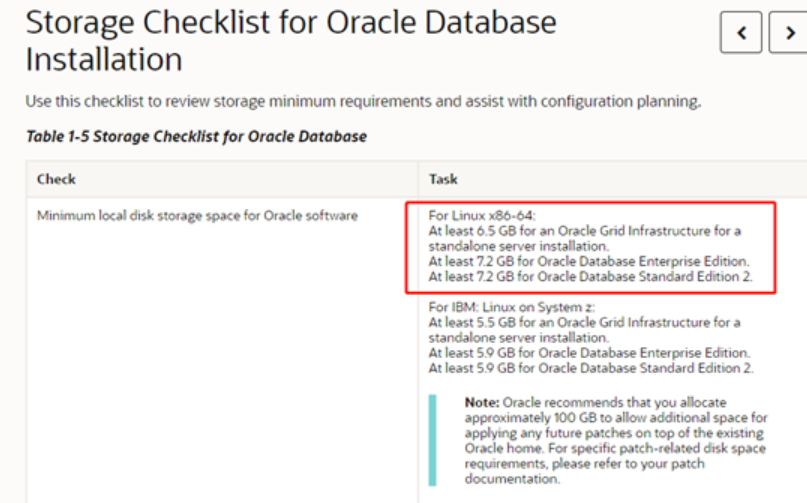
2.2 本次虚拟机环境
| CPU | 1 |
|---|---|
| 内存 | 4G |
| disk | 30G |
| swap | 4G |
| OS | oraclelinux 7.9 |
| 安装方式 | minial |
| ISO | OracleLinux-R7-U9-Server-x86_64-dvd.iso |
3 安装软件
小插曲,在最小化安装完成,发现ssh登录很慢,查看ssh配置文件,需要添加userDNS=no即可
3.1 yum配置
#mount cdrom
mount /dev/cdrom /mnt

#编辑repo
cd /etc/yum.repos.d/
# mkdir bak
# mv *.repo ./bak/
# vi oracle-linux-ol7.repo
or
cat >> /etc/yum.repos.d/oracle-linux-ol7.repo << "EOF"
[base]
name=base
baseurl=file:///mnt
enabled=1
gpgcheck=0
EOF
[root@oracle19c yum.repos.d]# more oracle-linux-ol7.repo
[base]
name=base
baseurl=file:///mnt
enabled=1
gpgcheck=0
[root@oracle19c yum.repos.d]#
[root@oracle11g yum.repos.d]# yum makecache
已加载插件:fastestmirror, langpacks
Loading mirror speeds from cached hostfile
c7-media
3.2 执行installoracle-database-preinstall-19c
相关安装包在ISO中的Packages中
[root@oraclerpm19c Packages]# cp oracle-database-preinstall-19c-1.0-2.el7.x86_64.rpm /sw
[root@oraclerpm19c Packages]# pwd
/mnt/Packages
yum -y install oracle-database-preinstall-19c
[root@oraclerpm19c sw]# yum -y install oracle-database-preinstall-19c
Loaded plugins: ulninfo
Resolving Dependencies
--> Running transaction check
---> Package oracle-database-preinstall-19c.x86_64 0:1.0-2.el7 will be installed
--> Processing Dependency: xorg-x11-xauth for package: oracle-database-preinstall-19c-1.0-2.el7.x86_64
--> Processing Dependency: xorg-x11-utils for package: oracle-database-preinstall-19c-1.0-2.el7.x86_64
--> Processing Dependency: unzip for package: oracle-database-preinstall-19c-1.0-2.el7.x86_64
--> Processing Dependency: sysstat for package: oracle-database-preinstall-19c-1.0-2.el7.x86_64
--> Processing Dependency: smartmontools for package: oracle-database-preinstall-19c-1.0-2.el7.x86_64
--> Processing Dependency: psmisc for package: oracle-database-preinstall-19c-1.0-2.el7.x86_64
--> Processing Dependency: nfs-utils for package: oracle-database-preinstall-19c-1.0-2.el7.x86_64
--> Processing Dependency: net-tools for package: oracle-database-preinstall-19c-1.0-2.el7.x86_64
--> Processing Dependency: libstdc++-devel for package: oracle-database-preinstall-19c-1.0-2.el7.x86_64
--> Processing Dependency: libaio-devel for package: oracle-database-preinstall-19c-1.0-2.el7.x86_64
--> Processing Dependency: ksh for package: oracle-database-preinstall-19c-1.0-2.el7.x86_64
--> Processing Dependency: glibc-devel for package: oracle-database-preinstall-19c-1.0-2.el7.x86_64
--> Processing Dependency: compat-libcap1 for package: oracle-database-preinstall-19c-1.0-2.el7.x86_64
--> Processing Dependency: bind-utils for package: oracle-database-preinstall-19c-1.0-2.el7.x86_64
--> Running transaction check
---> Package bind-utils.x86_64 32:9.11.4-26.P2.el7 will be installed
--> Processing Dependency: bind-libs-lite(x86-64) = 32:9.11.4-26.P2.el7 for package: 32:bind-utils-9.11.4-26.P2.el7.x86_64
--> Processing Dependency: bind-libs(x86-64) = 32:9.11.4-26.P2.el7 for package: 32:bind-utils-9.11.4-26.P2.el7.x86_64
--> Processing Dependency: liblwres.so.160()(64bit) for package: 32:bind-utils-9.11.4-26.P2.el7.x86_64
--> Processing Dependency: libisccfg.so.160()(64bit) for package: 32:bind-utils-9.11.4-26.P2.el7.x86_64
--> Processing Dependency: libisc.so.169()(64bit) for package: 32:bind-utils-9.11.4-26.P2.el7.x86_64
--> Processing Dependency: libirs.so.160()(64bit) for package: 32:bind-utils-9.11.4-26.P2.el7.x86_64
--> Processing Dependency: libdns.so.1102()(64bit) for package: 32:bind-utils-9.11.4-26.P2.el7.x86_64
--> Processing Dependency: libbind9.so.160()(64bit) for package: 32:bind-utils-9.11.4-26.P2.el7.x86_64
--> Processing Dependency: libGeoIP.so.1()(64bit) for package: 32:bind-utils-9.11.4-26.P2.el7.x86_64
---> Package compat-libcap1.x86_64 0:1.10-7.el7 will be installed
---> Package glibc-devel.x86_64 0:2.17-317.0.1.el7 will be installed
--> Processing Dependency: glibc-headers = 2.17-317.0.1.el7 for package: glibc-devel-2.17-317.0.1.el7.x86_64
--> Processing Dependency: glibc-headers for package: glibc-devel-2.17-317.0.1.el7.x86_64
---> Package ksh.x86_64 0:20120801-142.0.1.el7 will be installed
---> Package libaio-devel.x86_64 0:0.3.109-13.el7 will be installed
---> Package libstdc++-devel.x86_64 0:4.8.5-44.0.3.el7 will be installed
---> Package net-tools.x86_64 0:2.0-0.25.20131004git.el7 will be installed
---> Package nfs-utils.x86_64 1:1.3.0-0.68.0.1.el7 will be installed
--> Processing Dependency: libtirpc >= 0.2.4-0.7 for package: 1:nfs-utils-1.3.0-0.68.0.1.el7.x86_64
--> Processing Dependency: gssproxy >= 0.7.0-3 for package: 1:nfs-utils-1.3.0-0.68.0.1.el7.x86_64
--> Processing Dependency: rpcbind for package: 1:nfs-utils-1.3.0-0.68.0.1.el7.x86_64
--> Processing Dependency: quota for package: 1:nfs-utils-1.3.0-0.68.0.1.el7.x86_64
--> Processing Dependency: libnfsidmap for package: 1:nfs-utils-1.3.0-0.68.0.1.el7.x86_64
--> Processing Dependency: libevent for package: 1:nfs-utils-1.3.0-0.68.0.1.el7.x86_64
--> Processing Dependency: keyutils for package: 1:nfs-utils-1.3.0-0.68.0.1.el7.x86_64
--> Processing Dependency: libtirpc.so.1()(64bit) for package: 1:nfs-utils-1.3.0-0.68.0.1.el7.x86_64
--> Processing Dependency: libnfsidmap.so.0()(64bit) for package: 1:nfs-utils-1.3.0-0.68.0.1.el7.x86_64
--> Processing Dependency: libevent-2.0.so.5()(64bit) for package: 1:nfs-utils-1.3.0-0.68.0.1.el7.x86_64
---> Package psmisc.x86_64 0:22.20-17.el7 will be installed
---> Package smartmontools.x86_64 1:7.0-2.el7 will be installed
--> Processing Dependency: mailx for package: 1:smartmontools-7.0-2.el7.x86_64
---> Package sysstat.x86_64 0:10.1.5-19.el7 will be installed
--> Processing Dependency: libsensors.so.4()(64bit) for package: sysstat-10.1.5-19.el7.x86_64
---> Package unzip.x86_64 0:6.0-21.el7 will be installed
---> Package xorg-x11-utils.x86_64 0:7.5-23.el7 will be installed
--> Processing Dependency: libxcb.so.1()(64bit) for package: xorg-x11-utils-7.5-23.el7.x86_64
--> Processing Dependency: libxcb-shape.so.0()(64bit) for package: xorg-x11-utils-7.5-23.el7.x86_64
--> Processing Dependency: libdmx.so.1()(64bit) for package: xorg-x11-utils-7.5-23.el7.x86_64
--> Processing Dependency: libXxf86vm.so.1()(64bit) for package: xorg-x11-utils-7.5-23.el7.x86_64
--> Processing Dependency: libXxf86misc.so.1()(64bit) for package: xorg-x11-utils-7.5-23.el7.x86_64
--> Processing Dependency: libXxf86dga.so.1()(64bit) for package: xorg-x11-utils-7.5-23.el7.x86_64
--> Processing Dependency: libXv.so.1()(64bit) for package: xorg-x11-utils-7.5-23.el7.x86_64
--> Processing Dependency: libXtst.so.6()(64bit) for package: xorg-x11-utils-7.5-23.el7.x86_64
--> Processing Dependency: libXrender.so.1()(64bit) for package: xorg-x11-utils-7.5-23.el7.x86_64
--> Processing Dependency: libXrandr.so.2()(64bit) for package: xorg-x11-utils-7.5-23.el7.x86_64
--> Processing Dependency: libXinerama.so.1()(64bit) for package: xorg-x11-utils-7.5-23.el7.x86_64
--> Processing Dependency: libXi.so.6()(64bit) for package: xorg-x11-utils-7.5-23.el7.x86_64
--> Processing Dependency: libXext.so.6()(64bit) for package: xorg-x11-utils-7.5-23.el7.x86_64
--> Processing Dependency: libX11.so.6()(64bit) for package: xorg-x11-utils-7.5-23.el7.x86_64
--> Processing Dependency: libX11-xcb.so.1()(64bit) for package: xorg-x11-utils-7.5-23.el7.x86_64
---> Package xorg-x11-xauth.x86_64 1:1.0.9-1.el7 will be installed
--> Processing Dependency: libXmuu.so.1()(64bit) for package: 1:xorg-x11-xauth-1.0.9-1.el7.x86_64
--> Processing Dependency: libXau.so.6()(64bit) for package: 1:xorg-x11-xauth-1.0.9-1.el7.x86_64
--> Running transaction check
---> Package GeoIP.x86_64 0:1.5.0-14.el7 will be installed
--> Processing Dependency: geoipupdate for package: GeoIP-1.5.0-14.el7.x86_64
---> Package bind-libs.x86_64 32:9.11.4-26.P2.el7 will be installed
--> Processing Dependency: bind-license = 32:9.11.4-26.P2.el7 for package: 32:bind-libs-9.11.4-26.P2.el7.x86_64
---> Package bind-libs-lite.x86_64 32:9.11.4-26.P2.el7 will be installed
---> Package glibc-headers.x86_64 0:2.17-317.0.1.el7 will be installed
--> Processing Dependency: kernel-headers >= 2.2.1 for package: glibc-headers-2.17-317.0.1.el7.x86_64
--> Processing Dependency: kernel-headers for package: glibc-headers-2.17-317.0.1.el7.x86_64
---> Package gssproxy.x86_64 0:0.7.0-29.el7 will be installed
--> Processing Dependency: libini_config >= 1.3.1-31 for package: gssproxy-0.7.0-29.el7.x86_64
--> Processing Dependency: libverto-module-base for package: gssproxy-0.7.0-29.el7.x86_64
--> Processing Dependency: libref_array.so.1(REF_ARRAY_0.1.1)(64bit) for package: gssproxy-0.7.0-29.el7.x86_64
--> Processing Dependency: libini_config.so.3(INI_CONFIG_1.2.0)(64bit) for package: gssproxy-0.7.0-29.el7.x86_64
--> Processing Dependency: libini_config.so.3(INI_CONFIG_1.1.0)(64bit) for package: gssproxy-0.7.0-29.el7.x86_64
--> Processing Dependency: libref_array.so.1()(64bit) for package: gssproxy-0.7.0-29.el7.x86_64
--> Processing Dependency: libini_config.so.3()(64bit) for package: gssproxy-0.7.0-29.el7.x86_64
--> Processing Dependency: libcollection.so.2()(64bit) for package: gssproxy-0.7.0-29.el7.x86_64
--> Processing Dependency: libbasicobjects.so.0()(64bit) for package: gssproxy-0.7.0-29.el7.x86_64
---> Package keyutils.x86_64 0:1.5.8-3.el7 will be installed
---> Package libX11.x86_64 0:1.6.7-2.el7 will be installed
--> Processing Dependency: libX11-common >= 1.6.7-2.el7 for package: libX11-1.6.7-2.el7.x86_64
---> Package libXau.x86_64 0:1.0.8-2.1.el7 will be installed
---> Package libXext.x86_64 0:1.3.3-3.el7 will be installed
---> Package libXi.x86_64 0:1.7.9-1.el7 will be installed
---> Package libXinerama.x86_64 0:1.1.3-2.1.el7 will be installed
---> Package libXmu.x86_64 0:1.1.2-2.el7 will be installed
--> Processing Dependency: libXt.so.6()(64bit) for package: libXmu-1.1.2-2.el7.x86_64
---> Package libXrandr.x86_64 0:1.5.1-2.el7 will be installed
---> Package libXrender.x86_64 0:0.9.10-1.el7 will be installed
---> Package libXtst.x86_64 0:1.2.3-1.el7 will be installed
---> Package libXv.x86_64 0:1.0.11-1.el7 will be installed
---> Package libXxf86dga.x86_64 0:1.1.4-2.1.el7 will be installed
---> Package libXxf86misc.x86_64 0:1.0.3-7.1.el7 will be installed
---> Package libXxf86vm.x86_64 0:1.1.4-1.el7 will be installed
---> Package libdmx.x86_64 0:1.1.3-3.el7 will be installed
---> Package libevent.x86_64 0:2.0.21-4.el7 will be installed
---> Package libnfsidmap.x86_64 0:0.25-19.el7 will be installed
---> Package libtirpc.x86_64 0:0.2.4-0.16.el7 will be installed
---> Package libxcb.x86_64 0:1.13-1.el7 will be installed
---> Package lm_sensors-libs.x86_64 0:3.4.0-8.20160601gitf9185e5.el7 will be installed
---> Package mailx.x86_64 0:12.5-19.el7 will be installed
---> Package quota.x86_64 1:4.01-19.el7 will be installed
--> Processing Dependency: quota-nls = 1:4.01-19.el7 for package: 1:quota-4.01-19.el7.x86_64
--> Processing Dependency: tcp_wrappers for package: 1:quota-4.01-19.el7.x86_64
---> Package rpcbind.x86_64 0:0.2.0-49.el7 will be installed
--> Running transaction check
---> Package bind-license.noarch 32:9.11.4-26.P2.el7 will be installed
---> Package geoipupdate.x86_64 0:2.5.0-1.el7 will be installed
---> Package kernel-headers.x86_64 0:3.10.0-1160.el7 will be installed
---> Package libX11-common.noarch 0:1.6.7-2.el7 will be installed
---> Package libXt.x86_64 0:1.1.5-3.el7 will be installed
--> Processing Dependency: libSM.so.6()(64bit) for package: libXt-1.1.5-3.el7.x86_64
--> Processing Dependency: libICE.so.6()(64bit) for package: libXt-1.1.5-3.el7.x86_64
---> Package libbasicobjects.x86_64 0:0.1.1-32.el7 will be installed
---> Package libcollection.x86_64 0:0.7.0-32.el7 will be installed
---> Package libini_config.x86_64 0:1.3.1-32.el7 will be installed
--> Processing Dependency: libpath_utils.so.1(PATH_UTILS_0.2.1)(64bit) for package: libini_config-1.3.1-32.el7.x86_64
--> Processing Dependency: libpath_utils.so.1()(64bit) for package: libini_config-1.3.1-32.el7.x86_64
---> Package libref_array.x86_64 0:0.1.5-32.el7 will be installed
---> Package libverto-libevent.x86_64 0:0.2.5-4.el7 will be installed
---> Package quota-nls.noarch 1:4.01-19.el7 will be installed
---> Package tcp_wrappers.x86_64 0:7.6-77.el7 will be installed
--> Running transaction check
---> Package libICE.x86_64 0:1.0.9-9.el7 will be installed
---> Package libSM.x86_64 0:1.2.2-2.el7 will be installed
---> Package libpath_utils.x86_64 0:0.2.1-32.el7 will be installed
--> Finished Dependency Resolution
Dependencies Resolved
=======================================================================================================================================
Package Arch Version Repository Size
=======================================================================================================================================
Installing:
oracle-database-preinstall-19c x86_64 1.0-2.el7 base 19 k
Installing for dependencies:
GeoIP x86_64 1.5.0-14.el7 base 1.5 M
bind-libs x86_64 32:9.11.4-26.P2.el7 base 156 k
bind-libs-lite x86_64 32:9.11.4-26.P2.el7 base 1.1 M
bind-license noarch 32:9.11.4-26.P2.el7 base 90 k
bind-utils x86_64 32:9.11.4-26.P2.el7 base 259 k
compat-libcap1 x86_64 1.10-7.el7 base 17 k
geoipupdate x86_64 2.5.0-1.el7 base 34 k
glibc-devel x86_64 2.17-317.0.1.el7 base 1.1 M
glibc-headers x86_64 2.17-317.0.1.el7 base 692 k
gssproxy x86_64 0.7.0-29.el7 base 110 k
kernel-headers x86_64 3.10.0-1160.el7 base 9.0 M
keyutils x86_64 1.5.8-3.el7 base 53 k
ksh x86_64 20120801-142.0.1.el7 base 882 k
libICE x86_64 1.0.9-9.el7 base 66 k
libSM x86_64 1.2.2-2.el7 base 39 k
libX11 x86_64 1.6.7-2.el7 base 606 k
libX11-common noarch 1.6.7-2.el7 base 164 k
libXau x86_64 1.0.8-2.1.el7 base 28 k
libXext x86_64 1.3.3-3.el7 base 38 k
libXi x86_64 1.7.9-1.el7 base 40 k
libXinerama x86_64 1.1.3-2.1.el7 base 13 k
libXmu x86_64 1.1.2-2.el7 base 70 k
libXrandr x86_64 1.5.1-2.el7 base 27 k
libXrender x86_64 0.9.10-1.el7 base 25 k
libXt x86_64 1.1.5-3.el7 base 172 k
libXtst x86_64 1.2.3-1.el7 base 20 k
libXv x86_64 1.0.11-1.el7 base 18 k
libXxf86dga x86_64 1.1.4-2.1.el7 base 18 k
libXxf86misc x86_64 1.0.3-7.1.el7 base 19 k
libXxf86vm x86_64 1.1.4-1.el7 base 17 k
libaio-devel x86_64 0.3.109-13.el7 base 12 k
libbasicobjects x86_64 0.1.1-32.el7 base 25 k
libcollection x86_64 0.7.0-32.el7 base 41 k
libdmx x86_64 1.1.3-3.el7 base 15 k
libevent x86_64 2.0.21-4.el7 base 208 k
libini_config x86_64 1.3.1-32.el7 base 63 k
libnfsidmap x86_64 0.25-19.el7 base 49 k
libpath_utils x86_64 0.2.1-32.el7 base 28 k
libref_array x86_64 0.1.5-32.el7 base 27 k
libstdc++-devel x86_64 4.8.5-44.0.3.el7 base 1.5 M
libtirpc x86_64 0.2.4-0.16.el7 base 89 k
libverto-libevent x86_64 0.2.5-4.el7 base 8.2 k
libxcb x86_64 1.13-1.el7 base 213 k
lm_sensors-libs x86_64 3.4.0-8.20160601gitf9185e5.el7 base 41 k
mailx x86_64 12.5-19.el7 base 244 k
net-tools x86_64 2.0-0.25.20131004git.el7 base 305 k
nfs-utils x86_64 1:1.3.0-0.68.0.1.el7 base 412 k
psmisc x86_64 22.20-17.el7 base 141 k
quota x86_64 1:4.01-19.el7 base 178 k
quota-nls noarch 1:4.01-19.el7 base 90 k
rpcbind x86_64 0.2.0-49.el7 base 59 k
smartmontools x86_64 1:7.0-2.el7 base 546 k
sysstat x86_64 10.1.5-19.el7 base 315 k
tcp_wrappers x86_64 7.6-77.el7 base 78 k
unzip x86_64 6.0-21.el7 base 171 k
xorg-x11-utils x86_64 7.5-23.el7 base 114 k
xorg-x11-xauth x86_64 1:1.0.9-1.el7 base 29 k
Transaction Summary
=======================================================================================================================================
Install 1 Package (+57 Dependent packages)
Total download size: 21 M
Installed size: 40 M
Downloading packages:
---------------------------------------------------------------------------------------------------------------------------------------
Total 17 MB/s | 21 MB 00:00:01
Running transaction check
Running transaction test
Transaction test succeeded
Running transaction
Installing : libXau-1.0.8-2.1.el7.x86_64 1/58
Installing : libxcb-1.13-1.el7.x86_64 2/58
Installing : libevent-2.0.21-4.el7.x86_64 3/58
Installing : 32:bind-license-9.11.4-26.P2.el7.noarch 4/58
Installing : libbasicobjects-0.1.1-32.el7.x86_64 5/58
Installing : libcollection-0.7.0-32.el7.x86_64 6/58
Installing : libref_array-0.1.5-32.el7.x86_64 7/58
Installing : libICE-1.0.9-9.el7.x86_64 8/58
Installing : libtirpc-0.2.4-0.16.el7.x86_64 9/58
Installing : rpcbind-0.2.0-49.el7.x86_64 10/58
Installing : libSM-1.2.2-2.el7.x86_64 11/58
Installing : libverto-libevent-0.2.5-4.el7.x86_64 12/58
Installing : 1:quota-nls-4.01-19.el7.noarch 13/58
Installing : psmisc-22.20-17.el7.x86_64 14/58
Installing : mailx-12.5-19.el7.x86_64 15/58
Installing : 1:smartmontools-7.0-2.el7.x86_64 16/58
Installing : keyutils-1.5.8-3.el7.x86_64 17/58
Installing : libnfsidmap-0.25-19.el7.x86_64 18/58
Installing : libpath_utils-0.2.1-32.el7.x86_64 19/58
Installing : libini_config-1.3.1-32.el7.x86_64 20/58
Installing : gssproxy-0.7.0-29.el7.x86_64 21/58
Installing : libaio-devel-0.3.109-13.el7.x86_64 22/58
Installing : compat-libcap1-1.10-7.el7.x86_64 23/58
Installing : ksh-20120801-142.0.1.el7.x86_64 24/58
Installing : unzip-6.0-21.el7.x86_64 25/58
Installing : libX11-common-1.6.7-2.el7.noarch 26/58
Installing : libX11-1.6.7-2.el7.x86_64 27/58
Installing : libXext-1.3.3-3.el7.x86_64 28/58
Installing : libXi-1.7.9-1.el7.x86_64 29/58
Installing : libXrender-0.9.10-1.el7.x86_64 30/58
Installing : libXrandr-1.5.1-2.el7.x86_64 31/58
Installing : libXtst-1.2.3-1.el7.x86_64 32/58
Installing : libXxf86misc-1.0.3-7.1.el7.x86_64 33/58
Installing : libdmx-1.1.3-3.el7.x86_64 34/58
Installing : libXv-1.0.11-1.el7.x86_64 35/58
Installing : libXxf86vm-1.1.4-1.el7.x86_64 36/58
Installing : libXinerama-1.1.3-2.1.el7.x86_64 37/58
Installing : libXxf86dga-1.1.4-2.1.el7.x86_64 38/58
Installing : xorg-x11-utils-7.5-23.el7.x86_64 39/58
Installing : libXt-1.1.5-3.el7.x86_64 40/58
Installing : libXmu-1.1.2-2.el7.x86_64 41/58
Installing : 1:xorg-x11-xauth-1.0.9-1.el7.x86_64 42/58
Installing : lm_sensors-libs-3.4.0-8.20160601gitf9185e5.el7.x86_64 43/58
Installing : sysstat-10.1.5-19.el7.x86_64 44/58
Installing : libstdc++-devel-4.8.5-44.0.3.el7.x86_64 45/58
Installing : net-tools-2.0-0.25.20131004git.el7.x86_64 46/58
Installing : tcp_wrappers-7.6-77.el7.x86_64 47/58
Installing : 1:quota-4.01-19.el7.x86_64 48/58
Installing : 1:nfs-utils-1.3.0-0.68.0.1.el7.x86_64 49/58
Installing : geoipupdate-2.5.0-1.el7.x86_64 50/58
Installing : GeoIP-1.5.0-14.el7.x86_64 51/58
Installing : 32:bind-libs-lite-9.11.4-26.P2.el7.x86_64 52/58
Installing : 32:bind-libs-9.11.4-26.P2.el7.x86_64 53/58
Installing : 32:bind-utils-9.11.4-26.P2.el7.x86_64 54/58
Installing : kernel-headers-3.10.0-1160.el7.x86_64 55/58
Installing : glibc-headers-2.17-317.0.1.el7.x86_64 56/58
Installing : glibc-devel-2.17-317.0.1.el7.x86_64 57/58
Installing : oracle-database-preinstall-19c-1.0-2.el7.x86_64 58/58
Verifying : libtirpc-0.2.4-0.16.el7.x86_64 1/58
Verifying : 32:bind-libs-9.11.4-26.P2.el7.x86_64 2/58
Verifying : libXxf86misc-1.0.3-7.1.el7.x86_64 3/58
Verifying : libdmx-1.1.3-3.el7.x86_64 4/58
Verifying : libICE-1.0.9-9.el7.x86_64 5/58
Verifying : kernel-headers-3.10.0-1160.el7.x86_64 6/58
Verifying : geoipupdate-2.5.0-1.el7.x86_64 7/58
Verifying : 1:nfs-utils-1.3.0-0.68.0.1.el7.x86_64 8/58
Verifying : libXrender-0.9.10-1.el7.x86_64 9/58
Verifying : libref_array-0.1.5-32.el7.x86_64 10/58
Verifying : libXv-1.0.11-1.el7.x86_64 11/58
Verifying : libXi-1.7.9-1.el7.x86_64 12/58
Verifying : libXxf86vm-1.1.4-1.el7.x86_64 13/58
Verifying : libXt-1.1.5-3.el7.x86_64 14/58
Verifying : libcollection-0.7.0-32.el7.x86_64 15/58
Verifying : libbasicobjects-0.1.1-32.el7.x86_64 16/58
Verifying : glibc-devel-2.17-317.0.1.el7.x86_64 17/58
Verifying : oracle-database-preinstall-19c-1.0-2.el7.x86_64 18/58
Verifying : 32:bind-utils-9.11.4-26.P2.el7.x86_64 19/58
Verifying : rpcbind-0.2.0-49.el7.x86_64 20/58
Verifying : GeoIP-1.5.0-14.el7.x86_64 21/58
Verifying : xorg-x11-utils-7.5-23.el7.x86_64 22/58
Verifying : sysstat-10.1.5-19.el7.x86_64 23/58
Verifying : tcp_wrappers-7.6-77.el7.x86_64 24/58
Verifying : 32:bind-license-9.11.4-26.P2.el7.noarch 25/58
Verifying : net-tools-2.0-0.25.20131004git.el7.x86_64 26/58
Verifying : libXinerama-1.1.3-2.1.el7.x86_64 27/58
Verifying : libXtst-1.2.3-1.el7.x86_64 28/58
Verifying : libX11-1.6.7-2.el7.x86_64 29/58
Verifying : 32:bind-libs-lite-9.11.4-26.P2.el7.x86_64 30/58
Verifying : libxcb-1.13-1.el7.x86_64 31/58
Verifying : libstdc++-devel-4.8.5-44.0.3.el7.x86_64 32/58
Verifying : lm_sensors-libs-3.4.0-8.20160601gitf9185e5.el7.x86_64 33/58
Verifying : libini_config-1.3.1-32.el7.x86_64 34/58
Verifying : libX11-common-1.6.7-2.el7.noarch 35/58
Verifying : unzip-6.0-21.el7.x86_64 36/58
Verifying : 1:smartmontools-7.0-2.el7.x86_64 37/58
Verifying : libXext-1.3.3-3.el7.x86_64 38/58
Verifying : libevent-2.0.21-4.el7.x86_64 39/58
Verifying : ksh-20120801-142.0.1.el7.x86_64 40/58
Verifying : libverto-libevent-0.2.5-4.el7.x86_64 41/58
Verifying : compat-libcap1-1.10-7.el7.x86_64 42/58
Verifying : libXrandr-1.5.1-2.el7.x86_64 43/58
Verifying : libaio-devel-0.3.109-13.el7.x86_64 44/58
Verifying : gssproxy-0.7.0-29.el7.x86_64 45/58
Verifying : glibc-headers-2.17-317.0.1.el7.x86_64 46/58
Verifying : 1:xorg-x11-xauth-1.0.9-1.el7.x86_64 47/58
Verifying : libpath_utils-0.2.1-32.el7.x86_64 48/58
Verifying : 1:quota-4.01-19.el7.x86_64 49/58
Verifying : libnfsidmap-0.25-19.el7.x86_64 50/58
Verifying : libSM-1.2.2-2.el7.x86_64 51/58
Verifying : libXxf86dga-1.1.4-2.1.el7.x86_64 52/58
Verifying : libXmu-1.1.2-2.el7.x86_64 53/58
Verifying : keyutils-1.5.8-3.el7.x86_64 54/58
Verifying : libXau-1.0.8-2.1.el7.x86_64 55/58
Verifying : mailx-12.5-19.el7.x86_64 56/58
Verifying : psmisc-22.20-17.el7.x86_64 57/58
Verifying : 1:quota-nls-4.01-19.el7.noarch 58/58
Installed:
oracle-database-preinstall-19c.x86_64 0:1.0-2.el7
Dependency Installed:
GeoIP.x86_64 0:1.5.0-14.el7 bind-libs.x86_64 32:9.11.4-26.P2.el7
bind-libs-lite.x86_64 32:9.11.4-26.P2.el7 bind-license.noarch 32:9.11.4-26.P2.el7
bind-utils.x86_64 32:9.11.4-26.P2.el7 compat-libcap1.x86_64 0:1.10-7.el7
geoipupdate.x86_64 0:2.5.0-1.el7 glibc-devel.x86_64 0:2.17-317.0.1.el7
glibc-headers.x86_64 0:2.17-317.0.1.el7 gssproxy.x86_64 0:0.7.0-29.el7
kernel-headers.x86_64 0:3.10.0-1160.el7 keyutils.x86_64 0:1.5.8-3.el7
ksh.x86_64 0:20120801-142.0.1.el7 libICE.x86_64 0:1.0.9-9.el7
libSM.x86_64 0:1.2.2-2.el7 libX11.x86_64 0:1.6.7-2.el7
libX11-common.noarch 0:1.6.7-2.el7 libXau.x86_64 0:1.0.8-2.1.el7
libXext.x86_64 0:1.3.3-3.el7 libXi.x86_64 0:1.7.9-1.el7
libXinerama.x86_64 0:1.1.3-2.1.el7 libXmu.x86_64 0:1.1.2-2.el7
libXrandr.x86_64 0:1.5.1-2.el7 libXrender.x86_64 0:0.9.10-1.el7
libXt.x86_64 0:1.1.5-3.el7 libXtst.x86_64 0:1.2.3-1.el7
libXv.x86_64 0:1.0.11-1.el7 libXxf86dga.x86_64 0:1.1.4-2.1.el7
libXxf86misc.x86_64 0:1.0.3-7.1.el7 libXxf86vm.x86_64 0:1.1.4-1.el7
libaio-devel.x86_64 0:0.3.109-13.el7 libbasicobjects.x86_64 0:0.1.1-32.el7
libcollection.x86_64 0:0.7.0-32.el7 libdmx.x86_64 0:1.1.3-3.el7
libevent.x86_64 0:2.0.21-4.el7 libini_config.x86_64 0:1.3.1-32.el7
libnfsidmap.x86_64 0:0.25-19.el7 libpath_utils.x86_64 0:0.2.1-32.el7
libref_array.x86_64 0:0.1.5-32.el7 libstdc++-devel.x86_64 0:4.8.5-44.0.3.el7
libtirpc.x86_64 0:0.2.4-0.16.el7 libverto-libevent.x86_64 0:0.2.5-4.el7
libxcb.x86_64 0:1.13-1.el7 lm_sensors-libs.x86_64 0:3.4.0-8.20160601gitf9185e5.el7
mailx.x86_64 0:12.5-19.el7 net-tools.x86_64 0:2.0-0.25.20131004git.el7
nfs-utils.x86_64 1:1.3.0-0.68.0.1.el7 psmisc.x86_64 0:22.20-17.el7
quota.x86_64 1:4.01-19.el7 quota-nls.noarch 1:4.01-19.el7
rpcbind.x86_64 0:0.2.0-49.el7 smartmontools.x86_64 1:7.0-2.el7
sysstat.x86_64 0:10.1.5-19.el7 tcp_wrappers.x86_64 0:7.6-77.el7
unzip.x86_64 0:6.0-21.el7 xorg-x11-utils.x86_64 0:7.5-23.el7
3.3 安装Oracle软件rpm
[root@oraclerpm19c sw]# rpm -ivh oracle-database-
oracle-database-ee-19c-1.0-1.x86_64.rpm              oracle-database-preinstall-19c-1.0-2.el7.x86_64.rpm
[root@oraclerpm19c sw]# rpm -ivh oracle-database-ee-19c-1.0-1.x86_64.rpm
warning: oracle-database-ee-19c-1.0-1.x86_64.rpm: Header V3 RSA/SHA256 Signature, key ID ec551f03: NOKEY
Preparing...                          ################################# [100%]
Updating / installing...
   1:oracle-database-ee-19c-1.0-1     ################################# [100%]
[INFO] Executing post installation scripts...
[INFO] Oracle home installed successfully and ready to be configured.
To configure a sample Oracle Database you can execute the following service configuration script as root: /etc/init.d/oracledb_ORCLCDB-19c configure
3.4 安装后确认工作
3.4.1 hosts文件
经过确认没有修改,修改手工修改

[root@oraclerpm19c sw]# vi /etc/hosts
[root@oraclerpm19c sw]# cat /etc/hosts
127.0.0.1   localhost localhost.localdomain localhost4 localhost4.localdomain4
::1         localhost localhost.localdomain localhost6 localhost6.localdomain6
192.168.245.131 oraclerpm19c
[root@oraclerpm19c sw]#
3.4.2 network文件修改
Oracle脚本已经帮助修改
[root@oraclerpm19c ~]# more /etc/sysconfig/network
# Created by anaconda
# oracle-database-preinstall-19c : Add NOZEROCONF=yes
NOZEROCONF=yes
[root@oraclerpm19c ~]#
3.4.3 防火墙
防火墙不会被关闭,需要自己关闭
[root@oraclerpm19c security]# systemctl status firewalld
● firewalld.service - firewalld - dynamic firewall daemon
   Loaded: loaded (/usr/lib/systemd/system/firewalld.service; enabled; vendor preset: enabled)
   Active: active (running) since Tue 2021-07-20 18:24:21 CST; 1h 46min ago
     Docs: man:firewalld(1)
 Main PID: 821 (firewalld)
   CGroup: /system.slice/firewalld.service
           └─821 /usr/bin/python2 -Es /usr/sbin/firewalld --nofork --nopid

Jul 20 18:24:20 oraclerpm19c systemd[1]: Starting firewalld - dynamic firewall daemon...
Jul 20 18:24:21 oraclerpm19c systemd[1]: Started firewalld - dynamic firewall daemon.
Jul 20 18:24:21 oraclerpm19c firewalld[821]: WARNING: AllowZoneDrifting is enabled. This is considered an insecure configurati...t now.
Hint: Some lines were ellipsized, use -l to show in full.
[root@oraclerpm19c security]#
systemctl stop firewalld
systemctl disable firewalld
systemctl status firewalld
[root@oraclerpm19c ~]#  systemctl stop firewalld
[root@oraclerpm19c ~]# systemctl disable firewalld
Removed symlink /etc/systemd/system/multi-user.target.wants/firewalld.service.
Removed symlink /etc/systemd/system/dbus-org.fedoraproject.FirewallD1.service.
[root@oraclerpm19c ~]# systemctl status firewalld
● firewalld.service - firewalld - dynamic firewall daemon
   Loaded: loaded (/usr/lib/systemd/system/firewalld.service; disabled; vendor preset: enabled)
   Active: inactive (dead)
     Docs: man:firewalld(1)

Jul 20 18:24:20 oraclerpm19c systemd[1]: Starting firewalld - dynamic firewall daemon...
Jul 20 18:24:21 oraclerpm19c systemd[1]: Started firewalld - dynamic firewall daemon.
Jul 20 18:24:21 oraclerpm19c firewalld[821]: WARNING: AllowZoneDrifting is enabled. This is considered an insecure configuration option. It will be removed in a future release...ling it now.
Jul 20 20:12:14 oraclerpm19c systemd[1]: Stopping firewalld - dynamic firewall daemon...
Jul 20 20:12:16 oraclerpm19c systemd[1]: Stopped firewalld - dynamic firewall daemon.
Hint: Some lines were ellipsized, use -l to show in full.
[root@oraclerpm19c ~]#
3.4.4 selinux
[root@oraclerpm19c sw]# getenforce
Enforcing
[root@oraclerpm19c sw]# sestatus
SELinux status:                 enabled
SELinuxfs mount:                /sys/fs/selinux
SELinux root directory:         /etc/selinux
Loaded policy name:             targeted
Current mode:                   enforcing
Mode from config file:          enforcing
Policy MLS status:              enabled
Policy deny_unknown status:     allowed
Max kernel policy version:      31
[root@oraclerpm19c sw]# more /etc/selinux/
config         final/         semanage.conf  targeted/      tmp/
[root@oraclerpm19c sw]# more /etc/selinux/config

# This file controls the state of SELinux on the system.
# SELINUX= can take one of these three values:
#     enforcing - SELinux security policy is enforced.
#     permissive - SELinux prints warnings instead of enforcing.
#     disabled - No SELinux policy is loaded.
SELINUX=enforcing
# SELINUXTYPE= can take one of three values:
#     targeted - Targeted processes are protected,
#     minimum - Modification of targeted policy. Only selected processes are protected.
#     mls - Multi Level Security protection.
SELINUXTYPE=targeted


手工修改

[root@oraclerpm19c selinux]# SELINUX=`grep ^SELINUX= /etc/selinux/config`


if [ $SELINUX != "SELINUX=disabled" ];then

  cp /etc/selinux/config /etc/selinux/config.bak

  sed -i 's/^SELINUX=/#SELINUX=/g' /etc/selinux/config

  sed -i '$a SELINUX=disabled' /etc/selinux/config

else

  echo "SELINUX is already disabled"

fi[root@oraclerpm19c selinux]#
[root@oraclerpm19c selinux]#
[root@oraclerpm19c selinux]#
[root@oraclerpm19c selinux]# if [ $SELINUX != "SELINUX=disabled" ];then
>
>   cp /etc/selinux/config /etc/selinux/config.bak
>
>   sed -i 's/^SELINUX=/#SELINUX=/g' /etc/selinux/config
>
>   sed -i '$a SELINUX=disabled' /etc/selinux/config
>
> else
>
>   echo "SELINUX is already disabled"
>
> fi
[root@oraclerpm19c selinux]#
[root@oraclerpm19c selinux]# cat /etc/selinux/config

# This file controls the state of SELinux on the system.
# SELINUX= can take one of these three values:
#     enforcing - SELinux security policy is enforced.
#     permissive - SELinux prints warnings instead of enforcing.
#     disabled - No SELinux policy is loaded.
#SELINUX=enforcing
# SELINUXTYPE= can take one of three values:
#     targeted - Targeted processes are protected,
#     minimum - Modification of targeted policy. Only selected processes are protected.
#     mls - Multi Level Security protection.
SELINUXTYPE=targeted


SELINUX=disabled
[root@oraclerpm19c selinux]# setenforce 0
[root@oraclerpm19c selinux]# getenforce
Permissive
[root@oraclerpm19c selinux]# setstatus
-bash: setstatus: command not found
[root@oraclerpm19c selinux]# sestatus
SELinux status:                 enabled
SELinuxfs mount:                /sys/fs/selinux
SELinux root directory:         /etc/selinux
Loaded policy name:             targeted
Current mode:                   permissive
Mode from config file:          disabled
Policy MLS status:              enabled
Policy deny_unknown status:     allowed
Max kernel policy version:      31
[root@oraclerpm19c selinux]#
3.4.5 虚拟网卡状态
无需配置
]# systemctl stop libvirtd
]# systemctl disable libvirtd
Note:针对虚拟机

[root@oraclerpm19c selinux]# systemctl status libvirtd
Unit libvirtd.service could not be found.
[root@oraclerpm19c selinux]# ip a
1: lo: <LOOPBACK,UP,LOWER_UP> mtu 65536 qdisc noqueue state UNKNOWN group default qlen 1000
    link/loopback 00:00:00:00:00:00 brd 00:00:00:00:00:00
    inet 127.0.0.1/8 scope host lo
       valid_lft forever preferred_lft forever
    inet6 ::1/128 scope host
       valid_lft forever preferred_lft forever
2: ens33: <BROADCAST,MULTICAST,UP,LOWER_UP> mtu 1500 qdisc pfifo_fast state UP group default qlen 1000
    link/ether 00:0c:29:d3:e3:2a brd ff:ff:ff:ff:ff:ff
    inet 192.168.245.131/24 brd 192.168.245.255 scope global noprefixroute ens33
       valid_lft forever preferred_lft forever
    inet6 fe80::a5ac:dd1d:ff64:55e7/64 scope link noprefixroute
       valid_lft forever preferred_lft forever
3.4.6 核心参数
Oracle帮助修改了核心参数配置文件并生效,共享内容4T,憨憨。
[root@oraclerpm19c security]# sysctl -p
fs.file-max = 6815744
kernel.sem = 250 32000 100 128
kernel.shmmni = 4096
kernel.shmall = 1073741824
kernel.shmmax = 4398046511104
kernel.panic_on_oops = 1
net.core.rmem_default = 262144
net.core.rmem_max = 4194304
net.core.wmem_default = 262144
net.core.wmem_max = 1048576
net.ipv4.conf.all.rp_filter = 2
net.ipv4.conf.default.rp_filter = 2
fs.aio-max-nr = 1048576
net.ipv4.ip_local_port_range = 9000 65500
[root@oraclerpm19c security]# more /etc/sysctl.conf
# sysctl settings are defined through files in
# /usr/lib/sysctl.d/, /run/sysctl.d/, and /etc/sysctl.d/.
#
# Vendors settings live in /usr/lib/sysctl.d/.
# To override a whole file, create a new file with the same in
# /etc/sysctl.d/ and put new settings there. To override
# only specific settings, add a file with a lexically later
# name in /etc/sysctl.d/ and put new settings there.
#
# For more information, see sysctl.conf(5) and sysctl.d(5).

# oracle-database-preinstall-19c setting for fs.file-max is 6815744
fs.file-max = 6815744

# oracle-database-preinstall-19c setting for kernel.sem is '250 32000 100 128'
kernel.sem = 250 32000 100 128

# oracle-database-preinstall-19c setting for kernel.shmmni is 4096
kernel.shmmni = 4096

# oracle-database-preinstall-19c setting for kernel.shmall is 1073741824 on x86_64
kernel.shmall = 1073741824

# oracle-database-preinstall-19c setting for kernel.shmmax is 4398046511104 on x86_64
kernel.shmmax = 4398046511104

# oracle-database-preinstall-19c setting for kernel.panic_on_oops is 1 per Orabug 19212317
kernel.panic_on_oops = 1

# oracle-database-preinstall-19c setting for net.core.rmem_default is 262144
net.core.rmem_default = 262144

# oracle-database-preinstall-19c setting for net.core.rmem_max is 4194304
net.core.rmem_max = 4194304

# oracle-database-preinstall-19c setting for net.core.wmem_default is 262144
net.core.wmem_default = 262144

# oracle-database-preinstall-19c setting for net.core.wmem_max is 1048576
net.core.wmem_max = 1048576

# oracle-database-preinstall-19c setting for net.ipv4.conf.all.rp_filter is 2
net.ipv4.conf.all.rp_filter = 2

# oracle-database-preinstall-19c setting for net.ipv4.conf.default.rp_filter is 2
net.ipv4.conf.default.rp_filter = 2

# oracle-database-preinstall-19c setting for fs.aio-max-nr is 1048576
fs.aio-max-nr = 1048576

# oracle-database-preinstall-19c setting for net.ipv4.ip_local_port_range is 9000 65500
net.ipv4.ip_local_port_range = 9000 65500
3.4.7 limit文件
oracle帮助修改了limit文件,在limit.d下有两个文件20-nproc.conf oracle-database-preinstall-19c.conf,默认的limit.conf未没有修改
[root@oraclerpm19c limits.d]# ls
20-nproc.conf  oracle-database-preinstall-19c.conf
[root@oraclerpm19c limits.d]# more oracle-database-preinstall-19c.conf

# oracle-database-preinstall-19c setting for nofile soft limit is 1024
oracle   soft   nofile    1024

# oracle-database-preinstall-19c setting for nofile hard limit is 65536
oracle   hard   nofile    65536

# oracle-database-preinstall-19c setting for nproc soft limit is 16384
# refer orabug15971421 for more info.
oracle   soft   nproc    16384

# oracle-database-preinstall-19c setting for nproc hard limit is 16384
oracle   hard   nproc    16384

# oracle-database-preinstall-19c setting for stack soft limit is 10240KB
oracle   soft   stack    10240

# oracle-database-preinstall-19c setting for stack hard limit is 32768KB
oracle   hard   stack    32768

# oracle-database-preinstall-19c setting for memlock hard limit is maximum of 128GB on x86_64 or 3GB on x86 OR 90 % of RAM
oracle   hard   memlock    134217728

# oracle-database-preinstall-19c setting for memlock soft limit is maximum of 128GB on x86_64 or 3GB on x86 OR 90% of RAM
oracle   soft   memlock    134217728

# oracle-database-preinstall-19c setting for data soft limit is 'unlimited'
oracle   soft   data    unlimited

# oracle-database-preinstall-19c setting for data hard limit is 'unlimited'
oracle   hard   data    unlimited
[root@oraclerpm19c limits.d]# more 20-nproc.conf
# Default limit for number of user's processes to prevent
# accidental fork bombs.
# See rhbz #432903 for reasoning.

*          soft    nproc     4096
root       soft    nproc     unlimited
[root@oraclerpm19c limits.d]# pwd
/etc/security/limits.d
[root@oraclerpm19c limits.d]# cd ..
[root@oraclerpm19c security]# more limits.conf
# /etc/security/limits.conf
#
#This file sets the resource limits for the users logged in via PAM.
#It does not affect resource limits of the system services.
#
#Also note that configuration files in /etc/security/limits.d directory,
#which are read in alphabetical order, override the settings in this
#file in case the domain is the same or more specific.
#That means for example that setting a limit for wildcard domain here
#can be overriden with a wildcard setting in a config file in the
#subdirectory, but a user specific setting here can be overriden only
#with a user specific setting in the subdirectory.
#
#Each line describes a limit for a user in the form:
#
#<domain>        <type>  <item>  <value>
#
#Where:
#<domain> can be:
#        - a user name
#        - a group name, with @group syntax
#        - the wildcard *, for default entry
#        - the wildcard %, can be also used with %group syntax,
#                 for maxlogin limit
#
#<type> can have the two values:
#        - "soft" for enforcing the soft limits
#        - "hard" for enforcing hard limits
#
#<item> can be one of the following:
#        - core - limits the core file size (KB)
#        - data - max data size (KB)
#        - fsize - maximum filesize (KB)
#        - memlock - max locked-in-memory address space (KB)
#        - nofile - max number of open file descriptors
#        - rss - max resident set size (KB)
#        - stack - max stack size (KB)
#        - cpu - max CPU time (MIN)
#        - nproc - max number of processes
#        - as - address space limit (KB)
#        - maxlogins - max number of logins for this user
#        - maxsyslogins - max number of logins on the system
#        - priority - the priority to run user process with
#        - locks - max number of file locks the user can hold
#        - sigpending - max number of pending signals
#        - msgqueue - max memory used by POSIX message queues (bytes)
#        - nice - max nice priority allowed to raise to values: [-20, 19]
#        - rtprio - max realtime priority
#
#<domain>      <type>  <item>         <value>
#

#*               soft    core            0
#*               hard    rss             10000
#@student        hard    nproc           20
#@faculty        soft    nproc           20
#@faculty        hard    nproc           50
#ftp             hard    nproc           0
#@student        -       maxlogins       4

# End of file
3.4.8 THP
无需修改配置了
[root@oraclerpm19c selinux]# more /etc/default/grub
GRUB_TIMEOUT=5
GRUB_DISTRIBUTOR="$(sed 's, release .*$,,g' /etc/system-release)"
GRUB_DEFAULT=saved
GRUB_DISABLE_SUBMENU=true
GRUB_TERMINAL_OUTPUT="console"
GRUB_CMDLINE_LINUX="rd.lvm.lv=ol/root rd.lvm.lv=ol/swap rhgb quiet numa=off transparent_hugepage=never"
GRUB_DISABLE_RECOVERY="true"
[root@oraclerpm19c selinux]#

[root@oraclerpm19c selinux]# cat /sys/kernel/mm/transparent_hugepage/enabled
always madvise [never]
[root@oraclerpm19c selinux]# cat /sys/kernel/mm/transparent_hugepage/defrag
always defer defer+madvise madvise [never]
3.4.9 avahi
无需配置了
[root@oraclerpm19c selinux]# systemctl status avahi-daemon.socket avahi-daemon.service
Unit avahi-daemon.socket could not be found.
Unit avahi-daemon.service could not be found.
[root@oraclerpm19c selinux]# systemctl status avahi-daemon.socket
Unit avahi-daemon.socket could not be found.
[root@oraclerpm19c selinux]# systemctl status avahi-daemon
Unit avahi-daemon.service could not be found.
[root@oraclerpm19c selinux]# systemctl status avahi-daemon
Unit avahi-daemon.service could not be found.

必须关闭 avahi-daemon 服务(如果在系统中存在)

systemctl status avahi-daemon.socket avahi-daemon.service

systemctl stop avahi-daemon.socket avahi-daemon.service

systemctl disable avahi-daemon.socket avahi-daemon.service
3.4.10 软件包
Oracle专业的,安装包应该不会有问题
[root@oraclerpm19c selinux]#  rpm -q \
>  binutils \
>  compat-libcap1 \
>  compat-libstdc++-33 \
>  elfutils-libelf-devel \
>  gcc \
>  gcc-c++ \
>  glibc \
>  glibc-devel \
>  ksh \
>  libgcc \
>  libstdc++ \
>  libstdc++-devel \
>  libaio \
>  libaio-devel \
>  make \
>  sysstat \
>  unixODBC \
>  unixODBC-devel \
>  libXp \
>  parted \
>  xorg-x11-utils \
>  xorg-x11-xauth \
>  unzip \
>  tigervnc
binutils-2.27-44.base.0.1.el7.x86_64
compat-libcap1-1.10-7.el7.x86_64
package compat-libstdc++-33 is not installed
package elfutils-libelf-devel is not installed
package gcc is not installed
package gcc-c++ is not installed
glibc-2.17-317.0.1.el7.x86_64
glibc-devel-2.17-317.0.1.el7.x86_64
ksh-20120801-142.0.1.el7.x86_64
libgcc-4.8.5-44.0.3.el7.x86_64
libstdc++-4.8.5-44.0.3.el7.x86_64
libstdc++-devel-4.8.5-44.0.3.el7.x86_64
libaio-0.3.109-13.el7.x86_64
libaio-devel-0.3.109-13.el7.x86_64
make-3.82-24.el7.x86_64
sysstat-10.1.5-19.el7.x86_64
package unixODBC is not installed
package unixODBC-devel is not installed
package libXp is not installed
parted-3.1-32.0.1.el7.x86_64
xorg-x11-utils-7.5-23.el7.x86_64
xorg-x11-xauth-1.0.9-1.el7.x86_64
unzip-6.0-21.el7.x86_64
package tigervnc is not installed
[root@oraclerpm19c selinux]#
3.4.11 PAM
这个没有配置,不过关系也不大
[root@oraclerpm19c selinux]# more /etc/pam.d/login
#%PAM-1.0
auth [user_unknown=ignore success=ok ignore=ignore default=bad] pam_securetty.so
auth       substack     system-auth
auth       include      postlogin
account    required     pam_nologin.so
account    include      system-auth
password   include      system-auth
# pam_selinux.so close should be the first session rule
session    required     pam_selinux.so close
session    required     pam_loginuid.so
session    optional     pam_console.so
# pam_selinux.so open should only be followed by sessions to be executed in the user context
session    required     pam_selinux.so open
session    required     pam_namespace.so
session    optional     pam_keyinit.so force revoke
session    include      system-auth
session    include      postlogin
-session   optional     pam_ck_connector.so
[root@oraclerpm19c selinux]#
3.4.12 用户和组
[root@oraclerpm19c ~]# id oracle
uid=54321(oracle) gid=54321(oinstall) groups=54321(oinstall),54322(dba),54323(oper),54324(backupdba),54325(dgdba),54326(kmdba),54330(racdba)
[root@oraclerpm19c ~]#
3.4.13 目录结构
/opt/oracle/product/19c/dbhome_1 -- 安装到这里了
3.4.14 /etc/profile
没有添加
echo "
if [ $USER = "oracle" ] || [ $USER = "grid" ] || [ $USER = "root" ]; then
        if  [ $SHELL = "/bin/ksh" ];  then
              ulimit -p 655350
              ulimit -n 655350
        else
              ulimit -u 655350 -n 655350
        fi
fi">>/etc/profile
3.4.15 check一下
[root@oraclerpm19c sw]# sh check.sh
###################################################################################
检查修改信息

-----------------------------------------------------------------------------------

/etc/selinux/config


# This file controls the state of SELinux on the system.
# SELINUX= can take one of these three values:
#     enforcing - SELinux security policy is enforced.
#     permissive - SELinux prints warnings instead of enforcing.
#     disabled - No SELinux policy is loaded.
#SELINUX=enforcing
# SELINUXTYPE= can take one of three values:
#     targeted - Targeted processes are protected,
#     minimum - Modification of targeted policy. Only selected processes are protected.
#     mls - Multi Level Security protection.
SELINUXTYPE=targeted


SELINUX=disabled


-----------------------------------------------------------------------------------

/etc/sysconfig/network

# Created by anaconda
# oracle-database-preinstall-19c : Add NOZEROCONF=yes
NOZEROCONF=yes


-----------------------------------------------------------------------------------

/sys/kernel/mm/transparent_hugepage/enabled

always madvise [never]


-----------------------------------------------------------------------------------

/etc/hosts

127.0.0.1   localhost localhost.localdomain localhost4 localhost4.localdomain4
::1         localhost localhost.localdomain localhost6 localhost6.localdomain6
192.168.245.131 oraclerpm19c


-----------------------------------------------------------------------------------

/etc/ntp.conf

cat: /etc/ntp.conf: No such file or directory


-----------------------------------------------------------------------------------

/etc/sysctl.conf

# sysctl settings are defined through files in
# /usr/lib/sysctl.d/, /run/sysctl.d/, and /etc/sysctl.d/.
#
# Vendors settings live in /usr/lib/sysctl.d/.
# To override a whole file, create a new file with the same in
# /etc/sysctl.d/ and put new settings there. To override
# only specific settings, add a file with a lexically later
# name in /etc/sysctl.d/ and put new settings there.
#
# For more information, see sysctl.conf(5) and sysctl.d(5).

# oracle-database-preinstall-19c setting for fs.file-max is 6815744
fs.file-max = 6815744

# oracle-database-preinstall-19c setting for kernel.sem is '250 32000 100 128'
kernel.sem = 250 32000 100 128

# oracle-database-preinstall-19c setting for kernel.shmmni is 4096
kernel.shmmni = 4096

# oracle-database-preinstall-19c setting for kernel.shmall is 1073741824 on x86_64
kernel.shmall = 1073741824

# oracle-database-preinstall-19c setting for kernel.shmmax is 4398046511104 on x86_64
kernel.shmmax = 4398046511104

# oracle-database-preinstall-19c setting for kernel.panic_on_oops is 1 per Orabug 19212317
kernel.panic_on_oops = 1

# oracle-database-preinstall-19c setting for net.core.rmem_default is 262144
net.core.rmem_default = 262144

# oracle-database-preinstall-19c setting for net.core.rmem_max is 4194304
net.core.rmem_max = 4194304

# oracle-database-preinstall-19c setting for net.core.wmem_default is 262144
net.core.wmem_default = 262144

# oracle-database-preinstall-19c setting for net.core.wmem_max is 1048576
net.core.wmem_max = 1048576

# oracle-database-preinstall-19c setting for net.ipv4.conf.all.rp_filter is 2
net.ipv4.conf.all.rp_filter = 2

# oracle-database-preinstall-19c setting for net.ipv4.conf.default.rp_filter is 2
net.ipv4.conf.default.rp_filter = 2

# oracle-database-preinstall-19c setting for fs.aio-max-nr is 1048576
fs.aio-max-nr = 1048576

# oracle-database-preinstall-19c setting for net.ipv4.ip_local_port_range is 9000 65500
net.ipv4.ip_local_port_range = 9000 65500


-----------------------------------------------------------------------------------

/etc/security/limits.conf

# /etc/security/limits.conf
#
#This file sets the resource limits for the users logged in via PAM.
#It does not affect resource limits of the system services.
#
#Also note that configuration files in /etc/security/limits.d directory,
#which are read in alphabetical order, override the settings in this
#file in case the domain is the same or more specific.
#That means for example that setting a limit for wildcard domain here
#can be overriden with a wildcard setting in a config file in the
#subdirectory, but a user specific setting here can be overriden only
#with a user specific setting in the subdirectory.
#
#Each line describes a limit for a user in the form:
#
#<domain>        <type>  <item>  <value>
#
#Where:
#<domain> can be:
#        - a user name
#        - a group name, with @group syntax
#        - the wildcard *, for default entry
#        - the wildcard %, can be also used with %group syntax,
#                 for maxlogin limit
#
#<type> can have the two values:
#        - "soft" for enforcing the soft limits
#        - "hard" for enforcing hard limits
#
#<item> can be one of the following:
#        - core - limits the core file size (KB)
#        - data - max data size (KB)
#        - fsize - maximum filesize (KB)
#        - memlock - max locked-in-memory address space (KB)
#        - nofile - max number of open file descriptors
#        - rss - max resident set size (KB)
#        - stack - max stack size (KB)
#        - cpu - max CPU time (MIN)
#        - nproc - max number of processes
#        - as - address space limit (KB)
#        - maxlogins - max number of logins for this user
#        - maxsyslogins - max number of logins on the system
#        - priority - the priority to run user process with
#        - locks - max number of file locks the user can hold
#        - sigpending - max number of pending signals
#        - msgqueue - max memory used by POSIX message queues (bytes)
#        - nice - max nice priority allowed to raise to values: [-20, 19]
#        - rtprio - max realtime priority
#
#<domain>      <type>  <item>         <value>
#

#*               soft    core            0
#*               hard    rss             10000
#@student        hard    nproc           20
#@faculty        soft    nproc           20
#@faculty        hard    nproc           50
#ftp             hard    nproc           0
#@student        -       maxlogins       4

# End of file


-----------------------------------------------------------------------------------

/etc/pam.d/login

#%PAM-1.0
auth [user_unknown=ignore success=ok ignore=ignore default=bad] pam_securetty.so
auth       substack     system-auth
auth       include      postlogin
account    required     pam_nologin.so
account    include      system-auth
password   include      system-auth
# pam_selinux.so close should be the first session rule
session    required     pam_selinux.so close
session    required     pam_loginuid.so
session    optional     pam_console.so
# pam_selinux.so open should only be followed by sessions to be executed in the user context
session    required     pam_selinux.so open
session    required     pam_namespace.so
session    optional     pam_keyinit.so force revoke
session    include      system-auth
session    include      postlogin
-session   optional     pam_ck_connector.so


-----------------------------------------------------------------------------------

/etc/profile

# /etc/profile

# System wide environment and startup programs, for login setup
# Functions and aliases go in /etc/bashrc

# It's NOT a good idea to change this file unless you know what you
# are doing. It's much better to create a custom.sh shell script in
# /etc/profile.d/ to make custom changes to your environment, as this
# will prevent the need for merging in future updates.

pathmunge () {
    case ":${PATH}:" in
        *:"$1":*)
            ;;
        *)
            if [ "$2" = "after" ] ; then
                PATH=$PATH:$1
            else
                PATH=$1:$PATH
            fi
    esac
}


if [ -x /usr/bin/id ]; then
    if [ -z "$EUID" ]; then
        # ksh workaround
        EUID=`/usr/bin/id -u`
        UID=`/usr/bin/id -ru`
    fi
    USER="`/usr/bin/id -un`"
    LOGNAME=$USER
    MAIL="/var/spool/mail/$USER"
fi

# Path manipulation
if [ "$EUID" = "0" ]; then
    pathmunge /usr/sbin
    pathmunge /usr/local/sbin
else
    pathmunge /usr/local/sbin after
    pathmunge /usr/sbin after
fi

HOSTNAME=`/usr/bin/hostname 2>/dev/null`
HISTSIZE=1000
if [ "$HISTCONTROL" = "ignorespace" ] ; then
    export HISTCONTROL=ignoreboth
else
    export HISTCONTROL=ignoredups
fi

export PATH USER LOGNAME MAIL HOSTNAME HISTSIZE HISTCONTROL

# By default, we want umask to get set. This sets it for login shell
# Current threshold for system reserved uid/gids is 200
# You could check uidgid reservation validity in
# /usr/share/doc/setup-*/uidgid file
if [ $UID -gt 199 ] && [ "`/usr/bin/id -gn`" = "`/usr/bin/id -un`" ]; then
    umask 002
else
    umask 022
fi

for i in /etc/profile.d/*.sh /etc/profile.d/sh.local ; do
    if [ -r "$i" ]; then
        if [ "${-#*i}" != "$-" ]; then
            . "$i"
        else
            . "$i" >/dev/null
        fi
    fi
done

unset i
unset -f pathmunge


-----------------------------------------------------------------------------------

/home/grid/.bash_profile

cat: /home/grid/.bash_profile: No such file or directory


-----------------------------------------------------------------------------------

/home/oracle/.bash_profile

# .bash_profile

# Get the aliases and functions
if [ -f ~/.bashrc ]; then
        . ~/.bashrc
fi

# User specific environment and startup programs

PATH=$PATH:$HOME/.local/bin:$HOME/bin

export PATH


--------------------------------systemctl------------------------------------------

● firewalld.service - firewalld - dynamic firewall daemon
   Loaded: loaded (/usr/lib/systemd/system/firewalld.service; disabled; vendor preset: enabled)
   Active: inactive (dead)
     Docs: man:firewalld(1)

Jul 20 18:24:20 oraclerpm19c systemd[1]: Starting firewalld - dynamic firewall daemon...
Jul 20 18:24:21 oraclerpm19c systemd[1]: Started firewalld - dynamic firewall daemon.
Jul 20 18:24:21 oraclerpm19c firewalld[821]: WARNING: AllowZoneDrifting is enabled. This is considered an insecure configurati...t now.
Jul 20 20:12:14 oraclerpm19c systemd[1]: Stopping firewalld - dynamic firewall daemon...
Jul 20 20:12:16 oraclerpm19c systemd[1]: Stopped firewalld - dynamic firewall daemon.
Hint: Some lines were ellipsized, use -l to show in full.

Unit avahi-daemon.service could not be found.

Unit nscd.service could not be found.

Unit ntpd.service could not be found.


-----------------------------------------------------------------------------------

bc-1.06.95-13.el7 (x86_64)
binutils-2.27-44.base.0.1.el7 (x86_64)
compat-libcap1-1.10-7.el7 (x86_64)
package compat-libstdc++-33 is not installed
elfutils-libelf-0.176-5.el7 (x86_64)
package elfutils-libelf-devel is not installed
package fontconfig-devel is not installed
glibc-2.17-317.0.1.el7 (x86_64)
glibc-devel-2.17-317.0.1.el7 (x86_64)
ksh-20120801-142.0.1.el7 (x86_64)
libaio-0.3.109-13.el7 (x86_64)
libaio-devel-0.3.109-13.el7 (x86_64)
libX11-1.6.7-2.el7 (x86_64)
libXau-1.0.8-2.1.el7 (x86_64)
libXi-1.7.9-1.el7 (x86_64)
libXtst-1.2.3-1.el7 (x86_64)
libXrender-0.9.10-1.el7 (x86_64)
package libXrender-devel is not installed
libgcc-4.8.5-44.0.3.el7 (x86_64)
libstdc++-4.8.5-44.0.3.el7 (x86_64)
libstdc++-devel-4.8.5-44.0.3.el7 (x86_64)
libxcb-1.13-1.el7 (x86_64)
make-3.82-24.el7 (x86_64)
net-tools-2.0-0.25.20131004git.el7 (x86_64)
nfs-utils-1.3.0-0.68.0.1.el7 (x86_64)
python-2.7.5-89.0.1.el7 (x86_64)
package python-configshell is not installed
package python-rtslib is not installed
package python-six is not installed
package targetcli is not installed
smartmontools-7.0-2.el7 (x86_64)
sysstat-10.1.5-19.el7 (x86_64)
package gcc-c++ is not installed
package nscd is not installed
package unixODBC is not installed

################请仔细核对所有文件信息 !!!!!!!################
[root@oraclerpm19c sw]#
3.5 总结一下
3.5.1 安装后完成
| 内容 | 情况 |
|---|---|
| 网卡network中的NOZEROCONF=yes | 没有想到这个Oracle帮助完成了 |
| 虚拟网卡 | 这个没有注意,反正安装后没有 |
| 核心参数 | 完成了,共享内存4T |
| limit文件 | 完成了,但是不是在limit.conf配置 |
| THP | 关闭了 |
| avahi | 不知道是oraclelinux本身没有,但是被脚本配置,完成了 |
| 软件包 | 一个不少 |
| 用户和组 | 能建立的组都创建了,ID为54321 |
| 目录 | /opt/oracle/product/19c/dbhome_1 |
3.5.2 未完成的事项
| 内容 | 情况 |
|---|---|
| /etc/hosts | 自己配置,Oracle不管 |
| 防火墙 | 自己配置,Oracle不管 |
| selinux | 自己配置,Oracle不管,这个不应该 |
| PAM验证 | 没有配置,不过也不影响啥 |
| /etc/profile | 没有配置,如果不用ksh,不影响。安全需要配置 |
4 初始化数据库
4.1 查看配置脚本
/etc/init.d/oracledb_ORCLCDB-19c

# Setting the required environment variables
export ORACLE_HOME=/opt/oracle/product/19c/dbhome_1

export ORACLE_VERSION=19c
export ORACLE_SID=ORCLCDB
export TEMPLATE_NAME=General_Purpose.dbc
export CHARSET=AL32UTF8
export PDB_NAME=ORCLPDB1
export LISTENER_NAME=LISTENER
export NUMBER_OF_PDBS=1
export CREATE_AS_CDB=true

如果需要调整,修改上述配置即可
4.2 调整配置
export ORACLE_VERSION=19c
export ORACLE_SID=YANWEICDB
export TEMPLATE_NAME=General_Purpose.dbc
export CHARSET=AL32UTF8
export PDB_NAME=YANWEIPDB1
export LISTENER_NAME=LISTENER
export NUMBER_OF_PDBS=1
export CREATE_AS_CDB=true

....
# LISTENER_PORT: Database listener
LISTENER_PORT=1521


# ORACLE_DATA_LOCATION: Database oradatalocation
ORACLE_DATA_LOCATION=/opt/oracle/oradata


# EM_EXPRESS_PORT: Oracle EM Expresslistener
EM_EXPRESS_PORT=5500

Note:可以自行编辑脚本,修改dbname、字符集等,之后要修改此文件名/etc/sysconfig/oracledb_ORCLCDB-19c.conf


root@oraclerpm19c sysconfig]# more oracledb_YANWEICDB-19c.conf
#This is a configuration file to setup the Oracle Database.
#It is used when running '/etc/init.d/oracledb_ORCLCDB configure'.
#Please use this file to modify the default listener port and the
#Oracle data location.

# LISTENER_PORT: Database listener
LISTENER_PORT=1521

# ORACLE_DATA_LOCATION: Database oradata location
ORACLE_DATA_LOCATION=/opt/oracle/oradata

# EM_EXPRESS_PORT: Oracle EM Express listener
EM_EXPRESS_PORT=5500
[root@oraclerpm19c sysconfig]#
4.3 安装数据库
[root@oraclerpm19c init.d]# /etc/init.d/oracledb_YANWEICDB-19c configure
root@oraclerpm19c init.d]# /etc/init.d/oracledb_YANWEICDB-19c configure
Configuring Oracle Database YANWEICDB.
Prepare for db operation
8% complete
Copying database files
31% complete
Creating and starting Oracle instance
32% complete
36% complete
40% complete
43% complete
46% complete
Completing Database Creation

51% complete
54% complete
Creating Pluggable Databases
58% complete
77% complete
Executing Post Configuration Actions
100% complete
Database creation complete. For details check the logfiles at:
 /opt/oracle/cfgtoollogs/dbca/YANWEICDB.
Database Information:
Global Database Name:YANWEICDB
System Identifier(SID):YANWEICDB
Look at the log file "/opt/oracle/cfgtoollogs/dbca/YANWEICDB/YANWEICDB.log" for further details.

Database configuration completed successfully. The passwords were auto generated, you must change them by connecting to the database using 'sqlplus / as sysdba' as the oracle user.
4.4 测试
1 首先调整profile


[oracle@oraclerpm19c ~]$ cat >> /home/oracle/.bash_profile << "EOF"
export PATH
################ enmo add#########################
umask 022
export TMP=/tmp
export TMPDIR=$TMP
export ORACLE_BASE=/opt/oracle
export ORACLE_HOME=$ORACLE_BASE/product/19c/dbhome_1
export ORACLE_SID=YANWEICDB
export PATH=/usr/sbin:$PATH
export PATH=$ORACLE_HOME/bin:$ORACLE_HOME/OPatch:$PATH
export TNS_ADMIN=$ORACLE_HOME/network/admin
export LD_LIBRARY_PATH=$ORACLE_HOME/lib:$ORACLE_HOME/lib32:/lib/usr/lib:/usr/local/lib
export LC_ALL=en_US.UTF-8
export LANG=en_US.UTF-8
export NLS_OS_CHARSET=AL32UTF8
export NLS_LANG=AMERICAN_AMERICA.AL32UTF8
#alias sqlplus='rlwrap sqlplus'
#alias rman='rlwrap rman'
alias ggsci='rlwrap /u01/ogg/ggsci'
stty erase ^h
EOF


2 pdb直接是打开的
SQL> show pdbs

    CON_ID CON_NAME                       OPEN MODE  RESTRICTED
---------- ------------------------------ ---------- ----------
         2 PDB$SEED                       READ ONLY  NO
         3 YANWEIPDB1                     READ WRITE NO


3 查询datafile
   CON_ID Con_Name   T'space_Name                   File_Name
---------- ---------- ------------------------------ --------------------------------------------------
         1 CDB$ROOT   SYSAUX                         /opt/oracle/oradata/YANWEICDB/sysaux01.dbf
         1 CDB$ROOT   SYSTEM                         /opt/oracle/oradata/YANWEICDB/system01.dbf
         1 CDB$ROOT   TEMP                           /opt/oracle/oradata/YANWEICDB/temp01.dbf
         1 CDB$ROOT   UNDOTBS1                       /opt/oracle/oradata/YANWEICDB/undotbs01.dbf
         1 CDB$ROOT   USERS                          /opt/oracle/oradata/YANWEICDB/users01.dbf
         3 YANWEIPDB1 SYSAUX                         /opt/oracle/oradata/YANWEICDB/YANWEIPDB1/sysaux01.
                                                     dbf

         3 YANWEIPDB1 SYSTEM                         /opt/oracle/oradata/YANWEICDB/YANWEIPDB1/system01.
                                                     dbf

         3 YANWEIPDB1 TEMP                           /opt/oracle/oradata/YANWEICDB/YANWEIPDB1/temp01.db
                                                     f

         3 YANWEIPDB1 UNDOTBS1                       /opt/oracle/oradata/YANWEICDB/YANWEIPDB1/undotbs01
                                                     .dbf

         3 YANWEIPDB1 USERS                          /opt/oracle/oradata/YANWEICDB/YANWEIPDB1/users01.d
                                                     bf


10 rows selected.

sys@YANWEICD 21:53:57> l
  1  with Containers as (
  2    select PDB_ID Con_ID, PDB_Name Con_Name from DBA_PDBs
  3    union
  4    select 1 Con_ID, 'CDB$ROOT' Con_Name from Dual)
  5    select
  6    Con_ID,
  7    Con_Name "Con_Name",
  8    Tablespace_Name "T'space_Name",
  9    File_Name "File_Name"
 10    from CDB_Data_Files inner join Containers using (Con_ID)
 11    union
 12    select
 13    Con_ID,
 14    Con_Name "Con_Name",
 15    Tablespace_Name "T'space_Name",
 16    File_Name "File_Name"
 17    from CDB_Temp_Files inner join Containers using (Con_ID)
 18   order by 1, 3
 19*
sys@YANWEICD 21:54:00>
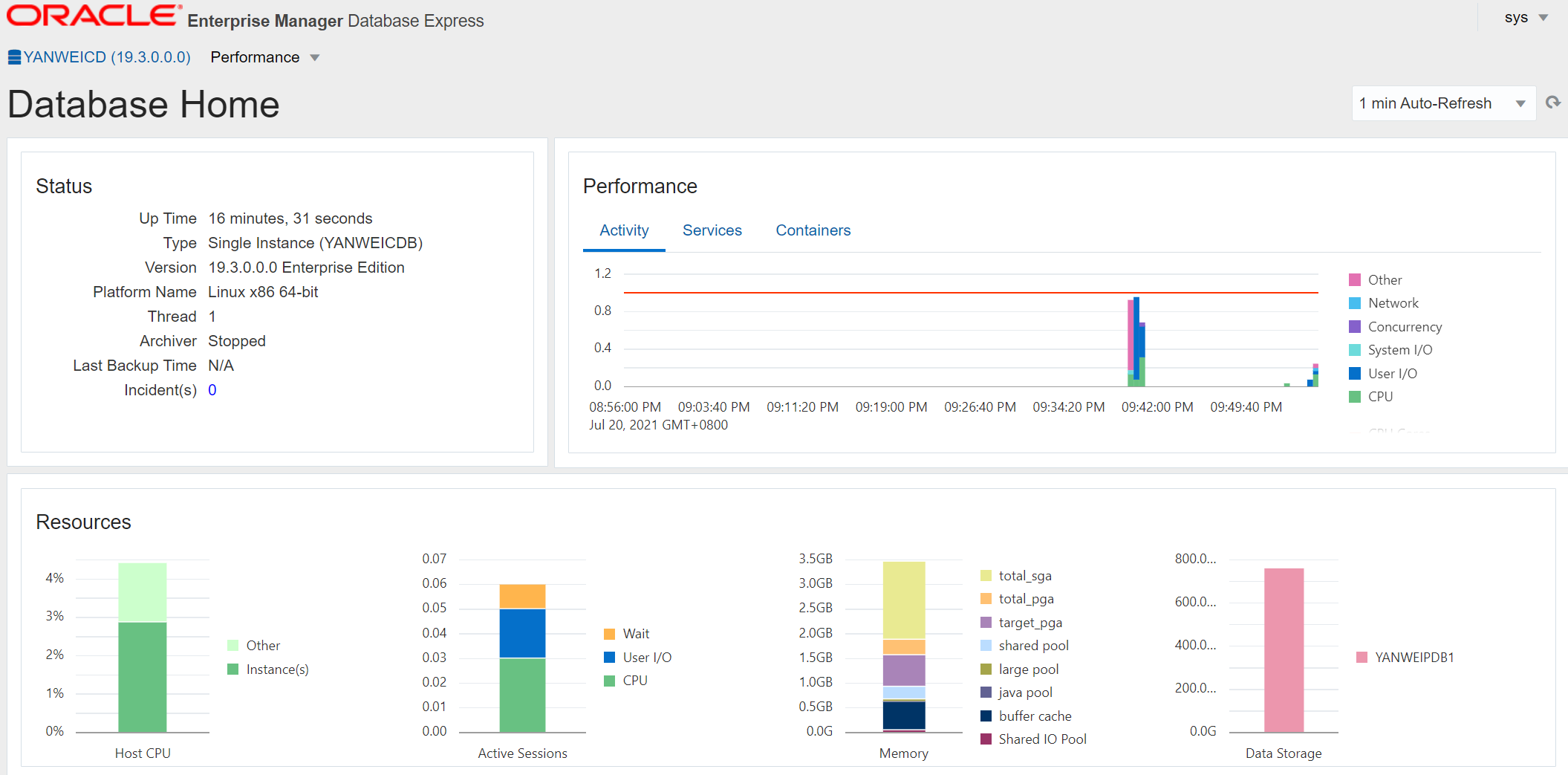
4.5 EM登录
select dbms_xdb_config.gethttpsport() from dual;
select dbms_xdb_config.gethttpport() from dual;

--参考配置命令
SQL> EXEC DBMS_XDB_CONFIG.SETHTTPSPORT(5500);
PL/SQL 过程已成功完成。

SQL> EXEC DBMS_XDB_CONFIG.SETHTTPPORT(5502);
PL/SQL 过程已成功完成。
---
5 总结
安装是快捷了,但是如何生产环境,我建议还是使用传统方式安装可靠可控。
最后修改时间:2021-07-28 14:17:53
「喜欢这篇文章,您的关注和赞赏是给作者最好的鼓励」
关注作者
【版权声明】本文为墨天轮用户原创内容,转载时必须标注文章的来源(墨天轮),文章链接,文章作者等基本信息,否则作者和墨天轮有权追究责任。如果您发现墨天轮中有涉嫌抄袭或者侵权的内容,欢迎发送邮件至:contact@modb.pro进行举报,并提供相关证据,一经查实,墨天轮将立刻删除相关内容。
