load data命令主要用于往Hive表导入数据,可以从本地文件导入,也可以从HDFS文件导入,命令的格式如下:
1.从本地把文件导入Hive表:
hive> load data local inpath '....../文件名'[overwrite] into table dest_tablepartition(dt='xxxxxx');
相当于复制,执行后源文件依然存在。写overwrite时表示覆盖目的路径下已存在的文件;不写时表示复制到目的路径下,之前已存在的文件和数据不变。
2.从HDFS把文件导入Hive表,把'local'关键字去掉:
hive> load data inpath 'hdfs:....../文件名'[overwrite] into table dest_tablepartition(dt='xxxxxx');
相当于剪切(移动),执行后源文件不再存在。写overwrite时表示覆盖目的路径下已存在的文件;不写时表示复制到目的路径下,之前已存在的文件和数据不变。
下面依次对这2种情况进行实验和总结。
1.从本地把文件导入Hive表
1.1 查看表结构:
$ hive -e "show create table db_test.sales_info_test"OKCREATE EXTERNAL TABLE `db_test.sales_info_test`(`c1` string COMMENT 'c1的注释',`c2` string COMMENT 'c2的注释',`c3` string COMMENT 'c3的注释',`c4` double COMMENT 'c4的注释',`c5` bigint COMMENT 'c5的注释')COMMENT '测试表'PARTITIONED BY (`dt` string)ROW FORMAT DELIMITEDFIELDS TERMINATED BY ',' -- 逗号作为字段值分隔符NULL DEFINED AS ''STORED AS INPUTFORMAT'org.apache.hadoop.mapred.TextInputFormat' -- text格式OUTPUTFORMAT'org.apache.hadoop.hive.ql.io.HiveIgnoreKeyTextOutputFormat'LOCATION'hdfs:....../db_test.db/sales_info_test'
1.2 开始导入,最好写上源文件的绝对路径:
$ cat sales_info.txt123,华为Mate10,31,999,20456,华为Mate30,31,2999,30789,小米5,31,800,201235,小米6,31,900,1004562,OPPO Findx,31,3900,50-- 字段之间是逗号分隔,与FIELDS TERMINATED BY ','一致$ hive -e "load data local inpath '/home/....../sales_info.txt'overwrite into table db_test.sales_info_testpartition(dt='2020-03-11') ";$ hive -e "select * from db_test.sales_info_test where dt = '2020-03-11'" ;OK123 华为Mate10 31 999.0 20 2020-03-11456 华为Mate30 31 2999.0 30 2020-03-11789 小米5 31 800.0 20 2020-03-111235 小米6 31 900.0 100 2020-03-114562 OPPO Findx 31 3900.0 50 2020-03-11Time taken: 0.814 seconds, Fetched: 5 row(s)-- 查询有数hive> dfs -du -h hdfs:....../sales_info_test ;131 hdfs:....../sales_info_test/dt=2020-03-11hive> dfs -du -h hdfs:....../sales_info_test/dt=2020-03-11 ;131 hdfs:....../sales_info_test/dt=2020-03-11/sales_info.txthive>-- 查询有数据文件,自动新建分区路径hive> show partitions sales_info_test ;OKdt=2020-03-11Time taken: 0.063 seconds, Fetched: 1 row(s)-- 查询有分区信息,自动新建分区信息$ ls -l......sales_info.txt-- 源数据文件依然存在
1.3 当然也可以不写绝对路径,在终端时,在进入hive时的目录下,如果有对应的源文件则不必写绝对路径:
$ ls -l......sales_info.txt -- 该目录下已存在源文件$ hivehive> load data local inpath 'sales_info.txt'overwrite into table db_test.sales_info_testpartition(dt='2020-03-11')
1.4 命令带有overwrite再次导入另一个文件:
$ hive -e "load data local inpath '/home/....../sales_info_v1.txt'overwrite into table db_test.sales_info_testpartition(dt='2020-03-11') ";hive> dfs -du -h hdfs:....../sales_info_test/dt=2020-03-11 ;141 hdfs:....../sales_info_test/dt=2020-03-11/sales_info_v1.txthive>-- overwrite会覆盖旧文件。之前的文件会被移动到回收站,现在是新导入的文件,
1.5 命令不带有overwrite再次导入另一个文件:
$ hive -e "load data local inpath '/home/....../sales_info_v3.txt'overwrite into table db_test.sales_info_testpartition(dt='2020-03-11') ";hive> dfs -du -h hdfs:....../sales_info_test/dt=2020-03-11 ;141 hdfs:....../sales_info_test/dt=2020-03-11/sales_info_v1.txt131 hdfs:....../sales_info_test/dt=2020-03-11/sales_info_v3.txthive> select * from sales_info_test where dt = '2020-03-11';OK123 华为1010Mate10 31 999.0 20 2020-03-11456 华为3030Mate30 31 2999.0 30 2020-03-11789 小米5 31 800.0 20 2020-03-111235 小米6 31 900.0 100 2020-03-114562 OPPO Findx 31 3900.0 50 2020-03-11123v3 华为Mate10 31 999.0 20 2020-03-11456v3 华为Mate30 31 2999.0 30 2020-03-11789v3 小米5 31 800.0 20 2020-03-111235v3 小米6 31 900.0 100 2020-03-114562v3 OPPO Findx 31 3900.0 50 2020-03-11Time taken: 0.05 seconds, Fetched: 10 row(s)-- 不带有overwrite导入相当于把文件复制过来,已存在的文件不变,记录增加
1.6 命令不带有overwrite再次导入一个同名文件:
$ hive -e "load data local inpath '/home/....../sales_info_v1.txt'overwrite into table db_test.sales_info_testpartition(dt='2020-03-11') ";hive> dfs -du -h hdfs:....../sales_info_test/dt=2020-03-11 ;141 hdfs:....../sales_info_test/dt=2020-03-11/sales_info_v1.txt141 hdfs:....../sales_info_test/dt=2020-03-11/sales_info_v1_copy_1.txt131 hdfs:....../sales_info_test/dt=2020-03-11/sales_info_v3.txt-- 如果导入同名文件,后导入的文件会被重命名,尾部添加'_copy_数字'
1.7 新建lzo表:
CREATE EXTERNAL TABLE `db_test.sales_info_lzo_test`(`c1` string COMMENT 'c1的注释',`c2` string COMMENT 'c2的注释',`c3` string COMMENT 'c3的注释',`c4` double COMMENT 'c4的注释',`c5` bigint COMMENT 'c5的注释')COMMENT '测试表lzo'PARTITIONED BY (`dt` string)ROW FORMAT DELIMITEDFIELDS TERMINATED BY ',' -- 逗号作为字段值分隔符NULL DEFINED AS ''STORED AS INPUTFORMAT'com.hadoop.mapred.DeprecatedLzoTextInputFormat' -- lzo格式OUTPUTFORMAT'org.apache.hadoop.hive.ql.io.HiveIgnoreKeyTextOutputFormat'
1.8 往lzo表导入这个txt数据文件,会发现数据查不到:
$ hive -e "load data local inpath '/home/....../sales_info_v3.txt'overwrite into table db_test.sales_info_lzo_testpartition(dt='2020-03-10')"$ hive -e "select * from db_test.sales_info_lzo_test where dt = '2020-03-10';"OKTime taken: 0.828 seconds-- 无记录$ hive -e "select count(*) from db_test.sales_info_lzo_test where dt = '2020-03-10';"OK5 --确实是有5条记录Time taken: 44.68 seconds, Fetched: 1 row(s)hive> dfs -du -h hdfs:....../sales_info_lzo_test/dt=2020-03-10 ;148 hdfs:....../sales_info_lzo_test/dt=2020-03-10/sales_info_v3.txthive>-- 确实存在数据文件
1.9 现在导入sales_info_v2.txt文件,
$ cat sales_info_v2.txt0123v2,华为Mate10,31,999,200456v2,华为Mate30,31,2999,300789v2,小米5,31,800,2001235v2,小米6,31,900,10004562v2,OPPO Findx,31,3900,50$ hive -e "load data local inpath '/home/....../sales_info_v2.txt'overwrite into table db_test.sales_info_testpartition(dt='2020-03-11') ";hive> dfs -du -h hdfs:....../sales_info_test/dt=2020-03-11 ;141 hdfs:....../sales_info_test/dt=2020-03-11/sales_info_v1.txt141 hdfs:....../sales_info_test/dt=2020-03-11/sales_info_v1_copy_1.txt151 hdfs:....../sales_info_test/dt=2020-03-11/sales_info_v2.txt131 hdfs:....../sales_info_test/dt=2020-03-11/sales_info_v3.txthive> select * from sales_info_test where dt = '2020-03-11';-- 查询后的结果如下,每个文件都是5条记录,-- 顺序与文件名的顺序相同,并不是按导入的先后顺序把记录排序
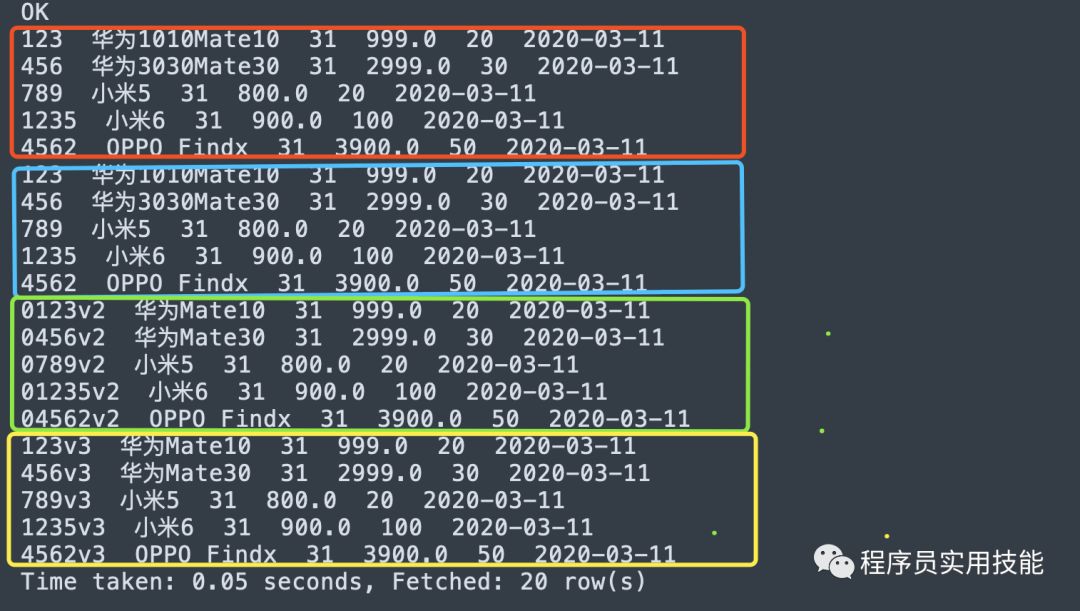
从本地导入文件,总结如下:
目的表要先存在,不然报错。
如果目的表的该分区路径和分区信息不存在,导入时会自动新建分区路径和添加分区信息,不用add partition ,能直接查数。
这里的本地是指安装Hive的机器,并不是跳板机或其他机器。
该命令相当于复制,把源文件复制到指定分区路径下,源文件依然存在。
导入的文件格式要与表的INPUTFORMAT格式相同才能查到数据,比如这里表的INPUTFORMAT是text格式 所以导入也需要txt格式的文件,不然查不到数。新手非常容易犯这个错!
写overwrite时,相当于覆盖,目的路径下已存在的文件都会被覆盖(不管之前的文件有多少个,不管之前的文件名称与即将导入的文件名称是否重复) 。目的路径下已存在的文件实际上是全被移动到回收站。
不写overwrite时,相当于复制,目的路径下已存在的文件不变,如果存在同名文件,后面复制过来的文件会被重命名(尾部添加'_copy_数字')。
把文件复制过来后,文件按文件名升序排序,文件的先后顺序就是记录的先后顺序。后导入过来的记录顺序与文件名的顺序相同,并不是按导入的时间先后排序。
最好写上源文件的绝对路径。
2.从HDFS把文件导入Hive表,把'local'关键字去掉:
2.1 新建测试表2:sales_info_test2,表结构与sales_info_test一致,再执行导入:
hive> load data inpath 'hdfs:......sales_info_test/dt=2020-03-11/sales_info_v1.txt'overwrite into table db_test.sales_info_test2partition(dt = '2020-03-08');hive> dfs -du -h hdfs:......sales_info_test/dt=2020-03-11 ;141 hdfs:....../sales_info_test/dt=2020-03-11/sales_info_v1_copy_1.txt151 hdfs:....../sales_info_test/dt=2020-03-11/sales_info_v2.txt131 hdfs:....../sales_info_test/dt=2020-03-11/sales_info_v3.txt-- 源数据文件sales_info_v1.txt已不存在hive> dfs -du -h hdfs:....../sales_info_test2/dt=2020-03-08 ;131 hdfs:....../sales_info_test2/dt=2020-03-08/sales_info_v1.txt-- 有数据文件,自动创建分区路径hive> show partitions sales_info_test2 ;OKdt=2020-03-08Time taken: 0.063 seconds, Fetched: 1 row(s)-- 查询有分区信息,自动新建分区信息hive> select * from db_test.sales_info_test2 ;OK123 华为Mate10 31 999.0 20 2020-03-08456 华为Mate30 31 2999.0 30 2020-03-08789 小米5 31 800.0 20 2020-03-081235 小米6 31 900.0 100 2020-03-084562 OPPO Findx 31 3900.0 50 2020-03-08Time taken: 0.407 seconds, Fetched: 5 row(s)-- 查询已有数据
再重复上面的实验,可总结如下:
目的表要先存在,不然报错。
如果目的表的该分区路径和分区信息不存在,导入时会自动新建分区路径和添加分区信息,不用add partition ,能直接查数。
该命令相当于剪切,把源文件移动到指定分区路径下,源文件则不再存在。
导入的文件格式要与表的INPUTFORMAT格式相同才能查到数据,比如这里表的INPUTFORMAT是text格式 所以导入也需要txt格式的文件,不然查不到数。新手非常容易犯这个错!
写overwrite时,相当于覆盖,目的路径下已存在的文件都会被覆盖(不管之前的文件有多少个,不管之前的文件名称与即将导入的文件名称是否重复) 。目的路径下已存在的文件实际上是全被移动到回收站。
不写overwrite时,相当于复制,目的路径下已存在的文件不变,如果存在同名文件,后面复制过来的文件会被重命名(尾部添加'_copy_数字')。
把文件复制过来后,文件按文件名升序排序,文件的先后顺序就是记录的先后顺序。后导入过来的记录顺序与文件名的顺序相同,并不是按导入的时间先后排序。
历史相关文章:
「欢迎关注,掌握工作实用技能」