



事务ID:
无论事务何时开始,都会由事务管理器分配一个唯一的事务ID(txid)。PostgreSQL 的txid 由32位无符号整数组成。2^32=4294967296, 也就是有42亿左右个事务。在事务开始后,使用内置函数 txid_current()会返回当前事务id。
example:ivandb=# begin;BEGINivandb=# select txid_current();txid_current--------------653(1 row)ivandb=# insert into t3 values('ivan4');
PostgreSQL 保留以下三个特别的事务ID:
0:表示无效事务ID。
1:表示初始化事务id,只在初始化数据库集蔟的时候使用。
2:表示冻结事务id。(这个很重要)
因为在PostgreSQL中,事务ID有限,所以事务ID的使用是循环的。对一个事务来说,在它之前的21亿个事务都属于过去,之后的21亿属于未来。
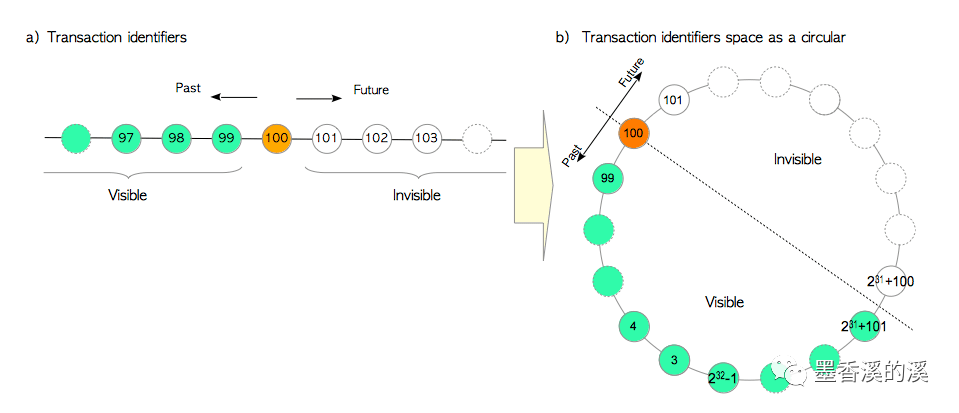
事务状态:
在PostgreSQL中定义了四种事务状态,分别是IN_PROGRESS(进行中),CMMITTED(已提交),ABORTED(回滚,中断)以及SUB_COMMITTED(子事务已提交)
\src\include\access\clog.h/** Possible transaction statuses --- note that all-zeroes is the initial* state.** A "subcommitted" transaction is a committed subtransaction whose parent* hasn't committed or aborted yet.*/typedef int XidStatus;#define TRANSACTION_STATUS_IN_PROGRESS 0x00#define TRANSACTION_STATUS_COMMITTED 0x01#define TRANSACTION_STATUS_ABORTED 0x02#define TRANSACTION_STATUS_SUB_COMMITTED 0x03
commit log:
commit log的物理文件存在$PGDATA/pg_xact 目录下。
Clog 会在启动的时候加载到内存里面,一般修改也会在内存中操作。所以要把commit log刷到物理文件,需要执行checkpoint.
具体定义:\src\backend\access\transam\clog.c
/** Defines for CLOG page sizes. A page is the same BLCKSZ as is used* everywhere else in Postgres.*定义CLOG 的页大小,页的大小应该跟数据库页面大小一致。* Note: because TransactionIds are 32 bits and wrap around at 0xFFFFFFFF,* CLOG page numbering also wraps around at 0xFFFFFFFF/CLOG_XACTS_PER_PAGE,* and CLOG segment numbering at* 0xFFFFFFFF/CLOG_XACTS_PER_PAGE/SLRU_PAGES_PER_SEGMENT. We need take no* explicit notice of that fact in this module, except when comparing segment* and page numbers in TruncateCLOG (see CLOGPagePrecedes).*//* We need two bits per xact, so four xacts fit in a byte */#define CLOG_BITS_PER_XACT 2 -- 2bit 记录一个事务#define CLOG_XACTS_PER_BYTE 4 -- 一字节记录4个事务#define CLOG_XACTS_PER_PAGE (BLCKSZ * CLOG_XACTS_PER_BYTE) -- 一页记录(8196*4=32784个事务)#define CLOG_XACT_BITMASK ((1 << CLOG_BITS_PER_XACT) - 1)#define TransactionIdToPage(xid) ((xid) (TransactionId) CLOG_XACTS_PER_PAGE) --txid存在于哪页 >> txid/(BLCKSZ*4)#define TransactionIdToPgIndex(xid) ((xid) % (TransactionId) CLOG_XACTS_PER_PAGE) --txid 在页中的偏移量 txid%(8192*4)#define TransactionIdToByte(xid) (TransactionIdToPgIndex(xid) / CLOG_XACTS_PER_BYTE) --页内的第几个byte (txid%(8192*4))/4#define TransactionIdToBIndex(xid) ((xid) % (TransactionId) CLOG_XACTS_PER_BYTE) --该字节中的第2*n bits.(n=[0-3]) xid%4
note:\src\include\access\slru.h
/** Define SLRU segment size. A page is the same BLCKSZ as is used everywhere* else in Postgres. The segment size can be chosen somewhat arbitrarily;* we make it 32 pages by default, or 256Kb, i.e. 1M transactions for CLOG* or 64K transactions for SUBTRANS.** Note: because TransactionIds are 32 bits and wrap around at 0xFFFFFFFF,* page numbering also wraps around at 0xFFFFFFFF/xxxx_XACTS_PER_PAGE (where* xxxx is CLOG or SUBTRANS, respectively), and segment numbering at* 0xFFFFFFFF/xxxx_XACTS_PER_PAGE/SLRU_PAGES_PER_SEGMENT. We need* take no explicit notice of that fact in slru.c, except when comparing* segment and page numbers in SimpleLruTruncate (see PagePrecedes()).*/#define SLRU_PAGES_PER_SEGMENT 32
example:
打开四个session:
同时执行以下SQL:
begin;select txid_current();insert into t3 values('ivan4');
获取了四个事务id: 660,661,662,663,根据以上算法,这四个事务ID会在同一页,同一个byte 上。
--存在0号页
postgres=# select 660/(8196*4),661/(8196*4),662/(8196*4),663/(8196*4);?column? | ?column? | ?column? | ?column?----------+----------+----------+----------0 | 0 | 0 | 0
--存在于页中的偏移量
postgres=# select 660%(8196*4),661%(8196*4),662%(8196*4),663%(8196*4);?column? | ?column? | ?column? | ?column?----------+----------+----------+----------660 | 661 | 662 | 663
--页内第165个字节。
postgres=# select (660%(8196*4))/4,(661%(8196*4))/4,(662%(8196*4))/4,(663%(8196*4))/4;?column? | ?column? | ?column? | ?column?----------+----------+----------+----------165 | 165 | 165 | 165
--字节内偏移量(2bit 为一个状态)
postgres=# select 660%4,661%4,662%4,663%4;?column? | ?column? | ?column? | ?column?----------+----------+----------+----------0 | 1 | 2 | 3
--查看clog.
postgres=# checkpoint;CHECKPOINT
[postgres@flyme pg_xact]$ ls -lrttotal 8-rw------- 1 postgres postgres 8192 Apr 5 22:09 0000
note: 可以看到此时的clog 是8k,也就是一个页。(0 号)
[postgres@flyme pg_xact]$ hexdump -C ./0000 -s 165 -n 1000000a5 00 |.|000000a6
此时的状态为0, 因为4个session 都属于未提交状态。
--提交事务660
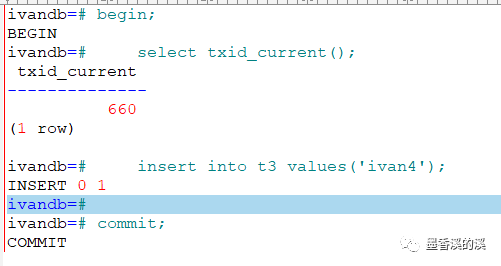
执行checkpoint 刷新clog. 可以看到物理clog 已经刷新。
[postgres@flyme pg_xact]$ ls -lrttotal 8-rw------- 1 postgres postgres 8192 Apr 5 22:21 0000[postgres@flyme pg_xact]$ dateSun Apr 5 22:21:56 CST 2020
dump 该bytes.
[postgres@flyme pg_xact]$ hexdump -C ./0000 -s 165 -n 1000000a5 01 |.|000000a6
为字节为1. 转换为8位二进制:
postgres=# select 01::bit(8);bit----------00000001
可以看到,该字节的0号位已经更新为已提交状态。
--回滚事务662
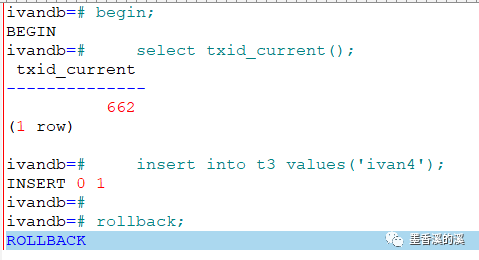
执行checkpoint 刷新clog。
dump 该bytes.
[postgres@flyme pg_xact]$ hexdump -C ./0000 -s 165 -n 1000000a5 21 |!|000000a6
note:此处有坑,21为16进制数据。
转换为8位二进制:
postgres=# select x'21'::bit(8);bit----------00100001(1 row)
可以看到该字节的2号位,已经更新为aborted 状态。
其他验证类似。此处不再举例。
