



作者
digoal
日期
2016-11-10
标签
namespace , veth pair , OpenvSwitch , OVS , bridge , VLAN , VM , 虚拟化 , 虚拟网桥
背景
在Linux虚拟化技术中,网络层面,通常除了网桥或虚拟交换机技术外。
还有一个重要的就是namespace和veth pair。
net namespace主要是隔离网络设备本身,例如在Linux 中有多个容器,每个容器对应各自的namespace,我们可以把不同的网络设备指派给不同的容器。
veth pair你可以理解为使用网线连接好的两个接口,把两个端口放到两个namespace中,那么这两个namespace就能打通。
如果要把namespace和本地网络打通,也可以创建veth设备,把两端分别放入本地和namespace。
下面是例子
http://www.cnblogs.com/hustcat/p/3928261.html
network namespace
创建network namespace
```
ip netns add blue
ip netns list
blue ```
添加网口到namespace
先创建veth
```
ip link add veth0 type veth peer name veth1
```
在当前namespace可以看到veth0和veth1
```
ip link list
1: lo:
2: eth0:
3: veth1:
4: veth0:
将veth1加到namespace “blue”
```
ip link set veth1 netns blue
```
此时,当前namepapce只能看到veth0。

通过如下命令可以查看blue namespace的网口
```
ip netns exec blue ip link list
```

配置network namespace的网口
通过ip netns exec可以配置namespace的网口
```
ip netns exec blue ifconfig veth1 172.17.42.2/16 up
```

network namespace的网口与物理网卡的通信
通过bridge来实现。参见veth pair一节。
主要参考
http://blog.scottlowe.org/2013/09/04/introducing-linux-network-namespaces/
veth pair
veth pair是用于不同network namespace间进行通信的方式,veth pair将一个network namespace数据发往另一个network namespace的veth。如下:
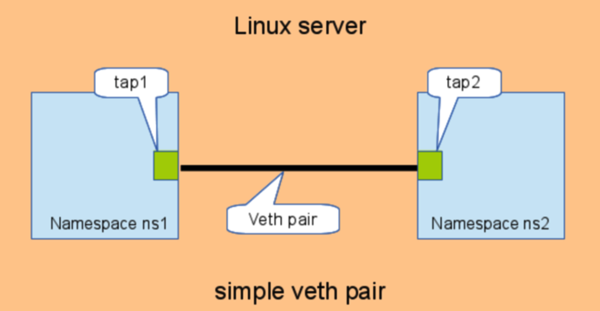
```
add the namespaces
ip netns add ns1
ip netns add ns2
create the veth pair
ip link add tap1 type veth peer name tap2
move the interfaces to the namespaces
ip link set tap1 netns ns1
ip link set tap2 netns ns2
bring up the links
ip netns exec ns1 ip link set dev tap1 up
ip netns exec ns2 ip link set dev tap2 up ```
如果多个network namespace需要进行通信,则需要借助bridge:
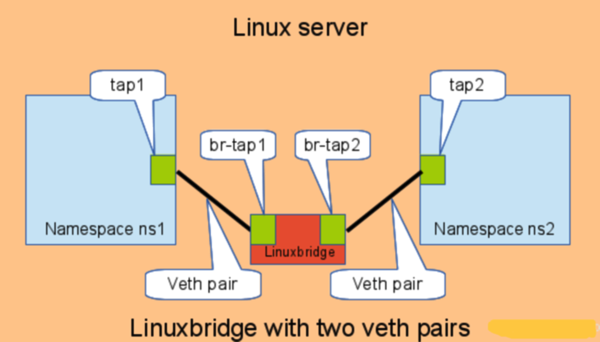
```
add the namespaces
ip netns add ns1
ip netns add ns2
create the switch
BRIDGE=br-test
brctl addbr $BRIDGE
brctl stp $BRIDGE off
ip link set dev $BRIDGE up
PORT 1
create a port pair
ip link add tap1 type veth peer name br-tap1
attach one side to linuxbridge
brctl addif br-test br-tap1
attach the other side to namespace
ip link set tap1 netns ns1
set the ports to up
ip netns exec ns1 ip link set dev tap1 up
ip link set dev br-tap1 up
PORT 2
create a port pair
ip link add tap2 type veth peer name br-tap2
attach one side to linuxbridge
brctl addif br-test br-tap2
attach the other side to namespace
ip link set tap2 netns ns2
set the ports to up
ip netns exec ns2 ip link set dev tap2 up
ip link set dev br-tap2 up
```
内核实现
veth的实现与loopback interface类似,比较简单:
``` //drivers/net/veth.c
static netdev_tx_t veth_xmit(struct sk_buff skb, struct net_device dev)
{
struct net_device *rcv = NULL;
struct veth_priv priv, rcv_priv;
priv = netdev_priv(dev);
rcv = priv->peer;
rcv_priv = netdev_priv(rcv);
stats = this_cpu_ptr(priv->stats);
length = skb->len;
//转发给peer
if (dev_forward_skb(rcv, skb) != NET_RX_SUCCESS)
goto rx_drop; ```
NETIF_F_NETNS_LOCAL
NETIF_F_NETNS_LOCAL是网络设备的一个特性,设置该特性的网络设备,不允许在不同network namespace间移动。这类设备也叫做本地设备(local devices)。
Loopback,VXLAN,PPP,bridge都是这类设备。可以通过ethtool -k,或者ethtool –show- features查看该值:
```
ethtool -k br0
netns-local: on [fixed] ```
如果对这类设备network namespace,会报下面的错误:
```
ip link set br0 netns ns1
RTNETLINK answers: Invalid argument ```
参考《Resource management:Linux kernel Namespaces and cgroups》
主要参考
http://www.opencloudblog.com/?p=66
PostgreSQL 许愿链接
您的愿望将传达给PG kernel hacker、数据库厂商等, 帮助提高数据库产品质量和功能, 说不定下一个PG版本就有您提出的功能点. 针对非常好的提议,奖励限量版PG文化衫、纪念品、贴纸、PG热门书籍等,奖品丰富,快来许愿。开不开森.
9.9元购买3个月阿里云RDS PostgreSQL实例
PostgreSQL 解决方案集合
德哥 / digoal's github - 公益是一辈子的事.

