



作者
digoal
日期
2018-07-25
标签
PostgreSQL , 热力图 , 空间切割 , 并行计算 , parallel safe
背景
结合空间数据,计算基于地理位置信息的热力图,在空间数据可视化场景中是一个非常常见的需求。
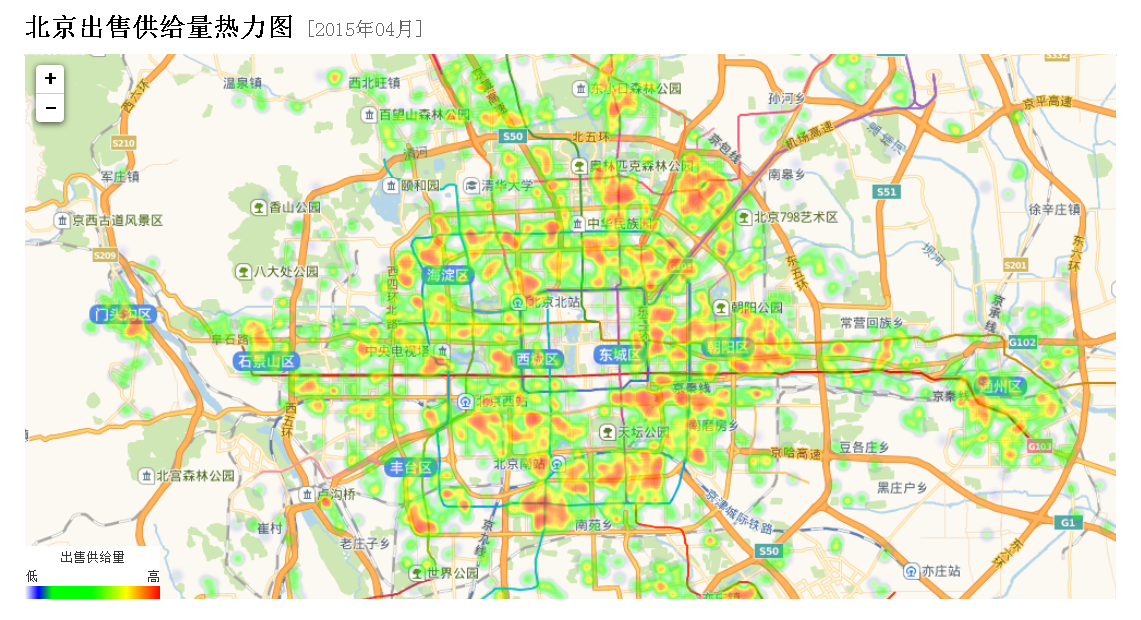
结合流计算,可以实现实时的热力图计算。
结合并行计算,可以高效率的对海量数据进行热力图计算。
计算热力图中bucket的方法
https://www.postgresql.org/docs/devel/static/functions-math.html
```
width_bucket(operand dp, b1 dp, b2 dp, count int)
int
return the bucket number to which operand would be assigned in a histogram having count equal-width buckets spanning the range b1 to b2;
returns 0 or count+1 for an input outside the range
width_bucket(5.35, 0.024, 10.06, 5)
3
width_bucket(operand numeric, b1 numeric, b2 numeric, count int)
int
return the bucket number to which operand would be assigned in a histogram having count equal-width buckets spanning the range b1 to b2;
returns 0 or count+1 for an input outside the range
width_bucket(5.35, 0.024, 10.06, 5)
3
```
例如
```
postgres=# select width_bucket(1,1,10,10);
width_bucket
1
(1 row)
postgres=# select width_bucket(0,1,10,10);
width_bucket
0
(1 row)
postgres=# select width_bucket(10,1,10,10);
width_bucket
11
(1 row)
postgres=# select width_bucket(9.9,1,10,10);
width_bucket
10
(1 row)
```
```
width_bucket(
p1 -- 输入值
p2 -- 边界值(最小,包含)
p3 -- 边界值(最大,不包含)
p4 -- 切割份数
)
当小于最小边界值时,返回0
当大于等于最大边界值时,返回p4+1
```
例如x轴的边界是1,10000,y轴的边界是1,10000。
x,y两个方向分别切割为50个bucket,一共2500个bucket,求一个点落在哪个bucket:
width_bucket(pos[0], 1, 10001, 50),  -- x轴落在哪列bucket
width_bucket(pos[1], 1, 10001, 50),  -- y轴落在哪列bucket
例子
1、建表
create table tbl_pos(
  id int,
  info text,   -- 信息
  val float8,  -- 取值
  pos point    -- 位置
);
2、写入1亿个点
```
vi test.sql
insert into tbl_pos values ( random()100000, md5(random()::text), random()1000, point((random()10000::int), (random()10000::int)) );
pgbench -M prepared -n -r -P 1 -f ./test.sql -c 50 -j 50 -t 2000000
```
3、热力图计算
强制并行计算
postgres=# set min_parallel_table_scan_size =0;
SET
postgres=# set min_parallel_index_scan_size =0;
SET
postgres=# set parallel_setup_cost =0;
SET
postgres=# set parallel_tuple_cost =0;
SET
postgres=# set max_parallel_workers_per_gather =28;
SET
postgres=# alter table tbl_pos set (parallel_workers =28);
ALTER TABLE
热力图计算SQL,效率还不错:
```
select
width_bucket(pos[0], 0, 10001, 50), -- x轴落在哪列bucket
width_bucket(pos[1], 0, 10001, 50), -- y轴落在哪列bucket
avg(val),
min(val),
max(val),
stddev(val),
count(*)
from tbl_pos
group by 1,2;
QUERY PLAN
Finalize GroupAggregate (cost=1252812.00..1252928.00 rows=200 width=48) (actual time=2632.324..2672.909 rows=2500 loops=1)
Group Key: (width_bucket(pos[0], '0'::double precision, '10001'::double precision, 50)), (width_bucket(pos[1], '0'::double precision, '10001'::double precision, 50))
-> Sort (cost=1252812.00..1252826.00 rows=5600 width=96) (actual time=2632.290..2648.544 rows=72500 loops=1)
Sort Key: (width_bucket(pos[0], '0'::double precision, '10001'::double precision, 50)), (width_bucket(pos[1], '0'::double precision, '10001'::double precision, 50))
Sort Method: external merge Disk: 9824kB
-> Gather (cost=1252460.37..1252463.37 rows=5600 width=96) (actual time=2532.132..2564.905 rows=72500 loops=1)
Workers Planned: 28
Workers Launched: 28
-> Partial HashAggregate (cost=1252460.37..1252463.37 rows=200 width=96) (actual time=2522.428..2523.559 rows=2500 loops=29)
Group Key: width_bucket(pos[0], '0'::double precision, '10001'::double precision, 50), width_bucket(pos[1], '0'::double precision, '10001'::double precision, 50)
-> Parallel Seq Scan on tbl_pos (cost=0.00..1189951.79 rows=3571919 width=16) (actual time=0.030..1302.462 rows=3448276 loops=29)
Planning time: 0.154 ms
Execution time: 2676.288 ms
(13 rows)
```
样本
postgres=# select
  width_bucket(pos[0], 0, 10001, 10),  -- x轴落在哪列bucket
  width_bucket(pos[1], 0, 10001, 10),  -- y轴落在哪列bucket
  avg(val),
  min(val),
  max(val),
  stddev(val),
  count(*)
from tbl_pos
  group by 1,2;
 width_bucket | width_bucket |       avg        |         min          |       max        |      stddev      |  count
--------------+--------------+------------------+----------------------+------------------+------------------+---------
            1 |            1 | 499.638668709335 | 0.000637955963611603 | 999.998900108039 | 288.562996477433 | 1002686
            1 |            2 | 499.772206697849 |  0.00113388523459435 | 999.999452847987 | 288.505295714968 | 1000891
            1 |            3 |  500.44455454312 |  0.00135181471705437 | 999.997937120497 |  288.45102360668 |  999911
            1 |            4 | 500.234164866407 |  0.00214902684092522 | 999.999100342393 | 288.707167816157 | 1000473
            1 |            5 | 499.793710464008 | 0.000125262886285782 | 999.999575316906 | 288.672382834812 |  999036
            1 |            6 | 500.366854944369 |  0.00212574377655983 | 999.999585561454 | 288.558891852102 |  998866
            1 |            7 | 499.825623783545 | 0.000547617673873901 | 999.999700114131 | 288.582317248892 | 1000902
            1 |            8 | 499.393569281915 |  0.00330200418829918 | 999.999083112925 | 288.561094278074 | 1000193
            1 |            9 | 499.713056248083 |  0.00243959948420525 | 999.999618623406 | 288.709997455837 | 1000017
            1 |           10 | 500.312448499828 |  0.00238511711359024 | 999.999850522727 | 288.865560266629 |  998469
            2 |            1 | 499.848655048635 |  0.00146497040987015 | 999.999508261681 | 288.639402346948 | 1000917
            2 |            2 | 500.084846394446 |   0.0005294568836689 | 999.999178107828 | 288.704696698903 |  997594
            2 |            3 |  499.99258346144 |  0.00163912773132324 |  999.99839020893 | 288.507497234907 | 1001310
            2 |            4 | 499.817295558208 |  0.00184541568160057 | 999.997940845788 | 288.767308817191 | 1000607
            2 |            5 |  499.87314410326 |  0.00135786831378937 | 999.999302905053 | 288.593077096809 |  998588
            2 |            6 | 499.825467223571 | 0.000847037881612778 | 999.998526647687 | 288.789326889728 | 1000426
            2 |            7 |  499.50907809986 |  7.4971467256546e-05 |   999.9989871867 | 288.535982009648 | 1001179
            2 |            8 | 499.850422744194 | 0.000966247171163559 | 999.999921303242 | 288.516738657089 | 1000745
            2 |            9 | 500.110417044655 | 0.000320374965667725 | 999.999660998583 |  288.77420504779 |  999978
            2 |           10 | 500.135548004555 | 0.000233296304941177 | 999.999852851033 | 288.520964728395 |  998363
........
取出数据,即可渲染。
结合流计算,可以在FEED数据写入时,实时的进行计算。而不是QUERY发起时计算。参考本文末尾的文档。
小结
PostgreSQL非常适合于时空数据的分析,包括本文提到的热力图分析。
使用并行计算,即查即算,1亿个点,差不多耗时2.7秒。
如果使用流式计算,写入时即算,查询时查的是结果,效率更高。
参考
1、求bucket值
https://www.postgresql.org/docs/devel/static/functions-math.html
```
width_bucket(operand dp, b1 dp, b2 dp, count int)
int
return the bucket number to which operand would be assigned in a histogram having count equal-width buckets spanning the range b1 to b2;
returns 0 or count+1 for an input outside the range
width_bucket(5.35, 0.024, 10.06, 5)
3
width_bucket(operand numeric, b1 numeric, b2 numeric, count int)
int
return the bucket number to which operand would be assigned in a histogram having count equal-width buckets spanning the range b1 to b2;
returns 0 or count+1 for an input outside the range
width_bucket(5.35, 0.024, 10.06, 5)
3
```
2、求geometry对象的x,y,z值
http://postgis.net/docs/manual-2.4/reference.html
ST_X — Return the X coordinate of the point, or NULL if not available. Input must be a point.
ST_XMax — Returns X maxima of a bounding box 2d or 3d or a geometry.
ST_XMin — Returns X minima of a bounding box 2d or 3d or a geometry.
ST_Y — Return the Y coordinate of the point, or NULL if not available. Input must be a point.
ST_YMax — Returns Y maxima of a bounding box 2d or 3d or a geometry.
ST_YMin — Returns Y minima of a bounding box 2d or 3d or a geometry.
ST_Z — Return the Z coordinate of the point, or NULL if not available. Input must be a point.
ST_ZMax — Returns Z minima of a bounding box 2d or 3d or a geometry.
ST_Zmflag — Returns ZM (dimension semantic) flag of the geometries as a small int. Values are: 0=2d, 1=3dm, 2=3dz, 3=4d.
ST_ZMin — Returns Z minima of a bounding box 2d or 3d or a geometry.
3、求point对象的x,y值
```
point[0]
point[1]
```
4、PostgreSQL 并行计算
《PostgreSQL 11 preview - 并行计算 增强 汇总》
《PostgreSQL 单表并行bulkload的extend file lock 冲突问题解决》
《阿里云RDS PostgreSQL OSS 外部表实践 - (dblink异步调用封装并行) 从OSS并行导入数据》
《PostgreSQL 变态并行拉取单表的方法 - 按块并行(按行号(ctid)并行) + dblink 异步调用》
《PostgreSQL 11 preview - 多阶段并行聚合array_agg, string_agg》
《PostgreSQL 11 preview - 分区表智能并行聚合、分组计算(已类似MPP架构,性能暴增)》
《PostgreSQL Oracle 兼容性之 - 自定义并行聚合函数 PARALLEL_ENABLE AGGREGATE》
《PostgreSQL VOPS 向量计算 + DBLINK异步并行 - 单实例 10亿 聚合计算跑进2秒》
《PostgreSQL 相似搜索分布式架构设计与实践 - dblink异步调用与多机并行(远程 游标+记录 UDF实例)》
《PostgreSQL 11 preview - Parallel Append(包括 union all\分区查询) (多表并行计算) sharding架构并行计算核心功能之一》
《PostgreSQL 11 preview - 并行排序、并行索引 (性能线性暴增) 单实例100亿TOP-K仅40秒》
《PostgreSQL 11 preview - 分区表智能并行JOIN (已类似MPP架构,性能暴增)》
《PostgreSQL 10 自定义并行计算聚合函数的原理与实践 - (含array_agg合并多个数组为单个一元数组的例子)》
《惊天性能!单RDS PostgreSQL实例 支撑 2000亿 - 实时标签透视案例 (含dblink异步并行调用)》
《HTAP数据库 PostgreSQL 场景与性能测试之 23 - (OLAP) 并行计算》
《PostgreSQL 如何让 列存(外部列存) 并行起来》
《阿里云RDS PostgreSQL OSS 外部表实践 - (dblink异步调用封装并行) 数据并行导出到OSS》
《PostgreSQL 并行写入堆表,如何保证时序线性存储 - BRIN索引优化》
《PostgreSQL 10.0 preview 功能增强 - 逻辑复制支持并行COPY初始化数据》
《PostgreSQL 10.0 preview 多核并行增强 - 控制集群并行度》
《PostgreSQL 10.0 preview 多核并行增强 - 索引扫描、子查询、VACUUM、fdw/csp钩子》
《PostgreSQL 10.0 preview sharding增强 - 支持Append节点并行》
《PostgreSQL 10.0 preview 多核并行增强 - 并行hash join支持shared hashdata, 节约哈希表内存提高效率》
《PostgreSQL 10.0 preview sharding增强 - postgres_fdw 多节点异步并行执行》
《PostgreSQL 10.0 preview 多核并行增强 - tuplesort 多核并行创建索引》
《PostGIS 地理信息、栅格数据 多核并行处理(st_memunion, st_union)》
《分析加速引擎黑科技 - LLVM、列存、多核并行、算子复用 大联姻 - 一起来开启PostgreSQL的百宝箱》
《PostgreSQL 9.6 并行计算 在 xfs, ext4 下的表现对比》
《PostgreSQL 9.6 并行计算 优化器算法浅析 - 以及如何强制并行度》
《PostgreSQL 9.6 引领开源数据库攻克多核并行计算难题》
5、流计算
《PostgreSQL 流式处理应用实践 - 二手商品实时归类(异步消息notify/listen、阅后即焚)》
《PostgreSQL 流计算插件pipelinedb sharding 集群版原理介绍 - 一个全功能的分布式流计算引擎》
《[未完待续] PostgreSQL 流式fft傅里叶变换 (plpython + numpy + 数据库流式计算)》
《PostgreSQL count-min sketch top-n 概率计算插件 cms_topn (结合窗口实现同比、环比、滑窗分析等) - 流计算核心功能之一》
《阿里云RDS PostgreSQL varbitx实践 - 流式标签 (阅后即焚流式批量计算) - 万亿级,任意标签圈人,毫秒响应》
《HTAP数据库 PostgreSQL 场景与性能测试之 32 - (OLTP) 高吞吐数据进出(堆存、行扫、无需索引) - 阅后即焚(JSON + 函数流式计算)》
《HTAP数据库 PostgreSQL 场景与性能测试之 31 - (OLTP) 高吞吐数据进出(堆存、行扫、无需索引) - 阅后即焚(读写大吞吐并测)》
《HTAP数据库 PostgreSQL 场景与性能测试之 27 - (OLTP) 物联网 - FEED日志, 流式处理 与 阅后即焚 (CTE)》
《[未完待续] 流式机器学习(online machine learning) - pipelineDB with plR and plPython》
《[未完待续] PostgreSQL 分布式流式计算 最佳实践》
《打造云端流计算、在线业务、数据分析的业务数据闭环 - 阿里云RDS、HybridDB for PostgreSQL最佳实践》
《PostgreSQL 10.0 preview 性能增强 - libpq支持pipeline batch模式减少网络交互提升性能》
《流计算风云再起 - PostgreSQL携PipelineDB力挺IoT》
《在PostgreSQL中实现update | delete limit - CTID扫描实践 (高效阅后即焚)》
《PostgreSQL Oracle 兼容性之 - PL/SQL pipelined》
《PostgreSQL 流计算指 pipelinedb 实时处理Kafka消息流》
PostgreSQL 许愿链接
您的愿望将传达给PG kernel hacker、数据库厂商等, 帮助提高数据库产品质量和功能, 说不定下一个PG版本就有您提出的功能点. 针对非常好的提议,奖励限量版PG文化衫、纪念品、贴纸、PG热门书籍等,奖品丰富,快来许愿。开不开森.
9.9元购买3个月阿里云RDS PostgreSQL实例
PostgreSQL 解决方案集合
德哥 / digoal's github - 公益是一辈子的事.

