作者
digoal
日期
2019-11-01
标签
PostgreSQL , haproxy , master listen , slave(s) listen , ha , stream replication , session loadbalance , xinetd
背景
HAProxy是一个非常流行的4层、7层(http)负载均衡与会话路由软件,效率也非常高。
虽然他没有办法直接实现pg的读写分离,但是可以实现比较简单的几类PG接入点(监听点)以及会话failover管理:
1、一个或多个主实例。(多个主实例通常是指如下架构:pg-xl的coordinator, citus的coordinator。或者完全对等的multi-master节点。)
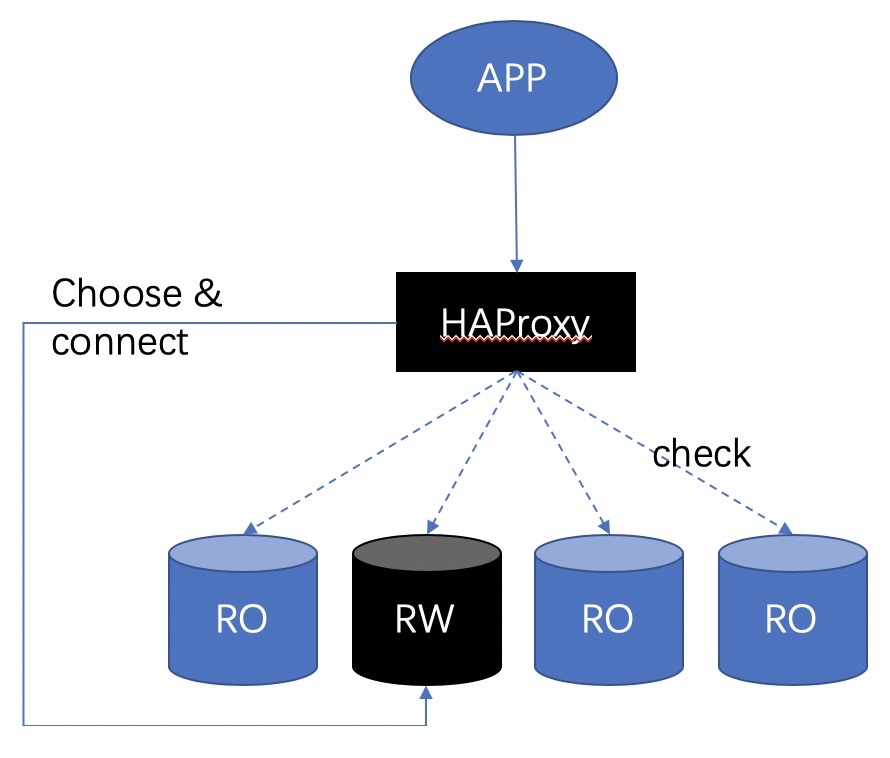
当会话对应的后端数据库检测到不符合预期状态时,主动断开会话,重联。(failover 会话)
rw点切换后,主动断开这个节点的会话,迁移到新的rw节点
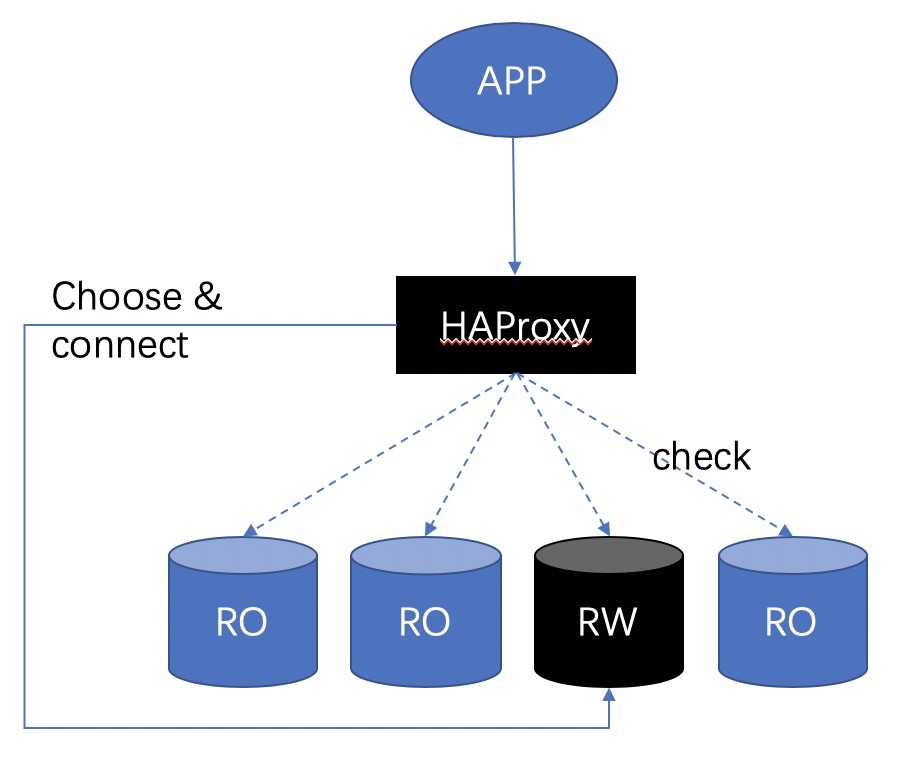
2、一个或多个只读实例。(例如一主多从多结构)
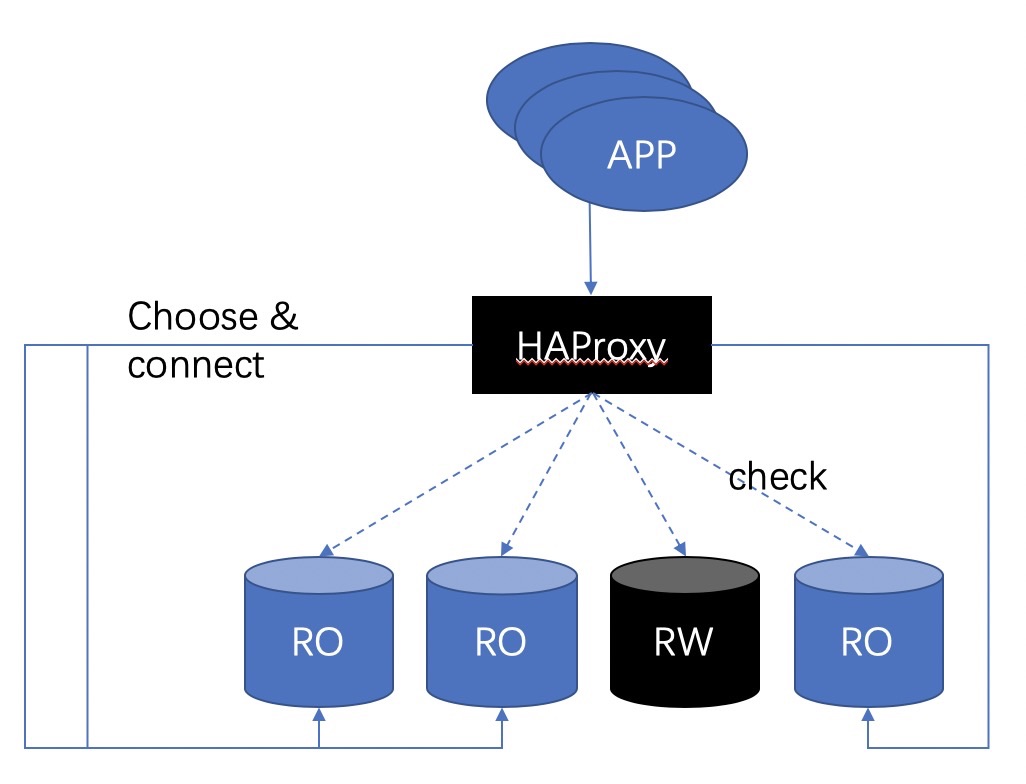
当后端有多个ro节点时,可以load balance(会话级)
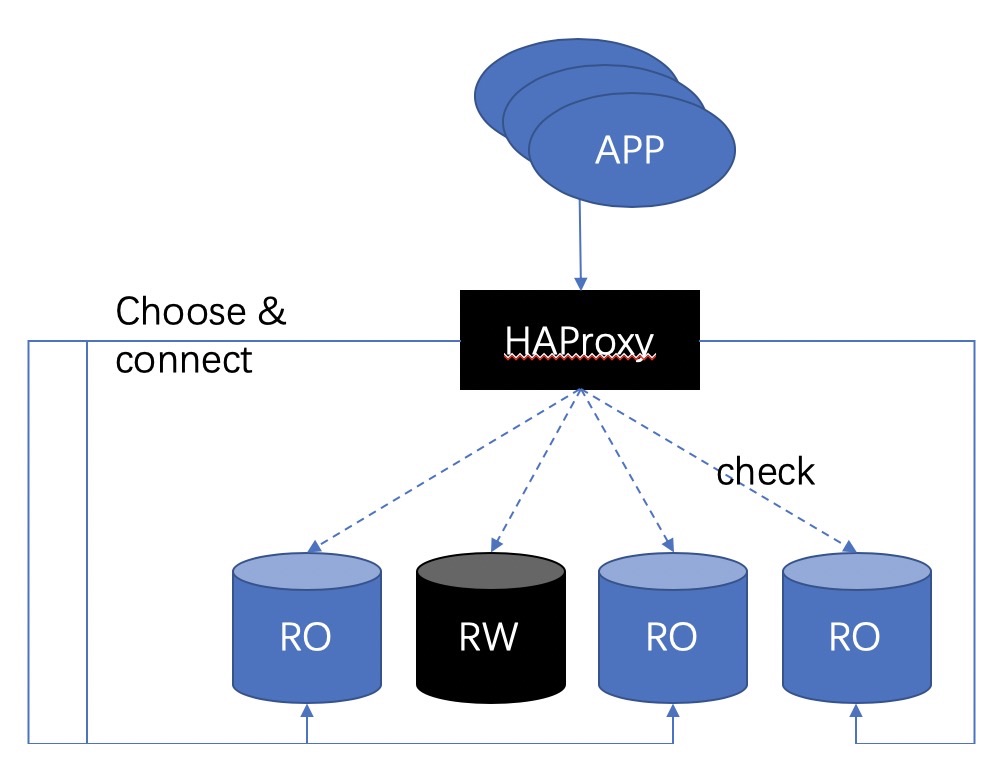
切换后,主动断开这个节点的会话,迁移到新的ro节点
实现例子
参考 https://www.percona.com/blog/2019/10/31/postgresql-application-connection-failover-using-haproxy-with-xinetd/
环境: CentOS 7, PostgreSQL , 主从 多台 (主从切换不需要haproxy管,haproxy只负责根据后端数据库的状态切换会话)
准备几个东西
- A simple shell script to check the status of the PostgreSQL instance running on the local machine.
- A xinetd service daemonizer.
- HAProxy: Which maintains the routing mechanism.
数据库服务器部署:check 后端数据库的脚本
这个脚本配置在数据库服务器上,用来获取数据库的三种状态:
1、恢复中(从库),返回206
2、主库,返回200
3、无法确认(数据库连接不上或其他问题),返回503
脚本如下,不同状态返回不同的内容:
```
!/bin/bash
This script checks if a postgres server is healthy running on localhost. It will return:
"HTTP/1.x 200 OK\r" (if postgres is running smoothly)
- OR -
"HTTP/1.x 500 Internal Server Error\r" (else)
The purpose of this script is make haproxy capable of monitoring postgres properly
It is recommended that a low-privileged postgres user is created to be used by this script.
For eg. create user healthchkusr login password 'hc321';
PGBIN=/usr/pgsql-10/bin
PGSQL_HOST="localhost"
PGSQL_PORT="5432"
PGSQL_DATABASE="postgres"
PGSQL_USERNAME="postgres"
export PGPASSWORD="passwd"
TMP_FILE="/tmp/pgsqlchk.out"
ERR_FILE="/tmp/pgsqlchk.err"
We perform a simple query that should return a few results
调用如下脚本,看返回结果pg_is_in_recovery看是不是在恢复中,t表示从库。f表示主库。
VALUE=/opt/bigsql/pg96/bin/psql -t -h localhost -U postgres -p 5432 -c "select pg_is_in_recovery()" 2> /dev/null
Check the output. If it is not empty then everything is fine and we return something. Else, we just do not return anything.
if [ $VALUE == "t" ]
then
/bin/echo -e "HTTP/1.1 206 OK\r\n"
/bin/echo -e "Content-Type: Content-Type: text/plain\r\n"
/bin/echo -e "\r\n"
/bin/echo "Standby"
/bin/echo -e "\r\n"
elif [ $VALUE == "f" ]
then
/bin/echo -e "HTTP/1.1 200 OK\r\n"
/bin/echo -e "Content-Type: Content-Type: text/plain\r\n"
/bin/echo -e "\r\n"
/bin/echo "Primary"
/bin/echo -e "\r\n"
else
/bin/echo -e "HTTP/1.1 503 Service Unavailable\r\n"
/bin/echo -e "Content-Type: Content-Type: text/plain\r\n"
/bin/echo -e "\r\n"
/bin/echo "DB Down"
/bin/echo -e "\r\n"
fi
```
脚本位置/opt/pgsqlchk
sudo chmod 755 /opt/pgsqlchk
数据库服务器部署:配置 xinetd 服务(check后端)
将/opt/pgsqlchk 检查脚本配置为xinetd服务,通过某个监听端口调用(本例为23267)
```
yum install -y xinetd telnet
vi /etc/xinetd.d/pgsqlchk
service pgsqlchk
{
flags = REUSE
socket_type = stream
port = 23267
wait = no
user = nobody
server = /opt/pgsqlchk
log_on_failure += USERID
disable = no
only_from = 0.0.0.0/0
per_source = UNLIMITED
}
```
添加xinetd服务
bash -c 'echo "pgsqlchk 23267/tcp # pgsqlchk" >> /etc/services'
启动xinetd服务
systemctl start xinetd
HAproxy节点部署
假设以上有两台数据库服务器pg0, pg1 (hostname, or dns配置).
另一台服务器,用于部署haproxy,如下。
yum install -y haproxy
配置haproxy.cfg
监听两个端口,5000对应check返回200状态的数据库节点(pg_is_in_recovery=f),为rw节点
5001对应check返回206状态的数据库节点(pg_is_in_recovery=t),为ro节点
```
vi /etc/haproxy/haproxy.cfg
global
maxconn 100
defaults
log global
mode tcp
retries 2
timeout client 30m
timeout connect 4s
timeout server 30m
timeout check 5s
listen stats
mode http
bind *:7000
stats enable
stats uri /
listen ReadWrite
bind *:5000
option httpchk
http-check expect status 200
default-server inter 3s fall 3 rise 2 on-marked-down shutdown-sessions
server pg0 pg0:5432 maxconn 100 check port 23267
server pg1 pg1:5432 maxconn 100 check port 23267
listen ReadOnly
bind *:5001
option httpchk
http-check expect status 206
default-server inter 3s fall 3 rise 2 on-marked-down shutdown-sessions
server pg0 pg0:5432 maxconn 100 check port 23267
server pg1 pg1:5432 maxconn 100 check port 23267
```
配置解读
- HAProxy is configured to use TCP mode
- HAProxy service will start listening to port 5000 and 5001
- Port 5000 is for Read-Write connections and 5001 is for Read-Only connections
- Status check is done using http-check feature on port 23267
- Both server pg0 and pg1 are candidates for both Read-write and Read-only connections
- Based on the http-check and the status returned, it decides the current role
如果只读节点有多台,配置到server里面即可。
启动 haproxy服务
systemctl start haproxy
测试
连接haproxy 5000端口,读写节点。
```
$ psql -h localhost -p 5000 -U postgres
Password for user postgres:
psql (9.6.5)
Type "help" for help.
postgres=# select pg_is_in_recovery();
pg_is_in_recovery
f
(1 row)
```
连接haproxy 5001端口,只读节点。
```
$ psql -h localhost -p 5001 -U postgres
Password for user postgres:
psql (9.6.5)
Type "help" for help.
postgres=# select pg_is_in_recovery();
pg_is_in_recovery
t
(1 row)
```
haproxy配置介绍
https://www.cnblogs.com/MacoLee/p/5853413.html
https://www.jianshu.com/p/8af373981cfe
```
#####全局配置#########
global
log 127.0.0.1 local0 #[日志输出配置,所有日志都记录在本机,通过local0输出]
log 127.0.0.1 local1 notice #定义haproxy 日志级别[error warringinfo debug]
daemon #以后台形式运行harpoxy
nbproc 1 #设置进程数量
maxconn 4096 #默认最大连接数,需考虑ulimit-n限制
#user haproxy #运行haproxy的用户
#group haproxy #运行haproxy的用户所在的组
#pidfile /var/run/haproxy.pid #haproxy 进程PID文件
#ulimit-n 819200 #ulimit 的数量限制
#chroot /usr/share/haproxy #chroot运行路径
#debug #haproxy 调试级别,建议只在开启单进程的时候调试
#quiet
##默认配置############
defaults
log global
mode http #默认的模式mode { tcp|http|health },tcp是4层,http是7层,health只会返回OK
option httplog #日志类别,采用httplog
option dontlognull #不记录健康检查日志信息
retries 2 #两次连接失败就认为是服务器不可用,也可以通过后面设置
#option forwardfor #如果后端服务器需要获得客户端真实ip需要配置的参数,可以从Http Header中获得客户端ip
option httpclose #每次请求完毕后主动关闭http通道,haproxy不支持keep-alive,只能模拟这种模式的实现
#option redispatch #当serverId对应的服务器挂掉后,强制定向到其他健康的服务器,以后将不支持
option abortonclose #当服务器负载很高的时候,自动结束掉当前队列处理比较久的链接
maxconn 4096 #默认的最大连接数
timeout connect 5000ms #连接超时
timeout client 30000ms #客户端超时
timeout server 30000ms #服务器超时
#timeout check 2000 #心跳检测超时
#timeout http-keep-alive10s #默认持久连接超时时间
#timeout http-request 10s #默认http请求超时时间
#timeout queue 1m #默认队列超时时间
balance roundrobin #设置默认负载均衡方式,轮询方式
#balance source #设置默认负载均衡方式,类似于nginx的ip_hash
#balnace leastconn #设置默认负载均衡方式,最小连接数
##统计页面配置########
listen stats
bind 0.0.0.0:1080 #设置Frontend和Backend的组合体,监控组的名称,按需要自定义名称
mode http #http的7层模式
option httplog #采用http日志格式
#log 127.0.0.1 local0 err #错误日志记录
maxconn 10 #默认的最大连接数
stats refresh 30s #统计页面自动刷新时间
stats uri /stats #统计页面url
stats realm XingCloud\ Haproxy #统计页面密码框上提示文本
stats auth admin:admin #设置监控页面的用户和密码:admin,可以设置多个用户名
stats auth Frank:Frank #设置监控页面的用户和密码:Frank
stats hide-version #隐藏统计页面上HAProxy的版本信息
stats admin if TRUE #设置手工启动/禁用,后端服务器(haproxy-1.4.9以后版本)
##设置haproxy 错误页面#####
errorfile 403 /home/haproxy/haproxy/errorfiles/403.http
errorfile 500 /home/haproxy/haproxy/errorfiles/500.http
errorfile 502 /home/haproxy/haproxy/errorfiles/502.http
errorfile 503 /home/haproxy/haproxy/errorfiles/503.http
errorfile 504 /home/haproxy/haproxy/errorfiles/504.http
##frontend前端配置##############
frontend main
bind :80 #这里建议使用bind :80的方式,要不然做集群高可用的时候有问题,vip切换到其他机器就不能访问了。
acl web hdr(host) -i www.abc.com #acl后面是规则名称,-i为忽略大小写,后面跟的是要访问的域名,如果访问www.abc.com这个域名,就触发web规则,。
acl img hdr(host) -i img.abc.com #如果访问img.abc.com这个域名,就触发img规则。
use_backend webserver if web #如果上面定义的web规则被触发,即访问www.abc.com,就将请求分发到webserver这个作用域。
use_backend imgserver if img #如果上面定义的img规则被触发,即访问img.abc.com,就将请求分发到imgserver这个作用域。
default_backend dynamic #不满足则响应backend的默认页面
##backend后端配置##############
backend webserver #webserver作用域
mode http
balance roundrobin #balance roundrobin 负载轮询,balance source 保存session值,支持static-rr,leastconn,first,uri等参数
option httpchk /index.html HTTP/1.0 #健康检查, 检测文件,如果分发到后台index.html访问不到就不再分发给它
server web1 10.16.0.9:8085 cookie 1 weight 5 check inter 2000 rise 2 fall 3
server web2 10.16.0.10:8085 cookie 2 weight 3 check inter 2000 rise 2 fall 3
#cookie 1表示serverid为1,check inter 1500 是检测心跳频率
#rise 2是2次正确认为服务器可用,fall 3是3次失败认为服务器不可用,weight代表权重
backend imgserver
mode http
option httpchk /index.php
balance roundrobin
server img01 192.168.137.101:80 check inter 2000 fall 3
server img02 192.168.137.102:80 check inter 2000 fall 3
backend dynamic
balance roundrobin
server test1 192.168.1.23:80 check maxconn 2000
server test2 192.168.1.24:80 check maxconn 2000
listen tcptest
bind 0.0.0.0:5222
mode tcp
option tcplog #采用tcp日志格式
balance source
#log 127.0.0.1 local0 debug
server s1 192.168.100.204:7222 weight 1
server s2 192.168.100.208:7222 weight 1
```
参考
https://www.percona.com/blog/2019/10/31/postgresql-application-connection-failover-using-haproxy-with-xinetd/
https://www.jianshu.com/p/8af373981cfe
https://www.cnblogs.com/MacoLee/p/5853413.html
PostgreSQL 许愿链接
您的愿望将传达给PG kernel hacker、数据库厂商等, 帮助提高数据库产品质量和功能, 说不定下一个PG版本就有您提出的功能点. 针对非常好的提议,奖励限量版PG文化衫、纪念品、贴纸、PG热门书籍等,奖品丰富,快来许愿。开不开森.
9.9元购买3个月阿里云RDS PostgreSQL实例
PostgreSQL 解决方案集合
德哥 / digoal's github - 公益是一辈子的事.