



自从知道了如何更优雅地可视化决策树 后,发现中文支持很差,就一直避免使用中文,最近的项目不得不输出中文,于是下决心解决掉它。
dtreeviz[1] 基于 matplotlib, 网上关于 matplotlib 中文支持的方案很多,但没有一个能解决问题, 认真查看代码后,发现需要同时从两方面下手,
修改 matplotlib 的配置 修改 dtreeviz 的底层代码
修改 dtreeviz 底层代码实现中文支持
修改 matplotlib 的配置只能部分解决乱码问题,于是需要从底层代码来解决这个问题。
dtreeviz 在trees.py
和classifiers.py
使用了默认字体Arial
, 我通过简单修改, 允许配置默认的字体。先附上简单的代码实现。
utils.py
添加一个变量,
import matplotlib.pyplot as pltdefault_font=plt.rcParams['font.sans-serif'][0]
这样只需要修改 matplotlib 默认字体就可以达到中文的完美支持(当然日语韩语也不是问题,只要有合适的字体),修改后的代码我放在了https://github.com/alitrack/dtreeviz
修改 matplotlib 默认字体
下面这段代码要优先执行
default_font = 'Arial Unicode MS'from matplotlib import pyplot as pltplt.rcParams['font.sans-serif']=[default_font]+plt.rcParams['font.sans-serif']plt.rcParams['axes.unicode_minus']=False # 确保正常显示减号➖
这样做的好处,是它这是当前环境下修改了 matplotlib 配置,并不会影响别的程序。
不建议修改配置文件(对于 seaborn,即使修改配置文件也没有用),可能影响别的程序。
测试效果
from sklearn.datasets import *from sklearn import treefrom dtreeviz.trees import *classifier = tree.DecisionTreeClassifier(max_depth=3)iris = load_iris()classifier.fit(iris.data, iris.target)#测试需要feature_names=['萼片sepal length (cm)','sepal width (cm)','花瓣petal length (cm)','花瓣petal width (cm)']class_names=["山鸢尾 (부채붓꽃)", "变色鸢尾(ブルーフラッグ)", "维吉尼亚鸢尾(Iris-virginica)"]## 画决策树viz = dtreeviz(classifier, iris.data, iris.target, target_name='variety', feature_names=feature_names, class_names=class_names # need class_names for classifier )viz
输出
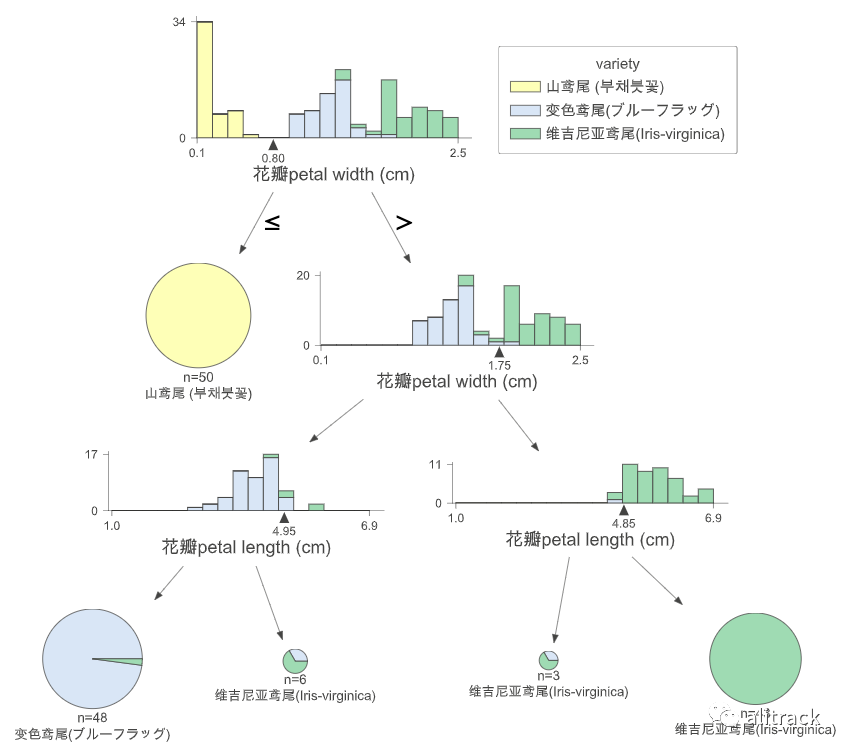
中日韩都不是问题?
如果你的系统没有中文字体,或者没有你想要的中文字体咋办?下面就介绍下如何给 matplotlib 安装中文字体。
给 matplotlib 安装中文字体
对于 macOS 和 Linux 可以使用下面两种方式来判断是否有你想要的字体
fc-list :lang=zh
或者
font_manager.fontManager.ttflist
会返回系统安装的字体以及字体所对应的字体名
(不同于字体文件名)
<Font 'Arial Unicode MS' (Arial Unicode.ttf) normal normal 400 normal>,
判断 matplotlib 默认字体及安装路径
通过下面命令,可以得知 matplotlib 的默认字体是DejaVuSans.ttf
,默认安装路径(具体看你的 Python 虚拟环境安装位置)是,
/Users/steven/anaconda3/envs/py39/lib/python3.9/site-packages/matplotlib/mpl-data/fonts/ttf/
from matplotlib import pyplot as pltplt.rcdefaults() # 恢复到初始化设置from matplotlib.font_manager import findfont, FontPropertiesfindfont(FontProperties(family=FontProperties().get_family()))
返回
'/Users/steven/anaconda3/envs/py39/lib/python3.9/site-packages/matplotlib/mpl-data/fonts/ttf/DejaVuSans.ttf'
下载与安装字体
下载想要的字体
比如 SimHei(simhei.ttf), Arial Unicode MS(Arial Unicode.ttf)
下载安装
下载好的字体 copy 到对应的目录,
cp simhei.ttf /Users/steven/anaconda3/envs/py39/lib/python3.9/site-packages/matplotlib/mpl-data/fonts/ttf/
清除 matplotlib 缓存
rm -rf ~/.matplotlib
reset 当前 notebook(如果是在 notebook 里)
seaborn 的中文支持
seaborn 也是基于 matplotlib, 它的中文支持更加方便,但网上的方案基本都有问题
import seaborn as snsfrom matplotlib import pyplot as pltiris = sns.load_dataset('iris')iris.columns=['萼片sepal_length', '萼片sepal_width', '花瓣petal_length', '花瓣petal_width', 'species']iris.replace(["setosa","versicolor","virginica"], ["山鸢尾 (부채붓꽃)", "变色鸢尾(ブルーフラッグ)", "维吉尼亚鸢尾(Iris-virginica)"], inplace=True)# sns.set_style("whitegrid",{"font.sans-serif":plt.rcParams['font.sans-serif']})# style used as a theme of graph# for example if we want black# graph with grid then write "darkgrid"sns.set_style("whitegrid")#set_style 会 override plt.rcParams['font.serif'],我们再override回来plt.rcParams['font.sans-serif']=[default_font]+plt.rcParams['font.sans-serif']plt.rcParams['axes.unicode_minus']=False # 让负号也能正常显示sns.pairplot(iris, hue="species")
输出
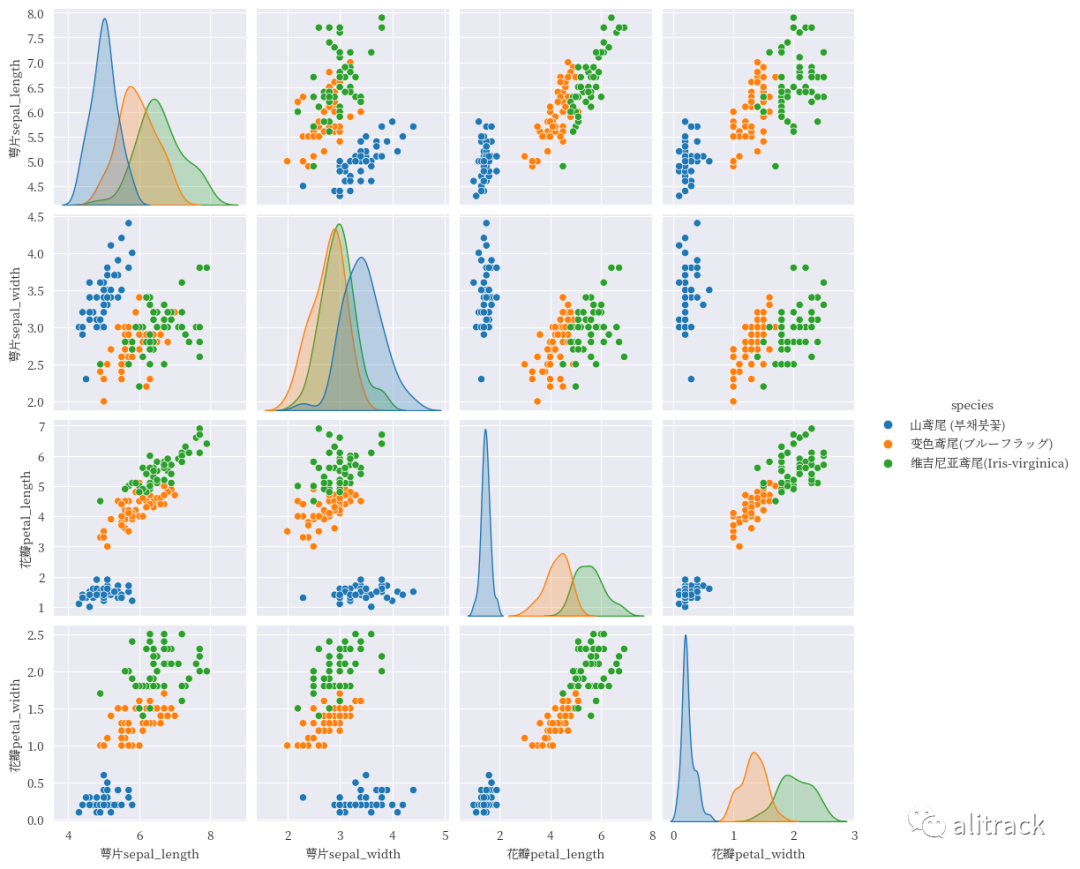
sns.set_style("whitegrid")
会覆盖 matplotlib 的默认字体设置,
这里可以做个简单的验证,
default_font="Arial Unicode MS"
plt.rcdefaults()
print("matplotlib默认:",plt.rcParams['font.sans-serif'])
sns.set_style('darkgrid')
print("被seaborn修改后:",plt.rcParams['font.sans-serif'])
plt.rcParams['font.sans-serif']=[default_font]+plt.rcParams['font.sans-serif']
print("再改回来:",plt.rcParams['font.sans-serif'])
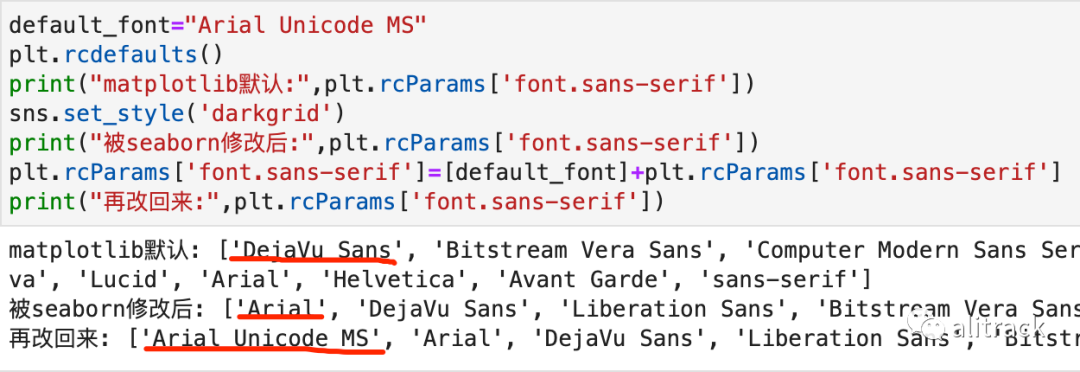
而我们要做就是在这个代码之后,改为我们希望的字体即可。
plt.rcParams['font.sans-serif']=[default_font]+plt.rcParams['font.sans-serif']
从上面 dtreeviz 和 seaborn 来看,关键是看字体配置啥时候被修改,记得改回来,使用你希望的字体。
字体资源
Google Noto Fonts[2]
Google 开源的字体,Noto
是no more tofu 的缩写(别再显示豆腐块,就是那种无法显示的字体以方块形式出现,像豆腐块),noto-cjk
的 GitHub 网址是https://github.com/googlefonts/noto-cjk。
其它的网上自己搜索吧。
参考资料
dtreeviz: https://github.com/alitrack/dtreeviz
[2]Google Noto Fonts: https://www.google.com/get/noto/
